Canopy vs Webwatcher
This comparison pits Canopy’s advanced AI filtering against Webwatcher’s deep communication tracking. Canopy excels at real-time content safety and boundary setting for many devices. Webwatcher prioritizes logging every digital exchange on fewer devices. Both tools unfortunately suffer from serious user complaints regarding support and stability.
Best for: Families prioritizing aggressive, real-time visual content filtering., Parents needing to set strict digital downtime schedules.
Best for: Parents needing deep, explicit logging of text messages and calls., Supervising a single teenager's Android device for high-risk behavior.
Potent Protection, Crippling Performance Issues
We recognize Canopy's sophisticated AI engine provides industry-leading filtration for explicit material across various devices, making it a powerful tool by design. Overall, while the core technology is advanced, significant user reports of unresponsive support, device lockouts, and severe performance degradation necessitate a low cautionary rating.
Pros
- Highly effective at blocking explicit and pornographic content using AI/machine learning.
- Comprehensive coverage across major operating systems (IOS, Android, Windows, Mac, Chromebooks).
- Includes aggressive anti-tampering/removal prevention features.
- Offers a risk-free 7-day trial and a 30-day money-back guarantee.
Cons
- Dramatically decreases internet speed and overall device performance for many users.
- Customer support is widely cited as unresponsive, unreliable, or non-existent.
- Difficulty removing the application once its protection is fully enabled.
- Inconsistent content blocking, sometimes failing to filter suggestive images or social media.
Extreme risk due to billing and support issues.
We found Webwatcher markets itself strongly on guaranteed functionality and comprehensive support for parental monitoring needs. However, our review of public user feedback showed severe, concrete accusations of fraudulent billing, refusal to issue refunds, and complete non-response from customer support. Overall, the serious financial and reliability risks reported by consumers necessitate a very low rating.
Pros
- Advertised compatibility across major devices (Android, iPhone, PC, Mac).
- Unlimited data storage is included in the current subscription plan.
- Setup is claimed to be quick and easy (under five minutes).
- Functionality is officially guaranteed with a full refund if issues cannot be resolved.
Cons
- Users report being refused refunds despite the official money-back guarantee.
- Specific claims of fraudulent double billing and funds theft were reported.
- Customer support was reported as non-responsive or misleading ('runaround').
- Product allegedly failed to work properly for some customers.
AboutCanopy
Canopy is a powerful digital parenting app built to keep children safer across their devices. It uses advanced computing technology, including artificial intelligence and machine learning. This technology instantly recognizes and filters out sensitive or pornographic content, even on your child’s smartphone camera. Setting up Canopy is simple: you download the Canopy App to manage settings and install the Shield App on each device you want to protect. ✅
AboutWebwatcher
WebWatcher is a specialized parental monitoring app. It is primarily aimed at supervising teenagers who may be involved in risky online behavior. The software gives parents necessary visibility into their child's digital footprint.
It works across major platforms including Android, iPhone, PC, and Mac devices. You can monitor everything seamlessly from anywhere using your secure, web-based online account. The application is designed to be discrete and tamper-proof once it's correctly installed. 💡
Highlights
Feature Comparison
Features Overview
We highlight the main differences and pick a winner for each feature.
Core Protection Philosophy
Canopy proactively filters content in real-time using AI technology. Webwatcher focuses on discreetly logging all communications for later review.
Canopy uses sophisticated AI/machine learning for instant content recognition. It filters and blocks sensitive material before it can be viewed. This aims for immediate protection and prevents viewing harmful imagery. Webwatcher is primarily a logging tool for reactive supervision. It records searches, texts, and apps for parents to review later. Webwatcher specializes in giving deep, raw visibility into digital activity. The key trade-off is prevention versus visibility. Canopy stops bad things from happening instantly. Webwatcher ensures you know exactly what the user is doing. If real-time pornography blocking is your main concern, Canopy is the clear choice. If text message content is paramount, Webwatcher provides better logging.
Performance and Stability
Canopy users report severe internet speed degradation and functionality issues. Webwatcher maintains better stability post-install.
User reviews heavily criticize Canopy for crippling performance issues. The app reportedly slows internet speeds substantially, sometimes making devices unusable. Some users report being locked out of their own essential devices. Webwatcher is designed to be discrete and tamper-proof once installed. Reports suggest that Webwatcher generally runs in the background without major system outages. Its focus on logging may be less processor intensive than AI filtering. This difference is a major decision point for users. Can you tolerate slow internet for aggressive filtering? Canopy forces a choice between security and network speed. Webwatcher is a better choice if stability and device performance are critical. Canopy’s performance cost is extremely high, despite its effectiveness.
Customer Support & Trust
Canopy support is often non-responsive, but Webwatcher faces severe claims of billing fraud and theft.
Canopy users frequently complain about unresponsive customer service and difficulties getting help. Support staff often fail to reply to detailed requests. Some users feel abandoned when issues arise. Webwatcher’s reputation is extremely poor due to financial complaints. Users claim the company refused refunds and engaged in unauthorized double billing. One user reported being charged for a service that never worked. Webwatcher's serious accusations of financial fraud override its monitoring claims. Canopy's poor responsiveness is frustrating; Webwatcher's reported actions are destructive. Canopy is the less risky choice regarding billing integrity. Webwatcher presents a major risk to customer finances and trust.
Device Count & Scalability
Canopy supports up to 10 devices on its family plans. Webwatcher's current plan is restricted to one monitoring device.
Canopy offers tiered plans protecting 3, 5, or up to 10 devices monthly or annually. This makes Canopy ideal for large families or homes with many shared devices. Canopy simplifies protection across your entire household. Webwatcher's explicitly priced plan covers only one device for three months. This model is focused on single use-case monitoring. Scaling Webwatcher to cover your whole family would be highly expensive. Canopy makes it easy to protect a mix of iOS, Android, and desktop devices together. Webwatcher's current pricing focuses specifically on monitoring a single Android device. Choose Canopy if you need to safeguard four or more devices simultaneously. Webwatcher is better suited for highly focused monitoring of a single target device.
Specialized Monitoring
Canopy excels at instant sexting and bullying alerts. Webwatcher provides specific, deep logging of Snapchat activity.
Canopy is unique in offering immediate alerts for detected sexting or risky photo sharing. It even extends protection to your child’s smartphone camera. Canopy monitors sensitive topics like bullying across social platforms. Webwatcher delivers specialized monitoring on platforms like Snapchat on Android. It captures screenshots and received messages, providing precise activity logs. This depth is useful for high-risk teens. Webwatcher gives you the exact content being exchanged by the user. Canopy quickly flags sensitive topics but provides less raw conversational data. If monitoring secretive apps like Snapchat is essential, Webwatcher has the technical edge. If proactive prevention and bullying alerts are key, choose Canopy.
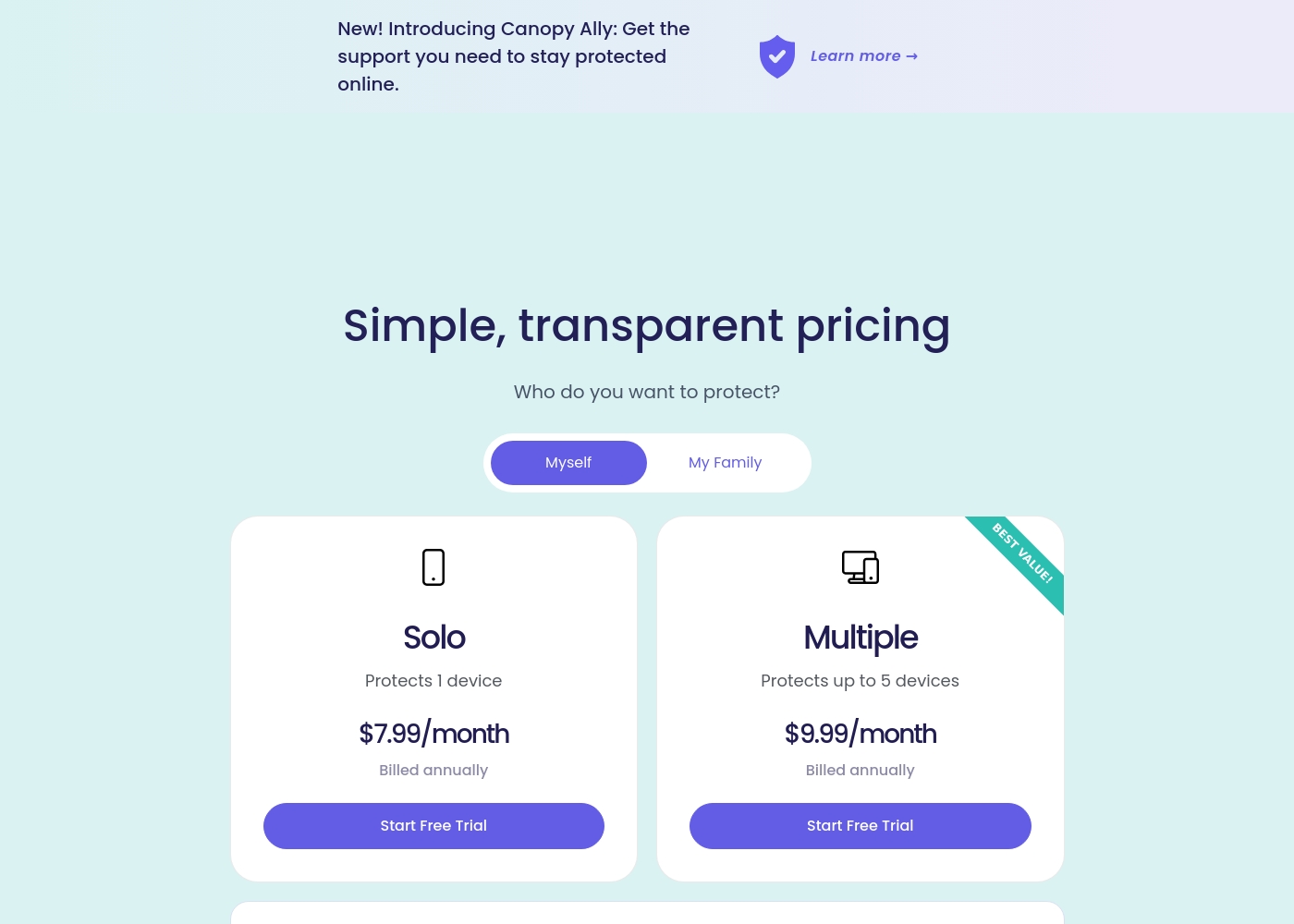
Canopy costs between $9.99 and $15.99 per month with three main monthly device plans: Up to 3 devices at $9.99/month, Up to 5 devices at $11.99/month, and Up to 10 devices at $15.99/month.
Canopy offers clear, device-based pricing designed to fit your family's needs. You can easily select the minimum number of devices required for full protection.
Up to 3 Devices
Price: $9.99 per month Best For: Small families or protecting a few critical devices Refund Policy: 30-day money-back guarantee Other Features:
- Access to all great features
- Email & phone support included
- Instant safety peace of mind
- Protects 1 device
- Access to all features
- Email & phone support
- Protects up to 5 devices
- Access to all features
- Email & phone support
- Access to all features
- Email & phone support
- Access to all features
- Email & phone support
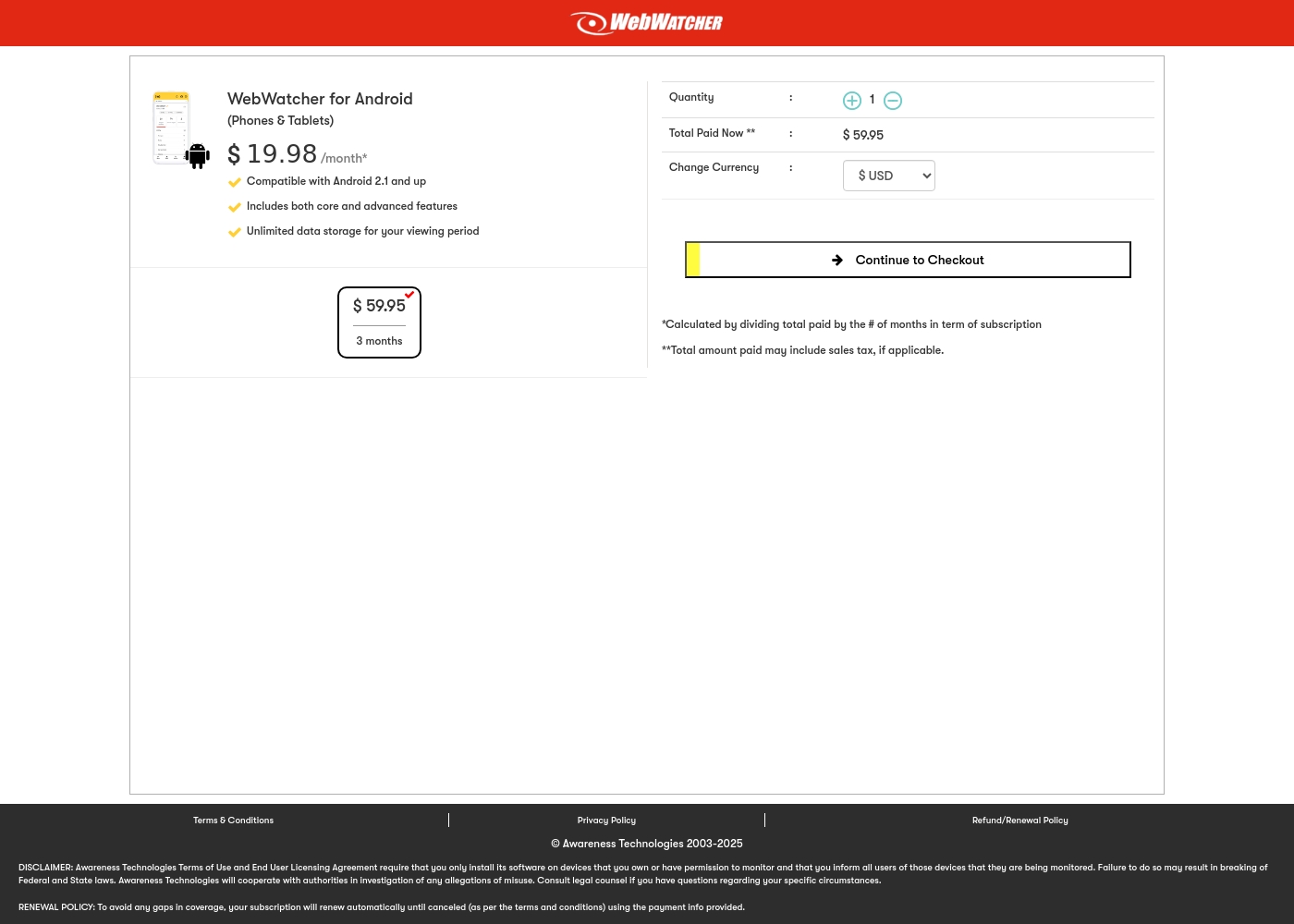
Webwatcher costs $19.98 per month with one explicitly priced plan: the 3-Month Android Subscription at $59.95 total.
Finding the right monitoring solution for your family is simple. Here is a detailed look at the pricing and features available in the current purchase flow.
3-Month Android Subscription
Price: $59.95 (paid every 3 months, calculated at $19.98/month) Best For: Parents monitoring Android phones and tablets Refund Policy: Full refund guaranteed if issues cannot be resolved Other Features:
- Compatible with Android 2.1 and newer versions
- Includes both core and advanced features
- Unlimited data storage for your full viewing period
- Compatible with Android 2.1 and up
- Includes both core and advanced features
- Unlimited data storage for your viewing period
Pricing Notes
- Canopy offers discounted annual rates starting at $7.99/month for single devices.
- Canopy provides flexible device limits up to 10 for centralized family protection.
- Webwatcher’s price of $19.98/month is based on a required three-month upfront payment of $59.95.
- Webwatcher’s pricing structure is explicit for only one Android device, making scaling prohibitively expensive.
- Canopy includes a 7-day free trial and a solid 30-day money-back guarantee.
Pricing Head-to-Head
User Reviews
Canopy receives critically mixed but predominantly negative feedback from users, resulting in a low 2.3-star Trustpilot rating. A major point of praise is its accuracy; several users confirm it is the most effective application they have found for blocking explicit/pornographic content using its specialized AI. However, this functionality comes at a severe cost to reliability and performance. The most recurring complaints center on the app dramatically slowing down internet speeds (in some cases dropping connection speeds by over 80%) and causing other legitimate applications or software to malfunction. 😔
Support responsiveness is also deeply criticized; users repeatedly report unresponsive customer service, difficulties contacting staff, or complete silence after submitting detailed troubleshooting information. Functionality issues include inconsistent blocking (failing to filter suggestive content or social media as requested) and, critically, inability to remove the app easily due to its anti-tamper protection. Multiple accounts reported being locked out of essential work devices for days while waiting for updates or support. The consensus suggests that while the core filtering technology is powerful, the crippling performance slowdowns and unacceptable support failures severely undermine its value.
This is a great app. I’ve had it for years and it’s the most effective one for blocking objectionable sites I've tried. Their tech support is superior and always willing to help.
Webwatcher’s external feedback is extremely limited, stemming only from two reviews which resulted in a very low 2.9 TrustScore. While the platform advertises a strong 'risk-free' guarantee and promises excellent, responsive customer care, the limited user reports strongly contradict these claims.
Both reviewers cited severe issues primarily centered on billing and refunds. Users claim they were refused refunds entirely, even when requested within the advertised refund window, despite the monitoring product reportedly failing to work properly.
They refused to honor the risk-free money-back guarantee, even though I submitted the request properly. Furthermore, the product I purchased never actually worked for me as advertised. I absolutely feel like they are ripping me off.
Our Verdict
Choosing between Canopy and Webwatcher is a difficult calculation. Both tools have serious, widely reported flaws that impact usability. If forced to choose, Canopy presents a safer path due to Webwatcher's financial risks. Canopy’s superpower lies in its aggressive, modern AI filtering capabilities. It is unmatched for real-time pornography and content blocking across all websites. Just be prepared for potential speed degradation; Canopy might keep your child safe but slow your internet to a crawl. Webwatcher excels at providing deep, explicit monitoring logs. If you absolutely need to see every text message or screenshot from Snapchat, Webwatcher delivers this data. However, be extremely wary of Webwatcher’s severe user claims of fraudulent billing and refusal to issue refunds. The deciding factor is the nature of the risk you are willing to take. Do you risk poor performance with Canopy or extreme financial malfeasance with Webwatcher? Given the high-trust relationship required, the financial risk of Webwatcher is unacceptable. Pick Canopy if you need robust, scalable device protection for multiple family members. Only consider Webwatcher if you need deep, targeted logging of one high-risk Android device and accept the significant risks associated with the company.
Frequently Asked Questions
Which is safer to purchase: Canopy or Webwatcher?
Canopy is the safer purchase, despite its performance issues. Webwatcher has widespread user complaints alleging fraudulent billing and theft. Canopy offers a reliable 30-day money-back guarantee policy.
Does Canopy block content better than Webwatcher?
Yes, Canopy uses AI for real-time, unmatched pornography blocking. Webwatcher is primarily a logging tool; it monitors activity but does not proactively block content. Canopy focuses on prevention, Webwatcher focuses on recording.
Which tool provides better text message visibility?
Webwatcher provides better visibility into actual text message content and calls. Canopy focuses on flagging sensitive discussion *topics* like bullying or drugs. Webwatcher shows you the explicit conversation logs.
Can I use Canopy or Webwatcher for a large family?
Canopy is designed for families, scaling up to 10 devices easily. Webwatcher’s currently advertised plan covers only one device. Scaling up with Webwatcher would be very expensive and complicated.
Canopy severely slows my internet speed. Does Webwatcher cause speed issues?
Canopy users widely report severe internet speed reduction due to its AI filtering. Webwatcher is a lighter, discrete logging tool. There are no major widespread reports of Webwatcher causing network slowdowns.
Does Webwatcher monitor Snapchat effectively?
Webwatcher offers specialized Snapchat monitoring on Android devices. It captures received messages and takes activity screenshots. Canopy focuses more generally on sensitive topics across social platforms.
Ready to Choose?
Both tools have their strengths. Choose based on your specific needs.