Canopy vs FamiSafe
Canopy and FamiSafe both offer high-tech parental controls but target different family needs. Canopy delivers unmatched, aggressive filtering, using AI to block pornography on every site. FamiSafe provides a vast array of monitoring tools and incredible scalability for large households. It's a choice between specialized deep filtering or comprehensive feature depth and value.
Best for: Parents prioritizing the highest standard of visual content filtering available., Small families (1-5 devices) requiring aggressive anti-tampering protection.
Best for: Large families or households needing monitoring for 10 to 40 devices affordably., Families with teenage drivers needing specialized speed and route monitoring reports.
Potent Protection, Crippling Performance Issues
We recognize Canopy's sophisticated AI engine provides industry-leading filtration for explicit material across various devices, making it a powerful tool by design. Overall, while the core technology is advanced, significant user reports of unresponsive support, device lockouts, and severe performance degradation necessitate a low cautionary rating.
Pros
- Highly effective at blocking explicit and pornographic content using AI/machine learning.
- Comprehensive coverage across major operating systems (IOS, Android, Windows, Mac, Chromebooks).
- Includes aggressive anti-tampering/removal prevention features.
- Offers a risk-free 7-day trial and a 30-day money-back guarantee.
Cons
- Dramatically decreases internet speed and overall device performance for many users.
- Customer support is widely cited as unresponsive, unreliable, or non-existent.
- Difficulty removing the application once its protection is fully enabled.
- Inconsistent content blocking, sometimes failing to filter suggestive images or social media.
Advanced parental controls, reliability needed.
We recognize FamiSafe's exceptionally comprehensive feature set, including AI monitoring and affordable plans that cover up to 40 devices. External feedback raises serious concerns regarding installation frustration, technical glitches, and overall reliability, especially on iOS devices. Overall, we recommend FamiSafe primarily for users who value advanced monitoring features and are comfortable managing potential technical challenges.
Pros
- Flexible subscription tiers covering up to 40 devices ($4.99/mo annual rate).
- Features include AI-powered monitoring for social media, chats, and content safety.
- Robust physical safety tools like real-time location tracking and Geofence alerts.
- Customer support, when reached, is often highly professional and technically focused.
Cons
- Users report significant issues with technical instability and app reliability.
- Setup process can be challenging, leading some users to report system disruption.
- Required iOS features/companion apps sometimes crash frequently upon opening.
- Initial refund procedures may be frustrating, requiring extensive troubleshooting and logs.
AboutCanopy
Canopy is a powerful digital parenting app built to keep children safer across their devices. It uses advanced computing technology, including artificial intelligence and machine learning. This technology instantly recognizes and filters out sensitive or pornographic content, even on your child’s smartphone camera. Setting up Canopy is simple: you download the Canopy App to manage settings and install the Shield App on each device you want to protect. ✅
AboutFamiSafe
FamiSafe is a next-generation parental control application designed by Wondershare. It empowers families to establish positive digital habits together. The platform lets you see and guide your child's activities, balancing freedom with necessary protection. It is built for all parents who want reliable tools to manage screens, monitor device activity, and protect loved ones in real life. You’ll receive detailed reports on daily device usage and app activities effortlessly. 💡
Highlights
Feature Comparison
Features Overview
We highlight the main differences and pick a winner for each feature.
Core Filtering Power
Canopy provides deep, AI-focused content filtering that is unmatched. FamiSafe uses broader content controls focusing on general web and video history.
Canopy uses advanced AI to block pornography on every single website. It filters inappropriate visual content in real-time instantly. This process even includes filtering suggestive images like lingerie and swimsuits. FamiSafe uses a standard Web Filter to block various categories of inappropriate sites. It specifically monitors YouTube and TikTok viewing history for age-appropriate content. FamiSafe prioritizes broader platform and device coverage. Canopy prioritizes blocking explicit visuals immediately through its powerful AI system. FamiSafe offers strong historical monitoring across specific video platforms and website categories. Both offer robust web safety tools. The specialized depth of Canopy's filtering system is its main selling point. FamiSafe is a generalist content blocker.
Value & Scalability
FamiSafe crushes Canopy on scalability and price point per device. Canopy caps out at only 10 devices monthly for a high price.
Canopy's most expensive monthly plan covers a maximum of 10 devices for $15.99/month. Protecting individual devices annually costs $7.99/month. Canopy's pricing increases substantially as your device count grows. FamiSafe offers huge value with its Yearly Plan covering up to 40 devices. This massive capacity costs an effective rate of just $4.99 per month. Even the monthly FamiSafe plan covers 5 devices affordably for $9.99. FamiSafe is clearly designed for large families with many connected devices. Canopy's pricing is better suited for smaller households needing minimal device coverage. FamiSafe offers superior cost effectiveness at scale. If you have more than 10 devices, FamiSafe is really the only affordable option here.
Physical Safety Features
FamiSafe is far superior, providing SOS alerts and specialized driving reports. Canopy offers only basic location check-ins.
Canopy provides standard location check-ins and geo-fence alerts. You get notified swiftly if your child leaves defined areas like school or home. This provides parents with basic necessary location awareness. FamiSafe is built with critical emergency tools and comprehensive real-world reports. It includes an SOS Alert feature for emergencies needing immediate help. FamiSafe also offers Driving Reports to monitor a new driver's speed and habits. FamiSafe integrates specialized tools like SOS and driving reports that are crucial for parents of teens. Canopy focuses only on necessary location tracking functionality. The distinction is between passive awareness and active emergency response. Parents monitoring new drivers will find FamiSafe's Driving Reports indispensable for coaching safe habits.
Anti-Tampering Measures
Canopy heavily promotes its aggressive anti-tampering feature. FamiSafe manages app removal through standard device permissions.
Canopy includes aggressive Removal Prevention to stop children from disabling the protective Shield App. This ensures that the parental controls remain permanently active. This feature is a core component of Canopy's safety strategy. FamiSafe secures its app using the device management permissions required for parental control tools. The data provided does not indicate a specialized, aggressive anti-tampering feature like Canopy’s is offered. Canopy’s aggressive approach guarantees the app stays installed against persistent attempts at removal. FamiSafe relies on simpler, standard operating system controls. FamiSafe users should prioritize technical stability over tampering prevention. Canopy provides instant peace of mind that its protective controls cannot be bypassed easily by savvy teens.
Social Media Monitoring
FamiSafe monitors communications across 14+ social platforms broadly. Canopy focuses sharply on alerting parents to sensitive topics within messages.
Canopy monitors messages for timely alerts regarding sensitive topics. This includes bullying, drugs, and alcohol discussions across connected platforms. The Canopy focus is on flagging high-risk conversational content. FamiSafe uses AI to monitor a massive 14+ social media platforms simultaneously. You can customize specific keywords to immediately trigger unique risk alerts. This provides extremely broad platform coverage and high customization. FamiSafe monitors a much wider range of social media applications comprehensively than Canopy. Canopy’s focus is sharper on recognizing high-risk text content and immediate alerts. Both aim to protect children from harmful interactions. If your family uses many obscure or niche social platforms, FamiSafe offers superior breadth of coverage.
Performance & Reliability
Both tools struggle with stability, but Canopy users report crippling slowdowns. FamiSafe users report major technical issues and app crashes.
Canopy users report a severe performance penalty, dramatically decreasing internet speed. The app frequently causes other legitimate applications to stop functioning correctly. This often leads users to uninstall Canopy due to device malfunction. FamiSafe users report technical instability, app crashes, and difficult device setup. The required iOS companion app crashes frequently, leading to user frustration. The reliability of FamiSafe is inconsistent across platforms. Canopy's primary failure is pervasive performance degradation impacting daily use. FamiSafe's failures stem from installation complexity and app stability issues. Neither tool offers the stability expected of premium software. Both FamiSafe and Canopy exhibit significant functional issues despite their advanced feature sets.
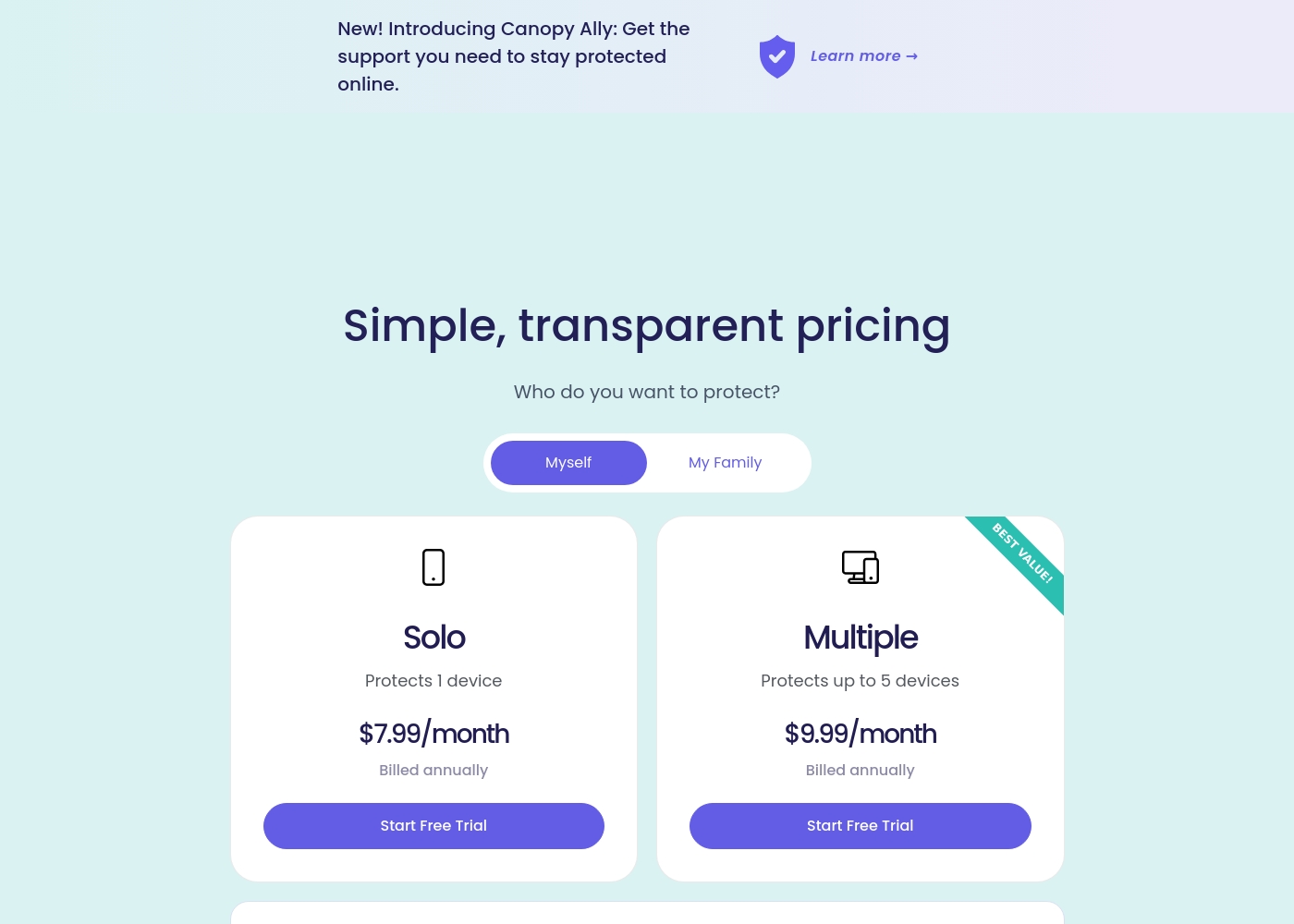
Canopy costs between $9.99 and $15.99 per month with three main monthly device plans: Up to 3 devices at $9.99/month, Up to 5 devices at $11.99/month, and Up to 10 devices at $15.99/month.
Canopy offers clear, device-based pricing designed to fit your family's needs. You can easily select the minimum number of devices required for full protection.
Up to 3 Devices
Price: $9.99 per month Best For: Small families or protecting a few critical devices Refund Policy: 30-day money-back guarantee Other Features:
- Access to all great features
- Email & phone support included
- Instant safety peace of mind
- Protects 1 device
- Access to all features
- Email & phone support
- Protects up to 5 devices
- Access to all features
- Email & phone support
- Access to all features
- Email & phone support
- Access to all features
- Email & phone support
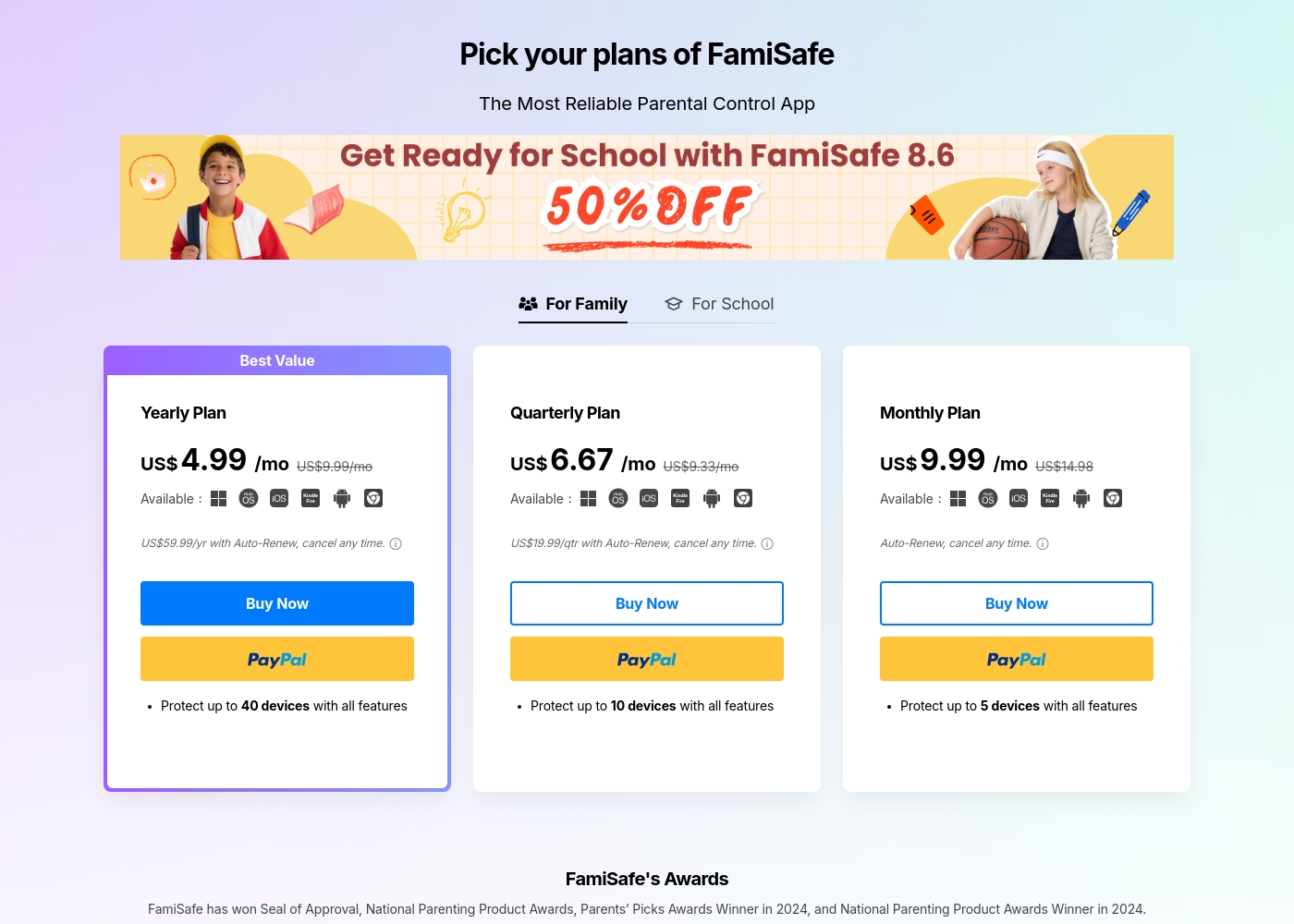
FamiSafe costs between US$4.99 and US$9.99 per month with three main plans: Yearly Plan at US$59.99/year, Quarterly Plan at US$19.99/quarter, and Monthly Plan at US$9.99/month.
FamiSafe provides simple, device-based plans for family monitoring. Here is a closer look at what each subscription offers.
Yearly Plan
Price: US$59.99 per year (effective US$4.99/mo) Websites Supported: Up to 40 devices Best For: Families needing comprehensive, long-term coverage Refund Policy: 7-day money-back guarantee Other Features:
- Includes all premium features
- Auto-Renews, cancel any time
- Protection for the highest number of devices
Pricing Notes
- FamiSafe offers superior value, protecting up to 40 devices for an effective rate of $4.99/month (on the annual plan).
- Canopy's pricing is significantly higher per device protected, capping at 10 devices monthly for $15.99.
- Canopy provides a longer 30-day money-back guarantee, offering more risk-free testing.
- FamiSafe offers a shorter 7-day money-back guarantee after initial purchase.
- All Canopy and FamiSafe paid plans include the full feature set; pricing only scales by device count.
Pricing Head-to-Head
User Reviews
Canopy receives critically mixed but predominantly negative feedback from users, resulting in a low 2.3-star Trustpilot rating. A major point of praise is its accuracy; several users confirm it is the most effective application they have found for blocking explicit/pornographic content using its specialized AI. However, this functionality comes at a severe cost to reliability and performance. The most recurring complaints center on the app dramatically slowing down internet speeds (in some cases dropping connection speeds by over 80%) and causing other legitimate applications or software to malfunction. 😔
Support responsiveness is also deeply criticized; users repeatedly report unresponsive customer service, difficulties contacting staff, or complete silence after submitting detailed troubleshooting information. Functionality issues include inconsistent blocking (failing to filter suggestive content or social media as requested) and, critically, inability to remove the app easily due to its anti-tamper protection. Multiple accounts reported being locked out of essential work devices for days while waiting for updates or support. The consensus suggests that while the core filtering technology is powerful, the crippling performance slowdowns and unacceptable support failures severely undermine its value.
This is a great app. I’ve had it for years and it’s the most effective one for blocking objectionable sites I've tried. Their tech support is superior and always willing to help.
FamiSafe holds a “Poor” 2.5 TrustScore, reflecting significant user frustration despite the company actively replying to 100% of negative feedback. The central issues revolve around technical operation and reliability. Users frequently cite major compatibility problems, including slow download speeds, app crashes—especially with the required “Wondershare Connect” tool for iPhone features—and reports of the application improperly installing or “ruining” device setup. The process to secure a refund can also be bureaucratic initially; customers sometimes had to “jump through hoops” by providing log files before the engineering team was convinced the product failed.
Conversely, nearly all positive feedback is centered on specific customer support agents, who are often described as outstanding, patient, fast, and technically competent (e.g., Mojoe, John, Angelo C). When a user successfully contacts a live agent, the problem is frequently resolved quickly or a full refund is processed, even covering taxes and VAT requested by European users. Overall, while the individual support experience is high-quality, the underlying product stability and the initial difficulty getting help contribute to the low external rating. 🤔
Mojoe was outstanding. He was technically competent, patient, and analytical, taking the time to walk me through every step. However, getting to a live person took too long, and I waited 30 minutes after being told it would be 13.
Our Verdict
Canopy and FamiSafe offer a fascinating trade-off between specialization and feature breadth. FamiSafe is the clear better choice for most families, delivering deep feature utility and excellent value. Canopy exists for the specific parent who needs one function—aggressive content blocking—done perfectly. Canopy excels at highly specialized, AI-driven content filtering above all else. Its AI instantly blocks pornography on virtually every site and flags specific suggestive content. Canopy’s aggressive anti-tampering feature also guarantees the Shield App stays installed permanently. FamiSafe offers phenomenal value and breadth, especially for huge families. Its top plan covers up to 40 devices for around $5 per month, blowing Canopy out of the water on cost. FamiSafe includes advanced tools like Driving Reports, SOS alerts, and monitoring across 14+ social platforms. The critical difference is reliability versus feature depth. Canopy’s reported severe performance issues (crippling internet speed) make it nearly unusable for many. While FamiSafe experiences technical glitches, it offers a functional, broader safety suite for a fraction of the cost. If your ultimate priority is military-grade content blocking and anti-tampering, buy Canopy. For everyone else needing affordability, teen physical safety tools, and broad social media monitoring, FamiSafe is the decisive winner.
Frequently Asked Questions
Which tool offers better content filtering: Canopy or FamiSafe?
Canopy offers a highly specialized, AI-driven filtering engine described as unmatched. It blocks pornography across every website and filters suggestive images. FamiSafe offers broader web filtering combined with dedicated YouTube and TikTok history monitoring.
Which software is better for large families with many devices?
FamiSafe is the superior choice for large families due to its scalability and pricing. The annual FamiSafe plan covers up to 40 devices for an effective rate of just $4.99 per month. Canopy supports a maximum of 10 devices monthly for a higher price.
Does FamiSafe include anti-tampering features like Canopy?
Canopy features aggressive Removal Prevention technology to stop children from uninstalling the protective app. FamiSafe manages app removal via standard device permissions. If powerful anti-tampering is essential, Canopy is the better option.
Why are the user reviews for both Canopy and FamiSafe relatively low?
Both tools struggle with significant technical and reliability issues reported by users. Canopy's score is lowered by severe internet slowdowns and poor support. FamiSafe’s score reflects widespread app stability and installation frustration, despite offering competent agents.
Which tool is better for parents of new teenage drivers?
FamiSafe is clearly better for monitoring young drivers. It offers specialized Driving Reports that track speed, routes, and habits. Canopy does not provide any dedicated features for monitoring driving safety.
How does Canopy’s money-back guarantee compare to FamiSafe’s?
Canopy offers a generous 30-day money-back guarantee, allowing ample time for testing. FamiSafe provides a much shorter, riskier 7-day money-back guarantee after purchase. Canopy is less risk-intensive to try initially.
Ready to Choose?
Both tools have their strengths. Choose based on your specific needs.