Canny vs Frill
Canny and Frill both centralize product feedback, but they appeal to different teams. Canny focuses on powerful Autopilot AI features and enterprise scalability. Frill prioritizes clean design and simple, unlimited user pricing. Picking the right tool depends entirely on your team's budget and desired complexity.
Best for: Organizations prioritizing advanced AI-driven feedback analysis and deduplication., Product teams requiring deep, two-way integration with Jira, Asana, or ClickUp.
Best for: Startups focused on a beautiful, highly customized end-user feedback experience., Teams requiring predictable pricing with unlimited tracked users from day one.
Powerful feedback tools, problematic billing practices.
We find Canny offers robust tools for centralizing feedback and utilizing AI for effective prioritization, supported by a clean user interface. However, we must strongly caution users regarding the documented issues with sharp pricing increases and the overly burdensome subscription cancellation process designed to create friction. Overall, the powerful features are significantly undermined by poor billing transparency and questionable customer retention tactics.
Pros
- Centralizes feedback capture and organization effectively.
- Includes AI tools (Autopilot) for fast deduplication and smarter analysis.
- UI is reported as clean, simple, and straightforward to use.
- Allows creation of public roadmaps and changelogs easily.
Cons
- Users report sudden and substantial price increases without notice.
- Cancellation process is intentionally difficult, requiring contacting support.
- Support responsiveness for cancellation disputes is perceived as inadequate.
- Some users feel the platform lacks crucial, expected functionalities.
Clean Design, Unified Feedback Loop
We found Frill excels at simplicity, offering a clean platform that unifies customer feedback, roadmaps, and announcements effectively in one place. Overall, we recommend Frill highly for teams prioritizing ease of use and superior design over complex, custom integration features.
Pros
- Excellent, elegant, and simple UI/UX design.
- Fast setup and intuitive ease of use.
- Unified tool for feedback, roadmaps, and announcements.
- Customer support is responsive and helpful.
Cons
- Jira integration is currently one-way sync only.
- Product development speed is reported as slow by some users.
- The Announcements feature could be improved.
AboutCanny
Canny is your complete customer feedback platform built to empower product teams. It's designed to organize all your incoming requests and help you prioritize what to build next. You can use it to gather, analyze, and organize feedback in one place. Moreover, you can create public or private roadmaps to keep everyone updated on your progress.
This system is trusted by both industry leaders and startups alike. Canny is scalable, making it perfect whether you're a small team or a large enterprise. It focuses on usability with a quick setup and a modern, intuitive UI. 💡
AboutFrill
Frill is a unified tool designed for teams dedicated to shipping better products, faster. It combines customer feedback boards, public roadmaps, and announcements into a single, elegant platform. You can install it quickly as a Web App or integrate the Widget directly onto your site. This thoughtfully designed platform focuses on simplicity, offering powerful customizability without the complex setup. It quickly becomes a crucial part of the feedback loop with your customers. ✅
Highlights
Feature Comparison
Features Overview
We highlight the main differences and pick a winner for each feature.
Pricing Model & Limits
Frill offers better cost predictability with unlimited users; Canny's pricing depends on user activity.
Canny uses strict limits based on 'tracked users,' which can range from 25 on the free plan to 5,000+. Paid tiers start from $19 per month annually but can escalate quickly with user growth. Frill uses predictable pricing based on features and platform capacity (ideas/surveys). Crucially, all Frill paid plans include unlimited usage and unlimited tracked users. Frill avoids the complexity and sharp cost increases associated with highly engaged user bases encountered by Canny users. If your business expects rapid user growth, Frill provides safer, more consistent budgeting month-to-month.
User Experience (UI/UX)
Frill offers a superior, elegant design, while Canny is simple and purely functional.
Canny has a clean, simple, and functional UI, making it straightforward to use for administrative tasks. It prioritizes efficiency over visual appeal for the product team. Frill is consistently praised for its elegant, beautiful, and minimalistic user interface and user experience. Users find Frill highly intuitive and easy to set up quickly. Frill’s superior design ensures a more engaging experience, encouraging customers to submit valuable, organized feedback. Frill's aesthetic focus helps make the feedback tool feel like a native extension of your branded application.
AI & Automation
Canny uses powerful AI to automate feedback analysis; Frill requires manual sorting.
Canny is strong here, including Autopilot AI features throughout its plans, even the Free tier. Autopilot automatically captures new feedback and deduplicates requests. Frill lacks features for AI assistance or automated deduplication within its feature set. Teams must manually sort, merge, and organize incoming ideas. Canny's Autopilot significantly reduces the manual administrative burden associated with managing large volumes of duplicate feature requests. This AI advantage means Canny product managers can spend less time cleaning data and more time deciding what to actually build next.
Integration Ecosystem
Canny offers deeper PM and CRM integrations; Frill offers standard connections.
Canny offers robust, deep integrations with crucial PM tools like Jira, ClickUp, and Asana starting with the Pro plan. Business tiers integrate CRM data. Frill connects with popular software including Slack, Trello, and Zendesk to facilitate workflow. However, external data suggests the Jira synchronization is often one-way. Canny provides a deeper feature set, allowing financial teams to connect feedback to potential revenue via CRM properties. If deep, two-way sync with your project management tools is essential, Canny is the proven choice.
Team Scaling & Access
Frill includes unlimited team collaboration; Canny imposes steep limits on manager licenses.
Canny limits the number of managers/teammates included: 5 on Core and 10 on Pro. Adding more managers rapidly increases the total cost of ownership. Frill allows unlimited teammates and managers across all subscription tiers, ensuring internal scaling is frictionless and affordable. Team size is never a cost factor. Teams with large internal stakeholder groups will find Frill far more scalable for cross-departmental product collaboration. Frill’s model ensures that the entire sales, marketing, and support organization can collaborate without escalating license costs.
Prioritization Tools
Canny uses data-rich custom formulas; Frill uses a visual Benefit/Cost matrix.
Canny provides advanced tools to build custom prioritization formulas, factoring in Impact vs Effort weights. It links directly to external CRM data. Frill uses an innovative, customizable Benefit and Cost scoring matrix. This visual prioritization method clearly highlights 'Quick Wins' for the team. Canny enables surgically precise prioritization by syncing properties like opportunity revenue data from tools like Salesforce or HubSpot. This makes prioritization data-driven. Frill is ideal if you need a simple, visual way to score ideas quickly based on internal effort and customer benefit.
Review Sentiment
Frill has a positive sentiment (4.4); Canny's strong features are undercut by billing complaints (3.2).
Canny reviews frequently cite severe operational friction, including sudden, substantial price increases and difficulties canceling subscriptions. This raises serious trust issues. Frill users provide overwhelmingly positive feedback, highlighting responsive customer support and the platform’s elegant UI/UX design. Frill’s excellent service reputation suggests a stable, trustworthy partnership, while Canny's billing flaws risk unexpected budget spikes. When customer experience matters, Frill clearly surpasses Canny in operational service delivery and user loyalty.
Language Support
Frill provides full platform localization; Canny only translates content within posts.
Canny offers Content Translations starting in the Core plan to translate the text within feedback posts itself. This helps gather multilingual input. Frill provides Full Translations, allowing every single phrase, label, and word within the entire platform to be localized easily. Frill provides a much more comprehensive and native experience for global users compared to Canny's content-only translation approach. If your audience spans multiple regions and requires a fully localized interface, Frill is the superior solution.
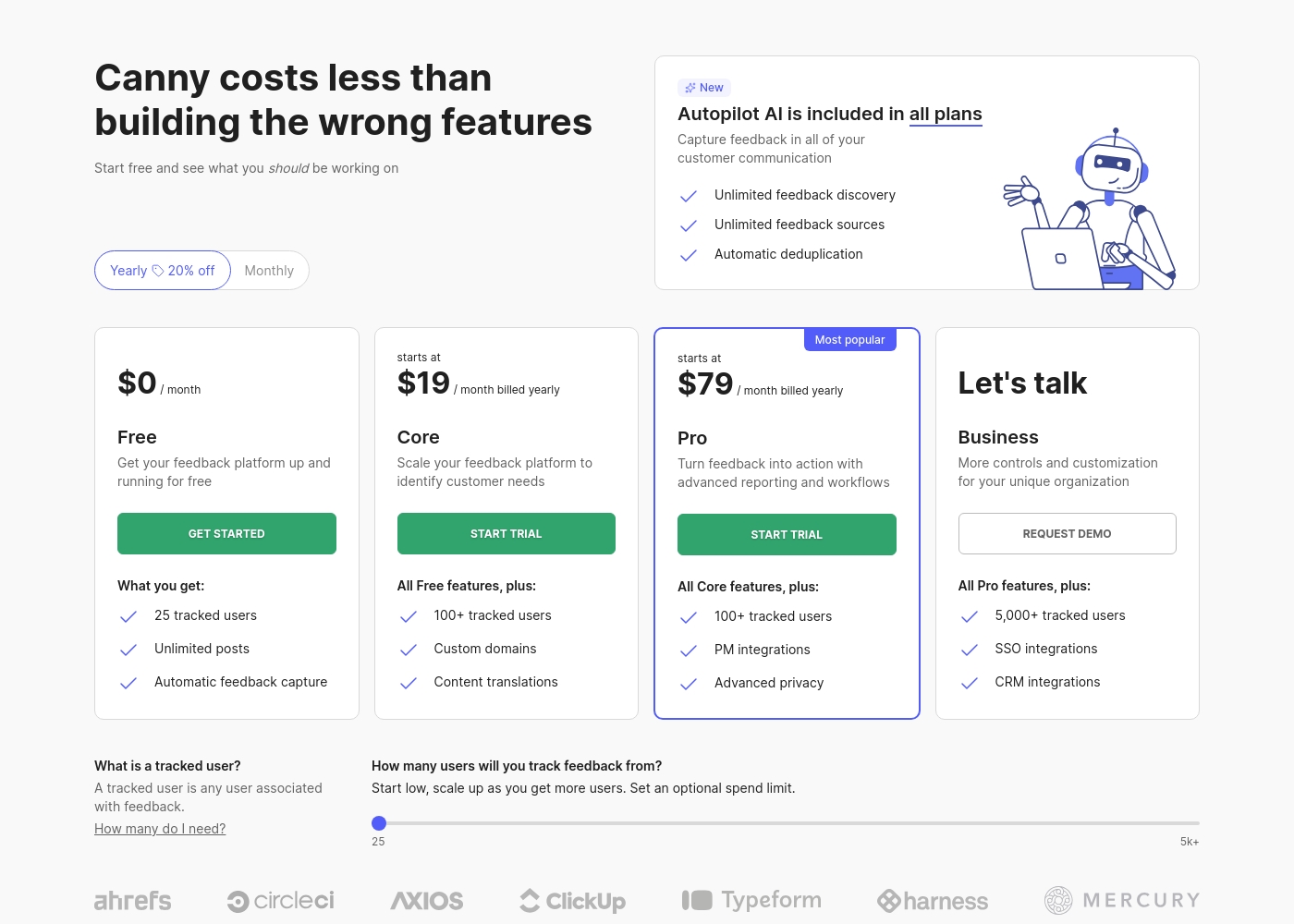
Canny costs between $0 and a custom rate per month with four plans: Free at $0/month, Core starting at $19/month (billed yearly), Pro starting at $79/month (billed yearly), and Business (custom pricing).
Below are the details for each plan, designed to help you centralize feedback and make better product decisions.
Free
Price: $0/month Best For: Getting your feedback platform up and running for free Other Features:
- 25 tracked users
- Unlimited posts and boards
- 5 managers
- Automatic feedback capture
- 25 tracked users
- 5 managers
- Unlimited posts and boards
- Automatic feedback capture
- Autopilot AI
- All Free features
- 100+ tracked users
- Custom domains
- Content translations
- Changelog
- All Core features
- 100+ tracked users
- PM integrations (e.g., Jira, ClickUp)
- Advanced privacy (private boards, private comments)
- 10 managers
- All Pro features
- 5,000+ tracked users
- SSO integrations (Okta, OIDC)
- CRM integrations (HubSpot, Salesforce)
- Custom control and customization
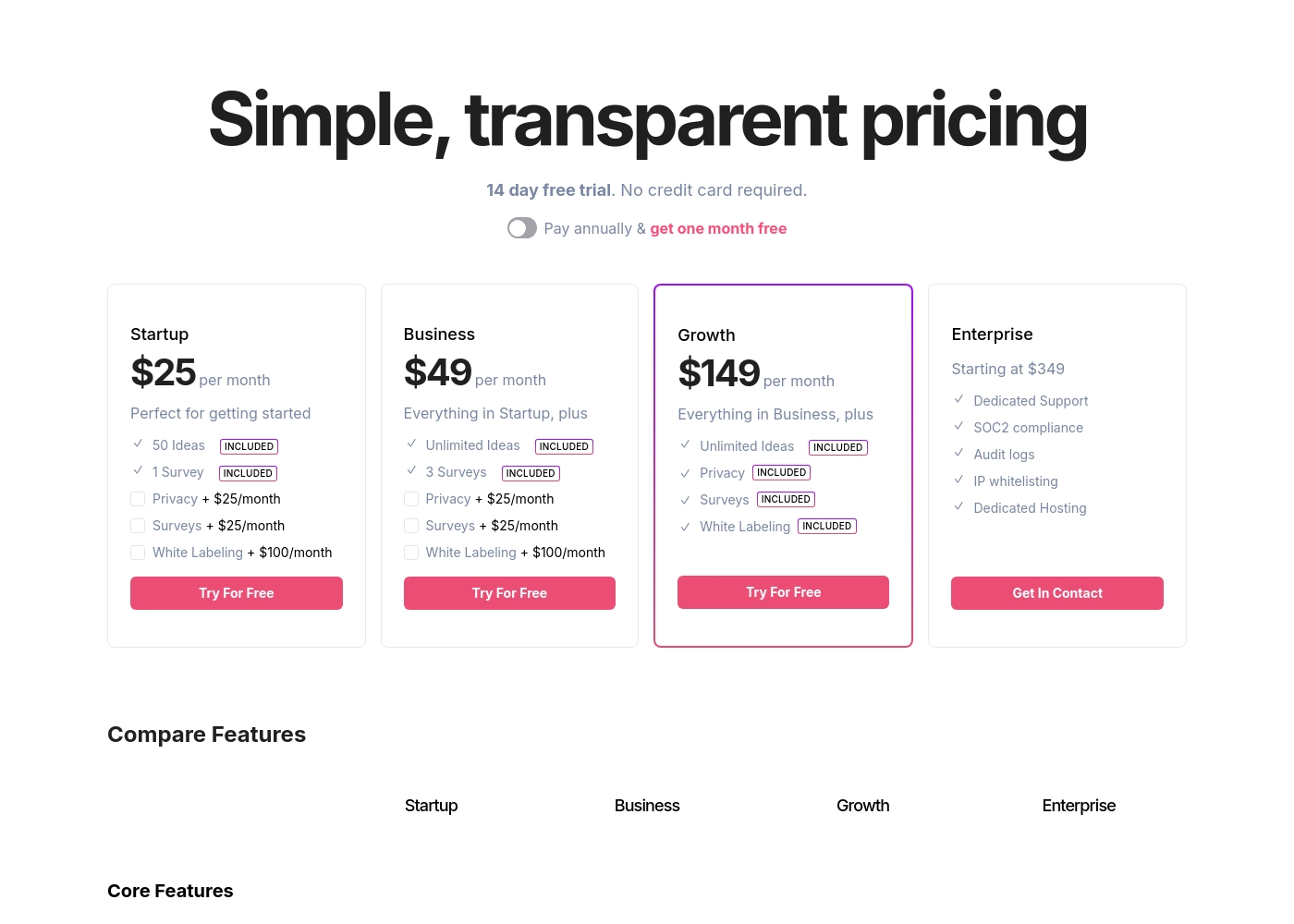
Frill costs between $25 and $349+ per month with four plans: Startup at $25, Business at $49, Growth at $149, and Enterprise starting at $349.
Below, you'll find a detailed breakdown of what each subscription level offers and who it's designed to help.
Startup
Price: $25 per month Best For: Getting started with basic feedback collection. Other Features:
- 50 Ideas INCLUDED
- 1 Survey INCLUDED
- Unlimited Teammates and Tracked Users
- Optional add-ons for Privacy ($25/month) and White Labeling ($100/month)
- 50 Ideas
- 1 Survey
- Unlimited Teammates/Managers
- Unlimited Tracked Users
- Unlimited Ideas
- 3 Surveys
- All Startup features included
- Unlimited Ideas
- Privacy Included
- Surveys Included (Unlimited)
- White Labeling Included
- All Business features included
- Dedicated Support
- SOC2 compliance
- Audit logs
- IP whitelisting
- Dedicated Hosting
Pricing Notes
- Frill includes unlimited teammates and users on all paid plans, ensuring predictable scaling costs.
- Canny scales costs based on 'tracked users,' which can lead to unexpected billing increases with rapid customer engagement.
- Canny has a free tier (25 users); Frill only offers a 14-day free trial.
- Many Canny users have reported substantial, sudden price hikes and confusing cancellation procedures.
- Both Canny and Frill offer discounts for annual commitments.
Pricing Head-to-Head
User Reviews
External feedback for Canny is heavily focused on operational issues, overshadowing the core product functionality, based on limited reviews. The most severe and recurring complaints strongly center on pricing and cancellation practices.
Users reported experiencing sudden and substantial price hikes, sometimes doubling their monthly costs from $200 to $400, calling the service 'overpriced' and citing a 'terrible pricing change.' While acknowledging the UI is straightforward and useful for creating public roadmaps, customers expressed frustration that the product lacks some important functionalities they needed. The cancellation process is strongly criticized as intentionally restrictive: users must contact support, leading to frustrating interactions with perceived 'AI robots' and even incorrect charging after cancellation attempts were made.
The product is simple and functional, but the price recently doubled from $200 to $400 a month, which is excessive for this type of software. We were charged again even after scheduling our cancellation through customer support.
Users consistently praise Frill for its simplicity and superior UI/UX. Reviewers frequently describe the platform as "beautiful," "clean," and "elegant," preventing the convoluted complexity found in competing tools.
Ease of use is a major highlight; setting up feedback boards, roadmaps, and announcements is described as "a breeze." Frill is valued for unifying these essential product management functions, helping teams feel more connected to their customers. Furthermore, customer support is highly rated.
Frill is a really simple feedback, roadmap, and announcements tool. The UI/UX is beautiful and straightforward, unlike others I've seen. It reminds me of Notion, which is a huge compliment to the developers.
Our Verdict
Canny and Frill both centralize product feedback, but Frill is the superior choice for most businesses prioritizing peace of mind. Frill generally wins on cost predictability and overall customer trust, despite Canny's technical edge. Its beautiful UI/UX keeps users engaged and managers happy. Canny’s superpower is its powerful technology and enterprise-grade capability. Its Autopilot AI automatically captures and deduplicates feedback, saving product managers significant hours weekly. Canny also boasts deep PM integrations (Jira, Asana, CRM) allowing for complex, valuable prioritization formulas. Frill shines in simplicity, design, and predictable scaling costs. Frill includes unlimited tracked users and unlimited teammates on every paid plan, avoiding Canny’s confusing usage-based cost escalations. Teams love Frill's unified platform for organizing ideas, roadmaps, and feature announcements with ease. The critical deciding factor here is customer trust and operational transparency. Canny faces recurring, severe complaints about sudden pricing increases and intentionally difficult subscription cancellation. Frill’s highly-rated support and straightforward model make it a much more trustworthy platform. Choose Frill if you prioritize design, simplicity, and scaling predictably with unlimited users. Canny is the right choice if you need the advanced AI analysis tools and essential CRM integrations, but proceed with caution regarding the documented billing issues.
Frequently Asked Questions
Which is better for small, budget-conscious teams: Canny or Frill?
Canny is better initially because it offers a fully functional free tier for up to 25 tracked users. Frill does not offer a free plan, providing only a 14-day trial instead. If your user base exceeds Canny's 25-user limit quickly, Frill's predictable unlimited user model becomes cheaper.
Does Canny have a feature comparable to Frill's unified Announcements?
Yes, both applications offer tools to close the feedback loop. Canny uses a dedicated Changelog feature for release notes and automatic voter notification. Frill uses its modern 'Announcements' feature, which also serves as a changelog.
Is Frill worth the higher entry-level price compared to Canny?
Frill starts at $25 per month, slightly higher than Canny's Core plan at $19 per month. However, Frill includes unlimited teammates and users immediately. Canny restricts both, meaning Frill offers better value if your team or user volume is growing fast.
Which tool manages multi-language feedback better for a global customer base?
Frill is superior in this area because it supports 'Full Translations' across every word and phrase in the platform. Canny only offers 'Content Translations' for posts, providing a less localized experience.
How does Canny's AI compare to Frill’s prioritization tools?
Canny uses Autopilot AI for automatic feedback capture and bulk deduplication, drastically reducing manual effort. Frill relies on its customizable Benefit/Cost Matrix for human-driven prioritization calculations.
Can I easily move my existing feedback from Canny to Frill?
Yes, migrating between the two platforms is supported and streamlined. Frill specifically lists native support for importing existing data directly from Canny’s feedback platform for easy switching.
Ready to Choose?
Both tools have their strengths. Choose based on your specific needs.