Canary Mail vs Gmail
Canary Mail and Gmail tackle email from very different angles. Canary Mail prioritizes high security with built-in end-to-end encryption. Gmail focuses on unmatched scale and deep integration within its ecosystem. The choice depends heavily on your privacy needs versus ecosystem dependence.
Best for: Professionals handling highly sensitive client data (e.g., law, finance)., Users seeking a multi-account client with native, built-in end-to-end encryption.
Best for: Organizations already deeply integrated within the Google Workspace ecosystem (Calendar, Meet, Drive)., Businesses requiring highly reliable, 24/7 access backed by global infrastructure.
Secure, feature-rich, but platform inconsistent.
Canary Mail focuses on combining enterprise-level security, like end-to-end encryption, with powerful, modern efficiency tools, including highly-rated AI assistance. We appreciate its commitment to a beautiful user interface and seamless multi-account management across devices. Overall, we recommend Canary Mail cautiously, as the platform offers exceptional features but requires that users tolerate significant, platform-specific stability issues and reportedly poor customer support.
Pros
- Features built-in end-to-end encryption for high security.
- Powerful AI capabilities for summarizing and drafting responses.
- Excellent multi-account management with fast syncing across devices.
- Intuitive user interface (UI) and aesthetically pleasing design.
Cons
- Significant, recurring stability issues and bugs, especially on Windows and Android.
- Reports of support being difficult or impossible to contact.
- The app can be slow and sluggish at loading messages.
- Core features, like creating groups for bulk sending, are missing.
Secure communication with powerful AI features.
We recognize Gmail as a technology leader, providing unmatched security and advanced AI features that significantly enhance productivity for both personal and business users. Overall, we caution prospective customers that the paid Workspace plans carry considerable risks due to widely reported customer service and billing failures.
Pros
- Enterprise-grade security blocks 99.9% of spam and phishing.
- AI tools (Gemini, Smart Compose) significantly enhance productivity and speed.
- Robust free tier is available for personal use with 15GB storage.
- Seamless integration with Google Meet, Chat, Calendar, and Tasks.
Cons
- Customer support is frequently described as non-existent and unhelpful.
- Widespread issues reported with billing errors and unexpected price increases.
- Difficulty canceling subscriptions results in substantial close-out fees or access issues.
- Users report being locked into annual contracts without clear warning.
AboutCanary Mail
Canary Mail is designed for users who expect the best from their communication tool. It promises top features, great design, and excellent security all in one place. Canary doesn't just meet expectations; it aims to sit firmly on top by raising the bar. 💡
This comprehensive approach means your email experience is efficient and thoroughly protected.
AboutGmail
Gmail is recognized as the world's number one email platform. It is a secure, easy-to-use, and AI-powered service trusted by billions of people and businesses globally. This platform provides more than just an inbox; it is a central hub for communication. You can access your account anytime, anywhere, whether on your computer, phone, watch, or tablet. 💡 Gmail helps professionals maintain connection and efficiency with Google’s robust, secure global infrastructure supporting them all day and night.
Highlights
Feature Comparison
Features Overview
We highlight the main differences and pick a winner for each feature.
Security & Encryption
Canary Mail offers superior privacy via native encryption; Gmail offers superior threat defense.
Canary Mail provides mandatory built-in end-to-end encryption. This powerful tool ensures that only the intended recipient can read your messages. It establishes rock-solid privacy for sensitive communications. Gmail uses powerful, enterprise-grade cloud protection and deep malware filtering. It automatically blocks 99.9% of spam, phishing, and threats instantly. Paid Gmail plans offer optional client-side encryption, but it is not the default. If your priority is maintaining ultimate message confidentiality, choose Canary Mail. If minimizing high volumes of daily threats is key, Gmail’s automatic filtering is superior.
AI Productivity Tools
Gmail AI focuses on high-speed composition; Canary Mail excels at summarizing and drafting.
Canary Mail includes highly-rated AI for summarizing long email threads quickly. Users find the drafting capability phenomenal for complex or swift response writing. It helps you triage a packed inbox effectively. Gmail leverages Gemini, Smart Compose, and Smart Reply to boost speed. These tools suggest responses and finish sentences as you type. Gmail's AI focuses on volume and instant, predictive replies using tools trusted by billions. Both offer strong AI, but Gmail's tools are deeply embedded for rapid composition at scale. Canary Mail focuses on interpreting content and robust response generation.
Ecosystem Integration
Gmail is the Google Workspace hub; Canary Mail is a flexible, standalone client.
Canary Mail is designed efficiently as a powerful, standalone multi-account email client. It manages diverse email providers well and syncs fast across platforms. Integration with third-party CRM tools is not highlighted. Gmail acts as a central hub for the entire Google ecosystem natively. You can launch Google Meet, schedule in Calendar, and manage Tasks, never leaving the inbox. This deep integration simplifies a busy professional's digital workflow. If your team uses Google Workspace for daily operations, Gmail’s integration is unparalleled. If you need client flexibility across multiple providers, Canary Mail is a great system-agnostic choice.
Mistake Prevention
Canary Mail prevents outbound errors; Gmail uses Nudges to remind responsive action.
Canary Mail focuses on proactive safety with its Human Error Prevention (HEP) feature. This checks for crucial errors like missing attachments before you hit send. It ensures your most important outbound communication is professional and correct. Gmail uses a feature called Nudges to provide automatic reminders. These Nudges prompt you to respond to pending emails efficiently. This helps ensure timely follow-up regarding inbound communications. The HEP in Canary Mail prevents costly sending mistakes, which is a major advantage. Gmail’s Nudges improve organization and responsiveness after the email is received.
Reliability and Stability
Gmail is rock-solid and highly reliable; Canary Mail faces persistent, recurring stability issues.
User feedback for Canary Mail frequently points to significant stability issues and bugs. This is especially problematic for those using Windows and Android systems regularly. The app can feel slow and sluggish when trying to load messages. Gmail is supported by Google's highly resilient global infrastructure providing trusted 24/7 access. It boasts zero high or critical vulnerabilities reported over five years. This system guarantees availability for business operations. For users running critical tasks, Gmail delivers proven, world-class reliability. Canary Mail's platform instability is a significant risk for professionals and larger teams.
Professional Sales Tools
Gmail supports mass personalized outreach; Canary Mail offers templates for individual speed.
Canary Mail helps individual efficiency through its powerful template feature. Users can quickly pull up standardized replies for common inquiries. Utilizing templates saves effort on repetitive customer communication every day. Gmail facilitates large-scale outreach using custom domains and mail merge capabilities. You can send personalized emails to 1,500 recipients at once using merge tabs. This robust feature is designed for growing professional sales and marketing efforts. Choose Canary Mail for high-velocity individual response times. Select Gmail if your priority is scaled, personalized communication to large customer segments.
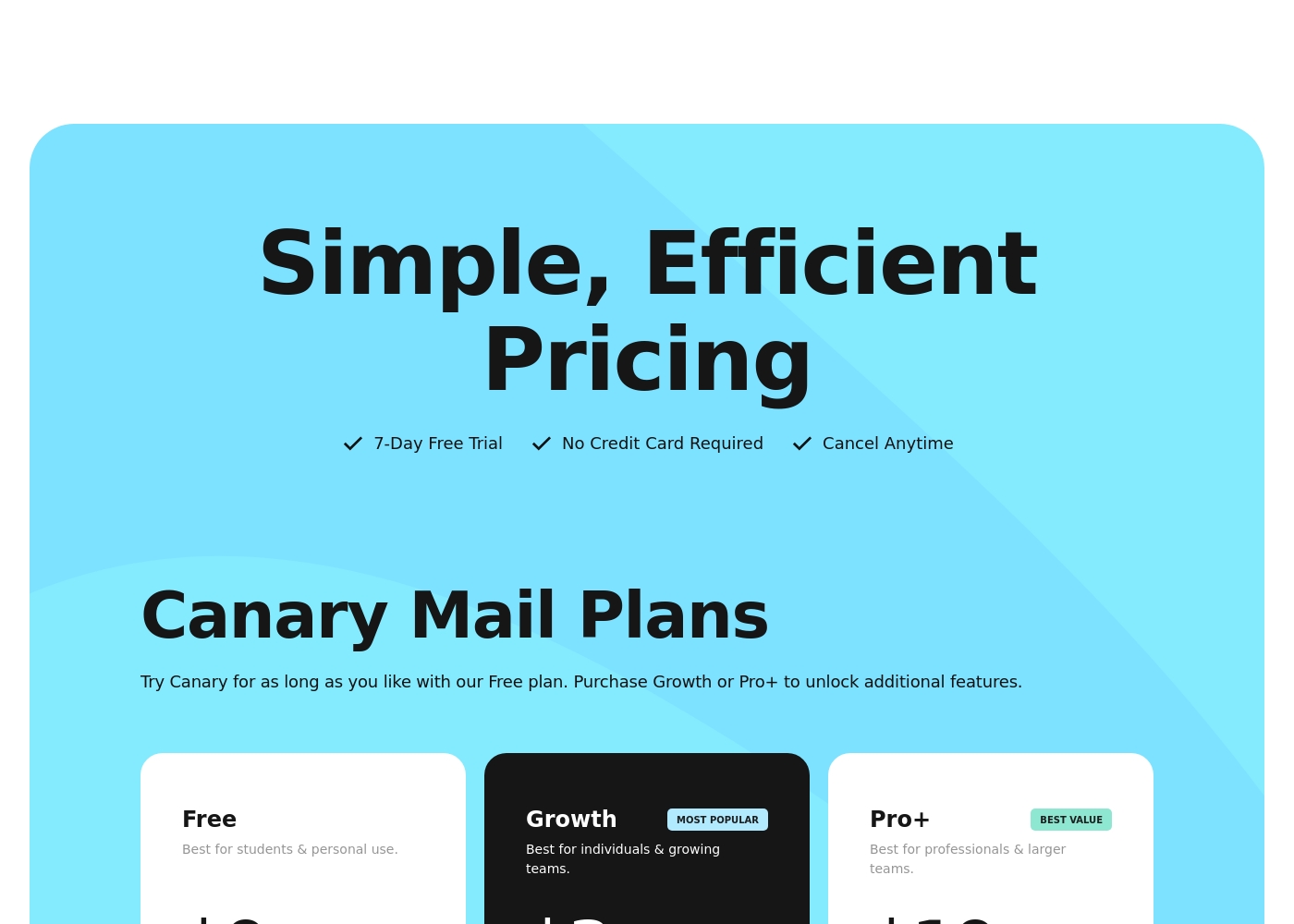
We believe in simple, efficient pricing. Here is a look at the features and target audience for each option.
Free
Price: Free Best For: students & personal use Other Features: Try Canary for as long as you like.
This plan is perfect if you are a student or only need basic personal email management. You can use this plan indefinitely and get comfortable with the application’s core functionality.
- Can be used indefinitely
- Includes core functionality
- Most Popular plan
- Best for individuals & growing teams
- Unlocks additional features
- Best Value tier
- Best for professionals & larger teams
- Unlocks additional features
There are two primary options shown: the free "No cost" plan, and the paid "Business Standard" plan.
It's important to choose the right plan based on how much storage you need and whether you require professional business features like a custom domain name. Here is a breakdown of the available options.
No cost
Price: Free Best For: Personal use, individuals, and students Refund Policy: Not applicable (it's free) Other Features:
- 15GB pooled storage per user to store emails and files.
- Default security encryption helps protect your data.
- Access your inbox anytime, anywhere via your computer, phone, watch, or tablet.
- Access to AI features (Gemini) through separately purchased Google AI Pro or Ultra plans for personal use.
- 15GB pooled storage per user
- Default security encryption
- Gemini integration available with Google AI Pro or Ultra personal plans
- 2TB pooled storage per user
- Custom domain
- Meeting recording
- Appointment scheduling
- Default security encryption, plus client-side encryption on select plans
Pricing Notes
- Both Canary Mail and Gmail offer robust, perpetual Free plans for personal use.
- Canary Mail offers a 7-day risk-free trial for premium tiers without demanding a credit card.
- The paid business plans for both Canary Mail and Gmail do not explicitly state subscription prices.
- Gmail's paid plans utilize a per-user seat model as part of Google Workspace.
- Canary Mail users choose between the Growth plan (popular) and Pro+ plan (best value) for added features.
Pricing Head-to-Head
User Reviews
Canary Mail receives highly polarized feedback, reflecting a split experience between those who find it indispensable and those frustrated by instability. Many users praise the intuitive design and excellent support for multiple accounts, noting fast synchronization across various devices, including Apple, Android, and Windows.
The much-touted AI features—capable of triaging, summarizing, and drafting complex responses—are often described as “phenomenal” and a significant edge over competitors. Conversely, a major theme focuses on recurring bugs and reliability issues, especially impacting the Windows and Android versions, sometimes resulting in corrupted attachments or slow, sluggish performance.
The AI is phenomenal! Canary helps me triage my inbox, summarize emails, and swiftly draft positive or negative responses. It works perfectly on my iPhone and Tab Ultra, keeping me updated everywhere I go.
Users are deeply divided when reviewing the Google Workspace experience. While the core Gmail service itself is universally acknowledged as reliable and secure (handling billions of users), external reviews, particularly for the paid Workspace platform, highlight pervasive customer service and billing failures.
Users frequently express widespread dissatisfaction with support responsiveness, often describing it as “non-existent,” slow, and frustratingly unprofessional. Recurring pain points include being locked into annual contracts without clear warning, experiencing shocking billing errors, dealing with double charging, and finding it nearly impossible to cancel without incurring significant fees.
I rely on Gmail daily for my small business needs. The seamless integration with Meet and Calendar keeps my workflow perfectly organized. The strong security features are truly reliable, too; I rarely see any spam.
Our Verdict
This choice is simply about security level versus deep ecosystem integration. If you prioritize maximum privacy in every message, Canary Mail is the clear winner. Gmail dominates if your organization lives completely inside Google Workspace already. Both Canary Mail and Gmail offer powerful AI assistance, but their core competencies diverge significantly. Canary Mail's power lies in its deep commitment to digital security and control features. It offers crucial built-in end-to-end encryption for total message privacy. Features like Human Error Prevention stop costly outbound mistakes before they happen. Canary Mail is best for those who handle sensitive legal or financial data. Gmail’s superpower is its massive scale, integration, and AI support network. It provides unmatched reliability using enterprise-grade global infrastructure 24/7. Gmail integrates completely with Meet, Calendar, and Chat right inside your inbox view. Its predictive AI tools significantly speed up high-volume responses. Critically, the deciding factor is non-negotiable stability versus custom, cutting-edge privacy. Canary Mail struggles with frequent, recurring platform bugs, especially on Windows and Android. Gmail provides proven, rock-solid reliability for all critical business functions. Choose Canary Mail if encryption is your highest priority; choose Gmail if system reliability must be paramount. If you are a professional who needs guaranteed message privacy first, definitely go with Canary Mail immediately. If you need a fully integrated business suite with proven stability for 50+ teammates, choose Gmail. Gmail offers the better foundation for growth and massive scale.
Frequently Asked Questions
Which has better security: Canary Mail or Gmail?
Canary Mail provides built-in end-to-end encryption for maximum message privacy. Gmail offers enterprise-grade infrastructure that automatically blocks 99.9% of spam and malware. If deep message privacy is critical, Canary Mail wins; for global high-volume threat defense, choose Gmail.
Which email client is better for managing multiple accounts?
Canary Mail is highly regarded for its excellent multi-account management features. It allows fast syncing and a seamless native UI across diverse operating systems. Gmail is functional but focuses less on being a centralized, multi-platform client.
Is Canary Mail more stable and reliable than Gmail?
No, user reviews often cite significant, recurring stability issues with Canary Mail. Gmail is backed by Google's secure, resilient global infrastructure 24/7. Gmail provides superior reliability; Canary Mail users report frequent bugs, especially on non-Apple operating systems.
Does Canary Mail integrate with Google Calendar or Meet?
Canary Mail is primarily a standalone email client, and deep integration with Workspace is not specified. Gmail is natively integrated with Meet, Calendar, Chat, and Tasks. You never need to leave your Gmail inbox to use these essential apps.
Which tool offers stronger sales and marketing features?
Gmail includes powerful mail merge capabilities allowing personalized emails to 1,500 recipients. Canary Mail offers templates best suited for high-speed individual replies. Gmail is better designed for scaled professional outreach.
Can I use Canary Mail for free indefinitely?
Yes, Canary Mail offers a perpetual Free plan with core email functionality for students and personal users. Gmail also offers a robust Free plan with 15GB of pooled storage. Both are great options if you only need basic, simple email management.
Ready to Choose?
Both tools have their strengths. Choose based on your specific needs.