Camtasia vs Viddyoze
Camtasia and Viddyoze approach video creation from completely opposite directions. Camtasia is a deep editor optimized for complex tutorials; Viddyoze builds quick, branded animations from templates. Decide if you need recording flexibility or immediate template speed and volume.
Best for: Corporate trainers and educators creating long-form tutorials, Users who need deep control over screen recording and editing
Best for: Freelance marketers needing commercial rights to serve clients, E-commerce businesses focused on fast, branded social media ads
Powerful screen recording, premium price tag.
We find Camtasia to be an extremely capable, industry-standard tool for creating high-quality instructional video content. Its multitrack editing flexibility and AI enhancements effectively streamline complex workflows. Overall, Camtasia excels in core functionality, but its restrictive, mandatory subscription model significantly diminishes the overall value proposition for many loyal users.
Pros
- Industry-standard platform for flexible screen recording and tutorial creation.
- Significantly simpler and more intuitive interface compared to advanced editors.
- Multitrack recording allows independent editing of screen, audio, and camera.
- Offers powerful AI features like text-based video editing and audio cleanup.
Cons
- Mandatory annual subscription model has replaced perpetual licenses.
- Users are frustrated by restrictive licensing (single-device sign-in limitations).
- Perceived as overly expensive compared to free or low-cost competitors.
- Inconsistent customer service experiences, including slow/non-responsive support.
Quick, Quality Video Creation with Billing Friction.
We find Viddyoze delivers excellent, professional video templates that are genuinely easy to customize and use. The platform significantly speeds up production for branding elements, allowing unlimited creation capacity for $47 per month. Overall, this is a highly functional tool marred by concerning reports of subscription transparency issues and difficult trial cancellation polices.
Pros
- Access to 5,000+ high-quality, professional templates.
- Extremely quick and easy to use, even for beginners.
- Unlimited creation capacity included in the monthly price.
- Commercial rights provided for client work.
Cons
- Free trial cancellation process is reported as confusing and deliberately difficult.
- Users report being incorrectly charged after attempting to cancel the trial.
- Requires caution regarding subscription monitoring and cancellation guidelines.
- The web interface is described as ‘cranky’ by some users.
AboutCamtasia
Camtasia is truly everything you need in one powerful tool. It combines screen recording with full video editing capabilities. This software uses AI-powered tools to simplify the creation process. It is designed to help you turn your existing knowledge into highly engaging videos. 💡
AboutViddyoze
Viddyoze is an intuitive, easy-to-use video creator designed for business owners and professionals. Over 180,000 creators trust this platform.
It’s been called the “Swiss Army Knife” for corporate branding video media because it allows you to brand content using your own colors and logos effortlessly. The best part?
You don’t need any video editing experience to start. If you can click a mouse, you can create amazing videos in minutes.
Highlights
Feature Comparison
Features Overview
We highlight the main differences and pick a winner for each feature.
Core Editing Depth
Camtasia offers total control over video tracks; Viddyoze is strictly confined to template customization.
Camtasia’s core strength is its powerful multitrack recording capability for maximum flexibility. It records screen, camera, and audio onto separate tracks for fully independent editing. This allows you to adjust and refine every detail without impacting the others. Viddyoze operates by customizing existing templates, focusing on colors, logos, and text elements. It lacks the deep, granular, timeline-based editing and mixing required for tutorials. The platform is not built for complex timelines. If you require detailed control over audio levels and precise recording manipulation, Camtasia is essential. Viddyoze is great for professional animations but poor for granular video correction. Real-world impact: Fixing one spoken mistake during a 30-minute training session is simple using Camtasia's separated audio track.
Video Creation Speed
Viddyoze utilizes cloud rendering for lightning-fast creation; Camtasia requires full timeline editing time.
Creating rich content in Camtasia involves recording and detailed editing on the desktop timeline. Even with AI tools, the user must still handle the assembly and refinement process. Camtasia helps create better videos faster than traditional desktop editors. Viddyoze boasts Lightning Fast Creation thanks to its cutting-edge cloud rendering technology. What used to take hours now takes only seconds to deliver the finished video. You simply select a template and render it quickly. Viddyoze is definitively the winner if production speed and volume of assets are the primary goals. Camtasia focuses on deep refinement and quality control over raw speed. Viddyoze videos are optimized and designed for immediate use on digital channels, promoting quick deployment to social platforms.
AI Capabilities
Camtasia uses AI for editing automation; Viddyoze uses AI primarily as an idea and structure assistant.
Camtasia uses AI for script generation, text-based video editing, and advanced audio cleanup for filler words. The Pro plan also adds AI translation, generated titles, and even avatar videos. Camtasia's AI directly modifies the content. Viddyoze features the ViddyBot, which acts as a 24/7 AI chatbot assistant. ViddyBot helps the user write, structure, and generate content ideas within the editor. It guides creation rather than directly editing video tracks. Camtasia offers more powerful AI for content refinement and localization tasks, especially for long-form content. Viddyoze’s AI focuses on concept generation and structural help. Both tools leverage AI, but Camtasia's features save significant manual editing time while Viddyoze helps overcome creative blocks.
Audio Refinement
Camtasia offers advanced audio cleanup; Viddyoze relies on external audio content.
Camtasia offers advanced, dedicated audio cleanup tools to polish your soundtrack effectively. These tools automatically remove distracting background noises such as fan noise and static. They also eliminate common filler words like 'uuhms' and 'aahs' from your narration instantly, producing clean speech. Viddyoze's focus is on template generation and integrating stock media, not on recording or editing narrated audio. The tool does not include specialized features for cleaning up user-recorded microphones. If you record your own voiceovers, Camtasia’s audio scrubbing tools are crucial for achieving professional quality. Viddyoze users must clean their audio outside the platform if needed. Because Camtasia keeps audio separate, you can perfect the sound quality quickly without touching the visual elements.
Commercial Use Rights
Viddyoze includes client commercial rights standard; Camtasia licenses are strictly non-transferable individual subscriptions.
Viddyoze provides full commercial rights for everything created while subscribed. This means users can confidently use Viddyoze to create content for their paying clients. This capability makes Viddyoze an ideal, profitable tool for freelancers. Camtasia's individual Essentials, Create, and Pro plans are strictly non-transferable subscriptions. Any creation for external clients would require reviewing separate, likely more expensive, 'Teams & Business' options. Client rights are not guaranteed in individual plans. For anyone running a marketing or freelance business, the included commercial rights from Viddyoze provide instant, necessary flexibility. You won't face limitations on how you use your videos. Camtasia is geared toward internal training departments, while Viddyoze targets external client content creation.
Branding & Templates
Viddyoze excels with 5,000+ templates and 1-click branding; Camtasia requires manual application onto recorded content.
Viddyoze provides access to a massive and constantly growing library of over 5,000 professional templates. Creating consistent company branding is incredibly fast with Viddyoze’s brand asset management. You can apply specific brand colors and logos in just three fast clicks. Camtasia does not focus on templates for primary video generation but excels at recording existing screens and content. While it offers 100M+ assets, integrating branding requires manual work in the desktop editor. If your goal is to quickly publish branded animated logos or e-commerce promo clips, Viddyoze is the clear choice. Viddyoze guarantees visual consistency across all template videos. This lightning-fast customization in Viddyoze means you boost your professional brand presence without complex editing work.
Pricing Structure
Viddyoze is monthly and accessible; Camtasia requires a higher, mandatory annual financial commitment.
Camtasia mandates annual subscriptions, ranging from $179.88 to $599.00 per year. There is no information provided about a monthly payment option. The high initial cost targets professional or dedicated corporate budgets. Viddyoze offers a single, commitment-free monthly subscription at $47. This includes unlimited creation capacity and full feature access. This model strongly appeals to users needing financial flexibility. Viddyoze is significantly more flexible for short-term projects or budget-conscious users due to its monthly billing. Camtasia demands a significant yearly investment for its advanced desktop functionality. Camtasia's clear annual pricing targets users who need a stable, long-term software license for their workflows.
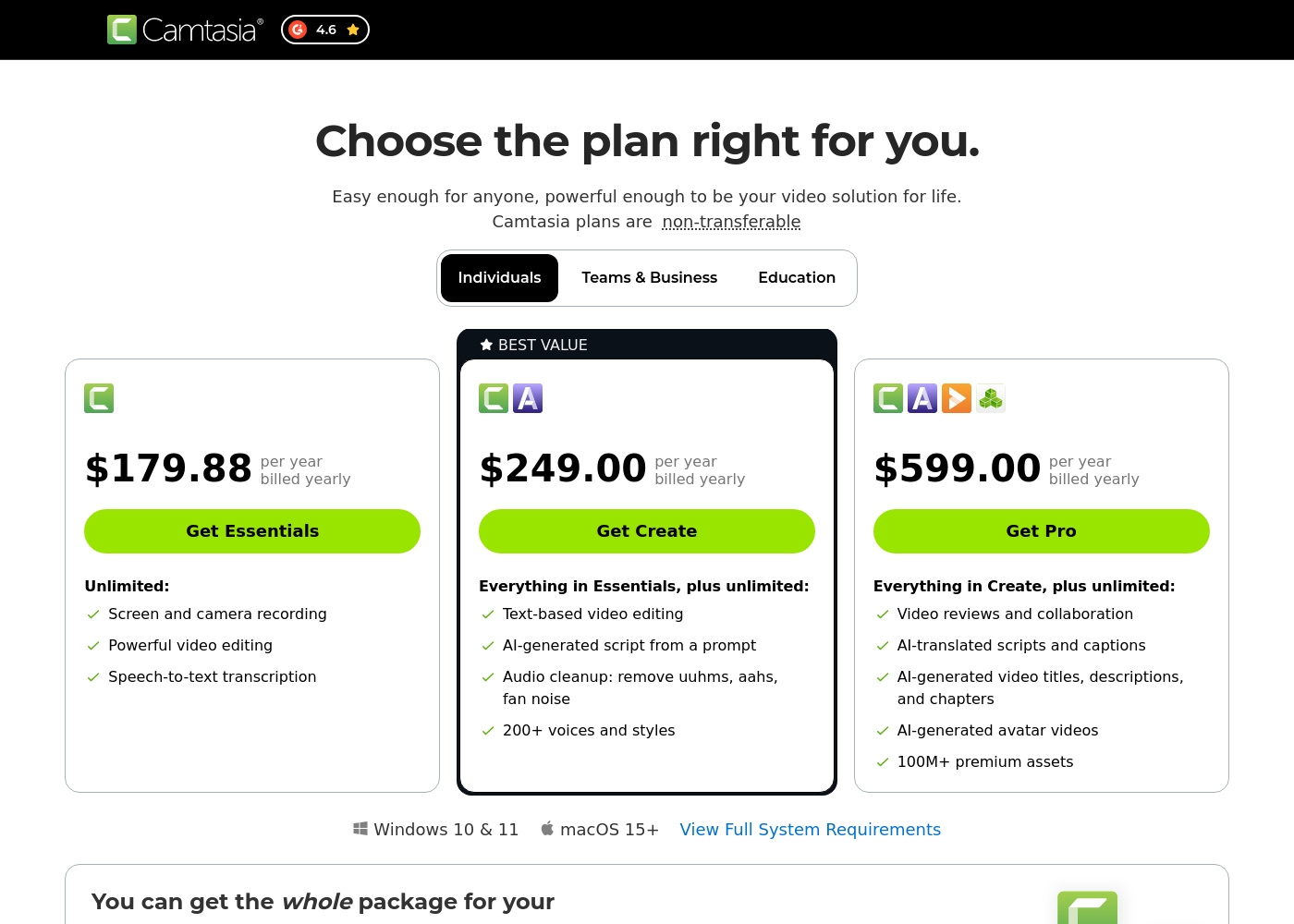
Camtasia costs between $179.88 and $599.00 per year with 3 plans: Essentials at $179.88, Create at $249.00, and Pro at $599.00. These plans cater to individuals, offering robust video and screen recording tools through an annual subscription model.
Essentials
Price: $179.88 per year billed yearly Other Features:
- Screen and camera recording
- Powerful video editing
- Speech-to-text transcription
The Essentials plan is perfect if you only need foundational tools for recording and editing videos. It provides unlimited screen and camera recording capabilities, which is great for beginners or those with basic needs.
- Screen and camera recording
- Powerful video editing
- Speech-to-text transcription
- Everything in Essentials
- Text-based video editing
- AI-generated script from a prompt
- Audio cleanup: remove uuhms, aahs, fan noise
- 200+ voices and styles
- Everything in Create
- Video reviews and collaboration
- AI-translated scripts and captions
- AI-generated video titles, descriptions, and chapters
- AI-generated avatar videos
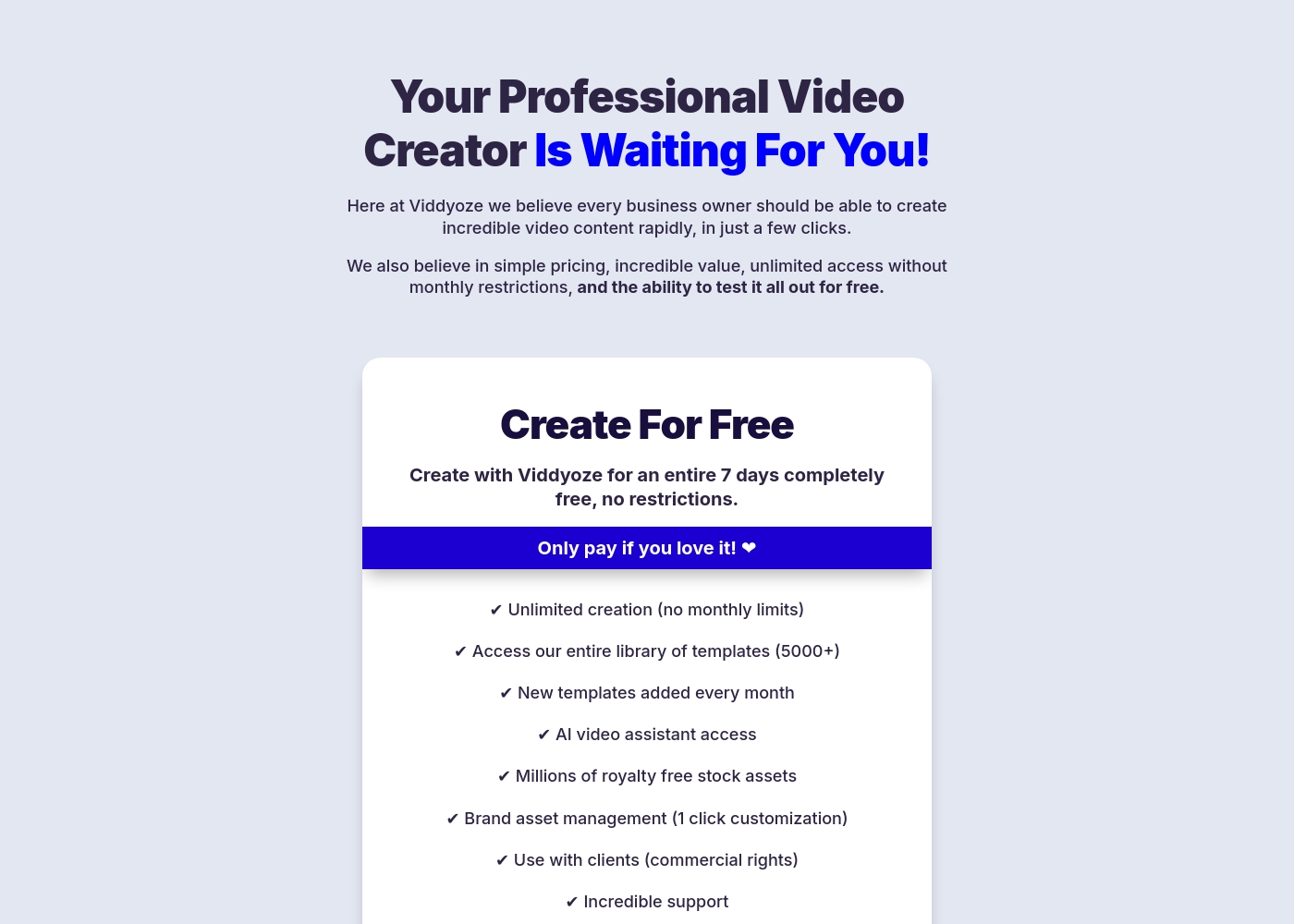
Viddyoze costs $47 per month with one plan: Monthly Subscription at $47/month.
We believe in simple pricing, so Viddyoze focuses on providing unlimited value within a single monthly fee. Here is a closer look at what the subscription includes.
Monthly Subscription
Price: $47/month Best For: Users needing unlimited video creation capacity and commercial rights Refund Policy: Cancel anytime (after the 7-day trial) Other Features:
- Unlimited creation (absolutely no monthly limits).
- Access to our massive library of over 5000+ templates.
- Includes full access to the AI video assistant (ViddyBot).
- Commercial rights for creating videos for your clients.
- Millions of royalty-free stock assets are included.
- Unlimited video creation (no monthly limits)
- Access to entire template library (5000+)
- New templates added every month
- AI video assistant access (ViddyBot)
- Millions of royalty free stock assets
Pricing Notes
- Camtasia requires an annual commitment ranging from $179.88 to $599.00 for its individual plans.
- Viddyoze has a straightforward plan at $47 per month, offering unlimited video creation capacity.
- Camtasia's licenses are strictly non-transferable individual subscriptions, restricting sharing or sale.
- Viddyoze offers a 7-day free trial, but external reviews report difficulty canceling and unauthorized charges.
- Viddyoze includes commercial rights for client work; Camtasia's individual license terms are not clear for client use.
Pricing Head-to-Head
User Reviews
Camtasia enjoys a long-standing reputation as an industry-standard tool, particularly for screen recording and tutorial creation. Users overwhelmingly praise the core software, noting it is dramatically simpler and more intuitive to use than complex alternatives like Adobe products, while still offering a deep feature set.
However, recent changes to the pricing model and licensing structure have caused significant user frustration. The shift to mandatory annual subscriptions, coupled with new restrictive single-device sign-in limits for individual users, is a major recurring complaint.
The software is great, the developers deserve five stars for the product quality. But management introduced a highly frustrating subscription model. The mandatory sign-in cycle when switching devices significantly harms my workflow.
Users frequently praise Viddyoze for its exceptional ease of use and high-quality templates, noting it's a great tool for quickly creating professional intros, outros, and branding materials. Many long-term users call it the “best investment” and value the simplicity of customizing animations in just a few clicks.
The tool is celebrated for helping content stand out and serving as a powerful secret weapon for marketing. However, external feedback reveals serious inconsistencies regarding billing and customer support reliability, particularly around the 7-day free trial.
I have been using Viddyoze for years. I love the ease of use and the quality of the projects it delivers. This tool has gotten me out of many creative jams quickly!
Our Verdict
Choosing between Camtasia and Viddyoze means deciding between deep editorial control and maximum production speed. They are built for different purposes, so the best tool depends entirely on your video needs. If you are recording software demos or detailed training videos, Camtasia offers the necessary toolkit. Camtasia’s superpower is its deep, integrated desktop recording and editing suite for complex projects. Use Camtasia for multitrack recording, which allows perfect separation of screen recordings and audio tracks. Its AI tools simplify complex tasks like advanced audio cleanup and text-based video editing. Camtasia is best for educators and corporate trainers focused on professional, long-form content that requires refinement. Viddyoze is unbeatable for speed and branding consistency thanks to its powerful template engine. You access 5,000+ templates for rapid creation of branded intros, outros, and social media ads. Viddyoze includes commercial rights, making it ideal for freelancers and agencies serving paying clients quickly. The ViddyBot AI assists with generating ideas and structuring template content. The ultimate trade-off is depth versus domain specialization. Camtasia gives you pro-level editing and control but requires a learning curve and high annual cost. Viddyoze is instant, cheap monthly, but critics warn about widespread subscription cancellation problems. Check Viddyoze’s billing policy carefully before signing up for the trial. Choose Camtasia if you record tutorials and need precise, detailed editing control over your narrative and tracks. Go with Viddyoze if you primarily need unlimited, lightning-fast creation of highly branded template animations for social media or client work.
Frequently Asked Questions
Which is better for instructional tutorials: Camtasia or Viddyoze?
Camtasia is clearly better for instructional tutorials and training videos. It provides deep multitrack recording, allowing separate editing of screen, audio, and camera. Viddyoze is template-based and lacks the necessary flexibility for long-form educational content.
Which software offers commercial rights for client work: Camtasia or Viddyoze?
Viddyoze explicitly includes full commercial rights in its monthly subscription fee. This allows you to confidently create videos for your paying clients using Viddyoze. Camtasia’s individual licenses are strictly non-transferable and do not confirm client commercial usage.
Can Viddyoze replace complex video editors like Camtasia for all projects?
No, Viddyoze cannot replace Camtasia if you need to record your screen or adjust multiple video tracks. Viddyoze is limited to customizing and launching animations from its massive template library. Camtasia is a full desktop editor offering deep control.
Is there a free trial available for Camtasia or Viddyoze?
Viddyoze offers a 7-day free trial giving you full, risk-free access to the platform features. The provided data for Camtasia does not confirm the availability of any formal money-back guarantee or free trial period.
Camtasia vs Viddyoze: Which is easier to achieve consistent branding?
Viddyoze is significantly easier for branding consistency thanks to its 5,000+ templates and 3-click customization. You can apply your logo and colors instantly to any animation. Camtasia requires the user to manually apply branding elements during the editing phase.
How do the pricing models differ between Camtasia and Viddyoze?
Camtasia requires an annual subscription ranging from $179.88 to $599.00 per year. Viddyoze offers a single, commitment-free plan billed monthly at $47. Viddyoze provides financial flexibility with its monthly option and a lower entry cost.
Ready to Choose?
Both tools have their strengths. Choose based on your specific needs.