Camtasia vs Powtoon
Camtasia and Powtoon are both top video creation tools built for very different jobs. Camtasia focuses on detailed control for recorded screen footage and tutorial editing. Powtoon excels at rapid, animated content creation using simple drag-and-drop design. You must choose between timeline editing depth or template-based visual production speed.
Best for: Corporate trainers creating compliance and policy videos, Content creators needing multitrack separation of audio and video
Best for: Marketing teams needing fast, eye-catching animated explainers, Users wanting a huge library of 4M+ stock assets and custom characters
Powerful screen recording, premium price tag.
We find Camtasia to be an extremely capable, industry-standard tool for creating high-quality instructional video content. Its multitrack editing flexibility and AI enhancements effectively streamline complex workflows. Overall, Camtasia excels in core functionality, but its restrictive, mandatory subscription model significantly diminishes the overall value proposition for many loyal users.
Pros
- Industry-standard platform for flexible screen recording and tutorial creation.
- Significantly simpler and more intuitive interface compared to advanced editors.
- Multitrack recording allows independent editing of screen, audio, and camera.
- Offers powerful AI features like text-based video editing and audio cleanup.
Cons
- Mandatory annual subscription model has replaced perpetual licenses.
- Users are frustrated by restrictive licensing (single-device sign-in limitations).
- Perceived as overly expensive compared to free or low-cost competitors.
- Inconsistent customer service experiences, including slow/non-responsive support.
AI power, five-star support, pricing caution.
Powtoon provides a powerful, AI-accelerated video platform that makes complex content creation accessible to anyone. We found the combination of vast asset libraries and the stated 24/7 priority support to be impressive. Overall, the product is strong, but we advise caution regarding the ambiguous subscription structures and extra charges for specific features.
Pros
- Customer support is exceptionally responsive, friendly, and professional.
- Support staff quickly resolves complex technical and account issues.
- Vast resource library includes over 4 million stock media assets.
- AI tools streamline workflow (scriptwriting, text-to-video, translation).
Cons
- Users report unexpected charges and difficulties canceling subscriptions.
- Lower-tier plans often require extra spending for 'Premium features.'
- AI features use a non-refundable, separate, usage-based credit system.
AboutCamtasia
Camtasia is truly everything you need in one powerful tool. It combines screen recording with full video editing capabilities. This software uses AI-powered tools to simplify the creation process. It is designed to help you turn your existing knowledge into highly engaging videos. 💡
AboutPowtoon
Powtoon is an accessible online video maker designed for everyone, regardless of skill level. It helps you easily create amazing videos and presentations.
This platform is trusted by over 50 million users, including 96% of Fortune 500 companies. Powtoon focuses on making storytelling simple and impactful.
You can use it to transform static documents or fresh ideas into crisp, engaging videos right away. It's often called "the Canva for Video" for its simplicity and power.
Highlights
Feature Comparison
Features Overview
We highlight the main differences and pick a winner for each feature.
Screen Recording Control
Camtasia offers superior multitrack recording depth; Powtoon provides essential screen capture features only.
Camtasia offers powerful multitrack recording capability across all plans. It separates screen, camera, and microphone audio onto independent tracks. This allows for precise, non-destructive editing adjustments after the recording session ends. Powtoon includes standard screen and camera capture functions. The goal is gathering raw footage, not granular timeline control like Camtasia offers. For creating professional, complex software tutorials, Camtasia is built for maximum flexibility. Powtoon’s screen recording is designed to quickly capture sections. You then combine this footage with their library of animated assets. Powtoon’s strength is rapid combination, not deep editing complexity. The Camtasia approach saves huge time if you often make mistakes speaking during a screen demo. Camtasia's specialized separation ensures total control over every element. Powtoon funnels you toward simple, highly animated output. Focus on Camtasia if your work requires minute, careful post-production adjustments. This control is crucial for educators who often update training videos. Camtasia lets you rerecord just the audio track if the visual remains the same.
AI Creation Workflow
Camtasia uses AI for editing existing video; Powtoon uses AI to generate entire animated videos fast.
Camtasia features innovative text-based editing starting in the Create plan. You edit video efficiently by working directly with the speech-to-text transcript. Removing a sentence from the script instantly cuts the corresponding video footage, accelerating refinement. Powtoon uses its AI Assistant to transform documents into engaging videos. It has AI scriptwriters that instantly generate outlines and concepts. The Powtoon workflow emphasizes rapid content generation over precision editing of recorded content. Camtasia works best when cleaning up long-form presentations or recordings. Powtoon is better suited for businesses that need to deliver short, animated marketing messages. The choice depends on where AI should enhance your productivity. Camtasia sharpens the content you already captured. Powtoon’s instant document-to-video function is very efficient for marketers. Camtasia saves hours when editing lengthy software demonstrations. If you prefer writing a script versus recording a screen, Powtoon handles that generation instantly.
Ease of Use
Powtoon has zero learning curve with drag-and-drop design; Camtasia requires proficiency with a timeline editor.
Powtoon is famous for its highly intuitive visual interface. It employs simple drag-and-drop mechanics and requires no prior video editing skills. You can create polished animated videos using templates immediately. Camtasia uses a traditional timeline editing workspace. While simpler than programs like Premiere Pro, Camtasia still requires you to learn track organization and timeline management. Powtoon's simplicity ensures rapid onboarding for all team members. Powtoon is often called "the Canva for Video" due to its accessible design. Using Camtasia requires a higher initial time investment. If speed and team accessibility are top priorities, Powtoon is the better choice. Professionals needing advanced features will appreciate Camtasia's complexity. Ease of use dramatically lowers the barrier to entry for video creation. Powtoon allows even non-designers to produce high-quality animated results quickly. Camtasia focuses on serving experienced users who need maximum control.
Audio Quality Tools
Camtasia offers powerful AI tools to remove background noise; Powtoon mainly offers generated voiceovers.
Camtasia excels at polishing captured audio to professional standards. Its AI audio cleanup removes distracting ambient noise like fan static immediately. Crucially, Camtasia can automatically eliminate filler words such as 'uuhms' and 'aahs' from your narration. Powtoon offers AI text-to-speech for generating natural voiceovers. However, it does not list similar advanced noise reduction capabilities for recorded audio. Clear audio is non-negotiable for effective training materials. Since Camtasia separates the audio track, cleanup is surgically precise. This focus on audio precision elevates the quality of instructional videos. Powtoon's strength is generating fully synthetic voice tracks quickly. Camtasia is superior for cleaning up real recorded human speech. For professional tutorials, Camtasia offers indispensable audio processing tools.
Pricing Structure
Camtasia uses mandatory annual fees; Powtoon uses hidden subscriptions alongside non-refundable usage credits.
Camtasia has clearly published, high annual prices ranging from $179.88 to $599.00/year. All plans are non-transferable individual subscriptions, billed yearly. Users dislike the mandatory subscription model replacing perpetual licenses. Powtoon's subscription costs are not openly published on the overview page. It relies on a usage-based AI credit system for advanced features. This system adds unpredictable complexity to the cost. Both Camtasia and Powtoon require users to exercise purchasing caution. Powtoon’s reliance on non-refundable credits can lead to unexpected spending. Camtasia's pricing is transparent but restrictive.
Customer Support
Powtoon provides rapid, highly-rated 24/7 Priority Support; Camtasia support is inconsistent per user reviews.
Powtoon receives near-universal praise for its professional customer service. Users highlight the effectiveness of 24/7 priority support, often resolving issues swiftly. Support staff frequently go above and beyond resolving specific technical problems and account issues. Camtasia reviews on support are mixed: some users report rapid technical help. However, others cite slow response times or frustrating, unhelpful automated replies. If guaranteed rapid support is critical to your workflow, Powtoon is statistically more reliable. Powtoon’s strong service rating acts as a solid organizational safeguard.
Global Localization
Powtoon provides full AI translation for voice and visuals; Camtasia focuses on translated scripts and captions.
Powtoon excels at localizing content for global audiences instantly. It uses advanced AI to translate scripts, captions, and voiceovers into multiple languages. Furthermore, Powtoon offers localized, lip-syncing AI avatars. Camtasia's Pro tier includes necessary AI-translated scripts and captions. Camtasia helps make your content accessible internationally. Powtoon offers a more sophisticated suite for true language and visual localization. This advanced feature set in Powtoon can make a huge difference in reaching non-English speaking markets efficiently.
Camtasia costs between $179.88 and $599.00 per year with 3 plans: Essentials at $179.88, Create at $249.00, and Pro at $599.00. These plans cater to individuals, offering robust video and screen recording tools through an annual subscription model.
Essentials
Price: $179.88 per year billed yearly Other Features:
- Screen and camera recording
- Powerful video editing
- Speech-to-text transcription
The Essentials plan is perfect if you only need foundational tools for recording and editing videos. It provides unlimited screen and camera recording capabilities, which is great for beginners or those with basic needs.
- Screen and camera recording
- Powerful video editing
- Speech-to-text transcription
- Everything in Essentials
- Text-based video editing
- AI-generated script from a prompt
- Audio cleanup: remove uuhms, aahs, fan noise
- 200+ voices and styles
- Everything in Create
- Video reviews and collaboration
- AI-translated scripts and captions
- AI-generated video titles, descriptions, and chapters
- AI-generated avatar videos
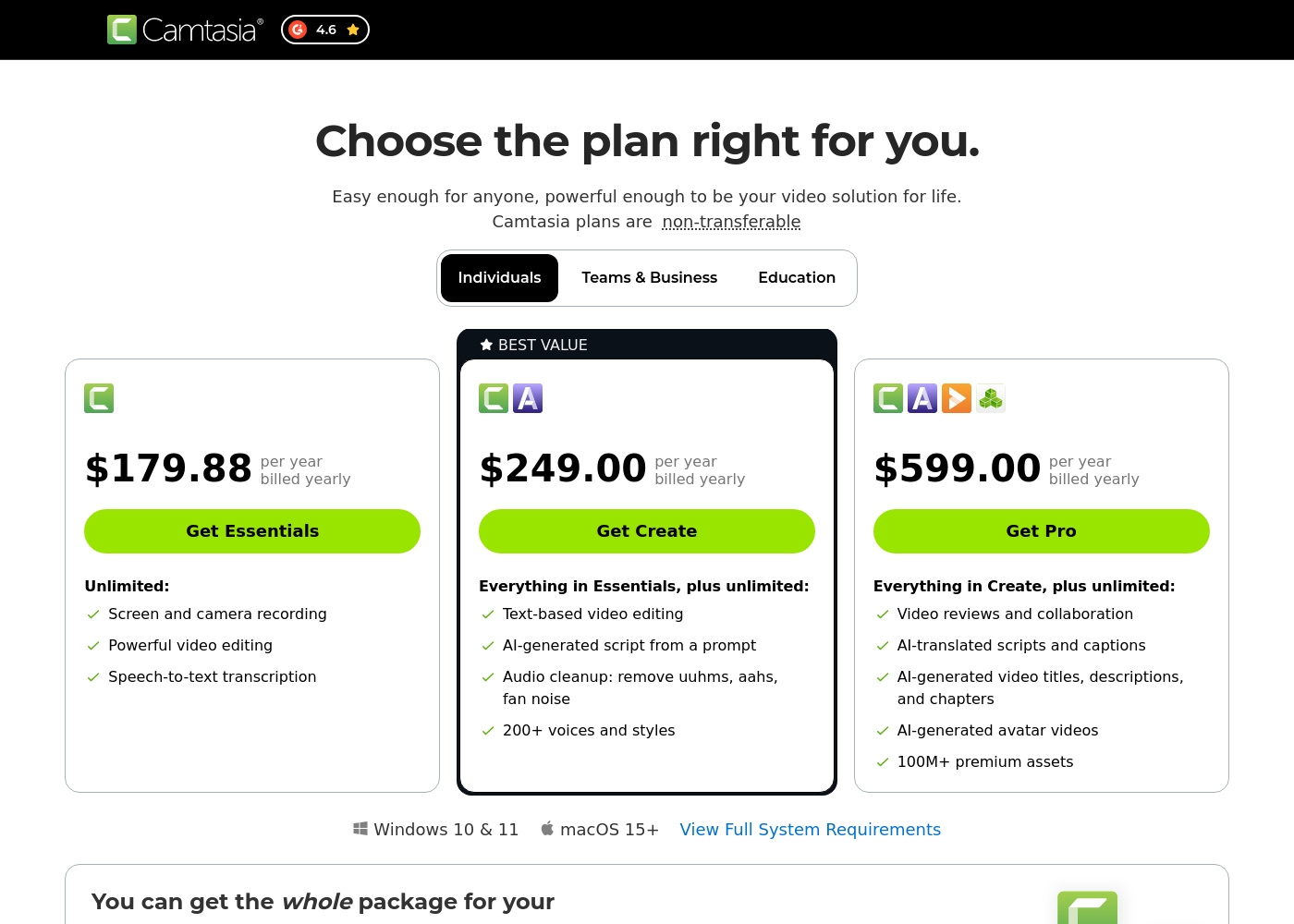
We can compare the features of these plans to help you decide which level of service best matches your needs for video creation.
FREE
Other Features: Unlimited (UNL) Powtoons
The Free plan is perfect if you want to try Powtoon's core features and start making videos right away. It includes unlimited creations, letting you explore the various tools before committing to a paid subscription.
- Unlimited Powtoons
- Unlimited Powtoons
- Powtoon branding removed
- Full HD video (1080p) download
- Full privacy control
- Commercial rights
- Unlimited Powtoons
- Powtoon branding removed
- Full HD video (1080p) download
- Full privacy control
- Commercial rights
- Unlimited Powtoons
- Powtoon branding removed
- Full HD video (1080p) download
- Full privacy control
- Commercial rights
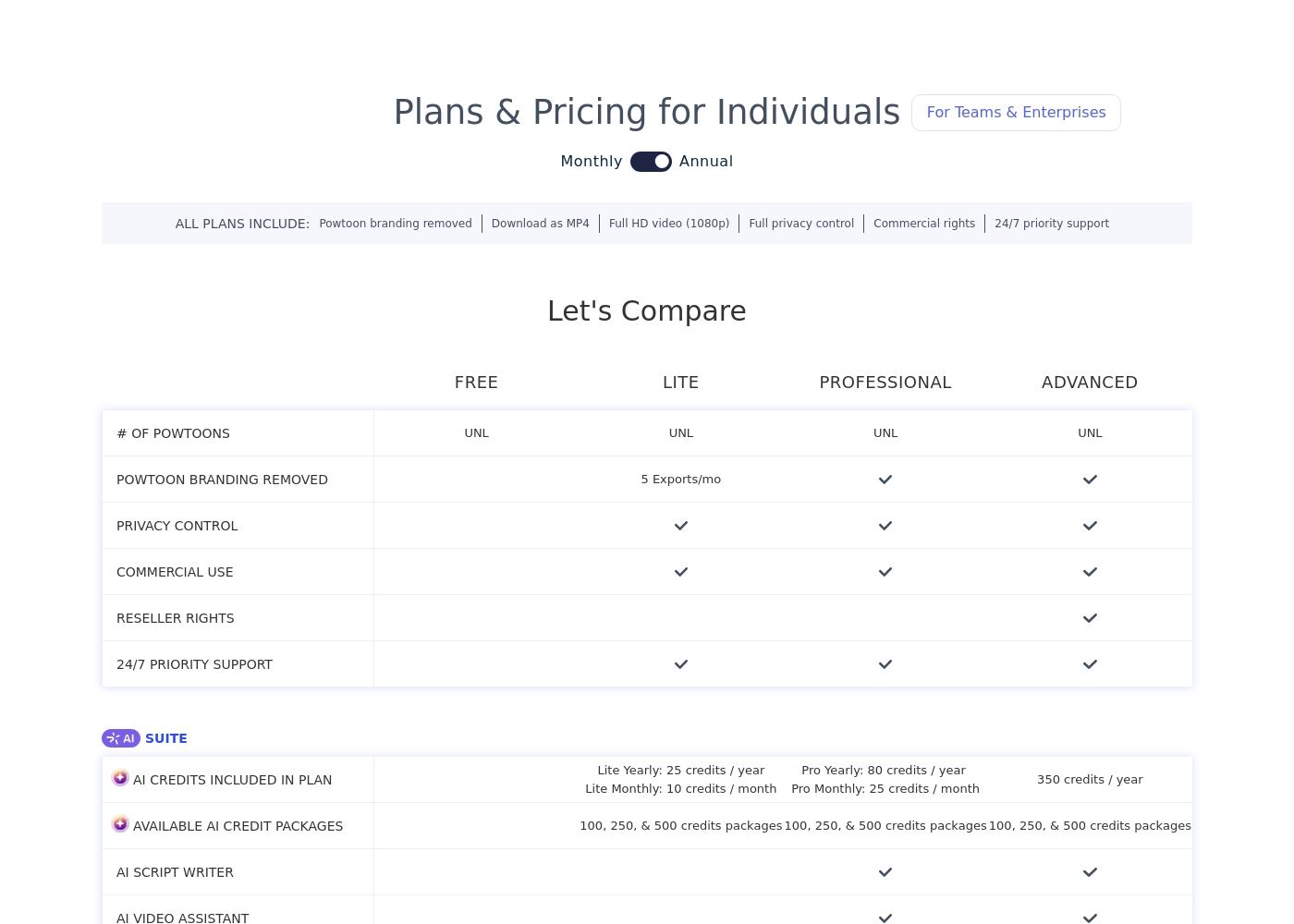
Pricing Notes
- Camtasia’s pricing is clearly published and mandatory for a single year subscription.
- Powtoon's core subscription cost is not published; total price depends on plan tier and usage.
- Powtoon requires purchasing non-refundable AI credit packages for advanced features.
- Camtasia replaced perpetual licenses with a restrictive annual subscription model.
- Powtoon offers a functional Free plan, whereas Camtasia requires upfront payment.
Pricing Head-to-Head
User Reviews
Camtasia enjoys a long-standing reputation as an industry-standard tool, particularly for screen recording and tutorial creation. Users overwhelmingly praise the core software, noting it is dramatically simpler and more intuitive to use than complex alternatives like Adobe products, while still offering a deep feature set.
However, recent changes to the pricing model and licensing structure have caused significant user frustration. The shift to mandatory annual subscriptions, coupled with new restrictive single-device sign-in limits for individual users, is a major recurring complaint.
The software is great, the developers deserve five stars for the product quality. But management introduced a highly frustrating subscription model. The mandatory sign-in cycle when switching devices significantly harms my workflow.
Powtoon consistently earns overwhelmingly positive praise for customer support responsiveness. Users describe the support team as professional, quick, and highly effective.
Reviewers frequently mention support staff by name, noting how they solve technical problems swiftly, sometimes even over weekends, or help transfer extensive work between accounts. 💪 This high level of service suggests a strong commitment to existing customers.
Top-notch responsiveness from the Powtoon support team. Volodymyr wrote back almost immediately regarding a technical problem with text color. The development team actually fixed my issue within just a few hours. This timely communication and swift action made all the difference.
Our Verdict
Camtasia and Powtoon are excellent products, but they specialize in vastly different areas. You must decide if you are editing or animating first. Camtasia is the undisputed king of precise screen recording depth and control. Powtoon is the champion of rapid, accessible animated video creation. Camtasia’s superpower is its rock-solid multitrack recording capability. It meticulously separates your screen, camera, and voice for independent, non-destructive editing. This is essential for creating professional software demonstrations using Camtasia. It also offers powerful AI audio cleanup, which removes 'uuhms' and distracting background noise. Powtoon’s strength lies in its speed, AI generation, and design simplicity. Its AI instantly converts documents or prompts into full animated videos, saving hours of work. The intuitive drag-and-drop interface ensures that anyone can use Powtoon without specialized training. Powtoon also backs its service with highly rated 24/7 customer support. The core difference is your desired output and required level of editing. Choose Camtasia if you record long, complex tutorials and need rigorous post-production control. Pick Powtoon if you prioritize creating quick, engaging animated explainer videos using templates and stock assets. Both Camtasia and Powtoon require users to be cautious about their respective pricing models. If your success depends on clean, precise recorded footage and detailed editing, choose Camtasia immediately. If rapid content generation, animation, and localization matter more, Powtoon is the clear, approachable winner.
Frequently Asked Questions
Which is better for instructional training videos: Camtasia or Powtoon?
Camtasia is better for high-quality, professional technical training videos. Its multitrack recording and AI audio cleanup create cleaner final products. Powtoon is better for explaining policies or concepts using quick, engaging animated explainers.
Does Powtoon offer multitrack editing like Camtasia?
No, Powtoon offers basic screen and camera recording functionality. It lacks the advanced multitrack separation that Camtasia provides. Only Camtasia lets you adjust your audio, camera, and screen recordings independently.
Is Camtasia or Powtoon better for global audience localization?
Powtoon is superior for localization capabilities in its AI features. It offers AI translation for voiceovers, captions, and scripts. Camtasia focuses localization primarily on translating captions and scripts only.
Can I use Camtasia or Powtoon for free?
Powtoon offers a functional, permanent Free plan with unlimited creations. Camtasia does not offer a free version or a money-back guarantee, only mandatory annual subscriptions. You must pay upfront to use Camtasia.
Which tool is easier to learn for a beginner: Camtasia or Powtoon?
Powtoon is significantly easier to learn due to its simple drag-and-drop interface. Camtasia requires users to master a more traditional, complex timeline editor. Beginners can create appealing videos faster using Powtoon.
How does the customer support compare between Camtasia and Powtoon?
Powtoon receives better customer review scores for its support team. Users consistently rate their 24/7 Priority Support as fast and helpful. Camtasia users report inconsistent experiences: some receive great help, others report slow responses.
Ready to Choose?
Both tools have their strengths. Choose based on your specific needs.