Camtasia vs Pinnacle Studio
Camtasia and Pinnacle Studio both edit video, but their target users are completely different. Camtasia is built for tutorials, speed, and powerful AI production workflows. Pinnacle Studio targets versatile creators prioritizing cinematic features like 8K support and advanced effects. The choice depends on whether you prioritize reliable performance or raw cinematic tools on a tight budget.
Best for: Educators and trainers creating video courses, Users needing superior audio cleanup and filler word removal
Best for: Creators needing MultiCam editing for complicated multi-angle scenes, Editors working with high-resolution 8K footage
Powerful screen recording, premium price tag.
We find Camtasia to be an extremely capable, industry-standard tool for creating high-quality instructional video content. Its multitrack editing flexibility and AI enhancements effectively streamline complex workflows. Overall, Camtasia excels in core functionality, but its restrictive, mandatory subscription model significantly diminishes the overall value proposition for many loyal users.
Pros
- Industry-standard platform for flexible screen recording and tutorial creation.
- Significantly simpler and more intuitive interface compared to advanced editors.
- Multitrack recording allows independent editing of screen, audio, and camera.
- Offers powerful AI features like text-based video editing and audio cleanup.
Cons
- Mandatory annual subscription model has replaced perpetual licenses.
- Users are frustrated by restrictive licensing (single-device sign-in limitations).
- Perceived as overly expensive compared to free or low-cost competitors.
- Inconsistent customer service experiences, including slow/non-responsive support.
Powerful features, critical flaws.
We found that Pinnacle Studio 26 advertises excellent advanced features like 8K video support and extensive creative bundles, often appealing through affordable one-time pricing. However, overwhelmingly negative user feedback regarding pervasive instability and completely absent customer support casts serious doubt on its usability. Overall, we cannot recommend this software until the severe stability and support issues reported by the user base are definitively addressed.
Pros
- Offers sophisticated, multi-track editing features (MultiCam, 8K support).
- Pricing model is an affordable one-time purchase (especially upgrade bundles).
- Includes comprehensive utility and asset bundles in higher-tier packages.
- Interface is considered user-friendly by some long-time users.
Cons
- Extremely frequent crashing and freezing are reported across multiple versions.
- Customer support is consistently described as non-existent and unhelpful.
- Users experience major issues with rendering, artifacts, and export failures.
- The software can fail to uninstall properly, requiring complex manual steps.
AboutCamtasia
Camtasia is truly everything you need in one powerful tool. It combines screen recording with full video editing capabilities. This software uses AI-powered tools to simplify the creation process. It is designed to help you turn your existing knowledge into highly engaging videos. 💡
AboutPinnacle Studio
Pinnacle Studio 26 provides a welcoming, intuitive workspace designed for sophisticated video creation. It is a comprehensive tool that includes video editing, screen recording, and DVD authoring capabilities. Whether you are new to video editing or already an experienced producer, this software has a tier that meets your goals. Use it professionally for vlogging, creating channel content, or powerful business video production. Pinnacle Studio helps you achieve professional results while taking your edits to the next level. 💡
Highlights
Feature Comparison
Features Overview
We highlight the main differences and pick a winner for each feature.
Core Focus & Interface
Camtasia shines for structured tutorials; Pinnacle Studio offers a versatile, cinematic workspace.
Camtasia is celebrated for its highly intuitive interface, dramatically simplifying video editing. It focuses entirely on screen recording quality and speeding up content creation. This makes Camtasia ideal for educators, communicators, and corporate training departments. Pinnacle Studio offers a broader, feature-rich workspace suitable for general creative video projects. It bundles editing, screen capture, and audio tools into one versatile package. Pinnacle Studio users expect color correction and advanced motion effects. The difference is specialization: Camtasia gets training content out faster. Pinnacle Studio delivers more generalized creative control and tools. If instructional video is your primary goal, Camtasia offers the faster path to completion. For complex, narrative projects requiring diverse effects, Pinnacle Studio provides the necessary depth.
Screen Recording & Flexibility
Camtasia offers superior multitrack separation; Pinnacle Studio provides standard integrated capture.
Camtasia's core strength is multitrack recording flexibility for screen, audio, and webcam captures. It separates all elements onto independent tracks automatically. This separation allows you to edit narration, screen action, or camera angle later without re-recording the whole video. Pinnacle Studio includes screen capture integration alongside its main video editing suite. While functional, the data does not confirm the same powerful multitrack separation capability. Its screen capture supports game and tutorial video creation. Camtasia eliminates frustrating locked-in recordings, saving significant time in post-production. Its specialization guarantees maximum editing independence. If precise editing refinement is essential for software demos, Camtasia handles it better.
Advanced AI Tools
Camtasia dominates with workflow AI; Pinnacle Studio relies on traditional editing methods.
Camtasia heavily integrates AI to speed up the video creation workflow dramatically. This includes innovative text-based editing, allowing you to edit the video timeline by manipulating transcribed text. The premium Pro plan also generates scripts and avatar videos. Pinnacle Studio focuses its feature set on traditional tools like color correction and MultiCam editing. The available data does not mention modern AI features like text-based editing or automatic script generation. It offers creative tools, not AI assistants. Camtasia's text-based editing is a massive speed boost, letting users edit video like a document. This feature alone drastically accelerates the finalization process. If time savings via AI is crucial, Camtasia is the clear choice.
Cinematic & High-End Production
Pinnacle Studio supports 8K and MultiCam; Camtasia focuses on tutorial basics.
Camtasia is optimized for educational video and does not mention advanced cinematic features like 8K support. Its toolset is deeply functional but centered on communication and clarity, not Hollywood effects. It lacks MultiCam editing capabilities. Pinnacle Studio supports high-detail projects by allowing the import of 8K footage. It also offers MultiCam editing, which is crucial for handling complex, multi-angle scenes and interviews. Pinnacle Studio also includes Green Screen support for compositing. If you are editing high-resolution creative footage or complex interviews, Pinnacle Studio provides the necessary tools. Camtasia simply isn't built for that level of video production complexity. Pinnacle Studio offers frame-accurate color correction and a wide range of effects.
Stability and Reliability
Camtasia performs stably; Pinnacle Studio users report frequent crashes and rendering errors.
Camtasia is generally seen as an industry standard, praised by users for its reliable core functionality. While some users report bugs or frustrating project loss, the software is rated highly for dependable performance. Camtasia supports smooth workflows. Pinnacle Studio users frequently report stability issues, crashes, and unreliable rendering behavior. Although the latest version promised performance improvements, instability remains a significant user critique. This dramatically disrupts workflows. Camtasia maintains a superior 4.2 user rating, reflecting higher satisfaction with its reliability. This dependability is essential for professional users. The 2.5 rating for Pinnacle Studio highlights critical trust issues due to ongoing crashes.
Pricing Structure & Cost
Camtasia requires high annual fees; Pinnacle Studio offers a low, one-time purchase price.
Camtasia uses a mandatory annual subscription model, costing between $179.88 and $599.00 per year. The high recurring cost is the most common reason for user frustration. This model ensures continuous updates and support access. Pinnacle Studio appears to use a perpetual license model, costing between $26–200 for ownership. This offers a significantly lower upfront barrier and avoids mandatory annual fees. The perceived value can be high. If budget is a primary concern, the low, one-time fee for Pinnacle Studio is highly attractive. However, Camtasia delivers predictable, supported features via its subscription. Pinnacle Studio offers lower cost, but Camtasia offers lower risk.
Customer Support Quality
Camtasia support is often rapid and helpful; Pinnacle Studio support is slow and inconsistent.
Camtasia users frequently praise their support staff for providing rapid and helpful responses to technical issues. Many loyal customers highlight excellent service experiences. Support is seen as a key differentiator. Pinnacle Studio support is often described by users as slow, unhelpful, and completely unresponsive. This slow support exacerbates existing reliability and stability problems. Getting timely fixes is often difficult. For professional users where downtime means lost money, reliable support is essential. Camtasia clearly provides a better safety net. Pinnacle Studio's reputation for poor support is a significant drawback.
Learning Resources & Onboarding
Pinnacle Studio provides extensive beginner resources; Camtasia relies on user familiarity.
Camtasia's documentation focuses primarily on its features and advanced capabilities. The software is intuitive, but explicit onboarding resources aren't prominently detailed in the provided data. Users often appreciate its simplicity. Pinnacle Studio offers highly valuable resources for new users, including built-in tutorials and learning videos. First-time users get a free 10-day StudioBacklot pass with training and royalty-free content access. This greatly eases the learning curve. If you are a beginner or transitioning from zero editing experience, Pinnacle Studio offers a more structured learning path. The StudioBacklot trial is an excellent way to get started and practice editing skills.
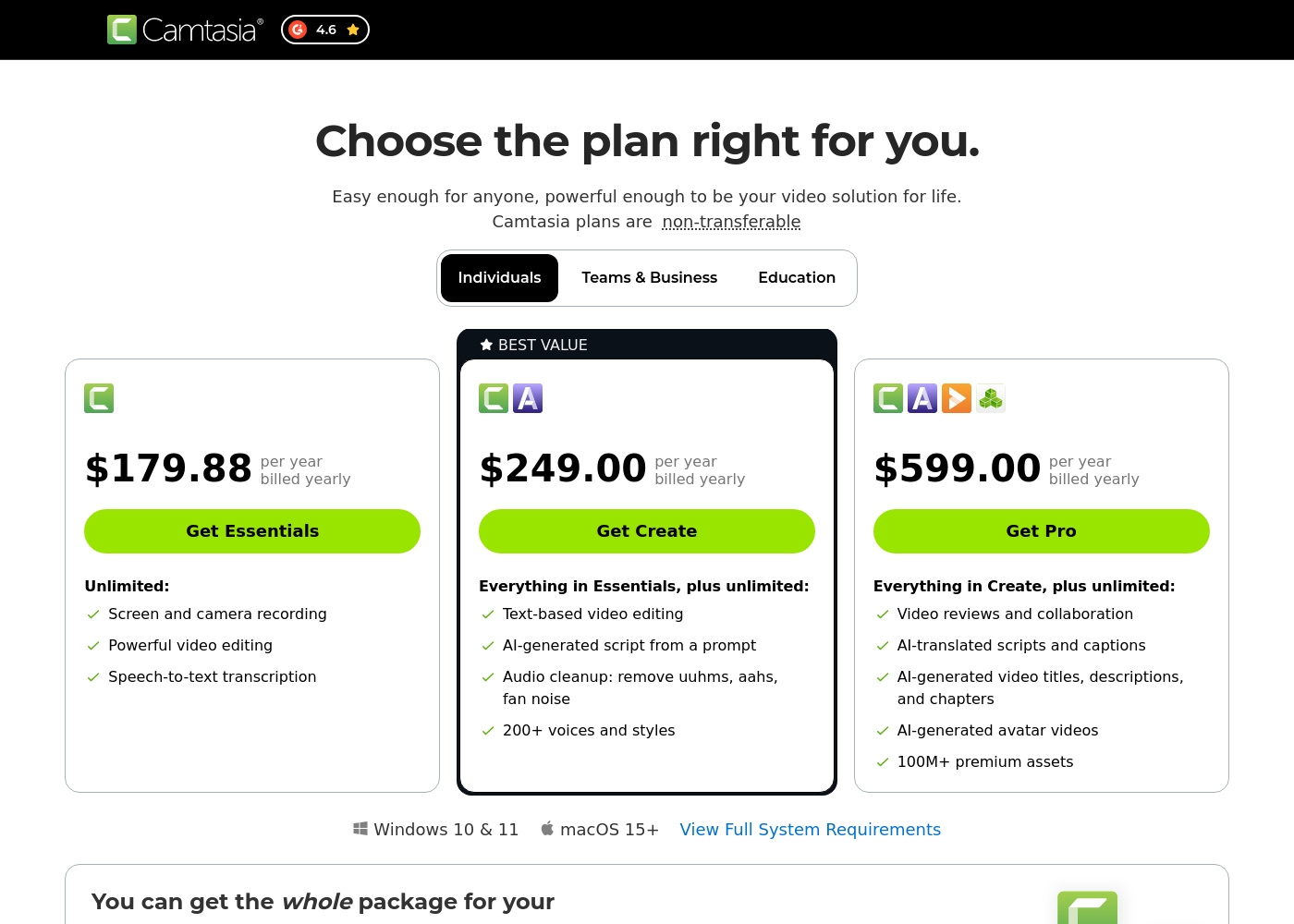
Camtasia costs between $179.88 and $599.00 per year with 3 plans: Essentials at $179.88, Create at $249.00, and Pro at $599.00. These plans cater to individuals, offering robust video and screen recording tools through an annual subscription model.
Essentials
Price: $179.88 per year billed yearly Other Features:
- Screen and camera recording
- Powerful video editing
- Speech-to-text transcription
The Essentials plan is perfect if you only need foundational tools for recording and editing videos. It provides unlimited screen and camera recording capabilities, which is great for beginners or those with basic needs.
- Screen and camera recording
- Powerful video editing
- Speech-to-text transcription
- Everything in Essentials
- Text-based video editing
- AI-generated script from a prompt
- Audio cleanup: remove uuhms, aahs, fan noise
- 200+ voices and styles
- Everything in Create
- Video reviews and collaboration
- AI-translated scripts and captions
- AI-generated video titles, descriptions, and chapters
- AI-generated avatar videos
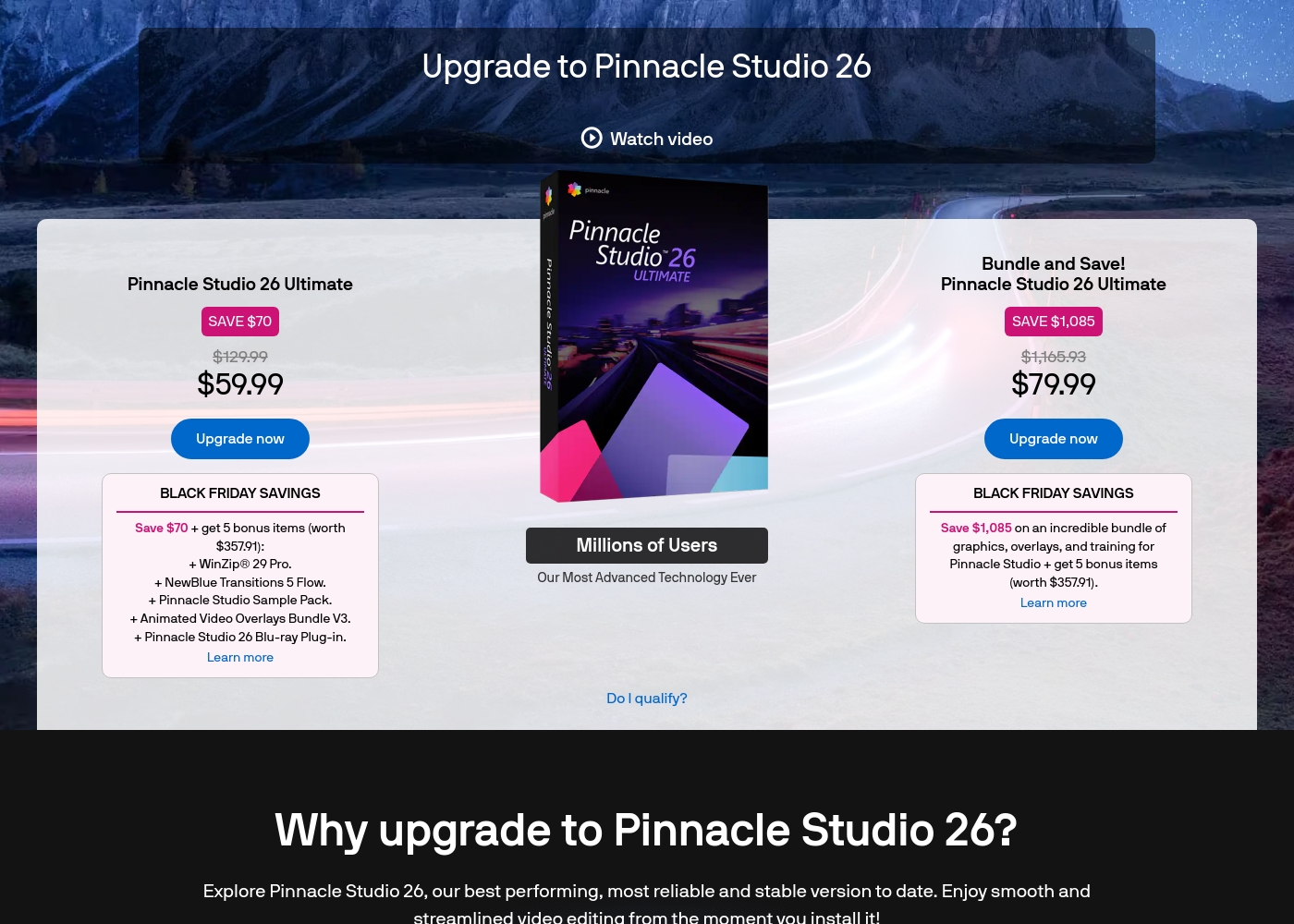
Pinnacle Studio 26 Ultimate acquisition costs range between $59.99 and $79.99 as a one-time upgrade purchase, with two main options: Pinnacle Studio 26 Ultimate at $59.99, and the Bundle and Save! version at $79.99.
These prices represent special Black Friday upgrade offers for users looking to access the latest features. Here is how the deals compare:
Pinnacle Studio 26 Ultimate
Price: $59.99 (One-time Upgrade Price) Best For: Current users who want the latest, most stable software version and specific utility tools. Other Features:
- Saves you $70 off the regular $129.99 price.
- Includes a total of 5 bonus items worth $357.91.
- Comes with WinZip® 29 Pro and NewBlue Transitions 5 Flow.
- Features the Pinnacle Studio 26 Blu-ray Plug-in.
- Includes the Pinnacle Studio Sample Pack and Animated Video Overlays Bundle V3.
- One-time price of $59.99 (was $129.99)
- 5 bonus items included (worth $357.91)
- Includes WinZip® 29 Pro
- Includes NewBlue Transitions 5 Flow
- Includes Pinnacle Studio 26 Blu-ray Plug-in
- One-time price of $79.99 (was $1,165.93)
- Includes all 5 bonus items (worth $357.91)
- Includes training, graphics, and overlays bundle
- Save $1,085 on the total package
Pricing Notes
- Camtasia uses a mandatory annual subscription billed yearly, which is a major point of user complaint.
- Pinnacle Studio appears to offer a one-time perpetual license with a much lower upfront cost.
- Camtasia's trial availability is not explicitly advertised for individual plans, but Pinnacle Studio offers a 10-day StudioBacklot pass.
- Camtasia pricing scales based on access to AI tools, collaboration, and a 100M+ asset library.
Pricing Head-to-Head
User Reviews
Camtasia enjoys a long-standing reputation as an industry-standard tool, particularly for screen recording and tutorial creation. Users overwhelmingly praise the core software, noting it is dramatically simpler and more intuitive to use than complex alternatives like Adobe products, while still offering a deep feature set.
However, recent changes to the pricing model and licensing structure have caused significant user frustration. The shift to mandatory annual subscriptions, coupled with new restrictive single-device sign-in limits for individual users, is a major recurring complaint.
The software is great, the developers deserve five stars for the product quality. But management introduced a highly frustrating subscription model. The mandatory sign-in cycle when switching devices significantly harms my workflow.
User feedback for Pinnacle Studio is exceptionally poor, primarily focusing on extreme frustrations with the software's reliability and performance. Despite newer versions claiming improved stability, many users report constant crashing, freezing, and issues with rendering, even when using high-spec computers.
This instability leads to lost progress and wasted time. The second overwhelmingly negative theme is customer support.
I’ve been using this product for several years because it is user friendly and features many nice tools. However, the tech support when there is an issue is not good at all. I was extremely disappointed and uninstalled the software despite owning it.
Our Verdict
Choosing between Camtasia and Pinnacle Studio is like choosing between a dependable sports car and an unreliable tank. If your goal is reliable, professional instruction, Camtasia wins easily. Pinnacle Studio is better if you need maximum cinematic muscle for the lowest cost. Camtasia's superpower is its complete workflow flexibility, built for rapid educational content production. Multitrack recording separates your screen, camera, and mic, allowing independent refinement and editing. The AI features, like text-based editing, let you edit the timeline simply by deleting words from the script. Pinnacle Studio shines where Camtasia doesn't—in cinematic mastery and advanced production features. If you must have 8K import support, MultiCam editing, and deep color correction, Pinnacle Studio is the affordable way to access them. Its one-time price beats Camtasia’s expensive annual subscription. The critical deciding factor is reliability versus the feature price ratio. Camtasia professionals pay a high yearly fee for guaranteed stability and excellent support staff. Pinnacle Studio users get raw features for less money, but they frequently complain about crashes and poor support responsiveness. Choose Camtasia if you create training or demo videos and value dependable software delivery and AI speed. Select Pinnacle Studio if cinematic features like MultiCam and 8K are non-negotiable and you can tolerate inconsistent performance and potential technical frustration.
Frequently Asked Questions
Which software is better for professional screen recording: Camtasia or Pinnacle Studio?
Camtasia is the clear winner for professional screen recording and tutorials. It offers unique multitrack recording capability, separating screen, audio, and webcam into layers. This independence allows for seamless post-production, saving considerable editing time.
Is Pinnacle Studio capable of editing high-resolution 8K video footage?
Yes, Pinnacle Studio can handle high-resolution 8K footage import for detailed projects. Camtasia does not specifically mention 8K support, focusing more on standard content resolutions. Pinnacle Studio is better suited for high-fidelity cinematic workflow.
Is Camtasia worth the high annual subscription cost over Pinnacle Studio’s one-time fee?
If reliability and AI-accelerated production speed are your highest priorities, Camtasia is worth the cost. Its dependable software and advanced tools, including text-based editing, minimize wasted time. Pinnacle Studio is cheaper upfront but risks workflow disruption due to stability issues.
Does Pinnacle Studio offer AI editing features like Camtasia’s script-based editing?
No, Pinnacle Studio does not appear to offer modern AI features like text-based editing or automated script generation. Camtasia excels here, allowing you to edit the timeline by simply deleting transcribed words. Pinnacle Studio relies on traditional, manual editing tools.
Which tool is better for editing multi-camera projects or footage from multiple angles?
Pinnacle Studio offers dedicated MultiCam editing capabilities, which is essential for multi-angle scenes. Camtasia lacks this specific high-end production feature. Pinnacle Studio is necessary if you regularly edit complex events or interviews.
How do Camtasia and Pinnacle Studio compare regarding product stability and crashes?
Camtasia generally has a strong reputation for stability and earns a 4.2 user rating. Pinnacle Studio users consistently report frequent crashes, rendering problems, and reliability concerns, reflected in its 2.5 rating. Camtasia offers much more predictable performance.
Ready to Choose?
Both tools have their strengths. Choose based on your specific needs.