Camtasia vs Kapwing
Camtasia and Kapwing represent two opposing philosophies for video editing. Camtasia is the powerful, feature-rich desktop software for tutorials and training. Kapwing offers browser-based speed built specifically for social media and quick project turnaround. Your choice depends entirely on platform preference and content goals.
Best for: Educators creating detailed tutorial content, Individuals needing high-quality screen recording flexibility
Best for: Social media managers needing constant, swift content creation, Small teams requiring seamless, real-time online collaboration
Powerful screen recording, premium price tag.
We find Camtasia to be an extremely capable, industry-standard tool for creating high-quality instructional video content. Its multitrack editing flexibility and AI enhancements effectively streamline complex workflows. Overall, Camtasia excels in core functionality, but its restrictive, mandatory subscription model significantly diminishes the overall value proposition for many loyal users.
Pros
- Industry-standard platform for flexible screen recording and tutorial creation.
- Significantly simpler and more intuitive interface compared to advanced editors.
- Multitrack recording allows independent editing of screen, audio, and camera.
- Offers powerful AI features like text-based video editing and audio cleanup.
Cons
- Mandatory annual subscription model has replaced perpetual licenses.
- Users are frustrated by restrictive licensing (single-device sign-in limitations).
- Perceived as overly expensive compared to free or low-cost competitors.
- Inconsistent customer service experiences, including slow/non-responsive support.
Easy UI, high-risk business policies.
We recognize Kapwing offers a powerful, user-friendly online editor perfect for quick social media content creation, often cited as being simple to figure out. However, serious concerns exist regarding its business model, aggressive paywalling, and unresponsive customer support practices. Overall, we caution users strongly due to predatory billing and an irresponsible user data retention policy that repeatedly results in unexpected, permanent content loss.
Pros
- User-friendly and simple interface (easy to figure out quickly).
- Browser-based editing requires no software downloads.
- Useful tools for repurposing content (e.g., short clips from long videos).
- Offers specific powerful timeline controls, including keyframes and custom animations.
Cons
- Aggressive paywalls make the free version nearly useless for core editing tasks.
- Irresponsible data retention; projects are reportedly deleted after short payment delays or 30 days.
- Unresponsive customer service, often hiding behind a strict "no refund policy".
- Auto-renewal policies sometimes lack proper notification, leading to unexpected charges.
AboutCamtasia
Camtasia is truly everything you need in one powerful tool. It combines screen recording with full video editing capabilities. This software uses AI-powered tools to simplify the creation process. It is designed to help you turn your existing knowledge into highly engaging videos. 💡
AboutKapwing
Kapwing is recognized as a powerful, yet incredibly user-friendly, online video service. It’s designed for anyone who needs to be immediately ready to create high-quality content. If you are a social media manager or someone who values speed and collaboration, this tool is described as essential for your bookmark list. Users consistently call it the most user friendly software they have ever used. 💡
Highlights
Feature Comparison
Features Overview
We highlight the main differences and pick a winner for each feature.
Platform & Accessibility
Camtasia is heavy desktop software; Kapwing is instantly accessible in any web browser.
Camtasia requires downloading and installing dedicated desktop software on Windows or macOS. This gives Camtasia robust performance and high stability for long projects. Kapwing is entirely browser-based, needing no downloads or complex setup to begin editing instantly. This platform choice makes Kapwing super user-friendly and highly portable across devices. Kapwing is perfect if you edit on the go or switch machines constantly throughout the day. Camtasia offers superior power but lacks the instant accessibility of an online service.
Screen Recording Depth
Camtasia provides unmatched multitrack control; Kapwing focuses more on clip editing.
Camtasia’s core strength is its powerful multitrack recording capability for tutorials. It records your screen, audio, and camera feeds onto separate, independent tracks for editing. This separation allows you to fix a small narration mistake without re-recording the visuals in Camtasia. Kapwing handles recording but is primarily focused on editing clips and repurposing existing visual content quickly. If flexible, high-quality screen demonstrations are your primary goal, Camtasia’s engineering wins clearly here.
Team Collaboration
Kapwing is built for online teamwork; Camtasia only offers limited review tools at its top tier.
Kapwing fully supports collaborative editing right within its shared team workspace environment. This feature streamlines efficient teamwork, making Kapwing ideal for social media team workflows. Camtasia requires the specialized Pro plan to unlock dedicated video review and collaboration features. The shared workspace in Kapwing is fundamental to its structure for fast, unified team editing. Camtasia’s collaboration features are an add-on; Kapwing is built around team speed.
AI Content Enhancement
Camtasia offers deep AI audio cleanup and text-based editing; Kapwing provides utility tools.
Camtasia excels with innovative AI features like text-based video editing for fast cuts. It also offers advanced audio cleanup to remove ‘uuhms,’ ‘aahs,’ and distracting fan noise from tracks. Kapwing provides useful tools like Clean Audio and Background Remover for quick visual polish. However, Camtasia's AI is focused on streamlining the professional editing process drastically. Camtasia allows you to edit the video timeline simply by adjusting the transcribed script text. This speeds up finalizing content far beyond Kapwing’s current AI toolkit.
Project Data Retention Risk
Kapwing reportedly deletes accounts and projects; Camtasia provides safer local file storage.
Camtasia relies primarily on local desktop storage, giving users high control over their project backups and longevity. The main risk with Camtasia is restrictive single-device licensing. Multiple Kapwing users report irresponsible data policies, losing all projects after billing delays or short payment lapses. Relying on Kapwing for professional, long-term content storage is extremely risky due to frequent project deletion reports. Camtasia is unequivocally the safer platform for preserving valuable hours of content creation work.
Learning Curve and Speed
Kapwing is simpler for beginners; Camtasia has a moderate curve but offers deeper features.
Kapwing receives high praise for its super user-friendly, simple online interface. Users can jump right in and start creating content immediately without a steep learning curve. Camtasia is simpler than editors like Adobe Premiere but offers a deeper level of complexity due to multitrack features. If your goal is speed and generating social media clips instantly, Kapwing allows faster creation. If you need mastery for long-form tutorials, Camtasia is necessary for its depth.
Pricing Model
Kapwing offers flexible monthly and free tiers; Camtasia forces expensive annual payments.
Camtasia mandates a required annual subscription, ranging from $179.88 to $599.00 per year for individuals. These are non-transferable licenses; there is no monthly option. Kapwing offers a permanent Free plan and flexible paid plans billed monthly or annually, per member. Its monthly pricing starts higher ($24/member) but offers budget flexibility. If you prefer to pay monthly or need to test the tools for free, Kapwing is the superior option.
Asset Library Access
Camtasia offers a massive professional asset library; Kapwing uses standard stock assets.
The Pro plan for Camtasia grants users access to an extensive library of over 100 million premium assets. This level of curated content supports high-volume professional video production effectively. Kapwing provides access to stock assets and unlimited overlays within its online editor. Camtasia’s offering is significantly grander, supporting large-scale enterprise content needs. If assets and templates are critical to your workflow, 100 million assets make Camtasia the clear choice.
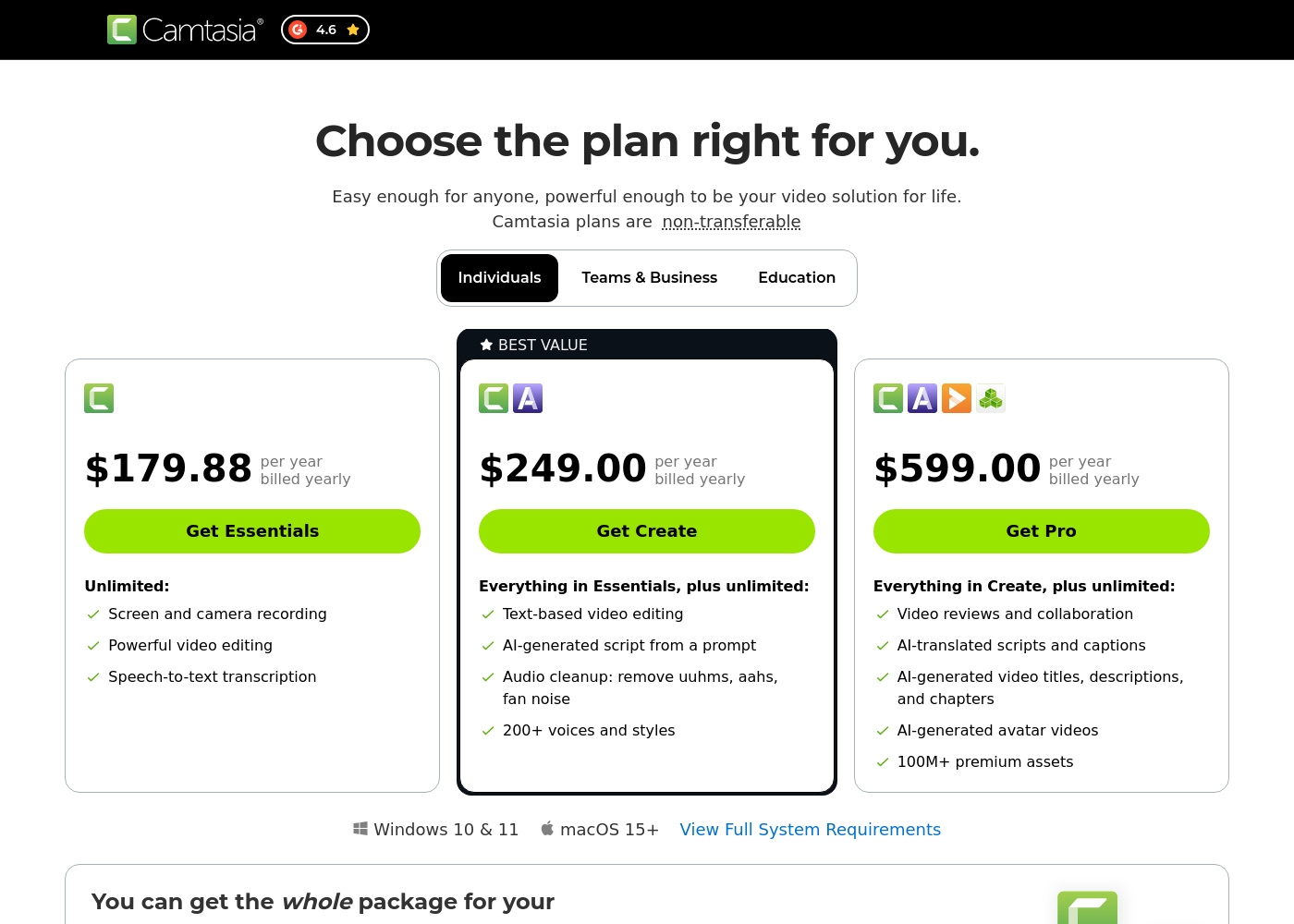
Camtasia costs between $179.88 and $599.00 per year with 3 plans: Essentials at $179.88, Create at $249.00, and Pro at $599.00. These plans cater to individuals, offering robust video and screen recording tools through an annual subscription model.
Essentials
Price: $179.88 per year billed yearly Other Features:
- Screen and camera recording
- Powerful video editing
- Speech-to-text transcription
The Essentials plan is perfect if you only need foundational tools for recording and editing videos. It provides unlimited screen and camera recording capabilities, which is great for beginners or those with basic needs.
- Screen and camera recording
- Powerful video editing
- Speech-to-text transcription
- Everything in Essentials
- Text-based video editing
- AI-generated script from a prompt
- Audio cleanup: remove uuhms, aahs, fan noise
- 200+ voices and styles
- Everything in Create
- Video reviews and collaboration
- AI-translated scripts and captions
- AI-generated video titles, descriptions, and chapters
- AI-generated avatar videos
These plans help you explore Kapwing's full power and create content faster in less time.
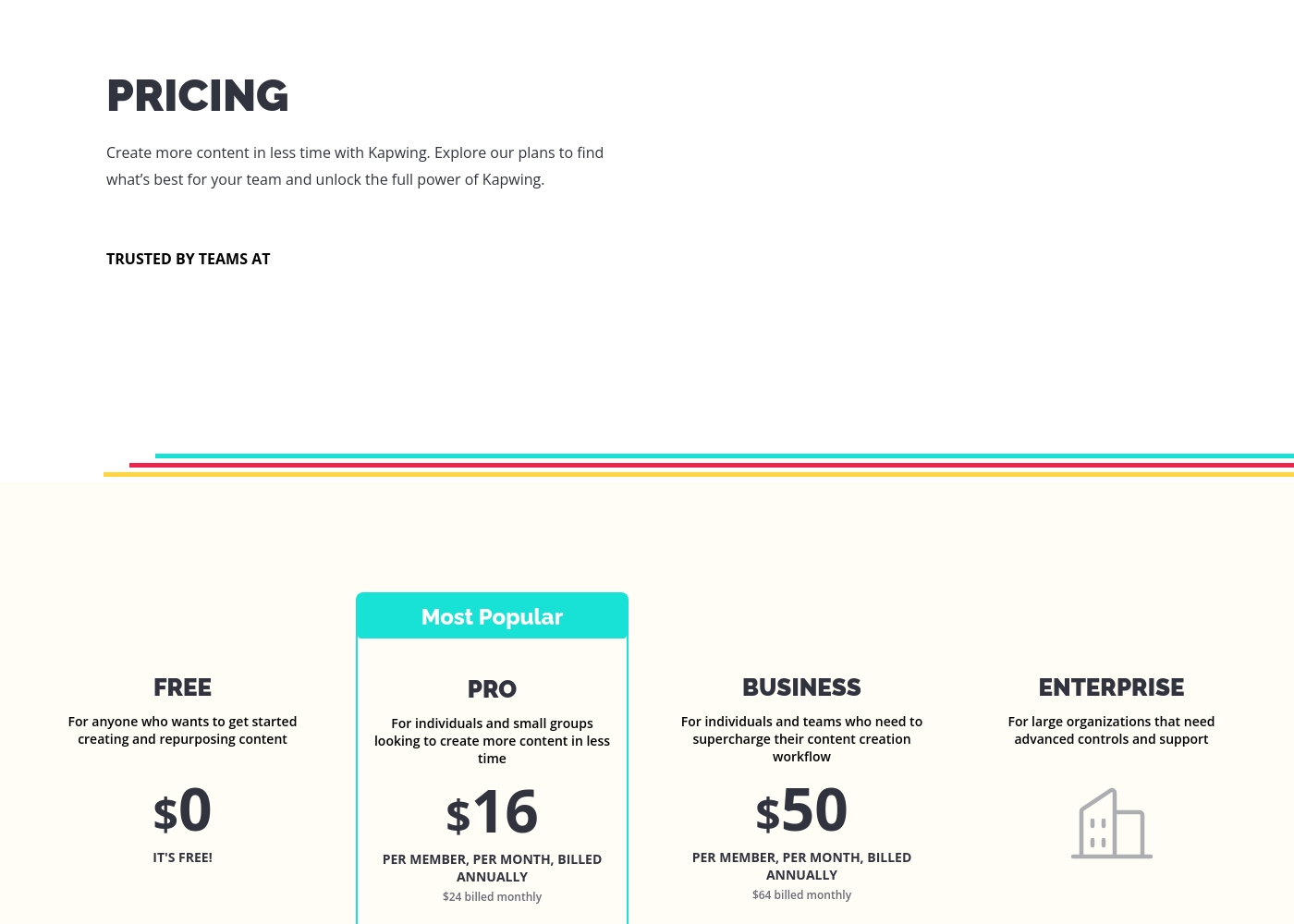
FREE
Price: $0 Best For: Anyone who wants to get started creating and repurposing content Other Features:
- It's free!
This is the perfect starting point if you are just beginning your content creation journey. You can access core tools without spending any money.
- Perfect for getting started creating and repurposing content
- Billed per member, per month
- For individuals and small groups
- Everything in Free, plus features for your team workspace
- Billed per member, per month
- For individuals and teams
- Everything in Pro, plus features for your team workspace
- For large organizations
- Advanced controls and support
- Everything in Business, plus features for your team workspace
Pricing Notes
- Camtasia requires mandatory annual payment; monthly billing is not an option for individual users.
- Kapwing offers significant savings by choosing annual billing over the higher monthly rates.
- Camtasia licenses are non-transferable individual subscriptions, limiting flexibility for teams.
- Kapwing's free plan is fully functional for assessment, unlike Camtasia which offers no formal free trial.
- Kapwing's pricing is transparently per-member, scaling with your team size easily.
Pricing Head-to-Head
User Reviews
Camtasia enjoys a long-standing reputation as an industry-standard tool, particularly for screen recording and tutorial creation. Users overwhelmingly praise the core software, noting it is dramatically simpler and more intuitive to use than complex alternatives like Adobe products, while still offering a deep feature set.
However, recent changes to the pricing model and licensing structure have caused significant user frustration. The shift to mandatory annual subscriptions, coupled with new restrictive single-device sign-in limits for individual users, is a major recurring complaint.
The software is great, the developers deserve five stars for the product quality. But management introduced a highly frustrating subscription model. The mandatory sign-in cycle when switching devices significantly harms my workflow.
Users often praise Kapwing’s generally simple user interface, noting it’s super easy to use right in the browser without needing complex downloads. They appreciate specific powerful features like detailed timeline controls and the new “Repurpose Video” button for quick short-form content creation.
However, recent external feedback is overwhelmingly negative regarding business practices and high-risk policies. Many users complain they are misled by marketing, finding that nearly all useful tools are locked behind an immediate, expensive paywall, making the free plan useless.
Kapwing is such a great tool for editing videos and creating content. It’s super easy to use, so you don’t need to be a pro to figure it out. Everything’s right there in your browser—no downloads needed.
Our Verdict
Choosing between Camtasia and Kapwing means picking your core workflow strategy. Do you need maximum power on your desktop, or maximum speed in your browser? Camtasia truly shines for professional tutorials and training materials. Its superpower is multitrack capability, separating screen, video, and audio perfectly for editing control. If you require advanced AI audio cleanup and immense asset libraries, Camtasia’s expensive annual subscription is justified. Kapwing is built for social content velocity and inherent collaboration among small teams. It’s incredibly easy to use right out of the box without any steep learning curve. Kapwing lets you resize content and work with colleagues faster than Camtasia, thanks to its online structure. The deciding factor is the risk. Camtasia is highly reliable, but Kapwing users frequently report permanent project deletion without warning. If you value project longevity, Camtasia offers much safer local storage and data control. Kapwing is risky despite its appealing simplicity and speed. For enterprise stability and deep control over instructional content, choose Camtasia. If you are a beginner or a social media team prioritizing monthly flexibility and speed above all else, Kapwing is technically faster, but proceed with extreme caution due to its reported data policy issues.
Frequently Asked Questions
Which software is better for professional instructional videos: Camtasia or Kapwing?
Camtasia is the industry standard for professional instructional videos and screen recording. It offers multitrack recording and advanced AI tools to polish narration perfectly. Kapwing is better suited for quick social media clips, not deep professional training.
Is Kapwing truly easier to learn than Camtasia?
Yes, Kapwing is widely cited as having one of the easiest interfaces in the industry. It works immediately in the browser. Camtasia has a moderate learning curve because it is a professional desktop video editing suite.
Does Camtasia offer monthly billing options for individuals?
No, Camtasia operates strictly on a mandatory annual subscription model for individual licenses. All prices are billed yearly upfront. Kapwing, conversely, offers flexible monthly, per-member billing.
Which tool has better team features: Camtasia or Kapwing?
Kapwing excels in team features due to its native browser-based collaborative editing workspace. Camtasia offers video review tools only in its highest-priced Pro tier. Kapwing is the superior choice for seamless team editing.
What is the biggest risk when using Kapwing over Camtasia?
The biggest risk with Kapwing is data retention and reliability. Multiple external reports indicate Kapwing permanently deletes users' projects after short payment delays. Camtasia offers safer, localized project storage.
Does Camtasia offer a free trial?
Camtasia does not provide information about a formal free trial or money-back guarantee for individuals. Kapwing offers a permanent, fully functional Free plan to test all core tools before upgrading.
Ready to Choose?
Both tools have their strengths. Choose based on your specific needs.