Camtasia vs Filmora 14
Camtasia is the industry standard for detailed screen recordings and training videos. Filmora 14 offers incredible AI tools and a much friendlier price point. We break down which video editor saves you time and money.
Best for: Creating professional instructional and training videos, Educators needing total control over screen and narration tracks
Best for: High-volume social media creators using TikTok, Reels, or YouTube Shorts, Budget-conscious creators seeking powerful generative AI tools
Powerful screen recording, premium price tag.
We find Camtasia to be an extremely capable, industry-standard tool for creating high-quality instructional video content. Its multitrack editing flexibility and AI enhancements effectively streamline complex workflows. Overall, Camtasia excels in core functionality, but its restrictive, mandatory subscription model significantly diminishes the overall value proposition for many loyal users.
Pros
- Industry-standard platform for flexible screen recording and tutorial creation.
- Significantly simpler and more intuitive interface compared to advanced editors.
- Multitrack recording allows independent editing of screen, audio, and camera.
- Offers powerful AI features like text-based video editing and audio cleanup.
Cons
- Mandatory annual subscription model has replaced perpetual licenses.
- Users are frustrated by restrictive licensing (single-device sign-in limitations).
- Perceived as overly expensive compared to free or low-cost competitors.
- Inconsistent customer service experiences, including slow/non-responsive support.
Powerful AI Editor, Buyer Beware.
We find Filmora 14 offers a powerful suite of AI editing tools and an accessible interface perfect for creators across all skill levels. While the feature set and performance are top-tier, we cannot overlook the severe, verified reports of deceptive billing and poor customer support from the vendor. Overall, this is a technically impressive editor marred by critical issues related to trust and operational transparency.
Pros
- Exceptionally easy to use interface suitable for all skill levels.
- Robust AI feature set simplifies complex edits like object removal and background cutting.
- Access to a massive 2.9M+ library of creative assets, music, and templates.
- Optimized performance with GPU acceleration, even on modest hardware.
Cons
- Severe billing issues and reported difficulties canceling auto-renewals.
- Support is often automated, unresponsive, and unhelpful via chat or email.
- Lack of transparency regarding hidden costs and AI credit consumption per feature.
- Perpetual license holders report forced migration to the newest version.
AboutCamtasia
Camtasia is truly everything you need in one powerful tool. It combines screen recording with full video editing capabilities. This software uses AI-powered tools to simplify the creation process. It is designed to help you turn your existing knowledge into highly engaging videos. 💡
AboutFilmora 14
Filmora 15 is an award-winning video editor designed for both beginners and experts alike. It aims to help you edit as an expert with Filmora AI by streamlining the entire creative process.
The interface is intuitive and clean, making video editing simple even for those without prior experience. You can literally type, drop, or sketch ideas into the platform, and Filmora helps bring them to life with AI-driven effects. The platform provides a connected experience; it's available across desktop, tablet, and mobile, allowing you to create exactly as you wish. 💡
Highlights
Feature Comparison
Features Overview
We highlight the main differences and pick a winner for each feature.
Pricing Flexibility
Filmora 14 offers unparalleled flexibility including perpetual and free options. Camtasia uses a mandatory, high-cost annual subscription model.
Camtasia pricing is strictly annual, highly discouraging budget-conscious creators. Plans range from $179.88 to $599.00 yearly for non-transferable licenses. Filmora 14 offers annual plans starting at $69.99, plus perpetual licenses for stability. They also provide a watermarked free version for beginners. The entry-level cost for Camtasia is much higher than Filmora 14's maximum annual price point. Filmora 14 also offers a stated 30-day money-back guarantee, unlike Camtasia. If budget stability and low entry cost are key factors, Filmora 14 is the much friendlier choice.
Screen Recording Focus
Camtasia is the industry leader for tutorials, offering specialized control. Filmora 14 provides general recording functionality.
Camtasia features unmatched multitrack recording capability separating screen, camera, and audio. This allows independent post-recording fixes, saving significant time. Filmora 14 offers standard recording but lacks the specialized, separated multitrack flexibility of Camtasia. It acts primarily as a general editor. This key difference makes Camtasia critical for flawless software demos and educational video creation. Fixing mistakes is dramatically easier in Camtasia's timeline. Camtasia excels at simplifying complex knowledge transfer through superior tutorial tools.
AI Workflow Acceleration
Filmora 14 focuses on generative AI for speed and creative start to finish. Camtasia’s AI refines content quality and editing precision.
Filmora 14 uses AI tools like 'Idea to Video' to generate scripts and visuals instantly for rapid project starts. It also automates short clip generation quickly. Camtasia excels with precision features like text-based video editing and AI audio cleanup to remove filler words. This cleans existing content. Filmora 14 helps you generate content fast; Camtasia helps you make existing content flawless. The value depends entirely on your primary workflow. Be aware that Filmora 14 uses a monthly AI credit system, which might create extra costs for heavy users.
Asset Library Access
Filmora 14 gives 2.3M+ assets to all paid users; Camtasia reserves its 100M+ assets for the Pro tier only.
Filmora 14 provides immediate access to over 2.3 million Filmora Creative Assets across all paid annual plans. This offers strong creative value immediately. Camtasia reserves its massive pool of 100 million-plus premium assets for users on the expensive $599/year Pro tier. Lower tiers are more restricted. For most creators, Filmora 14 provides better access to resources at a fraction of the cost. Camtasia only competes at its highest pricing level. Filmora 14 offers high creative depth without forcing an expensive plan upgrade.
Team Collaboration
Camtasia Pro offers built-in collaboration and video review tools. Filmora 14 does not provide internal features for team workflows.
The Camtasia Pro plan includes specific, integrated features for video reviews and streamlining team collaboration. This speeds up feedback cycles. Filmora 14 is designed as a single-user tool and lacks formal video review or team sharing functionality built into the editor. If your production workflow involves approvals or external stakeholder review, Camtasia Pro is the only option here. Camtasia helps teams finalize content faster by managing the feedback loop directly within the software.
Mobile & Cross-Platform
Filmora 14 allows editing across desktop and mobile devices. Camtasia is strictly limited to Windows and Mac desktop systems.
Filmora 14 Advanced and Premium plans include Apple Sync for editing across Mac, iOS, and iPadOS devices seamlessly. Cloud storage keeps projects current. Camtasia functions only as a desktop application and does not offer mobile editing or cloud synchronization features. It requires physical file transfers. For creators who edit on the go or prefer tablet-based work, Filmora 14 provides unmatched workflow flexibility. Filmora 14 is the necessary choice for true cross-platform content creation.
Social Media Focus
Filmora 14 features superior automation for social media platforms. Camtasia lacks specialized tools for dynamic format optimization.
Filmora 14 offers powerful tools like Auto Reframe to instantly adapt videos for vertical formats like TikTok and Reels. Smart Short Clips repurpose long content automatically. Camtasia lacks these specific social media workflow optimizations. Its focus is instructional, typically utilizing standard formats. Filmora 14 includes a Social Video Planner to help optimize and schedule posts across platforms. This maximizes reach quickly. If maximizing social media presence is crucial, Filmora 14 saves extensive manual labor on repurposing content.
Technical Performance
Filmora 14 explicitly details hardware optimization for speed. Camtasia’s data is less specific regarding performance enhancements.
Filmora 14 supports GPU acceleration for faster overall editing and rendering times across compatible systems. Speed is a priority. Mac users benefit specifically from integrated Metal rendering support on Filmora 14 for smoother playback and efficiency. Camtasia doesn't advertise this. Faster rendering helps Filmora 14 handle high-resolution footage more smoothly than standard editors. While both systems perform well, Filmora 14 clearly emphasizes its optimized speed capabilities.
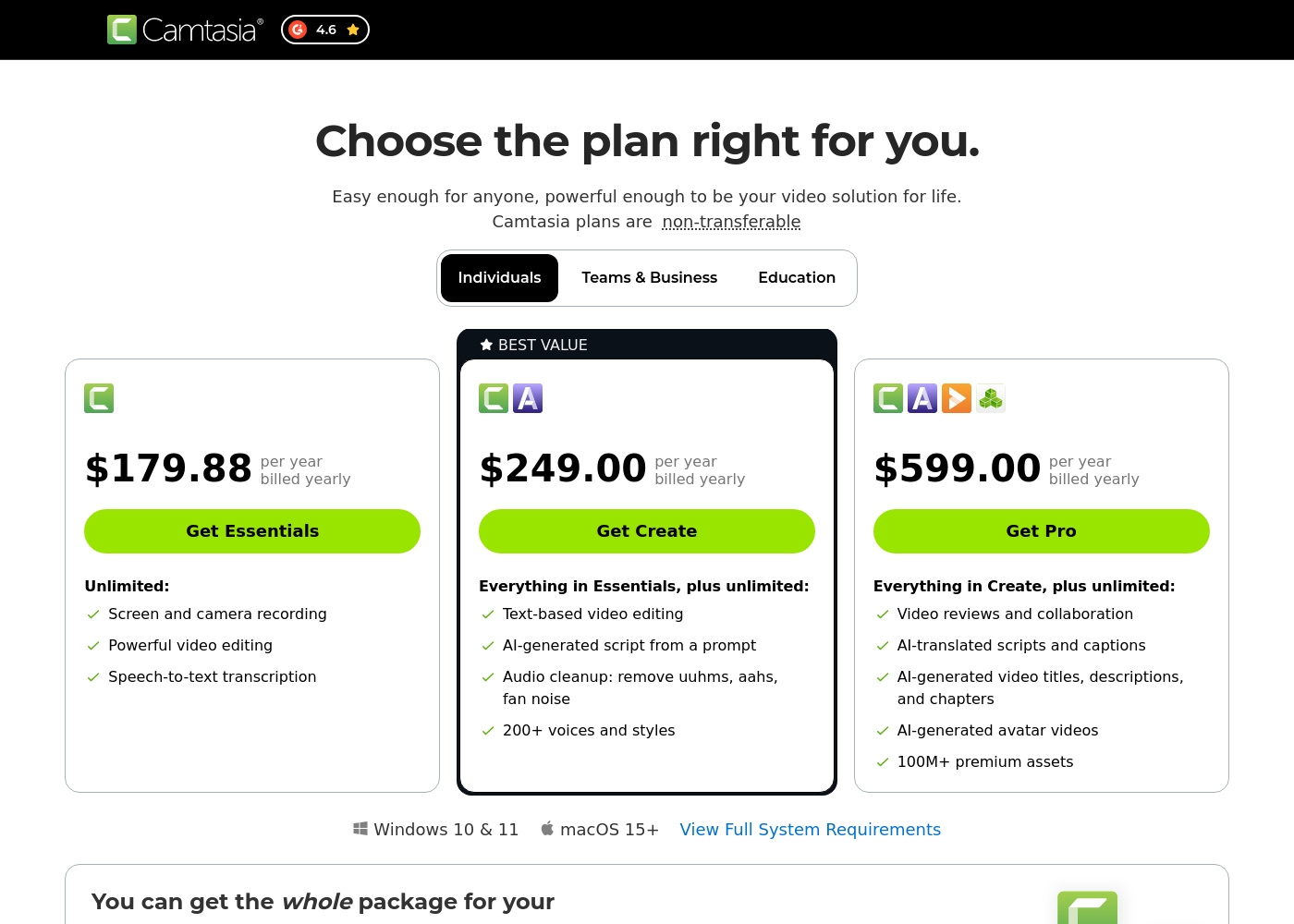
Camtasia costs between $179.88 and $599.00 per year with 3 plans: Essentials at $179.88, Create at $249.00, and Pro at $599.00. These plans cater to individuals, offering robust video and screen recording tools through an annual subscription model.
Essentials
Price: $179.88 per year billed yearly Other Features:
- Screen and camera recording
- Powerful video editing
- Speech-to-text transcription
The Essentials plan is perfect if you only need foundational tools for recording and editing videos. It provides unlimited screen and camera recording capabilities, which is great for beginners or those with basic needs.
- Screen and camera recording
- Powerful video editing
- Speech-to-text transcription
- Everything in Essentials
- Text-based video editing
- AI-generated script from a prompt
- Audio cleanup: remove uuhms, aahs, fan noise
- 200+ voices and styles
- Everything in Create
- Video reviews and collaboration
- AI-translated scripts and captions
- AI-generated video titles, descriptions, and chapters
- AI-generated avatar videos
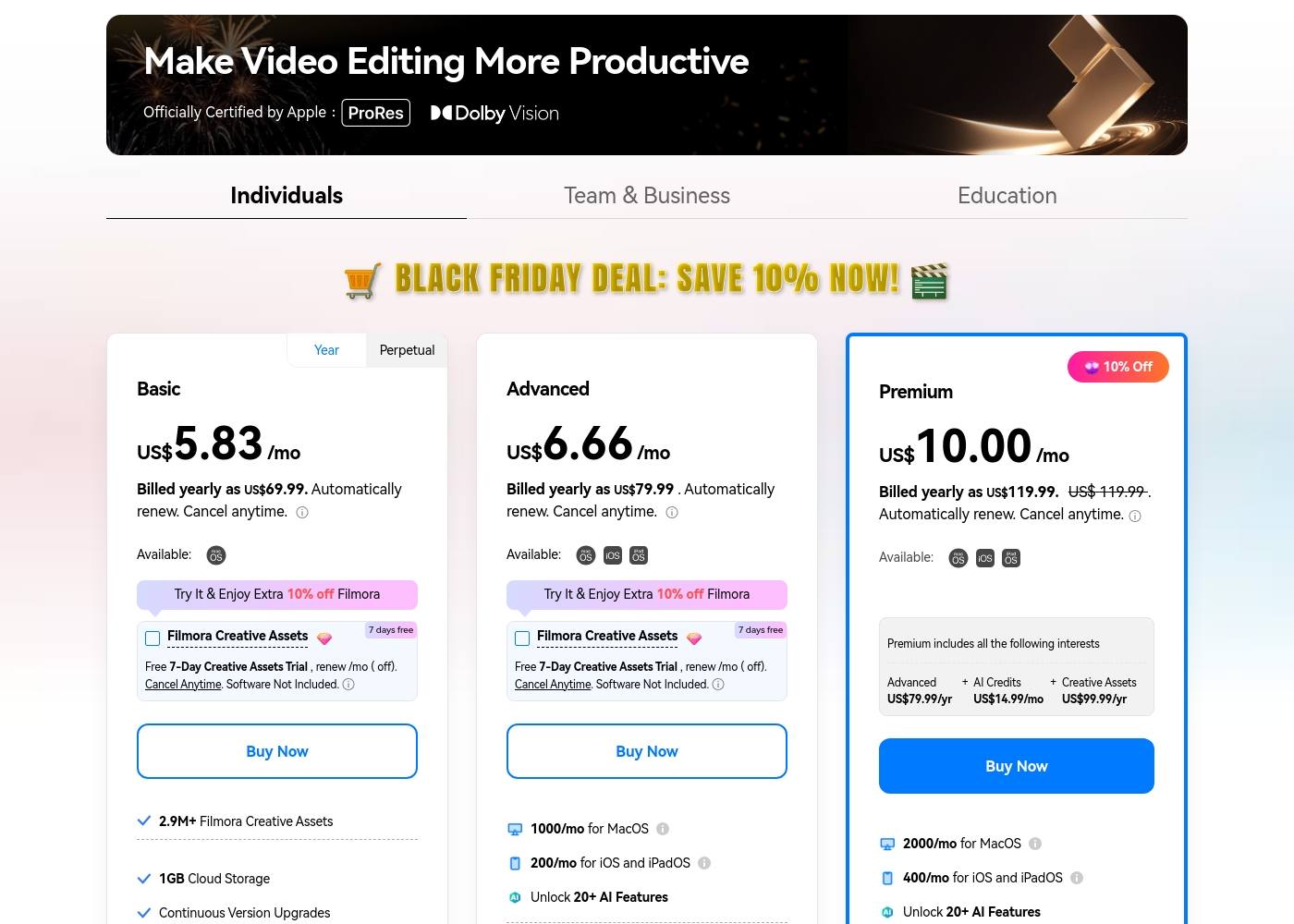
Filmora 14 costs between US$69.99 and US$119.99 per year with three individual annual plans: Basic at US$69.99, Advanced at US$79.99, and Premium at US$119.99.
These individual tiers offer flexible subscription options designed to fit different creator needs, from casual editing to advanced AI-enabled projects. All plans are billed annually and allow you to cancel renewal automatically at any time.
Basic
Price: Billed yearly as US$69.99 (US$5.83/mo) Refund Policy: 30-day money-back guarantee Other Features:
- 2.9M+ Filmora Creative Assets
- 1GB Cloud Storage
- Export without Watermark
- Continuous Version Upgrades
- 2.9M+ Filmora Creative Assets
- 1GB Cloud Storage
- Continuous Version Upgrades
- Export without Watermark
- 4K HD Export
- All Basic Features
- Apple Sync: macOS, iOS, iPadOS
- 10GB Cloud Storage
- 1000 AI Credits/mo for MacOS
- 200 AI Credits/mo for iOS and iPadOS
- All Advanced Features
- 2000 AI Credits/mo for MacOS
- 400 AI Credits/mo for iOS and iPadOS
- 100GB Cloud Storage
- Premium includes advanced bundle and creative assets
- One-time payment structure
- Enjoy Filmora 14 updates only (no major upgrades)
- 1,000 Filmora AI Credits (one-time grant)
- 2.9M+ Filmora Creative Assets
- 1GB Cloud Storage
Pricing Notes
- Camtasia requires a mandatory annual subscription, priced much higher than Filmora 14's equivalent plans.
- Filmora 14 offers a perpetual license option, which Camtasia does not, providing better budget predictability.
- Camtasia's entry-level price ($179.88/year) is higher than Filmora 14's top-tier annual price ($119.99/year).
- Filmora 14 uses a monthly AI credit system which can lead to hidden costs if usage exceeds the monthly allocation.
- Camtasia requires the Pro plan ($599/year) for its largest asset library; Filmora 14 includes 2.3M+ assets in all paid plans.
Pricing Head-to-Head
User Reviews
Camtasia enjoys a long-standing reputation as an industry-standard tool, particularly for screen recording and tutorial creation. Users overwhelmingly praise the core software, noting it is dramatically simpler and more intuitive to use than complex alternatives like Adobe products, while still offering a deep feature set.
However, recent changes to the pricing model and licensing structure have caused significant user frustration. The shift to mandatory annual subscriptions, coupled with new restrictive single-device sign-in limits for individual users, is a major recurring complaint.
The software is great, the developers deserve five stars for the product quality. But management introduced a highly frustrating subscription model. The mandatory sign-in cycle when switching devices significantly harms my workflow.
Users consistently praise Filmora for its excellent ease of use and intuitive, simple interface. Many editors, from hobbyists to long-term users, find the built-in features helpful, noting the software performs well even on modest hardware.
However, external feedback sharply pivots when discussing company operations. A significant volume of criticism focuses intensely on deceptive billing practices and poor customer service.
I love using Wondershare’s video editor, Filmora! It’s so easy to use and really fun too. This program keeps up with my creativity every step of the way.
Our Verdict
The critical decision between Camtasia and Filmora 14 depends entirely on your video format and available budget. If you must have flawless teaching videos, Camtasia might justify the premium cost. Filmora 14 is the clear winner for social media speed and incredible feature value. Camtasia is the gold standard for screen recording and creating professional tutorials. Its key advantage is multitrack recording which separates screen video and microphone audio. This allows you to fix narration mistakes without re-recording the entire Camtasia project. Camtasia also offers advanced text-based video editing for superior project precision. Filmora 14 is a powerhouse of accessible, generative AI and flexible, low pricing. It completely dominates in social media automation using Auto Reframe and Smart Short Clips. Filmora 14 also offers perpetual licenses and synchronization across desktop, iOS, and iPadOS devices. You can get Filmora 14’s top features for significantly less than Camtasia’s entry-level price. The deciding factor is purpose: Are you teaching or creating entertainment? Choose Camtasia if your content requires high-quality, precise instructional demos and integrated team collaboration. Opt for Filmora 14 if you need fast, fun editing output and powerful mobile flexibility. Filmora 14 wins for overall value, general editing, and social media speed. Camtasia retains its professional crown for complex training video production despite its steep mandatory annual pricing.
Frequently Asked Questions
Camtasia vs Filmora 14: Which offers the best value for money?
Filmora 14 offers significantly better value with annual plans starting much lower than Camtasia. Filmora 14 also provides a perpetual license option for stable, long-term use. Camtasia is strictly an expensive annual subscription model.
Does Camtasia offer mobile editing like Filmora 14 does?
No, Camtasia is limited to desktop use on Windows and Mac operating systems only. Filmora 14 allows editing and synchronization across Mac, iOS, and iPadOS devices. Filmora 14 offers true cross-platform content creation flexibility.
Which software is superior for screen recording instructional content?
Camtasia is superior due to its multitrack recording capability. This feature allows separate editing of the screen video and your microphone narration. Filmora 14 offers standard recording, but lacks this specialized independence.
Can I use dedicated collaboration features in Filmora 14?
No, Filmora 14 does not list specific team collaboration or video review tools. Camtasia provides integrated specialized features for team review in its Pro subscription tier. Camtasia is better equipped for high-volume team workflows.
Does Filmora 14 offer a perpetual license, and does Camtasia?
Yes, Filmora 14 provides flexible pricing, including one-time perpetual license options. Camtasia has shifted entirely to mandatory annual subscriptions. Camtasia no longer offers perpetual licenses for individual users.
Which tool focuses more on automated social media creation?
Filmora 14 is highly optimized for social platforms with automated tools. Features like Auto Reframe and Smart Short Clips accelerate content repurposing significantly. Camtasia focuses more on traditional professional training output.
Ready to Choose?
Both tools have their strengths. Choose based on your specific needs.