Backlog by Nulab Inc vs Notion
Backlog by Nulab Inc and Notion both promise to simplify your work, but they serve different masters. Backlog is a dev-focused hub with built-in Git, while Notion is the ultimate all-in-one for wikis and docs. Here's how to choose the right one for your team.
Best for: Software development teams needing integrated Git/SVN, Growing teams wanting predictable, flat-fee pricing
Best for: Teams looking to replace 5+ SaaS tools with one platform, Knowledge-intensive companies building a central wiki
Solid all-in-one for dev teams.
Overall, we find Backlog to be a capable and cost-effective platform that effectively merges project management, issue tracking, and code collaboration into a single tool. It's a strong choice for small to mid-sized teams looking to simplify their workflow without per-user costs.
Pros
- All-in-one platform combining project management, issue tracking, and Git/SVN repositories.
- Transparent, flat-fee pricing with no per-user charges, making it affordable for growing teams.
- Built-in AI assistant to help with summaries, file retrieval, and task drafting.
- Integrates with popular tools like Slack, Microsoft Teams, and Google Drive.
Cons
- External review sources were inaccessible, limiting our ability to gauge user sentiment on support or reliability.
- The platform's breadth might be overwhelming for very simple project tracking needs.
- Advanced features are only available on higher-priced plans.
- Specific details on performance with very large teams or complex codebases are unclear from provided materials.
Powerful software, risky provider.
We found Notion is an exceptionally flexible and powerful productivity tool, praised globally for its block-based editor and ability to consolidate diverse workflows. However, external evidence highlights significant failures in subscription management and support responsiveness. Overall, we advise extreme caution regarding billing procedures due to recurring reports of unauthorized charges and cancellation difficulties.
Pros
- Exceptionally powerful and versatile block-based editor.
- Effective for personal knowledge management and team use.
- Consolidates multiple specialized tools (wikis, CRMs, project management).
- Strong native AI assistance integrated throughout the workspace.
Cons
- Widespread reports of deceptive or confusing billing practices.
- Extremely poor and unresponsive customer support experiences.
- Users report app is often slow and unreliable.
- Difficulty canceling subscriptions and obtaining timely refunds.
AboutBacklog by Nulab Inc
Backlog is an all-in-one work management platform built for teams that build, plan, or create. 🚀 It combines project management, issue tracking, and team collaboration into a single, powerful tool. This makes it ideal for development teams managing code and bugs, design teams planning sprints, marketing teams running campaigns, and small businesses seeking a straightforward solution without user limits.
AboutNotion
Notion is your dedicated AI workspace and everything app. It is built to replace multiple specialized tools with one powerful platform. This centralized space lets teams consolidate project management, internal wikis, and basic CRM functions. Notion is trusted broadly; over 100 million users worldwide use it, and 62% of the Fortune 100 are customers. You can use it right in your browser or download specialized tools like Notion Mail and Notion Calendar to keep time and work together. ✅
Highlights
Feature Comparison
Features Overview
We highlight the main differences and pick a winner for each feature.
Core Philosophy
Backlog is a focused hub for building teams. Notion is a flexible canvas for all teams.
Backlog by Nulab Inc is built around project management and issue tracking for teams that ship software. It centers your work around code and tasks. Notion is your AI everything app, designed to replace multiple tools. It consolidates wikis, project trackers, and basic CRMs into one flexible space. The key trade-off is depth vs. breadth. Backlog goes deep on dev workflows, while Notion casts a wider net for all kinds of knowledge work.
AI Capabilities
Both have AI, but Notion's is more deeply woven into the platform experience.
Backlog by Nulab Inc offers an AI Assistant for creating summaries, finding files, and drafting daily to-do lists. It's a helpful sidekick for team planning. Notion provides an AI assistant to every person on your team. It's integrated for writing, search, and research, and G2 rates it the #1 AI writing tool. Notion's AI feels more central to the product. Backlog's AI is a focused tool for project management chores.
Pricing & Value
Backlog's flat fee wins for growing teams. Notion's per-seat model can add up fast.
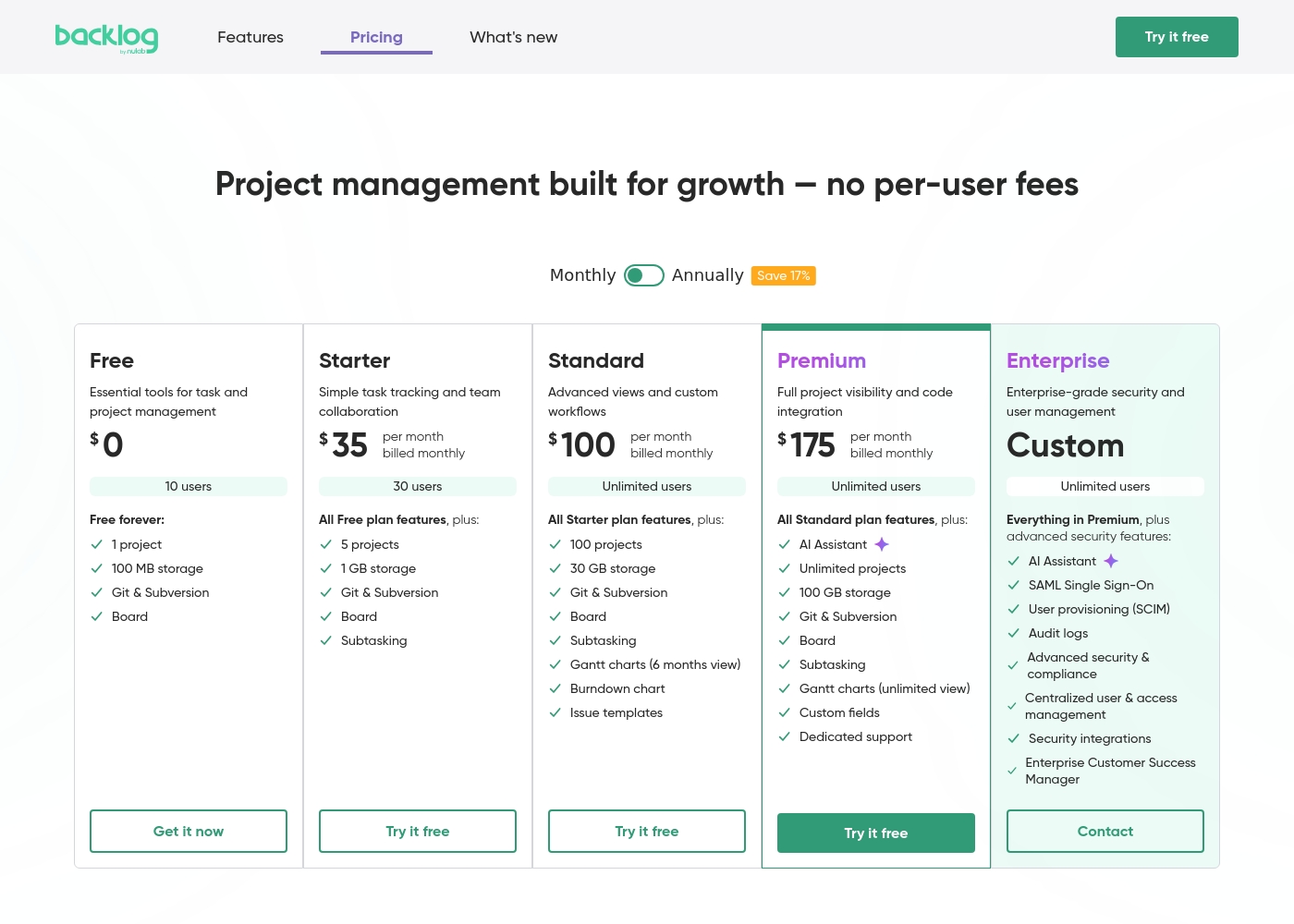
Backlog by Nulab Inc uses flat-fee pricing starting at $0. You pay one price regardless of how many people are on your team, which saves money as you scale. Notion charges per person, from $0 (individual) to $20 per seat monthly. Adding 10 new team members on the Plus plan costs an extra $100 per month. For a team of 20, Backlog's $175/month max is fixed. Notion's cost would keep climbing with each new user, making Backlog more predictable for budgeting.
Customization & Flexibility
Notion is infinitely flexible. Backlog is streamlined for its core tasks.
Backlog by Nulab Inc offers structured projects, issues, and wikis. You customize within a clear framework designed for project tracking. Notion uses a block-based editor that's endlessly adaptable. You can build databases, wikis, and project boards that look and work exactly how you want. If you love crafting custom systems, Notion wins. If you want a straightforward tool that just works for dev projects, Backlog is easier.
Version Control
Only one tool has it built-in. A dealbreaker for many dev teams.
Backlog by Nulab Inc includes native Git and SVN repositories. You manage code, track issues tied to commits, and handle bugs all in one place. Notion has no built-in version control. You must use external tools like GitHub or GitLab and connect them via integrations. For software teams, this is a massive difference. Backlog keeps code and tasks tightly linked without context switching.
Customer Support
User reports suggest both have room for improvement, but Notion's issues seem more severe.
Backlog by Nulab Inc provides email support for paid plans. Premium plans include dedicated support and 1:1 training. Notion's Trustpilot reviews frequently mention unresponsive or unhelpful support, especially around billing issues. Users report long delays and poor resolutions. Based on external reviews, Backlog's support appears more reliable. Notion's support is a common pain point for customers.
Scalability
Backlog scales predictably with flat fees. Notion's costs and complexity can grow.
Backlog by Nulab Inc plans allow unlimited users on Standard tiers and above, with fixed monthly costs. You add people without budget surprises. Notion scales by adding per-seat costs. Its flexible blocks can become complex and harder to manage for large teams without governance. For predictable growth, Backlog's model is simpler. For creating a vast, custom company workspace, Notion can scale in capability but not in price.
Mobile Experience
Both have apps, but user sentiment on Notion's app is notably worse.
Backlog by Nulab Inc has a mobile app for quick checks and task management on the go. It's functional for core features. Notion has mobile apps, but Trustpilot reviews report the app can be slow and unreliable. Users sometimes find it frustrating for quick access. Based on reported experiences, Backlog's mobile app seems more dependable. Notion's mobile performance is a common complaint.
Backlog by Nulab Inc pricing: Backlog by Nulab Inc offers a range of flat-fee plans starting from a free tier up to $175 per month, with no per-user fees. You can save 17% by choosing annual billing for any paid plan level reached by your team's needs. Plans range: $0–$210/month Billing options: Free plan, Free trial, Monthly subscription, Yearly subscription, Per seat pricing, Usage-based pricing
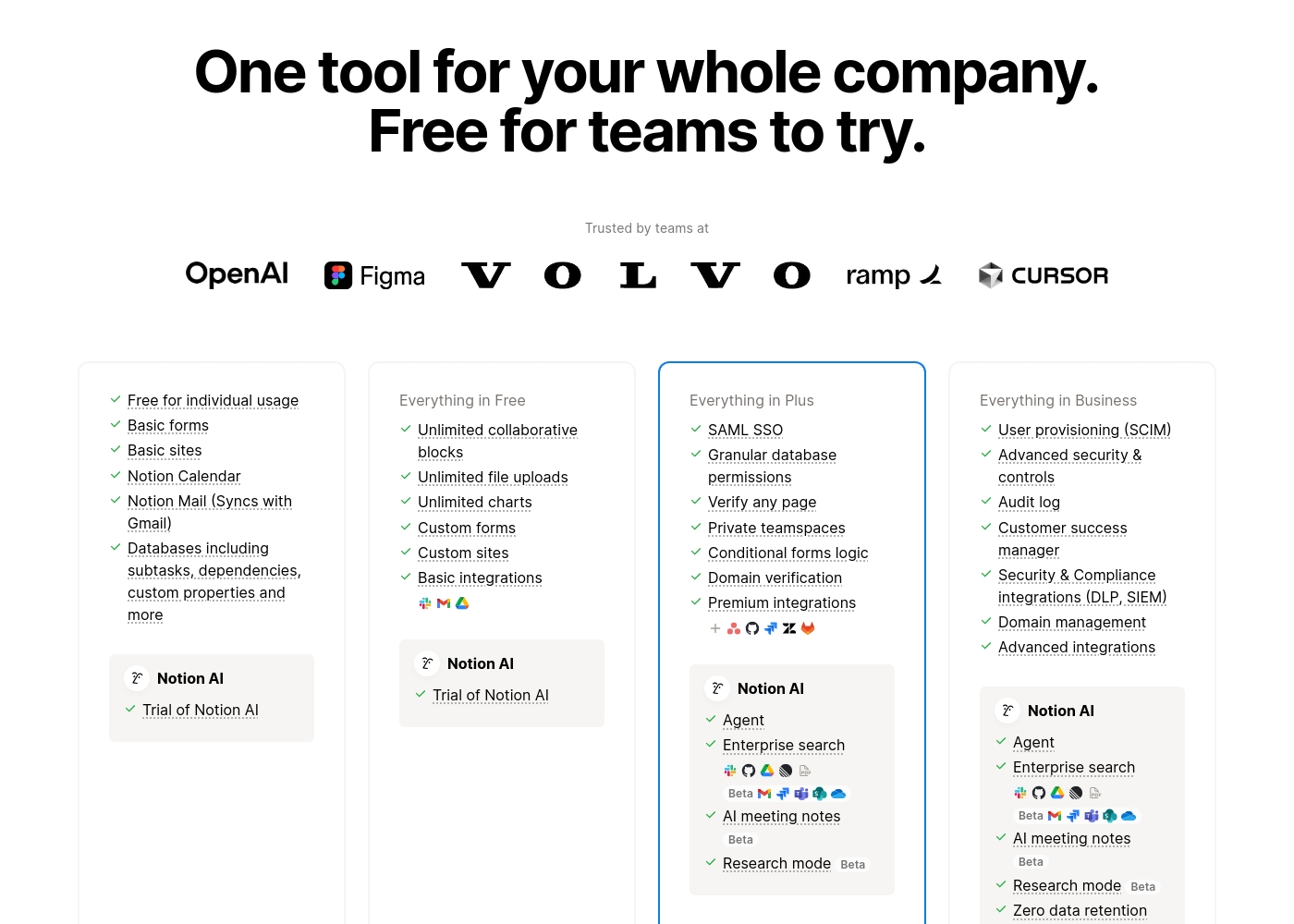
Notion costs between $0 and $20 per seat/month with four plans: Free at $0/seat/month, Plus at $10/seat/month, Business at $20/seat/month, and Enterprise (custom pricing).
Here’s a detailed look at the core features included in each subscription level.
- Unlimited pages and blocks for individuals
- Web publishing with 1 custom subdomain
- Basic forms and sites
- Notion Calendar and Mail synchronization
- Databases with subtasks and dependencies
- Unlimited blocks and file uploads
- 30 days of page history
- Basic SAML SSO
- Granular database permissions
- Access to unlimited charts
- 90 days of page history
- Advanced security controls and Audit log
- Conditional forms logic
- Domain verification
- Advanced page analytics (includes editor list)
- Unlimited page history and workspace analytics
- SCIM user provisioning
- Zero data retention with LLM providers for Notion AI
- Customer Success Manager support
- Security & Compliance integrations (DLP, SIEM)
Pricing Notes
- Backlog by Nulab Inc's flat-fee model means costs don't rise with team size. A team of 10 pays the same as a team of 50 on the same plan.
- Notion charges per person, so costs scale linearly. Adding 5 new members to the Plus plan increases the bill by $50/month.
- Notion offers a limited trial for teams. Backlog's 30-day free trial gives full access to paid features.
- Both offer annual billing discounts. Notion's Enterprise plan requires contacting sales for a custom quote.
Pricing Head-to-Head
User Reviews
We found that external review platforms like Trustpilot were not accessible due to verification errors, preventing us from gathering specific user sentiment from those sources. Capterra was not provided.
Therefore, our review is based solely on the official product information and pricing details from Nulab. ✅ We can confirm Backlog offers a unified platform for project management, issue tracking, and collaboration with built-in Git/SVN support and no per-user fees.
Backlog is great for keeping all our code and tasks in one place. The Git integration is seamless, and my team stopped switching between five different apps. It just works for our sprint planning.
Trustpilot feedback paints a sharply divided picture of Notion. While many users praise the platform as a terrific tool—highlighting its power, versatility, and unique block-based editor for personal and professional organization—these compliments are often eclipsed by grave concerns regarding management and billing practices.
A recurring major theme across many reviews details frustrating experiences with unexpected charges, deceptive auto-upgrades (especially relating to annual plans and new members), and significant challenges when trying to cancel subscriptions or obtain timely refunds. Furthermore, support responsiveness is frequently described as unsatisfactory, unhelpful, or even condescending, often failing to resolve billing errors or login issues.
Enjoy using Notion a lot for my daily work interface. It helps me set up my employees and assign tasks with no issue at all. We upgraded from the free plan and will absolutely continue using the platform.
Our Verdict
For most teams, the choice comes down to specialization vs. all-in-one flexibility. Backlog by Nulab Inc wins for software and project-focused teams. Notion wins for those needing a powerful, customizable company wiki and workspace. Backlog by Nulab Inc's superpower is its deep integration with code. It puts Git and SVN right alongside your issues and tasks. Developers stay in flow without switching between a project tool and a code repository. Notion's superpower is its infinite flexibility. It replaces your team wiki, basic CRM, and project tracker with one tool. Every team member also gets a powerful AI assistant for writing and research built in. The deciding factor is your primary need. If you build software and need cost certainty, pick Backlog by Nulab Inc. If you need to centralize all company knowledge and tolerate per-user costs, choose Notion. Final verdict: Choose Backlog by Nulab Inc for its developer focus and flat pricing. Choose Notion if you want a single, flexible canvas for your entire team's work, despite higher potential costs and support risks.
Frequently Asked Questions
Which is better for small teams: Backlog by Nulab Inc or Notion?
Backlog by Nulab Inc is likely better for small teams due to its flat-fee pricing. You won't pay more as you add people. Notion's free plan is powerful for individuals but limits team collaboration.
Does Backlog by Nulab Inc have a built-in wiki like Notion?
Yes, Backlog by Nulab Inc includes a basic wiki feature for documentation. Notion's wiki is far more powerful and customizable, often replacing dedicated knowledge base tools.
Is Notion worth the extra cost over Backlog by Nulab Inc?
It depends on your needs. Notion's cost is only higher if you have a large team. Its value comes from replacing multiple other tools. For a dev team, Backlog's built-in Git may offer more direct value.
Can I migrate from Backlog by Nulab Inc to Notion easily?
Migration is possible but may require manual work or third-party tools. Backlog by Nulab Inc offers import tools for Jira and Redmine. Moving data to Notion's flexible blocks would need careful planning.
Which tool has better customer support?
Based on user reviews, Backlog by Nulab Inc appears to have more responsive support. Notion's Trustpilot page is filled with complaints about unhelpful support and unresolved billing issues.
Is the pricing for Backlog by Nulab Inc really flat per user?
Yes. Backlog by Nulab Inc charges a flat monthly fee for each plan tier. This fee does not change based on how many users are in your workspace, unlike Notion's per-seat model.
Ready to Choose?
Both tools have their strengths. Choose based on your specific needs.