Aweber vs Sender
Choosing between Aweber and Sender comes down to simplicity versus a full-featured approach. Sender is the budget-friendly champion with a killer free plan. Aweber is the established player with robust automation and AI tools.
Best for: Small businesses needing advanced sales funnels and automation, E-commerce stores selling products directly via email
Best for: Startups and side hustles on a tight budget, Beginners building their first email list
Feature-rich, hampered by operational flaws.
We find AWeber provides a functional email marketing platform targeting small businesses with strong automation and AI tools. However, external feedback detailing unexpected billing practices and unannounced account suspensions raises significant concerns about user trust and service reliability. Overall, the reported operational and customer service drawbacks severely counteract the platform's solid feature set.
Pros
- Access to 24/7 support via phone, chat, and email (as advertised).
- Robust AI assistants available for drafting emails and refining subject lines.
- Flexible pricing tiers starting low for 500 contacts, available with a free trial.
- Unlimited features provided on the Plus plan, including automations and landing pages.
Cons
- Numerous reports of 'sneaky billing,' including charging for unsubscribed or inactive lists.
- Customer accounts or essential features often suspended without prior email notification.
- Users report significant difficulty securing refunds, even when canceling during the trial period.
- Arbitrary rejection of imported customer lists, leading to account suspension risks.
Simple, free, and effective for basics.
We found Sender to be a solid, no-frills tool for core email marketing tasks. Its free plan is a major draw for startups and small businesses. Overall, it delivers good value with a straightforward interface, though it may lack some advanced features for power users.
Pros
- Extremely generous free plan (2,500 contacts, 15k emails/month).
- Clean, user-friendly interface that's easy to learn.
- Transparent, affordable pricing with no hidden fees.
- Includes essential automation features from the start.
Cons
- Advanced features and segmentation are limited on lower tiers.
- Some users report occasional email deliverability issues.
- Integrations can be inconsistent with certain platforms.
- Free plan lacks SMS marketing capabilities.
AboutAweber
AWeber is a dedicated email and automation solution created to support small businesses. Their goal is to provide powerful tools that help you grow at a fraction of the cost of other systems. The platform focuses on making it easy to grow your customer base and increase your total revenue. ✅
It offers ready-made, eye-catching landing pages and sign-up forms that you can effortlessly add to your website. If you're ready to sell directly, you can also set up your own online store in just minutes. This complete system is designed to take your business to the next level.
AboutSender
Sender is an email marketing platform designed for businesses of all sizes. It helps you build, automate, and send email campaigns that people actually want to read. Think of it as your straightforward tool for staying in touch with your audience and driving sales. 🚀
Highlights
Feature Comparison
Features Overview
We highlight the main differences and pick a winner for each feature.
Free Plan & Pricing
Sender's free plan is unbeatable for new users. Aweber's free option is a time-limited trial.
Aweber's lowest paid plan, Lite, starts at $12.49/month for up to 500 subscribers. It includes a 14-day free trial. Sender offers a permanent Free Forever plan with up to 2,500 subscribers and 15,000 emails per month. No credit card required. The key difference is cost and commitment. Sender lets you start for free indefinitely, while Aweber requires a paid plan after the trial.
Ease of Use
Both tools are user-friendly, but Sender's interface is often praised for its simplicity.
Aweber is designed for small businesses and features a straightforward drag-and-drop editor. Some users find navigation intuitive. Sender is built for speed, claiming setup in about 5 minutes. Its clean interface is frequently highlighted in reviews for being easy to learn. Both are accessible, but Sender's minimalist approach may be slightly faster for absolute beginners.
Email Automation
Aweber offers more advanced, pre-built automation workflows. Sender provides solid basics on all plans.
Aweber provides powerful, 90% built automations for sales funnels, upsells, and cart recovery. The Plus plan offers unlimited automations. Sender includes essential email automation sequences on its Free Forever plan. You can set up welcome series and nurture campaigns immediately. Aweber's automations are more complex and specialized for ecommerce. Sender covers the fundamentals well for general marketing.
Customer Support
Aweber's premium support is only on its higher-tier plan. Sender offers 24/7 support to everyone.
Aweber provides Priority 24/7 Phone, Chat, and Email support exclusively with its Plus plan ($19.99/month). Lite users get standard chat and email. Sender includes 24/7 live support on all plans, including the free one. The Professional plan adds premium support. For guaranteed live help at any tier, Sender has the clear advantage.
Advanced Features
Aweber has more built-in ecommerce and AI tools. Sender focuses on core email marketing and offers SMS as an add-on.
Aweber includes a built-in online store, payment processing, and AI writing assistants for subject lines and copy. It also handles web push notifications. Sender's strengths are its generous free plan, automation, and transactional emails. It offers SMS marketing credits for purchase. Choose Aweber for an all-in-one marketing suite. Choose Sender for focused, affordable email and SMS.
Integration Ecosystem
Aweber boasts a massive library of 750+ integrations. Sender covers popular e-commerce and CMS platforms.
Aweber integrates with over 750 business tools, including major payment processors and CRMs. This broad connectivity is a key strength. Sender focuses on key integrations with WordPress, WooCommerce, PrestaShop, and Zapier for connecting other apps. If you use many different software tools, Aweber's extensive ecosystem is more versatile.
Scalability
Both scale with subscriber counts. Sender's transparent pricing and unlimited Enterprise plan are appealing.
Aweber's pricing increases with your subscriber list. The Done For You plan offers expert setup for growing businesses. Sender's plans are clearly tiered by subscriber count, from Free up to custom Enterprise pricing with unlimited emails. Multi-user seats scale with the plan. Sender's straightforward scaling and unlimited top-tier plan may be simpler for long-term growth.
Value for Money
Sender offers exceptional value, especially with its free plan. Aweber provides more features at a higher cost.
Sender's Free Forever plan is a huge value proposition for startups and small lists. Paid plans are very affordable. Aweber's paid plans include advanced features like ecommerce and AI tools, which justify the higher price for businesses needing them. For pure budget-friendliness, Sender wins. For feature density per dollar, it depends on your needs.
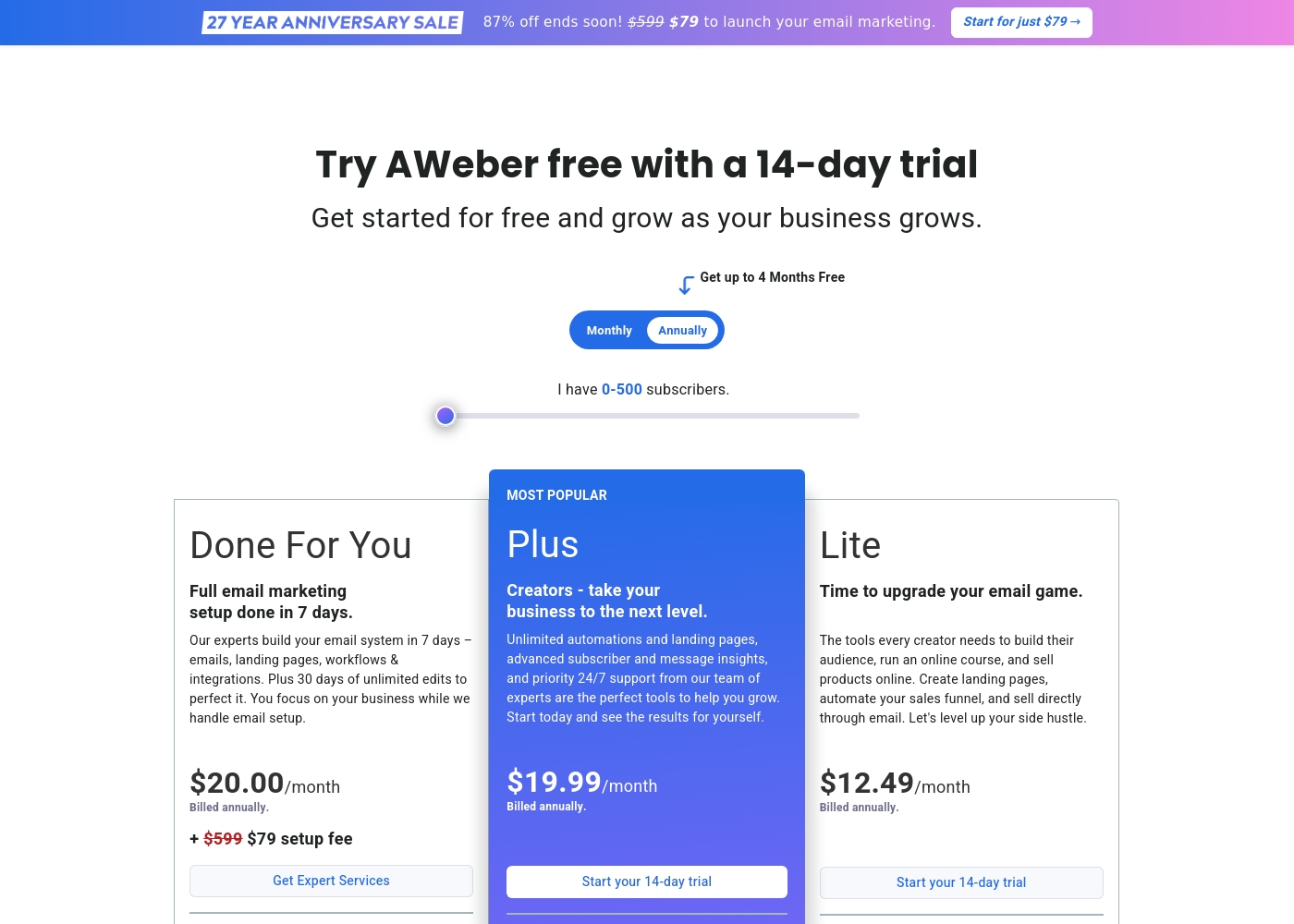
Aweber costs between $12.49/month and $20.00/month (billed annually) for 0-500 subscribers with three options: Lite at $12.49/month, Plus at $19.99/month, and Done For You at $20.00/month plus a $79 setup fee.
These pricing points reflect the annual billing option for the entry-level subscriber count. Your monthly cost will increase as your list grows beyond 500 subscribers.
Lite
Price: $12.49/month (Billed annually) Best For: Creators starting a side hustle or selling courses Other Features:
- Limited to 3 Landing pages and 3 Email automations
- 1.0% Ecommerce transaction fees
- Includes Web Push Notifications service
- Send to basic segments only
- Create landing pages, automate sales funnels, and sell directly through email
- Web Push Notifications (up to 50,000 subscribers/sends)
- Simple subscriber and message analytics
- AWeber Ecommerce (1.0% transaction fee)
- Unlimited automations and landing pages
- Advanced subscriber and message insights (analytics)
- Priority 24/7 Phone, Chat, and Email support
- Remove AWeber branding
- AWeber Ecommerce (0.6% transaction fee)
- Full email marketing setup done in 7 days by experts
- Includes emails, landing pages, workflows, and integrations built
- 30 days of unlimited edits to perfect the system
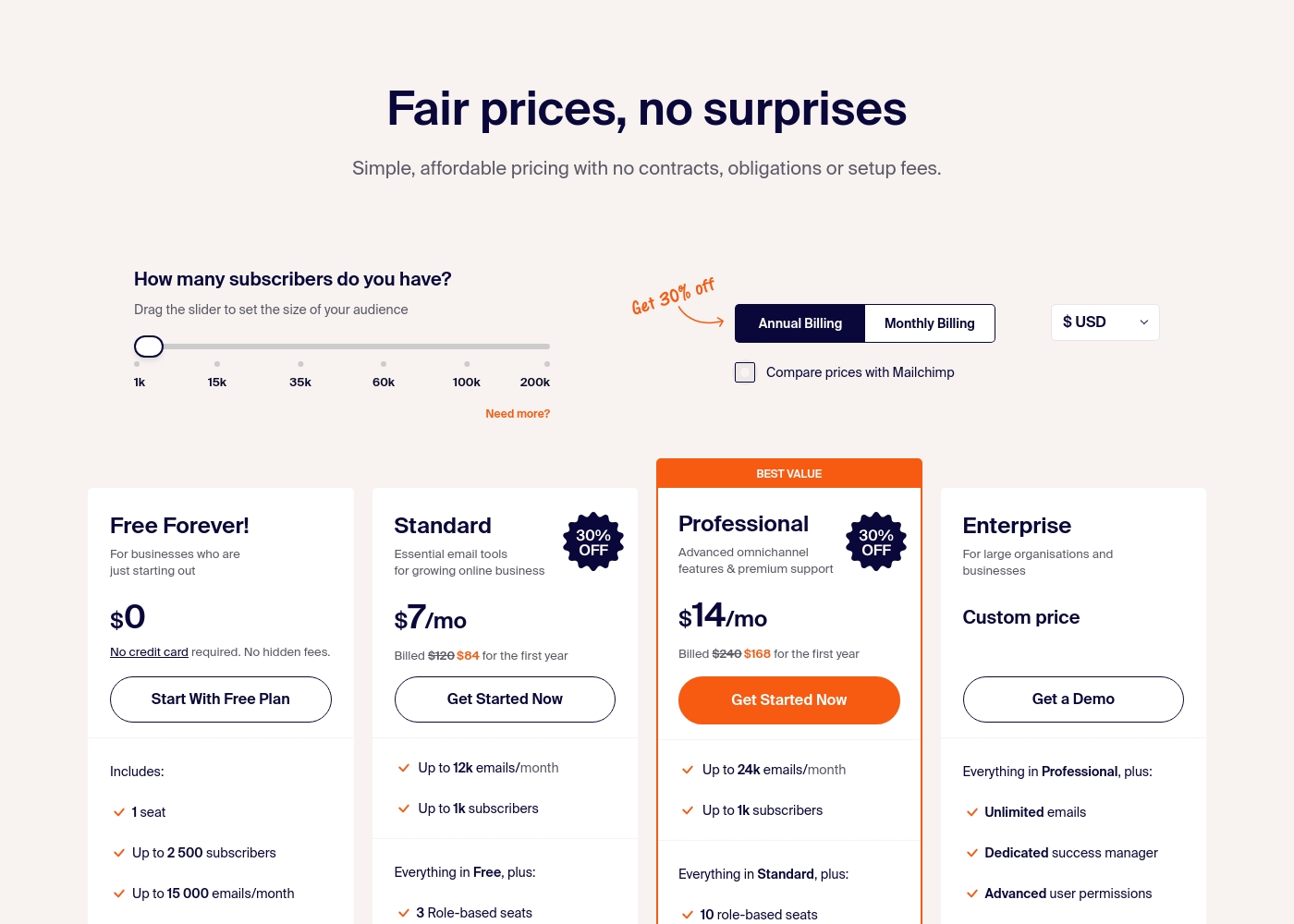
Sender costs between $0 and a custom price per month with 4 plans: Free Forever at $0, Standard at $7, Professional at $14, and Enterprise at Custom price.
Take a look at the specific features and limits included in each plan tier below.
Free Forever!
Price: $0 monthly Best For: Businesses who are just starting out Other Features: 1 seat, up to 2,500 subscribers, 15,000 emails/month, 24/7 live support, email automation.
- 1 seat
- Up to 2,500 subscribers
- Up to 15,000 emails/month
- 24/7 live support
- Email automation
- Up to 12k emails/month
- Up to 1k subscribers
- 3 Role-based seats
- Automated sequences
- Up to 24k emails/month
- Up to 1k subscribers
- 10 role-based seats
- Premium support
- Unlimited emails
- Dedicated success manager
- Advanced user permissions
Pricing Notes
- Aweber's advertised prices are for up to 500 subscribers with annual billing. Costs rise as your list grows.
- Sender's Free Forever plan includes 2,500 subscribers and 15,000 emails/month. No credit card needed.
- Aweber charges transaction fees on ecommerce sales (1.0% Lite, 0.6% Plus).
- Sender's Enterprise plan is custom-priced and includes unlimited emails and a dedicated success manager.
Pricing Head-to-Head
User Reviews
User feedback drawn from Trustpilot highlights significant issues, focusing primarily on billing transparency and account management practices. Users frequently cite instances of unexpected charges and "sneaky billing," such as being billed for unsubscribed contacts or experiencing price jumps after promotional periods ended.
Some customers reported that charges continued well after they attempted to cancel annual subscriptions. Customer support experiences are highly polarized; although AWeber advertises award-winning 24/7 service, several reviewers detail unhelpful interactions, arbitrary account suspensions (often related to list importing issues), and frustrating difficulty obtaining refunds even during specified trial periods, leading to claims of "unethical" practices.
I have been an AWeber client for a while and usually I'm quite happy with their offering. Their helpline is reliable and quick whenever I do need assistance with campaigns. This long-term relationship suggests consistent service quality has been provided.
User sentiment on Trustpilot and Capterra highlights Sender's generous free plan and ease of setup as major positives. Many praise the intuitive interface and reliable automation.
😊 However, some note occasional deliverability hiccups and a learning curve for advanced features. Customer support is frequently mentioned as responsive, though a few users report slow responses during peak times.
The free plan is unbeatable for a new business. I set up my first automation in minutes. The platform is simple and gets the job done without fuss.
Our Verdict
For most beginners and budget-conscious users, Sender is the better pick. Its free plan and simple approach lower the barrier to entry dramatically. Aweber's superpower is its feature depth. It packs powerful automation, built-in ecommerce, and helpful AI tools into one platform. Sender's superpower is its incredible value and transparency. You get a generous free plan, clear pricing, and solid essentials without complexity. The deciding factor is your stage and needs. If you're just starting or watching costs, Sender is the clear winner. If you need advanced sales tools and have a budget, Aweber is worth considering. Choose Aweber if you want an all-in-one marketing suite and don't mind paying more. Choose Sender if you want to start free, keep it simple, and scale affordably.
Frequently Asked Questions
Which is better for small teams: Aweber or Sender?
Sender is better for small teams on a budget. Its Standard plan includes 3 user seats for $7/month. Aweber's Lite plan limits you to 3 users, but the Plus plan with unlimited users costs $19.99/month.
Does Aweber have a free plan like Sender?
No, Aweber does not have a permanent free plan. It offers a 14-day free trial. Sender's Free Forever plan is available indefinitely with no credit card required.
Is Sender worth the extra cost over Aweber?
Sender is usually cheaper, not more expensive. Its free plan is unbeatable for starting out. Paid plans start at $7/month, while Aweber's start at $12.49/month.
Can I migrate from Aweber to Sender easily?
Aweber offers free expert migration from other platforms. Sender does not list specific migration services. You would likely need to import your list manually or check their documentation.
Which tool has better ecommerce features?
Aweber has more robust built-in ecommerce. It includes a store builder, payment processing, and automated funnels for upsells. Sender focuses on email and offers SMS as an add-on.
Do both tools offer email automation?
Yes, both offer email automation. Aweber provides advanced, pre-built workflows on its paid plans. Sender includes essential automation sequences even on its free plan.
Ready to Choose?
Both tools have their strengths. Choose based on your specific needs.