AVS4YOU vs Viddyoze
People often compare AVS4YOU and Viddyoze when choosing a video tool. AVS4YOU is a powerful desktop suite for detailed editing and conversion. Viddyoze is a template-driven cloud platform focused on fast, branded video creation.
Best for: Windows users who need permanent, one-time access to video tools, Hobbyists who need full control over timeline editing and conversion
Best for: Online marketers and agencies leveraging video for clients (commercial rights included), Businesses needing consistently branded intros, outros, and logo animations
Functional suite with restrictive licensing.
We assessed the AVS4YOU suite as a highly functional and simple solution for diverse multimedia editing and conversion needs. While the array of tools is excellent and priced competitively, we found the single-device licensing policy highly restrictive, especially for the popular “Unlimited Subscription.” Overall, the product delivers quality output but requires clearer communication regarding license portability.
Pros
- Excellent value for the comprehensive multimedia software suite.
- Software is highly versatile for video, audio, and conversion tasks.
- Simple, intuitive, and user-friendly interface design.
- Technical support staff is consistently praised for quick responses.
Cons
- The "Unlimited" license is strictly limited to a single PC/device.
- License transfer or reactivation is often complex after a computer crash.
- Software can become slow when processing very large video files.
- Screen capture feature sometimes records without accompanying audio.
Quick, Quality Video Creation with Billing Friction.
We find Viddyoze delivers excellent, professional video templates that are genuinely easy to customize and use. The platform significantly speeds up production for branding elements, allowing unlimited creation capacity for $47 per month. Overall, this is a highly functional tool marred by concerning reports of subscription transparency issues and difficult trial cancellation polices.
Pros
- Access to 5,000+ high-quality, professional templates.
- Extremely quick and easy to use, even for beginners.
- Unlimited creation capacity included in the monthly price.
- Commercial rights provided for client work.
Cons
- Free trial cancellation process is reported as confusing and deliberately difficult.
- Users report being incorrectly charged after attempting to cancel the trial.
- Requires caution regarding subscription monitoring and cancellation guidelines.
- The web interface is described as ‘cranky’ by some users.
AboutAVS4YOU
AVS4YOU is rightly called the “Ultimate multimedia editing family.” It is a collection of tools designed for anyone looking to produce high-quality video and audio content, and even more. Whether you need to convert files, trim a video, or apply engaging effects like Chroma key, this family of software has you covered. Users consistently highlight that it's very convenient, user friendly, and functional ✨.
AboutViddyoze
Viddyoze is an intuitive, easy-to-use video creator designed for business owners and professionals. Over 180,000 creators trust this platform.
It’s been called the “Swiss Army Knife” for corporate branding video media because it allows you to brand content using your own colors and logos effortlessly. The best part?
You don’t need any video editing experience to start. If you can click a mouse, you can create amazing videos in minutes.
Highlights
Feature Comparison
Features Overview
We highlight the main differences and pick a winner for each feature.
Core Functionality
AVS4YOU delivers a deep editing suite for full media control and conversion. Viddyoze specializes in rapidly creating professional, template-based branded clips.
AVS4YOU provides five distinct programs for video editing, conversion, playback, and disc creation. It's built for raw handling of source files, including Chroma key features. Viddyoze is centered around a massive library of 5,000+ templates. It’s perfect for quick intros, outros, and logo animations for brand consistency. The trade-off is depth versus speed; AVS4YOU allows more complex timelines. Viddyoze wins on marketing velocity and easy results. If you need to edit a 20-minute video, use AVS4YOU. If you need 10 social media ads promptly, Viddyoze is much faster.
Template Library
Viddyoze offers access to 5,000+ templates for instant, professional results. AVS4YOU is focused more on manual effects and tools.
Viddyoze provides a massive, growing library of over 5,000 professional templates for every use case. This template base drives the core creation process. AVS4YOU offers standard effects and transitions within its editor, but it lacks Viddyoze's large, pre-designed structure templates. Viddyoze's templates allow rapid customization using only three clicks for consistent branding. AVS4YOU requires more manual effort for polishing. If your workflow demands frequent, high-quality, pre-built visuals, Viddyoze saves significant time starting with templates.
Licensing & Rights
Viddyoze grants essential commercial rights and is web-based. AVS4YOU uses very restrictive single-device desktop licensing.
AVS4YOU's Unlimited license ($79 one-time) is strictly limited to one Windows PC. License transfers after a PC upgrade are often complex and difficult. Viddyoze grants commercial rights, allowing users to create content for paying clients using the subscription. This provides crucial business flexibility. The major complaint about AVS4YOU is the restrictive nature of its single-PC license key. Viddyoze avoids this hardware lock-in entirely. Businesses serving clients should strongly favor Viddyoze due to its commercial rights inclusion.
AI Assistance
Viddyoze integrates ViddyBot, a 24/7 AI assistant for creative support. AVS4YOU is a traditional software suite lacking any AI features.
Viddyoze includes ViddyBot, a 24/7 AI chatbot assistant available for immediate creation and idea support. This speeds up complex planning. AVS4YOU is a traditional software suite focusing on manual controls, conversion, and timeline manipulation. It does not advertise any modern AI tools. ViddyBot helps beginners overcome creative hurdles and generate structured content ideas instantly. It's a valuable brainstorming tool. If you value having an automated assistant for creative blocks or structure guidance, Viddyoze is your only valid choice.
Device Compatibility
AVS4YOU is strictly a desktop application designed only for Windows. Viddyoze is fully accessible via any modern web browser.
AVS4YOU explicitly states its Multimedia Suite is 'for Windows' only. It provides no specification or support for other operating systems like Mac or Linux. Viddyoze's cloud platform means it works instantly on Windows, Mac, or mobile devices via the browser interface using a single login. This difference is critical; Mac users cannot run the AVS4YOU suite natively. They must use Viddyoze. Viddyoze offers far greater device flexibility for remote or cross-platform teams and solo users.
Video Conversion
AVS4YOU excels at file conversion, supporting all key formats and using GPU acceleration. Viddyoze focuses on animated output.
AVS4YOU utilizes its Video Converter utility to handle various video formats easily. It supports large file sizes and complex conversions. GPU acceleration within AVS4YOU speeds up the conversion process tremendously, ensuring efficiency with large batches. It handles both video and audio. Viddyoze focuses primarily on generating short animated clips from templates. It does not offer general multimedia file conversion tools. If your primary need is transforming files between diverse formats before editing, AVS4YOU is the tool you require.
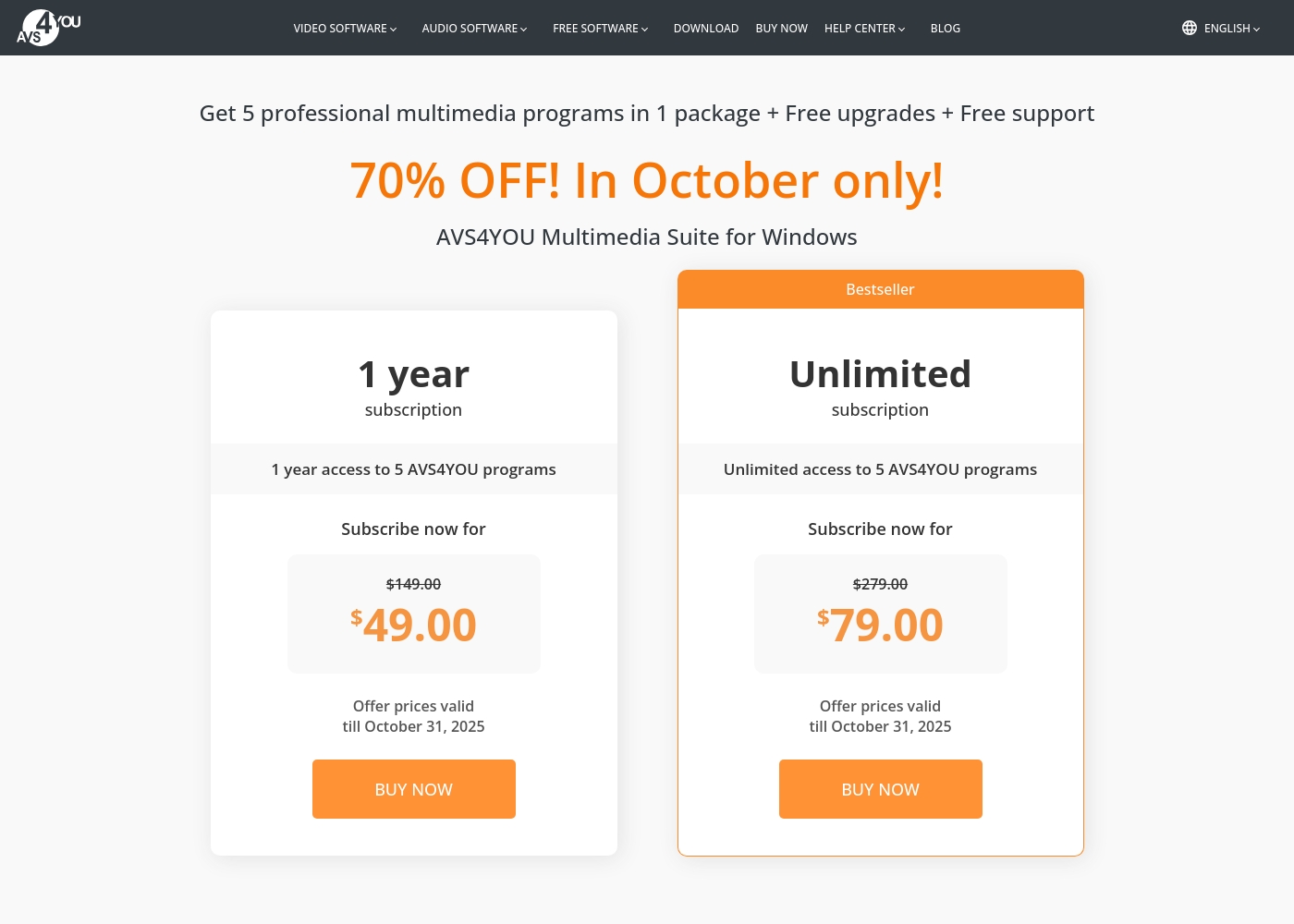
AVS4YOU costs between $49.00 and $79.00 per purchase with 2 main plans: 1 Year Subscription at $49.00/year and Unlimited Subscription at $79.00 one-time.
The simple pricing structure focuses on giving you total access to the AVS4YOU Multimedia Suite. Here is a breakdown of the two options currently available.
1 Year Subscription
Price: $49.00 per year (discounted from $149.00) Best For: Users who want flexibility or prefer annual budgeting Refund Policy: 30-day money-back guarantee Other Features:
- 1 year access to 5 AVS4YOU programs
- Includes free upgrades and free support
- No watermark on output files while active
- 1 year access to 5 AVS4YOU programs
- Free upgrades
- Free support
- One license key per computer
- Unlimited lifetime access to 5 AVS4YOU programs
- One-time payment (no yearly renewals)
- Free upgrades for programs
- Free support
- Bestseller
Viddyoze costs $47 per month with one plan: Monthly Subscription at $47/month.
We believe in simple pricing, so Viddyoze focuses on providing unlimited value within a single monthly fee. Here is a closer look at what the subscription includes.
Monthly Subscription
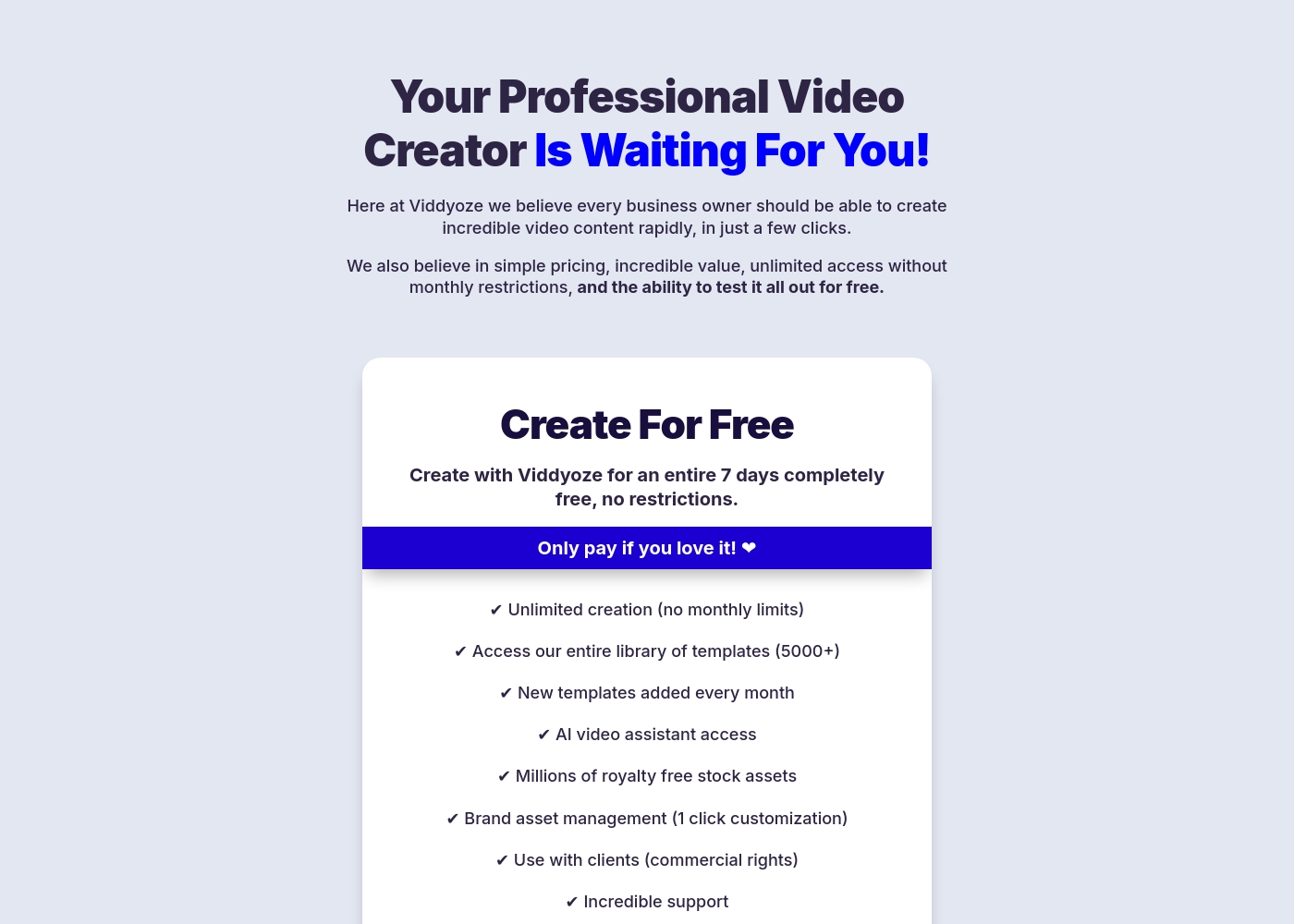
Price: $47/month Best For: Users needing unlimited video creation capacity and commercial rights Refund Policy: Cancel anytime (after the 7-day trial) Other Features:
- Unlimited creation (absolutely no monthly limits).
- Access to our massive library of over 5000+ templates.
- Includes full access to the AI video assistant (ViddyBot).
- Commercial rights for creating videos for your clients.
- Millions of royalty-free stock assets are included.
- Unlimited video creation (no monthly limits)
- Access to entire template library (5000+)
- New templates added every month
- AI video assistant access (ViddyBot)
- Millions of royalty free stock assets
Pricing Notes
- AVS4YOU offers an appealing $79 one-time payment for lifetime access, offering great long-term value.
- The AVS4YOU license is severely restricted to a single PC, causing friction upon hardware changes.
- Viddyoze costs $47 monthly but includes unlimited creation and commercial rights, essential for business users.
- Users report difficulty canceling the 7-day Viddyoze trial and being incorrectly charged; caution is strongly advised.
- Viddyoze's ongoing cost is higher than AVS4YOU's one-time option, but it provides continuous feature and template updates.
Pricing Head-to-Head
User Reviews
Users generally recommend AVS4YOU for its user-friendly interface and reliable functionality across a comprehensive suite of multimedia tools. Reviewers frequently emphasize the software's excellent versatility for tasks like video editing, audio conversion, and DVD copying, stressing that it offers exceptional value for the price point.
The technical support team also receives high praise for its accessibility, promptness, and effectiveness in quickly resolving various technical issues. Many long-time customers affirm that the company consistently updates its software, honoring its commitments over many years.
I am a long time user of both AVS VIDEO and AUDIO editors. These tools are remarkably easy to use and produce high quality content with minimal effort! I recommend the full suite highly.
Users frequently praise Viddyoze for its exceptional ease of use and high-quality templates, noting it's a great tool for quickly creating professional intros, outros, and branding materials. Many long-term users call it the “best investment” and value the simplicity of customizing animations in just a few clicks.
The tool is celebrated for helping content stand out and serving as a powerful secret weapon for marketing. However, external feedback reveals serious inconsistencies regarding billing and customer support reliability, particularly around the 7-day free trial.
I have been using Viddyoze for years. I love the ease of use and the quality of the projects it delivers. This tool has gotten me out of many creative jams quickly!
Our Verdict
AVS4YOU and Viddyoze couldn't be more different; your optimal choice depends entirely on your workflow. If you want a full, feature-rich desktop toolbox, AVS4YOU is the clear answer. If you need speed, templates, and commercial client rights, Viddyoze is the superior tool. However, remember AVS4YOU’s one-time price is appealing. Be aware that the license is strictly tied to a single, specific PC, which constantly frustrates long-term users. AVS4YOU's superpower is its comprehensive functionality and deep editing control. You get five separate programs enabling advanced features like Chroma key and fast GPU-accelerated conversion. Use AVS4YOU for serious multi-media editing, audio manipulation, and archiving family memories onto DVDs. The $79 Unlimited plan represents fantastic value if you are fine with the restrictive licensing. Viddyoze excels at velocity and visual branding consistency immediately. Its massive library of 5,000+ professional templates allows you to create slick logos and social ads in minutes. Viddyoze includes commercial rights for client work and offers continuous feature updates and AI support (ViddyBot). It is the perfect choice for agencies and online marketers needing high-volume production quickly. The deciding factor is control versus convenience and platform. AVS4YOU gives you granular manual control over your projects on your local Windows machine. Viddyoze offers cloud convenience and professional templates, making expert results look effortless on any device. Pick Viddyoze if you sell videos frequently; choose AVS4YOU only if you need comprehensive editing depth. Final verdict: Viddyoze is better for marketing and commercial business use due to flexibility and speed. AVS4YOU is the superior tool for complex, multi-media editing tasks, provided you can accept the restrictive single-PC Windows license.
Frequently Asked Questions
Which is better for deep video editing: AVS4YOU or Viddyoze?
AVS4YOU is significantly better designed for deep editing tasks. It is a full multimedia desktop suite featuring Chroma key and non-recoding editing. Viddyoze only allows customization of pre-set, promotional templates.
Does Viddyoze offer a one-time purchase like AVS4YOU?
No, Viddyoze operates solely on a recurring monthly subscription model ($47/month). AVS4YOU offers an attractive Unlimited Subscription for a $79 one-time fee. The AVS4YOU license is tied to a specific single PC.
Can I use AVS4YOU on my Mac or laptop?
No, AVS4YOU is explicitly marketed as software only for Windows operating systems. Viddyoze is a cloud service accessible on any device with a capable web browser.
Which tool is better for creating branded social media clips?
Viddyoze is ideal for creating short, branded social media clips quickly. It provides 5,000+ templates and 3-click branding customization. AVS4YOU requires more manual effort for these quick assets.
Is AVS4YOU’s “Unlimited Subscription” truly unlimited?
The purchase includes lifetime usage access, but it is strictly limited to a single PC. You must buy a new license if you upgrade your computer, which is a major point of user complaint.
Does Viddyoze include commercial rights for client work?
Yes, the Viddyoze monthly plan includes full commercial rights. You can confidently create videos and branded assets for your paying clients without extra fees.
Ready to Choose?
Both tools have their strengths. Choose based on your specific needs.