AVS4YOU vs Pinnacle Studio
This comparison pits long-term value against cutting-edge editing capability. AVS4YOU is an affordable, comprehensive multimedia suite built for simple tasks. Pinnacle Studio offers advanced features but users report frustrating performance issues. You must choose between dependable simplicity and feature-rich instability.
Best for: Budget-conscious users seeking a permanent, one-time payment video solution., Users who require frequent video conversion and basic editing tools in one suite.
Best for: Video enthusiasts who need MultiCam editing capabilities., Creators working actively with 8K footage or high-resolution timelines.
Functional suite with restrictive licensing.
We assessed the AVS4YOU suite as a highly functional and simple solution for diverse multimedia editing and conversion needs. While the array of tools is excellent and priced competitively, we found the single-device licensing policy highly restrictive, especially for the popular “Unlimited Subscription.” Overall, the product delivers quality output but requires clearer communication regarding license portability.
Pros
- Excellent value for the comprehensive multimedia software suite.
- Software is highly versatile for video, audio, and conversion tasks.
- Simple, intuitive, and user-friendly interface design.
- Technical support staff is consistently praised for quick responses.
Cons
- The "Unlimited" license is strictly limited to a single PC/device.
- License transfer or reactivation is often complex after a computer crash.
- Software can become slow when processing very large video files.
- Screen capture feature sometimes records without accompanying audio.
Powerful features, critical flaws.
We found that Pinnacle Studio 26 advertises excellent advanced features like 8K video support and extensive creative bundles, often appealing through affordable one-time pricing. However, overwhelmingly negative user feedback regarding pervasive instability and completely absent customer support casts serious doubt on its usability. Overall, we cannot recommend this software until the severe stability and support issues reported by the user base are definitively addressed.
Pros
- Offers sophisticated, multi-track editing features (MultiCam, 8K support).
- Pricing model is an affordable one-time purchase (especially upgrade bundles).
- Includes comprehensive utility and asset bundles in higher-tier packages.
- Interface is considered user-friendly by some long-time users.
Cons
- Extremely frequent crashing and freezing are reported across multiple versions.
- Customer support is consistently described as non-existent and unhelpful.
- Users experience major issues with rendering, artifacts, and export failures.
- The software can fail to uninstall properly, requiring complex manual steps.
AboutAVS4YOU
AVS4YOU is rightly called the “Ultimate multimedia editing family.” It is a collection of tools designed for anyone looking to produce high-quality video and audio content, and even more. Whether you need to convert files, trim a video, or apply engaging effects like Chroma key, this family of software has you covered. Users consistently highlight that it's very convenient, user friendly, and functional ✨.
AboutPinnacle Studio
Pinnacle Studio 26 provides a welcoming, intuitive workspace designed for sophisticated video creation. It is a comprehensive tool that includes video editing, screen recording, and DVD authoring capabilities. Whether you are new to video editing or already an experienced producer, this software has a tier that meets your goals. Use it professionally for vlogging, creating channel content, or powerful business video production. Pinnacle Studio helps you achieve professional results while taking your edits to the next level. 💡
Highlights
Feature Comparison
Features Overview
We highlight the main differences and pick a winner for each feature.
Pricing & Value
AVS4YOU offers remarkable long-term value; Pinnacle Studio has high feature costs.
AVS4YOU offers a permanent Unlimited Subscription for a $79 one-time payment. This provides lifetime access to five separate programs. Pinnacle Studio uses a purchase model starting around $26. Exact lifetime costs are much less clear. AVS4YOU is significantly cheaper and more certain for long-term users. The AVS4YOU Unlimited plan avoids yearly renewal fees forever.
Stability and Crashes
AVS4YOU runs dependably; Pinnacle Studio’s reliability is a major risk point.
AVS4YOU is usually simple and stable, with minor slowdowns on very large files. Pinnacle Studio frequently suffers from critical stability issues and crashes. Users cite problems with rendering and unreliable exports often. Pinnacle Studio improved stability with recent updates, but user reports remain mixed. AVS4YOU delivers a consistently more dependable editing workflow.
Advanced Features
Pinnacle Studio supports high-end editing; AVS4YOU stick to functional basics.
Pinnacle Studio excels with powerful, advanced editing capabilities. This includes MultiCam editing and support for importing massive 8K footage. AVS4YOU provides standard trimming, conversion, and Chroma key. AVS4YOU focuses on making essential tasks easy, not high-end production. For complex multi-camera projects, Pinnacle Studio is the only viable choice here.
Licensing Flexibility
AVS4YOU locks software to one PC; Pinnacle Studio is likely more forgiving.
The AVS4YOU Infinite license is strictly limited to one specialized PC/device. Losing your computer makes reactivation complex or impossible. Pinnacle Studio uses a standard purchase model, which is generally more flexible. AVS4YOU’s restrictive licensing is a huge hidden pain point for many long-term users. Users who frequently upgrade hardware should avoid the AVS4YOU Unlimited plan due to the risk.
Non-Recoding Edits
AVS4YOU saves time with ReMaker; Pinnacle Studio relies on standard export.
AVS4YOU includes the specialized AVS Video ReMaker tool, avoiding full video reconversion. This saves massive amounts of time when doing simple cuts on large files. Pinnacle Studio uses standard complex rendering processes after every major edit. AVS4YOU provides a key efficiency boost for quick, high-volume trimming tasks. Using AVS Video ReMaker maintains original video quality instantly during light edits.
Customer Support
AVS4YOU support is excellent; Pinnacle Studio support is poorly rated.
AVS4YOU's technical support staff is consistently praised by clients. Users describe their responses as prompt, effective, and easily accessible. Pinnacle Studio users frequently cite slow responses or unhelpful technical support experiences. Reliable customer service minimizes downtime when problems occur. AVS4YOU clearly wins the support battle, ensuring you get help quickly.
Learning Resources
Pinnacle Studio offers great structured learning; AVS4YOU relies on simplicity.
Pinnacle Studio gives new users access to built-in tutorials and guides. It also provides a valuable 10-day StudioBacklot trial for training and content. The AVS4YOU interface is intuitive and simple to master immediately. AVS4YOU is inherently easier, but Pinnacle Studio offers structured, detailed help. Beginners needing in-depth training resources will benefit most from Pinnacle Studio.
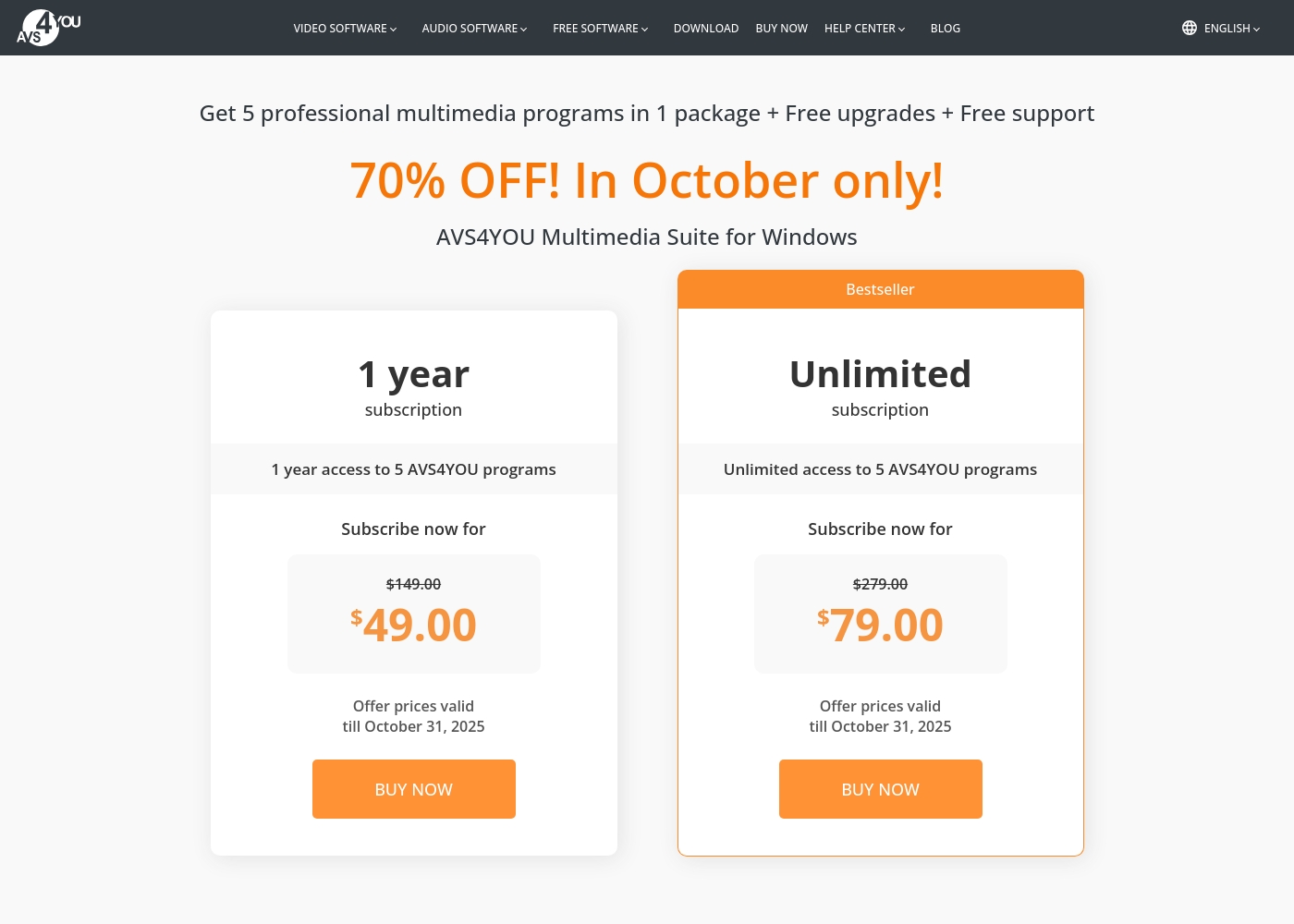
AVS4YOU costs between $49.00 and $79.00 per purchase with 2 main plans: 1 Year Subscription at $49.00/year and Unlimited Subscription at $79.00 one-time.
The simple pricing structure focuses on giving you total access to the AVS4YOU Multimedia Suite. Here is a breakdown of the two options currently available.
1 Year Subscription
Price: $49.00 per year (discounted from $149.00) Best For: Users who want flexibility or prefer annual budgeting Refund Policy: 30-day money-back guarantee Other Features:
- 1 year access to 5 AVS4YOU programs
- Includes free upgrades and free support
- No watermark on output files while active
- 1 year access to 5 AVS4YOU programs
- Free upgrades
- Free support
- One license key per computer
- Unlimited lifetime access to 5 AVS4YOU programs
- One-time payment (no yearly renewals)
- Free upgrades for programs
- Free support
- Bestseller
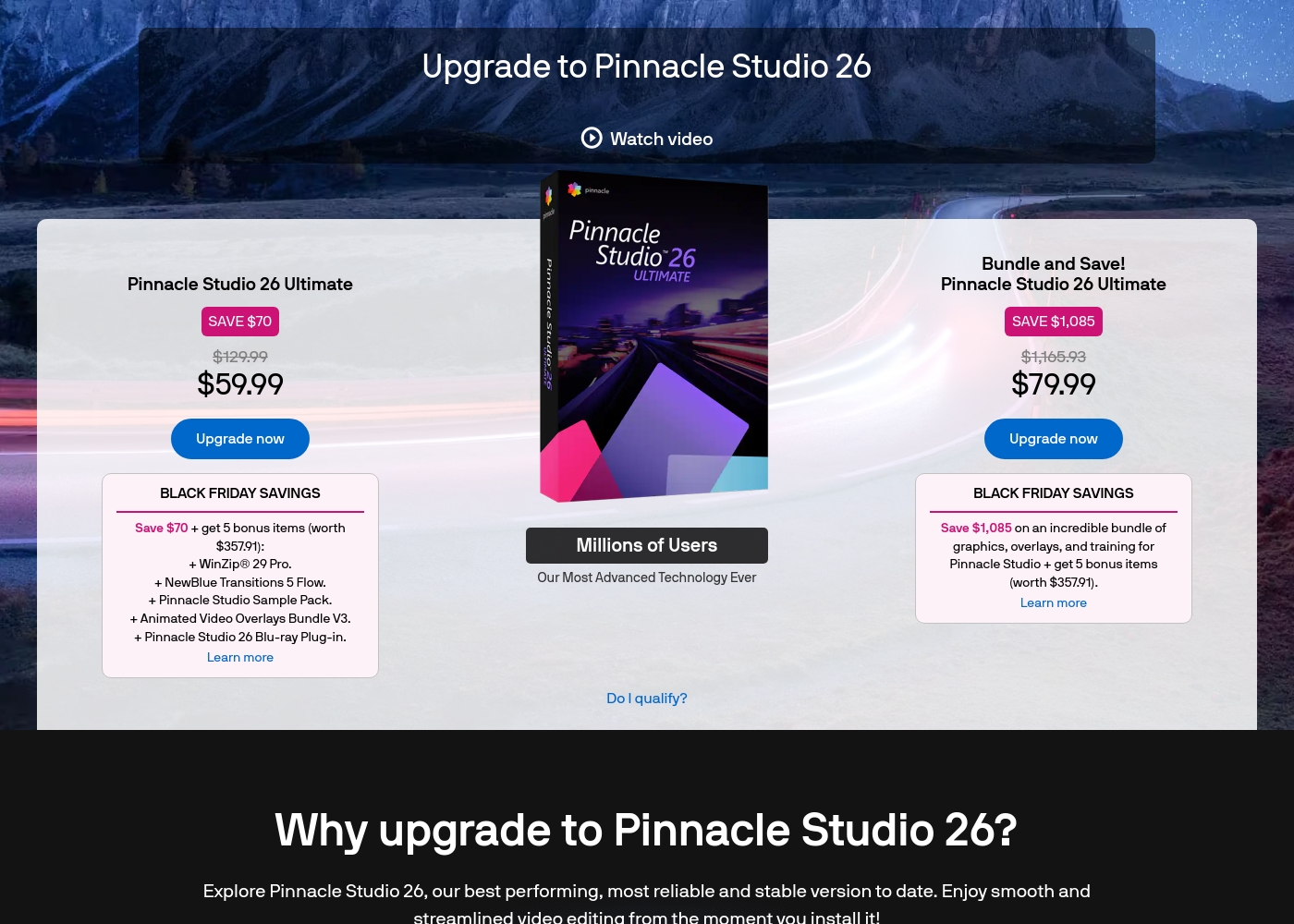
Pinnacle Studio 26 Ultimate acquisition costs range between $59.99 and $79.99 as a one-time upgrade purchase, with two main options: Pinnacle Studio 26 Ultimate at $59.99, and the Bundle and Save! version at $79.99.
These prices represent special Black Friday upgrade offers for users looking to access the latest features. Here is how the deals compare:
Pinnacle Studio 26 Ultimate
Price: $59.99 (One-time Upgrade Price) Best For: Current users who want the latest, most stable software version and specific utility tools. Other Features:
- Saves you $70 off the regular $129.99 price.
- Includes a total of 5 bonus items worth $357.91.
- Comes with WinZip® 29 Pro and NewBlue Transitions 5 Flow.
- Features the Pinnacle Studio 26 Blu-ray Plug-in.
- Includes the Pinnacle Studio Sample Pack and Animated Video Overlays Bundle V3.
- One-time price of $59.99 (was $129.99)
- 5 bonus items included (worth $357.91)
- Includes WinZip® 29 Pro
- Includes NewBlue Transitions 5 Flow
- Includes Pinnacle Studio 26 Blu-ray Plug-in
- One-time price of $79.99 (was $1,165.93)
- Includes all 5 bonus items (worth $357.91)
- Includes training, graphics, and overlays bundle
- Save $1,085 on the total package
Pricing Notes
- AVS4YOU offers a fixed, one-time price of $79 for permanent, lifetime software access.
- Pinnacle Studio has a lower initial entry price point but requires recurring purchases or licenses.
- The AVS4YOU Unlimited License is strictly tied to one computer and is non-transferable, a significant limitation.
- AVS4YOU includes a strong 30-day money-back guarantee for risk-free evaluation.
- Pinnacle Studio includes valuable access to the 10-day StudioBacklot trial for training assets.
Pricing Head-to-Head
User Reviews
Users generally recommend AVS4YOU for its user-friendly interface and reliable functionality across a comprehensive suite of multimedia tools. Reviewers frequently emphasize the software's excellent versatility for tasks like video editing, audio conversion, and DVD copying, stressing that it offers exceptional value for the price point.
The technical support team also receives high praise for its accessibility, promptness, and effectiveness in quickly resolving various technical issues. Many long-time customers affirm that the company consistently updates its software, honoring its commitments over many years.
I am a long time user of both AVS VIDEO and AUDIO editors. These tools are remarkably easy to use and produce high quality content with minimal effort! I recommend the full suite highly.
User feedback for Pinnacle Studio is exceptionally poor, primarily focusing on extreme frustrations with the software's reliability and performance. Despite newer versions claiming improved stability, many users report constant crashing, freezing, and issues with rendering, even when using high-spec computers.
This instability leads to lost progress and wasted time. The second overwhelmingly negative theme is customer support.
I’ve been using this product for several years because it is user friendly and features many nice tools. However, the tech support when there is an issue is not good at all. I was extremely disappointed and uninstalled the software despite owning it.
Our Verdict
Choosing between AVS4YOU and Pinnacle Studio means picking your priority. Do you value stability and guaranteed lifetime access, or do you need advanced features at any cost? For the vast majority of consumer editors, AVS4YOU is the safer and clearer choice. AVS4YOU’s superpower is undeniable long-term value combined with simplicity and stability. For only $79, you get the Unlimited Subscription providing permanent access to five tools. Plus, AVS4YOU's technical support is consistently praised for being quick and extremely effective. Pinnacle Studio's superpower lies in its professional feature set and 8K support. It offers MultiCam editing, Stop Motion, and powerful color correction tools. If your projects rely on these advanced capabilities, Pinnacle Studio is technically superior. The deciding factor is reliability versus advanced functionality. Pinnacle Studio offers amazing features, but user reports of crashes and poor support are constant. AVS4YOU offers a simple, stable workflow with excellent support. Choose AVS4YOU if you prioritize ease of use and maximum value over many years. Go with Pinnacle Studio only if MultiCam or 8K support is absolutely essential for your video projects.
Frequently Asked Questions
Which software is better for beginners: AVS4YOU or Pinnacle Studio?
AVS4YOU is designed for maximum simplicity; users master the basics in minutes. Pinnacle Studio offers more complexity but provides structured learning via included tutorials and StudioBacklot. If raw simplicity is key, AVS4YOU is easier to start with immediately.
Can I get a lifetime license for Pinnacle Studio?
No explicit lifetime license is offered for Pinnacle Studio based on available data. AVS4YOU offers the compelling Unlimited Subscription for a one-time fixed payment. This makes AVS4YOU the better long-term value option by avoiding annual renewals.
Which editing software supports high-resolution 8K video footage?
Pinnacle Studio specifically supports importing and working with 8K footage. AVS4YOU focuses on standard video formats and does not mention 8K compatibility. If you are editing incredibly high-resolution files, Pinnacle Studio is the necessary tool.
Is AVS4YOU's licensing highly restrictive?
Yes, the AVS4YOU license is strictly tied to one computer only. License transfer becomes complicated if your computer crashes or you upgrade your hardware. This restriction is a major pain point frequently mentioned by AVS4YOU users.
Which tool has better customer support when problems arise?
AVS4YOU is widely praised for its prompt and effective technical support team. Pinnacle Studio users often cite slow, inconsistent, or unhelpful support responses. AVS4YOU offers a much better experience when seeking technical help.
Does AVS4YOU include MultiCam editing features like Pinnacle Studio?
No, AVS4YOU does not include the advanced MultiCam editing capabilities. Pinnacle Studio is built for multi-camera sequencing and offers dedicated MultiCam tools. If you use several camera angles, Pinnacle Studio is the only product suitable.
Ready to Choose?
Both tools have their strengths. Choose based on your specific needs.