AVS4YOU vs Kapwing
This is a classic battle: desktop suite power versus fast online editing speed. AVS4YOU offers huge functionality for a low, one-time Windows fee. Kapwing provides browser-based creation and great teamwork tools but on a strict monthly fee structure. The choice depends entirely on your platform needs and tolerance for licensing drama.
Functional suite with restrictive licensing.
We assessed the AVS4YOU suite as a highly functional and simple solution for diverse multimedia editing and conversion needs. While the array of tools is excellent and priced competitively, we found the single-device licensing policy highly restrictive, especially for the popular “Unlimited Subscription.” Overall, the product delivers quality output but requires clearer communication regarding license portability.
Pros
- Excellent value for the comprehensive multimedia software suite.
- Software is highly versatile for video, audio, and conversion tasks.
- Simple, intuitive, and user-friendly interface design.
- Technical support staff is consistently praised for quick responses.
Cons
- The "Unlimited" license is strictly limited to a single PC/device.
- License transfer or reactivation is often complex after a computer crash.
- Software can become slow when processing very large video files.
- Screen capture feature sometimes records without accompanying audio.
Easy UI, high-risk business policies.
We recognize Kapwing offers a powerful, user-friendly online editor perfect for quick social media content creation, often cited as being simple to figure out. However, serious concerns exist regarding its business model, aggressive paywalling, and unresponsive customer support practices. Overall, we caution users strongly due to predatory billing and an irresponsible user data retention policy that repeatedly results in unexpected, permanent content loss.
Pros
- User-friendly and simple interface (easy to figure out quickly).
- Browser-based editing requires no software downloads.
- Useful tools for repurposing content (e.g., short clips from long videos).
- Offers specific powerful timeline controls, including keyframes and custom animations.
Cons
- Aggressive paywalls make the free version nearly useless for core editing tasks.
- Irresponsible data retention; projects are reportedly deleted after short payment delays or 30 days.
- Unresponsive customer service, often hiding behind a strict "no refund policy".
- Auto-renewal policies sometimes lack proper notification, leading to unexpected charges.
AboutAVS4YOU
AVS4YOU is rightly called the “Ultimate multimedia editing family.” It is a collection of tools designed for anyone looking to produce high-quality video and audio content, and even more. Whether you need to convert files, trim a video, or apply engaging effects like Chroma key, this family of software has you covered. Users consistently highlight that it's very convenient, user friendly, and functional ✨.
AboutKapwing
Kapwing is recognized as a powerful, yet incredibly user-friendly, online video service. It’s designed for anyone who needs to be immediately ready to create high-quality content. If you are a social media manager or someone who values speed and collaboration, this tool is described as essential for your bookmark list. Users consistently call it the most user friendly software they have ever used. 💡
Highlights
Feature Comparison
Features Overview
We highlight the main differences and pick a winner for each feature.
Platform & Accessibility
AVS4YOU is a powerful Windows desktop suite; Kapwing is fully cross-platform online.
AVS4YOU is strictly a Windows-only desktop application suite. You must download and install all five programs locally. Kapwing is browser-based, meaning you can access it instantly from any operating system. This includes Mac, Linux, and mobile devices. Kapwing wins on flexibility, offering instant access anywhere with an internet connection. AVS4YOU provides higher performance due to native desktop operation. If you use Mac or work across devices, Kapwing is essential; AVS4YOU is not an option for you.
Pricing Model & Value
AVS4YOU offers huge, low-cost long-term value; Kapwing is subscription-based and per-user.
AVS4YOU's Unlimited Subscription is a low $79 one-time payment for permanent access. This provides excellent value over time for solo users. Kapwing uses monthly per-member pricing, costing up to $50/member/month if billed annually. Costs scale rapidly for teams. AVS4YOU is clearly superior for the solo user or small budget needing a full feature set permanently. Kapwing's high monthly fee is only worthwhile if you leverage its specific team and online advantages consistently.
Collaboration Tools
Kapwing is built for team editing; AVS4YOU is strictly a single-user tool.
Kapwing supports seamless collaborative editing for teams within a shared online workspace. This dramatically boosts group productivity. AVS4YOU is licensed strictly to one computer, preventing team members from easily sharing the same working project or license. For any project requiring immediate team input or multiple editors, Kapwing is the only logical choice here. Solo creators focused on single workstations won't utilize Kapwing's collaboration features or need high per-user pricing.
License Restrictions
AVS4YOU's license is highly restrictive to one PC; Kapwing offers online portability.
AVS4YOU's Unlimited Subscription is permanently tied to only one physical computer/device. Transferring the license is complex and often fails upon hardware crash. Kapwing is accessed online, allowing you to instantly switch devices seamlessly without license concerns. AVS4YOU's rigid single-device limitation causes user friction and poor sentiment when hardware changes unexpectedly. Kapwing avoids physical restrictions but risks punishing data deletion if billing lapses, posing a different workflow risk.
Specialized Utility
AVS4YOU features non-recoding editing; Kapwing excels at social media repurposing.
AVS4YOU includes Video ReMaker, allowing fast, quality-preserving edits without full file reconversion. It also easily burns custom DVD/Blu-ray discs. Kapwing excels at social media optimization with dedicated tools like the Resizer and Smart Cut functionality. If you handle massive files and need speed or physical media output, the specialized AVS4YOU tools are much better. Kapwing is the better tool for creators focused purely on quick-turnaround digital content delivery for multiple platforms.
Customer Support & Trust
AVS4YOU support is praised and trustworthy; Kapwing support is frequently reported as unresponsive.
AVS4YOU customers frequently praise the support team for being prompt, accessible, and highly effective. They resolve technical issues quickly. Kapwing users report unresponsive customer service and very rigid 'no refund' policies, even when billing issues arise. AVS4YOU offers a clear 30-day money-back guarantee, significantly mitigating initial purchase risk effectively. Kapwing has a very high risk profile, exacerbated by reports of permanent project deletion upon minimal billing delays.
Multimedia Scope
AVS4YOU is a full 5-program suite; Kapwing is primarily a focused online video editor.
AVS4YOU offers a comprehensive suite including a Converter, ReMaker, Editor, Player, and Audio tools. It handles video, audio, and images powerfully. Kapwing concentrates solely on modern online video editing features and content repurposing workflows. For users seeking one platform for conversion, editing, and playback in one purchase, AVS4YOU provides a broader solution. If you only need strong browser-based video editing and collaboration, Kapwing’s focused set meets those exact needs.
Accessibility Tools
Kapwing has excellent subtitling features; AVS4YOU details are not specified.
Kapwing features robust and easy-to-use subtitling tools built directly into the online editor. This greatly improves video accessibility. Kapwing is praised for helping creators address accessibility needs, significantly boosting reach. AVS4YOU's feature details do not explicitly highlight strong dedicated subtitling or accessibility tools. For creators specializing in public content where captions are mandatory, Kapwing holds the clear advantage here.
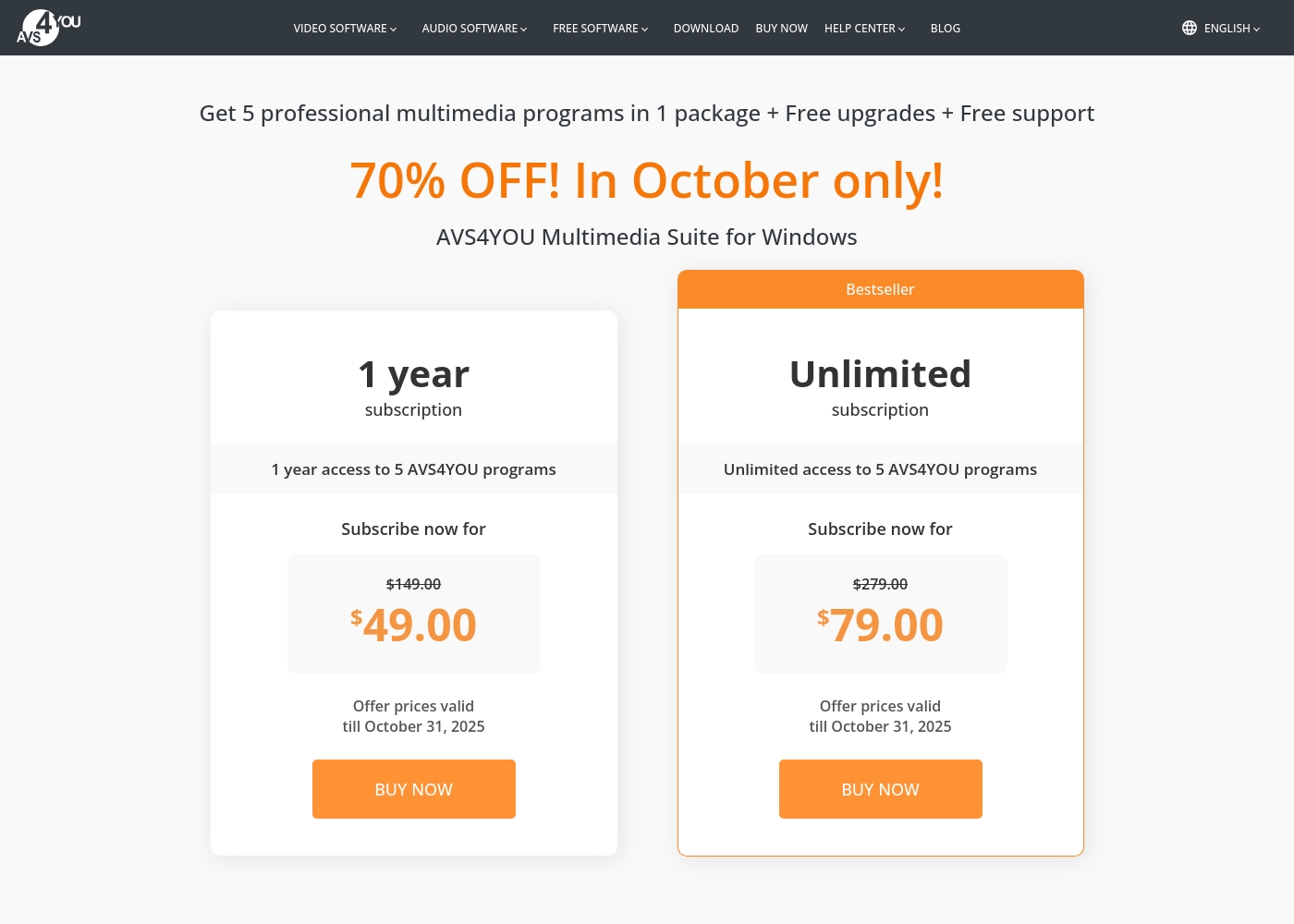
AVS4YOU costs between $49.00 and $79.00 per purchase with 2 main plans: 1 Year Subscription at $49.00/year and Unlimited Subscription at $79.00 one-time.
The simple pricing structure focuses on giving you total access to the AVS4YOU Multimedia Suite. Here is a breakdown of the two options currently available.
1 Year Subscription
Price: $49.00 per year (discounted from $149.00) Websites Supported: Not explicitly stated (One license per computer) Best For: Users who want flexibility or prefer annual budgeting Refund Policy: 30-day money-back guarantee Other Features:
- 1 year access to 5 AVS4YOU programs
- Includes free upgrades and free support
- No watermark on output files while active
- 1 year access to 5 AVS4YOU programs
- Free upgrades
- Free support
- One license key per computer
- Unlimited lifetime access to 5 AVS4YOU programs
- One-time payment (no yearly renewals)
- Free upgrades for programs
- Free support
- Bestseller
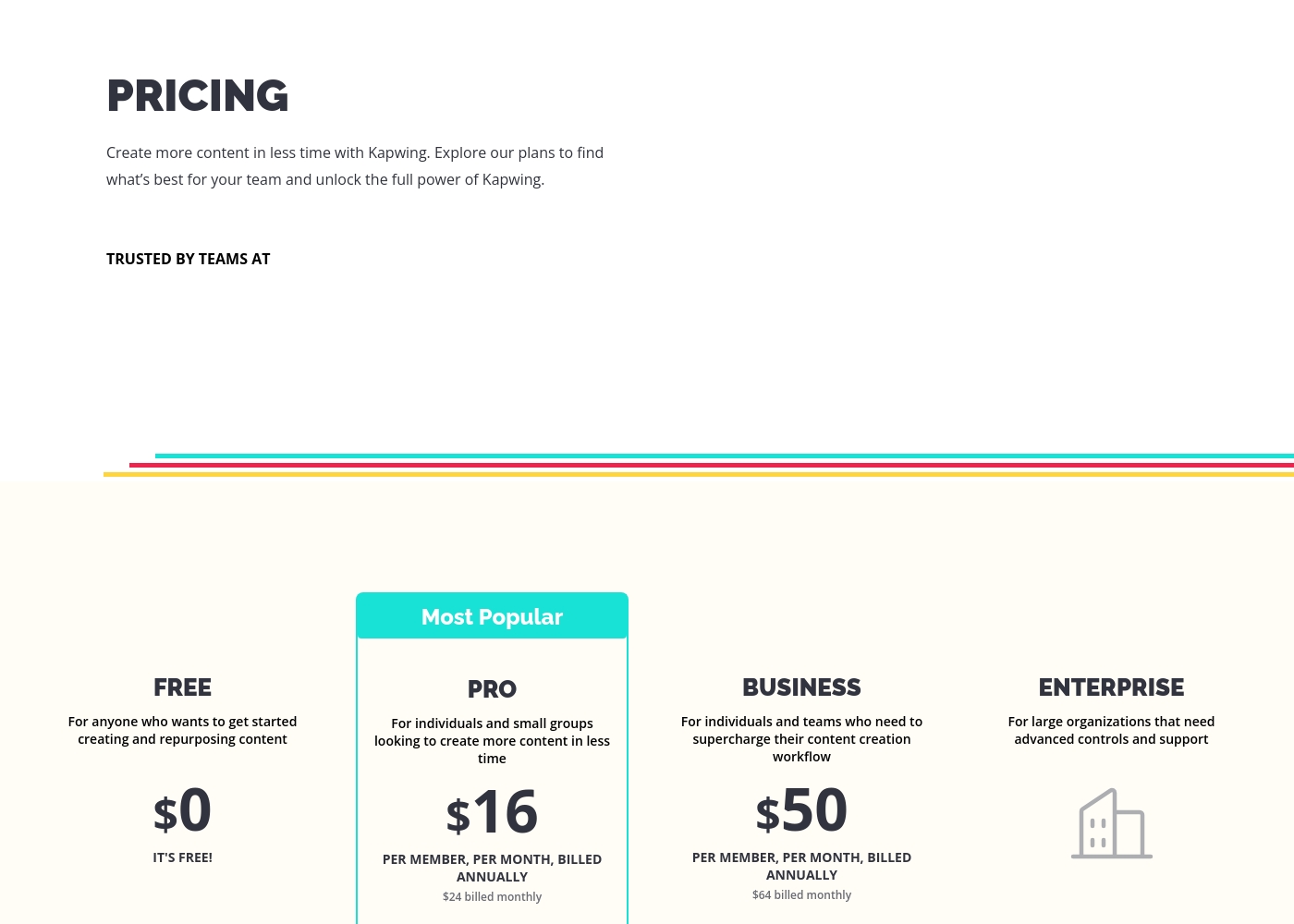
Kapwing costs between $0 and $50 per member/month (billed annually) with four plans: Free at $0, Pro at $16/member/month, Business at $50/member/month, and Enterprise (price not explicitly stated).
These plans help you explore Kapwing's full power and create content faster in less time.
FREE
Price: $0 Websites Supported: Not explicitly stated Best For: Anyone who wants to get started creating and repurposing content Refund Policy: Not explicitly stated Other Features:
- It's free!
- Perfect for getting started creating and repurposing content
- Billed per member, per month
- For individuals and small groups
- Everything in Free, plus features for your team workspace
- Billed per member, per month
- For individuals and teams
- Everything in Pro, plus features for your team workspace
- For large organizations
- Advanced controls and support
- Everything in Business, plus features for your team workspace
Pricing Notes
- AVS4YOU offers an incredible one-time $79 purchase for permanent access to five programs.
- The AVS4YOU price is strictly tied to one computer, causing issues upon hardware change or failure.
- AVS4YOU offers a clear 30-day money-back guarantee, while Kapwing does not state one.
- Kapwing uses a per-member model, making costs scale rapidly for collaborative teams.
- Kapwing's annual billing saves users signficantly over taking monthly rates, up to $14 per member monthly.
Pricing Head-to-Head
User Reviews
Users generally recommend AVS4YOU for its user-friendly interface and reliable functionality across a comprehensive suite of multimedia tools. Reviewers frequently emphasize the software's excellent versatility for tasks like video editing, audio conversion, and DVD copying, stressing that it offers exceptional value for the price point.
The technical support team also receives high praise for its accessibility, promptness, and effectiveness in quickly resolving various technical issues. Many long-time customers affirm that the company consistently updates its software, honoring its commitments over many years.
I am a long time user of both AVS VIDEO and AUDIO editors. These tools are remarkably easy to use and produce high quality content with minimal effort! I recommend the full suite highly.
Users often praise Kapwing’s generally simple user interface, noting it’s super easy to use right in the browser without needing complex downloads. They appreciate specific powerful features like detailed timeline controls and the new “Repurpose Video” button for quick short-form content creation.
However, recent external feedback is overwhelmingly negative regarding business practices and high-risk policies. Many users complain they are misled by marketing, finding that nearly all useful tools are locked behind an immediate, expensive paywall, making the free plan useless.
Kapwing is such a great tool for editing videos and creating content. It’s super easy to use, so you don’t need to be a pro to figure it out. Everything’s right there in your browser—no downloads needed.
Our Verdict
This comparison truly relies on deep user needs: desktop ownership versus online portability. AVS4YOU is the clear winner on trust, value, and overall functional depth. Kapwing is faster for teams but unfortunately presents a major data risk. AVS4YOU’s superpower is offering a massive suite for a tiny one-time fee. The Unlimited Subscription is only $79 for permanent access across five crucial programs. Users praise the friendly interface and responsive technical support staff consistently. AVS4YOU is ideal for Windows users wanting to edit videos, convert files, and manage media for years. Kapwing’s strength is instant, collaborative, browser-based editing speed. It's fantastic for remote social media teams needing rapid content creation and repurposing. Kapwing is undoubtedly the better tool for real-time collaboration and seamless cross-platform access. However, its high per-member subscription pricing quickly adds up for growing teams. The deciding factor is balancing security against convenience and cost. AVS4YOU is stable, cheap, and offers a strong 30-day money-back guarantee. Kapwing’s reputation suffers badly from reports of permanent project data deletion and rigid billing policies. Do not use Kapwing if you cannot tolerate a high risk of unexpected data loss. Pick AVS4YOU if you are a Windows editor seeking maximum features for minimum long-term cost. Choose Kapwing only if seamless team collaboration from a browser is your absolute highest operational priority.
Frequently Asked Questions
AVS4YOU vs Kapwing: Which is better for collaborative team editing?
Kapwing is explicitly designed for team editing and supports shared online workspaces. AVS4YOU is strictly licensed for use by a single person on one PC. Kapwing is the only real choice for any team collaboration needs.
Is AVS4YOU available for Mac users or operating systems besides Windows?
No, the AVS4YOU Multimedia Suite is explicitly designed only for Windows operating systems. Kapwing is fully cloud-based, making it instantly accessible for Mac and Linux users via a web browser.
Which software is cheaper for a single user, AVS4YOU or Kapwing?
AVS4YOU is vastly cheaper for a solo editor; the Unlimited Subscription is a very low one-time $79 purchase. Kapwing is subscription-based and the paid plans are charged per member monthly.
Does Kapwing have a money-back guarantee like AVS4YOU?
AVS4YOU offers a clear and transparent 30-day money-back guarantee for a risk-free purchase. Kapwing does not state an explicit money-back guarantee on its paid subscription plans.
Which tool is better for outputting video to DVD or Blu-ray discs?
AVS4YOU includes specific tools like the Video ReMaker to create and burn customized DVD and Blu-ray menus. Kapwing focuses solely on digital, online content delivery formats for social media.
Are user projects safe in AVS4YOU or Kapwing?
AVS4YOU stores projects locally on your computer, minimizing platform risk. Kapwing faces severe criticism for reportedly deleting user projects without warning after only short billing delays.
Ready to Choose?
Both tools have their strengths. Choose based on your specific needs.