AVS4YOU vs Invideo
This comparison pits AVS4YOU's proven, comprehensive desktop suite against Invideo's rapid, modern AI platform. AVS4YOU offers deep desktop functionality control and permanent ownership. Invideo delivers blazing speed and scalability via text-to-video capabilities. You're choosing between owning your software forever versus paying for monthly content volume.
Best for: Users requiring a permanent video/audio suite on a budget, Archiving and digitizing older physical media (camcorder transfer, DVDs)
Best for: Marketing agencies needing rapid content generation (UGC ads, promos), Small teams (up to 3 users) focused on scaling content output 5x faster
Functional suite with restrictive licensing.
We assessed the AVS4YOU suite as a highly functional and simple solution for diverse multimedia editing and conversion needs. While the array of tools is excellent and priced competitively, we found the single-device licensing policy highly restrictive, especially for the popular “Unlimited Subscription.” Overall, the product delivers quality output but requires clearer communication regarding license portability.
Pros
- Excellent value for the comprehensive multimedia software suite.
- Software is highly versatile for video, audio, and conversion tasks.
- Simple, intuitive, and user-friendly interface design.
- Technical support staff is consistently praised for quick responses.
Cons
- The "Unlimited" license is strictly limited to a single PC/device.
- License transfer or reactivation is often complex after a computer crash.
- Software can become slow when processing very large video files.
- Screen capture feature sometimes records without accompanying audio.
Rapid AI Video Creation, Backed by Humans.
We found Invideo AI to be exceptionally effective at transforming text prompts into polished videos quickly, enabling users to cut production time significantly. The platform stands out due to its genuinely dedicated, 24/7 customer support, which navigates users past complexity and technical inconsistencies. Overall, Invideo is a powerful AI tool deserving of content creators looking for speed and reliability, especially given the human safety net.
Pros
- Exceptional 24/7 customer support delivered by responsive, real humans.
- Dramatically reduces video creation time, boosting workflow efficiency.
- Highly user-friendly for generating videos from simple text prompts.
- Allows sophisticated editing of audio, voice, and captions using natural language.
Cons
- Occasional inconsistencies or anomalous results in AI-generated content quality.
- Users report frustration being charged for unsatisfactory generative AI prompts.
- Generating time can be lengthy when making multiple revisions.
- The media and video library needs expansion to offer more content variety.
AboutAVS4YOU
AVS4YOU is rightly called the “Ultimate multimedia editing family.” It is a collection of tools designed for anyone looking to produce high-quality video and audio content, and even more. Whether you need to convert files, trim a video, or apply engaging effects like Chroma key, this family of software has you covered. Users consistently highlight that it's very convenient, user friendly, and functional ✨.
AboutInvideo
Invideo is an AI tool designed to give you the power to play and create. It transforms simple text prompts related to your business or casual ideas into cinematic videos, professional promos, and detailed explainers instantly.
This platform is perfect for creators, educators, non-profits, and marketing agencies seeking rapid content creation. Whether you need an engaging UGC ad or a detailed product reel, Invideo handles the complex work. You're empowered to generate and edit content that reaches new customers across various countries, languages, and beliefs worldwide. 💡
Highlights
Feature Comparison
Features Overview
We highlight the main differences and pick a winner for each feature.
Core Workflow Speed
Invideo uses AI to generate videos instantly; AVS4YOU relies on manual timeline editing.
Invideo’s core feature is transforming a text prompt into a complete video draft immediately. This massive efficiency boost cuts video creation time significantly. Users report reducing production time from hours down to just 30 minutes. AVS4YOU uses traditional desktop editing requiring manual effort on a timeline. Its workflow involves selecting media, trimming clips, and applying effects by hand. This process is time-consuming but offers deep control. AVS4YOU helps speed up local media tasks using GPU conversion acceleration. Invideo's acceleration comes from its core AI engine, not your local hardware. For high-volume creators, Invideo offers scalability that AVS4YOU's single-PC, manual process cannot match. Speed is the biggest difference here.
Advanced Editing Tools
AVS4YOU provides cinematic effects, while Invideo uses AI to execute edits via text command.
AVS4YOU offers specific, advanced cinematic tools within its Video Editor program. These include features like Chroma key (green screen) and dramatic Slow Motion effects. You get precise, physical control over your assets. Invideo edits are performed using natural language prompts, simplifying the process greatly. You type 'change X to Y' and the AI executes the sophisticated modification. AVS4YOU also provides the Video ReMaker tool for non-recoding editing. This technical ability saves significant time while preserving maximum quality. If you need granular, frame-by-frame control and specific effects implementation, AVS4YOU is the choice. Invideo is for fast content refinement.
Pricing & Ownership
AVS4YOU sells permanent software ownership; Invideo sells temporary monthly usage and credits.
AVS4YOU offers an Unlimited Subscription for a low one-time fee of $79. This grants permanent, lifetime access to the entire multimedia suite. This is rare and offers fantastic long-term value. Invideo uses a recurring subscription model (starting at $28/month). Pricing scales based on usage quotas like AI credits and video minutes. AVS4YOU users own the software forever and do not worry about expiring monthly quotas. This eliminates recurring payment stress. Invideo users must constantly monitor their expiring monthly credits and video minutes. If you need 50+ videos monthly, Invideo requires ongoing significant investment.
Collaboration & Access
Invideo is cloud-based for teams; AVS4YOU is locally installed on a single, fixed PC.
Invideo is a cloud platform, accessible from any browser across multiple operating systems. Paid plans allow up to three users to collaborate on projects simultaneously. AVS4YOU is strictly Windows desktop software requiring local installation. Its licensing is rigidly tied to one specific computer device. This single-PC restriction means AVS4YOU is not suitable for team collaboration or shared workflows. License transfer is also difficult if your computer crashes. Invideo is designed explicitly for scaling content production within small teams or agencies needing shared access globally.
Input Capabilities
AVS4YOU provides robust desktop sourcing tools; Invideo focuses on utilizing text and stock assets.
AVS4YOU includes specific tools for capturing raw source footage directly to your PC. This includes built-in screen capture and camcorder transfer functionality. It's built for digitizing. Invideo's sourcing relies heavily on its large library of stock assets and AI generation. Input primarily starts with a text prompt or natural language instruction. AVS4YOU is essential if you need to transfer and edit personal physical media like old camcorder tapes or DVDs. It manages the whole digitization flow. Invideo shines when creating new, dynamic content where accessing 320+ iStock assets monthly is crucial for rapid assembly.
Customer Support
Invideo offers 24/7 human support; AVS4YOU provides highly effective, responsive standard support.
Invideo guarantees 24/7 access to real human support staff to resolve issues instantly. Users frequently praise the speed and quality of their responsiveness. AVS4YOU support is also consistently praised for being prompt and very effective at technical problem resolution. They are widely considered reliable. Invideo's availability around the clock makes it vital for agencies operating across different time zones. You always have immediate help. While AVS4YOU support is great, Invideo's 24/7 access is a significant differentiator for mission-critical issues.
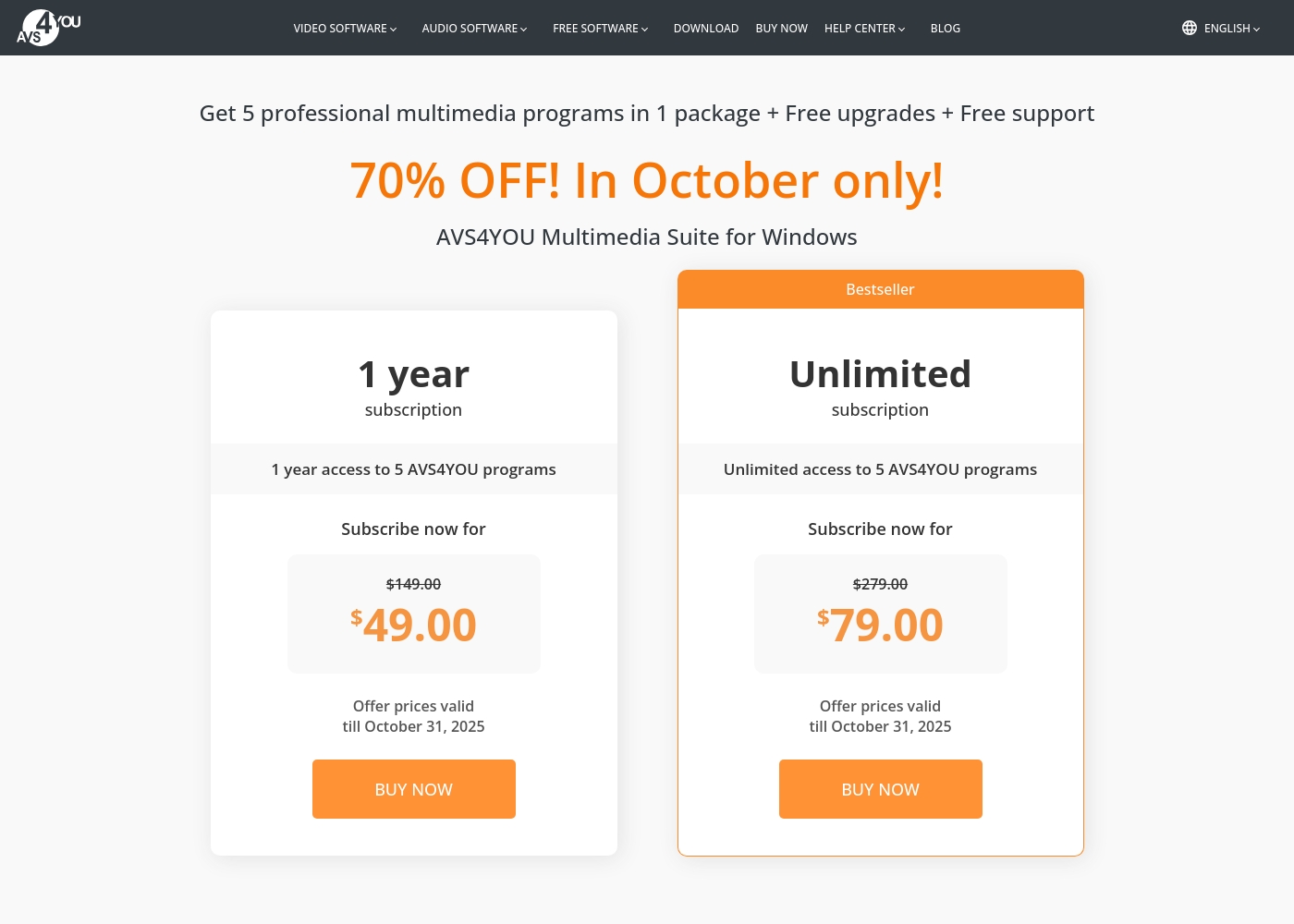
AVS4YOU costs between $49.00 and $79.00 per purchase with 2 main plans: 1 Year Subscription at $49.00/year and Unlimited Subscription at $79.00 one-time.
The simple pricing structure focuses on giving you total access to the AVS4YOU Multimedia Suite. Here is a breakdown of the two options currently available.
1 Year Subscription
Price: $49.00 per year (discounted from $149.00) Best For: Users who want flexibility or prefer annual budgeting Refund Policy: 30-day money-back guarantee Other Features:
- 1 year access to 5 AVS4YOU programs
- Includes free upgrades and free support
- No watermark on output files while active
- 1 year access to 5 AVS4YOU programs
- Free upgrades
- Free support
- One license key per computer
- Unlimited lifetime access to 5 AVS4YOU programs
- One-time payment (no yearly renewals)
- Free upgrades for programs
- Free support
- Bestseller
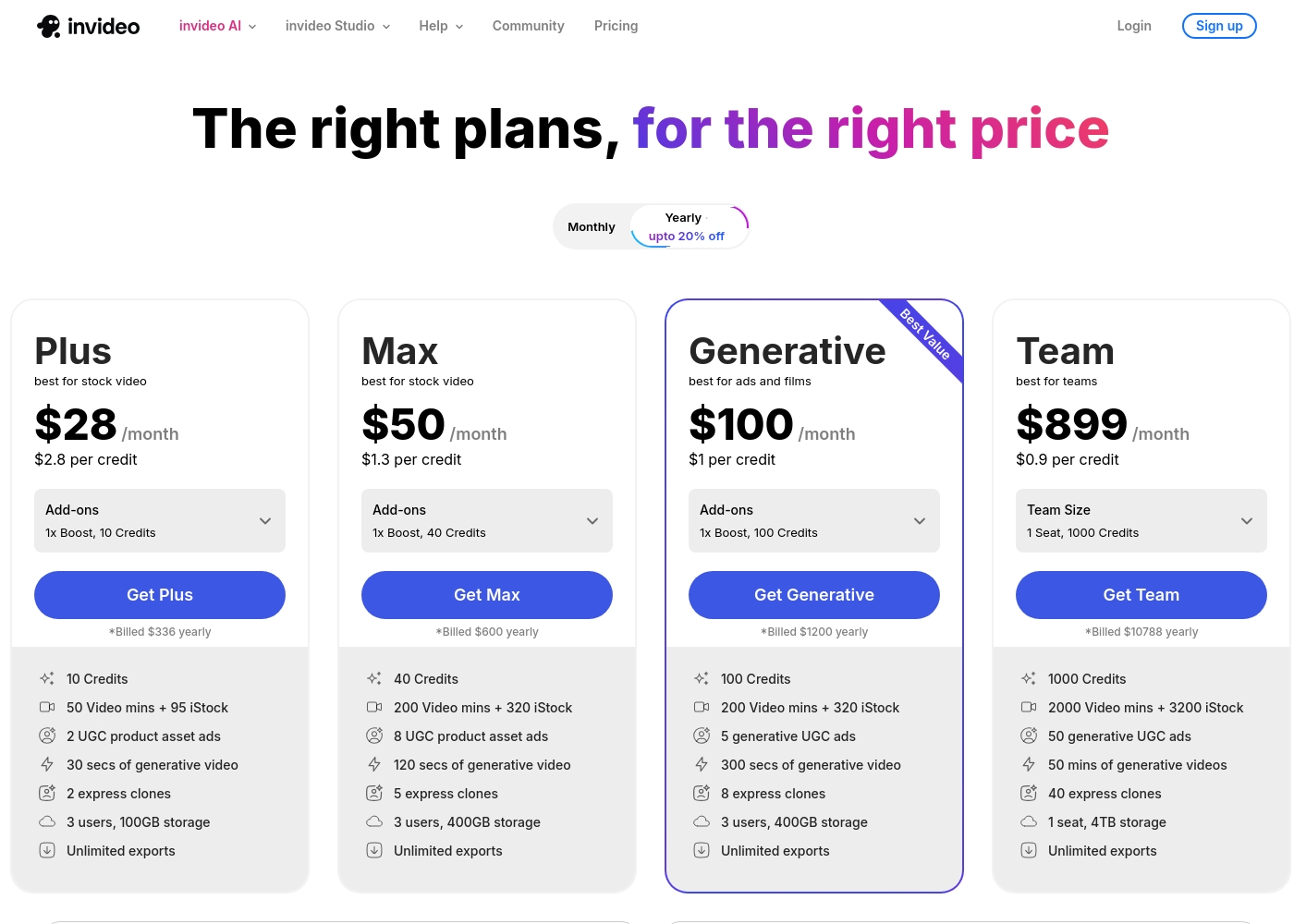
Invideo pricing ranges from $0 for the Free plan up to $899 per month for the Team plan, with three intermediate tiers: Plus at $28/month, Max at $50/month, and Generative at $100/month.
Here are the details for the plans available across monthly and yearly billing cycles.
- 10 Video mins and 1 AI credit per week
- 1 Express avatar
- 4 Exports per week with invideo watermark
- No access to generative features
- 10 Credits ($2.8 per credit)
- 50 Video mins + 95 iStock
- 2 UGC product asset ads
- 30 secs of generative video
- 2 express clones
- 40 Credits ($1.3 per credit)
- 200 Video mins + 320 iStock
- 8 UGC product asset ads
- 120 secs of generative video
- 5 express clones
- 100 Credits ($1 per credit)
- 200 Video mins + 320 iStock
- 5 generative UGC ads
- 300 secs of generative video
- 8 express clones
Pricing Notes
- AVS4YOU offers a permanent Unlimited Subscription for a $79 one-time payment.
- The AVS4YOU license is permanently tied to a single PC/device, limiting portability and team use.
- Invideo has a robust Free plan, while AVS4YOU content is watermarked if unregistered.
- Invideo's paid plans are usage-based, tracking AI credits and video minutes that reset monthly.
- AVS4YOU provides a firm 30-day money-back guarantee, which Invideo does not offer formally.
Pricing Head-to-Head
User Reviews
Users generally recommend AVS4YOU for its user-friendly interface and reliable functionality across a comprehensive suite of multimedia tools. Reviewers frequently emphasize the software's excellent versatility for tasks like video editing, audio conversion, and DVD copying, stressing that it offers exceptional value for the price point.
The technical support team also receives high praise for its accessibility, promptness, and effectiveness in quickly resolving various technical issues. Many long-time customers affirm that the company consistently updates its software, honoring its commitments over many years.
I am a long time user of both AVS VIDEO and AUDIO editors. These tools are remarkably easy to use and produce high quality content with minimal effort! I recommend the full suite highly.
Invideo AI enjoys widely positive reception, particularly for the strength of its customer support. Users frequently highlight the responsiveness and genuine care of the support team, praising specific agents for being patient, kind, and knowledgeable in resolving complex issues like billing errors or login problems.
Reviewers consistently find the platform an invaluable tool that is super easy to use, delivering professional results and saving significant time; some creators even attribute substantial growth in their channels to using the software. However, sentiment isn't universally positive regarding the core AI engine.
I had made the mistake of removing the email connected to my plan and couldn't understand why I was being charged. Patrick immediately located the account, helped me cancel the subscription, and provided great service. The team is excellent!
Our Verdict
Deciding between AVS4YOU and Invideo means choosing between absolute ownership and AI-driven speed. Both tools excel, but they serve completely different masters. AVS4YOU's superpower is its permanent ownership model for just $79 one-time. If you use Windows and need a versatile multimedia suite forever, AVS4YOU is unbeatable value. It provides deep, granular control, non-recoding editing, and classic archiving tools. Invideo, contrastingly, is a modern AI powerhouse built for speed and volume. It lets you create polished videos from simple text prompts in minutes, not hours. Invideo’s 24/7 human support and scalable, cloud-based platform provide serious confidence for teams. The deciding factor is undoubtedly licensing and core technology. AVS4YOU locks you to one PC with no flexibility; Invideo is built explicitly to collaborate. Pick Invideo if you produce frequent, marketing-driven videos for client needs and require speed. Choose AVS4YOU if you require permanent, powerful, Windows-based tools for personal projects and media archiving.
Frequently Asked Questions
Which is better for high-volume content creators, AVS4YOU or Invideo?
Invideo is far superior for high volume because it uses AI generation and supports team collaboration. AVS4YOU is limited to a desktop and manual, single-PC rendering. Invideo can cut video creation time down significantly for agencies.
Does AVS4YOU offer a permanent license, unlike Invideo?
Yes, AVS4YOU’s Unlimited Subscription is a one-time purchase of $79 for guaranteed lifetime access. Invideo uses a monthly or annual tiered subscription model. Invideo does not offer perpetual software ownership.
Is Invideo's editing system as precise as the one found in AVS4YOU?
AVS4YOU offers granular desktop control and specific tools like non-recoding editing and Chroma key effects. Invideo performs sophisticated edits using natural language commands. AVS4YOU gives you precise, manual timeline authority.
Is AVS4YOU cloud-based, or is it restricted to a single operating system?
AVS4YOU is strictly a Windows desktop suite that requires local installation and processing. Its license is tied to one PC only. Invideo is a flexible cloud-based platform accessible from any device.
Does Invideo include free stock footage and assets like the Max plan promises?
Yes, Invideo paid plans include substantial stock resources, such as up to 320 iStock assets monthly on the Max plan. AVS4YOU does not include any third-party stock asset libraries with its suite.
Which software is better for archiving old physical media, AVS4YOU or Invideo?
AVS4YOU is much better for archiving historical footage. It includes tools to transfer video directly from camcorders and create customized DVD/Blu-ray menus. Invideo focuses primarily on digital, AI-generated content.
Ready to Choose?
Both tools have their strengths. Choose based on your specific needs.