AVS4YOU vs Filmora 14
AVS4YOU and Filmora 14 have totally different approaches to editing software. AVS4YOU provides a complete multimedia suite for a simple, low, one-time fee. Filmora 14 is focused purely on powerful, modern, AI-driven video creation. The choice depends heavily on your platform and need for AI features.
Best for: Windows users primarily focused on conversion and archiving, Users seeking a permanent, non-subscription based editing solution
Best for: Content creators needing fast AI automation (enhancement, ideas), Users editing across multiple devices (Mac, Windows, iOS)
Functional suite with restrictive licensing.
We assessed the AVS4YOU suite as a highly functional and simple solution for diverse multimedia editing and conversion needs. While the array of tools is excellent and priced competitively, we found the single-device licensing policy highly restrictive, especially for the popular “Unlimited Subscription.” Overall, the product delivers quality output but requires clearer communication regarding license portability.
Pros
- Excellent value for the comprehensive multimedia software suite.
- Software is highly versatile for video, audio, and conversion tasks.
- Simple, intuitive, and user-friendly interface design.
- Technical support staff is consistently praised for quick responses.
Cons
- The "Unlimited" license is strictly limited to a single PC/device.
- License transfer or reactivation is often complex after a computer crash.
- Software can become slow when processing very large video files.
- Screen capture feature sometimes records without accompanying audio.
Powerful AI Editor, Buyer Beware.
We find Filmora 14 offers a powerful suite of AI editing tools and an accessible interface perfect for creators across all skill levels. While the feature set and performance are top-tier, we cannot overlook the severe, verified reports of deceptive billing and poor customer support from the vendor. Overall, this is a technically impressive editor marred by critical issues related to trust and operational transparency.
Pros
- Exceptionally easy to use interface suitable for all skill levels.
- Robust AI feature set simplifies complex edits like object removal and background cutting.
- Access to a massive 2.9M+ library of creative assets, music, and templates.
- Optimized performance with GPU acceleration, even on modest hardware.
Cons
- Severe billing issues and reported difficulties canceling auto-renewals.
- Support is often automated, unresponsive, and unhelpful via chat or email.
- Lack of transparency regarding hidden costs and AI credit consumption per feature.
- Perpetual license holders report forced migration to the newest version.
AboutAVS4YOU
AVS4YOU is rightly called the “Ultimate multimedia editing family.” It is a collection of tools designed for anyone looking to produce high-quality video and audio content, and even more. Whether you need to convert files, trim a video, or apply engaging effects like Chroma key, this family of software has you covered. Users consistently highlight that it's very convenient, user friendly, and functional ✨.
AboutFilmora 14
Filmora 15 is an award-winning video editor designed for both beginners and experts alike. It aims to help you edit as an expert with Filmora AI by streamlining the entire creative process.
The interface is intuitive and clean, making video editing simple even for those without prior experience. You can literally type, drop, or sketch ideas into the platform, and Filmora helps bring them to life with AI-driven effects. The platform provides a connected experience; it's available across desktop, tablet, and mobile, allowing you to create exactly as you wish. 💡
Highlights
Feature Comparison
Features Overview
We highlight the main differences and pick a winner for each feature.
AI Capabilities
Filmora 14 deeply integrates AI; AVS4YOU offers zero AI tools. Filmora 14 vastly streamlines modern editing workflows.
AVS4YOU handles traditional multimedia tasks without relying on automation. You get robust tools like Chroma key but no AI assistance. Filmora 14 is built around specialized AI features that save immense time. These include AI Video Enhancer and Idea to Video. Filmora 14 uses AI to handle complex tasks quickly, like translating video or auto-reframing for social media. AVS4YOU makes you do all that work manually. If you rely on smart features for fast content creation, Filmora 14's powerful AI platform is clearly superior.
Pricing Structure
AVS4YOU offers a simple, permanent license at a low cost. Filmora 14 uses a subscription model tied to valuable AI credits.
AVS4YOU is remarkably affordable, offering a lifetime license for just $79 one-time. This includes free upgrades across its five programs. Filmora 14 uses higher-priced annual subscriptions, starting at $69.99/year. Annual plans come bundled with monthly AI credits. The biggest difference is the structure: AVS4YOU is a one-time purchase model. Filmora 14 is a recurring professional subscription. If long-term budget predictability is key, AVS4YOU provides unbeatable value with its Unlimited Subscription plan.
Platform Options
Filmora 14 supports cross-platform editing across Mac, iOS, and Windows. AVS4YOU is exclusively a Windows-only desktop suite.
AVS4YOU is explicitly built and marketed as a Windows-only utility suite. You will not find compatible versions for Mac or iOS. Filmora 14 works seamlessly across Windows, Mac, iPhone, and iPad devices. The Advanced plans include Apple Sync for flexible editing. If you own a Mac, the choice is easy: Filmora 14 is the only option here. AVS4YOU cannot support your hardware needs. The platform choice impacts collaboration and flexibility for cross-device workflows significantly. Filmora 14 wins easily on options.
Single-PC Licensing
AVS4YOU’s lifetime license is strictly locked to one PC, causing user frustration. Filmora 14 uses modern, transferable per-user licensing.
The AVS4YOU Unlimited plan is fantastic value but carries a catch. The license is strictly tied to one specific computer device. If that PC crashes or you upgrade, AVS4YOU requires a complex reactivation or new purchase. Users frequently complain about this restriction. Filmora 14 licenses are per-user, allowing better flexibility and transferability between devices. This is the industry standard today. This rigid device lock makes AVS4YOU unusable for users who frequently upgrade or change their primary editing machine.
Non-Recoding Edits
AVS4YOU features a dedicated ReMaker tool for frame-accurate, quick no-render edits. Filmora 14 requires standard rendering for all edits.
AVS4YOU includes the specialized AVS Video ReMaker program in its suite. This tool cuts, trims, and joins files without requiring a full reconversion. This non-recoding process saves enormous amounts of time when working with large files. It maintains the original video quality perfectly. Filmora 14 utilizes a standard project rendering workflow for every edit and cut. This generally takes longer, especially with high-resolution footage. If your main task is high-speed trimming and cutting large raw files, AVS4YOU’s ReMaker provides a huge, time-saving advantage.
Asset Libraries
Filmora 14 grants access to 2.3M+ assets and templates. AVS4YOU relies on basic included effects and transitions only.
Filmora 14 boasts the enormous Filmora Creative Assets library upon subscription. This includes 2.3 million quality assets, effects, and templates. AVS4YOU includes standard transition and effects packages. It offers a capable but self-contained feature set without external premium resources. The massive asset repository within Filmora 14 reduces the need for third-party purchases. You get instant access to huge creative volume. If you are a prolific social media creator needing fresh designs constantly, Filmora 14 provides unmatched integrated resources.
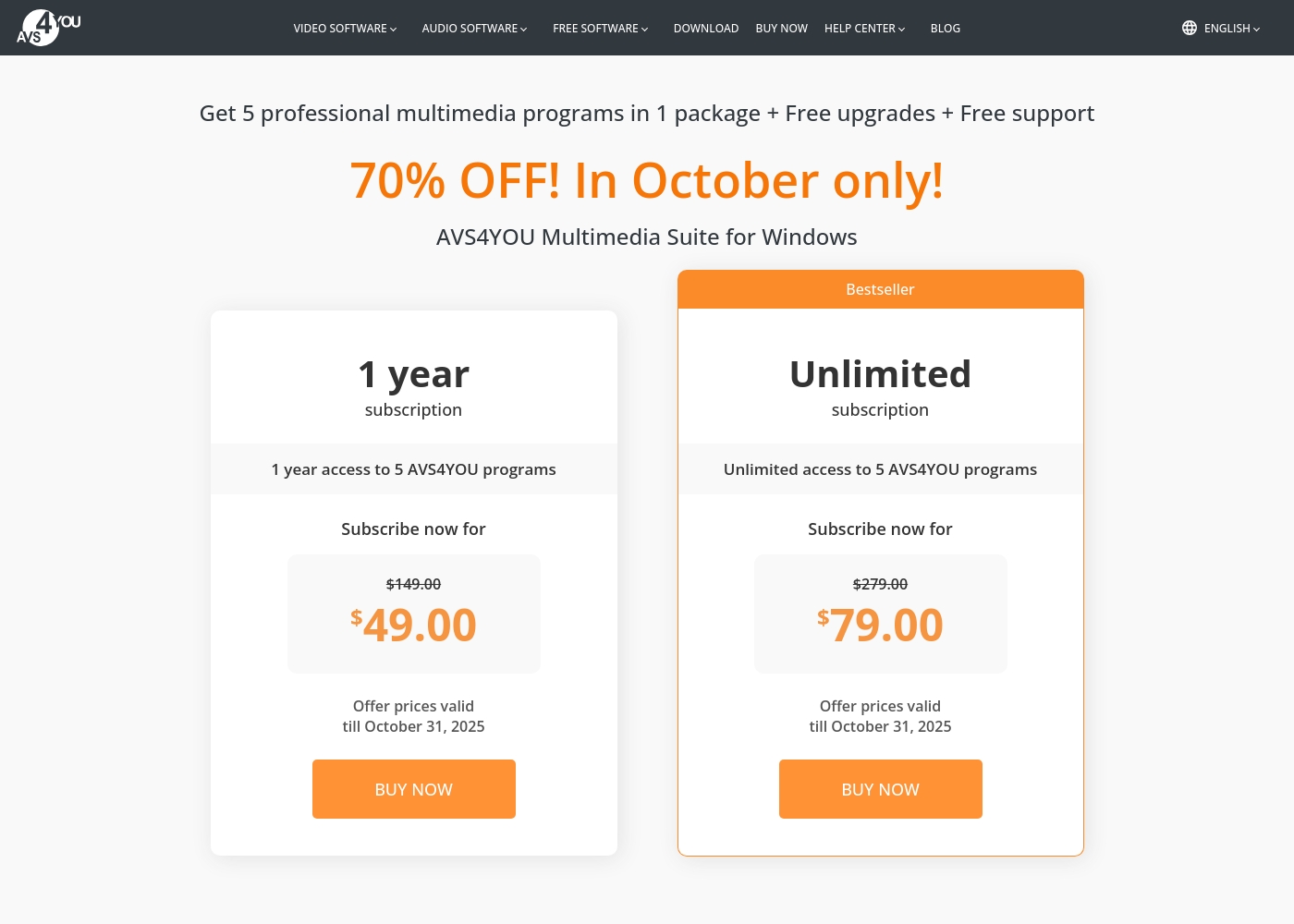
AVS4YOU costs between $49.00 and $79.00 per purchase with 2 main plans: 1 Year Subscription at $49.00/year and Unlimited Subscription at $79.00 one-time.
The simple pricing structure focuses on giving you total access to the AVS4YOU Multimedia Suite. Here is a breakdown of the two options currently available.
1 Year Subscription
Price: $49.00 per year (discounted from $149.00) Best For: Users who want flexibility or prefer annual budgeting Refund Policy: 30-day money-back guarantee Other Features:
- 1 year access to 5 AVS4YOU programs
- Includes free upgrades and free support
- No watermark on output files while active
- 1 year access to 5 AVS4YOU programs
- Free upgrades
- Free support
- One license key per computer
- Unlimited lifetime access to 5 AVS4YOU programs
- One-time payment (no yearly renewals)
- Free upgrades for programs
- Free support
- Bestseller
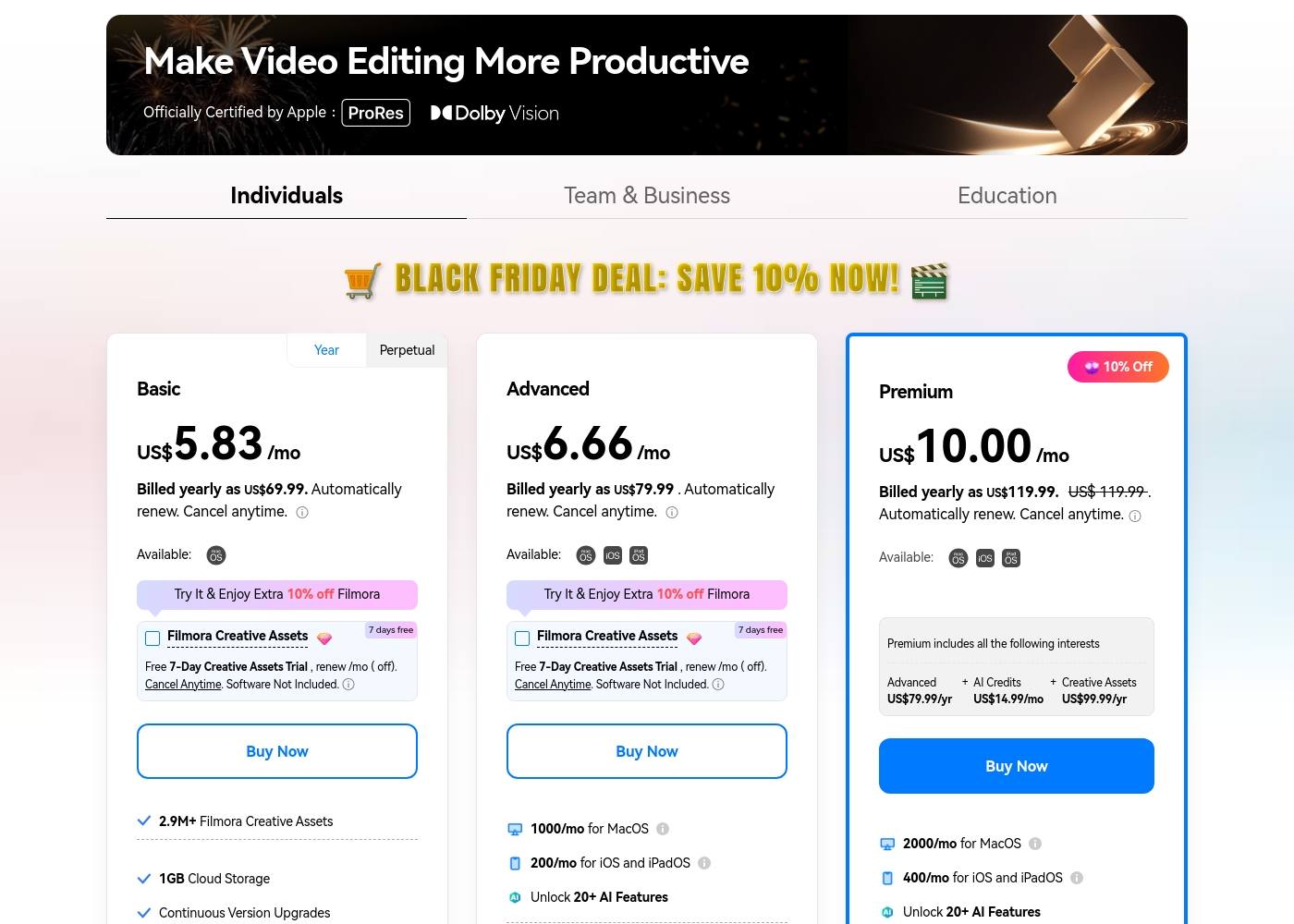
Filmora 14 costs between US$69.99 and US$119.99 per year with three individual annual plans: Basic at US$69.99, Advanced at US$79.99, and Premium at US$119.99.
These individual tiers offer flexible subscription options designed to fit different creator needs, from casual editing to advanced AI-enabled projects. All plans are billed annually and allow you to cancel renewal automatically at any time.
Basic
Price: Billed yearly as US$69.99 (US$5.83/mo) Refund Policy: 30-day money-back guarantee Other Features:
- 2.9M+ Filmora Creative Assets
- 1GB Cloud Storage
- Export without Watermark
- Continuous Version Upgrades
- 2.9M+ Filmora Creative Assets
- 1GB Cloud Storage
- Continuous Version Upgrades
- Export without Watermark
- 4K HD Export
- All Basic Features
- Apple Sync: macOS, iOS, iPadOS
- 10GB Cloud Storage
- 1000 AI Credits/mo for MacOS
- 200 AI Credits/mo for iOS and iPadOS
- All Advanced Features
- 2000 AI Credits/mo for MacOS
- 400 AI Credits/mo for iOS and iPadOS
- 100GB Cloud Storage
- Premium includes advanced bundle and creative assets
- One-time payment structure
- Enjoy Filmora 14 updates only (no major upgrades)
- 1,000 Filmora AI Credits (one-time grant)
- 2.9M+ Filmora Creative Assets
- 1GB Cloud Storage
Pricing Notes
- AVS4YOU offers incredible long-term value with its $79 one-time Unlimited Subscription plan.
- The Filmora 14 free version is continuous but exports all videos with a permanent watermark.
- Filmora 14's core AI features rely on separate monthly allocations of AI credits; unused credits expire.
- The AVS4YOU pricing model is fundamentally simpler and lacks the hidden costs related to AI credits and premium assets found in Filmora 14.
Pricing Head-to-Head
User Reviews
Users generally recommend AVS4YOU for its user-friendly interface and reliable functionality across a comprehensive suite of multimedia tools. Reviewers frequently emphasize the software's excellent versatility for tasks like video editing, audio conversion, and DVD copying, stressing that it offers exceptional value for the price point.
The technical support team also receives high praise for its accessibility, promptness, and effectiveness in quickly resolving various technical issues. Many long-time customers affirm that the company consistently updates its software, honoring its commitments over many years.
I am a long time user of both AVS VIDEO and AUDIO editors. These tools are remarkably easy to use and produce high quality content with minimal effort! I recommend the full suite highly.
Users consistently praise Filmora for its excellent ease of use and intuitive, simple interface. Many editors, from hobbyists to long-term users, find the built-in features helpful, noting the software performs well even on modest hardware.
However, external feedback sharply pivots when discussing company operations. A significant volume of criticism focuses intensely on deceptive billing practices and poor customer service.
I love using Wondershare’s video editor, Filmora! It’s so easy to use and really fun too. This program keeps up with my creativity every step of the way.
Our Verdict
Choosing between AVS4YOU and Filmora 14 really comes down to your personal workflow needs. There is no single winner here; they serve different masters. Filmora 14 is the definitive champion for modern, AI-powered video editing and platform flexibility. AVS4YOU’s superpower is its phenomenal value and comprehensive suite capability. The Unlimited Subscription locks in five programs for only $79 one-time. AVS4YOU also offers the unique Video ReMaker tool, allowing time-saving cuts without full reconversion. Filmora 14’s power lies in its deep integration of artificial intelligence. Features like the AI Video Enhancer and Auto Reframe speed up production immensely. Filmora 14 also provides superior performance optimization and works across Mac, Windows, and iOS devices. The deciding factor is often the platform you use and your tolerance for licensing restrictions. If you use a Mac or need cross-device syncing, Filmora 14 is your only real choice. However, beware that AVS4YOU’s one-time license is strictly locked to that single Windows PC. For budget-focused Windows users needing a suite of converters and editors, AVS4YOU is untouchable value. But if you are a social creator requiring AI speed, unlimited assets, and flexibility, you must spend more for Filmora 14’s subscription.
Frequently Asked Questions
Which software is better for Mac users, AVS4YOU or Filmora 14?
Filmora 14 is the only choice for Mac users. AVS4YOU is strictly a Windows-only multimedia suite. Filmora 14 is optimized for Mac performance using Metal rendering.
Is AVS4YOU's Unlimited Subscription truly permanent access?
Yes, AVS4YOU offers permanent software access for a one-time fee. However, the license is rigidly tied to a single, specific PC. You may need to repurchase the license if you upgrade your computer.
Does Filmora 14 cost more than AVS4YOU in the long run?
Yes, Filmora 14 will likely cost more due to its subscription model. AVS4YOU offers a one-time $79 plan. Filmora 14 requires annual renewal and may require buying additional AI credits.
Which tool is better for creating short social media videos?
Filmora 14 is superior for social media creation due to its AI tools. Smart Short Clips automatically converts long videos into shareable segments. AVS4YOU requires entirely manual editing and reframing.
Does AVS4YOU offer cloud storage like Filmora 14?
No, AVS4YOU operates solely as a desktop software suite. Filmora 14 includes cloud storage ranging from 1GB to 100GB depending on the annual plan you select.
Can I use Filmora 14 without paying the subscription fee?
Yes, Filmora 14 offers a permanently free version for testing and usage. All videos exported from the free version will include a permanent watermark on the final output.
Ready to Choose?
Both tools have their strengths. Choose based on your specific needs.