AVS4YOU vs Camtasia
AVS4YOU and Camtasia tackle video editing from opposite ends of the spectrum. AVS4YOU offers vast utility bundled into a low one-time price. Camtasia is the industry standard for professional recording and high-quality tutorials. Now we determine if cheap utility can truly beat AI-powered flexibility.
Best for: Budget-conscious solo users needing diverse multimedia tools, Users focused on video conversion or digitizing legacy media
Best for: Educators and trainers creating frequent, high-quality tutorials, Professional software demonstrators needing clean screen recordings
Functional suite with restrictive licensing.
We assessed the AVS4YOU suite as a highly functional and simple solution for diverse multimedia editing and conversion needs. While the array of tools is excellent and priced competitively, we found the single-device licensing policy highly restrictive, especially for the popular “Unlimited Subscription.” Overall, the product delivers quality output but requires clearer communication regarding license portability.
Pros
- Excellent value for the comprehensive multimedia software suite.
- Software is highly versatile for video, audio, and conversion tasks.
- Simple, intuitive, and user-friendly interface design.
- Technical support staff is consistently praised for quick responses.
Cons
- The "Unlimited" license is strictly limited to a single PC/device.
- License transfer or reactivation is often complex after a computer crash.
- Software can become slow when processing very large video files.
- Screen capture feature sometimes records without accompanying audio.
Powerful screen recording, premium price tag.
We find Camtasia to be an extremely capable, industry-standard tool for creating high-quality instructional video content. Its multitrack editing flexibility and AI enhancements effectively streamline complex workflows. Overall, Camtasia excels in core functionality, but its restrictive, mandatory subscription model significantly diminishes the overall value proposition for many loyal users.
Pros
- Industry-standard platform for flexible screen recording and tutorial creation.
- Significantly simpler and more intuitive interface compared to advanced editors.
- Multitrack recording allows independent editing of screen, audio, and camera.
- Offers powerful AI features like text-based video editing and audio cleanup.
Cons
- Mandatory annual subscription model has replaced perpetual licenses.
- Users are frustrated by restrictive licensing (single-device sign-in limitations).
- Perceived as overly expensive compared to free or low-cost competitors.
- Inconsistent customer service experiences, including slow/non-responsive support.
AboutAVS4YOU
AVS4YOU is rightly called the “Ultimate multimedia editing family.” It is a collection of tools designed for anyone looking to produce high-quality video and audio content, and even more. Whether you need to convert files, trim a video, or apply engaging effects like Chroma key, this family of software has you covered. Users consistently highlight that it's very convenient, user friendly, and functional ✨.
AboutCamtasia
Camtasia is truly everything you need in one powerful tool. It combines screen recording with full video editing capabilities. This software uses AI-powered tools to simplify the creation process. It is designed to help you turn your existing knowledge into highly engaging videos. 💡
Highlights
Feature Comparison
Features Overview
We highlight the main differences and pick a winner for each feature.
Pricing Model
AVS4YOU shines with unmatched value via its one-time purchase. Camtasia requires a mandatory annual subscription.
AVS4YOU offers an Unlimited Subscription for a $79 one-time payment. This provides lifetime access to the entire multimedia suite. Camtasia only offers mandatory annual subscriptions, starting at $179.88 yearly. This is significantly more expensive than AVS4YOU. AVS4YOU is the clear winner for budget-conscious users prioritizing long-term savings. Camtasia targets professionals with recurring annual budgets. Over three years, Camtasia costs over $500, while AVS4YOU remains just $79. The value proposition of AVS4YOU is exceptional.
Multitrack Recording
Camtasia provides separate tracks for screen and audio for max flexibility. AVS4YOU lacks this high-end integrated feature.
Camtasia's core strength is recording the screen, camera, and voice on separate tracks. This allows independent editing of every element after recording. AVS4YOU offers screen capture, but the recording is basic and lacks granular multitrack separation. You're limited in post-production edits. If you make complex tutorials that require precise synchronization, Camtasia is indispensable. AVS4YOU is designed for simpler, utility-based recordings. Camtasia's flexible recording saves professionals hours compared to dealing with locked-in files. This justifies Camtasia's higher price.
AI Video Editing
Camtasia utilizes advanced AI features to accelerate editing workflows. AVS4YOU relies on traditional, manual editing tools.
Camtasia offers innovative text-based editing, allowing cuts based on transcripts. It also generates scripts from prompts. AVS4YOU features professional effects like Chroma key and Slow Motion. However, it lacks any modern AI productivity features. Editing video by simply removing text in Camtasia drastically speeds up the process. AVS4YOU requires traditional timeline scrubbing. Camtasia is built for speed and efficiency for high-volume content creators using smart AI.
Professional Audio
Camtasia provides dedicated AI tools to clean up noisy tutorial audio. AVS4YOU includes a generalized audio editor.
Camtasia's advanced audio cleanup removes distracting 'uuhms,' 'aahs,' or background fan noise. This ensures crystal-clear narration. AVS4YOU’s suite includes a functional audio editor for basic tasks. It doesn't offer the specialized AI cleanup Camtasia provides. Great videos need great audio to be professional quality. Camtasia excels at perfecting the sound for educational content. This specialized tool makes Camtasia far superior for any user relying on complex voiceovers or training materials.
Non-Recoding Edits
AVS4YOU features a specialized tool to cut files without full reconversion. Camtasia requires a full render after major edits.
The AVS Video ReMaker allows fast trimming and joining of files without reconverting the whole file. This saves quality and time. Camtasia's editing is powerful but typically requires a full render upon export of the final video project. If you simply need to make minor cuts or trims to large files, AVS4YOU is faster. The specialized utility of AVS4YOU fits its value model. AVS4YOU's non-recoding feature is a huge benefit when handling large, high-definition source files quickly.
OS Compatibility
Camtasia works perfectly on both Windows and macOS systems. AVS4YOU only supports the Windows operating system.
Camtasia is designed to run natively on both major desktop platforms, Windows and Mac. This supports cross-platform users. AVS4YOU is explicitly marketed as being 'for Windows' and offers no Mac compatibility. Mac users are out of luck. If you work on a Mac or use multiple operating systems, Camtasia is the only choice. AVS4YOU locks you into the Windows ecosystem. Camtasia is superior for corporate or educational environments with mixed hardware platforms.
Licensing Model
Both AVS4YOU and Camtasia enforce highly restrictive single-device licensing. Transferring licenses is difficult or impossible.
AVS4YOU's 'Unlimited' license is strictly tied to a single PC installation. PC crashes may require buying a new license key. Camtasia subscriptions are also non-transferable individual subscriptions tied to a single sign-in. This locks the user in. Users of both AVS4YOU and Camtasia criticize this restrictive licensing policy. It is a major friction point for both brands. Always verify your intended upgrade path before committing to either AVS4YOU or Camtasia.
Collaboration Tools
Camtasia includes dedicated tools for team video reviews in its Pro plan. AVS4YOU is strictly a single-user utility suite.
Camtasia's Pro plan specifically includes video reviews and collaborative features for teams. This streamlines feedback loops. AVS4YOU is entirely focused on the individual user's editing and conversion needs. It has no shared workflow support. If you are working with others on content approval and production, Camtasia is necessary. AVS4YOU offers no team solution. Camtasia is built for professional content teams and agencies, unlike the singular focus of AVS4YOU.
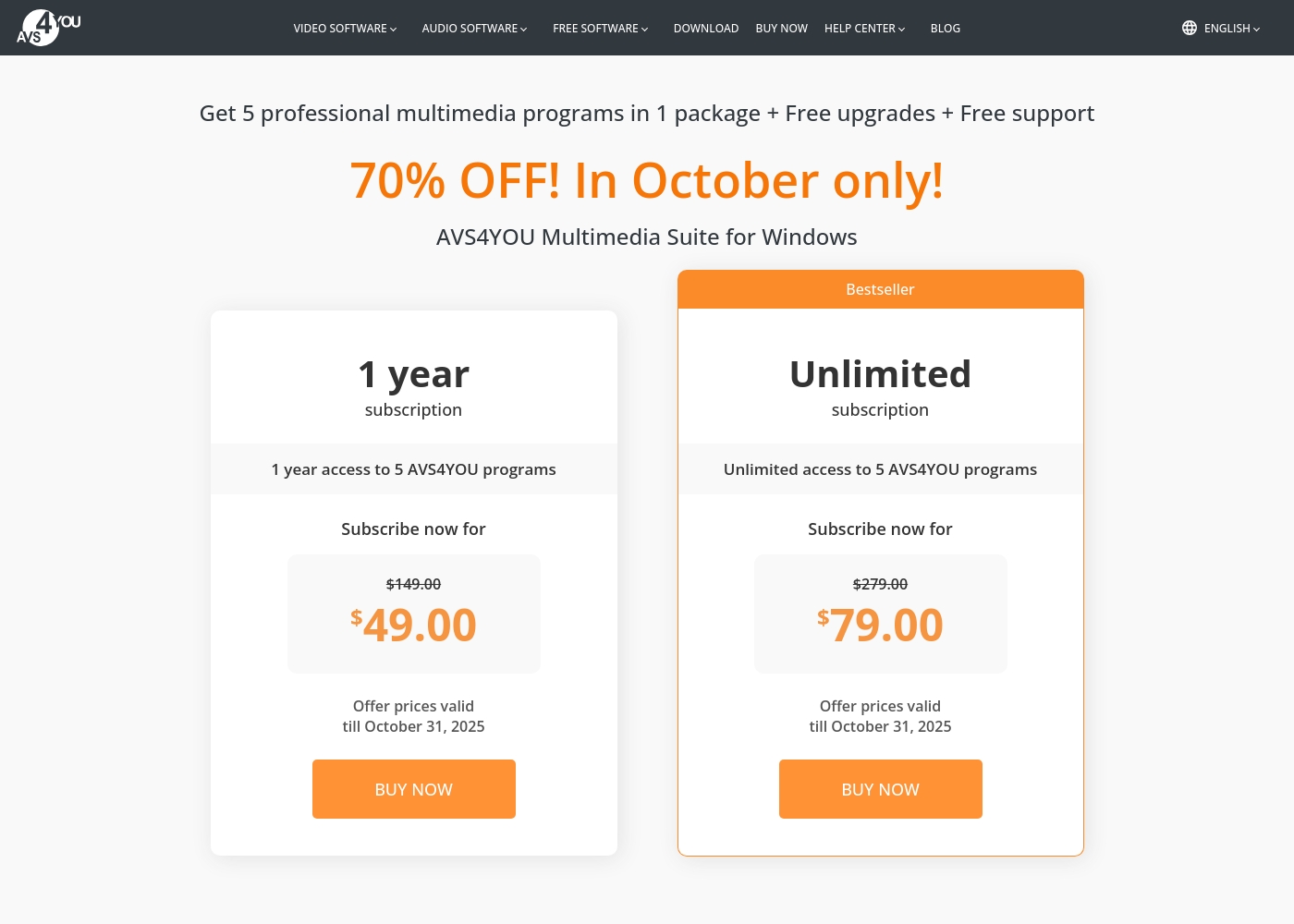
AVS4YOU costs between $49.00 and $79.00 per purchase with 2 main plans: 1 Year Subscription at $49.00/year and Unlimited Subscription at $79.00 one-time.
The simple pricing structure focuses on giving you total access to the AVS4YOU Multimedia Suite. Here is a breakdown of the two options currently available.
1 Year Subscription
Price: $49.00 per year (discounted from $149.00) Best For: Users who want flexibility or prefer annual budgeting Refund Policy: 30-day money-back guarantee Other Features:
- 1 year access to 5 AVS4YOU programs
- Includes free upgrades and free support
- No watermark on output files while active
- 1 year access to 5 AVS4YOU programs
- Free upgrades
- Free support
- One license key per computer
- Unlimited lifetime access to 5 AVS4YOU programs
- One-time payment (no yearly renewals)
- Free upgrades for programs
- Free support
- Bestseller
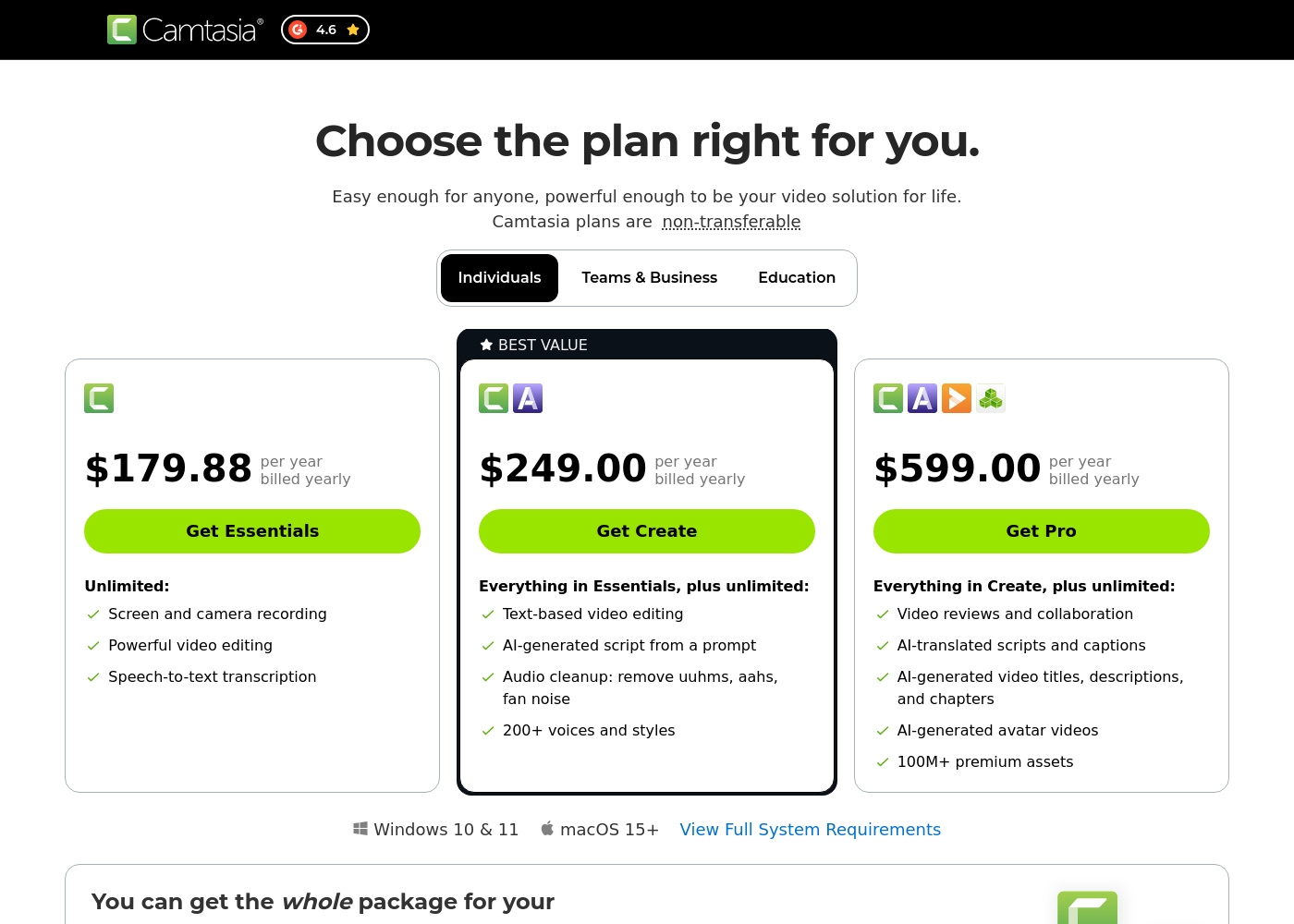
Camtasia costs between $179.88 and $599.00 per year with 3 plans: Essentials at $179.88, Create at $249.00, and Pro at $599.00. These plans cater to individuals, offering robust video and screen recording tools through an annual subscription model.
Essentials
Price: $179.88 per year billed yearly Other Features:
- Screen and camera recording
- Powerful video editing
- Speech-to-text transcription
The Essentials plan is perfect if you only need foundational tools for recording and editing videos. It provides unlimited screen and camera recording capabilities, which is great for beginners or those with basic needs.
- Screen and camera recording
- Powerful video editing
- Speech-to-text transcription
- Everything in Essentials
- Text-based video editing
- AI-generated script from a prompt
- Audio cleanup: remove uuhms, aahs, fan noise
- 200+ voices and styles
- Everything in Create
- Video reviews and collaboration
- AI-translated scripts and captions
- AI-generated video titles, descriptions, and chapters
- AI-generated avatar videos
Pricing Notes
- AVS4YOU's Unlimited plan is a $79 one-time purchase with permanent access.
- Camtasia's lowest price is $179.88 annually, requiring constant renewal.
- AVS4YOU offers a 30-day money-back guarantee; Camtasia's guarantee is not explicit.
- Both AVS4YOU and Camtasia restrict license use to a single device/computer.
Pricing Head-to-Head
User Reviews
Users generally recommend AVS4YOU for its user-friendly interface and reliable functionality across a comprehensive suite of multimedia tools. Reviewers frequently emphasize the software's excellent versatility for tasks like video editing, audio conversion, and DVD copying, stressing that it offers exceptional value for the price point.
The technical support team also receives high praise for its accessibility, promptness, and effectiveness in quickly resolving various technical issues. Many long-time customers affirm that the company consistently updates its software, honoring its commitments over many years.
I am a long time user of both AVS VIDEO and AUDIO editors. These tools are remarkably easy to use and produce high quality content with minimal effort! I recommend the full suite highly.
Camtasia enjoys a long-standing reputation as an industry-standard tool, particularly for screen recording and tutorial creation. Users overwhelmingly praise the core software, noting it is dramatically simpler and more intuitive to use than complex alternatives like Adobe products, while still offering a deep feature set.
However, recent changes to the pricing model and licensing structure have caused significant user frustration. The shift to mandatory annual subscriptions, coupled with new restrictive single-device sign-in limits for individual users, is a major recurring complaint.
The software is great, the developers deserve five stars for the product quality. But management introduced a highly frustrating subscription model. The mandatory sign-in cycle when switching devices significantly harms my workflow.
Our Verdict
The choice between AVS4YOU and Camtasia boils down to cost versus professional grade control. If budget is key, AVS4YOU is the clear winner for lifetime ownership. The $79 one-time fee for AVS4YOU provides a huge multimedia utility suite forever. AVS4YOU gives you basic editing, fast conversions, and powerful disc burning tools in one simple package. It's the perfect toolkit for casual users on Windows who need maximum utility. AVS4YOU is excellent for digitizing and managing vast personal media libraries efficiently. Camtasia is the professional choice for creating highly polished instructional video content. Camtasia's superpower is its multitrack recording and AI features. You get separate recording tracks and AI audio cleanup that removes 'uuhms' and fan noise. Camtasia is worth the higher annual price if you create tutorials that need to look polished and save editing time. Its superior AI and collaboration tools streamline high-volume production. AVS4YOU simply cannot compete with Camtasia’s flexible editing capabilities. Final Recommendation: If you are an educator or professional content creator, choose Camtasia. If you are a Windows user needing great value and diverse utility tools for personal use, grab the AVS4YOU lifetime license.
Frequently Asked Questions
Which software is better for creating professional tutorials: AVS4YOU or Camtasia?
Camtasia is far better for tutorials due to its core focus and features. Camtasia offers multitrack recording and advanced AI audio cleanup. AVS4YOU provides only basic screen recording capabilities.
Does AVS4YOU offer a lifetime license like Camtasia?
AVS4YOU offers a brilliant Unlimited Subscription as a one-time purchase for $79. Camtasia is subscription-only and does not offer a lifetime license. AVS4YOU is much cheaper long-term.
Is Camtasia available for Mac users, while AVS4YOU is not?
Yes, Camtasia works natively on both Windows and macOS operating systems. AVS4YOU is marketed explicitly as being a Windows-only utility suite. Mac users must select Camtasia.
Can I transfer my license for AVS4YOU or Camtasia to a new computer?
Transferring licenses is highly restrictive for both AVS4YOU and Camtasia. Both are strictly tied to a single PC or sign-in device. This is a common pain point for users of both products.
Which software handles video file conversion better?
AVS4YOU includes a specialized Video Converter with GPU acceleration. It handles all key formats easily. Camtasia focuses on editing recorded video, not broad file conversion utility.
Is Camtasia worth the significantly higher annual cost over AVS4YOU?
Camtasia is worth it if you need advanced features like AI editing and collaboration tools. AVS4YOU is better if you prioritize extreme value and simple utility over professional-grade assets.
Ready to Choose?
Both tools have their strengths. Choose based on your specific needs.