Audacity vs Soundop Audio Editor
Audacity and Soundop Audio Editor offer very different approaches to audio editing needs. Audacity is the world-famous, completely free, open-source tool for basic tasks and beginners. Soundop Audio Editor is a robust, paid professional audio workstation designed for Windows power users. This comparison shows exactly where to invest your time and money.
Best for: New podcasters looking for a free, zero-cost starting tool., Students needing cross-platform, accessible audio software.
Best for: Windows-based mastering engineers needing high-resolution 192 kHz audio., Audio professionals requiring precise spectral editing repair tools.
Powerful, free audio editor; stability needed.
We recognize Audacity as the premium choice for free, open-source audio editing. It offers strong value, cross-platform support, and deep analysis tools. Overall, we see that recurring stability issues and complexity in newer versions hinder its potential as a reliable professional DAW.
Pros
- Completely free, open-source software offering full audio editing capabilities.
- Cross-platform support for Windows, macOS, and Linux operating systems.
- Simple, functional interface is ideal for basic sound effects and tasks.
- Supports VST3 plugins and offers advanced deep audio analysis features.
Cons
- Reliability issues include frequent crashing, persistent bugs, and project recovery problems.
- Newer versions (like 3.2.x) struggle with accurately capturing analog real-time input.
- Users describe the interface as archaic and "completely not intuitive."
- Some professional users criticize the sound output quality as muffled or flat.
Pros
Cons
AboutAudacity
Audacity is the perfect app for anyone needing to manipulate sound or get creative with audio. As the world's most popular audio editing and recording program, it meets many different needs.
Audacity is ideal whether you are producing a podcast, creating music, or just trying things out with new sound files. If you need to quickly edit or export a file for any reason, this versatile tool is ready to help.
Best of all, Audacity remains completely free for everyone and is proudly open source. A passionate worldwide community of audio lovers continues to collaborate and improve the software every day.
AboutSoundop Audio Editor
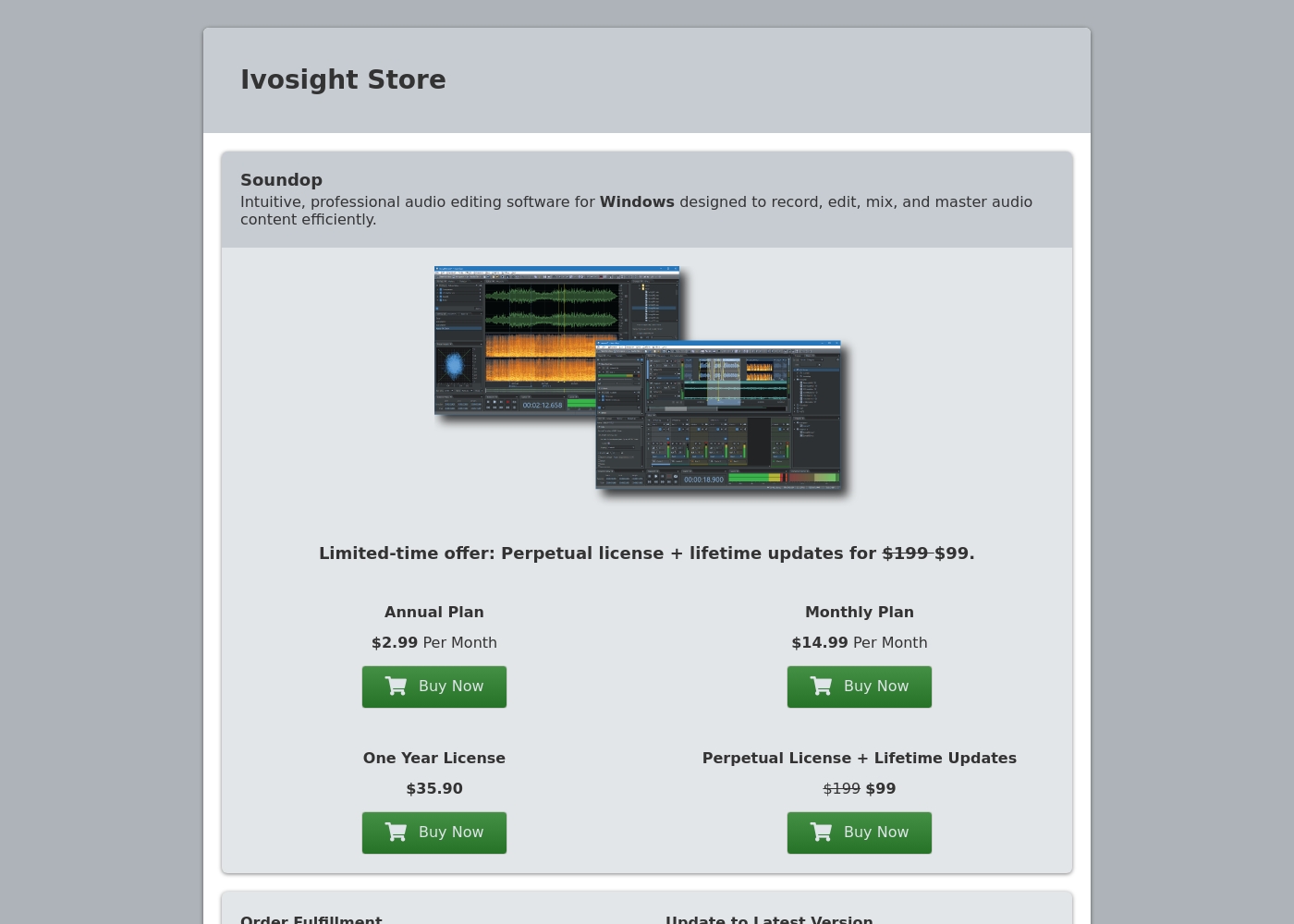
✨ Soundop is a full-featured audio editor and multitrack mixing environment for Windows. It's designed for musicians, podcasters, audio engineers, and hobbyists who want professional-grade tools. Whether you're recording a single voiceover or mixing a complex multitrack song, it provides the necessary precision and flexibility.
Highlights
Feature Comparison
Features Overview
We highlight the main differences and pick a winner for each feature.
Pricing Model
Audacity is completely free forever; Soundop Audio Editor requires a paid license.
Audacity has always been totally free and is completely open-source software. You can download and use Audacity across Windows, Mac, and Linux with no cost. There are zero plans or subscriptions for Audacity functionality. Soundop Audio Editor offers four paid plans, including monthly and annual subscriptions. You can also purchase a Perpetual License for $99 for permanent software ownership and lifetime updates. Audacity wins on zero cost, making it instantly accessible to everyone. Soundop Audio Editor offers flexible paid options including highly economical annual rates, about $2.99 monthly. The free price point of Audacity is hard to beat for students or hobbyists.
System Compatibility
Audacity works on all major OS; Soundop Audio Editor is strictly Windows-only.
Audacity is robustly cross-platform, offering seamless installation on Windows, macOS, and Linux systems. This flexibility is perfect for users who switch between different operating environments easily. Soundop Audio Editor is exclusively designed as a powerful audio workstation for Windows. It does not natively support macOS or Linux operating systems yet, limiting its user base. Choose Audacity if you mix computing platforms or use Mac/Linux consistently. Soundop Audio Editor commits fully to the Windows ecosystem for optimized, high-performance use.
Advanced Mixing
Soundop Audio Editor offers unlimited tracks and pro routing; Audacity handles basic multi-track sessions.
Audacity provides basic multi-track capability, suitable for simple tasks like podcast layering. It often lacks key features like professional signal routing and automatic latency compensation. Soundop Audio Editor is a professional DAW with unlimited audio and bus tracks. Key features include side-chaining and automatic latency compensation for complex projects. For complex music production and mastering, Soundop Audio Editor is a clear winner. Audacity is best for simpler speech and basic track arrangements.
Spectral Editing
Soundop Audio Editor provides precise spectral repair; Audacity only offers a visualization view.
Audacity provides a Spectrogram view for visual frequency analysis and detailed inspection. You can view the frequencies to identify distortion, but direct editing is unavailable. Soundop Audio Editor performs precise noise reduction using spectral editing capabilities. You can visually locate, isolate, and remove unwanted sounds like clicks or hums with great accuracy. Soundop Audio Editor offers advanced, sample-level noise correction and repair tools. Audacity helps you identify the issue using visualization, but not directly fix it in frequency domain.
Audio Fidelity & Drivers
Soundop Audio Editor supports pro drivers and 192 kHz audio; Audacity uses standard system settings.
Audacity is functional for general use but relies on standard system audio drivers for I/O. Maximum audio resolution is not a central selling point for Audacity's core design. Soundop Audio Editor supports pro drivers like ASIO, WASAPI, and MME for low latency. It handles high-resolution audio up to 24-bit precision and a 192 kHz sample rate. For studio quality and critical low-latency recording, Soundop Audio Editor is the professional choice. Audacity is acceptable for standard desktop audio and voice recording tasks.
Batch Processing
Soundop Audio Editor processes files concurrently; Audacity is better suited for single projects.
Audacity handles single-file editing well and supports basic import/export conversions as needed. It lacks specialized tools needed for processing very large volumes of audio files quickly and repeatedly. Soundop Audio Editor features robust, flexible batch processing tools for high volume work. You can even run multiple instances concurrently, standardizing large libraries efficiently. To process hundreds of files rapidly and consistently, Soundop Audio Editor saves significant time. Audacity requires manual or sequential processing for high-volume conversion workflows.
Audacity costs $0 per month with 1 plan: the Free Open Source Plan at $0.
- Record and edit audio
- Cross-platform support (Windows, MacOS, Linux)
- Import, export, and convert all major audio formats (WAV, MP3, FLAC, Ogg)
- Supports third-party plugins (VST3, Nyquist)
- Deep audio analysis features (Spectogram view)

Soundop Audio Editor costs between $35.88 and $99 for permanent or annual options with four plans: Annual Plan at $2.99 per month, Monthly Plan at $14.99 per month, One Year License at $35.90, and Perpetual License at $99.
Take a look at the different ways you can get started below.
Annual Plan
Price: $2.99 Per Month Websites Supported: Not explicitly stated Best For: Long-term users who want the lowest monthly rate Refund Policy: Not explicitly stated Other Features: Standard audio editing and mixing, VST/VST3 support, Waveform and spectral editing
- Waveform and spectral editing
- Multitrack mixing
- Unlimited audio and bus tracks
- VST and VST3 support
- Full effect suite
- Automation modes
- Side-chain processing
- ASIO and WASAPI support
- Non-recurring billing
- Full feature access for 12 months
- Batch processing
- High-precision recording
- One-time payment
- Lifetime updates included
- Activation on two computers
- Includes all current and future features
Pricing Notes
- Audacity is entirely free and open-source, offering unparalleled access at $0 cost.
- Soundop Audio Editor offers a flexible Perpetual License for $99, providing lifetime ownership and updates.
- The annual plan for Soundop Audio Editor is highly discounted, dropping the effective monthly cost to approximately $2.99.
- Audacity has no hidden fees, but optional third-party plugins accessed via Muse Hub might require separate purchases.
Pricing Head-to-Head
User Reviews
Users widely praise Audacity because it is completely free and provides an excellent entry point into audio editing. Reviewers frequently describe it as “simple, functional, fast, and easy,” particularly for basic tasks like recording sound effects or removing background noise.
However, community feedback reveals significant concerns regarding long-term reliability and complex setups. Several users note that the software feels “archaic” and is prone to debilitating crashes, installer bugs, and project recovery failures.
Audacity was the first digital audio workstation I ever tried out. It’s extremely easy to use and helps you understand how DAWs work in general. You can get things done like recording and quickly removing background noises.
Our Verdict
Choosing between Audacity and Soundop Audio Editor boils down to budget and professional needs. Do you need a free, basic editor, or a powerful, paid Windows workstation? Both tools are powerful, yet they target entirely different user bases and skill sets. Audacity is the unmatched champion of accessibility and zero cost. Audacity is perfect for students, novices, and new podcasters starting out today. If your work only requires noise reduction and simple file conversion, Audacity delivers immense, $0 value. Be warned that Audacity users report recent stability issues, bugginess, and archaic design. Soundop Audio Editor is purpose-built for high-fidelity professional work on Windows. Soundop Audio Editor provides precise spectral editing, unlimited tracks, and professional ASIO driver support. Its robust batch processor makes Soundop Audio Editor ideal for standardizing large libraries efficiently and quickly. The deciding factor is your operating platform and required features. Choose Audacity if you are budget-conscious, use Mac/Linux, or only need basic cuts and effects. Pick Soundop Audio Editor if you rely on Windows and require precise, high-fidelity mixing, mastering, and reliable performance. Ultimately, Audacity is the best free entry point into audio editing available today. For serious, high-volume, professional Windows work, Soundop Audio Editor provides the necessary power and paid stability.
Frequently Asked Questions
Which is better for complex music mixing: Audacity or Soundop Audio Editor?
Soundop Audio Editor is vastly superior for complex mixing workflows. It offers unlimited tracks, professional side-chaining, and automatic latency compensation. Audacity is limited to basic multi-track overlays, suitable only for simple music and voice layering.
Is Soundop Audio Editor worth the cost compared to the free Audacity?
Yes, if you need professional features and guaranteed stability on Windows. Soundop Audio Editor provides high-resolution 192 kHz audio and spectral editing. Audacity is free, but frequent crashes and stability issues might cost you time and frustration.
Does Audacity offer spectral editing like Soundop Audio Editor?
No, Audacity only provides a Spectrogram view for analyzing frequencies visually. Soundop Audio Editor allows true precise spectral editing. This means Soundop Audio Editor can visually fix specific noises that Audacity can only identify.
Can I use Soundop Audio Editor on macOS or Linux?
No, Soundop Audio Editor is exclusively developed for the Windows operating system. Audacity, however, is fully cross-platform and runs seamlessly on Windows, macOS, and Linux.
How does Audacity handle collaboration compared to Soundop Audio Editor?
Audacity offers an integrated online companion, Audio.com, for collaboration and versioned cloud backups. Soundop Audio Editor is purely local desktop software, requiring users to manage sharing manually.
Does Soundop Audio Editor impose limitations on track count?
No, Soundop Audio Editor supports mixing with an unlimited number of audio and bus tracks. This makes it ideal for scoring projects or complex sound design. Audacity's effective track count is limited by system resources and stability.
Ready to Choose?
Both tools have their strengths. Choose based on your specific needs.