Audacity vs Auphonic
Audacity and Auphonic solve completely different problems in the audio world. Audacity is a powerful manual editor, free forever, if you enjoy hands-on control. Auphonic is your dedicated AI engineer, automating difficult post-production work for consistency. Which tool you choose depends completely on your desired workflow.
Powerful, free audio editor; stability needed.
We recognize Audacity as the premium choice for free, open-source audio editing. It offers strong value, cross-platform support, and deep analysis tools. Overall, we see that recurring stability issues and complexity in newer versions hinder its potential as a reliable professional DAW.
Pros
- Completely free, open-source software offering full audio editing capabilities.
- Cross-platform support for Windows, macOS, and Linux operating systems.
- Simple, functional interface is ideal for basic sound effects and tasks.
- Supports VST3 plugins and offers advanced deep audio analysis features.
Cons
- Reliability issues include frequent crashing, persistent bugs, and project recovery problems.
- Newer versions (like 3.2.x) struggle with accurately capturing analog real-time input.
- Users describe the interface as archaic and "completely not intuitive."
- Some professional users criticize the sound output quality as muffled or flat.
Automated sound engineering for pros.
We found Auphonic provides a robust, AI-driven solution for achieving consistent broadcast quality across various media types, supported by features like advanced leveling and noise reduction. Overall, we recommend Auphonic for creators and professionals needing reliable, automated post-production workflow.
Pros
- Trusted by 1M+ users for reliable, professional audio quality.
- Highly effective noise and reverb reduction features (complete and correct elimination).
- Intuitive design and easy user interface.
- Flexible processing time options (permanent free plan, recurring, and one-time credits).
Cons
- Processing speed can be slow according to external user feedback.
- Pricing tiers are based on credits; official currency costs are not published upfront.
- Recurring monthly credits do not roll over.
AboutAudacity
Audacity is the perfect app for anyone needing to manipulate sound or get creative with audio. As the world's most popular audio editing and recording program, it meets many different needs.
Audacity is ideal whether you are producing a podcast, creating music, or just trying things out with new sound files. If you need to quickly edit or export a file for any reason, this versatile tool is ready to help.
Best of all, Audacity remains completely free for everyone and is proudly open source. A passionate worldwide community of audio lovers continues to collaborate and improve the software every day.
AboutAuphonic
Auphonic is designed to be your dedicated AI sound engineer ✨. It handles the post-production work for many different types of media files. This smart service specifically supports processing for audiobooks, radio broadcasts, and educational videos. If you are a podcaster, this tool can easily simplify your entire production workflow. It combines powerful intelligence with ease of use to deliver professional sound every time.
Highlights
Feature Comparison
Features Overview
We highlight the main differences and pick a winner for each feature.
Core Purpose
Audacity is a flexible, open-source editor for hands-on creativity. Auphonic is a highly specialized cloud service that fully automates mastering.
Audacity is an open-source desktop application focused on deep, manual audio editing. You have full control over the waveform, cutting, and applying specific effects instantly. It's built for those who want to get their hands dirty. Auphonic functions as an AI sound engineer, relying on algorithms for consistency. You upload a file, and Auphonic returns a fully processed, broadcast-ready product. It is designed to remove the need for manual mixing entirely. Audacity demands your time and editing expertise to master tracks correctly. Auphonic saves you time and guarantees professional consistency using automated processing. The two tools accomplish quality audio in vastly different ways. Since Audacity focuses on detailed editing and Auphonic focuses on automated finishing, they often complement each other.
Pricing Model
Audacity is completely free, relying on open-source contributions. Auphonic uses a usage-based, complex credit system for processing time.
The core Audacity application is completely free forever with no hidden costs or subscriptions. This zero-cost model makes Audacity accessible to students and hobbyists globally. Third-party plugins or the Audio.com companion may incur separate costs. Auphonic operates on a processing credit system, charging based on output duration. It offers a permanent free plan giving 2 hours of processing monthly. Paid credits (recurring/one-time) are required for high volume or advanced features. Audacity’s transparency is unbeatable for budget conscious users; its price is zero. Auphonic's credit system can feel opaque, as currency costs are not always transparently published upfront. Auphonic works for professionals; Audacity works for everyone. Auphonic's free 2 hours allows robust testing of its AI quality before you commit to purchasing any processing credits.
Loudness & Leveling
Auphonic automatically adheres to strict broadcast loudness standards. Audacity requires manual adjustment of compression and leveling effects.
Users must manually apply complex compressors and limiters within Audacity to achieve consistent volume. While Audacity features powerful tools, consistency relies entirely on the user's mixing skill. This manual process is often time-consuming and prone to error. Auphonic features the Intelligent Leveler, ensuring volumes are perfectly consistent and adhere to specifications instantly. Auphonic meets all required loudness standards for platforms like radio and podcasts automatically. This automation guarantees smooth, professional results every time. If professional consistency is critical, Auphonic is the clear superior choice for process reliability and speed. Audacity requires expert knowledge and significant manual effort for the same result. Auphonic completely eliminates the mastering learning curve. Podcasters especially benefit from Auphonic since it auto-corrects levels between multiple remote speakers effortlessly.
Noise Reduction
Auphonic features highly effective, automated noise and reverb reduction. Audacity provides useful but entirely manual noise gating and reduction tools.
Audacity offers reliable noise reduction tools, which require sampling the initial noise floor first. This feature is effective for basic ambient humming or static removal. The quality depends heavily on careful user tweaking of process parameters. Auphonic's algorithms are praised for completely and correctly eliminating background noise and troublesome reverb. This critical clean-up step is seamless and automated after file upload. Users report being highly impressed with Auphonic's overall accuracy. For clean, professional audio, Auphonic’s AI delivers superior, less destructive noise removal automatically. Audacity's tools are functional but often require aggressive settings that can degrade overall sound quality. Auphonic is the clear efficiency choice. Use Auphonic to save hours cleaning up noisy source audio, letting you focus editing time in Audacity on other creative elements.
User Interface & Experience
Audacity’s interface is often described as archaic and confusing for new users. Auphonic provides a simple, modern, web-based workflow.
Many users describe the Audacity interface as challenging and outdated, limiting modern ease of use. Tutorials often fail to match the application's current behavior in newer versions. Its workflow is complicated for beginners learning digital audio. Auphonic benefits from an intuitive design and easy-to-understand web interface based on clear steps. The platform simplifies the complex technical process of mastering audio. Users praise the simple process: upload, select preset, process, and download finished audio. Auphonic wins heavily on user experience by automating complexity through a clean interface. Audacity's extensive feature set is often buried under an old, unstable user experience. Usability is a common complaint against Audacity's recent releases. If you prefer a clean, browser-based, step-by-step approach, Auphonic will feel instantly familiar and accessible.
Advanced Workflow
Auphonic excels at automation with Watch Folders and automatic notes. Audacity requires tedious manual effort for every single step.
Every step in Audacity—from applying noise reduction to mixing tracks—is manual and requires user intervention. Audacity provides no inherent tools for batch processing or automated file monitoring. It is strictly a project-by-project editing tool. Auphonic's paid plans unlock sophisticated automation features, including Watch Folders that automatically process new uploads. Auphonic can also generate automatic shownotes and chapter markers using speech recognition. This saves massive time for high-volume content creators. For serious podcasters or professionals with high volume, Auphonic is designed to scale and streamline process flow. Audacity simply cannot compete with Auphonic's advanced automation capabilities. This level of AI saves hours every week. If you routinely process 10+ hours of audio per month, Auphonic’s automation becomes a necessary advantage over Audacity.
Stability & Reliability
Audacity suffers from known instability and crashes in newer versions. Auphonic offers reliable, consistent processing in the cloud model.
Recent reviews highlight Audacity's significant stability issues, including crashing and project recovery failures. This instability means relying on Audacity for critical, large projects can be inherently risky. Bugs have been reported in previously reliable features. Auphonic's processing happens reliably server-side; if a production fails, you are not charged credits. This cloud model offers reliability and consistency, ensuring successful output. The result quality is professional and predictable every time. Audacity’s instability is a major drawback for professional daily use, despite its free nature. Auphonic offers peace of mind with reliable, predictable results. Stability is a key difference between the two tools. For tight deadlines and critical workflows, the dependable cloud architecture of Auphonic is clearly safer than an unstable application like Audacity.
Integration Ecosystem
Audacity supports local VST/Nyquist plugins for creative effects. Auphonic integrates with cloud storage services for streamlined file transfers.
Audacity is a powerful host for third-party plugins, supporting VST3 and Nyquist formats. This robust support allows deep customization of effects and sound design. Users can leverage Muse Hub for access to additional processing tools and effects. Auphonic integrates with popular external services for seamless uploads and transfers. These connections include Dropbox, Google Drive, and SFTP. This flexibility helps users process massive files without long direct uploads. If your priority is creative effects and unique sound design, Audacity and its plugin support are necessary. If your priority is workflow efficiency and file management, Auphonic wins. Audacity is feature-centric; Auphonic is flow-centric. Professional workflows often begin with creative editing in Audacity and finish with automated mastering via Auphonic integrations.
Audacity costs $0 per month with 1 plan: the Free Open Source Plan at $0.
- Record and edit audio
- Cross-platform support (Windows, MacOS, Linux)
- Import, export, and convert all major audio formats (WAV, MP3, FLAC, Ogg)
- Supports third-party plugins (VST3, Nyquist)
- Deep audio analysis features (Spectogram view)

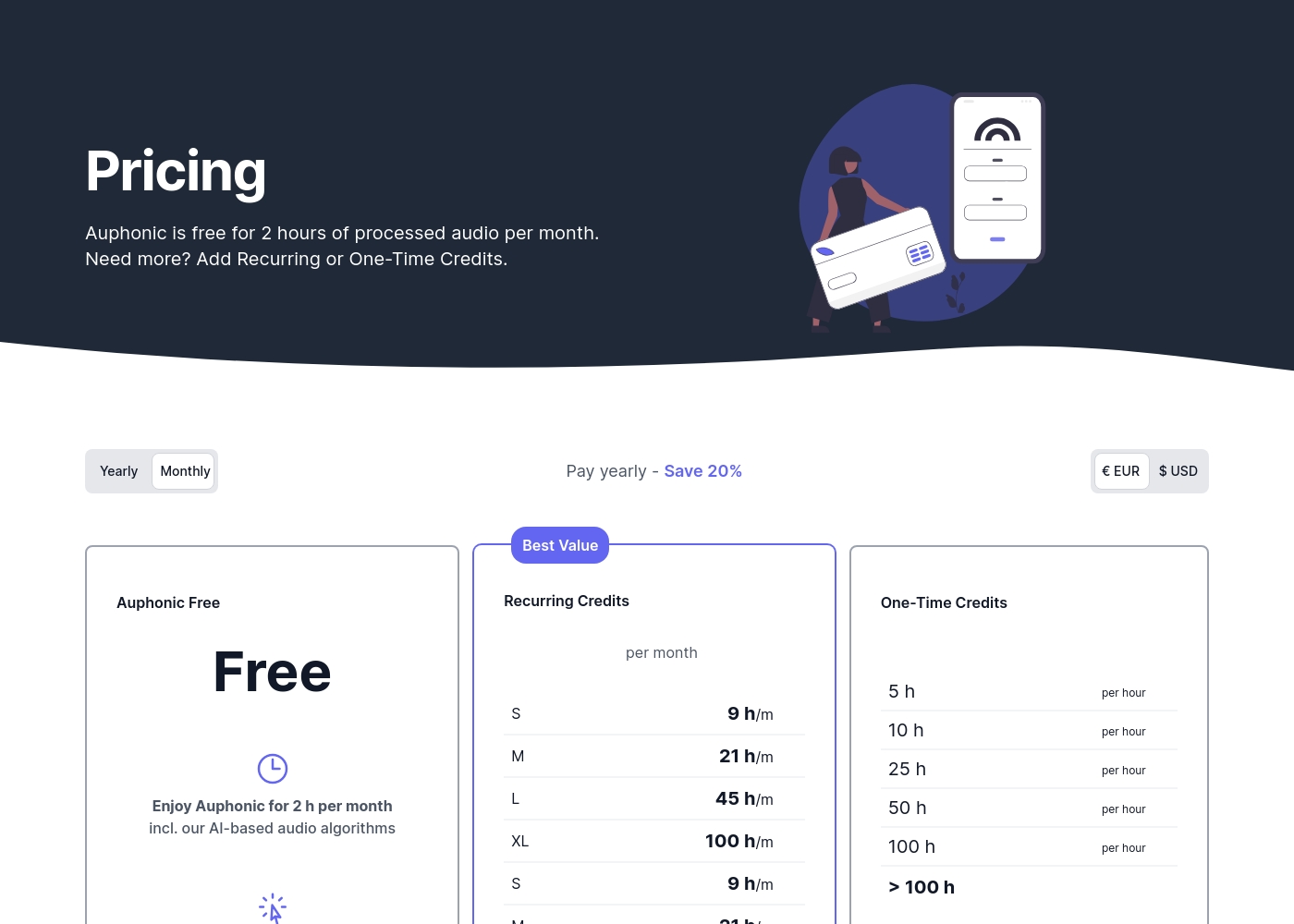
Auphonic costs are based on processing credits, offering a Free plan up to 2 hours per month, or flexible Recurring and One-Time Credit bundles where prices are not explicitly stated.
Now let's review the details for these credit options and available features.
Auphonic Free
Price: Free Websites Supported: Not explicitly stated Best For: Exploring the core features and processing limited, occasional content. Refund Policy: Not explicitly stated Other Features: Intelligent Leveler, Noise & Reverb Reduction, 2 hours of processed audio per month, production includes Auphonic jingle.
- 2 hours of processed audio per month
- AI-based audio algorithms
- Intelligent Leveler
- Noise & Reverb Reduction
- Loudness specifications
- Full access to advanced workflow features
- Standard support
- Multilingual speech recognition
- Automatic shownotes and chapters
- Watch folders
Pricing Notes
- Audacity is unique as it is entirely free, open-source software, removing all financial barriers for users.
- Auphonic uses a credit system based on processed audio time, making cost calculation dependent on usage.
- Auphonic offers a permanent Free plan providing 2 hours of processing monthly, which helps users test the core AI quality.
- Auphonic's recurring monthly credits do not roll over; unused time is lost at the end of the billing cycle.
- One-time credits purchased from Auphonic never expire and are used after recurring credits are depleted.
Pricing Head-to-Head
User Reviews
Users widely praise Audacity because it is completely free and provides an excellent entry point into audio editing. Reviewers frequently describe it as “simple, functional, fast, and easy,” particularly for basic tasks like recording sound effects or removing background noise.
However, community feedback reveals significant concerns regarding long-term reliability and complex setups. Several users note that the software feels “archaic” and is prone to debilitating crashes, installer bugs, and project recovery failures.
Audacity was the first digital audio workstation I ever tried out. It’s extremely easy to use and helps you understand how DAWs work in general. You can get things done like recording and quickly removing background noises.
While Auphonic is trusted by over a million users, available external user feedback is currently summarized by a single 5-star review found on Trustpilot. This reviewer offered strong praise, confirming the service delivers exactly what they needed.
The primary sentiment centered on ease of use, describing the interface as intuitive and simple. Crucially, the reviewer confirmed the high effectiveness of the core noise reduction technology: it eliminates background audio noise completely and correctly.
This tool was exactly what I needed. It functions very well and is genuinely intuitive to use. It manages to completely and correctly eliminate background sound.
Our Verdict
Audacity and Auphonic are audio tools that serve nearly opposite functions today. Audacity is the free, hands-on workshop for dedicated creatives. Auphonic is the paid, fully-automated factory that produces perfect, consistent results every time. Audacity's undeniable superpower is its zero cost and deep, manual editing capability. You can use Audacity on every operating system and manipulate every sound wave precisely. It remains the best choice for anyone learning audio design or needing local VST functionality. Auphonic's superpower is guaranteed professional consistency achieved using its AI sound engine. Auphonic takes away hours of tedious post-production work like loudness leveling and noise reduction instantly. It is essential for high-volume, reliable content creation for podcasts or audiobooks. The deciding factor is whether you budget money or spend time on post-production. If budget is $0, Audacity wins; accept the archaic interface and potential crashes. If time and guaranteed quality are paramount, Auphonic’s automated system is worth the credit cost. If you need deep, creative editing, choose Audacity. If you need flawless, scalable broadcast-quality sound mastering, Auphonic is the necessary professional solution.
Frequently Asked Questions
Which tool is better for professional-grade loudness and consistency?
Auphonic is designed specifically for broadcast consistency and uses the Intelligent Leveler automatically. Audacity requires applying manual effects and checking loudness standards yourself. Auphonic guarantees professional results.
Since Audacity is free, is Auphonic worth the cost?
Auphonic is worth the cost if you value automation and guaranteed, perfect consistency across many files. Audacity is free but requires substantial manual labor for similar professional results. Auphonic saves significant production time.
Does Audacity offer automatic shownote generation like Auphonic?
No, Audacity lacks the advanced AI processing features needed for automated tasks. Auphonic uses multilingual speech recognition to generate shownotes and chapters in its paid tiers.
Is Auphonic suitable for deep, creative waveform editing?
No. Auphonic is purely a robust post-processing tool accessed via a web interface. Audacity is the proper desktop editing application for manual cutting and detailed manipulation. Use Audacity for editing first.
Which software is more stable and reliable for large projects?
Auphonic is more reliable as its processing happens in a stable cloud environment. Audacity has known complaints about crashing and project recovery failures in recent versions. Auphonic offers peace of mind.
Can Audacity integrate with external cloud services like Google Drive?
Audacity is a local desktop editor focused on local files or the companion Audio.com. Auphonic integrates natively with Dropbox, SFTP, and Google Drive for seamless mass uploads.
Ready to Choose?
Both tools have their strengths. Choose based on your specific needs.