Asana vs Wrike
Asana and Wrike both dominate the project management software space. Wrike focuses heavily on complex enterprise workflows and deep customization. Asana prioritizes flexible use and organizational alignment across all teams. The choice depends entirely on your need for rigid, supported structure versus easy adoption.
Best for: Growing teams of 5-50 users needing quick adoption, Organizations prioritizing strategic goal alignment (OKRs)
Best for: Enterprise organizations (200+ users) needing deep customization, Marketing and creative agencies requiring advanced file proofing
Great features, poor customer support.
We find that Asana offers powerful project management features, excellent organizational scalability, and a generous free plan suitable for small teams. However, recurring external reports indicate severe problems with customer service responsiveness and billing transparency, heavily detracting from the product’s core strengths. Overall, we recommend caution for small businesses or any organization prioritizing reliable, direct customer support.
Pros
- Powerful free tier available for individuals and small teams (up to 10 users).
- Flexible design for managing tasks, projects, and team workflows efficiently.
- Supports excellent scalability, trusted by many Fortune 100 companies.
- Advanced features like Gantt charts and Timeline views are available starting on the Starter plan.
Cons
- Customer service is widely reported as non-existent, slow, or dependent on ineffective chatbots.
- Numerous complaints regarding deceptive auto-renewal practices and unauthorized charges.
- Refund requests are frequently denied, increasing costs for unintended subscriptions.
- Users often lose access or tasks when attempting to downgrade from a paid trial to the free plan.
Enterprise Power Meets Complex Commitment.
We find Wrike is an exceptionally versatile project solution, noted for scaling efficiently across corporate environments up to 3000 users and unifying communication across highly complex workflows. Overall, the software offers a powerful feature set for advanced visibility and customization, but we caution users regarding the rigid annual subscriptions and documented difficulties with managing auto-renewal and pricing increases.
Pros
- Transforms and streamlines complex corporate workflows efficiently.
- Highly customizable for various methodologies (e.g., Holacracy, OKR).
- Excellent collaborative transparency and 360° project visibility.
- Provides fast and helpful customer support regarding implementation and bugs.
Cons
- Pricing practices are reported as aggressive, often resulting in significant renewal increases.
- Subscriptions are difficult to cancel, and users report trouble stopping automatic renewal.
- Some teams report challenging adoption and setup processes.
- Users report instances of being oversold on features bundles they did not need.
AboutAsana
Asana is an online platform built specifically to manage your team’s work, projects, and tasks. It supports powerful Human + AI collaboration.
This AI component understands your specific business context, helping to move your most important work forward efficiently. Because it's a centralized ecosystem, it easily brings all doers and stakeholders together in one place. 💡
AboutWrike
Wrike is a trusted end-to-end enterprise work management solution. It's designed for organizations ready to transform manual processes into interconnected, automated workflows. Teams from 20 to 20,000 thrive here because Wrike is highly adaptable to any industry or size. It brings multiple teams into the same place for game-changing visual collaboration. Wrike is where you can easily align strategy and effectively execute your projects and programs. 💡
Highlights
Feature Comparison
Features Overview
We highlight the main differences and pick a winner for each feature.
Customer Support
Wrike’s support is highly rated, especially for complex implementation. Asana support is universally criticized as slow or non-existent.
Asana users report massive dissatisfaction with customer support responsiveness. Support often relies on slow email correspondence or useless chatbots. Users attempting to reach a human through Asana often find the process impossible. Wrike support is described as ‘exemplar,’ especially during initial setup and bug fixes. Teams transitioning to Wrike praise the guided professional deployment assistance. For enterprise teams, quick and reliable support is non-negotiable. This difference is the most critical hurdle for any small team considering Asana.
Free Plan Value
Asana’s free tier is robust for 10 users; Wrike’s free tier is significantly more restrictive.
Asana offers a powerful free plan for up to 10 users, perfect for small teams. This plan includes unlimited tasks, projects, and messages within basic views. Wrike offers a permanent Free plan, but it contains strict limitations. Users face active task limitations, pushing them toward a paid commitment sooner. If you are a startup or small business, Asana offers much better functionality at zero cost. Wrike performs best starting at the Team plan, which requires an annual commitment.
Pricing Commitment
Asana allows monthly billing; Wrike requires mandatory, rigid annual contracts for all paid plans.
Asana offers clear pricing tiers and allows users to choose monthly or annual billing. The commitment is flexible for teams that are just starting out. Wrike requires a mandatory annual contract and is billed yearly for all paid plans. Users report aggressive renewal increases and difficulty canceling. This rigid payment model can be a hidden cost factor for small or volatile teams. Asana is much easier to commit to temporarily, preventing unexpected charges.
Creative Agency Tools
Wrike is significantly better for creative teams needing advanced file proofing. Asana lacks specialized review features.
Asana offers basic project management and approval tracking features. It does not contain specialized tools for reviewing creative assets. Wrike provides robust proofing for over 30 file formats, including video and HTML. This tool centralizes feedback and accelerates the review cycle immensely. Marketing agencies managing high volumes of campaigns prefer Wrike for its specialized review functionality. Wrike even allows guest approvals for external clients easily. Creative teams focused on visual assets will find Wrike's specialized features essential for faster delivery.
Automation Rules
Asana offers unlimited rules cheaper; Wrike caps actions but focuses on complex data syncing.
Asana offers unlimited automation rules starting with the entry-level Starter plan. This removes any limits on workflow standardization. Wrike places specific quotas on automation actions based on the plan level. Quotas range from 50 up to 1500 actions per user per month. If your team performs high-volume operational automation, Asana provides better value upfront. Wrike’s strength lies in Wrike Integrate for complex data syncs. Teams needing simple, high-frequency rules will save money choosing Asana.
Strategic Alignment
Asana excels at connecting daily tasks directly to organizational goals. Wrike focuses more on project visibility.
Asana links individual work seamlessly to overall strategic goals and objectives. The platform enforces organizational clarity and accountability. Asana’s Advanced plan offers unlimited portfolios to orchestrate work across multiple departments effectively. Wrike also supports strategic alignment but emphasizes 360° visibility for current workload and resource planning. For setting and tracking OKRs company-wide, Asana has a slightly stronger methodology baked in.
Scalability & Enterprise
Wrike is built primarily as an end-to-end management solution for large organizations. Asana also scales well, but Wrike is optimized for high complexity.
Asana is trusted by 85% of Fortune 100 companies, proving its massive scalability. Asana offers Enterprise+ tiers with HIPAA and SIEM integration. Wrike is designed for teams ranging between 20 and 20,000 users seamlessly. Its customization features handle the most complex internal IT and engineering requests. Wrike provides exceptional security standards like ISO 27001 alongside role-based controls. Enterprise users often find Wrike's customization deeper for unique workflows.
AI Functionality
Asana AI handles routine context work; Wrike AI focuses on predictive risk and advanced analytics.
Asana AI Studio helps teams accelerate work by managing repetitive tasks and context. AI access is included starting on the Starter plan. Wrike integrates advanced AI capabilities into every layer of work management. This supports features like predictive risk analysis and optimization reports. Both tools leverage AI, but Asana targets task efficiency while Wrike targets data-driven strategic decisions. Wrike uses AI to empower better data analytics for managers.
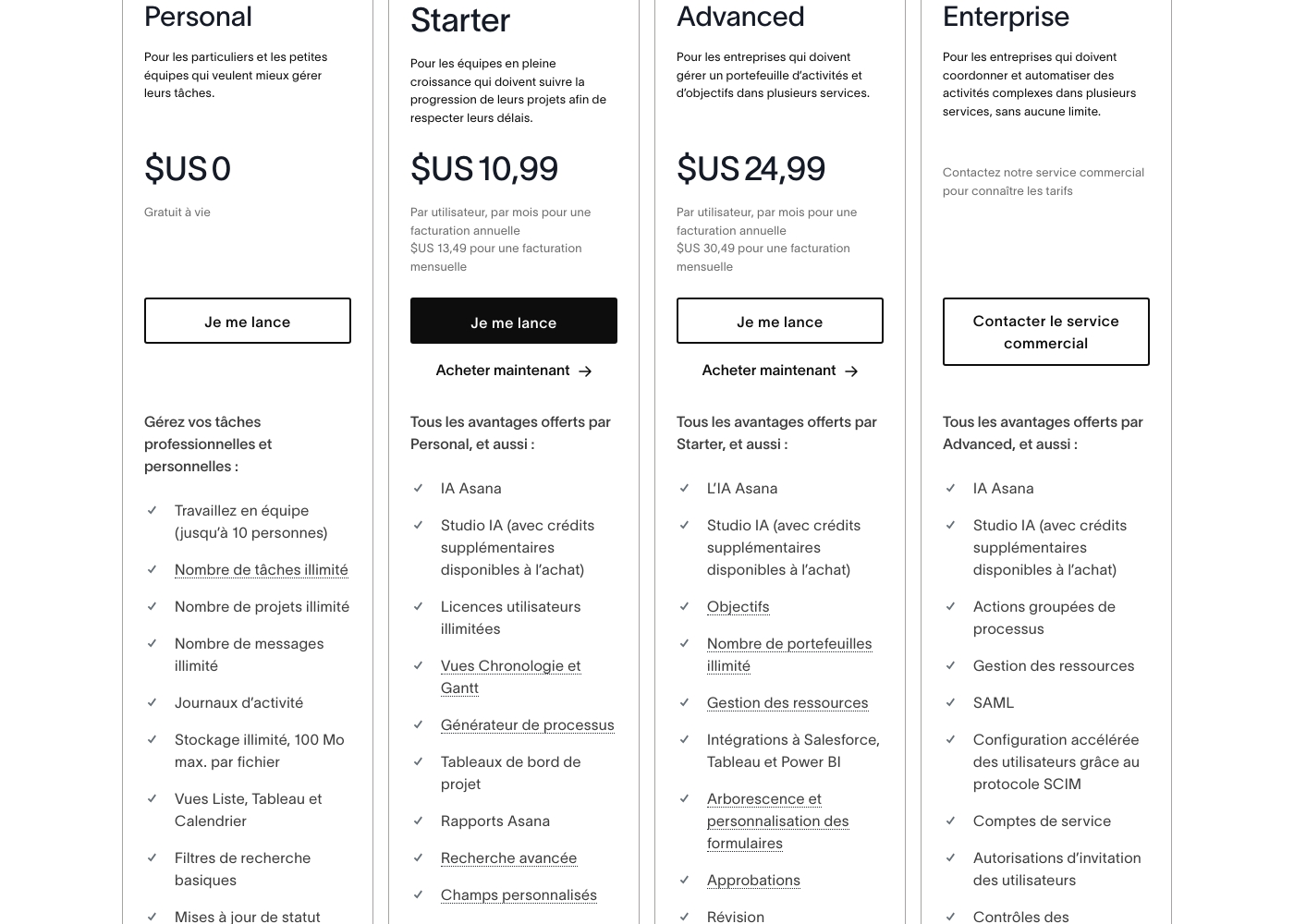
Asana costs between $US 0 and $24.99 per user per month (annual billing) with 5 plans: Personal at $US 0, Starter at $US 10.99, Advanced at $US 24.99, Enterprise at Contact Sales, and Enterprise+ at Contact Sales.
Here is a breakdown of what each plan offers your team.
Personal
Price: $US 0 (Free for life) Best For: Individuals and small teams wanting better task management Other Features:
- Work in teams (up to 10 people)
- Unlimited tasks, projects, and messages
- Unlimited storage (100 MB max. per file)
- List, Board, and Calendar views
- Basic search filters
- Work in teams (up to 10 people)
- Unlimited tasks, projects, and messages
- Unlimited storage (100 MB max. per file)
- List, Board, and Calendar views
- Basic search filters
- Unlimited user licenses
- Asana AI Studio access
- Timeline and Gantt Views
- Process Generator
- Advanced Search and Custom Fields
- Objectives and unlimited portfolios
- Resource Management
- Integrations to Salesforce, Tableau, and Power BI
- Form customization and approvals
- Native time tracking
- Bulk process actions
- SAML and SCIM for accelerated user configuration
- Service accounts
- 24/7 support
- Custom branding
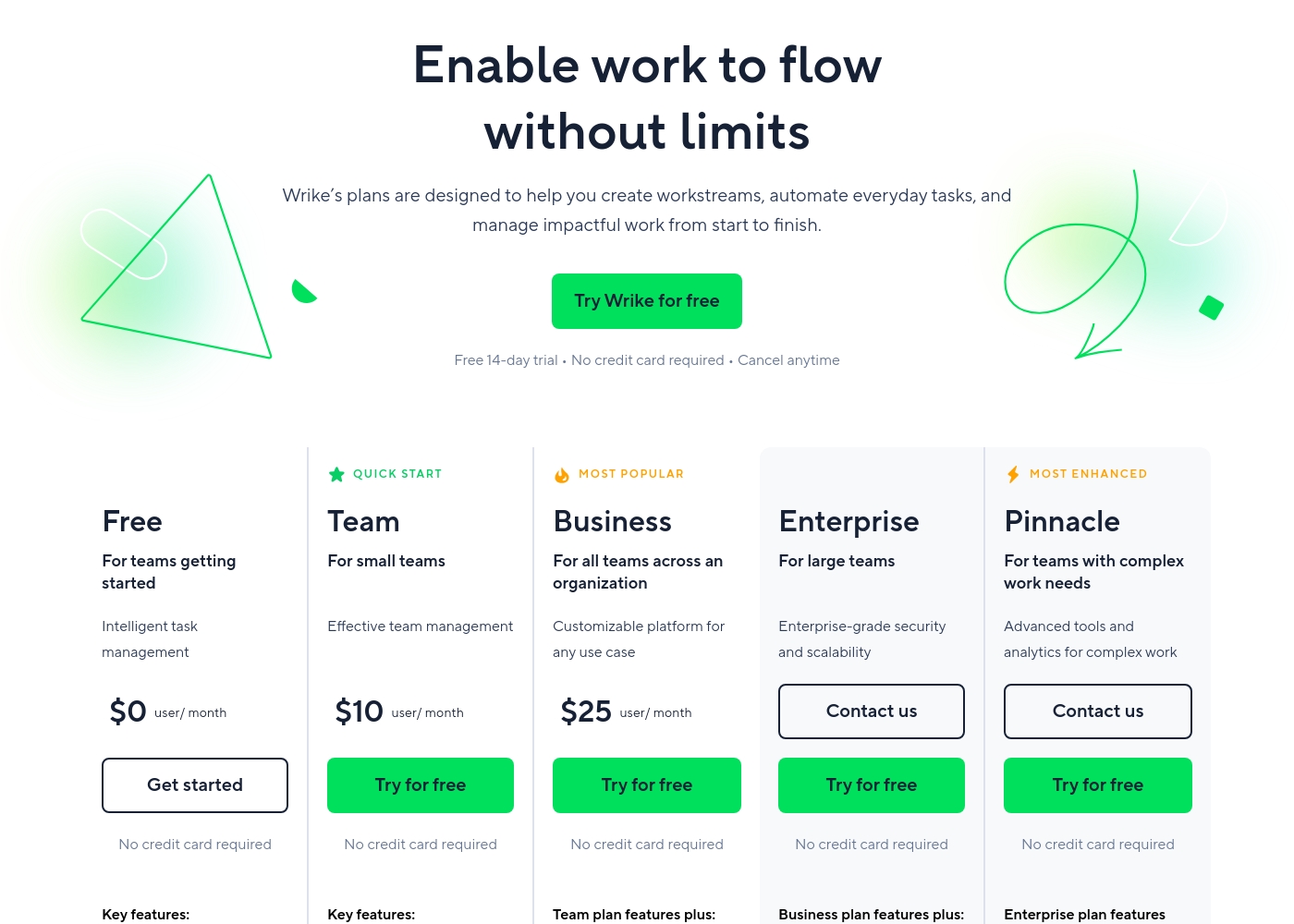
Wrike costs between $0 and $25 per user/month, with five plans: Free at $0/user/month, Team at $10/user/month, Business at $25/user/month, and Enterprise and Pinnacle which require users to contact sales.
- Web, desktop, and mobile apps
- Project and task management
- Board view (Kanban)
- Table view (spreadsheet format)
- Folders structure & nested projects
- Unlimited projects, tasks, & subtasks
- Gantt charts, Calendar & Chart view
- Generative AI, 2 GB storage per user
- Project Blueprints and Unlimited request forms
- Approvals & guest approvals
- Resource & Capacity Planning
- File and video proofing (30+ file formats)
- Real-time reports
- SAML-based SSO and Two-Factor Authentication (2FA)
- Password policies and custom access roles
- Customizable user types and Admin permissions
- User audit reports
Pricing Notes
- Wrike requires mandatory annual subscriptions for all paid plans, billed yearly.
- Asana allows monthly payments on lower paid tiers, providing more financial flexibility.
- Both Asana and Wrike explicitly state they do not offer refunds once a paid subscription begins.
- Asana's Free plan accommodates up to 10 users, while Wrike's Free plan has limitations on active tasks.
- Wrike users frequently report aggressive renewal increases and extreme difficulty when attempting to cancel commitments.
Pricing Head-to-Head
User Reviews
External feedback, predominantly showcased through Trustpilot, reveals widespread dissatisfaction among users, giving the service a significantly low overall rating. Customers frequently criticize the subscription and billing practices, often citing unexpected auto-renewals or unauthorized charges occurring months after cancellation or trial expiration. The inability to secure refunds, even in cases of clear error, is a major pain point.
🚨 The most significant complaint centers on support responsiveness. Reviewers report slow service, sometimes waiting a week for an email reply, reliance on frustrating chatbots, and difficulties contacting a human representative. While some users acknowledge the base product is flexible and has good design features, the company's operational infrastructure and seeming focus on larger enterprises leaves smaller businesses feeling neglected, leading many to label the experience customer-hostile or deceptive.
The app itself is great, offering good design, projects, and flexible team spaces. However, the customer service experience is awful. The only way to talk to CS is often through slow, ineffective emails.
Users consistently praise Wrike's powerful capabilities in transforming workflow management and driving organizational efficiency. Many reviewers, including team leads and large enterprise users, call it one of the best project management systems available, noting its strong suitability for high-level customization for specific methodologies like OKR.
Its ability to centralize communication, provide 360° visibility, and manage collaboration across large global teams is frequently highlighted as second to none. Furthermore, customer support is often described as exemplar, particularly regarding implementation and quick bug fixes.
Using Wrike for three years has completely changed how we manage our workflows. The biggest transformation is how streamlined and fast our operations have become. It's truly efficient for our large team.
Our Verdict
Picking between Asana and Wrike ultimately depends on your tolerance for complexity and risk. Asana is the flexible, easy-to-adopt choice for rapid project clarity. Wrike is the powerful, deeply customizable option tailored for large enterprise scale and specialized needs. Asana excels at aligning daily tasks with high-level company strategy and objectives. Its free plan supports 10 users with unlimited functions, offering unbeatable value. Asana also offers unlimited automation rules starting on the inexpensive Starter plan. Choose Asana if structure, quick team adoption, and monthly payment options are your top priorities. Wrike is ideal for organizations with complex, highly specialized workflows. It offers powerful creative tools like video and HTML proofing for agencies. Wrike’s 4.1 review rating reflects excellent support and implementation help, a key strength. Wrike requires a full annual commitment for all paid subscriptions, which is a major factor. The biggest difference is customer support and financial commitment risk. Wrike offers reliable, highly rated support during complex implementation. Asana receives substantial negative feedback about slow, non-existent customer service. If you need reliable support and specialized tools like proofing, Wrike justifies that mandatory annual commitment. If your team is under 50, start with Asana's robust free or Starter plan for unmatched flexibility. If you are a large enterprise or agency needing rigid controls, better support, and specialized creative features, Wrike is the superior and more stable choice.
Frequently Asked Questions
Which software is better for small teams: Asana or Wrike?
Asana is better for small teams due to its excellent, generous Free plan. The Asana Free plan supports up to 10 users with unlimited projects and tasks. Wrike’s free offering is very basic and quickly pushes users toward a paid, annual commitment.
Does Asana have specialized proofing features like Wrike?
No, Asana does not feature the same specialized proofing capabilities as Wrike. Wrike offers robust tools to proof over 30 file formats, including video and HTML. Creative teams and agencies focused on assets will find Wrike's features essential.
Is Wrike staff highly-rated compared to Asana’s customer support?
Wrike’s customer support is frequently described as 'exemplar,' especially for implementation and bug fixes. Asana receives overwhelming negative feedback regarding its support responsiveness. Asana users often report difficulties reaching a human representative.
Which offers a more flexible pricing commitment, Asana or Wrike?
Asana offers a more flexible commitment by allowing monthly payments on its paid Starter and Advanced tiers. Wrike requires a mandatory annual subscription for all paid plans. This forces a longer-term financial risk commitment with Wrike.
Which tool provides better features for strategic goal alignment?
Asana is slightly stronger for strategic alignment and objective tracking. The platform is designed to link daily tasks directly to organizational goals. Asana's Advanced plan includes tools for unlimited portfolios to coordinate work company-wide.
Does Wrike or Asana offer better value for workflow automation?
Asana offers better value by including unlimited automation rules starting on its Starter plan. Wrike applies automation quotas ranging from 50 to 1500 actions per user per month. Teams needing high-volume simple rules should choose Asana.
Ready to Choose?
Both tools have their strengths. Choose based on your specific needs.