Asana vs Monday.com
Asana and Monday.com are both enterprise project management powerhouses. Asana is excellent for linking daily tasks directly to high-level strategic goals. Monday.com offers superior flexibility and an incredibly visual interface built for speed. Picking one depends entirely on whether your organization seeks strict governance or total customization.
Best for: Large enterprises prioritizing top-down goal alignment (OKRs), Organizations needing to standardize processes organization-wide rapidly
Best for: Teams requiring a highly visual, fast-to-adopt project management solution, Mid-to-large teams (15+ users) supporting highly diverse functions (Sales, Marketing, HR)
Great features, poor customer support.
We find that Asana offers powerful project management features, excellent organizational scalability, and a generous free plan suitable for small teams. However, recurring external reports indicate severe problems with customer service responsiveness and billing transparency, heavily detracting from the product’s core strengths. Overall, we recommend caution for small businesses or any organization prioritizing reliable, direct customer support.
Pros
- Powerful free tier available for individuals and small teams (up to 10 users).
- Flexible design for managing tasks, projects, and team workflows efficiently.
- Supports excellent scalability, trusted by many Fortune 100 companies.
- Advanced features like Gantt charts and Timeline views are available starting on the Starter plan.
Cons
- Customer service is widely reported as non-existent, slow, or dependent on ineffective chatbots.
- Numerous complaints regarding deceptive auto-renewal practices and unauthorized charges.
- Refund requests are frequently denied, increasing costs for unintended subscriptions.
- Users often lose access or tasks when attempting to downgrade from a paid trial to the free plan.
Intuitive, Flexible Work Management Platform
We find Monday.com to be an extremely versatile AI work platform for unifying task management and enterprise execution. Its visual appeal and intuitive, no-code interface ensure rapid team adoption and customization for any complex workflow. Overall, we recommend Monday.com for mid-sized teams that need robust automation and detailed, company-wide project tracking capabilities.
Pros
- Visually appealing and intuitive user interface (UI) design.
- High flexibility and customization allow creation of unique workflows.
- Robust automations and integrations streamline processes efficiently.
- Effective tracking across multiple departments (e.g., CRM, marketing, IT).
Cons
- Base pricing model is perceived as too complex and costs quickly escalate with features.
- Mandatory minimum seat purchases increase expense for small teams.
- Users report occasional glitches and limits on data export functions.
- Canceling or unsubscribing from paid plans can be unexpectedly difficult.
AboutAsana
Asana is an online platform built specifically to manage your team’s work, projects, and tasks. It supports powerful Human + AI collaboration.
This AI component understands your specific business context, helping to move your most important work forward efficiently. Because it's a centralized ecosystem, it easily brings all doers and stakeholders together in one place. 💡
AboutMonday.com
Monday.com is an AI work platform designed to unify your entire product suite. This system supports collaboration and execution for every team in your company. Whether you manage projects, accelerate sales, or handle IT support, tuesday.com offers specialized products for departmental needs. This comprehensive approach powers seamless operations across your whole organization.
It serves teams managing Projects, Sales, Marketing, IT & Ops, Product & Engineering, and Leadership. Leading brands and over 60% of the Fortune 500 trust this platform for enterprise execution. 💡
Highlights
Feature Comparison
Features Overview
We highlight the main differences and pick a winner for each feature.
User Interface & Design
Monday.com is highly visual and intuitive, whereas Asana is structured and list-focused.
Asana focuses on connecting work to goals using a structured, task-centric layout. It prioritizes detailed clarity for complex task hierarchies. Monday.com is renowned for its visually appealing design and heavy use of color-coding for status. The intuitive look and drag-and-drop customization allow for quick team adoption. Monday.com users generally report a faster, smoother experience right out of the box. Asana can feel clunky until you master its specific navigation.
Workflow Flexibility
Monday.com provides a no-code interface for highly tailored workflows across diverse functions. Asana offers standardization through replicable processes.
Monday.com uses a flexible, no-code interface to let teams create uniquely customized boards and trackers. This is great for handling Sales and HR within one platform. Asana encourages rigid standardization using its reusable Process Generator capability. This helps enforce consistency organization-wide for complex or repeatable workflows. If you need unique, highly adaptable pipelines for specialized departments, choose Monday.com. Asana is better if standardization and consistency are your top priority.
Automation Limits
Asana offers unlimited automation rules on its Starter plan; Monday.com uses high but tiered monthly action limits.
Asana provides unlimited automation rules starting on the Starter plan ($10.99/user/month). This gives teams maximum freedom to automate routine tasks instantly. Monday.com uses strict but high monthly action limits based on the subscription tier. The Standard plan only allows 250 actions monthly, which is easily depleted by active teams. Monday.com's Enterprise plan jumps significantly to 250,000 actions, scaling for massive volume. Asana wins for small to mid-sized teams due to the unlimited rule count.
Pricing for Small Teams
Asana has a superior Free plan for 10 users, while Monday.com forces a paid 3-seat minimum.
Asana offers a powerful Free Personal plan supporting up to 10 users with unlimited tasks and projects. This plan provides excellent budget relief for small, growing businesses. Monday.com's Free plan is limited to only two users, making it unsuitable for most teams. Paid tiers on Monday.com mandate a minimum purchase of three seats, drastically increasing the starting expense. Asana's price structure is much more accessible and budget-friendly for small teams of 3 to 10 people.
Strategic Goal Management
Asana is fundamentally designed to link execution to strategic company objectives. Monday.com focuses on departmental execution.
Asana actively connects strategic goals directly to daily tasks for powerful clarity and accountability across the whole organization. The Advanced plan includes Objectives and unlimited portfolios for high-level oversight. Monday.com features Portfolio management only at the Enterprise tier, targeting program management specifically. Asana provides a clearer, top-down structure necessary for large organizations managing OKRs at scale. Asana ensures every doer sees how their work contributes to the high-level strategy.
Customer Support
Monday.com offers prioritized support for paid users; Asana is widely criticized for having essentially non-existent customer service.
Monday.com provides prioritized customer support starting on the Basic paid plan. Enterprise customers receive dedicated 24/7 quality support for maximum reliability. Asana's external reviews cite overwhelming dissatisfaction with support responsiveness and billing issues. Users report waiting weeks for replies and relying on ineffective chatbots. For crucial operational reliability, Monday.com's dedicated support structure provides peace of mind. Asana's reported lack of support is a severe drawback for many buyers.
Enterprise Security
Both offer high-level security, but Asana has a specialized Enterprise+ tier for strict industry compliance.
Monday.com provides Enterprise-grade security, governance controls, and ISO certifications. It supports multi-level permissions for managing sensitive data. Asana offers a specialized Enterprise+ tier for highly regulated industries. This tier supports crucial features like HIPAA compliance and SIEM integration. If your needs involve advanced regulatory requirements, Asana's Enterprise+ is purpose-built. For generalized high-level security, both platforms are robust options.
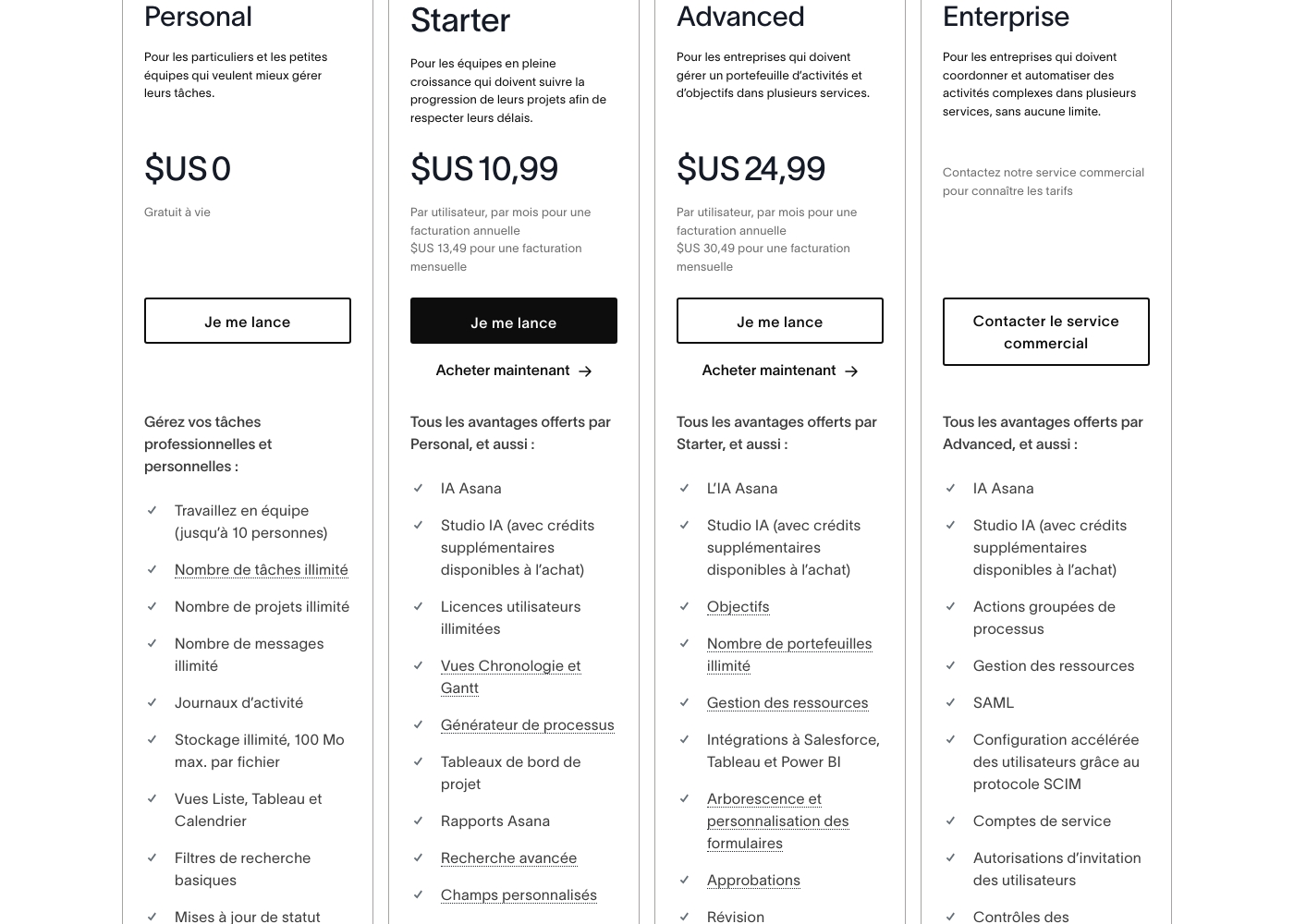
Asana costs between $US 0 and $24.99 per user per month (annual billing) with 5 plans: Personal at $US 0, Starter at $US 10.99, Advanced at $US 24.99, Enterprise at Contact Sales, and Enterprise+ at Contact Sales.
Here is a breakdown of what each plan offers your team.
Personal
Price: $US 0 (Free for life) Best For: Individuals and small teams wanting better task management Other Features:
- Work in teams (up to 10 people)
- Unlimited tasks, projects, and messages
- Unlimited storage (100 MB max. per file)
- List, Board, and Calendar views
- Basic search filters
- Work in teams (up to 10 people)
- Unlimited tasks, projects, and messages
- Unlimited storage (100 MB max. per file)
- List, Board, and Calendar views
- Basic search filters
- Unlimited user licenses
- Asana AI Studio access
- Timeline and Gantt Views
- Process Generator
- Advanced Search and Custom Fields
- Objectives and unlimited portfolios
- Resource Management
- Integrations to Salesforce, Tableau, and Power BI
- Form customization and approvals
- Native time tracking
- Bulk process actions
- SAML and SCIM for accelerated user configuration
- Service accounts
- 24/7 support
- Custom branding
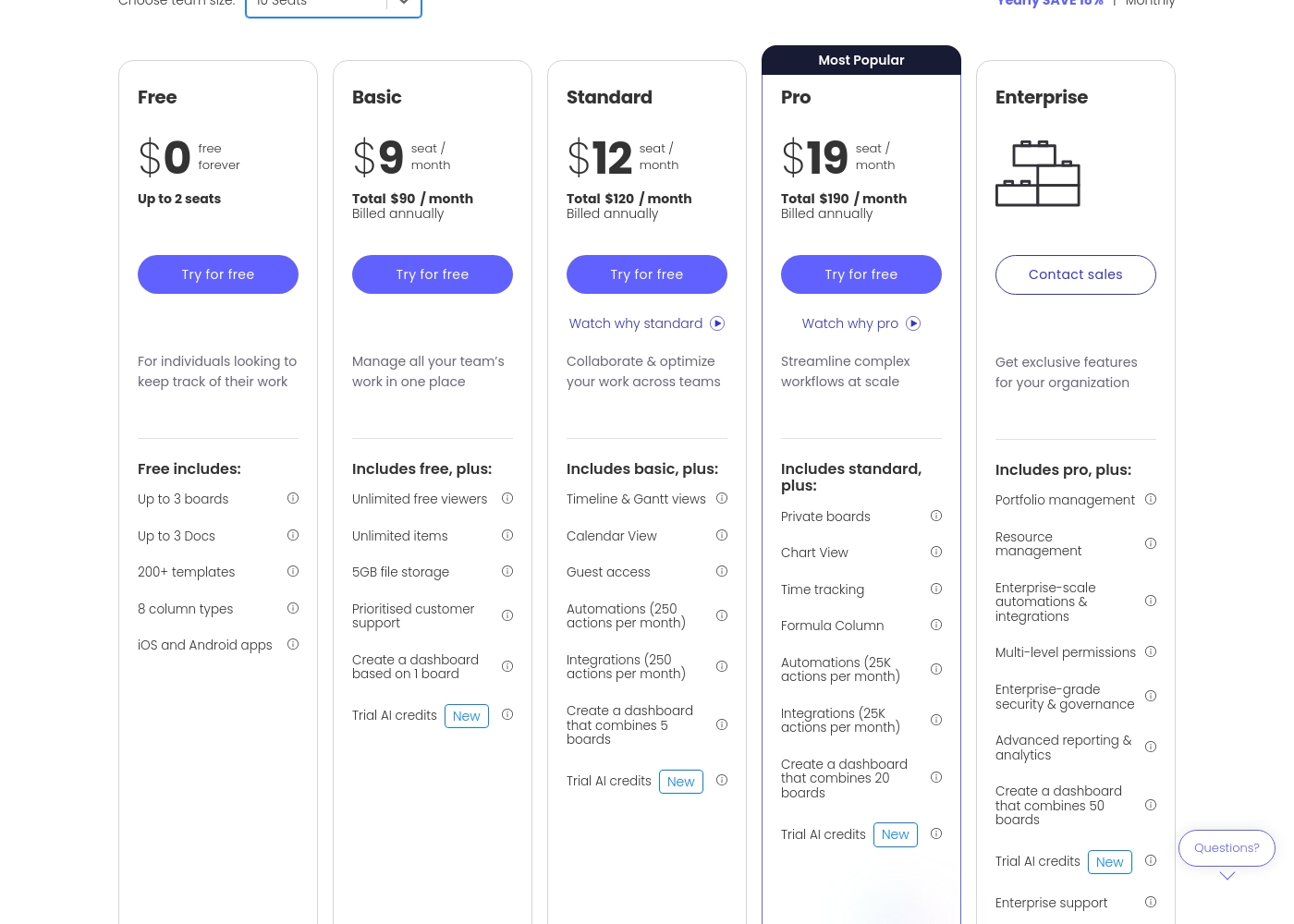
Monday.com costs between $0 and $19 per seat per month (billed annually) with five plans: Free at $0, Basic at $9, Standard at $12, Pro at $19, and Enterprise (contact sales).
Let's break down what's included in each plan to help you pick the best fit.
Free
Price: $0/month Best For: Individuals looking to keep track of their work Other Features:
- Up to 3 boards
- Up to 3 Docs
- 200+ templates
- iOS and Android apps
- Up to 3 boards
- Up to 3 Docs
- 200+ templates
- 8 column types
- iOS and Android apps
- Unlimited free viewers
- Unlimited items
- 5GB file storage
- Prioritised customer support
- Create a dashboard based on 1 board
- Timeline & Gantt views
- Calendar View
- Guest access
- Automations (250 actions per month)
- Integrations (250 actions per month)
- Private boards
- Chart View
- Time tracking
- Formula Column
- Automations (25K actions per month)
Pricing Notes
- Asana offers a much more generous Free plan, supporting up to 10 users versus Monday.com's limit of 2.
- Monday.com mandates a three-seat minimum purchase for all paid plans, increasing the starting cost for small businesses.
- Asana explicitly states they do not provide refunds once a paid subscription has started.
- Monday.com offers a partial refund if you cancel an annual plan within the first 30 days of purchase.
- For features requiring a sales quote, Monday.com’s Pro plan is cheaper ($19/seat) than Asana’s Advanced plan ($24.99/user).
Pricing Head-to-Head
User Reviews
External feedback, predominantly showcased through Trustpilot, reveals widespread dissatisfaction among users, giving the service a significantly low overall rating. Customers frequently criticize the subscription and billing practices, often citing unexpected auto-renewals or unauthorized charges occurring months after cancellation or trial expiration. The inability to secure refunds, even in cases of clear error, is a major pain point.
🚨 The most significant complaint centers on support responsiveness. Reviewers report slow service, sometimes waiting a week for an email reply, reliance on frustrating chatbots, and difficulties contacting a human representative. While some users acknowledge the base product is flexible and has good design features, the company's operational infrastructure and seeming focus on larger enterprises leaves smaller businesses feeling neglected, leading many to label the experience customer-hostile or deceptive.
The app itself is great, offering good design, projects, and flexible team spaces. However, the customer service experience is awful. The only way to talk to CS is often through slow, ineffective emails.
Users consistently praise Monday.com for its visually appealing and intuitive user interface, making complex project status easy to track. Many reviewers highlight the platform's incredible flexibility, allowing teams to build highly customized workflows for diverse needs, from project management to sales CRM.
Key features like robust automations and integrations are universally valued, helping teams streamline processes and drastically reduce time spent in meetings and emails. Onboarding is often described as quick and intuitive, proving fast time to value.
Monday.com is the best! This platform helps us track task management and employee productivity, ensuring the best outcome for our clients. Nothing falls through the cracks anymore, which is a massive improvement.
Our Verdict
Asana and Monday.com are both platform giants, but they serve two distinct visions. The choice boils down entirely to your organization’s preference for structure versus flexibility. Monday.com generally pulls ahead for most growing teams due to its superior user experience and dependable support structure. Asana, despite its scale, suffers significant user complaints about service responsiveness and questionable billing practices. Asana’s core strength is organizational control and deep strategic alignment. It actively links every daily task to corporate objectives and offers unlimited process rules on its Starter plan. If you need tight, structured “air traffic control” over complex production demands, Asana is expertly built for that top-down governance. Its excellent 10-user free plan is also unmatched value. Monday.com’s superpower is its visual appeal, flexibility, and rapid adoption rate. Its no-code interface lets diverse teams—like Sales, HR, and IT—easily create highly customized, tailored workspaces. Crucially, Monday.com provides prioritized customer support, making onboarding and issue resolution smooth and reliable. The deciding factor should be customer experience and cost structure for growth. Monday.com excels in user satisfaction and flexibility, but its mandatory 3-seat minimum sharply raises the initial cost. Asana is cheap initially for small teams but requires tolerance for its poorly rated customer service. Ultimately, choose Monday.com if customization power, visual tracking, and support are mandates for your operational team. Choose Asana if you are a large enterprise prioritizing total strategic governance or if you are using the generous free plan.
Frequently Asked Questions
Which is better for small teams: Asana or Monday.com?
Asana is better for small teams, offering a highly functional Free plan for up to 10 users. Monday.com's free option is limited to two users. For paid plans, Monday.com requires a more expensive minimum purchase of three seats.
Why is Monday.com's pricing more expensive for small teams than Asana?
Monday.com mandates a minimum purchase of three seats for all paid plans. If you only have two users, you must pay for three seats, increasing costs. Asana allows per-user monthly billing with no seat minimums above its 10-user Free plan.
Which tool offers better automation features: Asana or Monday.com?
Asana offers unlimited automation rules starting on its lowest paid plan ($10.99/user/month). Monday.com limits actions, starting with 250 per month on the Standard tier. For high volume, Monday.com's Enterprise plan offers a massive 250,000 actions monthly.
Can I get a refund if I cancel Monday.com or Asana?
Monday.com offers a partial refund if you cancel an annual subscription within the first 30 days. Asana explicitly states they do not provide refunds once a paid subscription has started. This is a critical distinction for annual users.
Which tool is more geared towards strategic goal management (OKRs)?
Asana has a stronger focus on goals and strategy, linking daily tasks to objectives and unlimited portfolios. This helps maintain clarity and accountability up to the highest executive levels. Monday.com focuses more on achieving project execution within specific departmental workspaces.
Does Asana offer dedicated customer support, or is it automated?
Only Asana’s highest Enterprise+ tier includes 24/7 dedicated support. Users on lower plans overwhelmingly report relying on slow emails and frustrating, ineffective chatbots. Monday.com offers prioritized customer support starting on its Basic paid plan.
Ready to Choose?
Both tools have their strengths. Choose based on your specific needs.