Animaker vs VEED
Animaker excels at studio-quality animation and live-action video creation. VEED focuses on fast, browser-based end-to-end editing with powerful AI features. Deciding comes down to creative style versus workflow efficiency. Both offer strong AI solutions, but address very different video needs.
Best for: Educational content creators needing complex character animation, Small businesses prioritizing responsive customer support
Best for: Marketing teams seeking 60% reduction in video editing time, Teams prioritizing seamless browser-based collaboration and asset sharing
AI video creation meets superb service.
We reviewed Animaker's powerful AI platform and found it excels in democratizing video creation for all user levels. Its strong focus on user experience and comprehensive feature set makes it highly competitive, especially for complex animation needs. Overall, we recommend Animaker for users prioritizing stellar support and accessible, studio-quality output.
Pros
- Exceptional, highly responsive customer support (often resolving issues within the hour).
- Highly user-friendly interface that is excellent for beginners and non-designers.
- Studio-quality animation and live-action video creation capabilities.
- Extensive and unique character customization options (ethnicity, features).
Cons
- Some users report the pricing structure can feel expensive, especially for light usage.
- Occasional reports of the system being cumbersome or experiencing crashes.
- Limitations in the asset library regarding available character actions matching specific backgrounds.
- No explicit money-back guarantee mentioned in the standard pricing structure.
Browser-based video editing power.
We find VEED to be a highly accessible, browser-based video editing solution that excels at streamlining content creation using powerful AI. Overall, we recommend this platform, especially for short-form content, despite the premium pricing required for full functionality.
Pros
- Extremely intuitive and beginner-friendly interface.
- Fully web-based; no software installation or downloads required.
- Powerful AI tools for auto-subtitles, translations, and video generation.
- Excellent for creating and editing short-form content (e.g., YouTube Shorts).
Cons
- Subscription costs are frequently cited as a limiting factor.
- Unreliable for long-form video recording and editing (potential data loss/glitches).
- Exporting 4K video is restricted to higher-tier or professional plans.
- AI translations (subtitles) can sometimes be inaccurate or difficult to edit manually.
AboutAnimaker
Animaker is known as the world’s most complete Animation and Video Making Tool. It's truly a world-class system built for everyone. This platform helps you create both animation and live-action content with ease. Whether you are running a startup or working for a seasoned Fortune 500 company, you can achieve studio-quality results. More than 30 million users already trust this powerful system to deliver effective visual communication. 💡
AboutVEED
VEED is a complete end-to-end video suite designed for busy teams and creators. It allows you to create, collaborate, and share impressive videos entirely from within your browser. This platform offers seamless workflow consolidation, perfect for everyone from individual content makers to large organizations like the Fortune 500. It includes smart collaboration tools and a dedicated Brand Kit, ensuring your team maintains consistency. Additionally, you access a vast, royalty-free stock library featuring over 2 million video and audio assets. 💡
Highlights
Feature Comparison
Features Overview
We highlight the main differences and pick a winner for each feature.
Core Specialty
Animaker is best for comprehensive animation; VEED dominates all-in-one browser editing.
Animaker is known as the world’s most complete Animation and Video Making Tool. It creates both animated and live-action videos easily. VEED is an end-to-end video suite accessible entirely in your web browser. It consolidates recording, editing, and publishing. Animaker requires a bigger learning commitment for character animation. VEED simplifies the workflow immediately by eliminating separate tools. If you need character animation, choose Animaker; for efficiency, choose VEED.
Team Collaboration
VEED offers built-in collaboration features; Animaker locks them behind the top Enterprise tier.
VEED features Review Mode and Asset Sharing for seamless team feedback. The integrated Brand Kit ensures consistency across all team members' videos. Animaker requires the custom-priced Enterprise plan for Live Collaboration or Team Licenses. This limitation makes teamwork impractical for small businesses using Animaker. VEED empowers teams to scale video production easily from standard paid tiers.
Advanced AI Editing
VEED offers intelligent video correction tools; Animaker focuses AI on generation and voiceovers.
VEED features Filler Word Removal and Eye Contact Correction for polished presenter videos. Magic Cut helps automatically shorten and refine your video timeline rapidly. Animaker uses patented AI for generating videos from text within seconds. It also boasts a Neural TTS Engine with over 800 voices. VEED's AI directly enhances the quality of recorded footage for fast, professional polish.
Customer Support
Animaker is praised for its exceptional, highly responsive customer support; VEED support details are less transparent.
Animaker users frequently mention issues resolved quickly by specific, named staff members. Support responsiveness is a major reason for Animaker’s impressive user satisfaction rating. VEED links to contact options but does not publicly state a guaranteed service-level agreement (SLA). When high-stakes projects crash, Animaker’s responsive support is a significant operational advantage. Animaker is clearly the winner here.
Resolution & Quality
Animaker offers 2K on its popular Pro plan; both reserve 4K for their highest enterprise plans.
Animaker offers 2K video quality on its reasonably priced Pro tier, alongside commercial rights. Animaker reserves 4K resolution exclusively for the high-end Enterprise tier. VEED restricts 4K export capability to its premium paid subscriptions. For serious creators needing great quality without custom pricing, Animaker’s Pro plan is the clear choice. Lower-tier VEED plans will not allow 4K exports.
Mobile Capability
VEED has a dedicated mobile app for professional editing; Animaker's mobile capabilities are not advertised.
VEED offers the powerful VEED Captions App for editing and publishing from your phone. This makes VEED ideal for fast, on-the-go content creation and quick adjustments. Animaker does not explicitly state offering an equivalent feature-rich mobile editing application. VEED allows you to add accurate subtitles and edit pro-level video right from your pocket. This is a massive win for VEED.
Pricing Clarity
Animaker provides clear tiered pricing; VEED’s costs for standard paid subscription tiers are opaque.
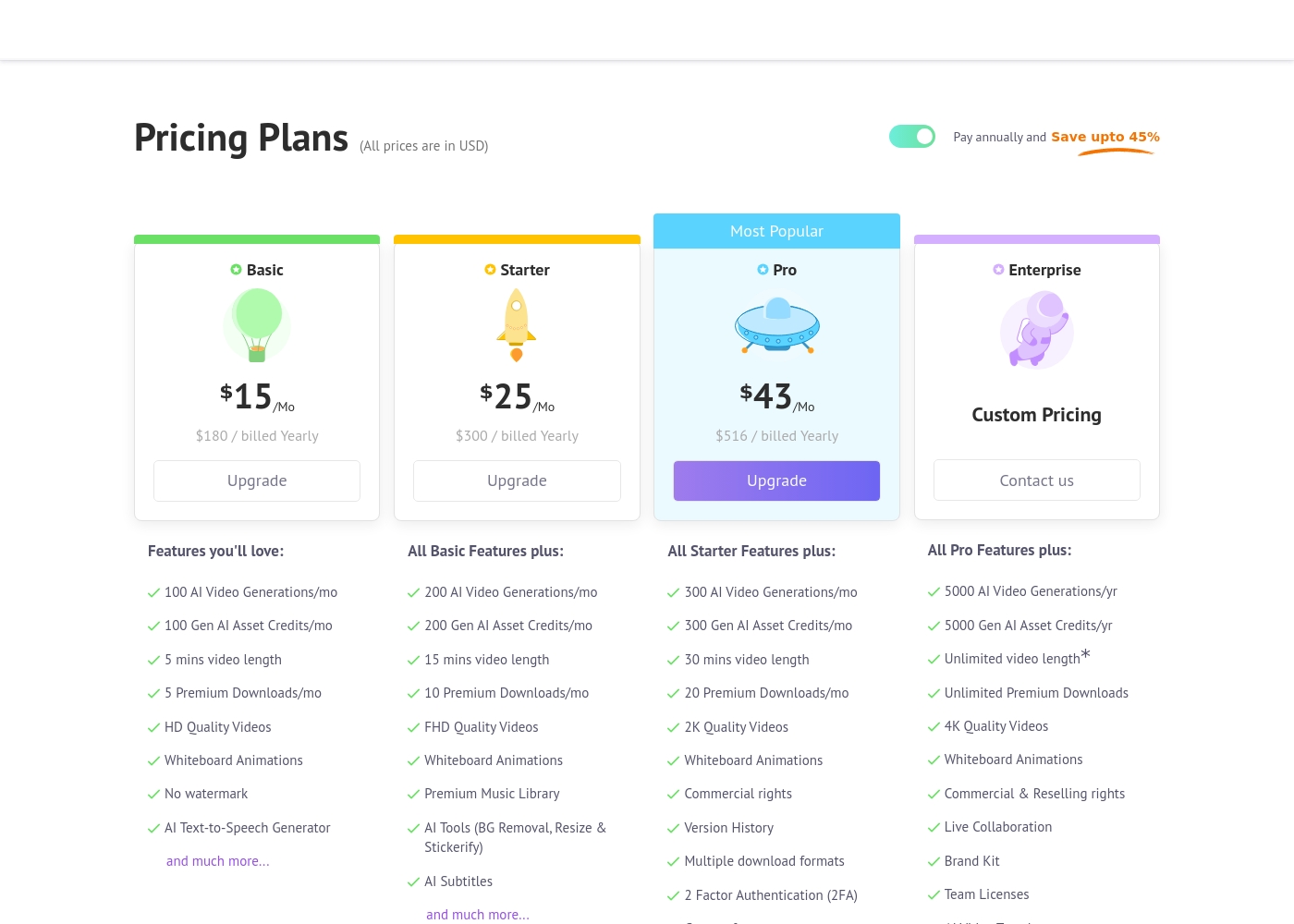
Animaker clearly lists prices from $15-$43/month, although these rates require annual commitment. VEED only details its Free tier and requires contact for Enterprise pricing. This transparency makes budgeting for Animaker significantly easier for small teams. VEED users must investigate further to understand the cost of standard Pro or Business features.
Animaker costs between $180 and $516 per year with four primary plans: Basic at $180/year, Starter at $300/year, Pro at $516/year, and Enterprise at Custom Pricing.
Let's explore the details of each subscription level so you can find the perfect fit for your video creation needs.
Basic
Price: $15/Mo ($180 billed Yearly) Other Features:
- 100 AI Video Generations/mo
- 5 Premium Downloads/mo
- 5 mins video length
- HD Quality Videos
- No watermark
- AI Text-to-Speech Generator
- 100 AI Video Generations/mo
- 5 mins video length
- 5 Premium Downloads/mo
- HD Quality Videos
- No watermark
- 200 AI Video Generations/mo
- 15 mins video length
- FHD Quality Videos
- Premium Music Library
- AI Tools (BG Removal, Resize & Stickerify)
- 300 AI Video Generations/mo
- 30 mins video length
- 2K Quality Videos
- Commercial rights
- Version History
- 5000 AI Video Generations/yr
- Unlimited Premium Downloads
- Unlimited video length*
- 4K Quality Videos
- Commercial & Reselling rights
Specific pricing tables are not publicly detailed here, but VEED does offer multiple ways to engage with the product, ranging from free access to custom enterprise solutions. This structure ensures users of all sizes can find a suitable entry point.
Free Access
Price: Free Best For: Users who want to test core features or single creators with minimal usage needs. Other Features:
- Start for free * No credit card required
- Use the video editor
- Access AI tools like Auto Subtitle Generator
You can begin using VEED immediately without needing to enter any payment information. It’s an ideal option for anyone looking to quickly test the core capabilities and user experience of this powerful video editing suite before deciding on a financial commitment.

Pricing Notes
- Animaker requires an annual commitment to access the lowest advertised monthly prices, saving up to 45%.
- VEED's detailed subscription costs for standard paid plans are not publicly listed, requiring users to contact sales.
- The Pro plan on Animaker ($43/mo) includes Commercial rights, 2K video, and 2FA security.
- Neither Animaker nor VEED explicitly mentions a money-back guarantee or refund policy.
Pricing Head-to-Head
User Reviews
External reviews for Animaker are overwhelmingly positive, primarily driven by its exceptionally responsive customer support and accessible design. Users frequently mention the support team's promptness, with many citing effective solutions provided quickly by named staff members like Ashik, Bala, and Giftson.
The platform is highly lauded for its user-friendliness, making it simple for beginners to jump in and create high-quality animated videos, often without needing tutorials. Reviewers note that the varied character creation options, including different ethnicities and features, are a significant plus for creative versatility.
I really like using Animaker; it’s super practical and easy to use with many functions to choose from. However, I think it is a bit expensive, so consider the cost if you only need to create one video.
VEED enjoys generally positive external feedback, focusing heavily on its ease of use and accessibility. Reviewers consistently praise the web-based platform for being intuitive, beginner-friendly, and having a clean interface, which makes creating professional videos quick and simple.
Many users appreciate the robust features like drag-and-drop functionality, good animation options, and powerful AI tools, particularly for generating content and quickly creating YouTube Shorts. The platform’s ability to handle high-fidelity transcriptions is also frequently mentioned.
VEED simplifies the video creation process significantly. Editing and adding effects, especially utilizing new AI technology, makes improving your product fast and seamless. I highly recommend this platform.
Our Verdict
The core decision between Animaker and VEED rests on your primary content need. If you need dynamic, custom animation or character-driven stories, Animaker is the clear, specialized winner. Its tools are engineered to make sophisticated animation possible for everyone, regardless of design experience. Animaker also backs its product with exceptional, highly responsive customer support, giving users peace of mind in high-stakes projects. However, if your video demands are speed, efficiency, and team collaboration, VEED is unparalleled. VEED is a true end-to-end browser suite built to reduce editing time significantly. Its sophisticated AI features correct flaws like filler words quickly, producing highly polished internal communications instantly. VEED also provides robust, integrated team collaboration tools right out of the box, unlike Animaker. The deciding factor is organizational structure versus creative style. If you run a team that needs shared assets and streamlined feedback, VEED wins easily. Conversely, if high-quality 2K animation and reliable customer service are paramount, Animaker is the better investment. Choose Animaker for studio-quality explainers; choose VEED for rapid, professional team video assets.
Frequently Asked Questions
Which is better for small teams: Animaker or VEED?
VEED is far better for small teams due to built-in features like Brand Kit and Review Mode. Animaker restricts essential collaboration features behind the costly Enterprise plan. VEED enables easy asset sharing and feedback loops immediately.
How does Animaker's AI compare to VEED's AI?
Animaker's AI focuses on generating videos from text and ultra-realistic voiceovers (Neural TTS). VEED's AI specializes in video correction tools like removing filler words and fixing the speaker's gaze. They target different parts of the video workflow.
Is VEED worth the extra uncertainty in cost over Animaker?
Animaker provides clear, tiered pricing starting at $15/month with an annual commitment requirement. VEED's lack of standard plan pricing makes budgeting uncertain for many professional users. Animaker offers much better transparency for financial planning.
Is Animaker or VEED easier for beginners to learn quickly?
VEED is generally cited as extremely intuitive and beginner-friendly due to its unified, web-based interface. Animaker is also user-friendly but manages more specialized animation features, which may necessitate a steeper initial learning curve.
Can both Animaker and VEED export videos in 4K?
Yes, both Animaker and VEED offer 4K export capability on their highest-tier, custom-priced plans. Animaker provides 2K quality on its Pro plan, which is unlocked for less than the top VEED tiers.
Should I choose Animaker if I want animated characters and advanced customization?
Yes, Animaker is the specialized choice here with extensive character customization options, including unique features. VEED focuses more on enhancing live-action presenters or using generic AI Avatars.
Ready to Choose?
Both tools have their strengths. Choose based on your specific needs.