Animaker vs Pinnacle Studio
Animaker and Pinnacle Studio offer very different ways to create video content. Animaker focuses on making complex animation easy using AI and templates. Pinnacle Studio is a traditional, feature-rich video editor for existing footage. Your choice hinges on whether you need quick, character-driven animation or deep manual video editing.
Best for: L&D and HR professionals needing constant training videos, Marketing agencies focused on high-volume animated video content
Best for: Experienced video editors working with high-resolution 8K footage, Content creators requiring MultiCam or screen capture tools for tutorials
AI video creation meets superb service.
We reviewed Animaker's powerful AI platform and found it excels in democratizing video creation for all user levels. Its strong focus on user experience and comprehensive feature set makes it highly competitive, especially for complex animation needs. Overall, we recommend Animaker for users prioritizing stellar support and accessible, studio-quality output.
Pros
- Exceptional, highly responsive customer support (often resolving issues within the hour).
- Highly user-friendly interface that is excellent for beginners and non-designers.
- Studio-quality animation and live-action video creation capabilities.
- Extensive and unique character customization options (ethnicity, features).
Cons
- Some users report the pricing structure can feel expensive, especially for light usage.
- Occasional reports of the system being cumbersome or experiencing crashes.
- Limitations in the asset library regarding available character actions matching specific backgrounds.
- No explicit money-back guarantee mentioned in the standard pricing structure.
Powerful features, critical flaws.
We found that Pinnacle Studio 26 advertises excellent advanced features like 8K video support and extensive creative bundles, often appealing through affordable one-time pricing. However, overwhelmingly negative user feedback regarding pervasive instability and completely absent customer support casts serious doubt on its usability. Overall, we cannot recommend this software until the severe stability and support issues reported by the user base are definitively addressed.
Pros
- Offers sophisticated, multi-track editing features (MultiCam, 8K support).
- Pricing model is an affordable one-time purchase (especially upgrade bundles).
- Includes comprehensive utility and asset bundles in higher-tier packages.
- Interface is considered user-friendly by some long-time users.
Cons
- Extremely frequent crashing and freezing are reported across multiple versions.
- Customer support is consistently described as non-existent and unhelpful.
- Users experience major issues with rendering, artifacts, and export failures.
- The software can fail to uninstall properly, requiring complex manual steps.
AboutAnimaker
Animaker is known as the world’s most complete Animation and Video Making Tool. It's truly a world-class system built for everyone. This platform helps you create both animation and live-action content with ease. Whether you are running a startup or working for a seasoned Fortune 500 company, you can achieve studio-quality results. More than 30 million users already trust this powerful system to deliver effective visual communication. 💡
AboutPinnacle Studio
Pinnacle Studio 26 provides a welcoming, intuitive workspace designed for sophisticated video creation. It is a comprehensive tool that includes video editing, screen recording, and DVD authoring capabilities. Whether you are new to video editing or already an experienced producer, this software has a tier that meets your goals. Use it professionally for vlogging, creating channel content, or powerful business video production. Pinnacle Studio helps you achieve professional results while taking your edits to the next level. 💡
Highlights
Feature Comparison
Features Overview
We highlight the main differences and pick a winner for each feature.
Core Function
Animaker uses AI for easy animation, while Pinnacle Studio offers deep tools for editing live footage.
Animaker is the world's most complete Animation and Video Making Tool for quick results. It focuses on using AI to generate videos from simple text inputs instantly. Animaker enables beginners to produce studio-quality animation and live-action content easily. Pinnacle Studio is versatile, designed for creators editing raw footage in a single workspace. It integrates editing, screen capture, and audio tools for high-control projects. Pinnacle Studio supports powerful features like professional color correction and MultiCam editing. The trade-off is automation versus control; Animaker makes complex motion graphics painless. Pinnacle Studio demands manual input but handles high-definition 8K imports. If your project requires animated characters, Animaker is superior. If you need to cut a multi-angle interview, use Pinnacle Studio.
Ease of Use
Animaker is highly beginner-friendly; Pinnacle Studio requires more technical editing knowledge.
Animaker is praised for its highly user-friendly interface, especially helpful for non-designers and beginners. Reviewers report they can 'excel quickly' without external help. The platform simplifies complex processes like animation and character creation. Pinnacle Studio users note the interface is user-friendly, and built-in tutorials help new users get started. However, mastering MultiCam or frame-accurate editing demands advanced technical skill. Animaker democratizes creation with templates and AI for speed, requiring less technical skill. Pinnacle Studio offers deeper control but requires a steeper learning commitment. For a marketing team that needs fast, frequent video output, Animaker saves far more time.
Video Quality & Tools
Pinnacle Studio handles massive 8K footage imports and MultiCam, while Animaker supports 4K output up to 30 mins video length.
Animaker supports high-quality downloads up to 2K for Pro users and 4K quality for Enterprise tiers. Its focus is on synthesizing high-quality animated scenes quickly. The Pro limit is a 30-minute video length. Pinnacle Studio supports importing high-resolution 8K footage to integrate into projects. It offers frame-accurate editing, lens correction, and advanced color correction tools. Animaker excels at synthesizing content efficiently, particularly 2K/4K animation outputs. Pinnacle Studio provides the essential capacity and tools needed to professionally manipulate raw 8K footage. If you shoot cinema quality video on professional cameras, Pinnacle Studio provides the necessary capacity. Animaker is best for rapid instructional video creation.
Reliability
Animaker is generally stable and consistent; Pinnacle Studio users report frequent crashes and rendering issues.
Animaker reviews indicate a stable experience, though occasional reports mention the system feeling cumbersome. This seems infrequent based on overall positive sentiment. Pinnacle Studio reviews repeatedly cite serious stability issues like frequent crashes and concerns about unreliable rendering. Users note the software significantly disrupts their professional workflow. This is a critical difference: Animaker delivers consistent performance, backed by strong support. Pinnacle Studio offers powerful features but can be highly unreliable in daily use. Workflow disruption often costs more than feature limitations; Pinnacle Studio's instability is a major drawback for long-form projects.
Customer Service
Animaker has exceptionally responsive custom support; Pinnacle Studio’s support is frequently described as slow and unhelpful.
Animaker receives overwhelming praise for its high-quality, highly responsive customer service, resolving issues quickly. Users often credit named staff members for effective solutions, emphasizing trust. Pinnacle Studio reviews repeatedly mention inconsistent or slow technical support, with some describing the responses as unhelpful. Users struggle to get timely fixes for reported software issues. Animaker treats support as a core feature, generating high user satisfaction and trust. Pinnacle Studio’s support weaknesses compound its reported stability problems. If you are a beginner relying on rapid help, Animaker provides a much safer, more guided experience.
Purchase Model
Animaker requires annual subscription commitment, while Pinnacle Studio implies a lower, one-time purchase price.
Animaker operates on a strict subscription model; the lowest prices necessitate an annual commitment ($180–$516 yearly). Monthly options are not standard for the tiered plans. Pinnacle Studio pricing starts at $26 and ranges up to $200, which suggests a common perpetual desk software license. This means potentially lower recurring costs. Animaker offers ongoing access to cloud assets and cutting-edge AI features via subscription. Pinnacle Studio usually provides deep software access for a single, potentially lower, upfront cost. Freelancers on a tighter budget might prefer the one-time investment of Pinnacle Studio to control yearly expenses.
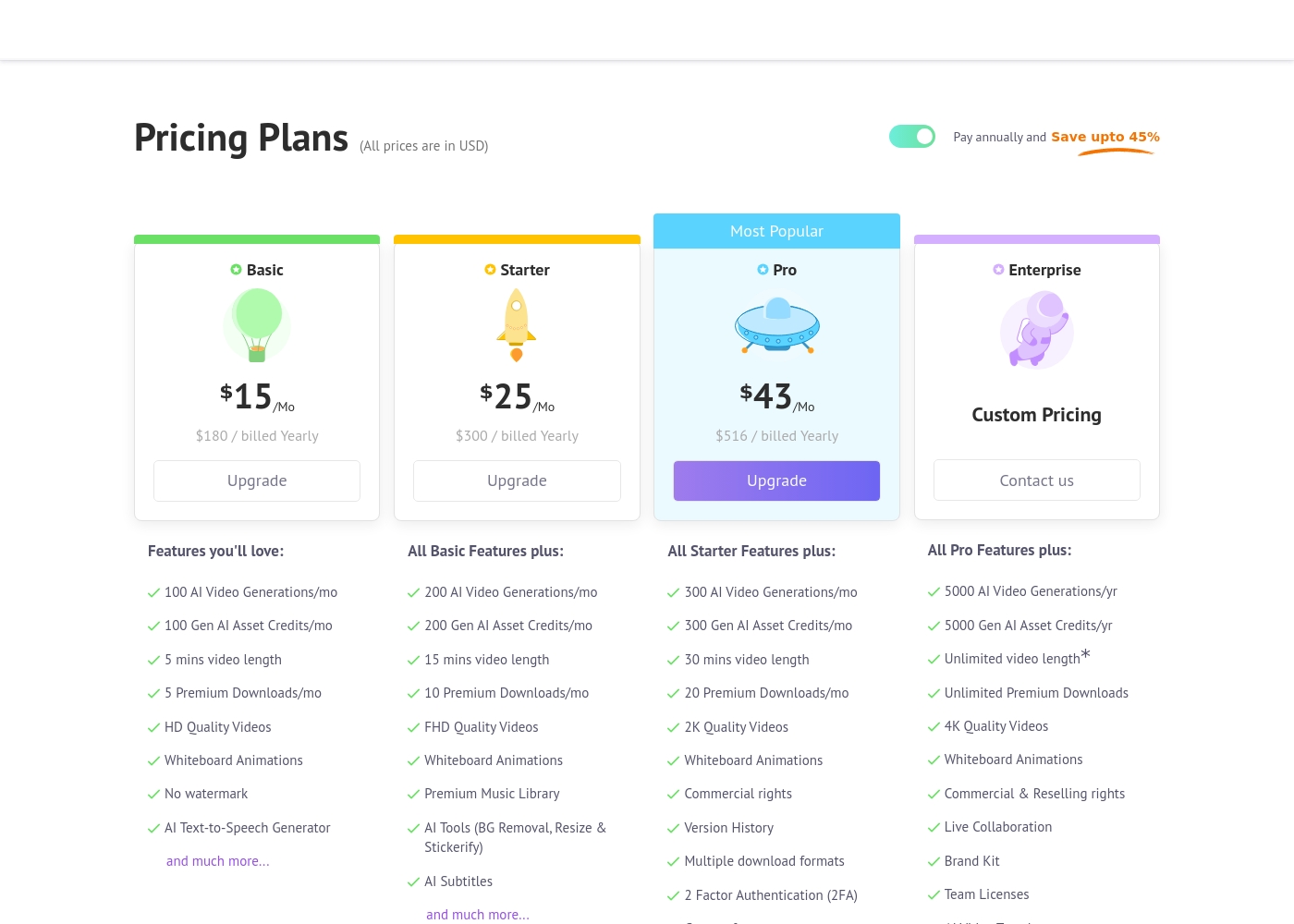
Animaker costs between $180 and $516 per year with four primary plans: Basic at $180/year, Starter at $300/year, Pro at $516/year, and Enterprise at Custom Pricing.
Let's explore the details of each subscription level so you can find the perfect fit for your video creation needs.
Basic
Price: $15/Mo ($180 billed Yearly) Other Features:
- 100 AI Video Generations/mo
- 5 Premium Downloads/mo
- 5 mins video length
- HD Quality Videos
- No watermark
- AI Text-to-Speech Generator
- 100 AI Video Generations/mo
- 5 mins video length
- 5 Premium Downloads/mo
- HD Quality Videos
- No watermark
- 200 AI Video Generations/mo
- 15 mins video length
- FHD Quality Videos
- Premium Music Library
- AI Tools (BG Removal, Resize & Stickerify)
- 300 AI Video Generations/mo
- 30 mins video length
- 2K Quality Videos
- Commercial rights
- Version History
- 5000 AI Video Generations/yr
- Unlimited Premium Downloads
- Unlimited video length*
- 4K Quality Videos
- Commercial & Reselling rights
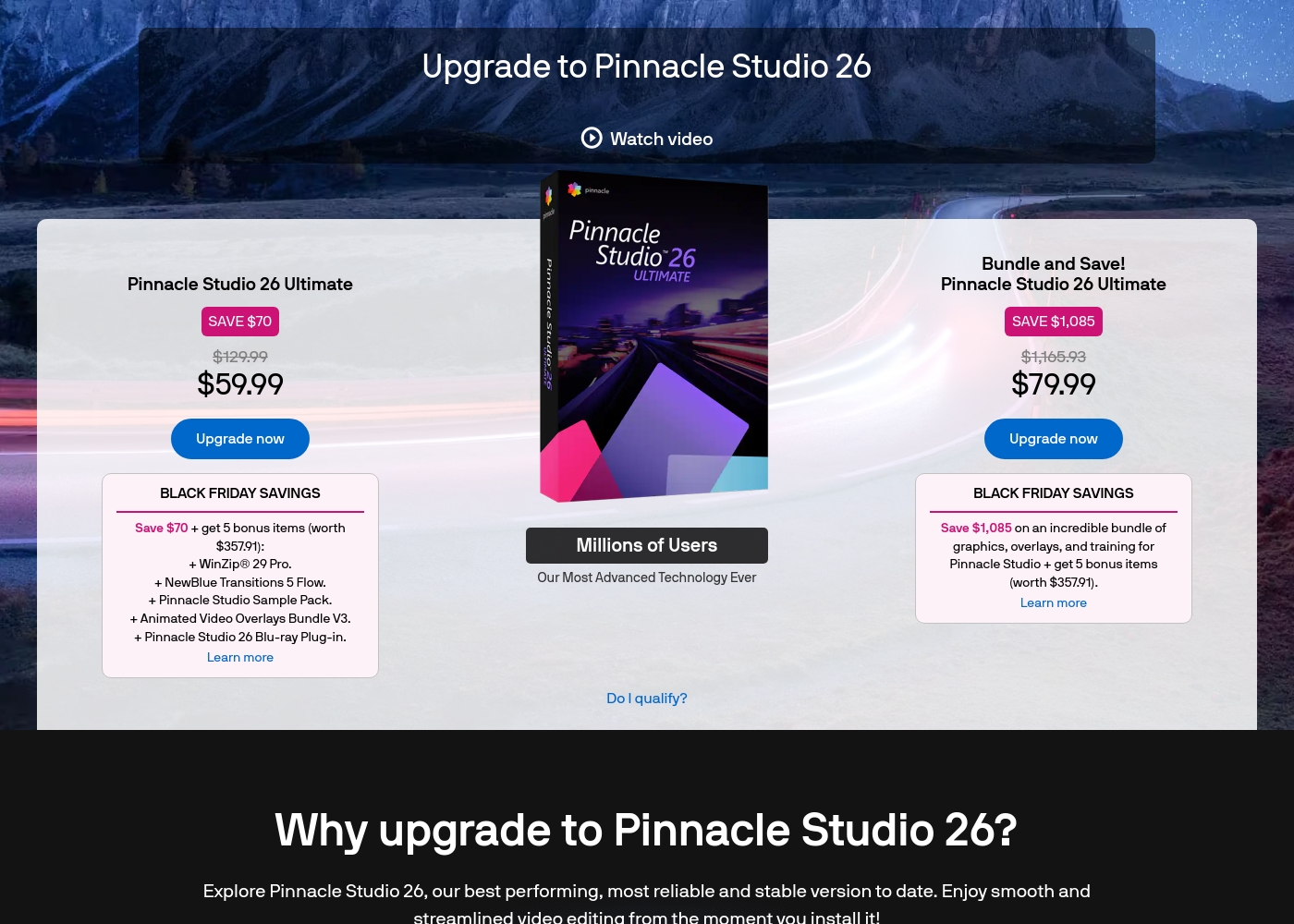
Pinnacle Studio 26 Ultimate acquisition costs range between $59.99 and $79.99 as a one-time upgrade purchase, with two main options: Pinnacle Studio 26 Ultimate at $59.99, and the Bundle and Save! version at $79.99.
These prices represent special Black Friday upgrade offers for users looking to access the latest features. Here is how the deals compare:
Pinnacle Studio 26 Ultimate
Price: $59.99 (One-time Upgrade Price) Best For: Current users who want the latest, most stable software version and specific utility tools. Other Features:
- Saves you $70 off the regular $129.99 price.
- Includes a total of 5 bonus items worth $357.91.
- Comes with WinZip® 29 Pro and NewBlue Transitions 5 Flow.
- Features the Pinnacle Studio 26 Blu-ray Plug-in.
- Includes the Pinnacle Studio Sample Pack and Animated Video Overlays Bundle V3.
- One-time price of $59.99 (was $129.99)
- 5 bonus items included (worth $357.91)
- Includes WinZip® 29 Pro
- Includes NewBlue Transitions 5 Flow
- Includes Pinnacle Studio 26 Blu-ray Plug-in
- One-time price of $79.99 (was $1,165.93)
- Includes all 5 bonus items (worth $357.91)
- Includes training, graphics, and overlays bundle
- Save $1,085 on the total package
Pricing Notes
- Animaker requires an annual commitment to access the lowest advertised monthly prices, saving up to 45%.
- Pinnacle Studio's pricing is significantly lower upfront, but lacks transparency on subscription options or commercial licensing.
- Animaker's Pro plan ($516 annually) is the minimum required tier for commercial usage rights.
- Animaker includes limits on premium downloads and AI generations in all paid subscription tiers.
Pricing Head-to-Head
User Reviews
External reviews for Animaker are overwhelmingly positive, primarily driven by its exceptionally responsive customer support and accessible design. Users frequently mention the support team's promptness, with many citing effective solutions provided quickly by named staff members like Ashik, Bala, and Giftson.
The platform is highly lauded for its user-friendliness, making it simple for beginners to jump in and create high-quality animated videos, often without needing tutorials. Reviewers note that the varied character creation options, including different ethnicities and features, are a significant plus for creative versatility.
I really like using Animaker; it’s super practical and easy to use with many functions to choose from. However, I think it is a bit expensive, so consider the cost if you only need to create one video.
User feedback for Pinnacle Studio is exceptionally poor, primarily focusing on extreme frustrations with the software's reliability and performance. Despite newer versions claiming improved stability, many users report constant crashing, freezing, and issues with rendering, even when using high-spec computers.
This instability leads to lost progress and wasted time. The second overwhelmingly negative theme is customer support.
I’ve been using this product for several years because it is user friendly and features many nice tools. However, the tech support when there is an issue is not good at all. I was extremely disappointed and uninstalled the software despite owning it.
Our Verdict
Choosing between Animaker and Pinnacle Studio is deciding between automation and custom control. If you seek fast, effortless results and reliability, Animaker is the superior choice for most creators. If you are a seasoned editor dedicated to raw footage control, Pinnacle Studio provides those specific tools. Animaker’s superpower is making high-quality video accessible to everyone, regardless of skill level. It uses breakthrough AI to generate stunning animated content from text prompts within seconds. Moreover, users consistently praise Animaker for its exceptionally responsive support team and stable platform. Pinnacle Studio is designed for the technical user who needs deep control over existing footage and high-res files. It offers advanced features like MultiCam editing, 8K import support, and professional color correction. However, exercise caution; recurring user feedback mentions frequent, frustrating crashes. Workflow reliability is the deciding factor alongside content type. Animaker provides a smooth, guided process perfect for marketing and training videos. Pinnacle Studio provides deep technical tools, but its reported instability often interrupts professional timelines. Pick Animaker if you need high-volume content, reliable performance, and stellar support. Choose Pinnacle Studio if you absolutely must edit 8K footage or use MultiCam and are willing to risk periodic system instability.
Frequently Asked Questions
Which is better for beginners needing professional results: Animaker or Pinnacle Studio?
Animaker is much better for beginners, designed specifically for non-designers using AI tools. It provides an exceptionally user-friendly interface and highly responsive customer support. Pinnacle Studio requires more technical knowledge to utilize its advanced editing features effectively.
Does Pinnacle Studio support AI features like those found in Animaker?
No, Pinnacle Studio focuses on traditional manual editing tools and 8K footage processing. Animaker's core offering includes Text-to-Video generation and a Neural Text-to-Speech engine. Animaker automates content creation, a feature Pinnacle Studio lacks entirely.
Can I use Animaker for multi-camera video editing or screen capture?
Animaker does not include MultiCam editing or screen capture tools. It focuses instead on animation and single-stream live-action editing. Pinnacle Studio explicitly offers MultiCam editing and screen capture, making it better for tutorials.
Is Pinnacle Studio worth the lower one-time purchase cost over Animaker’s subscription?
Pinnacle Studio’s single purchase is appealing, but users frequently report frustrating crashes and instability issues. Animaker’s subscription includes continuous access to support and new AI features, providing higher reliability. Consider the potential time lost using Pinnacle Studio.
Which tool is better for creating HR training and L&D videos?
Animaker is perfectly suited for L&D and HR, offering specialized features and character creation. Animaker's quick animation tools transform complex topics into engaging, understandable videos rapidly. Pinnacle Studio is overkill for these common business use cases.
Which software is more reliable based on user reviews and sentiment?
Animaker maintains an excellent review profile, with users championing its product stability and support team efficiency. Pinnacle Studio has lower ratings due to frequent user complaints about intermittent crashing and poor rendering reliability. Animaker offers a smoother professional workflow.
Ready to Choose?
Both tools have their strengths. Choose based on your specific needs.