Animaker vs Invideo
Animaker and Invideo are both top AI video tools but target different needs. Animaker focuses on studio-quality animation and comprehensive creation tools. Invideo is built for lightning-fast content generation using simple text prompts. The choice depends entirely on your required speed versus visual polish trade-off.
Best for: L&D creators needing engaging, customized training materials, HR professionals streamlining animated onboarding videos easily
Best for: Content creators needing 20+ UGC ads or videos per week, Marketing agencies focused on high-volume, rapid content iteration
AI video creation meets superb service.
We reviewed Animaker's powerful AI platform and found it excels in democratizing video creation for all user levels. Its strong focus on user experience and comprehensive feature set makes it highly competitive, especially for complex animation needs. Overall, we recommend Animaker for users prioritizing stellar support and accessible, studio-quality output.
Pros
- Exceptional, highly responsive customer support (often resolving issues within the hour).
- Highly user-friendly interface that is excellent for beginners and non-designers.
- Studio-quality animation and live-action video creation capabilities.
- Extensive and unique character customization options (ethnicity, features).
Cons
- Some users report the pricing structure can feel expensive, especially for light usage.
- Occasional reports of the system being cumbersome or experiencing crashes.
- Limitations in the asset library regarding available character actions matching specific backgrounds.
- No explicit money-back guarantee mentioned in the standard pricing structure.
Rapid AI Video Creation, Backed by Humans.
We found Invideo AI to be exceptionally effective at transforming text prompts into polished videos quickly, enabling users to cut production time significantly. The platform stands out due to its genuinely dedicated, 24/7 customer support, which navigates users past complexity and technical inconsistencies. Overall, Invideo is a powerful AI tool deserving of content creators looking for speed and reliability, especially given the human safety net.
Pros
- Exceptional 24/7 customer support delivered by responsive, real humans.
- Dramatically reduces video creation time, boosting workflow efficiency.
- Highly user-friendly for generating videos from simple text prompts.
- Allows sophisticated editing of audio, voice, and captions using natural language.
Cons
- Occasional inconsistencies or anomalous results in AI-generated content quality.
- Users report frustration being charged for unsatisfactory generative AI prompts.
- Generating time can be lengthy when making multiple revisions.
- The media and video library needs expansion to offer more content variety.
AboutAnimaker
Animaker is known as the world’s most complete Animation and Video Making Tool. It's truly a world-class system built for everyone. This platform helps you create both animation and live-action content with ease. Whether you are running a startup or working for a seasoned Fortune 500 company, you can achieve studio-quality results. More than 30 million users already trust this powerful system to deliver effective visual communication. 💡
AboutInvideo
Invideo is an AI tool designed to give you the power to play and create. It transforms simple text prompts related to your business or casual ideas into cinematic videos, professional promos, and detailed explainers instantly.
This platform is perfect for creators, educators, non-profits, and marketing agencies seeking rapid content creation. Whether you need an engaging UGC ad or a detailed product reel, Invideo handles the complex work. You're empowered to generate and edit content that reaches new customers across various countries, languages, and beliefs worldwide. 💡
Highlights
Feature Comparison
Features Overview
We highlight the main differences and pick a winner for each feature.
Core Focus
Animaker excels at animation polish; Invideo excels at rapid AI generation speed.
Animaker is the world’s most complete Animation and Video Making Tool. It handles both animation and live-action content with ease. Animaker focuses on deep creative control and studio-quality output. Invideo shines in speed, creating cinematic videos from simple text prompts instantly. Its core feature is rapid AI-based text-to-video generation for high-volume content. Invideo’s goal is helping you generate and edit faster than ever before. Animaker offers superior character and presentation customization tools. Invideo is built for high-pace marketing needs like producing UGC ads quickly. If you prioritize creative polish, choose Animaker; for sheer output volume, pick Invideo.
Creation Speed & Workflow
Invideo drastically cuts production time compared to Animaker's comprehensive creation.
Animaker uses a patented AI process to generate engaging videos from simple text in seconds. The platform quickly converts raw footage into publish-ready highlight videos. Speed in Animaker is achieved within a full-featured video ecosystem. Invideo focuses intensely on speed, reporting creation time cut from half a day to just 30 minutes. Its text-prompt input is designed to translate ideas into finished video immediately. This rapid conversion process is optimized for scaling content output. Invideo wins on workflow efficiency crucial for high-volume generation. Animaker offers speed but is aimed at a more polished, complete product. A marketer needing 50 variations of an ad immediately should use Invideo for faster iteration cycles.
Editing Interface
Invideo uses text prompts for editing; Animaker uses a comprehensive visual editor.
Animaker provides a robust, professional ecosystem with traditional timeline editing capabilities. Users rely on various AI utility tools like background removal and resizing. This interface offers comprehensive control over visual aspects. Invideo's innovative approach features sophisticated editing via natural language text prompts. Users can update images, audio, voice, or captions by simply writing an instruction. This lets you literally “edit like you think” without touching the timeline. Invideo simplifies complex video modifications for non-technical users significantly. Animaker requires navigating a more standard suite of creative tools for fine-tuning. This makes Invideo much more accessible for rapid revisions and content iteration.
Highest Video Quality
Animaker explicitly supports 4K output, a feature not advertised by Invideo.
Animaker supports outputs in HD, FHD, 2K, and top-tier 4K video resolution. The coveted 4K quality is specifically available in the Enterprise plan. Popular plans still reach FHD and 2K resolution. Invideo’s features focus on usage quotas (credits, video minutes, iStock assets) rather than resolution specs. Maximum supported quality is not explicitly stated in their feature lists. Animaker wins for professionals who specifically require broadcast-level 4K fidelity. If output resolution is your highest priority, Animaker is the clear choice. If you need broadcast-level quality, Animaker provides the guarantee of 4K output at its top tier.
Character Tools
Animaker offers deeper character customization; Invideo uses basic express avatars.
Animaker provides extensive and unique character customization options for users. This includes fine-tuning ethnicity, physical features, and actions within the platform. It offers an Avatar-powered Presentation Maker. Invideo supports the generation of Express Avatars and Express Clones within its paid subscriptions. These are primarily functional AI actors used for quickly creating UGC ads. They lack the extensive personalization seen in Animaker. Animaker provides vastly superior creative control for building brand-specific characters. Invideo prioritizes functional speed over detailed creative design. If your content relies heavily on unique, personalized animated characters, Animaker is superior.
Team Collaboration
Animaker supports true live collaboration; Invideo limits user access significantly.
Animaker includes crucial team collaboration features in its Enterprise tier. This package offers Live Collaboration, dedicated Team Licenses, and controlled Brand Kits. It is built for large organizational use. Invideo's standard plans (Plus, Max, Generative) limit access to three users total. The Team plan requires purchasing additional seats separately if you need to scale up. Collaboration is less integrated. Animaker provides a dedicated, formal solution for enterprise-level team collaboration needs. Invideo requires workarounds for large teams needing concurrent project access. Large marketing departments needing simultaneous project work will find Animaker's Enterprise tier more scalable.
Customer Support
Both offer exemplary human support, but Invideo guarantees 24/7 availability.
Animaker boasts exceptional and highly responsive customer support staff. Users frequently give high praise, citing specific team members for quick issue resolution. Support is a major benefit of Animaker. Invideo provides exceptional 24/7 customer support delivered by responsive, real humans. Users find the support team genuinely caring and highly knowledgeable in solving problems. Invideo guarantees round-the-clock availability. While both tools have outstanding support, Invideo’s 24/7 guaranteed access slightly edges out Animaker. Both companies prioritize customer success. Global teams operating across multiple time zones benefit significantly from Invideo's 24/7 availability.
Multilingual Support
Animaker offers Neural TTS in 175+ languages; Invideo focuses on localization editing.
Animaker’s Voice Pro feature includes access to an AI-based Neural TTS Engine. This engine supports over 800 human-like voices across more than 175 languages. Multilingual depth is extensive. Invideo is designed to expand global reach and specifically supports creating videos that resonate across diverse countries and languages. You can change voiceovers using simple text prompts. Animaker offers a broader, more quantitative selection for realistic voice generation. Invideo provides easier editing and localization via natural language commands. If you need niche language support for training videos, Animaker’s 175+ languages are superior.
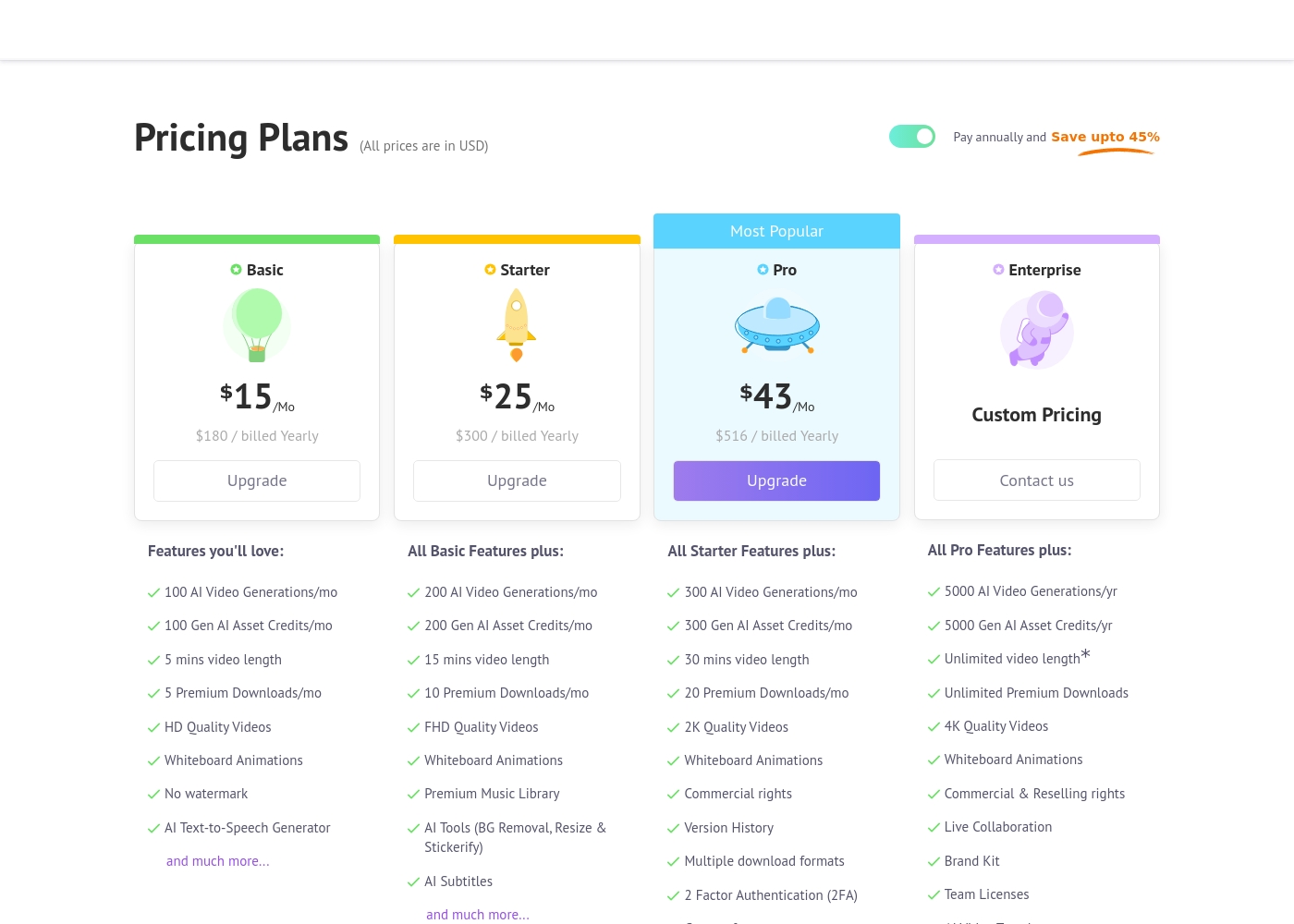
Animaker costs between $180 and $516 per year with four primary plans: Basic at $180/year, Starter at $300/year, Pro at $516/year, and Enterprise at Custom Pricing.
Let's explore the details of each subscription level so you can find the perfect fit for your video creation needs.
Basic
Price: $15/Mo ($180 billed Yearly) Other Features:
- 100 AI Video Generations/mo
- 5 Premium Downloads/mo
- 5 mins video length
- HD Quality Videos
- No watermark
- AI Text-to-Speech Generator
- 100 AI Video Generations/mo
- 5 mins video length
- 5 Premium Downloads/mo
- HD Quality Videos
- No watermark
- 200 AI Video Generations/mo
- 15 mins video length
- FHD Quality Videos
- Premium Music Library
- AI Tools (BG Removal, Resize & Stickerify)
- 300 AI Video Generations/mo
- 30 mins video length
- 2K Quality Videos
- Commercial rights
- Version History
- 5000 AI Video Generations/yr
- Unlimited Premium Downloads
- Unlimited video length*
- 4K Quality Videos
- Commercial & Reselling rights
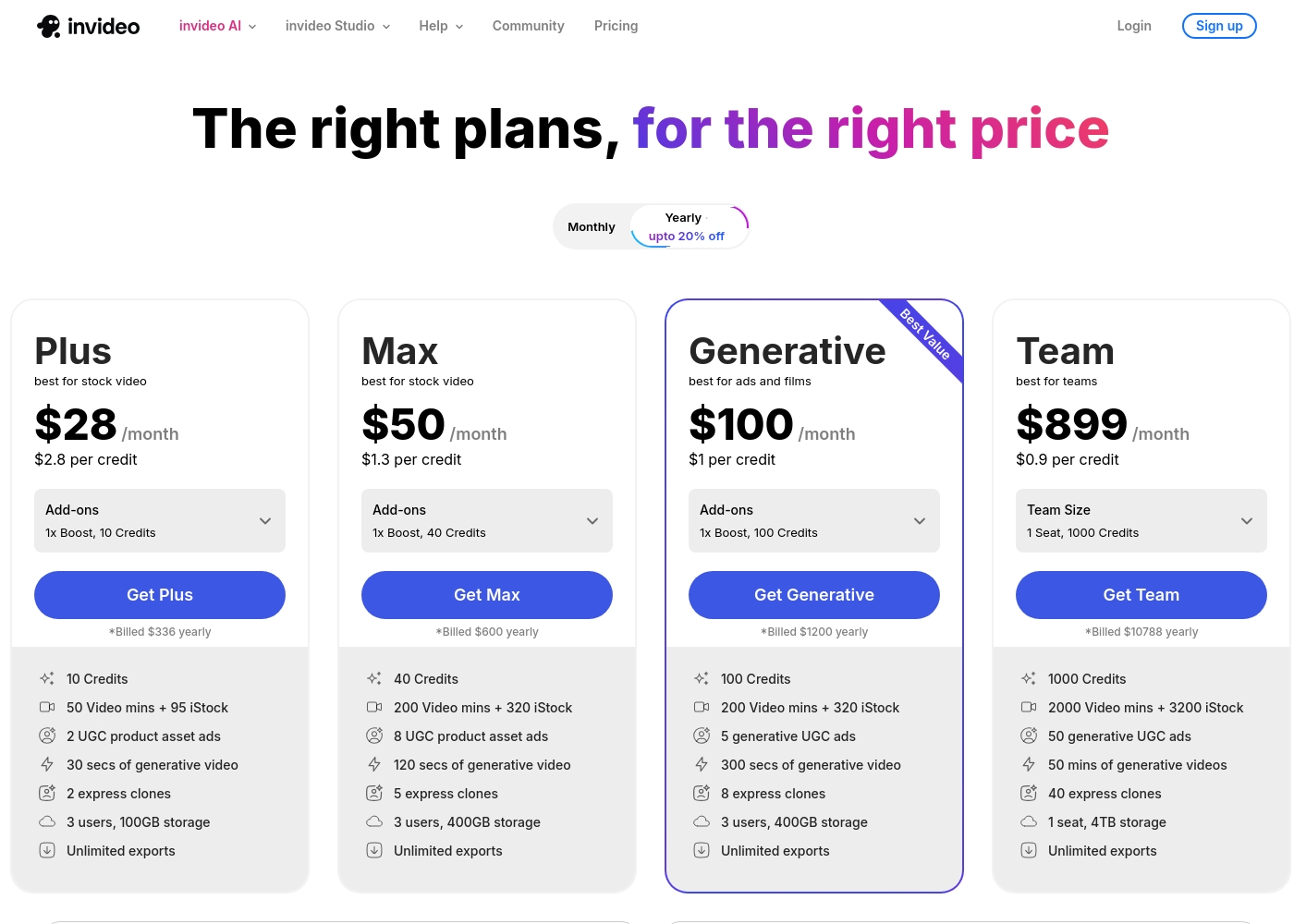
Invideo pricing ranges from $0 for the Free plan up to $899 per month for the Team plan, with three intermediate tiers: Plus at $28/month, Max at $50/month, and Generative at $100/month.
Here are the details for the plans available across monthly and yearly billing cycles.
- 10 Video mins and 1 AI credit per week
- 1 Express avatar
- 4 Exports per week with invideo watermark
- No access to generative features
- 10 Credits ($2.8 per credit)
- 50 Video mins + 95 iStock
- 2 UGC product asset ads
- 30 secs of generative video
- 2 express clones
- 40 Credits ($1.3 per credit)
- 200 Video mins + 320 iStock
- 8 UGC product asset ads
- 120 secs of generative video
- 5 express clones
- 100 Credits ($1 per credit)
- 200 Video mins + 320 iStock
- 5 generative UGC ads
- 300 secs of generative video
- 8 express clones
Pricing Notes
- Animaker's monthly prices ($15-$43) require a money-saving annual commitment, unlike Invideo.
- Invideo offers flexible monthly payment options across all paid tiers starting at $28/month.
- Invideo's pricing is highly usage-based, costing less per AI credit at higher subscription volumes.
- Animaker users must purchase extra exports if they exceed their monthly download limits.
- Neither Animaker nor Invideo explicitly offers a money-back guarantee on standard subscription plans.
Pricing Head-to-Head
User Reviews
External reviews for Animaker are overwhelmingly positive, primarily driven by its exceptionally responsive customer support and accessible design. Users frequently mention the support team's promptness, with many citing effective solutions provided quickly by named staff members like Ashik, Bala, and Giftson.
The platform is highly lauded for its user-friendliness, making it simple for beginners to jump in and create high-quality animated videos, often without needing tutorials. Reviewers note that the varied character creation options, including different ethnicities and features, are a significant plus for creative versatility.
I really like using Animaker; it’s super practical and easy to use with many functions to choose from. However, I think it is a bit expensive, so consider the cost if you only need to create one video.
Invideo AI enjoys widely positive reception, particularly for the strength of its customer support. Users frequently highlight the responsiveness and genuine care of the support team, praising specific agents for being patient, kind, and knowledgeable in resolving complex issues like billing errors or login problems.
Reviewers consistently find the platform an invaluable tool that is super easy to use, delivering professional results and saving significant time; some creators even attribute substantial growth in their channels to using the software. However, sentiment isn't universally positive regarding the core AI engine.
I had made the mistake of removing the email connected to my plan and couldn't understand why I was being charged. Patrick immediately located the account, helped me cancel the subscription, and provided great service. The team is excellent!
Our Verdict
The Animaker versus Invideo debate boils down to creative control against sheer velocity. Both offer powerful AI, but their approach to video success differs significantly. Which tool wins depends on your specific workflow needs and budget tolerance. Animaker dominates if you need high-fidelity, polished content with deep controls. Animaker supports unique character customization ideal for storytelling and complex animation projects. It offers crucial features like 4K video output and team licensing for serious organizations. Animaker is the superior choice for sophisticated educational or internal communication videos. Invideo's superpower is production speed and simplicity. It transforms complex ideas into ready-to-share videos instantly using natural language prompts. Invideo lets you perform advanced edits on audio or images just by typing a simple instruction. If your goal is pumping out dozens of high-volume marketing pieces, Invideo is exponentially faster. Your primary editing style should determine your selection. Choose Animaker if you need robust creative control and brand-compliant quality. Pick Invideo for raw production volume and lightning-fast, text-based edits. For solo creators and agencies prioritizing speed, Invideo wins easily due to its flexibility and 30-minute generation time. Enterprise teams needing structure, 4K quality, and true collaboration features should invest in Animaker.
Frequently Asked Questions
Which is better for small marketing agencies, Animaker or Invideo?
Invideo is better for agencies needing to produce high volumes of content quickly. Invideo's text-to-video capabilities dramatically reduce production time. Animaker is better if the agency focuses on highly customized animation or explainer video development.
Does Animaker support text-based editing like the feature in Invideo?
No, Animaker does not offer the same natural language editing as Invideo. Invideo lets you change audio or visuals by typing simple instructions. Animaker uses a more traditional, comprehensive editing interface complemented by AI utility tools.
Is Invideo fundamentally cheaper than Animaker for light usage?
Yes, Invideo has a permanent Free plan and flexible monthly options starting at $28. Animaker forces users into an annual commitment for its listed best prices. Invideo offers better short-term flexibility and low volume entry.
Which tool offers superior customer support for global users?
Invideo offers guaranteed 24/7 human customer support, making it superior for global teams. Animaker also has highly rated, responsive support, but Invideo's availability is guaranteed around the clock.
Which one is better for creating highly detailed animated characters?
Animaker is significantly better for character creation and customization. Animaker provides extensive tools to personalize character features and ethnicity. Invideo offers functional express avatars for quick deployment rather than deep customization.
Does Animaker allow monthly payment, or must I pay annually?
Animaker’s advertised monthly prices require an annual commitment to save up to 45%. Monthly payment options are not explicitly available for standard subscription tiers. Invideo offers straightforward monthly billing.
Ready to Choose?
Both tools have their strengths. Choose based on your specific needs.