Animaker vs FlexClip
Animaker and FlexClip are both powerful AI video platforms, but they serve different needs. Animaker excels at studio-quality animation and personalized support. FlexClip offers superior speed, a massive stock library, and better feature accessibility.
Best for: Creating professional, studio-quality animated content, HR teams designing engaging onboarding videos
Best for: Social media managers needing high-volume content daily, Creators requiring access to 4 million+ commercial stock assets
AI video creation meets superb service.
We reviewed Animaker's powerful AI platform and found it excels in democratizing video creation for all user levels. Its strong focus on user experience and comprehensive feature set makes it highly competitive, especially for complex animation needs. Overall, we recommend Animaker for users prioritizing stellar support and accessible, studio-quality output.
Pros
- Exceptional, highly responsive customer support (often resolving issues within the hour).
- Highly user-friendly interface that is excellent for beginners and non-designers.
- Studio-quality animation and live-action video creation capabilities.
- Extensive and unique character customization options (ethnicity, features).
Cons
- Some users report the pricing structure can feel expensive, especially for light usage.
- Occasional reports of the system being cumbersome or experiencing crashes.
- Limitations in the asset library regarding available character actions matching specific backgrounds.
- No explicit money-back guarantee mentioned in the standard pricing structure.
Easy Video Editor with Powerful AI
We found FlexClip to be exceptionally strong in combining a massive commercial asset library with highly effective AI tools that dramatically speed up the creative process. The user experience is smooth and intuitive, which lowers the barrier to entry significantly for new creators. Overall, we recommend FlexClip as a top choice for individuals and businesses seeking fast, high-quality video production.
Pros
- Highly intuitive, drag-and-drop interface designed for quick and easy video creation.
- Extensive library including 6,000+ templates and millions of searchable stock assets.
- Powerful AI features significantly streamline tasks like video generation and subtitling.
- Offers high-quality 4K download options (available on the Business plan).
Cons
- Advanced editing features like keyframes or keystone adjustments are currently missing.
- AI accuracy can sometimes fail, such as incomplete lyric or subtitle extraction.
- Stock music selection could be broader and more diverse in trending genres.
- Paid plans are necessary to unlock full features, resource access, and remove the trademarked watermark.
AboutAnimaker
Animaker is known as the world’s most complete Animation and Video Making Tool. It's truly a world-class system built for everyone. This platform helps you create both animation and live-action content with ease. Whether you are running a startup or working for a seasoned Fortune 500 company, you can achieve studio-quality results. More than 30 million users already trust this powerful system to deliver effective visual communication. 💡
AboutFlexClip
FlexClip is an all-in-one online video editing solution designed to make powerful video creation accessible to everyone. It's built for folks who need professional output without needing extensive filmmaking experience. Based on user testimonials, this tool is perfect for educators, marketers, designers, and small business owners alike. It provides flexible editing capabilities right in your browser, helping you produce high-quality clips quickly. ✅
Highlights
Feature Comparison
Features Overview
We highlight the main differences and pick a winner for each feature.
Library and Assets
FlexClip offers millions of stock assets; Animaker focuses on unique, detailed character creation.
Animaker is known for its extensive, unique character customization options. Animaker includes an online graphic design tool for unique in-scene designs. FlexClip explicitly provides over 4 million stock videos, photos, and music tracks. FlexClip’s commercial library is massive, ensuring you never run out of licensed material. If you need massive searchable stock footage, FlexClip is the overwhelming choice. Animaker is better if custom animated characters are the core of your videos.
Max Output Quality
Both offer 4K video, but FlexClip makes it much more affordable to access.
Animaker offers 4K resolution exclusively on its custom-priced Enterprise plan. Animaker’s most popular Pro plan only supports downloads up to 2K quality. FlexClip makes 4K Ultra HD downloads available starting with its fixed-price Business plan. FlexClip offers 1080p full-HD on its entry-level Plus plan. FlexClip gives creators easier access to professional, top-tier video resolution than Animaker.
Advanced Editing
FlexClip offers granular editing controls; Animaker focuses more on simplifying animation.
Animaker focuses on animated character creation and editing raw footage into short, punchy videos. Animaker doesn't explicitly list specific advanced visual effects tools in its core plans. FlexClip includes powerful, dedicated tools like the Chroma Key for background replacement. FlexClip also offers the precise Speed Curve function to control video pacing. If you need granular control over video effects and pacing, FlexClip is the superior choice.
Customer Support
Animaker delivers exceptionally responsive, high-touch support; FlexClip is simply prompt.
Animaker receives enormous praise from users regarding its quick and helpful customer support staff. Users cite specific names and mention quick issue resolutions within the hour. FlexClip's users report its support is generally prompt and responsive when technical issues arise. Specific Service Level Agreements (SLAs) are not published for FlexClip. For top-tier, personalized rapid problem-solving, Animaker is the absolute clear winner.
Unique Feature Set
Animaker offers unique presentation tools; FlexClip provides multi-language AI translation.
Animaker features the unique Avatar-powered Presentation Maker for dynamic experiences. Animaker also has a First-of-a-kind AI-Powered Emailer for flawless video emails. FlexClip offers an AI Translator tool to easily create multi-language video versions. FlexClip provides advanced AI tools for generating video from articles or URLs. Both tools carve out their own niches with unique AI innovations.
Collaboration and Teams
FlexClip offers accessible team features; Animaker restricts crucial tools to Enterprise users.
Animaker reserves Live Collaboration, Team Licenses, and Brand Kits for its Enterprise tier. Animaker's Pro plan lacks the explicit shared workspace features necessary for seamless teamwork. FlexClip supports smooth coordination and sharing with dedicated cloud storage space included in paid plans. FlexClip’s Business plan offers 100GB of cloud space for larger team projects. FlexClip offers more accessible and practical team features for mid-sized teams or businesses.
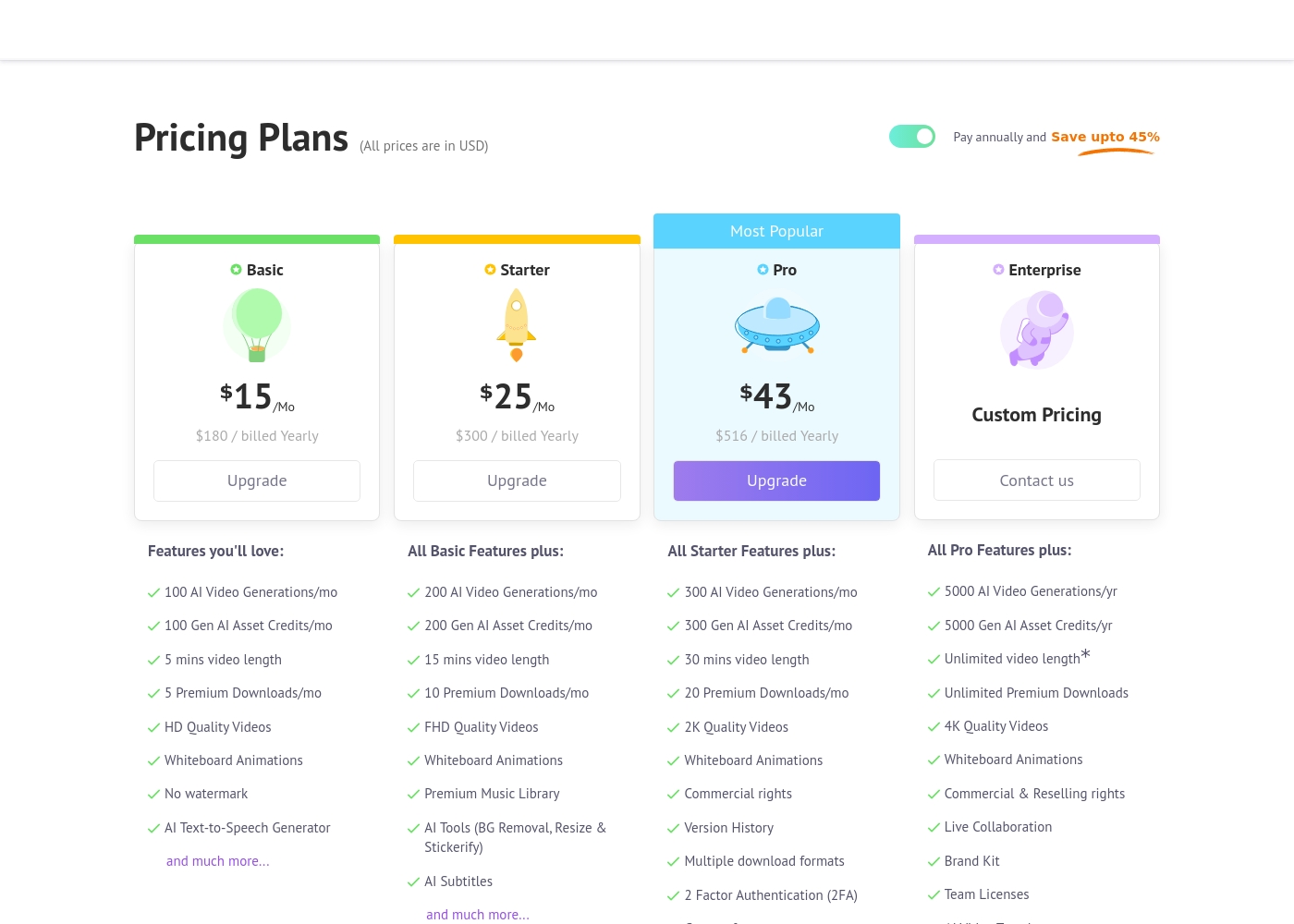
Animaker costs between $180 and $516 per year with four primary plans: Basic at $180/year, Starter at $300/year, Pro at $516/year, and Enterprise at Custom Pricing.
Let's explore the details of each subscription level so you can find the perfect fit for your video creation needs.
Basic
Price: $15/Mo ($180 billed Yearly) Other Features:
- 100 AI Video Generations/mo
- 5 Premium Downloads/mo
- 5 mins video length
- HD Quality Videos
- No watermark
- AI Text-to-Speech Generator
- 100 AI Video Generations/mo
- 5 mins video length
- 5 Premium Downloads/mo
- HD Quality Videos
- No watermark
- 200 AI Video Generations/mo
- 15 mins video length
- FHD Quality Videos
- Premium Music Library
- AI Tools (BG Removal, Resize & Stickerify)
- 300 AI Video Generations/mo
- 30 mins video length
- 2K Quality Videos
- Commercial rights
- Version History
- 5000 AI Video Generations/yr
- Unlimited Premium Downloads
- Unlimited video length*
- 4K Quality Videos
- Commercial & Reselling rights
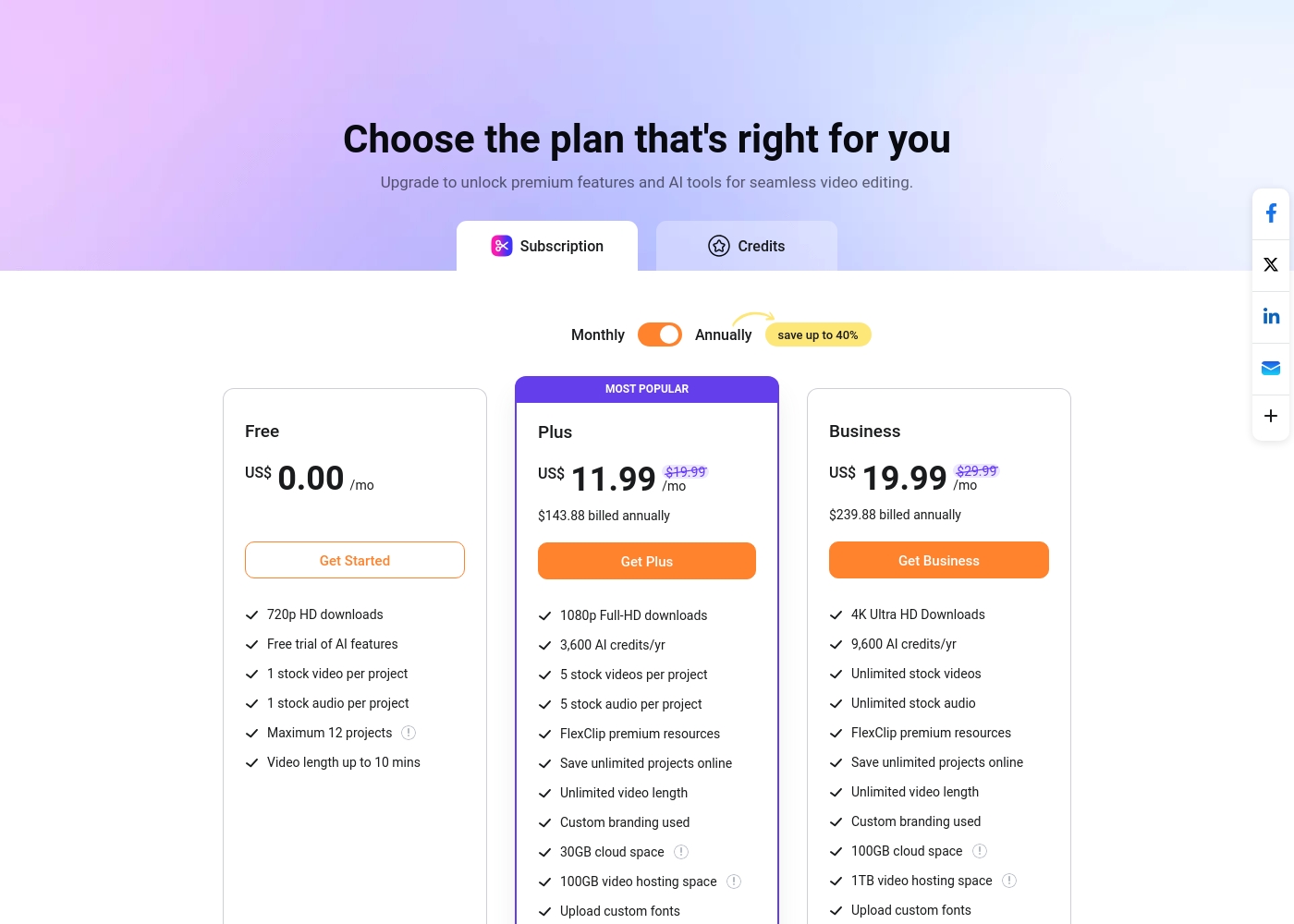
FlexClip costs between US$0.00 and US$19.99 per month with 3 plans: Free at US$0.00, Plus at US$11.99, and Business at US$19.99.
You can examine the different plan options below to decide which one fits your creative needs best.
Free
Price: US$0.00/mo Best For: Testing out the service and casual video creation Other Features:
- 720p HD downloads
- Free trial of AI features
- 1 stock video and 1 stock audio per project
- Maximum 12 projects allowed
- 720p HD downloads
- Free trial of AI features
- 1 stock video per project
- 1 stock audio per project
- 1080p Full-HD downloads
- 3,600 AI credits/yr
- FlexClip premium resources
- Save unlimited projects online
- Custom branding used
- 4K Ultra HD Downloads
- 9,600 AI credits/yr
- Unlimited stock videos
- Unlimited stock audio
- FlexClip premium resources
Pricing Notes
- Animaker's listed monthly prices require annual commitment, saving users up to 45%.
- FlexClip's top-tier Business plan is cheaper than Animaker's entry-level plan.
- FlexClip includes 4K access on its $19.99/month Business plan.
- Animaker reserves 4K export quality for its custom-priced Enterprise plan.
- Both platforms offer a robust permanent Free plan for testing capabilities.
Pricing Head-to-Head
User Reviews
External reviews for Animaker are overwhelmingly positive, primarily driven by its exceptionally responsive customer support and accessible design. Users frequently mention the support team's promptness, with many citing effective solutions provided quickly by named staff members like Ashik, Bala, and Giftson.
The platform is highly lauded for its user-friendliness, making it simple for beginners to jump in and create high-quality animated videos, often without needing tutorials. Reviewers note that the varied character creation options, including different ethnicities and features, are a significant plus for creative versatility.
I really like using Animaker; it’s super practical and easy to use with many functions to choose from. However, I think it is a bit expensive, so consider the cost if you only need to create one video.
Users overwhelmingly praise FlexClip’s user-friendly interface and minimal learning curve, noting that it makes powerful video creation accessible to everyone, regardless of prior experience. Many reviewers state that the platform significantly reduces the time required for content creation, often replacing more complex software they previously relied on.
The extensive library of over 6,000 templates and vast stock footage is frequently highlighted as a major efficiency booster. The incorporated AI tools, such as the Video Generator, are generally seen as game-changers, streamlining workflow for commercial and personal projects.
This thing is awesome! I needed to create a simulation video quickly, and FlexClip saved the day by making complex editing simple. It’s highly versatile and intuitive with a minimal learning curve, offering great value for beginners.
Our Verdict
If you are trying to decide, the distinction is clear: FlexClip is the winner for speed, value, and general video editing. Animaker is the undisputed champion if high-end, customized animation is your primary, non-negotiable requirement. FlexClip is faster and dramatically cheaper for high-quality professional output. Animaker's superpower is its breakthrough AI animation toolset and unique features. Animaker allows unique character customization and offers the unique Avatar-powered Presentation Maker. Crucially, Animaker provides exceptional, highly responsive customer support staff cited by name in reviews. FlexClip shines by offering a massive commercial asset library of over 4 million stock videos. FlexClip provides 4K video resolution right in its affordable Business plan. FlexClip also includes specialized advanced editing tools like the Chroma Key and Speed Curve. The deciding factor should be your budget versus your need for specialized animation. FlexClip delivers essential 4K output alongside unlimited assets for under $20/month. Animaker requires contacting sales for the Enterprise plan just to produce in 4K. Choose FlexClip if you prioritize affordability, vast resources, and rapid production workflows. Pick Animaker if specialized animation, avatar presentations, and reliable, high-touch support are your absolute business priorities.
Frequently Asked Questions
Which tool is better for creating high-quality animated videos?
Animaker is explicitly designed as a complete animation and video making tool. It focuses on studio-quality animation and unique character creation. FlexClip is a more general-purpose video editor focused on speed and stock media integration.
Is FlexClip cheaper than Animaker for annual subscriptions?
Yes, FlexClip is significantly more affordable overall. FlexClip’s top tier, Business plan, costs $19.99/month annually. Animaker's Starter plan, which lacks 4K, costs $25/month annually.
Can I export video in 4K resolution with FlexClip easily?
Yes, FlexClip offers 4K Ultra HD downloads starting in its affordable Business plan. Animaker restricts 4K resolution access only to its most expensive, custom-priced Enterprise tier.
Which software offers a larger commercial stock asset library?
FlexClip is the clear winner, explicitly listing over 4 million commercial stock videos and photos. Animaker mentions access to assets, but does not quantify the size of its stock library.
Does Animaker have specialized editing features like Chroma Key or Speed Curve?
FlexClip explicitly lists advanced features like Chroma Key and precise Speed Curve editing. Animaker focuses features on animation creation, and these specific tools are not listed.
Which service has better customer support according to user reviews?
Animaker is highly praised for its exceptionally responsive customer support staff. Users frequently highlight quick resolution times and personalized service. FlexClip's support is good but not described with the same level of enthusiasm.
Ready to Choose?
Both tools have their strengths. Choose based on your specific needs.