Animaker vs Camtasia
Animaker and Camtasia tackle video creation from opposite angles. Animaker is the superior choice for AI-powered animation and rapid content generation. Camtasia is the gold standard for screen recording and deep editing of educational content. Your choice depends entirely on whether you prioritize creation speed or editing control.
Best for: Marketing teams needing high-volume animated social content, Startups focused on rapid content generation using AI text-to-video
Best for: EdTech professionals creating complex software tutorials, Trainers requiring powerful multitrack screen recording separation
AI video creation meets superb service.
We reviewed Animaker's powerful AI platform and found it excels in democratizing video creation for all user levels. Its strong focus on user experience and comprehensive feature set makes it highly competitive, especially for complex animation needs. Overall, we recommend Animaker for users prioritizing stellar support and accessible, studio-quality output.
Pros
- Exceptional, highly responsive customer support (often resolving issues within the hour).
- Highly user-friendly interface that is excellent for beginners and non-designers.
- Studio-quality animation and live-action video creation capabilities.
- Extensive and unique character customization options (ethnicity, features).
Cons
- Some users report the pricing structure can feel expensive, especially for light usage.
- Occasional reports of the system being cumbersome or experiencing crashes.
- Limitations in the asset library regarding available character actions matching specific backgrounds.
- No explicit money-back guarantee mentioned in the standard pricing structure.
Powerful screen recording, premium price tag.
We find Camtasia to be an extremely capable, industry-standard tool for creating high-quality instructional video content. Its multitrack editing flexibility and AI enhancements effectively streamline complex workflows. Overall, Camtasia excels in core functionality, but its restrictive, mandatory subscription model significantly diminishes the overall value proposition for many loyal users.
Pros
- Industry-standard platform for flexible screen recording and tutorial creation.
- Significantly simpler and more intuitive interface compared to advanced editors.
- Multitrack recording allows independent editing of screen, audio, and camera.
- Offers powerful AI features like text-based video editing and audio cleanup.
Cons
- Mandatory annual subscription model has replaced perpetual licenses.
- Users are frustrated by restrictive licensing (single-device sign-in limitations).
- Perceived as overly expensive compared to free or low-cost competitors.
- Inconsistent customer service experiences, including slow/non-responsive support.
AboutAnimaker
Animaker is known as the world’s most complete Animation and Video Making Tool. It's truly a world-class system built for everyone. This platform helps you create both animation and live-action content with ease. Whether you are running a startup or working for a seasoned Fortune 500 company, you can achieve studio-quality results. More than 30 million users already trust this powerful system to deliver effective visual communication. 💡
AboutCamtasia
Camtasia is truly everything you need in one powerful tool. It combines screen recording with full video editing capabilities. This software uses AI-powered tools to simplify the creation process. It is designed to help you turn your existing knowledge into highly engaging videos. 💡
Highlights
Feature Comparison
Features Overview
We highlight the main differences and pick a winner for each feature.
Core Video Focus
Animaker builds appealing animated content fast; Camtasia deeply customizes screen-recorded footage.
Animaker is built for studio-quality animation and live-action fusion. It targets marketers and L&D wanting high visual appeal immediately. The platform simplifies complex character creation for non-designers. Camtasia is the industry standard for screen recording and professional tutorial editing. Its design prioritizes flexibility when editing desktop actions and voiceovers. It is perfect for training and clear instructional content. The distinction is clear: Animaker builds appealing animated content from scratch using AI. Camtasia deeply customizes raw screen-recorded footage. If you teach software or need detailed step-by-step guides, Camtasia’s desktop focus is superior.
AI Creation Speed
Animaker generates videos from text instantly; Camtasia uses AI for editing efficiency.
Animaker drives workflow with AI, generating entire videos from simple text inputs within seconds. This focus is on maximal output volume for constant content needs. It also uses AI for ultra-realistic Neural Text-to-Speech voices. Camtasia leverages AI for post-production refinement, like text-based editing and script generation. AI tools simplify the manual editing process significantly. It helps you perfect the recording you already made. Animaker provides fast content generation; Camtasia offers smart content refinement and cleanup. Animaker wins for production speed and volume. Animaker is great if you need 50 pieces of content this month; Camtasia is better if you need a perfect 15-minute tutorial.
Screen Recording
Camtasia offers unmatched multitrack separation; Animaker doesn't feature dedicated screen recording.
Animaker doesn't include powerful, dedicated screen recording software natively. It focuses on importing footage or creating assets from within its platform. The tool is animation-focused rather than capture-focused. Camtasia allows separate tracks for screen, camera, microphone, and system audio. This multitrack separation prevents frustrating re-recording when mistakes happen. It provides total editing independence for every element. Camtasia entirely eliminates the pain point of locked-in recordings common in other tools. This flexibility is critical for L&D and trainers. Camtasia ensures you can fix a tiny narration error without touching the 20 minutes of screen demonstration.
Audio Enhancement
Camtasia excels with AI cleanup to remove sounds; Animaker focuses on high-quality TTS voice generation.
Animaker provides a great Text-to-Speech engine supporting 175+ languages for high-quality voiceovers. Its primary audio focus is on synthetic voices. Camtasia offers advanced audio cleanup to remove 'uuhms,' 'aahs,' and background fan noise instantly. This makes recorded narration sound professional and clean. It also includes 200+ distinct voice styles. Animaker generates the voice; Camtasia polishes the existing human recording. Camtasia offers superior tools for professional sound. For clear instructional videos where audio quality is paramount, Camtasia provides essential clean-up features.
Collaboration
Camtasia offers video review earlier; Animaker reserves best collaboration for Enterprise plans.
Animaker locks truly seamless team collaboration and team licenses behind the custom-priced Enterprise tier. Its lower tiers are geared mostly toward individual creation. Camtasia includes dedicated video review and collaboration features in its $599 Pro plan. This streamlines the feedback loop for content teams editing tutorials. Both tools offer team support, but Animaker's best features are enterprise-only. Camtasia offers defined collaboration slightly earlier in its pricing tiers. Teams needing rapid iteration and feedback loops should evaluate Camtasia Pro or Animaker Enterprise carefully.
Workflow Technology
Camtasia simplifies editing using transcription; Animaker offers unique presentation features.
Animaker includes unique features like the Avatar-powered Presentation Maker and AI-Powered Emailer. These tools support marketing and sales workflows effectively. It focuses on diversifying content formats. Camtasia leverages innovative text-based video editing. You delete transcribed words, and the corresponding video clips snap out instantly. This saves immense editing time compared to timeline scrubbing. Camtasia's text-based editing provides a fundamental shift in editing efficiency for recorded speech. The workflow savings are massive for long videos. If you edit video based on lengthy scripts, Camtasia’s transcript workflow is a massive, measurable time saver.
Output Resolution
Animaker supports up to 4K resolution; Camtasia focuses on HD/FHD tutorial quality.
Animaker supports HD, FHD, and 2K video output at lower tiers. Its custom Enterprise plan unlocks top-tier 4K video resolution for high-end needs. This maximizes viewing quality. Camtasia offers powerful editing tools, but explicit 4K output is not guaranteed across its tiers. It typically outputs standard HD/FHD quality suitable for screen recordings and tutorials. Animaker provides a clear path to high-resolution 4K output if premium quality is required. Camtasia maintains high quality standard for desktop videos. Choose Animaker if you require the absolute maximum 4K fidelity for broadcast or large-screen displays.
Pricing Clarity
Animaker offers a trial and lower entry price; Camtasia has a high floor price and no stated trial.
Animaker starts lower at $15/month (billed annually) and includes a 7-day free trial on premium features. This lowers the barrier to entry significantly. Animaker offers a free perpetual basic plan. Camtasia starts at a much higher annual price point of $179.88/year and does not explicitly offer a free trial or money-back guarantee. Subscriptions are mandatory annual commitments. Animaker provides more financial flexibility and a way to test premium tools risk-free. Camtasia requires a larger upfront commitment to its annual plans. Users concerned about testing the platform before buying will greatly appreciate Animaker’s 7-day trial offering.
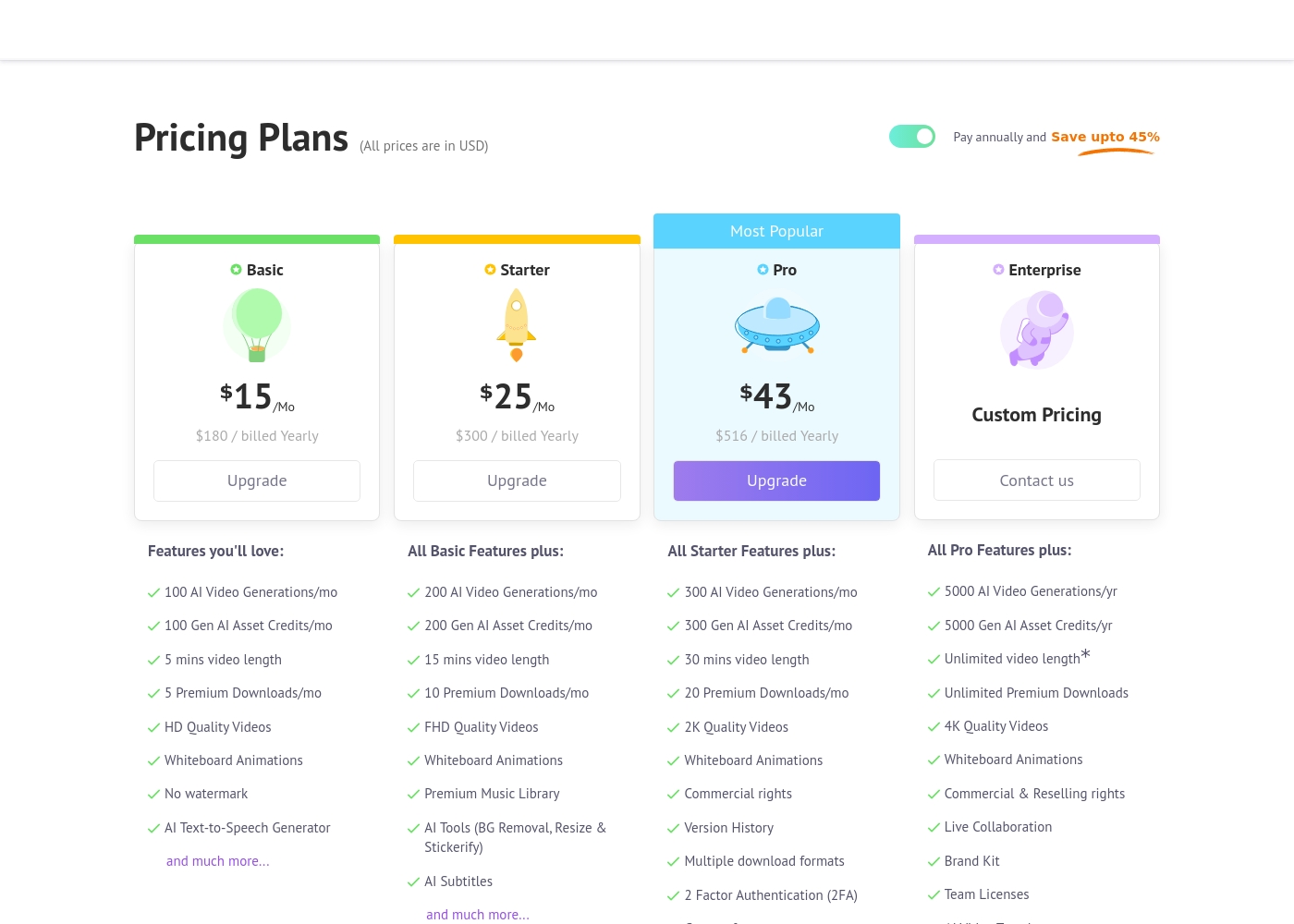
Animaker costs between $180 and $516 per year with four primary plans: Basic at $180/year, Starter at $300/year, Pro at $516/year, and Enterprise at Custom Pricing.
Let's explore the details of each subscription level so you can find the perfect fit for your video creation needs.
Basic
Price: $15/Mo ($180 billed Yearly) Other Features:
- 100 AI Video Generations/mo
- 5 Premium Downloads/mo
- 5 mins video length
- HD Quality Videos
- No watermark
- AI Text-to-Speech Generator
- 100 AI Video Generations/mo
- 5 mins video length
- 5 Premium Downloads/mo
- HD Quality Videos
- No watermark
- 200 AI Video Generations/mo
- 15 mins video length
- FHD Quality Videos
- Premium Music Library
- AI Tools (BG Removal, Resize & Stickerify)
- 300 AI Video Generations/mo
- 30 mins video length
- 2K Quality Videos
- Commercial rights
- Version History
- 5000 AI Video Generations/yr
- Unlimited Premium Downloads
- Unlimited video length*
- 4K Quality Videos
- Commercial & Reselling rights
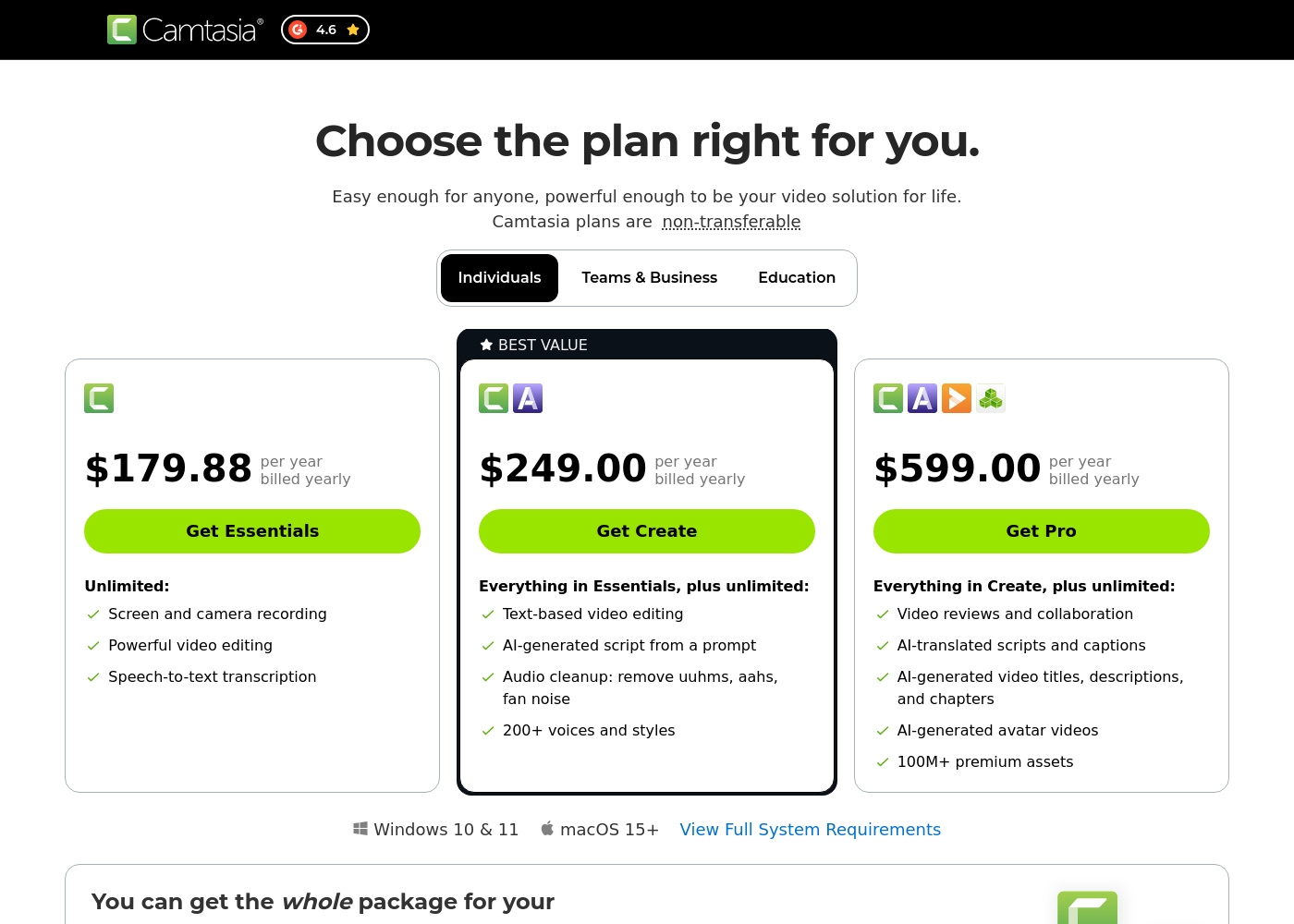
Camtasia costs between $179.88 and $599.00 per year with 3 plans: Essentials at $179.88, Create at $249.00, and Pro at $599.00. These plans cater to individuals, offering robust video and screen recording tools through an annual subscription model.
Essentials
Price: $179.88 per year billed yearly Other Features:
- Screen and camera recording
- Powerful video editing
- Speech-to-text transcription
The Essentials plan is perfect if you only need foundational tools for recording and editing videos. It provides unlimited screen and camera recording capabilities, which is great for beginners or those with basic needs.
- Screen and camera recording
- Powerful video editing
- Speech-to-text transcription
- Everything in Essentials
- Text-based video editing
- AI-generated script from a prompt
- Audio cleanup: remove uuhms, aahs, fan noise
- 200+ voices and styles
- Everything in Create
- Video reviews and collaboration
- AI-translated scripts and captions
- AI-generated video titles, descriptions, and chapters
- AI-generated avatar videos
Pricing Notes
- Animaker's monthly prices only apply when committing to the annual billing cycle, offering significant savings (up to 45%).
- Camtasia's pricing is strictly annual for individual licenses, requiring a higher upfront investment.
- Animaker offers a 7-day trial that unlocks premium features like 2K exports and asset access.
- Animaker's popular Pro plan includes commercial rights at $516/year; Camtasia’s similar collaboration tier is $599/year.
Pricing Head-to-Head
User Reviews
External reviews for Animaker are overwhelmingly positive, primarily driven by its exceptionally responsive customer support and accessible design. Users frequently mention the support team's promptness, with many citing effective solutions provided quickly by named staff members like Ashik, Bala, and Giftson.
The platform is highly lauded for its user-friendliness, making it simple for beginners to jump in and create high-quality animated videos, often without needing tutorials. Reviewers note that the varied character creation options, including different ethnicities and features, are a significant plus for creative versatility.
I really like using Animaker; it’s super practical and easy to use with many functions to choose from. However, I think it is a bit expensive, so consider the cost if you only need to create one video.
Camtasia enjoys a long-standing reputation as an industry-standard tool, particularly for screen recording and tutorial creation. Users overwhelmingly praise the core software, noting it is dramatically simpler and more intuitive to use than complex alternatives like Adobe products, while still offering a deep feature set.
However, recent changes to the pricing model and licensing structure have caused significant user frustration. The shift to mandatory annual subscriptions, coupled with new restrictive single-device sign-in limits for individual users, is a major recurring complaint.
The software is great, the developers deserve five stars for the product quality. But management introduced a highly frustrating subscription model. The mandatory sign-in cycle when switching devices significantly harms my workflow.
Our Verdict
The battle between Animaker and Camtasia is a split decision based purely on your workflow needs. This isn't about which tool is better overall, but what kind of video you create daily. It’s about deciding whether you need AI creation power or supreme editing control. If speed and visual novelty are your priority, Animaker is almost certainly the winner for you. Animaker's superpower is making high-quality animation accessible to everyone, instantly. It uses breakthrough AI to generate stunning videos from simple text inputs within seconds. Animaker provides strong commercial rights and a clear path to 4K output for serious creators. Plus, Animaker is widely noted for its fantastic, responsive customer support. Camtasia’s strength lies in its industry-leading screen recording and deep desktop editing tools. Its proprietary multitrack recording separates audio and camera from the screen, saving immense re-recording time. Camtasia also offers innovative text-based editing, allowing users to edit video by simply deleting transcript text. Here's the deciding factor: Are you recording live screen demonstrations, or are you synthesizing animated content? If you need animation, avatar presentations, or high volume output, choose Animaker. If you are an L&D pro creating detailed software demos and tutorials, Camtasia’s editing flexibility is crucial. Final verdict: Pick Animaker if you prioritize fast, AI-driven animation and need a friendly interface and high resolution. Choose Camtasia if your work centers on complex instructional tutorials requiring control over every recorded element and advanced audio polishing.
Frequently Asked Questions
Is Camtasia better for editing raw video footage than Animaker?
Yes, Camtasia is definitively built around powerful desktop video editing, especially for screen-recorded content. Animaker focuses more on generating synthesized video content and animation. Camtasia’s unique multitrack editing capability speeds up raw footage refinement substantially.
Which tool is more beginner-friendly for making general marketing videos?
Animaker is often rated highly for its exceptional ease of use and friendly interface. Beginners can create studio-quality animated videos quickly in Animaker. Camtasia requires a slightly steeper learning curve focusing on timeline management.
Does Animaker or Camtasia offer 4K video resolution output?
Animaker officially supports up to 4K output resolution, which is available on its custom Enterprise plan. Camtasia focuses on professional HD/FHD quality, which is suitable for standard tutorial content.
Does Animaker offer a free trial, unlike Camtasia’s mandatory annual commitment?
Yes, Animaker offers a generous 7-day free trial that unlocks many premium features, including 2K video output. Camtasia does not explicitly offer a free trial or money-back guarantee for its mandatory annual subscriptions.
Which tool is better for creating training videos with clean audio?
Camtasia wins easily here because of its advanced AI audio cleanup features. This AI automatically removes 'uuhms,' 'aahs,' and background noise effectively. Animaker’s audio strength is generating synthetic voices.
If I need commercial rights, which software is more affordable?
Animaker starts offering commercial rights with its Pro plan at $516 annually. Camtasia’s Pro plan for collaboration and advanced features costs $599 annually. Animaker offers slightly cheaper commercial entry.
Ready to Choose?
Both tools have their strengths. Choose based on your specific needs.