Amadine vs CorelDRAW
Amadine and CorelDRAW are popular, powerful professional vector design applications. The central conflict here is platform commitment versus toolset breadth. Amadine offers superb long-term value strictly for Apple users; CorelDRAW is a massive, cross-platform design suite.
Best for: Designers completely dedicated to the Apple ecosystem (Mac, iPhone, iPad)., Freelancers needing a powerful, stable vector tool without recurring subscription costs.
Best for: Professional studios requiring extensive integrated page layout and publishing features., Design houses needing advanced photo editing capabilities in the core design suite.
Powerful vector design for the Apple designer.
We find Amadine strikes an excellent balance between power and simplicity for users dedicated to the Apple ecosystem. Overall, we recommend this software highly for its robust feature set and unparalleled affordability through its lifetime license options.
Pros
- Mac lifetime license offers excellent long-term value.
- Intuitive UI dramatically simplifies the design workflow.
- Full feature parity across all Apple devices (Mac, iPad, iPhone).
- Includes professional tools like CMYK support and the innovative Fusion Tool.
Cons
- The software is exclusively confined to the Apple operating system ecosystem.
- iPad/iPhone usage requires subscription or a separate purchase, unlike the Mac version.
- Specific integration capabilities with non-Apple services are not clearly detailed.
Powerful design suite with unstable support.
We find CorelDRAW Graphics Suite offers a comprehensive, professional design experience coupled with a competitive annual price point equivalent to $22.42 per month. However, external feedback consistently highlights serious concerns about software stability and abysmal customer support responsiveness. Overall, the powerful feature set is hampered by reliability issues and questionable transparency in feature delivery.
Pros
- Complete suite for professional vector illustration, layout, and photo editing.
- Considered user-friendly and approachable for a powerful design tool.
- Highly flexible platform with customizable workspaces and toolbars.
- Competitive annual subscription cost for a complete software suite.
Cons
- Reports of extremely poor, non-existent customer support.
- Frequent software instability and crashing, especially with large files.
- Lack of backward compatibility and issues managing older licenses.
- Concerns regarding false advertising of included features (AI, cloud sharing) that require extra cost.
AboutAmadine
Amadine is a comprehensive vector graphics application designed specifically for Mac, iPad, and iPhone. It serves both seasoned design professionals and creative amateurs alike. The developers focused on precision and user needs, resulting in software that makes bringing your creative ideas to life much easier. Its seamless balance across different Apple platforms lets you work wherever creativity strikes. 💡
AboutCorelDRAW
CorelDRAW Graphics Suite is a professional resource designed to push the boundaries of visual communication. It serves as your comprehensive go-to toolbox for creative projects involving graphics. The suite provides specialized capabilities covering professional vector illustration and effective page layout. Users also gain powerful tools for typography, font management, and advanced photo editing. 💡 Plus, subscribers now get exclusive access to CorelDRAW Web Online graphic design features.
Highlights
Feature Comparison
Features Overview
We highlight the main differences and pick a winner for each feature.
Pricing & Value
Amadine offers superior long-term value by eliminating required subscriptions. CorelDRAW is stuck entirely on an annual subscription model.
Amadine’s Mac users can buy a powerful vector tool for a single lifetime payment. The single-user license starts at an excellent one-time price of $29.99. CorelDRAW demands a high annual subscription cost, currently $269.00 per year. This recurring fee is necessary to maintain access and receive the newest major features. Amadine provides unparalleled affordability for independent designers and small teams using the five-seat Family License. This is perfect for avoiding subscription fatigue. CorelDRAW's subscription model ensures you always have the latest update immediately. However, Amadine's low cost drastically lowers the barrier to entry.
Ecosystem & Platform
CorelDRAW is cross-platform for Mac and Windows; Amadine is strictly an Apple-only vector tool.
Amadine is built only for the Apple ecosystem, fully utilizing macOS, iPadOS, and iOS technologies. Amadine offers feature parity across all these Apple devices. CorelDRAW provides its full professional Graphics Suite application for both Mac and Windows operating systems. It is the flexible choice for mixed creative environments. If your studio uses both Windows and Mac computers, CorelDRAW simplifies cross-platform file management. Amadine forces Apple commitment or requires alternative tools for PC users. Amadine offers a single, streamlined experience optimized fully for Mac users. This dedication enhances performance on Apple Silicon machines.
Tool Scope & Breadth
CorelDRAW is a massive design suite; Amadine is a dedicated, focused vector illustration tool.
Amadine focuses purely on professional vector illustration, offering core tools for drawing and shape manipulation. It requires external tools for page layout. CorelDRAW is a comprehensive suite, including advanced photo editing capabilities and robust page layout functions. It’s an all-in-one resource. CorelDRAW also incorporates specialized font management and extensive typography tools in the suite. This makes managing complex text layouts much easier. If you need a tool that handles both image retouching and multi-page publishing, CorelDRAW is the preferred, complete choice.
Vector Precision Tools
Both tools offer unique approaches to complex vector shaping for professional results. They use different methods.
Amadine features the Fusion Tool, a smart alternative to traditional boolean operations. It easily merges contours and lines to create intricate, specific new shapes smoothly. CorelDRAW offers a specialized feature to apply symmetry to objects quickly and simply. This saves time on creating geometric patterns and detailed repeatable assets. Amadine focuses on easier complex shape construction and smooth curve tuning for detailed assets. Its corner tool has presets like Concave arc and Elliptic shapes. Both Amadine and CorelDRAW provide the underlying tools needed for highly detailed, professional vector illustration work.
Mobile Workflows
Amadine delivers a true native mobile experience; CorelDRAW relies on an online web application access.
Amadine runs as a fully featured, native application on iPad and iPhone devices. It maintains full feature parity with the Mac version for seamless transitions. CorelDRAW subscribers gain access to CorelDRAW Web for online graphic design features. This allows some flexibility away from the desktop environment. Working with Amadine on iPad utilizes touch optimization and full Apple Pencil support. This feels natural for drawing and detailed editing. Amadine's commitment to native mobile development provides a faster, more reliable, and deeper integration than CorelDRAW’s web access solution.
Stability & Quality
Amadine appears stable and reliable; CorelDRAW is widely criticized for frequent crashing and bugs.
User review data for CorelDRAW repeatedly highlights severe software instability. Reports note CorelDRAW often crashes when dealing with large, complex files. Amadine is often praised for its easy-to-use UI, which implies a cleaner, more controlled performance environment. No systemic stability issues were reported. Reliability is crucial for professional work; CorelDRAW's instability threatens deadlines and file integrity. Always back up large CorelDRAW files frequently. Amadine’s focus on a single ecosystem likely contributes to its perceived stability and optimization on Mac devices.
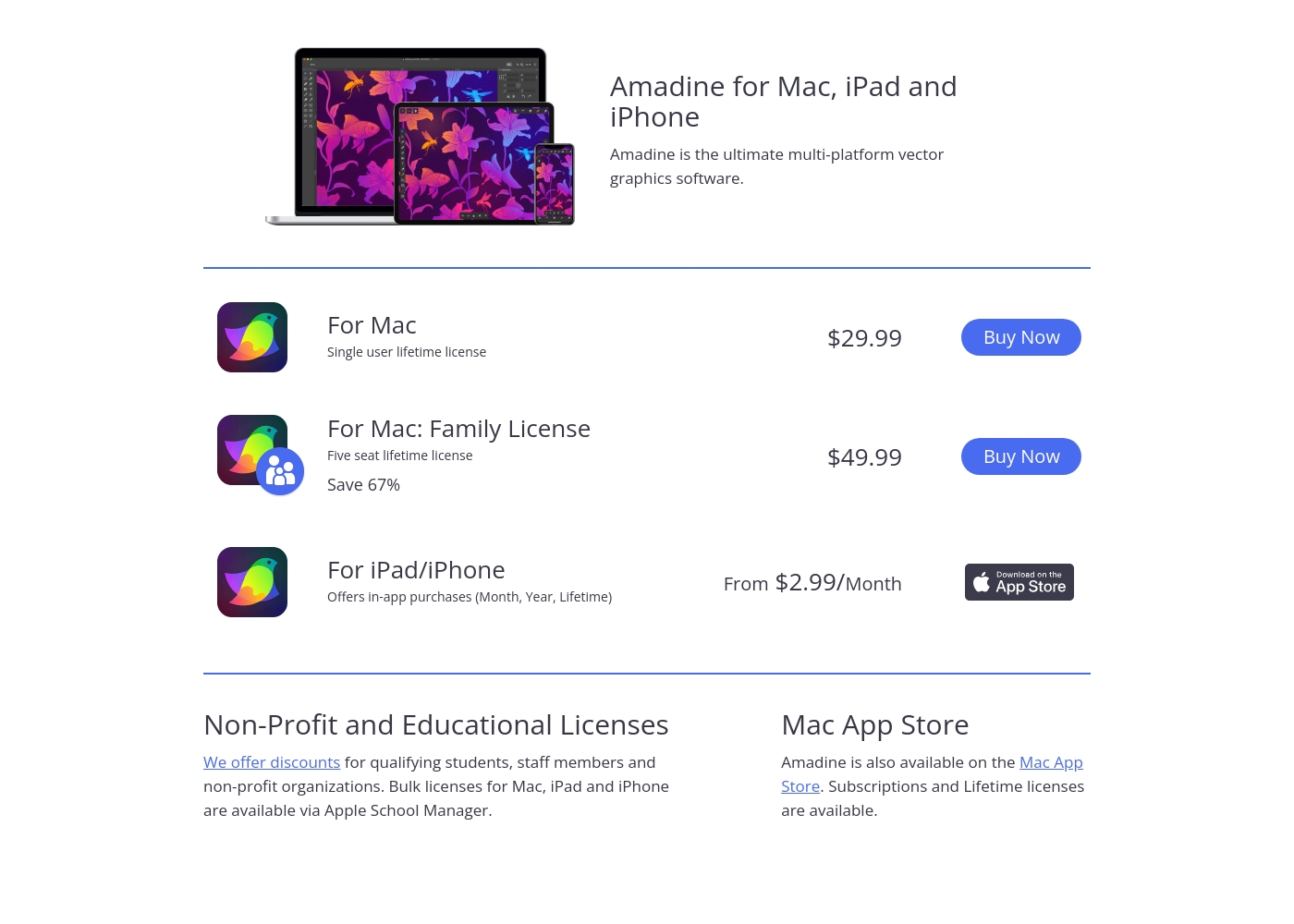
Amadine costs between $2.99 per month and $49.99 lifetime with three main plans: Mac Single User at $29.99 lifetime, Mac Family License at $49.99 lifetime, and iPad/iPhone starting at $2.99 per month.
Now, here is a detailed breakdown of the specific pricing options available for each platform.
Amadine for Mac
Price: $29.99 (Lifetime license) Best For: Individual users needing powerful vector graphics software on one Mac device. Refund Policy: 30-day money-back guarantee (when purchased from the official website) Other Features:
- Single user lifetime license
- Single user license
- Lifetime license
- Five seat license
- Lifetime license
- Save 67%
- Offers in-app purchases: Monthly, Yearly, and Lifetime
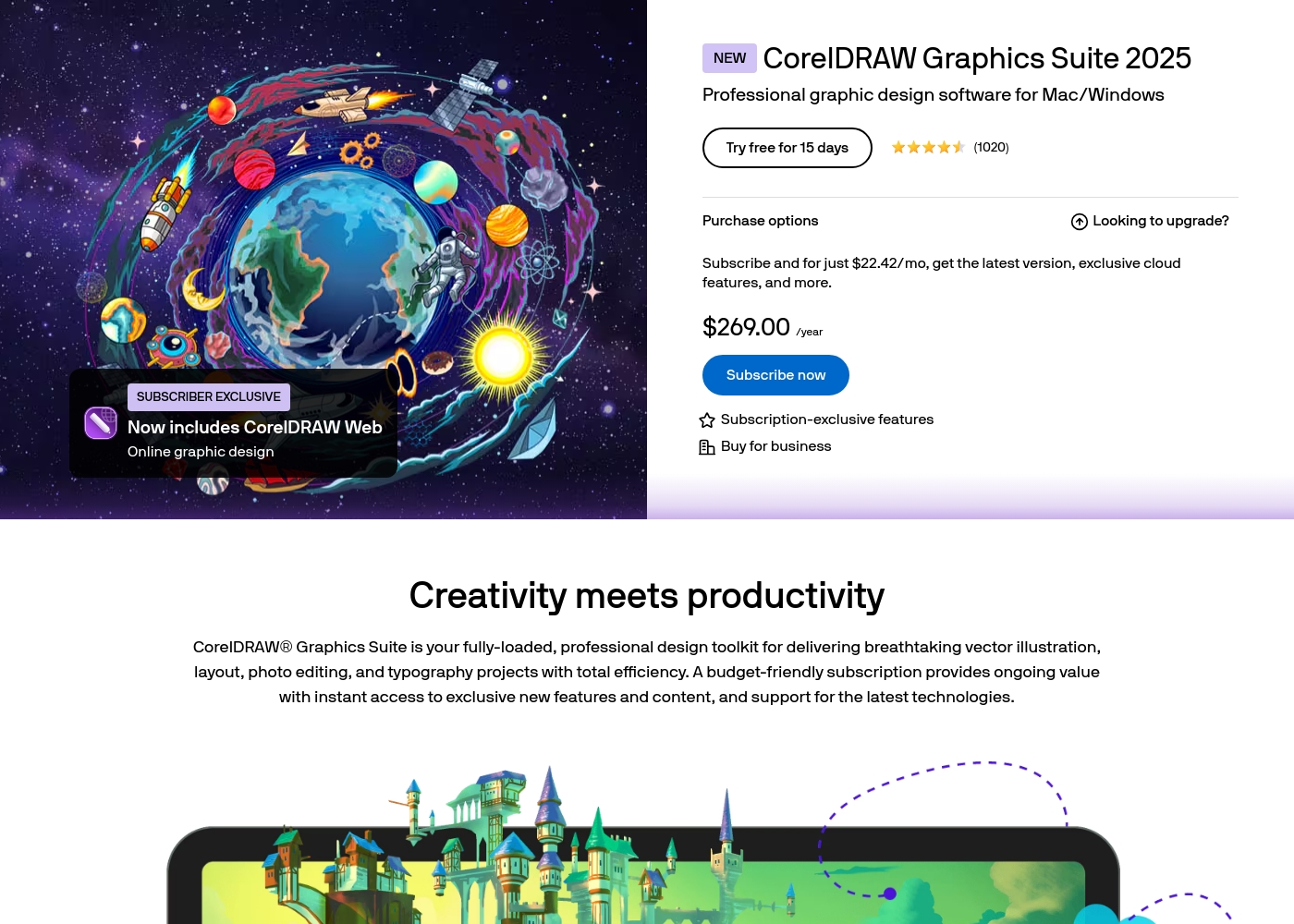
CorelDRAW costs $269.00 per year with 1 advertised plan: CorelDRAW Graphics Suite 2025 Subscription at $269.00 annually (or $22.42 per month equivalent).
Let's look closer at the subscription options available for this professional graphics suite, which is designed for Mac and Windows.
CorelDRAW Graphics Suite 2025 Subscription
Price: $269.00 annually ($22.42/mo equivalent) Best For: Professional graphic design software for Mac/Windows Other Features:
- Latest software version
- Exclusive cloud features
- Includes CorelDRAW Web (Online graphic design)
- Subscription-exclusive features
- Latest version of CorelDRAW Graphics Suite
- Exclusive cloud features
- Includes CorelDRAW Web (Online graphic design)
- Subscription-exclusive features
Pricing Notes
- Amadine offers a one-time lifetime license for Mac users starting at just $29.99, providing immense long-term value.
- CorelDRAW is primarily sold as an annual subscription for $269.00, making it significantly more expensive over time.
- Amadine’s $49.99 Family License covers five seats on Mac, making it highly cost-effective for small households and teams.
- CorelDRAW has faced user criticism regarding hidden costs or additional fees required for advertised ‘exclusive’ features.
Pricing Head-to-Head
User Reviews
Review data from external platforms is currently very limited, as no user snippets were provided for analysis from either Trustpilot or Capterra. We are therefore unable to offer a synthesis of general public sentiment regarding crucial themes such as customer support responsiveness, update reliability, or integration capabilities.
Based solely on the product’s self-description, the focus is on providing a neat and convenient UI and offering superb value through one-time lifetime payments for Mac users. While the platform claims to have advanced specialized tools like the Fusion Tool and true cross-platform functionality with feature parity, we cannot confirm user satisfaction or real-world reliability without external testimony.
The combined sentiment from Trustpilot (2.5/5) and Capterra reviews presents a stark dichotomy. On one hand, loyal, long-time users praise CorelDRAW’s powerful functionality, stating it performs exactly what they need for professional vector work.
This high praise confirms the software's core feature accuracy and utility. However, the overwhelmingly negative majority sentiment focuses on three critical areas: customer service, reliability, and pricing transparency.
I just love CorelDRAW. I’ve been working happily with it for over 10 years, and I truly don’t want to switch to any of the newer tools. It still does exactly what I need on a daily basis, and I really like it.
Our Verdict
The choice between Amadine and CorelDRAW boils down to your design breadth versus your budget and stability needs. If you are an Apple-focused designer, Amadine delivers unparalleled, stable value for a one-time fee. CorelDRAW is better suited for a professional who needs every tool under the sun, subscription be damned. Amadine’s superpower is delivering a modern, intuitive, and seamlessly integrated Apple vector experience. It offers full native feature parity across all Mac, iPad, and iPhone devices. Utilizing tools like the Fusion Tool helps simplify complex design operations without overwhelming the artist. CorelDRAW thrives as a comprehensive, all-in-one professional design package. It includes robust page layout features, advanced photo editing, and integrated font management. CorelDRAW is flexible for studios running mixed environments but requires a hefty annual investment. The critical deciding factor is reliability versus expansive features. CorelDRAW offers maximum depth, but user reviews heavily criticize its crashes and abysmal support. Amadine delivers a stable, focused experience with superb cost efficiency. Final Recommendation: Choose Amadine if you value stability and a lifetime license on Mac hardware. Only opt for CorelDRAW if you absolutely require its integrated layout and photo tools in a cross-platform environment.
Frequently Asked Questions
Which is more cost-effective: Amadine's lifetime license or CorelDRAW's subscription?
Amadine provides radical long-term cost savings with its Mac lifetime license starting at $29.99. CorelDRAW only offers an annual subscription costing $269.00 per year. Amadine is the clear winner for cost-conscious individual designers.
Does Amadine or CorelDRAW provide better cross-platform capability?
CorelDRAW is superior for cross-platform studios, natively supporting both Mac and Windows operating systems. Amadine is entirely limited to the Apple ecosystem (Mac, iPad, iPhone).
Does Amadine offer the same robust features as the CorelDRAW Graphics Suite?
No. CorelDRAW is an extensive suite integrating page layout, photo editing, and font management systems. Amadine is strictly focused on high-quality vector illustration and shape creation tools.
Which software provides a better experience when designing on an iPad or iPhone?
Amadine offers a superior experience with fully native, optimized applications for iPadOS and iOS. CorelDRAW relies on its CorelDRAW Web online version for mobile access.
Is CorelDRAW a more stable program than Amadine based on user feedback?
No, reliable user feedback indicates quite the opposite. CorelDRAW users frequently report software instability, crashing with large files, and reliability issues. Amadine appears to offer a more stable platform.
Can Amadine handle print-ready professional design projects?
Yes, Amadine fully supports both essential CMYK and RGB color models for professional output. This ensures your color accuracy for both print and digital production needs.
Ready to Choose?
Both tools have their strengths. Choose based on your specific needs.