AirSlate vs Assembly
AirSlate and Assembly solve two very different business headaches. AirSlate automates complex internal document workflows. Assembly creates a modern, branded client portal. The choice isn't close once you know which problem you're tackling.
Best for: Growing teams automating internal document workflows, Businesses needing deep CRM and database integration
Best for: Accounting, law, and consulting firms seeking a unified client hub., Marketing and creative agencies wanting a branded client portal.
Powerful automation, high client friction.
We find AirSlate offers an impressive, comprehensive no-code automation platform featuring excellent CRM and API connectivity. Overall, we see it as a powerful tool for complex internal workflows, but user accessibility issues for external stakeholders must be addressed.
Pros
- Provides comprehensive, no-code document automation.
- Strong CRM and API integration capabilities are available.
- Features specific 'autostart' functionality for workflows.
- Offers a definitive, entry-level Free Plan.
Cons
- Strict technical requirements for external users (e.g., specific OS/browser).
- Paid tier pricing is not publicly transparent.
- Poor external client communication processes were reported.
Solid all-in-one client portal
Overall, we find Assembly to be a strong, user-friendly platform for professional firms aiming to centralize client management and present a polished brand. It delivers on its core promise of a modern portal but may require consideration for specific integration needs or advanced customization.
Pros
- Intuitive, modern interface that is easy for clients and staff to navigate.
- Comprehensive all-in-one platform replacing scattered emails, files, and invoices.
- Strong branding and white-labeling options, especially on higher-tier plans.
- Includes key features like invoicing, messaging, and eSignatures without add-ons.
Cons
- Pricing escalates significantly for team seats and advanced features like HIPAA.
- Some users report navigation friction or layout issues when accessing specific features under time pressure.
- Integration options may require setup work if your specific software isn't listed.
- Not ideal for very simple or infrequent client interactions due to pricing structure.
AboutAirSlate
AirSlate WorkFlow is a powerful, no-code platform designed to simplify complex document tasks. It provides end-to-end automation for growing teams and enterprises of all sizes.
You define your document process visually without needing technical expertise or complicated coding skills. WorkFlow revolutionizes how companies handle their critical document lifecycles.
It includes document creation, automatic filling, real-time routing, and eSignatures all in one automated system. It’s easy to use and helps you enhance productivity while achieving seamless workflow automation.
AboutAssembly
💡 Assembly is a client portal and back-office platform for professional service firms. It's built for businesses in accounting, law, marketing, real estate, and tech. The goal is to replace clutter with a single, client-friendly hub.
Highlights
Feature Comparison
Features Overview
We highlight the main differences and pick a winner for each feature.
Core Purpose
AirSlate automates internal document workflows. Assembly manages external client relationships.
AirSlate is a no-code engine for automating document creation, routing, and signatures. It's built to replace manual, internal business processes like onboarding or contract approvals. Assembly is a client portal and back office. It gives your clients a modern hub to communicate, share files, sign contracts, and pay invoices. The key difference is focus. AirSlate optimizes your internal operations. Assembly improves your external client experience.
User Interface
AirSlate is a powerful workflow builder. Assembly is an intuitive client portal.
AirSlate's interface is a visual, drag-and-drop workflow builder. You define business logic and data flows. It's powerful but geared toward process setup. Assembly's interface is designed for end clients. It's clean, modern, and focuses on ease of use for people who aren't your employees. The trade-off is complexity vs. simplicity. AirSlate's UI is for building the engine. Assembly's UI is for the final customer experience.
Integrations
AirSlate connects deeply with CRMs and databases. Assembly connects to business tools via API.
AirSlate offers deep, bi-directional integrations with CRMs like Salesforce and databases. It can pull data to pre-fill docs and push completed records back automatically. Assembly integrates with tools you already use, like Zapier, Make, and specific software via API. It's about connecting your portal to your existing stack. AirSlate's integrations are for data accuracy in workflows. Assembly's are for workflow continuity across tools.
Client Experience
Assembly excels here with a branded portal. AirSlate has minimal external-facing features.
Assembly provides a dedicated, branded portal where your clients can log in. They see all their documents, messages, and invoices in one place. It's designed to impress. AirSlate is primarily internal. External users receive document links to sign. There's no ongoing client portal or hub. If making a modern, professional first impression on clients is key, Assembly is the clear choice.
Security & Compliance
Both offer enterprise-grade security. AirSlate's is always on; Assembly's is tiered.
AirSlate provides enterprise-ready security and HIPAA compliance across its platform. It's built for handling sensitive internal documents. Assembly offers SOC2 and HIPAA compliance, but requires the Advanced plan ($399/mo) for a BAA and audit logs. The Enterprise plan adds custom SSO. AirSlate's security is a core feature. Assembly's advanced compliance is a premium add-on for specific industries.
Pricing Transparency
Assembly has clear, public pricing. AirSlate uses a custom quote model.
Assembly lists four clear tiers: Starter ($39), Professional ($149), Advanced ($399), and Enterprise ($2,000). You know what you pay before signing up. AirSlate offers a Free Plan but requires you to contact sales for paid tier pricing. Costs are customized and not public. This makes budgeting easier with Assembly. With AirSlate, you need to engage with sales to get a number.
Onboarding & Setup
AirSlate can take hours to set up a workflow. Assembly is a quick portal launch.
AirSlate states you can set up workflows in minutes instead of hours. The initial workspace setup is fast, but configuring complex logic takes time. Assembly is designed for quick implementation. Users report setting up a compliant portal quickly without custom coding. Both are relatively quick to start, but the initial goal differs: a workflow vs. a live client portal.
Customer Support
Support varies by plan for both. Assembly's tiers are more clearly defined.
AirSlate's support details aren't publicly listed. You're directed to contact their team. Assembly outlines support by plan: standard for Starter, priority email for Professional, priority call for Advanced, and a dedicated success manager for Enterprise. Assembly provides more transparency on what support level you'll get at each price point.
Reporting & Analytics
AirSlate offers real-time workflow monitoring. Assembly focuses on client activity.
AirSlate provides real-time monitoring and optimization tools for your document flows. You can see where bottlenecks occur. Assembly's analytics focus on client interactions. You get visibility into portal activity and engagement. The data serves different purposes: AirSlate for process efficiency, Assembly for client relationship health.
Scalability
AirSlate scales with custom pricing. Assembly scales with clear plan limits.
AirSlate is built for growing teams and enterprises. Scaling likely means a custom enterprise quote. Assembly scales via its plan tiers. You move from Starter to Enterprise based on users, clients, and automation limits. Assembly's path is more predictable. AirSlate's is more flexible but less transparent.
Review the information below to understand how the plans are structured and which robust document solution might suit your business needs best.
Free Plan
Price: $0 per month Best For: Exploring advanced product features before commitment. Other Features:
- Create an account and secure workspace
- Explore advanced product features
- Access dynamic document tools
This Free Plan is perfect if you want to test the powerful document automation capabilities without any initial financial commitment. It’s an ideal way for small teams or individuals to try out the no-code drag-and-drop workflow builder and see the value before paying.
- Create secure workspace for your team
- Explore advanced product features
- Comprehensive integrations (CRM/Database)
- Enterprise-ready security and compliance
- Real-time monitoring and optimisation tools
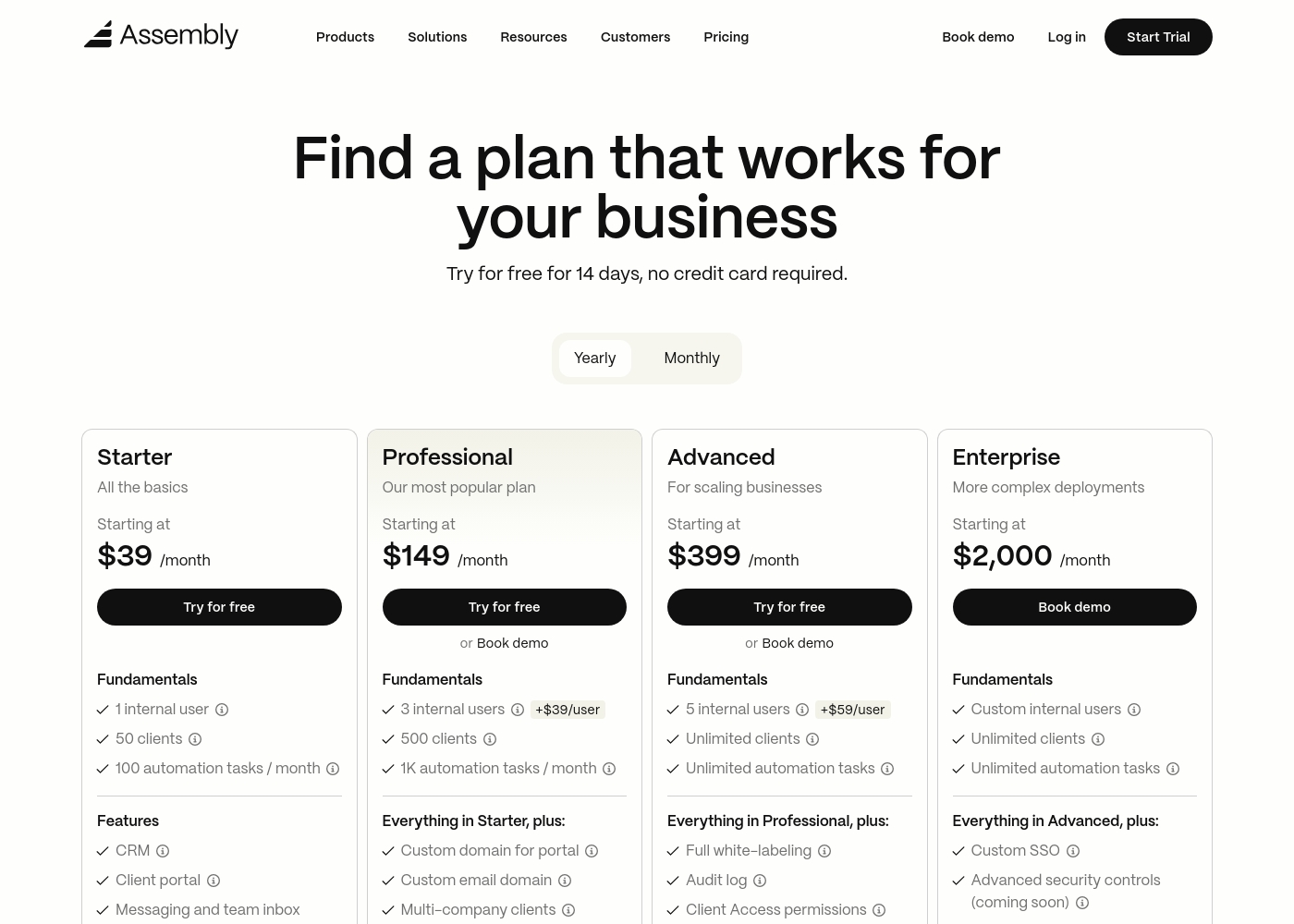
Assembly costs between $39 and $2,000 per month with 4 plans: Starter at $39, Professional at $149, Advanced at $399, and Enterprise at $2,000.
Take a look at the feature breakdown for each tier below.
Starter
Price: $39 / month Best For: Solo entrepreneurs and small service providers Refund Policy: 30-day satisfaction guarantee Other Features: CRM, white-labeled client portal, messaging, invoicing, and task management.
- CRM
- Client portal
- Messaging & inbox
- Invoices & pay links
- Proposals & contracts
- Custom domain
- API & Zapier/Make
- Multi-company clients
- Low payment fees
- Full white-labeling
- Audit log
- HIPAA compliance
- Client access permissions
- Custom SSO
- Sandbox workspace
- Dedicated success manager
- Technical advisor
Pricing Notes
- AirSlate's Free Plan lets you explore features, but paid pricing is completely custom.
- Assembly's pricing is transparent and public, starting at $39/month for solo users.
- Assembly charges extra for additional team seats on Professional ($39) and Advanced ($59) plans.
- AirSlate's cost could be higher or lower depending on your specific workflow volume and needs.
- Assembly offers a 30-day money-back guarantee, reducing initial risk.
Pricing Head-to-Head
User Reviews
User feedback for AirSlate is currently polarized due to extremely limited public data. On the positive side, users strongly praise the platform's advanced automation capabilities, specifically highlighting the effectiveness of autostarts and robust features like CRM and API integration.
These functionalities suggest AirSlate is a powerful tool for businesses requiring complex, interconnected workflows and seamless data exchange. However, specific customer experiences have revealed significant accessibility barriers for external participants.
So far, it's been great. We love the advanced automation features included, especially the autostarts capability. Robust CRM and API integrations really sealed the deal for us, saving us significant time daily.
From our research on Trustpilot and Capterra, users consistently praise Assembly for its modern, intuitive interface and the ease with which it centralizes client communication. The platform is frequently described as a clean, all-in-one hub that simplifies operations.
However, some users on Capterra note occasional friction in navigation under time pressure and desire more robust customization. Support responsiveness and the value of included features like invoicing and portals are highlighted as major positives, while pricing for higher tiers is seen as a consideration for scaling firms.
Assembly's interface is quick to navigate and simple to operate. It has been great for keeping our client recognition tasks organized in one place without a steep learning curve.
Our Verdict
For most businesses comparing these two, Assembly is the better pick. It solves the common problem of scattered client communication with a clean, modern solution. AirSlate's superpower is powerful, internal document automation. It excels at connecting your CRMs and databases to pre-fill and route complex paperwork. If your main pain is manual data entry and clunky internal approvals, AirSlate is the engine you need. Assembly's superpower is client experience. It gives your clients a professional, branded portal to handle everything from messages to payments. It replaces email chaos with a centralized, impressive hub that strengthens your brand. The deciding factor is simple: who are you optimizing for? If you're fixing internal operations for your team, choose AirSlate. If you're transforming the experience for your clients, choose Assembly. Go with AirSlate if you're a growing enterprise drowning in manual document tasks. Choose Assembly if you're a professional service firm wanting to wow clients from the first click. The right tool depends entirely on whether the work happens inside your walls or outside them.
Frequently Asked Questions
Which is better for small teams: AirSlate or Assembly?
Assembly is generally better for small professional service teams. Its Starter plan is affordable and designed for solo or small firm client management. AirSlate's value for small teams depends on your specific automation needs and custom pricing.
Does AirSlate have a client portal like Assembly?
No, AirSlate does not have a dedicated client portal. It is focused on internal document workflow automation. Clients receive individual document links for signing but don't get a centralized hub.
Is Assembly worth the extra cost over AirSlate?
This isn't a direct cost comparison. AirSlate's pricing is custom and could be higher or lower. Assembly's cost is for a complete client portal solution. The value depends on whether you need internal workflow automation or a client-facing hub.
Can I use both AirSlate and Assembly together?
Yes, they serve complementary purposes. You could use AirSlate for complex internal document automation and Assembly for your client-facing portal. They don't directly integrate but solve different halves of the client lifecycle.
Which tool is easier to set up?
Assembly is generally quicker to set up as a live client portal. AirSlate requires configuring your specific document workflows and integrations, which can take more initial time to build correctly.
Which is better for HIPAA compliance?
Both can be HIPAA compliant, but the requirements differ. AirSlate states it offers HIPAA compliance as a core feature. Assembly requires the Advanced plan ($399/month) or higher to get a signed BAA and audit logs.
Ready to Choose?
Both tools have their strengths. Choose based on your specific needs.