Adobe Photoshop vs Fotor
This comparison pits the robust, industry-standard editor against the AI-driven, accessible platform. Adobe Photoshop offers unmatched professional depth for complex manipulation. Fotor prioritizes speed, ease of use, and cross-platform accessibility, even offering a free plan.
Best for: Professional designers and photo retouchers, Large creative agencies needing collaborative enterprise tools
Best for: Small business owners needing quick product photo touch-ups, Social media managers requiring fast batch editing and cleanup
Master software, deceptive pricing
We find Adobe Photoshop offers industry-leading intuitive tools for fast, precise image editing, which dramatically improves professional workflows. However, we cannot ignore the widespread user complaints regarding the costly, confusing annual subscription model and the aggressive cancellation fees. Overall, the powerful features are currently overshadowed by surrounding corporate policies and poor customer support.
Pros
- Industry-leading, powerful features for professional image editing.
- Intuitive tools speed up complex selection and color adjustments.
- Smart workflow suggestions help handle complicated projects faster.
- Special comprehensive plans available for students and educators.
Cons
- The subscription model is widely criticized as misleading (annual contract paid monthly).
- Substantial cancellation fees are enforced for early termination.
- Customer and technical support are widely described as non-existent or unhelpful.
- Reports of sudden product crashes across multiple devices.
Powerful AI tools, usability offsets billing friction.
We find Fotor offers robust AI tools for simplified photo and video creation, making high-end editing highly accessible for beginners. However, the paid experience is frequently marred by ambiguous payment policies and pressure from the restrictive credit system. Overall, Fotor is a powerful editor best suited for high-volume hobbyists who tolerate navigating the premium paywalls.
Pros
- Excellent user-friendliness and easy learning curve for all users.
- Robust AI generator for images and videos with high-quality results.
- Effective tools for quick edits, object removal, and background replacement.
- Includes specialized high-end features like AI Slides and batch editing (Pro+).
Cons
- Frequent user complaints about unexpected billing and unclear refund/cancellation policies.
- Restrictive credit and points system bothers many users who want unlimited use.
- Some reviewers find the platform less ideal for complex professional work.
- Suspected use of incentives to gain positive reviews via a credit system.
AboutAdobe Photoshop
Photoshop is the essential tool for professional image editing. It offers new, intuitive tools designed specifically to speed up your process. You can browse plans easily, whether you are an individual, a business, or looking for options tailored for students and teachers. You can even try Photoshop out with a generous free trial. It’s built to help you explore every feature of digital creation. 💡
AboutFotor
Fotor is a user-friendly online photo editor designed for everyone. It works well for both amateurs and more seasoned professionals. Unlike complex traditional software, Fotor provides powerful editing features within a highly intuitive interface. You can easily edit your photos online in just three simple steps: Upload, Edit, and Download.
It’s also incredibly flexible. You can use Fotor on Windows, Mac, iOS, and Android devices. This availability means you can enhance your pictures anytime, anywhere, all managed with a single account. 💡
Highlights
Feature Comparison
Features Overview
We highlight the main differences and pick a winner for each feature.
Professional Editing Depth
Adobe Photoshop provides unequaled professional control and deep layer editing capabilities. Fotor simplifies tasks but lacks the granular technical depth of its competitor.
Adobe Photoshop is the definitive standard for sophisticated retouching and manipulation. It offers intuitive tools but still demands professional mastery for best results. This tool handles complicated projects more efficiently using smart workflow suggestions. Adobe Photoshop allows incredible precision for selections, layer masks, and color grading. Fotor uses a simple, three-step 'Upload, Edit, Download' workflow for quick results. This tool is designed to make complex editing outcomes simple using AI. Fotor focuses on quick enhancements like object removal and beautifying portraits. Fotor is great for rapid content creation, but Adobe Photoshop is necessary for pixel-perfect, high-stakes commercial work. This is the core trade-off: unparalleled depth versus simple accessibility. For true design freedom, Adobe Photoshop remains essential. For instance, an agency retouching a global ad campaign must use Adobe Photoshop for maximum quality control. A social media manager needing quick fixes can instantly use Fotor across any device, saving time.
Ease of Use
Fotor's intuitive editor makes stunning results achievable for beginners instantly. Adobe Photoshop requires significant time investment to master complex tools.
Adobe Photoshop provides robust features that speed professionals up but requires learning complex layers and toolsets. Its powerful workflow suggestions guide experienced users. Despite intuitive improvements, Adobe Photoshop is designed for those who already understand professional terminology. Fotor offers an extremely easy learning curve suitable for anyone making quick edits. The interface is highly accessible across desktop and mobile platforms. Users can achieve impressive results without needing specialized editing expertise. Fotor is the better choice for everyday users seeking immediate results and usability. Adobe Photoshop is ideal when the learning time is justifiable by extremely high output quality. Fotor minimizes complexity, while Adobe Photoshop maximizes control. If you want to edit a photo in under five minutes, Fotor will deliver. If you are starting a graphic design career, you must commit to learning Adobe Photoshop.
Generative AI
Fotor clearly defines monthly credit allotments for high-volume AI usage across premium tiers. Adobe Photoshop integrates AI, but feature access seems less transparent.
Adobe Photoshop utilizes generative AI within its sophisticated editing features. Access to generative credits is primarily marketed within the powerful Students & Teachers Creative Cloud Pro plan. The core focus of Adobe Photoshop remains traditional, precise raster editing. Fotor makes Generative AI central, offering up to 300 credits per month in the Pro+ plan. This includes specialized features like AI Slides, AI Write, and advanced AI image generation. Users can buy additional retail credits if their monthly quota runs out. Fotor is built around high-volume, quick AI content creation and generation. Adobe Photoshop leverages AI chiefly to enhance existing professional workflows, like masking. Fotor provides clear limits and focuses on AI outputs. For creating many new, novel image concepts quickly, Fotor is purpose-built for that output. Adobe Photoshop uses AI to make existing tasks like selections faster.
Batch Processing
Fotor handles high volumes, allowing batch editing of up to 50 images instantly. Adobe Photoshop focuses on intricate, single-image professional detail workflows.
Adobe Photoshop provides complex actions and scripting for batch tasks, but it is not natively designed for simple, high-volume batch processing. Its core strength lies in individual image perfection. Complex workflow suggestions help manage one difficult project efficiently. Fotor offers extremely fast, dedicated batch processing tools in its Pro and Pro+ plans effectively. Users can edit up to 50 images at once, including specialized functions like batch background removal. This feature maximizes speed for repetitive tasks. Fotor is superior for users who upload large volumes of standard images needing the same adjustments or effects. Adobe Photoshop is necessary when every single image requires pixel-level unique attention. Fotor optimizes repetition for speed. An e-commerce seller processing 30 product shots needs Fotor's batch background remover to save hours of work. A creative director perfecting one key visual needs the individual depth of Adobe Photoshop.
E-commerce Focus
Fotor includes dedicated AI tools for quick e-commerce product backdrops and processing. Adobe Photoshop requires manual effort or advanced techniques.
Adobe Photoshop is the primary tool for detailed product retouching and color correction. However, generating new, professional backdrops is a manual process requiring skill. Connectivity to Adobe Express helps move assets for quick graphic deployment. Fotor excels by using its AI background generator specifically for product shots. Users can automatically remove backgrounds and generate professional replacements instantly. This simplifies the creation of consistent, high-quality product images. If you need speedy creation of visually strong e-commerce content, Fotor provides targeted tools. If you need fine-tuning every single reflection and shadow, Adobe Photoshop is required. Fotor speeds up the asset pipeline remarkably. Fotor allows a small business to look professional effortlessly without hiring a skilled retoucher. Adobe Photoshop demands significant expertise to achieve the same result manually.
Cross-Platform Access
Fotor works seamlessly across all major devices, syncing workflow across desktop and mobile. Adobe Photoshop relies heavily on the desktop application for maximal power.
Adobe Photoshop is strongest as a desktop application where maximum processing power is required for complex files. While mobile options exist, the full, powerful experience is desktop-bound. This focus ensures stability during heavy usage. Fotor is highly flexible, supporting Windows, Mac, iOS, and Android devices easily. Your single account syncs your work across all platforms. This ensures maximum accessibility for quick edits anywhere. If you often switch between editing on your phone and your computer, Fotor offers superior convenience. Adobe Photoshop is best when you are committed to a heavy-duty workstation setup. Fotor delivers total accessibility. You can start an edit using the Fotor app on the bus and finish it on your laptop at home. This seamless mobility is a huge advantage over Adobe Photoshop for casual creation.
Pricing Structure
Adobe Photoshop uses controversial annual contracts that hide high cancellation fees. Fotor offers a robust free plan but uses a credit system for key features.
Adobe Photoshop uses subscriptions tailored for individuals, businesses, and education, but exact prices are often undisclosed. Users report substantial frustration with the annual contract paid monthly model. Early termination often results in unexpected and large cancellation fees. Fotor offers a dependable US$0 Basic plan for foundational editing forever. Premium plans (Pro/Pro+) unlock advanced features and generous monthly generative AI credits. The lack of a free trial for premium tiers is offset by the free Basic plan. Adobe Photoshop risks major user complaints due to its alleged lack of pricing transparency and aggressive billing practices. Fotor is less risky to explore due to the free tier, but the credit system can feel restrictive to heavy users. If budget predictability and transparency are key, neither platform is perfect, based on user feedback. However, starting with Fotor is completely free, unlike the commitment required by Adobe Photoshop.
Since pricing is dynamic based on location and user type, details are often customized. Here's a breakdown of the subscription options available.
Individuals
Best For: Individual professionals, hobbyists, and freelancers Other Features:
- Create faster with new intuitive image editing tools
- Make precise selections easily
- Instantly adjust color with on-canvas controls
- Smart workflow suggestions
This plan is perfect if you need the full power of Photoshop just for yourself. It gives you the latest features and updates, ensuring you always have cutting-edge tools for your creative work. You get all the essential features needed for professional image editing.
- Create faster with new intuitive image editing tools
- Make precise selections in a click
- Instantly adjust color with on-canvas controls
- Perform complex edits more quickly with smart workflow suggestions
- Full version of Photoshop, Illustrator, Premiere Pro, and more
- Own portfolio website
- Apps to create and share photos, videos, and graphics anywhere
- Helpful tutorials for every skill level
- Generative credits for premium creative AI features

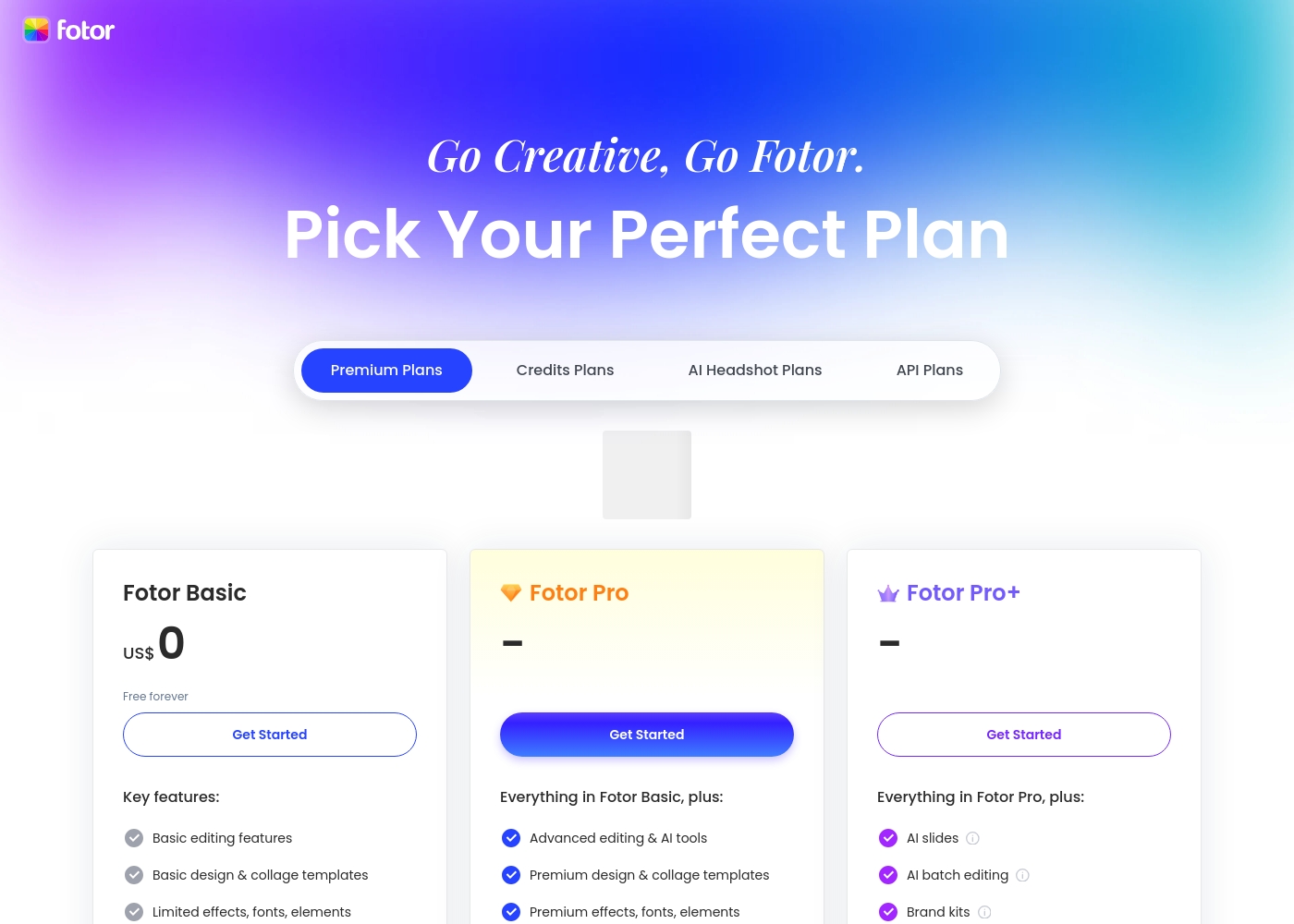
Fotor offers a variety of plans designed for different levels of usage. You should pick the tier that best matches your design volume and required AI tools. Take a look at the features included in each tier below.
Fotor Basic
Price: US$ 0 (Free forever) Best For: Casual users or beginners Other Features: Basic editing, 1000+ templates, Normal JPG & PNG downloads, Limited free Fotor credits, 512 MB cloud storage.
The Basic plan is a fantastic starting point for anyone. It's free forever, letting you handle fundamental photo adjustments and design layouts. However, be aware that features like image resizing, AI tools, and watermarking removal require an upgrade. It’s perfect if you just need light editing capacity.
- Basic editing features
- Basic design & collage templates (1000+)
- Limited effects, fonts, elements
- Normal JPG & PNG download file format
- Limited free Fotor credits
- Advanced editing & AI tools
- Watermark-free, Ad-free
- HD JPG & PNG downloads
- Premium design & collage templates (100,000+)
- Full access elements, fonts, backgrounds
- Everything in Fotor Pro
- AI Slides, AI Write, AI Image/Video Generation, AI Video Editing tools
- AI face & portrait tools
- Batch background remover, Batch AI upscaler
- 300 credits/month and eligible to buy retail credits
Pricing Notes
- Adobe Photoshop requires an annual commitment paid monthly, which has led to widespread user criticism regarding high cancellation fees.
- Fotor operates on a competitive freemium model, providing a robust $0 Basic plan to start editing immediately.
- Adobe Photoshop offers specialized volume licenses for business and educational institutions with non-public pricing.
- Fotor's premium tiers depend heavily on a restrictive generative credit system for advanced AI features.
- While Fotor has no traditional free trial for Pro tiers, the free Basic plan tests fundamental editing tools.
- Adobe Photoshop offers a free trial to evaluate the immense functionalities before a long-term commitment.
Pricing Head-to-Head
User Reviews
External feedback overwhelmingly targets the corporate policies of the provider rather than the core software's performance. While many users acknowledge that the core programs (like Photoshop) are powerful and effective tools, frustration centers almost entirely on the subscription model and inadequate customer service.
Pricing is frequently branded as excessive, misleading, and confusing, especially concerning the annual contract paid monthly structure. The primary complaint, mentioned repeatedly, is the cancellation process, which many users describe as a scam due to substantial “early termination fees” or the inability to cancel online 🤔.
The software is genuinely great, but the company's approach is terrifying. After my free trial, I switched to monthly payments, but canceling meant I had to pay a massive early termination fee. This pricing policy feels predatory.
Fotor’s user reception is sharply divided, but praise for the application’s functionality is strong. Users consistently highlight the platform's exceptional ease of use, finding it quick for editing photos and generating AI images and videos.
Many appreciate the comprehensive variety of powerful AI features, noting the solid quality of results. The tool is often described as perfect for beginners, quick edits, and social media posting, providing excellent value for money.
The site is incredibly fast and truly easy to use. It has so many features which could seem daunting, but it doesn't take long to master the basics. You can do so many things with photo editing and AI video creations with just one site!
Our Verdict
This comparison truly comes down to intent: are you a professional or a prolific creator? If your reputation hinges on pixel-perfect, detailed work, Adobe Photoshop is non-negotiable. Its complexity is the price you pay for industry-leading power and sophisticated results. Adobe Photoshop offers unparalleled control for complex selection and detailed color adjustment. Adobe Photoshop is the undisputed king of sophisticated, pixel-level manipulation and advanced visual effects. It provides smart workflow suggestions and unique tools that dramatically accelerate professional processes. You need Adobe Photoshop for complex, non-destructive editing requiring meticulous precision. Conversely, Fotor excels in user-friendliness and rapid, AI-powered content creation for everyone else. Fotor lets you remove objects and generate flawless product backdrops incredibly fast. It is fantastic for high-volume tasks like batch processing up to 50 images simultaneously. The deciding factor might be budget and commitment; Adobe Photoshop requires a high-cost annual contract that users often feel is misleading. Fotor offers a robust free tier and superior mobile flexibility, minimizing risk. The pricing reflects the difference between a lifelong career tool and a modern utility. Final verdict: Choose Adobe Photoshop if your career demands the highest professional standards and depth. Pick Fotor if you need affordable, quick AI editing for maximizing content output across social media or e-commerce.
Frequently Asked Questions
Which tool is easier to learn for a beginner: Adobe Photoshop or Fotor?
Fotor is significantly easier to learn and designed for quick results right away. It uses a straightforward 'Upload, Edit, Download' approach for enhancing photos. Adobe Photoshop requires substantial time and practice to master its complex layers and professional tools.
Can I use Fotor for professional, high-end graphic design projects?
Fotor is excellent for quick content creation, touching up photos, and generating assets fast. However, it lacks the deep, granular control necessary for high-end professional graphic design. Adobe Photoshop is the necessary tool for traditional design careers.
Does Adobe Photoshop offer a free plan similar to Fotor’s Basic tier?
No, Adobe Photoshop does not offer a free editing plan; it is subscription-based. Adobe Photoshop provides a free trial to test out the full software functionality before committing. Fotor offers a robust free Basic plan for indefinite casual use.
How do the generative AI features compare between Adobe Photoshop and Fotor?
Fotor's AI is more readily available and specialized for creation, offering clear monthly credit quotas up to 300. Adobe Photoshop integrates AI primarily to speed up existing complex editing tasks. Fotor wins for sheer volume of new AI content generation.
Which software is better for quick e-commerce product photos?
Fotor is superior for e-commerce because of its quick batch processing and AI background tools. It lets you generate professional backdrops instantly across many images. Adobe Photoshop requires more manual work for consistency across product shots.
Why are the user sentiment reviews for Adobe Photoshop relatively low?
External review data indicates Adobe Photoshop users widely criticize the company's subscription model and billing practices. Complaints center on the confusing annual commitment and difficult cancellation processes. Fotor receives higher praise for its features and usability.
Ready to Choose?
Both tools have their strengths. Choose based on your specific needs.