Adobe InDesign vs Fotor
Adobe InDesign and Fotor feel like different design worlds, and that sparks big decisions.
Best for: Professional designers needing complex, multi-page layouts, Teams already invested in Adobe tools and Creative Cloud
Best for: Freelancers or small teams seeking fast image edits, High-volume product photo teams needing batch processing
Industry Standard, Administrative Headaches
We find Adobe InDesign to be an unmatched, industry-standard tool for professional layout and efficient design work. However, we must caution potential subscribers about the complex and often punitive subscription practices, including aggressive cancellation fees and misleading contract terms. Overall, the software is exceptional for productivity, but the purchasing ecosystem requires significant oversight and is widely criticized.
Pros
- Industry standard for complex professional layout design.
- Built specifically to maximize productivity and efficiency.
- Seamless integration within the Adobe Creative Cloud ecosystem.
- Allows designers to move past routine, tedious tasks.
Cons
- Subscription terms are often unclear, leading to unexpected annual commitments.
- Punitive early cancellation fees are widely reported by users.
- Customer support is frequently described as unhelpful or difficult to access.
- Subscription costs may auto-renew at significantly increased prices.
Powerful AI tools, usability offsets billing friction.
We find Fotor offers robust AI tools for simplified photo and video creation, making high-end editing highly accessible for beginners. However, the paid experience is frequently marred by ambiguous payment policies and pressure from the restrictive credit system. Overall, Fotor is a powerful editor best suited for high-volume hobbyists who tolerate navigating the premium paywalls.
Pros
- Excellent user-friendliness and easy learning curve for all users.
- Robust AI generator for images and videos with high-quality results.
- Effective tools for quick edits, object removal, and background replacement.
- Includes specialized high-end features like AI Slides and batch editing (Pro+).
Cons
- Frequent user complaints about unexpected billing and unclear refund/cancellation policies.
- Restrictive credit and points system bothers many users who want unlimited use.
- Some reviewers find the platform less ideal for complex professional work.
- Suspected use of incentives to gain positive reviews via a credit system.
AboutAdobe InDesign
Adobe InDesign is the essential layout tool designed for professionals who prioritize efficiency. This software is built specifically to help you reimagine productivity in every layout you create. You can quickly move past routine, tedious tasks and dedicate more time to actual design work. InDesign operates seamlessly as a critical component of the trusted Adobe Creative Cloud ecosystem. 💡
AboutFotor
Fotor is a user-friendly online photo editor designed for everyone. It works well for both amateurs and more seasoned professionals. Unlike complex traditional software, Fotor provides powerful editing features within a highly intuitive interface. You can easily edit your photos online in just three simple steps: Upload, Edit, and Download.
It’s also incredibly flexible. You can use Fotor on Windows, Mac, iOS, and Android devices. This availability means you can enhance your pictures anytime, anywhere, all managed with a single account. 💡
Highlights
Feature Comparison
Features Overview
We highlight the main differences and pick a winner for each feature.
User Interface
InDesign offers a dense, professional UI; Fotor stays clean and approachable.
Paragraph 1: Adobe InDesign offers extensive panels, styles, and typography controls. Paragraph 2: It’s built for precise, multi-page layouts. Paragraph 3: Fotor delivers a simple, intuitive UI with guided edits. Paragraph 4: You can complete edits in a couple of clicks.
Collaboration & Sharing
InDesign integrates with Behance and Creative Cloud Libraries; Fotor focuses on speed.
Paragraph 1: Adobe InDesign enables asset libraries and sharing through Creative Cloud. Paragraph 2: It supports Behance for showcasing work and team collaboration. Paragraph 3: Fotor emphasizes quick edits and batch processing over deep collaboration. Paragraph 4: Real-world impact: teams lean on InDesign for multi-user workflows, while Fotor suits fast social content.
Batch Processing
Fotor shines with batch edits; InDesign lacks batch tooling in core plans.
Paragraph 1: Adobe InDesign targets complex layouts, not bulk image tasks. Paragraph 2: Fotor Pro+ supports batch editing up to 50 images. Paragraph 3: The difference is speed versus depth. Paragraph 4: For agencies handling many images, Fotor speeds up production considerably.
Cross-Platform Experience
Fotor excels across devices; InDesign remains desktop-focused.
Paragraph 1: Fotor works on Windows, Mac, iOS, and Android. Paragraph 2: InDesign runs on desktop platforms within Creative Cloud. Paragraph 3: The trade-off is mobility versus the depth of layout control. Paragraph 4: If you work across devices, Fotor reduces friction.
AI Capabilities
Adobe InDesign offers vast AI credits with Pro; Fotor provides accessible AI features.
Paragraph 1: InDesign Creative Cloud Pro includes 4000 monthly AI credits. Paragraph 2: InDesign base offers 25 monthly generative credits. Paragraph 3: Fotor Pro gives 100 AI credits, Pro+ up to 300 credits. Paragraph 4: Trade-off is depth of tools versus ease of use in practice.
Pricing Transparency
Adobe lists two clear paths; Fotor pricing details are fuzzier.
Paragraph 1: InDesign base is US$22.99/month; Pro is US$69.99. Paragraph 2: Fotor Basic is free; Pro and Pro+ costs aren’t fully disclosed. Paragraph 3: Credits and storage vary by tier in both. Paragraph 4: Plan terms require careful review before purchasing.
Storage & Asset Management
Both offer cloud storage; InDesign ties to Creative Cloud; Fotor adds brand kits.
Paragraph 1: Adobe InDesign includes 100GB cloud storage with plans. Paragraph 2: Fotor Pro provides 2GB, Pro+ offers 100GB. Paragraph 3: Creative Cloud Libraries offer asset management for InDesign. Paragraph 4: Brand kits and batch tools add value for Fotor Pro+.
API & Extensibility
InDesign relies on the broader Creative Cloud; Fotor offers API plans with limited details.
Paragraph 1: InDesign benefits from deep Creative Cloud integrations. Paragraph 2: Fotor advertises API Plans without full public documentation. Paragraph 3: The main difference is ecosystem depth. Paragraph 4: Teams needing custom workflows may prefer InDesign.
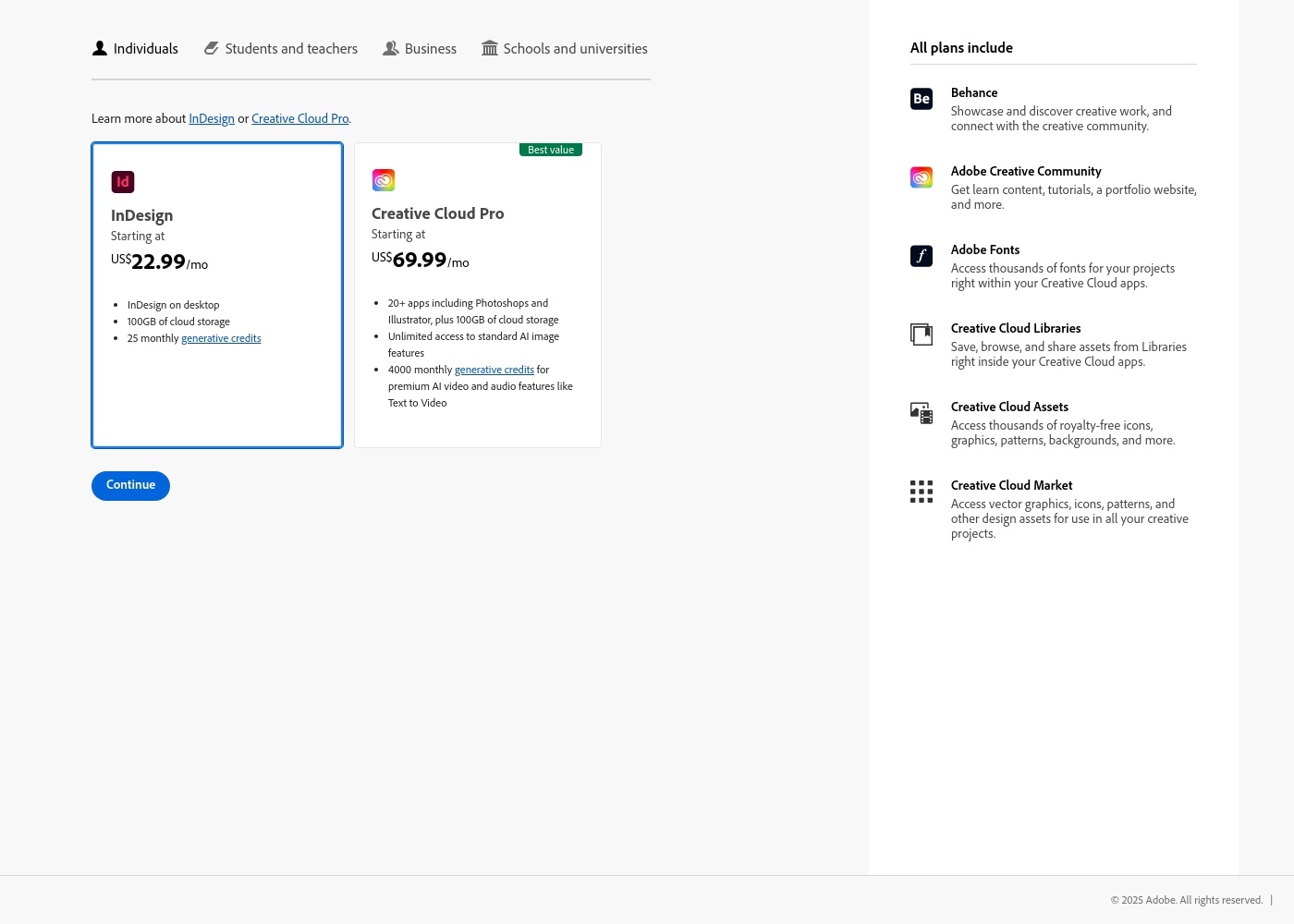
Adobe InDesign costs between US$22.99/mo and US$69.99/mo with 2 plans available for individuals: InDesign at US$22.99/mo and Creative Cloud Pro at US$69.99/mo.
Adobe provides flexible subscription options tailored for individual users. Here are the details for the core plans offered:
InDesign
Price: US$22.99/mo Other Features:
- InDesign on desktop
- 100GB of cloud storage
- 25 monthly generative credits
- InDesign on desktop
- 100GB of cloud storage
- 25 monthly generative credits
- Behance and Creative Community access
- Adobe Fonts and Creative Cloud Assets access
- 20+ apps including Photoshop and Illustrator
- 100GB of cloud storage
- Unlimited access to standard AI image features
- 4000 monthly generative credits for premium AI video/audio features
- Behance and Creative Community access
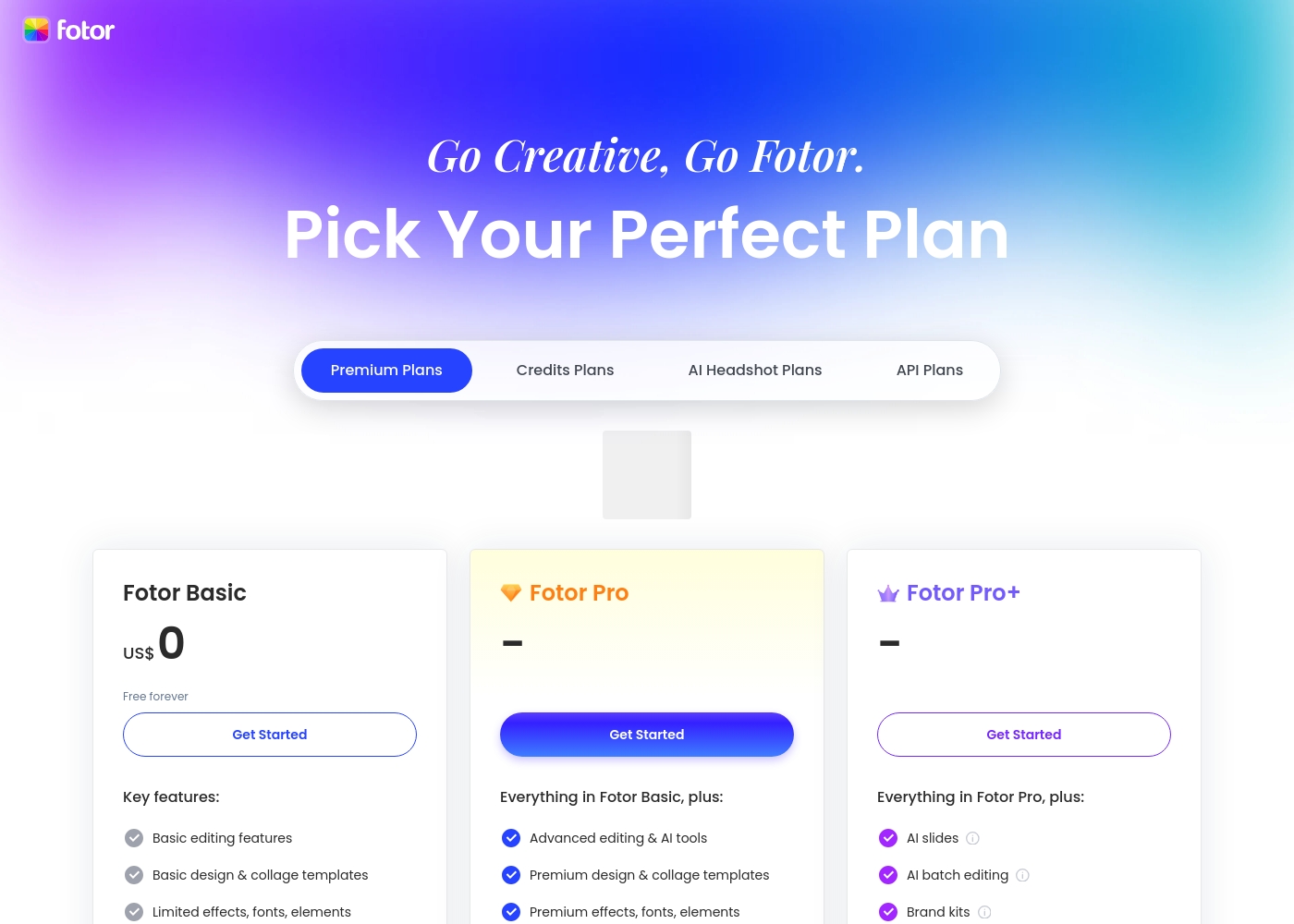
Fotor offers a variety of plans designed for different levels of usage. You should pick the tier that best matches your design volume and required AI tools. Take a look at the features included in each tier below.
Fotor Basic
Price: US$ 0 (Free forever) Best For: Casual users or beginners Other Features: Basic editing, 1000+ templates, Normal JPG & PNG downloads, Limited free Fotor credits, 512 MB cloud storage.
The Basic plan is a fantastic starting point for anyone. It's free forever, letting you handle fundamental photo adjustments and design layouts. However, be aware that features like image resizing, AI tools, and watermarking removal require an upgrade. It’s perfect if you just need light editing capacity.
- Basic editing features
- Basic design & collage templates (1000+)
- Limited effects, fonts, elements
- Normal JPG & PNG download file format
- Limited free Fotor credits
- Advanced editing & AI tools
- Watermark-free, Ad-free
- HD JPG & PNG downloads
- Premium design & collage templates (100,000+)
- Full access elements, fonts, backgrounds
- Everything in Fotor Pro
- AI Slides, AI Write, AI Image/Video Generation, AI Video Editing tools
- AI face & portrait tools
- Batch background remover, Batch AI upscaler
- 300 credits/month and eligible to buy retail credits
Pricing Notes
- Adobe InDesign base includes 100GB cloud storage and 25 monthly generative credits.
- Creative Cloud Pro includes 100GB storage, 4000 monthly AI credits, and 20+ apps.
- Fotor Basic is free forever; Pro and Pro+ unlock AI credits and storage (2GB/100GB).
- Adobe InDesign cancellation policies and annual commitments are frequently cited in user reviews.
- Fotor pricing details for Pro and Pro+ are not fully disclosed; terms require careful review.
Pricing Head-to-Head
User Reviews
Users universally acknowledge Adobe's software quality, but the administrative experience generates massive friction. Reviewers on Trustpilot frequently describe the rigid subscription model as a trap or 'scam.' These grievances stem from immense difficulty and substantial fees for early cancellation.
Many users cite being locked into annual contracts when they expected monthly payment options. Reliability concerns are also common; software sometimes crashes or malfunctions, requiring lengthy workarounds.
I signed up for what I thought was a simple monthly payment plan, but it was actually an underlying yearly contract. They tried to charge me an immense termination fee just for attempting to cancel early. This aggressive policy damages client loyalty immensely.
Fotor’s user reception is sharply divided, but praise for the application’s functionality is strong. Users consistently highlight the platform's exceptional ease of use, finding it quick for editing photos and generating AI images and videos.
Many appreciate the comprehensive variety of powerful AI features, noting the solid quality of results. The tool is often described as perfect for beginners, quick edits, and social media posting, providing excellent value for money.
The site is incredibly fast and truly easy to use. It has so many features which could seem daunting, but it doesn't take long to master the basics. You can do so many things with photo editing and AI video creations with just one site!
Our Verdict
Bottom line: it’s a tie for many teams, but with clear trade-offs. Adobe InDesign shines in complex layouts and deep Creative Cloud integration, making it ideal for publishers and multi-project studios. Fotor wins on speed, ease of use, and cross-device editing, perfect for social content and quick campaigns. The deciding factor is your workflow: if you live in layouts, pick InDesign; if you live in edits, pick Fotor. For most people, start with Fotor Basic and test AI features, then upgrade if you need professional publishing fidelity.
Frequently Asked Questions
Which is better for small teams: Adobe InDesign or Fotor?
For small teams prioritizing publishing depth, InDesign with Creative Cloud Pro is strong. If you want quick edits and easy collaboration across devices, Fotor fits better. Start with Fotor Basic to test the waters.
Does Adobe InDesign have AI features like Fotor?
Adobe InDesign offers generative AI credits: 25 monthly on the InDesign plan, 4000 on Creative Cloud Pro. Fotor Pro includes 100 AI credits, Pro+ 300. So InDesign offers larger credits in its top tier; Fotor is more accessible day-to-day.
Is Fotor worth the extra cost over Adobe InDesign?
Fotor has a free Basic plan, and Pro/Pro+ unlock more AI and storage. InDesign pricing shows two clear paths: US$22.99 or US$69.99 per month. Consider your need for rapid edits versus complex layout control.
Can I migrate from Adobe InDesign to Fotor easily?
Migration specifics aren’t detailed. InDesign and Fotor target different workflows: layout precision versus fast image edits. Plan a gradual transition if moving projects between them.
What is Fotor's refund policy?
Fotor’s refund details aren’t clearly stated. External feedback highlights unclear cancellation terms. Review terms carefully before upgrading to a paid plan.
Does Adobe InDesign integrate with other tools?
Yes, InDesign integrates tightly with the Adobe Creative Cloud ecosystem. You’ll access fonts, libraries, and assets across tools like Photoshop and Illustrator.
Ready to Choose?
Both tools have their strengths. Choose based on your specific needs.