Adobe InDesign vs Adobe Photoshop
These Adobe giants serve completely different creative tasks, so you must choose carefully. Adobe InDesign is the master of multi-page layout and publishing efficiency. Adobe Photoshop reigns supreme for precise single-image editing and visual manipulation speed. The key decision is whether your job is arrangement or pixel manipulation.
Best for: Magazine and newspaper publishers, Professional book and eBook designers
Best for: Professional photographers requiring advanced retouching, Digital artists and illustrators focused on pixel editing
Industry Standard, Administrative Headaches
We find Adobe InDesign to be an unmatched, industry-standard tool for professional layout and efficient design work. However, we must caution potential subscribers about the complex and often punitive subscription practices, including aggressive cancellation fees and misleading contract terms. Overall, the software is exceptional for productivity, but the purchasing ecosystem requires significant oversight and is widely criticized.
Pros
- Industry standard for complex professional layout design.
- Built specifically to maximize productivity and efficiency.
- Seamless integration within the Adobe Creative Cloud ecosystem.
- Allows designers to move past routine, tedious tasks.
Cons
- Subscription terms are often unclear, leading to unexpected annual commitments.
- Punitive early cancellation fees are widely reported by users.
- Customer support is frequently described as unhelpful or difficult to access.
- Subscription costs may auto-renew at significantly increased prices.
Master software, deceptive pricing
We find Adobe Photoshop offers industry-leading intuitive tools for fast, precise image editing, which dramatically improves professional workflows. However, we cannot ignore the widespread user complaints regarding the costly, confusing annual subscription model and the aggressive cancellation fees. Overall, the powerful features are currently overshadowed by surrounding corporate policies and poor customer support.
Pros
- Industry-leading, powerful features for professional image editing.
- Intuitive tools speed up complex selection and color adjustments.
- Smart workflow suggestions help handle complicated projects faster.
- Special comprehensive plans available for students and educators.
Cons
- The subscription model is widely criticized as misleading (annual contract paid monthly).
- Substantial cancellation fees are enforced for early termination.
- Customer and technical support are widely described as non-existent or unhelpful.
- Reports of sudden product crashes across multiple devices.
AboutAdobe InDesign
Adobe InDesign is the essential layout tool designed for professionals who prioritize efficiency. This software is built specifically to help you reimagine productivity in every layout you create. You can quickly move past routine, tedious tasks and dedicate more time to actual design work. InDesign operates seamlessly as a critical component of the trusted Adobe Creative Cloud ecosystem. 💡
AboutAdobe Photoshop
Photoshop is the essential tool for professional image editing. It offers new, intuitive tools designed specifically to speed up your process. You can browse plans easily, whether you are an individual, a business, or looking for options tailored for students and teachers. You can even try Photoshop out with a generous free trial. It’s built to help you explore every feature of digital creation. 💡
Highlights
Feature Comparison
Features Overview
We highlight the main differences and pick a winner for each feature.
Core Purpose
Adobe InDesign handles multi-page arrangement; Adobe Photoshop handles single-image manipulation.
Adobe InDesign is the essential layout tool for desktop publishing professionals. It efficiently manages typography, page flow, and complex multi-page files like reports. It helps designers move past routine, tedious layout tasks quickly. Adobe Photoshop is built for pixel-level mastery and professional image editing. It offers intuitive tools to create faster, focusing on photo retouching and accurate visual effects. The core difference is scale: you use Adobe InDesign for brochures and books, and Adobe Photoshop for optimizing the embedded photos. If your final output is a physical or virtual document with structure, Adobe InDesign is the tool you need.
Editing & Selection Speed
Adobe Photoshop provides quicker image selection; Adobe InDesign speeds up document flow.
Adobe InDesign supercharges existing layout workflows by maximizing professional efficiency. It focuses on processes that accelerate final layout delivery. This structure is built for speed over dozens of pages. Adobe Photoshop drives speed through highly intuitive new image editing tools. It helps users make precise selections with just a single click of the mouse. Adobe Photoshop also provides instant, hands-on color adjustments using clear, on-canvas controls. Adobe InDesign offers advanced template and style management for layout consistency. Adobe Photoshop makes manipulating an image faster; Adobe InDesign makes arranging polished assets faster.
Generative AI Access
Adobe Photoshop offers far more accessible AI image features through Creative Cloud plans.
The dedicated Adobe InDesign subscription includes minimal generative AI assistance: just 25 monthly credits. This limits complex AI experimentation significantly. Creative Cloud Pro plans, which include Adobe Photoshop, typically offer unlimited access to standard AI image features. These plans also include generous 4000 monthly premium credits. For heavy experimentation, Adobe Photoshop's ecosystem offers much less restricted generative capabilities. The focus is simply on speed and volume for AI image creation. If AI image generation is a critical part of your workflow, purchasing a bundle including Adobe Photoshop is a better value proposition.
Handling Complexity
Adobe InDesign masters complex pages; Adobe Photoshop masters complex visual data.
Adobe InDesign is purpose-built to handle complex multi-page designs and large publications without friction. It helps maximize professional potential in layout management. Adobe Photoshop specializes in complicated projects, offering smart workflow suggestions to manage heavy editing sessions more efficiently. It makes difficult retouching seamless. Choose Adobe InDesign if your complexity comes from typography, layout structure, and document flow. Choose Adobe Photoshop if your complexity involves masks and layered pixel manipulation. Both tools are industry leaders, ensuring high professional standards when handling their respective complex tasks.
Integration & Ecosystem
Both apps integrate seamlessly, but Adobe Photoshop has connectivity to consumer tools like Express.
Adobe InDesign operates smoothly as a critical component of the Creative Cloud ecosystem. This seamless link allows easy asset access via Creative Cloud Libraries. Adobe Photoshop also offers seamless editing, including connectivity to simplified platforms like Adobe Express. This is useful for rapid social media asset deployment. The tight integration means images perfected in Adobe Photoshop flow instantly into layouts created in Adobe InDesign. Transferring files and assets between Adobe InDesign and Adobe Photoshop is a frictionless process supported by Creative Cloud.
Subscription Policy
Both Adobe InDesign and Adobe Photoshop share the same widely criticized administrative headache.
User reviews for Adobe InDesign cite misleading contract terms and immense difficulty canceling subscriptions. Reports mention unexpected annual commitments. Similarly, Adobe Photoshop users report high punitive early termination fees and automatic renewals at increased costs. Customer support is often described as non-existent. This massive friction with pricing and billing is the primary source of user resentment for Adobe products. We strongly advise reviewing all contract terms meticulously before subscribing to either Adobe InDesign or Adobe Photoshop.
Adobe InDesign costs between US$22.99/mo and US$69.99/mo with 2 plans available for individuals: InDesign at US$22.99/mo and Creative Cloud Pro at US$69.99/mo.
Adobe provides flexible subscription options tailored for individual users. Here are the details for the core plans offered:
InDesign
Price: US$22.99/mo Other Features:
- InDesign on desktop
- 100GB of cloud storage
- 25 monthly generative credits
- InDesign on desktop
- 100GB of cloud storage
- 25 monthly generative credits
- Behance and Creative Community access
- Adobe Fonts and Creative Cloud Assets access
- 20+ apps including Photoshop and Illustrator
- 100GB of cloud storage
- Unlimited access to standard AI image features
- 4000 monthly generative credits for premium AI video/audio features
- Behance and Creative Community access
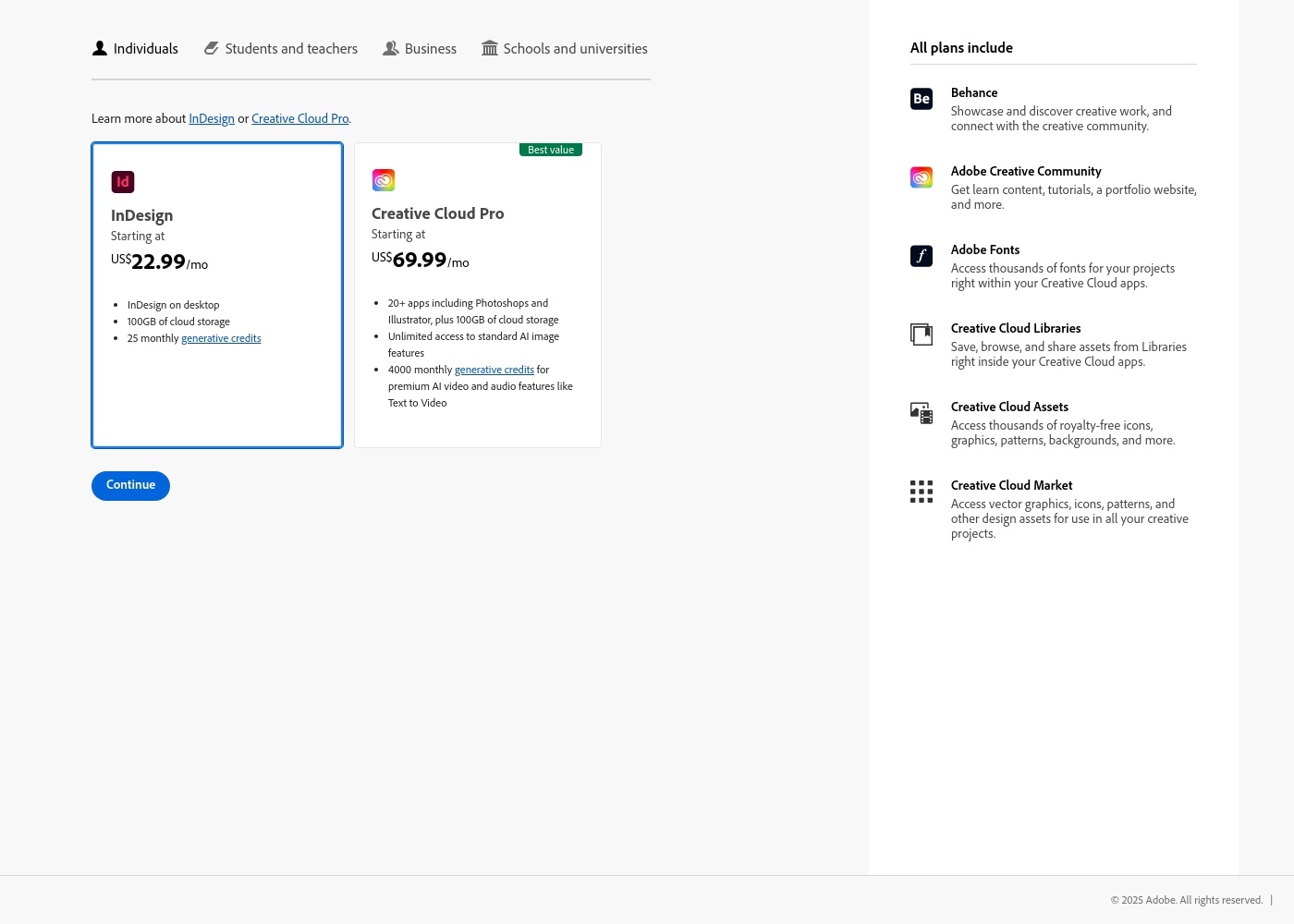
Since pricing is dynamic based on location and user type, details are often customized. Here's a breakdown of the subscription options available.
Individuals
Best For: Individual professionals, hobbyists, and freelancers Other Features:
- Create faster with new intuitive image editing tools
- Make precise selections easily
- Instantly adjust color with on-canvas controls
- Smart workflow suggestions
This plan is perfect if you need the full power of Photoshop just for yourself. It gives you the latest features and updates, ensuring you always have cutting-edge tools for your creative work. You get all the essential features needed for professional image editing.
- Create faster with new intuitive image editing tools
- Make precise selections in a click
- Instantly adjust color with on-canvas controls
- Perform complex edits more quickly with smart workflow suggestions
- Full version of Photoshop, Illustrator, Premiere Pro, and more
- Own portfolio website
- Apps to create and share photos, videos, and graphics anywhere
- Helpful tutorials for every skill level
- Generative credits for premium creative AI features

Pricing Notes
- A standalone plan for Adobe InDesign is clearly priced at $22.99/mo, while numerical pricing for Adobe Photoshop is obscured.
- Both Adobe InDesign and Adobe Photoshop subscriptions are widely reported by users as annual commitments paid monthly, leading to significant termination fees.
- The Creative Cloud Pro plan (starting at $69.99/mo) includes both Adobe InDesign and Adobe Photoshop, offering maximum feature value.
- User reviews heavily criticize the lack of transparency and high cost of cancellation for subscribing to either Adobe InDesign or Adobe Photoshop.
- Adobe Photoshop offers specific, value-added bundles for Students and Teachers with comprehensive Creative Cloud access.
Pricing Head-to-Head
User Reviews
Users universally acknowledge Adobe's software quality, but the administrative experience generates massive friction. Reviewers on Trustpilot frequently describe the rigid subscription model as a trap or 'scam.' These grievances stem from immense difficulty and substantial fees for early cancellation.
Many users cite being locked into annual contracts when they expected monthly payment options. Reliability concerns are also common; software sometimes crashes or malfunctions, requiring lengthy workarounds.
I signed up for what I thought was a simple monthly payment plan, but it was actually an underlying yearly contract. They tried to charge me an immense termination fee just for attempting to cancel early. This aggressive policy damages client loyalty immensely.
External feedback overwhelmingly targets the corporate policies of the provider rather than the core software's performance. While many users acknowledge that the core programs (like Photoshop) are powerful and effective tools, frustration centers almost entirely on the subscription model and inadequate customer service.
Pricing is frequently branded as excessive, misleading, and confusing, especially concerning the annual contract paid monthly structure. The primary complaint, mentioned repeatedly, is the cancellation process, which many users describe as a scam due to substantial “early termination fees” or the inability to cancel online 🤔.
The software is genuinely great, but the company's approach is terrifying. After my free trial, I switched to monthly payments, but canceling meant I had to pay a massive early termination fee. This pricing policy feels predatory.
Our Verdict
Choosing between Adobe InDesign and Adobe Photoshop isn't about which one is better; it's about defining your job. They are foundational tools built for completely different purposes. Are you arranging assets for publication, or are you manipulating the assets themselves? That is the deciding factor. Adobe InDesign is the essential layout tool for maximum publishing efficiency. It lets you move beyond tedious mechanical work to focus entirely on design and structure. If your deliverable is a multi-page document—like a complex annual report or a magazine—Adobe InDesign is non-negotiable. Adobe Photoshop is the undisputed professional champion for single-image manipulation and speed editing. It offers intuitive tools for precise selection and instant color correction on raster images. Use Adobe Photoshop for photo retouching, visual effects, and streamlining complicated editing processes. The real choice comes down to scale and output. Use Adobe InDesign if your complexity comes from page count, structure, and text flow management. Pick Adobe Photoshop if your complexity is focused on pixel-level detail and visual fidelity. Ultimately, if you need both powerful editing and structure, investing in the Creative Cloud plan that includes both Adobe InDesign and Adobe Photoshop is the best value. Otherwise, choose Adobe InDesign for layouts and Adobe Photoshop for photos.
Frequently Asked Questions
Which tool is better for complex design tasks, Adobe InDesign or Adobe Photoshop?
That depends entirely on the design type. Adobe InDesign is built specifically for complex layout designs and multi-page publishing. Adobe Photoshop handles complexity in detailed, pixel-level photo manipulation and retouching tasks. Neither tool substitutes for the other's specialty.
Can Adobe InDesign perform the same photo editing tasks as Adobe Photoshop?
No. Adobe Photoshop is the essential tool for professional image editing, focusing on pixel manipulation. Adobe InDesign provides basic image placement but is dedicated to high-efficiency layout and arrangement. You need Adobe Photoshop for specialized retouching.
Which software is the industry standard for professional print production and final layout?
Adobe InDesign is universally recognized as the industry standard for professional layout design and pre-press finalization. It ensures exceptional, compelling layouts without production friction. Use Adobe Photoshop only to prepare component images for placement.
Do both Adobe InDesign and Adobe Photoshop have complex or punitive subscription contracts?
Yes, external user reviews heavily criticize the administrative experience for both products. Users report difficulty with cancellations and mandatory annual commitments paid monthly for both Adobe InDesign and Adobe Photoshop. Review all contract terms carefully.
Which tool offers more powerful generative AI capabilities for image creation?
Adobe Photoshop is superior if you need heavy AI imaging assistance. Its corresponding Creative Cloud Pro plan offers unlimited access to standard AI image features. The standalone Adobe InDesign plan only includes a limited 25 monthly generative credits.
Can I use assets created in Adobe Photoshop directly in Adobe InDesign?
Yes, both tools operate seamlessly within the Adobe Creative Cloud ecosystem. Images perfected and saved in Adobe Photoshop are easily accessed and placed into layouts created in Adobe InDesign. This integration eliminates transfer friction.
Ready to Choose?
Both tools have their strengths. Choose based on your specific needs.