AdGuard vs NextDNS
AdGuard and NextDNS are both powerful privacy and ad blocking tools. They protect your data, but use wildly different methods. AdGuard installs robust software on every device you own. NextDNS secures your whole network remotely from the cloud.
Best for: Users who want a one-time purchase Lifetime license, Individuals needing deep application-level ad filtering on devices
Best for: Large families needing unlimited device coverage on a budget, Users looking for a high-performance, cloud-based security filter
Definitive system-wide ad and privacy protection.
We found AdGuard provides robust, system-wide protection across all major operating systems, moving far beyond typical browser extensions to enhance both speed and digital privacy. Its strong blocking reliability, coupled with notably fast and professional customer support, positions it well in the market. Overall, this is a premium utility perfect for users demanding comprehensive control and a clean online experience.
Pros
- Highly effective, system-wide ad and tracker blocking across all devices.
- Available as a one-time perpetual license, avoiding recurring fees.
- Customer support is notably fast, helpful, and highly professional.
- Excellent performance optimization with minimal resource usage.
Cons
- System-level permissions required may raise user security concerns.
- Setup can occasionally require advanced steps (e.g., configuring firewalls or working with beta versions).
- License transfer or restoration can be difficult if account details are lost.
Exceptional Filtering, Unreliable Customer Service.
NextDNS provides an incredibly powerful and low-latency cloud DNS filtering solution that excels at blocking malware, ads, and trackers across all devices. We found the feature set comprehensive and the pricing highly accessible, especially the robust free tier. Overall, the service is top-tier operationally, but we observed chronic user reports of unresponsive customer support and unresolved billing issues.
Pros
- Excellent filtering against malware, trackers, and in-app advertisements.
- Extremely fast global server network with ultra-low query latency.
- Highly configurable with deep statistics and customizable data residency (logging).
- Very generous free plan and a low-cost Pro tier for unlimited personal use.
Cons
- Repeated user reports of non-existent or unresponsive customer support.
- Some users switching due to perceived stagnation in feature development.
- Occasional payment systems bugs leading to billing errors or wrong plan activation.
- Lacks some advanced features found in comparable competitors (e.g., sorting lists).
AboutAdGuard
AdGuard is a versatile utility designed to make the web cleaner and strongly protect your digital life. It goes far beyond a simple browser extension experience.
AdGuard offers full-fledged applications for major platforms, including Windows, Mac, Android, and iOS. This system-wide approach means it works everywhere, eliminating ads and trackers in standard browsers and various mobile apps.
It focuses on privacy first and actively guards against known dangerous or malicious sites. The company has protected over 160 million users since 2009.
AboutNextDNS
NextDNS functions as an advanced network layer filter, often described as a "Pi-hole in the cloud." Instead of requiring heavy software on every device, it secures your connection at the fundamental DNS level. This approach means security, parental controls, and ad-blocking start instantly, regardless of where you connect.
It features native support on major platforms and relies on modern, encrypted protocols like DNS-over-HTTPS and DNS-over-TLS. Crucially, all the processing occurs remotely, guaranteeing zero impact on your device's CPU, memory, or battery life. 💡
Highlights
Feature Comparison
Features Overview
We highlight the main differences and pick a winner for each feature.
Core Technology
AdGuard is an app that cleans content; NextDNS is a firewall that blocks domains.
AdGuard is a full software application installed on your device. It blocks ads system-wide in all apps and browsers. This deep control also removes the empty space left by blocked elements. NextDNS functions remotely as a cloud firewall. It secures your connection at the fundamental DNS level. Setup is quick and works instantly across your entire network. AdGuard offers deep localized content filtering and visual clean-up. NextDNS offers fast, uniform protection based on domain resolution. The choice here is between comprehensive system customization or network-wide simplicity.
Performance & Impact
NextDNS offers ultra-low latency; AdGuard uses minimal device resources locally.
AdGuard speeds up page loading by blocking ad elements early. It operates locally with consistently minimal resource usage. The application handles filtering on your machine. NextDNS uses a massive global network of 132 server locations. All complex processing happens remotely in the cloud. This architecture results in zero impact on your device's CPU or battery life. NextDNS provides superior speed from its edge network architecture. AdGuard trades zero impact for stronger visual content modification. If you use mobile devices extensively, NextDNS wins by providing protection without draining your battery.
Pricing & Value
AdGuard offers Lifetime deals; NextDNS provides a generous, affordable Free tier.
AdGuard offers highly desirable Lifetime licenses for a one-time fee. This option covers up to nine devices forever. AdGuard also has a 60-day money-back guarantee. NextDNS has an excellent, permanent Free plan (300k queries monthly). The Pro plan costs only $19.90 annually for unlimited personal use. NextDNS saves you 17% on annual billing. AdGuard is the clear winner for long-term savings via its Lifetime model. NextDNS is easily accessible with its permanent free usage tier. Users who hate recurring bills will find the AdGuard Lifetime option incredibly valuable.
Device Coverage
NextDNS offers unlimited devices; AdGuard is capped at nine per Family license.
AdGuard's Family license limits device coverage to nine machines. If you have many more devices, you must contact their sales team. This is sufficient for most homes. NextDNS Pro plan provides protection for unlimited devices. It covers all devices connected via your router or configuration. This makes NextDNS incredibly scalable for large users. AdGuard protects a limited number of devices deeply using dedicated software. NextDNS protects unlimited devices efficiently via network settings. NextDNS is better for technologically dense households or users aiming for full coverage everywhere.
Parental Controls
NextDNS offers advanced scheduling; AdGuard provides solid built-in content filtering.
AdGuard includes a comprehensive Parental Control feature in its installed application. Parents can easily block inappropriate material and unsafe sites. NextDNS provides time-based control called 'Recreational Time' scheduling. It can restrict apps like TikTok to specific daily hours. It also enforces SafeSearch across the network. NextDNS has superior, granular control over access times and mandatory safety settings. AdGuard's controls are effective but less detail-oriented than NextDNS's. Parents requiring strict time management will find NextDNS's scheduling feature a game changer.
Customer Support
AdGuard support is excellent and professional; NextDNS support is frequently unresponsive.
AdGuard provides 24/7 technical support via email. Users consistently praise their fast, highly professional responses. Support is a core strength for AdGuard. NextDNS Free and Pro users rely on community support channels. Dedicated email support is only available for Business and Education tiers. Trustpilot reviews frequently mention unanswered billing queries. AdGuard offers reliable, direct help when you need it most. NextDNS users might feel isolated when facing technical or payment problems. If guaranteed, quick support is a necessity, AdGuard is the safer choice.
Customization & Logging
NextDNS allows deep data residency choice; AdGuard focuses on application feature control.
AdGuard allows fine-tuning control over web requests and advanced DNS settings. You can customize element blocking using the Assistant feature. NextDNS offers real-time logs and customizable retention up to two years. Users can choose log storage location (US, EU, UK, Switzerland). It also supports DNS Rewrites. NextDNS provides unparalleled control over network visibility and data compliance requirements. AdGuard customization is centered around the device application. Power users interested in network forensics and total data control should choose NextDNS.
AdGuard offers two license types—Personal and Family—available as annual subscriptions or a one-time Lifetime purchase.
You can view the full comparison of purchasing options below.
Personal License (1 Year)
Best For: Individual users or very small households. Refund Policy: 60-day money-back guarantee Other Features:
- Protects up to 3 devices
- Billed annually
- Universal license (works on Windows, macOS, Android, and iOS)
- Automatic renewal enabled
- Protects up to 3 devices
- Universal license (Windows, macOS, Android, iOS)
- Billed annually
- Includes automatic renewals
- Protects up to 9 devices
- Universal license (Windows, macOS, Android, iOS)
- Billed annually; VAT may apply
- Option to upgrade from Personal license
- Protects up to 3 devices
- One-time payment
- Universal license
- No recurring fees
- Protects up to 9 devices
- One-time payment
- Universal license
- No auto-renewal if purchased with cryptocurrency
NextDNS costs between $0 and $199 per year with 4 plans: Free at $0/month, Pro at $19.90/year, Business at $199/year, and Education at $199/year.
Here is a breakdown of what each NextDNS plan offers.
Free
Price: $0 /month Best For: Users with low query volume or beginners Other Features:
- 300,000 queries per month
- Unlimited devices and configurations
- Access to all features
- Community support
- Unlimited devices
- Unlimited configurations
- Access to all features
- Community support
- Unlimited queries
- Unlimited devices
- Unlimited configurations
- Access to all features
- Community support
- Unlimited queries
- Unlimited devices
- Unlimited configurations
- Access to all features
- Email support
- Unlimited queries
- Unlimited devices
- Unlimited configurations
- Access to all features
- Email support
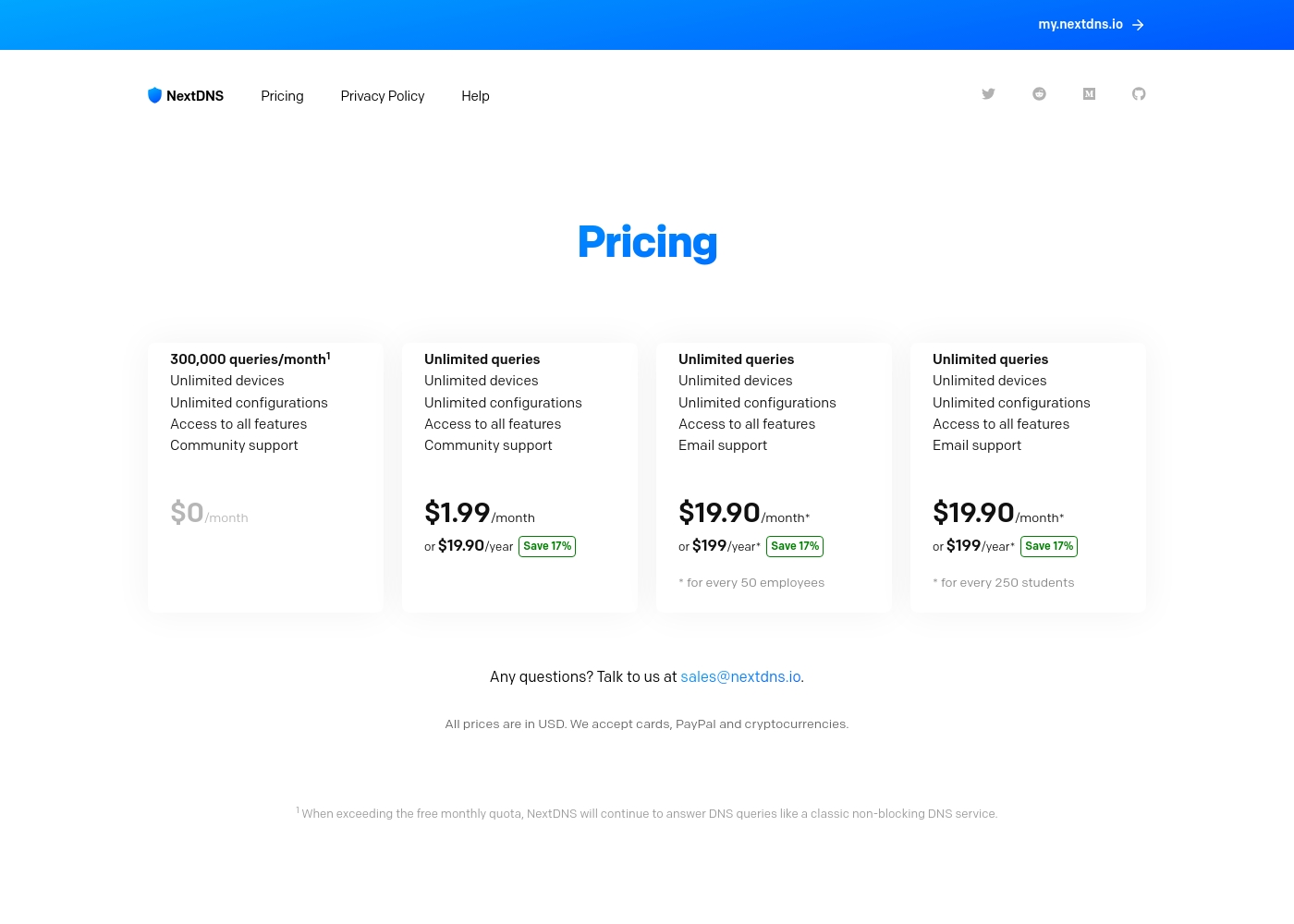
Pricing Notes
- AdGuard offers Lifetime licenses, which many users find to be excellent long-term value.
- AdGuard includes a generous 60-day money-back guarantee, reducing risk.
- NextDNS offers a permanent Free tier capped at 300,000 monthly queries.
- The NextDNS Pro plan is only $19.90 per year for unlimited individual use.
- NextDNS users save 17% overall if they choose annual billing for paid plans.
Pricing Head-to-Head
User Reviews
AdGuard receives excellent feedback across platforms, holding a strong 4.4 rating on Trustpilot. Users overwhelmingly praise the product's effectiveness and reliability, noting that it flawlessly blocks intrusive ads, including those from challenging sources like YouTube, and operates with minimal impact on computer resources.
The widespread availability of a perpetual (Lifetime) license is highly appreciated, offering excellent long-term value in an increasingly subscription-based market. Customer support is a significant highlight, frequently described as rapid, professional, and highly attentive; technicians are lauded for going the "extra mile" to provide detailed guidance and swift resolutions to complex issues like OS compatibility problems and payment errors.
I'm really glad that in a world where almost all services work on a subscription basis, there's AdGuard with a perpetual license. It is reliable and I don't have to worry about annoying ads. I use it with both Apple and Windows operating systems without any issues.
User feedback on NextDNS is strongly polarized, resulting in a Great 3.8 average rating from Trustpilot. Customers frequently praise the excellent performance, noting that the server network is fast, resulting in ultra-low latency and a “set up and forget” experience.
Many reviewers found the service highly effective at blocking ads (even in-app on Android) and appreciated the comprehensive filtering options, which easily replace self-hosted solutions like Pi-hole. The feature set is considered superior to many rivals, focusing on threat intelligence and deep privacy defense.
It's beautifully simple and works perfectly! This custom DNS service delivers privacy and ad-blocking in a professional, no-hassle way. The web interface is clean and setup instructions are very clear.
Our Verdict
If you’re deciding between AdGuard and NextDNS, your choice hinges on core protection philosophy. NextDNS is a cloud solution; AdGuard is premium software. AdGuard is an excellent piece of device software, blocking system-wide and even clearing up ad gaps. Its Lifetime license offers superb long-term value and eliminates recurring subscriptions. Crucially, AdGuard's customer support is widely heralded as fast and professional. NextDNS is a lightweight, ultrafast cloud-based DNS filter. It protects unlimited devices with zero impact on battery or CPU performance. Its Pro plan is incredibly cheap ($19.90/year), covering large households easily. NextDNS offers unparalleled network visibility and privacy logging control. The deciding factor is your preferred approach: deep local control versus fast, network-wide coverage. If support and clean pages are vital, pick AdGuard immediately. If performance and unlimited devices are key, pick NextDNS. Choose AdGuard for premium software features and the Lifetime pricing model. Choose NextDNS if you prioritize unlimited device coverage and zero CPU usage across your entire network.
Frequently Asked Questions
Which is better for securing a Smart Home or router network?
NextDNS is superior for router-level protection due to its cloud DNS architecture. It instantly covers every connected device seamlessly. AdGuard offers AdGuard Home, but NextDNS requires simpler DNS setup for whole home coverage.
Does AdGuard offer unlimited device coverage like NextDNS?
No, AdGuard limits coverage to nine devices on its Family Lifetime plan. NextDNS offers unlimited devices on its low-cost Pro plan ($19.90/year). NextDNS wins for scalable device counts.
Which service has the better customer support experience?
AdGuard consistently receives high marks for its fast and professional 24/7 email support. NextDNS users frequently report issues with unresponsive support teams. AdGuard is the clear winner for reliable help.
Can NextDNS effectively block ads inside mobile apps?
Yes, NextDNS blocks tracking domains used by mobile apps via DNS filtering. However, AdGuard, as a system-wide application, often achieves deeper content modification. AdGuard can also actively remove visual ad gaps.
Which tool offers the best value for long-term use?
AdGuard offers the best long-term value with its one-time Lifetime license purchase. You pay once and receive protection forever. NextDNS offers extremely low annual costs but requires subscription renewal.
Is NextDNS worth it if I only browse occasionally?
Absolutely. NextDNS offers a fantastic Free plan capped at 300,000 queries per month. This is more than enough for casual browsing. AdGuard provides free browser extensions, but its strongest features require payment.
Ready to Choose?
Both tools have their strengths. Choose based on your specific needs.