ActivePieces vs Netlify
ActivePieces and Netlify are both powerful, but they solve completely different problems. ActivePieces is an AI-first automation platform, while Netlify is a web development and deployment powerhouse. You're not really choosing between similar tools—you're deciding what job you need done.
Best for: Marketing and operations teams automating repetitive cross-app tasks, Technical startups building AI-first products and workflows
Best for: Frontend developers deploying JAMstack or static sites, Marketing teams launching and iterating on campaign landing pages
Powerful Automation, Complex Pricing
We find ActivePieces to be a technologically superior tool that rivals Zapier and Make, excelling in handling complex, AI-first workflows and offering excellent cost efficiency. Overall, while the core automation engine and feature set are industry-leading and SOC 2 Type II compliant, the platform's relationship with its community has been significantly strained by retroactive policy and pricing changes.
Pros
- AI-first automation featuring agents and 470 connectors.
- High flexibility with no-code canvas and powerful Code module for custom JS libraries.
- Considered cost-effective and cheaper than competitors like Zapier and n8n.
- Includes enterprise-ready features like flow versioning and auto retry for failures.
Cons
- Lack of transparency regarding sudden, substantial pricing structure changes.
- Early supporters felt betrayed by perceived changes to lifetime deals.
- Users were automatically downgraded from paid plans to trial plans without notification.
- Inconsistent customer support response for issues not reported on GitHub.
Streamlined, powerful deployment.
We find Netlify is a top-tier choice for modern web projects. It excels at taking you from code to a live site with incredible speed and simplicity. Overall, it's a robust, developer-friendly platform that delivers on its promise of unified, fast deployments, though its credit system requires mindful usage.
Pros
- Extremely fast deployments, often under 30 seconds.
- Generous free tier perfect for side projects and experiments.
- Unified workflow: deploy from Git, API, or even AI prompts.
- Built-in features like HTTPS, forms, and image optimization.
Cons
- Credit-based billing can be complex to predict and manage.
- Support access and response times vary significantly by plan.
- Advanced customization may require workarounds or higher-tier plans.
- Pausing all sites on an account if one project hits its limit.
AboutActivePieces
ActivePieces delivers the full ecosystem for AI automation and agents. It focuses on connecting smart agents, no-code flows, and a central data store called Tables. This impressive platform is trusted by companies ranging from startups all the way to Fortune 50 organizations. You can easily start using ActivePieces on the cloud, or choose to self-host with Docker for ultimate control. Whether you are building complex AI agents or setting up simple automations, the system makes it smart and easy. 💡
AboutNetlify
It's a modern web development platform for teams and solo creators. ✨ Whether you're building a marketing site, a fullstack app, or an internal tool, Netlify handles the infrastructure. You focus on creating, and it manages deployment, scaling, and security on a global network.
Highlights
Feature Comparison
Features Overview
We highlight the main differences and pick a winner for each feature.
Core Platform & Purpose
ActivePieces automates tasks across apps with AI. Netlify deploys and hosts web projects globally.
ActivePieces is an AI-first automation platform. You build workflows connecting over 470 apps. It includes data tables and human approval steps.\n\nNetlify is a web development platform. It handles building, deploying, and scaling websites and fullstack applications. It provides infrastructure like a global edge network.\n\nThe key difference is fundamental. ActivePieces runs your internal processes. Netlify delivers your digital products to users worldwide.
Automation & AI
ActivePieces is built for AI agents and workflow automation. Netlify uses AI for content generation and prototyping.
ActivePieces shines with AI-first automation. You can create agents that think and act across your systems. They use MCPs to give external AI tools superpowers.\n\nNetlify uses AI as a tool within its platform. Its AI Gateway connects to models like OpenAI. Agent Runners help generate pages from prompts.\n\nActivePieces makes AI the core of your operations. Netlify uses AI to speed up development and content tasks.
Deployment & Hosting
Netlify specializes in instant, global web deployment. ActivePieces is not a hosting platform.
ActivePieces is not designed for hosting websites or applications. Its focus is on running automated workflows behind the scenes.\n\nNetlify excels here. Deploy from Git, CLI, or drag-and-drop. Every change gets a preview URL. It runs on a global edge network.\n\nIf you need to get a site live fast, Netlify is the tool. If you need to automate tasks, ActivePieces is the choice.
Ease of Use
Both are user-friendly for their respective tasks. ActivePieces uses a visual canvas; Netlify has a clean dashboard.
ActivePieces offers what it calls the easiest no-code canvas. You click to build automation flows. It includes logic like conditions and loops.\n\nNetlify's dashboard is straightforward. Connecting a Git repo is seamless. Non-developers can use drag-and-drop or AI agents.\n\nEase of use depends on your goal. Building automations is simple in ActivePieces. Deploying a site is simple in Netlify.
Integrations & Ecosystem
ActivePieces connects to 470+ apps for automation. Netlify connects to Git, databases, and AI for development.
ActivePieces boasts over 470 integrations called pieces. This includes tools for CRM, marketing, and development. The library grows via community contributions.\n\nNetlify integrates deeply with Git providers like GitHub. It connects to databases, authentication, and AI models. Its ecosystem is developer-focused.\n\nActivePieces has a broader app catalog. Netlify has deeper, specialized integrations for web development workflows.
Data Management
ActivePieces has built-in Tables for data. Netlify offers managed databases as a service.
ActivePieces includes Tables. Think of them as connected Google Sheets inside your automations. Agents and flows read and write this data directly.\n\nNetlify provides managed Postgres databases. These are production-ready. You connect them to your app's serverless functions.\n\nActivePieces data is for workflow context. Netlify data is for your application's core functionality.
Collaboration & Review
Netlify's preview URLs are a game-changer for team review. ActivePieces focuses on human approval workflows.
ActivePieces uses a Todos feature. Flows can request human approval for specific steps. This keeps humans in the loop for critical decisions.\n\nNetlify automatically creates preview URLs for every change. Teams review updates in a live environment before publishing. One-click rollback is available.\n\nNetlify's collaboration is visual and web-focused. ActivePieces's collaboration is about operational approvals.
Pricing & Value
ActivePieces has a clear, usage-based free tier. Netlify's free plan is generous, but paid plans require sales contact.
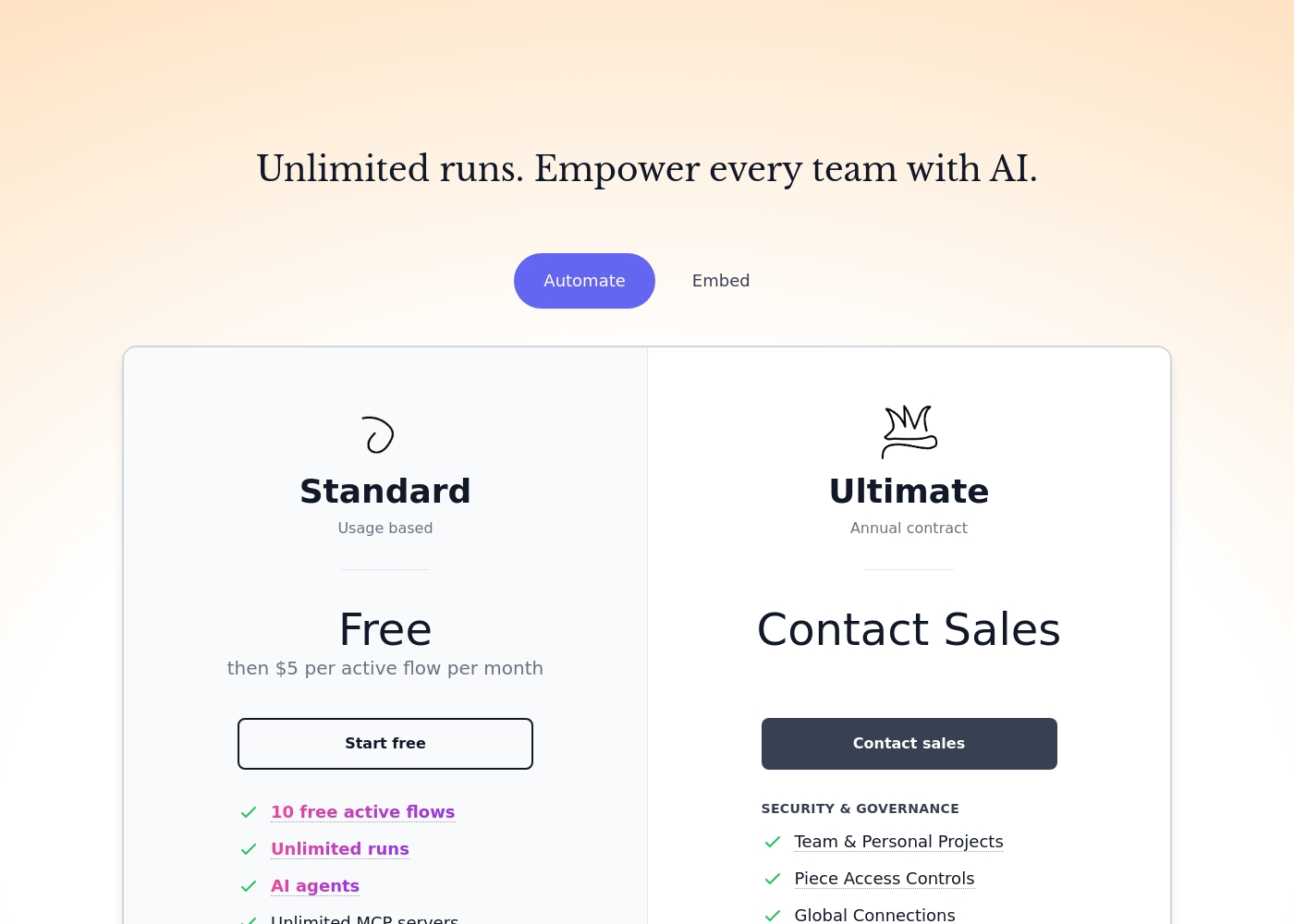
ActivePieces Standard plan is free for 10 active flows. Then it's $5 per additional active flow monthly. Unlimited runs are included.\n\nNetlify offers a solid free plan for personal projects. Paid Pro and Enterprise plans have custom pricing. You must contact sales for quotes.\n\nActivePieces offers transparent, low-cost scaling. Netlify's value depends on your usage and custom quote.
Security & Compliance
ActivePieces is SOC 2 Type II compliant. Netlify provides standard security features; enterprise plans add guarantees.
ActivePieces is SOC 2 Type II compliant. The Ultimate plan adds SSO, custom RBAC, and audit logs. Its open-source core allows self-hosting.\n\nNetlify includes automated HTTPS and DDoS protection. Enterprise plans offer a 99.99% uptime SLA and advanced access controls.\n\nActivePieces has out-of-the-box compliance. Netlify's top-tier security is part of enterprise packages.
ActivePieces cloud plans start Free, then cost $5 per active flow per month, with enterprise tier pricing requiring a sales inquiry. Two managed plans are available: Standard (Free then $5 per active flow per month) and Ultimate (Contact Sales, Annual contract).
Here is a look at the specific features included in each plan type.
Standard
Price: Free then $5 per active flow per month Other Features:
- 10 free active flows
- Unlimited runs
- AI agents
- Unlimited MCP servers
- Unlimited tables
- Email support
- 10 free active flows
- Unlimited runs
- AI agents
- Unlimited MCP servers
- Unlimited tables
- Security & Governance
- Team & Personal Projects
- Piece Access Controls
- Global Connections
- Custom RBAC
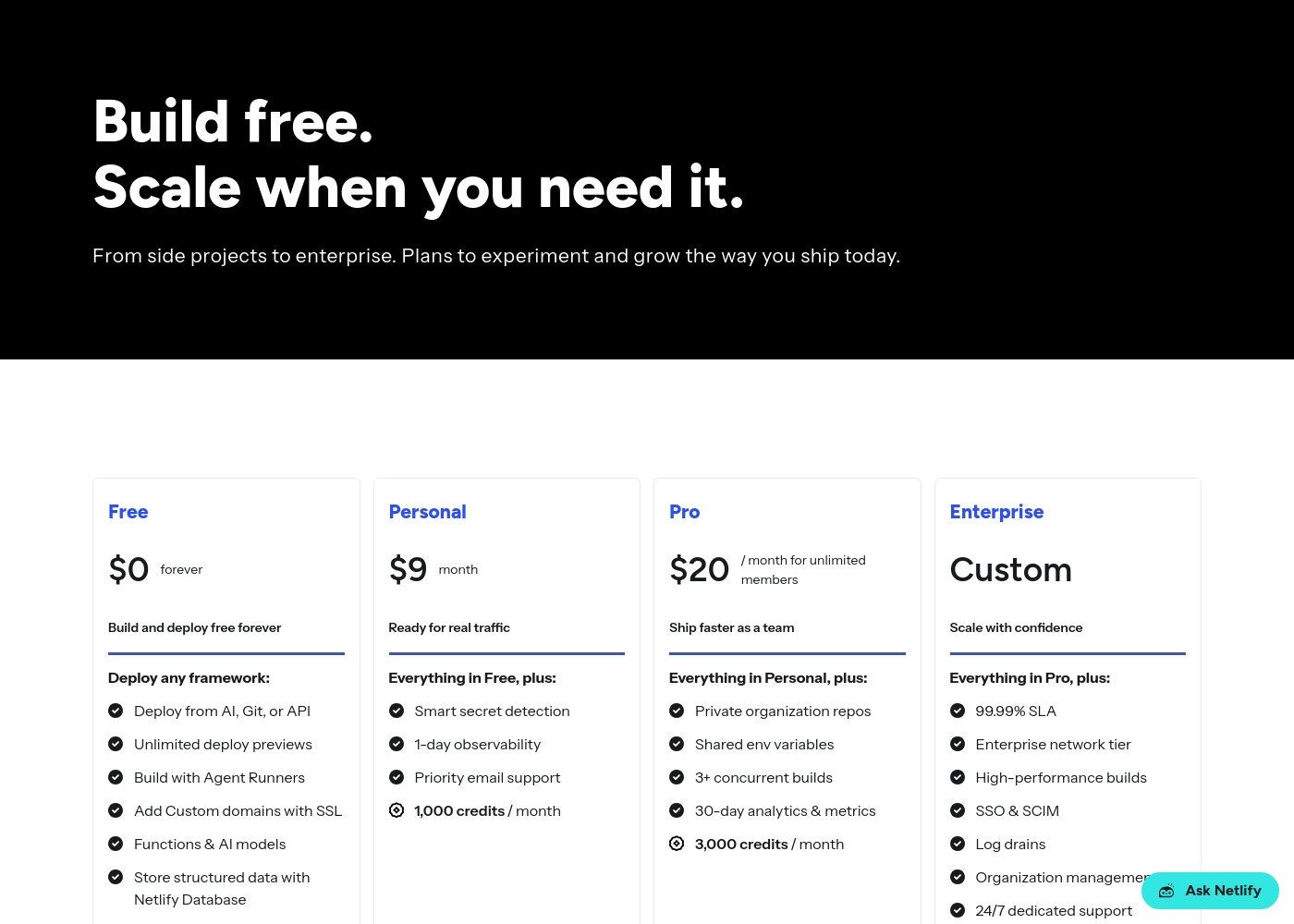
Netlify pricing: Netlify offers a flexible pricing model starting with a free tier and scaling through Personal at $9/month and Pro at $20/month. Costs are primarily driven by monthly usage credits for bandwidth, builds, and AI inference targets side projects to enterprise teams alike-it's a system built for growth without friction-where you only pay for what you actually use while your sites stay live and protected on their global network infrastructure. To get the most from our platform check out our diverse plans designed specifically for developers like yourself wishing for ease-of-use or advanced security controls tailored for massive scale operations today-you can even start building right now without spending a dime on our robust free-forever plan which includes deployments across any framework you prefer using our intuitive tools and lightning-fast developer experience with zero upfront commitment needed from you today-or if your project demands more power then simply upgrade to one of our premium plans which offer enhanced performance and priority support for all your needs-and rest assured that we have you covered every step of the way with our industry-leading platform features and support for all major frameworks used globally by millions of developers like yourself every single day because we care about your success and want to help you achieve your goals as quickly and efficiently as possible without any unnecessary delays or complications along the way-so why wait any longer-start your journey with Netlify today and see the difference for yourself-it's time to build better web experiences for everyone-join our community and start building the future of the web together with us right now-you won't regret it and we are excited to see what amazing things you will create next-good luck and happy building-it's going to be great-really great-believe us-it will be-you'll see-it's the best decision you could make for your business or personal projects today-a
Pricing Notes
- ActivePieces has a transparent free tier with 10 flows, then $5/active flow. No separate trial needed.
- Netlify's free plan is for personal projects. Paid plan pricing is not public and requires a sales conversation.
- ActivePieces Ultimate plan requires an annual contract. Netlify Enterprise plans also involve custom agreements.
- ActivePieces charges per active flow, not per run. Netlify's paid costs scale with usage (bandwidth, builds).
Pricing Head-to-Head
User Reviews
We see a nuanced divide in user feedback for ActivePieces on Trustpilot, reflecting both its powerful technical capabilities and its governance challenges. Users consistently praise the platform as a powerful, cost-effective alternative to established competitors like Zapier and Make.
Reviewers note its simple integration process, short learning curve, and ability to handle intricate, heavy-lifting workflows effectively. Many users appreciate the solid community support and quick response when submitting platform bugs via GitHub.
I moved nearly all my Zaps from Zapier with no issues. Their pricing is truly amazing and much cheaper than key competitors. They even allow connecting multiple Gmail accounts to one workflow, which is a limiting factor on n8n.
We couldn't pull live reviews from Trustpilot or Capterra due to access restrictions. However, based on common user feedback themes for platforms like Netlify, users often praise ease of use 🚀, fast deployments, and a generous free tier.
Many appreciate the unified workflow and global performance. Potential drawbacks can include confusion over credit-based billing and support response times on lower tiers.
Netlify makes deployment incredibly simple. Push to Git and it's live. The preview deployments for every branch are a game-changer for our team's review process.
Our Verdict
This isn't a fair fight. ActivePieces and Netlify are built for completely different jobs. You're not picking the 'better' tool—you're picking the right tool for your task.\n\nActivePieces is your AI-powered operations manager. It excels at connecting your apps and automating the work between them. Its superpower is building smart agents that handle complex workflows across 470+ tools.\n\nNetlify is your world-class web deployer. It makes getting code live instant and reliable. Its superpower is global speed, with preview environments that make team collaboration safe and simple.\n\nThe deciding factor is your primary need. If your problem is 'we waste hours on repetitive tasks between apps,' choose ActivePieces. If your problem is 'getting our website or app live is slow and complicated,' choose Netlify.\n\nFor most teams, this choice is clear. Need to automate your business processes? Go with ActivePieces. Need to launch a web project fast? Go with Netlify. They're both leaders, just in very different arenas.
Frequently Asked Questions
Can I use ActivePieces to deploy my website like Netlify?
No. ActivePieces is for workflow automation, not web hosting. It connects apps and automates tasks. Use Netlify or another host to get your site live on the internet.
Which is better for a small business: ActivePieces or Netlify?
It depends on your need. A small business needing to automate marketing emails and CRM updates should choose ActivePieces. A small business needing a new website should choose Netlify.
Does Netlify have automation features like ActivePieces?
Not directly. Netlify has serverless functions and AI tools for app logic. But ActivePieces is a dedicated platform for building complex, cross-application automation workflows.
Is ActivePieces free to start, like Netlify's free plan?
Yes. ActivePieces has a free tier with 10 active flows. Netlify also has a generous free plan. Both let you start without payment, but their paid models differ.
Can I migrate from one platform to the other?
They are not interchangeable, so you wouldn't migrate between them. You would use each for its purpose. You might use both: automate with ActivePieces, and deploy the app it helps build with Netlify.
Which is better for developers?
Both are developer-friendly but for different tasks. ActivePieces offers a code module for custom JS. Netlify offers a great Git workflow, CLI, and serverless functions for web development.
Ready to Choose?
Both tools have their strengths. Choose based on your specific needs.