Crazyegg

Crazyegg

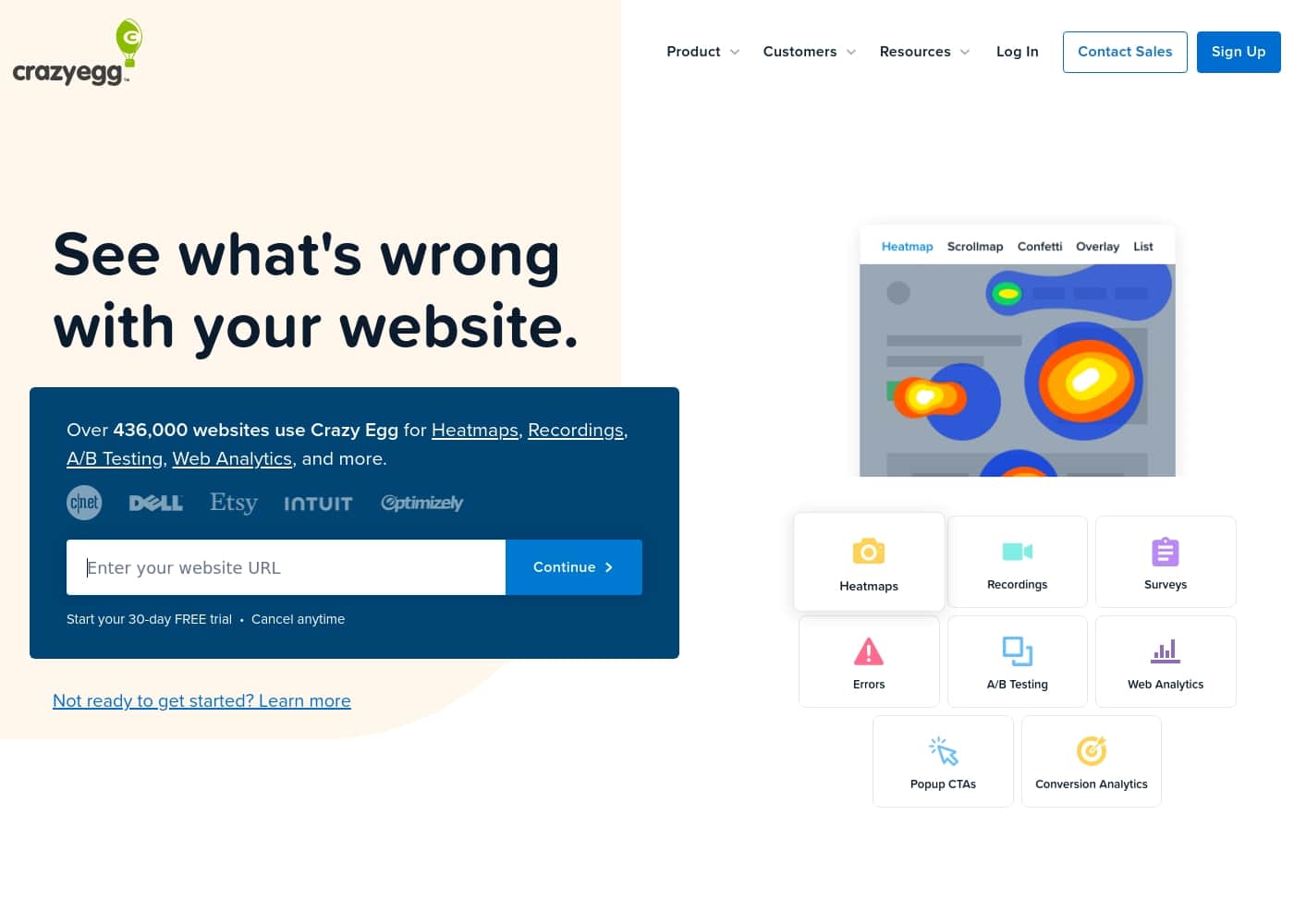
See what's wrong with your website with heatmaps, recordings, and analytics.

#3 dans A/B Testing
1 阅读时间 · 更新时间 10/4/2025
Crazyegg首页截图

At a glance

Quick overview for Crazyegg: rating, pricing summary, key features, and highlights.

Ciroapp 评论

3.0
Solid features, mixed reliability.

We assess Crazy Egg as a capable optimization suite with heatmaps, session recordings, and A/B testing that helps explain visitor behavior. Overall, we find it valuable for teams that want quick insights and experiments, but billing quirks and inconsistent support reduce confidence in long-term use.

优点

  • Pro:Robust heatmaps, session recordings, and A/B testing
  • Pro:Real-time analytics in a single dashboard
  • Pro:Easy integration via Google Tag Manager
  • Pro:Surveys and popup CTAs for fast feedback

缺点

  • Con:Billing defaults to annual plans, causing surprises
  • Con:Inconsistent or variable customer support
  • Con:Reliability concerns with tracking conversions
  • Con:Reports of occasional glitches or performance issues
范围: $0–$599/monthFree plan, Free trial, Monthly subscription
This section is a summary. Detailed sections about features, use cases, pricing, and reviews follow below.

Crazyegg评论、价格、功能、优缺点

Many site owners don’t know what’s happening on their pages. Guesswork wastes time and blocks growth. 🔎

Crazy Egg helps you see what’s wrong with your website with heatmaps, session recordings, and more. You can run A/B Testing and view real-time analytics to measure impact.

Crazyegg 是什么?

Crazy Egg is a website optimization suite used by over 436,000 websites to understand visitors. It brings together Heatmaps, Session Recordings, A/B Testing, Web Analytics, Surveys, and Popup CTAs to show what works and what causes friction. ✨

Crazyegg 主要功能

🔎 See where visitors interact on your pages

Understand what grabs attention and what doesn’t. Heatmaps, Scrollmaps, and Confetti Maps show you where visitors click and how far they scroll. These visuals turn behavior into concrete ideas.

You’ll know which page content performs best and where to improve. Use heatmaps to guide layout tweaks. Then test changes with A/B Testing or Session Recordings.

See the outcomes in a simple, real-time dashboard.

✨ Watch real visitors in action

See actual visitor journeys in real time with Session Recordings. You’ll watch how people move, where they hesitate, and what drives clicks. Recordings help you spot friction and motivation, so you can fix issues fast.

  • Spot friction in critical flows - Validate changes with real behavior - Learn what motivates engagement Use when you want to understand behavior beyond numbers.

✨ Experiment and learn with A/B Testing

Launch experiments easily and learn what changes drive conversions. A/B Testing works for any skill level. It compares variants and shows which version wins.

Run tests on different pages or messages, then apply winning ideas across your site. Use the results to prioritize improvements and grow conversions.

✨ All-in-one real-time analytics

Get real-time traffic data in a simple dashboard. See all your metrics without the time-consuming setup. AI-automated analysis surfaces patterns, and exportable data tables make sharing findings easy.

See what’s happening now and track how changes affect performance over time. - Real-time traffic reporting - AI-automated analysis - Exportable data tables

🗳️ Gather fast feedback with Surveys and Popup CTAs

Capture visitor opinions quickly with Surveys. Design your own custom questions, or choose from 50+ templates. Popup CTAs help test messages and track click and conversion rates.

Easy setup with one line of code or popular integrations; unlimited seats and domains mean your whole team can use it. - 50+ templates - Custom question flows - Popup CTAs to test messages

使用案例

👀 Identify friction with heatmaps and session recordings

When a page isn’t performing, heatmaps show exactly where visitors click and how far they scroll. This helps you see what content draws attention.

Scrollmaps and Confetti Maps add detail about which parts of the page attract eyes and clicks.

Session Recordings let you watch real visitors in action, spotting friction and motivation.

Together with A/B Testing and Web Analytics, Crazy Egg helps you test changes and see results in real time.

🧭 Diagnose and optimize a landing page — quick flow

Step 1: Open Heatmaps to see where visitors click and how far they scroll.

Step 2: Watch Session Recordings to observe how real visitors move through the page.

Step 3: Run an A/B Test to compare a revised layout or copy.

Step 4: Review Web Analytics to gauge impact in real time.

💡 Turn problems into improvements with surveys and popups

Problem: A content site saw low newsletter signups on its homepage.

Approach: Deploy Surveys to learn what readers want and use Popup CTAs to test signup messages.

Outcome: You can see click and conversion rates to learn what works.

⚡ Real-time campaign insights

During a marketing push, real-time traffic data sits in one simple dashboard.

AI-automated analysis highlights trends so you can act fast.

Exportable data tables help you share insights with your team.

🗣️ Fast feedback and messaging tests

Use Surveys to get quick feedback with templates.

Deploy Popup CTAs to test messages and see click and conversion rates.

This helps you learn what readers want and improve pages.

Crazyegg 价格概览

价格范围
$0–$599/month
价格类型
Free plan, Free trial, Monthly subscription

Plans from $0/month

Pricing

Crazyegg pricing: Plans from $0/month Plans range: $0–$599/month Billing options: Free plan, Free trial, Monthly subscription

用户评论

Trustpilot and Capterra show a mixed picture. On Trustpilot, users praise the platform’s robust features—heatmaps, session recordings, and A/B testing—and note that when billing issues arise, responsive support and refunds can save the day.

Yet recurring threads highlight annual-charge surprises, unhelpful agents, and inconsistent service. A few reviewers report excellent, empathetic help, while others call the experience frustrating or opaque.

Capterra feedback mirrors this balance, acknowledging usability and value for some teams, while flagging pricing concerns and reliability questions. Overall, Crazy Egg remains a strong option for teams wanting fast, visual insights and quick experimentation, provided they’re prepared to navigate billing quirks and variable support.

🔎 Bold terms emphasize core strengths like heatmaps, session recordings, and A/B Testing, while the emphasis on pricing/value and reliability captures the main trade-offs.

其他地方的用户评价

Alex D.
· Trustpilot
5.0 / 5

I tried Crazy Egg for a client project. When billing got messy, they refunded me after a calm, helpful support interaction. The tool itself offers strong insights that helped our optimization efforts.

Priya K.
· Trustpilot
2.0 / 5

There were concerns about annual billing and unexpected charges. The experience felt confusing at times, and some responses were slow.

还没有评论。

撰写评论

为Crazyegg撰写评论
0/100个字符
0/2000个字符

为什么要使用 Crazyegg?

  • See exactly where visitors interact with your site using Heatmaps, Scrollmaps, and Confetti Maps. - Watch real visitors in action with Session Recordings to spot friction and motivation.

  • Launch experiments with A/B Testing to learn what changes drive more conversions, for any skill level. - Get real-time traffic data in one simple dashboard, with AI-automated analysis.

  • Gather fast feedback with Surveys using a library of 50+ templates. - Deploy Popup CTAs to test messages and see click and conversion rates.

准备好使用Crazyegg转变您的工作流程了吗?

Crazyegg 替代工具

A/B Testing 类别中的其他工具

常见问题

What integrations does Crazy Egg support?

Crazy Egg can be installed with a single code snippet and supports popular integrations like Google Tag Manager, Shopify, and WordPress.

What are the usage limits for the Starter plan?

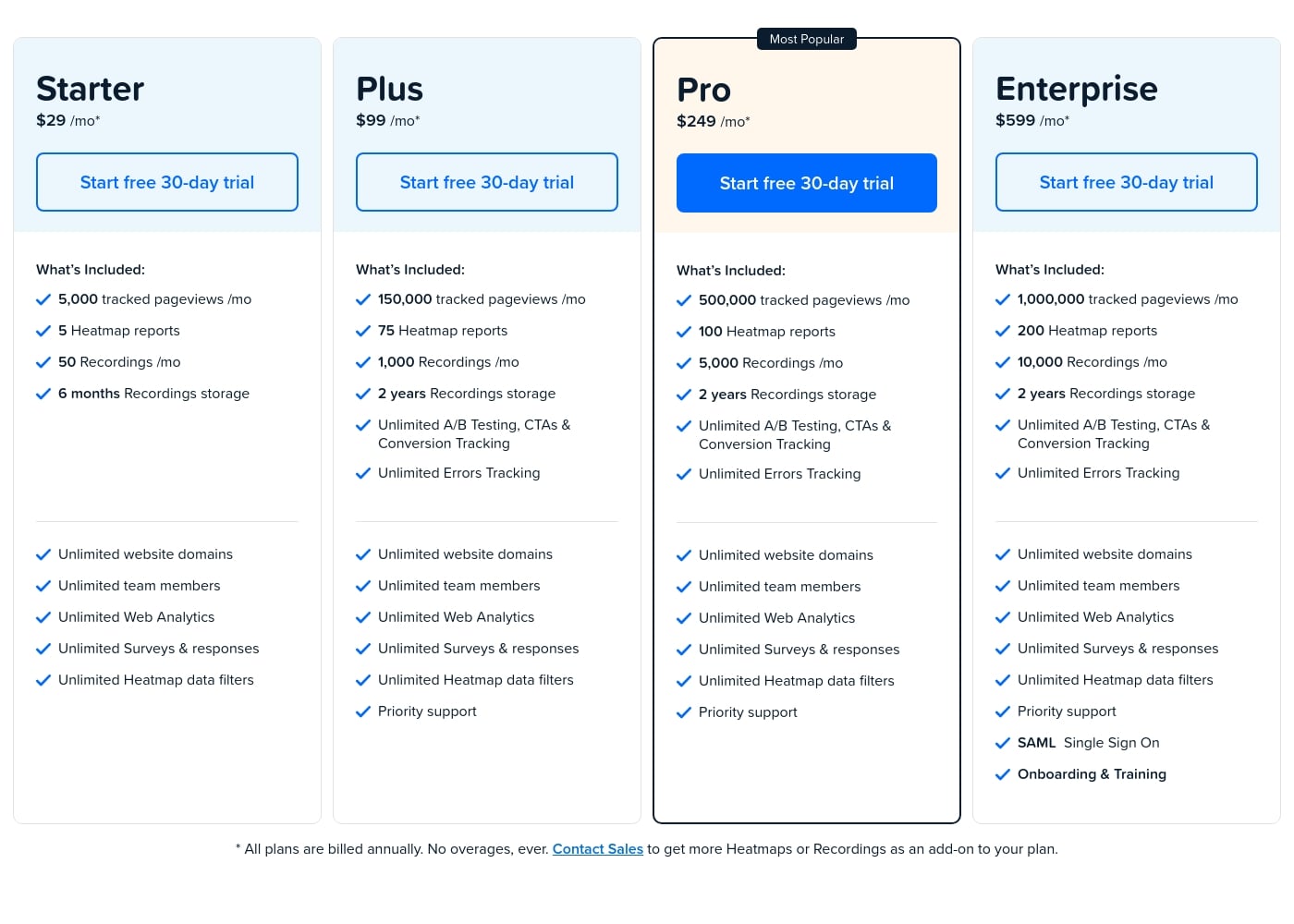
Starter includes 5,000 tracked pageviews per month, 5 heatmap reports, 50 recordings per month, and 6 months of recording storage.

What are the usage limits for the Plus plan?

Plus includes 150,000 tracked pageviews per month, 75 heatmap reports, 1,000 recordings per month, 2 years of recording storage, and unlimited A/B testing, CTAs, and conversion tracking.

What are the usage limits for the Pro plan?

Pro includes 500,000 tracked pageviews per month, 100 heatmap reports, 5,000 recordings per month, 2 years of recording storage, plus unlimited A/B testing, CTAs, conversion tracking, and unlimited errors tracking.

What are the usage limits for the Enterprise plan?

Enterprise includes 1,000,000 tracked pageviews per month, 200 heatmap reports, 10,000 recordings per month, 2 years of recording storage, unlimited A/B testing, CTAs & conversion tracking, unlimited errors tracking, unlimited domains, and unlimited team members.

Do all plans include unlimited seats and domains?

Yes, every plan offers unlimited website domains and unlimited team members.

Is there a free trial, and how long does it last?

Yes, Crazy Egg offers a 30-day free trial on all plans.

How is billing handled, and are there overage charges?

All plans are billed annually, with no overages.

Which plans include priority support?

Priority support is included on Plus, Pro, and Enterprise plans; Starter does not include it.

What about onboarding and training?

Onboarding and training are listed as included features with the Enterprise plan. Not explicitly stated for the other plans.

Is SAML Single Sign-On available, and if so, on which plan?

SAML Single Sign-On is available on the Enterprise plan.

Where can I find information about region or language support?

Not explicitly stated on the official site.

准备尝试Crazyegg了吗?查看官方网站或价格。