Zendesk

Zendesk review

Unified customer and employee service with AI agents that learn from every resolution

Zendesk costs from $19/mo · 4 plans · prices checked Oct 13, 2026

By Ciroapp Editorial Team · Updated Sep 16, 2026

Commission may apply at no extra cost

Zendesk homepage screenshot

At a glance

Quick overview for Zendesk: rating, pricing summary, key features, and highlights.
Pricing verified Oct 13, 2026

Ciroapp score

4.1/ 5

Zendesk pulls email, chat, phone, and social into one workspace, with AI agents that resolve routine requests and learn from every resolution. The trade-off is cost: per-agent seat prices climb quickly, and add-ons plus usage-based billing can inflate invoices. Overall, it's a safe, well-supported pick for teams with real ticket volume and the budget to match.

Pros

  • Pros:AI agents learn from every resolution through the Resolution Learning Loop, so automation quality compounds over time instead of plateauing after setup
  • Pros:Email, live chat, phone, social, and messaging all land in one ticketing workspace with automatic routing, so agents keep full context when customers switch channels
  • Pros:Operations tooling is built in rather than bolted on — Copilot reply suggestions, automatic QA scoring for both human and AI conversations, and AI-powered workforce forecasting

Cons

  • Cons:Per-agent pricing escalates fast — Suite Team costs $55/agent/month and Suite Professional $115, with add-ons like Copilot ($50), Workforce Engagement ($50), and Contact Center ($83) billed separately per agent
  • Cons:Usage-based billing on features such as App Builder, Action Builder, and Voice means costs rise once AI volume exceeds plan allowances, making monthly invoices harder to predict
  • Cons:No money-back guarantee is listed, so the 14-day trial is the only risk-free way to validate fit before an annual commitment
Best for
  • Mid-sized and enterprise support teams handling high ticket volume across email, chat, phone, and social who need unified routing, tracking, and reporting
  • E-commerce and SaaS companies that want AI agents deflecting routine, repetitive requests 24/7 while human agents focus on complex issues
  • Organizations that want one system for both external customer support and internal IT/HR employee service
Free trial
Yes — 14 days
This section is a summary. Detailed sections about features, use cases, pricing, and reviews follow below.

What is Zendesk?

Zendesk is one of the platforms most support teams eventually evaluate, and for good reason: it handles both customer and employee service from a single workspace, pulling email, chat, phone, social, and messaging into unified tickets with full context. AI agents now resolve routine requests end-to-end and learn from every interaction, while Copilot assists humans on the complex ones. More than 100,000 companies use it globally, which brings a large integration marketplace and mature tooling — along with pricing that deserves a careful look before you commit.

Zendesk is a customer and employee service platform that unifies conversations from every channel into one ticketing system. Beyond the helpdesk core, it layers in AI agents for automated resolutions, knowledge bases for self-service, quality assurance, workforce management, and voice through a separate Contact Center add-on. Self-serve plans run from $19 to $115 per agent per month on annual billing, with a custom-priced Suite Enterprise + Copilot tier for large organizations.

Should you choose Zendesk?

Quick buyer guidance before you compare plans or click through.

Choose it if

  • Mid-sized and enterprise support teams handling high ticket volume across email, chat, phone, and social who need unified routing, tracking, and reporting
  • E-commerce and SaaS companies that want AI agents deflecting routine, repetitive requests 24/7 while human agents focus on complex issues
  • Organizations that want one system for both external customer support and internal IT/HR employee service
  • Support operations leaders who need quality assurance scoring, workforce forecasting, and analytics built in rather than purchased as separate point tools

Skip it if

  • Very small teams or solo founders — the $19 Support Team plan covers only basic email ticketing, and anything omnichannel or AI-powered starts at $55 per agent per month
  • Budget-sensitive teams that need predictable costs — usage-based charges on App Builder, Action Builder, and Voice can inflate invoices when AI volume spikes
  • Teams with thin or outdated documentation — AI agents draw on connected knowledge, so automation quality suffers without a maintained knowledge base
  • Buyers who insist on a money-back guarantee — none is listed, so you're relying entirely on the 14-day trial

Next steps before buying

  1. 1Start the 14-day free trial (no credit card required), which unlocks the full Suite Professional plan so you can test the complete feature set
  2. 2Connect your email channel first, then import or link your knowledge base so AI agents have accurate content to answer from before you enable automation
  3. 3Estimate your agent count and expected AI resolution volume, then compare Support Team ($19), Suite Team ($55), and Suite Professional ($115) against that math before choosing annual billing
  4. 4Search the Zendesk Marketplace for your CRM and internal tools, and list which paid add-ons (Copilot, Workforce Engagement Bundle, Contact Center) your workflow actually requires
  5. 5For enterprise needs like sandbox environments, approval workflows, or custom agent roles, book a sales call for a Suite Enterprise + Copilot quote; qualified startups can also apply for the 6-month trial for up to 50 agents

Zendesk Key Features

🤖 AI agents that learn from every resolution

Zendesk AI Agents resolve requests end-to-end, understanding intent and sentiment without human help. Every interaction feeds the Resolution Learning Loop, so the next answer is better than the last. Use them for repetitive questions and 24/7 coverage.

The result: up to 80% automation and a team free to focus on complex work.

✨ Every channel in one workspace

Email, live chat, phone, social, and messaging apps all land in one place. Your team tracks, organizes, and resolves tickets without switching tools. Routing and triggers send each conversation to the right person automatically.

It's ideal when volume grows and scattered inboxes start slowing people down.

✨ Built-in tools for quality at scale

Beyond the inbox, Zendesk covers your whole support operation. These built-in tools help quality stay high as volume grows:

  • Copilot suggests replies and summaries so agents work faster
  • Quality assurance scores human and AI agent conversations automatically
  • Workforce management forecasts staffing and schedules with AI precision

✨ Self-service powered by connected knowledge

Build internal and external help centers powered by connected knowledge. Customers find answers on their own, and AI agents draw on the same content to automate more requests. It's useful when you want routine questions handled before they ever reach your team.

🔌 Set up fast and connect your stack

Connect your knowledge and go live with a few clicks. No scripting or developers required. AI agents absorb ticket spikes around the clock, so you can scale without adding headcount.

And with 1,800+ apps and integrations in the marketplace, Zendesk fits the tools you already use.

Use Cases

🎫 Unify every support channel

Handle email, chat, phone, social, and messaging in one workspace. Tickets stay organized and routed so nothing slips through. Agents keep full context, even when customers switch channels.

Expected outcome: Fewer lost tickets and faster replies.

Tip: Start with ticketing on Support Team, then add channels as you grow.

🤖 Automate routine requests with AI agents

AI agents answer common questions around the clock and resolve routine tasks end-to-end. They learn from every interaction, so results improve over time. Your team focuses on complex work.

Expected outcome: High request volume handled without adding headcount.

Tip: Connect your knowledge base first so AI answers stay accurate.

🧑‍💻 Give employees fast internal support

IT, HR, and shared services teams resolve employee requests in one place. Structured workflows guide each request to resolution, and AI answers routine questions instantly.

Expected outcome: Employees get quick help instead of waiting on email threads.

📞 Modernize your contact center with voice

Voice AI handles routine calls and authentication, so customers skip hold music. Agents get suggestions and summaries while reporting tracks performance across voice and digital.

Expected outcome: Faster call resolutions and less repetitive agent work.

Tip: Contact Center is a separate add-on, so check costs before you buy.

Zendesk pricing

From$19/mo

  • 4 plans

Prices checked on Oct 13, 2026 from Zendesk's pricing page

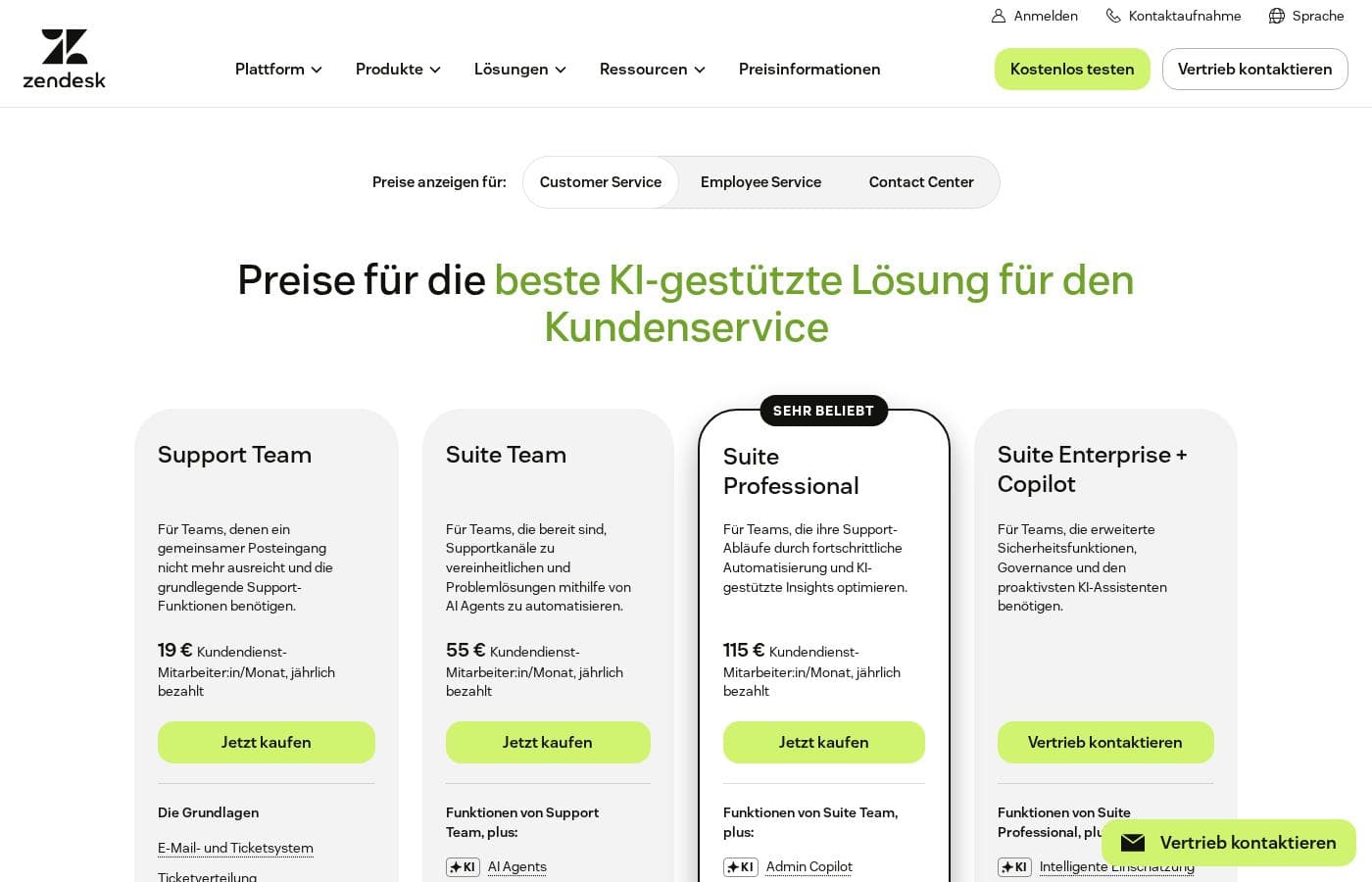
Zendesk pricing page screenshotView pricing page screenshot
PlanBilled monthlyBilled annuallyIncludes
Support Team
per user
—
$19/mo
$228 per year
  • Email and ticketing system
  • Ticket routing
  • Prebuilt analytics dashboards
  • Pre-written responses
  • Customer context
  • +1
Suite Team
per user
—
$55/mo
$660 per year
  • Everything in Support Team
  • AI Agents
  • AI Knowledge Base
  • AI Action Builder
  • Omnichannel routing
  • +2
Suite Professional
per user
—
$115/mo
$1,380 per year
  • Everything in Suite Team
  • AI Admin Copilot
  • AI App Builder
  • AI Writing Tools
  • AI Quick Reports
  • +2
Suite Enterprise + Copilot
See vendor page
See vendor page
  • Everything in Suite Professional
  • AI Intelligent Triage
  • AI Auto Assist
  • Generative AI for Voice
  • Approval workflows
  • +2

Price history

Tracking prices since Oct 1, 2026. No price change detected yet.

Pricing types: Free trial, Monthly subscription, Yearly subscription, Per seat pricing, Usage-based pricing

Pricing notes

Zendesk uses seat-based pricing that ranges from $19 to $115 per agent/month on annual billing. Plans include Support Team ($19), Suite Team ($55), and Suite Professional ($115), plus a custom-priced Suite Enterprise + Copilot tier, with monthly billing available at a higher rate.

Zendesk costs between $19 and $115 per agent/month (billed annually) with three self-serve plans: Support Team at $19, Suite Team at $55, and Suite Professional at $115, plus a custom-priced Suite Enterprise + Copilot tier.

Here's what each plan includes so you can match one to your team.

Support Team

Price: $19 per agent/month, paid yearly

Best For: Teams that have outgrown a shared inbox and need core support essentials

Other Features:

  • Email and ticketing system
  • Ticket routing
  • Prebuilt analytics dashboards
  • Pre-written responses and customer context
  • Automations and triggers

This is the simplest way in. If you mostly handle email support and want clean, organized ticketing, Support Team covers the basics at the lowest price.

Suite Team

Price: $55 per agent/month, paid yearly

Best For: Teams ready to unify support channels and automate resolutions with AI Agents

Other Features:

  • Everything in Support Team, plus AI Agents
  • AI Knowledge Base and AI Action Builder
  • Omnichannel routing
  • Messaging and live chat
  • Telephony

Pick this one when you're done juggling separate tools. It brings email, chat, social, and phone into one workspace, and AI agents handle routine requests around the clock.

Suite Professional

Price: $115 per agent/month, paid yearly

Best For: Teams optimizing support operations with advanced automation and AI-driven insights

Other Features:

  • Everything in Suite Team, plus AI Admin Copilot
  • AI App Builder and AI Writing Tools
  • AI Quick Reports
  • Skills-based routing
  • IVR phone tree

This is Zendesk's most popular plan, and it's the sweet spot for growing teams. Admins get AI help running operations, and smarter routing sends each ticket to the right person the first time.

Suite Enterprise + Copilot

Price: Custom — talk to sales

Best For: Teams needing advanced security, governance, and the most proactive AI assistant

Other Features:

  • Everything in Suite Professional, plus AI Intelligent Triage
  • AI Auto Assist for agents
  • Generative AI for Voice
  • Approval workflows and a sandbox environment
  • Custom agent roles

Large organizations with strict security or governance needs should start here. You'll need to contact sales, so expect a quote shaped around your team's size and requirements.

A few extras worth knowing. Zendesk sells add-ons: Copilot at $50 per agent/month, the Workforce Engagement Bundle at $50, and Contact Center at $83, all billed yearly. Some features, like App Builder, Action Builder, and Voice, are billed on usage that exceeds plan allowances. It's smart to confirm your seat count and expected AI volume before you buy.

Try before you commit. Zendesk offers a 14-day free trial with no credit card required, and it unlocks the full Suite Professional plan. Qualified startups can also apply for a 6-month trial for up to 50 agents. There's no money-back guarantee listed, so use the trial to make sure the fit is right.

Cost calculator

Estimate what Zendesk costs for your team.

Billing

Support Team has no published price for this billing cycle.

Support Team is priced per user: price × 5 seats. Estimate based on published list prices, before taxes, add-ons and discounts.

How to pay less for Zendesk

  • Use the 14-day free trial before you pay.
  • Some plans are priced per user: only pay for seats people actually use.
Start free trial

Email me when Zendesk changes price

One email when we detect a price change on the vendor's pricing page. No newsletter, no deals. Unsubscribe in one click.

User Reviews

No reviews yet.

Write a Review

Write a Review for Zendesk
0/100 characters
0/2000 characters

Why use Zendesk?

The main reason to choose Zendesk is consolidation with intelligence: instead of stitching together a shared inbox, chat widget, phone system, and separate AI bot, one platform routes and tracks everything while automation quality improves with each resolved ticket. For teams with meaningful volume, that combination of omnichannel routing, AI deflection, and built-in QA typically saves more agent hours than the seat cost.

The 1,800+ app marketplace and open APIs also mean it usually fits the stack you already run.

Zendesk alternatives

Other tools in the Knowledge Base category

View all Knowledge Base tools
Help Scout

Help Scout

Knowledge Base4.1/5

Help Scout is a modern customer service platform built to connect every team to the voice of the customer. It gathers all your scattered support channels into one consolidated, easy-to-use system. Teams report that it's just like using a shared email inbox, but far more robust and organized. The platform is designed to bring structure and flexibility to the organization. This ensures a calm, measurable approach to your daily support work.

Docsie

Docsie

Knowledge Base3.5/5

Docsie is an award-winning platform designed specifically for managing enterprise knowledge bases. It acts as your central hub for standard operating procedures (SOPs), help documents, and essential knowledge sharing. The platform transforms outdated, complicated files into dynamic, searchable, and multilingual solutions. Docsie is built for teams worldwide who need to deliver consistent, high-quality technical content efficiently. Everything is secured with robust enterprise-grade features.

Freshdesk is a help desk and ticketing system that converts incoming customer messages from multiple channels into organized tickets. Agents can assign, prioritize, collaborate on, and resolve those tickets using workflows, canned responses, SLA policies, and automation rules. The platform also includes a self-service knowledge base, customer portals, reporting dashboards, and a marketplace of 150+ third-party integrations covering CRM, e-commerce, messaging, and productivity tools.

Zendesk FAQ

How much does Zendesk cost?

Zendesk's cheapest paid plan, Support Team, costs $19 per month. Paid plans range from $19 to $115 per month. Prices checked on Oct 13, 2026 from the vendor's pricing page.

Does Zendesk have a free plan?

No. Zendesk lists no free plan; the cheapest paid plan starts at $19 per month.

Does Zendesk offer a free trial or a money-back guarantee?

Zendesk offers a 14-day free trial.

Has Zendesk's price changed recently?

No. We have not detected a price change since we started tracking on Oct 1, 2026.

Does Zendesk integrate with other tools like my CRM?

Yes. The Zendesk Marketplace lists 1,800+ apps, partners, and integrations, plus APIs for custom connections to CRMs, identity providers, and internal systems. Browse the Marketplace or developer docs to check your specific tools before buying.

How does Zendesk protect my customer data?

Zendesk uses enterprise-grade security and privacy controls, with regular audits of its applications, systems, and networks. Compliance details and certifications are documented in the Zendesk Trust Center — worth reviewing against your own requirements.

What payment methods and currencies does Zendesk accept?

You can pay by credit or debit card, PayPal, or direct debit from a bank account. Zendesk bills in USD, EUR, GBP, and BRL. Enterprise purchases through sales may qualify for invoice billing.

Can Zendesk support customers in multiple languages?

AI agents support 80+ languages, so customers can get help in their own language. Zendesk also runs localized sites across regions including Europe, Latin America, Asia-Pacific, and Japan. Confirm exact coverage for your markets.

Ready to try Zendesk? Check out the official site or pricing.

Are you Zendesk? Claim this listing · Get the badge