Trafft

Trafft review

Free 24/7 booking, calendar sync, and automated reminders for service businesses

By Ciroapp Editorial Team Β· Updated Sep 9, 2026

Commission may apply at no extra cost

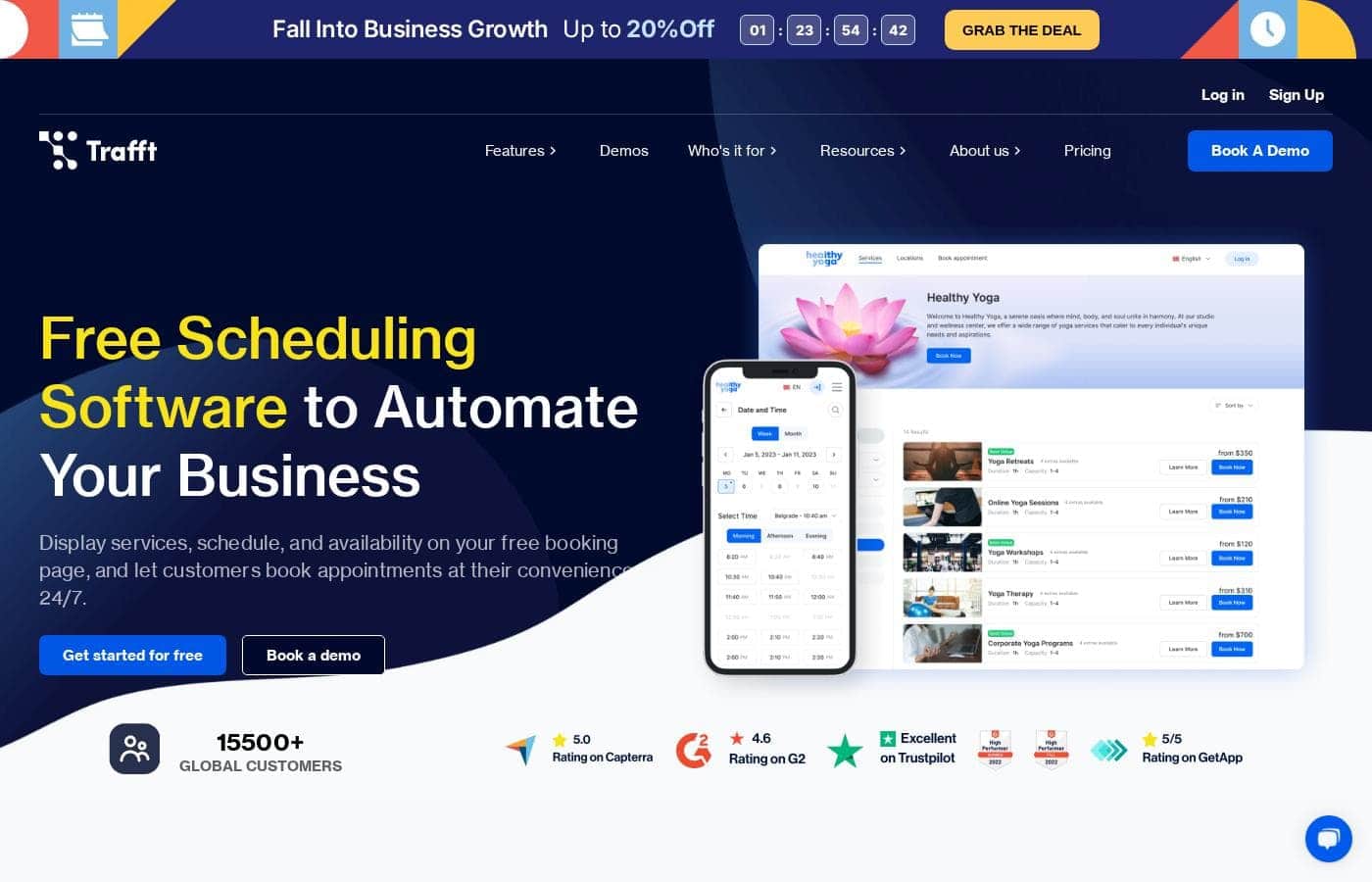
Trafft homepage screenshot

At a glance

Quick overview for Trafft: rating, pricing summary, key features, and highlights.
Vendor page checked Oct 13, 2026

Ciroapp score

3.9/ 5

Trafft covers the essentials for appointment-driven businesses: a genuinely usable free booking page, multi-location dashboards, automated reminders, and payments collected at booking. The catch is that dollar prices stay hidden until you toggle billing periods, and no third-party reviews back up user sentiment. Overall, it's a solid pick for salons, coaches, and clinics that verify costs first.

Pros

  • Pros:The forever-free plan is genuinely usable β€” 100 appointments per month, a Trafft-hosted booking page, QR-code booking, an embeddable form, 200 automated email notifications, and Square payments β€” no credit card or existing website required.
  • Pros:Booking channels go well beyond a standard page β€” clients can book via Instagram, shared links, QR codes, embedded forms, and Reserve with Google, so availability is reachable wherever clients already are.
  • Pros:Automated reminders run across email, SMS, and WhatsApp (WhatsApp on Business tier), replacing manual follow-up texts and directly targeting no-show reduction.

Cons

  • Cons:Published calendar sync covers Google, Outlook, and Apple only β€” businesses relying on another calendar system have no documented support and must verify compatibility before committing.
  • Cons:Dollar figures aren't shown at a glance; you have to toggle billing periods on the pricing page, and extra users beyond each plan's cap (3–30 users) plus SMS credits beyond the 5–10 included on top tiers all add per-user or top-up fees.
  • Cons:SMS credits aren't included at all on Free, Mini, or Growth plans, so SMS reminder costs are an add-on for most lower-tier users.
Best for
  • Salons, barbershops, and spas managing several staff schedules
  • Coaches, tutors, and consultants selling session-based time
  • Personal trainers, yoga studios, and fitness classes
Free trial
Yes β€” 14 days
Money-back guarantee
Yes β€” 30 days
This section is a summary. Detailed sections about features, use cases, pricing, and reviews follow below.

What is Trafft?

Chasing clients by phone, fixing double bookings, and eating no-show costs drains hours you'd rather spend on real work. Trafft puts a free booking page online 24/7, syncs your calendars, and sends automated reminders β€” so clients book themselves and your schedule runs smoothly.

Trafft is online appointment scheduling software for service-based businesses. It handles bookings, staff schedules, customer records, payments, and reminders in one place. Solo professionals can start on a forever-free plan, while multi-location teams manage everything from a single dashboard.

The site targets salons, coaches, tutors, trainers, clinics, and other appointment-driven businesses.

Should you choose Trafft?

Quick buyer guidance before you compare plans or click through.

Choose it if

  • You want 24/7 bookings via a free page, Instagram, shared links, QR codes, or Reserve with Google
  • You use Google or Outlook calendars and need sync to avoid double bookings
  • You want automated email, SMS, or WhatsApp reminders doing the follow-up for you
  • You'd rather collect secure online payments with invoices sent automatically
  • You want staff calendars, customer records, and performance stats in one place

Skip it if

  • The site only names Google and Outlook calendar sync β€” if you rely on another calendar system, confirm compatibility before committing.
  • Public pricing detail is thin. Beyond the free plan for solo professionals, tier costs and limits aren't shown, so verify what you'll pay as you grow.
  • Headline stats (50k+ businesses, 8m+ appointments) are labeled as combined Trafft and Amelia user data β€” treat them as vendor-reported figures.
  • Virtual sessions depend on integrations like Zoom or Google Meet, so confirm the tools your workflow needs are supported.
  • Regulated healthcare or government buyers should verify compliance requirements, which the site doesn't address.

Next steps before buying

  1. 1Check Trafft's current pricing to see what the free plan includes and where paid tiers begin.
  2. 2Confirm your must-have integrations β€” calendars, payment gateways, and Zoom or Google Meet if you run virtual sessions.
  3. 3Compare Trafft with one or two alternatives on price and limits for your team size.
  4. 4Sign up for the free plan and test the booking page, reminders, and mobile app before upgrading.
  5. 5Review any trial, refund, or cancellation terms before moving to a paid tier.

Ease of use

Trafft presents itself as simple enough to skip training, with light and dark themes, a customizable booking page, and responsive mobile management. The vendor says its support team helps with questions and onboarding. Signals point to easy setup, though this review is based on published site content, not hands-on testing.

Trafft Key Features

πŸ“… Take bookings 24/7, wherever your clients are

Your booking page never closes. Clients book from a Trafft-hosted page, an embedded form on your site, your Instagram bio or story, a shared link, a QR code, or Reserve with Google. Availability stays current, so bookings roll in even while you sleep.

No website? Trafft provides one for you.

✨ One dashboard for every schedule and location

Create flexible schedules for each employee and manage every staff calendar from one dashboard β€” or let team members self-schedule. Google and Outlook sync gives you a single view of all appointments, so double bookings and conflicts get caught early. Running multiple locations?

They all live in the same place too.

✨ Automated reminders that cut no-shows

Stop texting clients manually. Trafft sends reminders automatically before appointments, so customers show up and staff stay in the loop. Reminders go out by:

  • Email
  • SMS
  • WhatsApp

It's follow-up work you never have to think about again.

✨ Get paid with the booking

Payments arrive with the appointment instead of after it. Clients pay online through secure payment gateways, and Trafft sends invoices automatically. You get paid safely and on time, with no awkward chasing over unpaid bookings.

⭐ Know your numbers, know your customers

The dashboard puts your numbers in one view: occupancy, returning customer rate, most in-demand employees and services, and earnings. Pair that with the built-in CRM to keep customer records handy, spot favorite services, and send birthday greetings or loyalty coupons that keep people coming back.

Use Cases

πŸš€ Solo pros launch a booking page β€” no website needed

No website? No problem. Coaches, tutors, and stylists can set up Trafft's free booking page and share it on Instagram or by link. The free plan covers 100 appointments a month.

Expected outcome: clients book themselves 24/7 β€” no phone tag.

Tip: QR codes work great in-store.

βœ‚οΈ Salons cut no-shows and double bookings

Your barbershop or spa runs on staff schedules. Sync Google and Outlook calendars, let stylists self-schedule, and send automated email or SMS reminders before each visit.

Expected outcome: fewer empty chairs and no more overlapping appointments.

πŸ’» Tutors and coaches host virtual sessions

Language teachers and life coaches can teach from anywhere. Clients book through your page, then meet on Zoom or Google Meet. Collect payment with the booking and send the invoice automatically.

Expected outcome: paid, booked, and reminded β€” without lifting a finger.

πŸ“ Multi-location teams run from one dashboard

You manage two salons across town. Trafft keeps every location, staff calendar, and customer record in one dashboard. Track occupancy, top services, and earnings at a glance, and check bookings from the mobile app.

Expected outcome: the whole business in one place, wherever you are.

Trafft pricing

  • 5 plans

Prices not verified yet β€” see the vendor page.

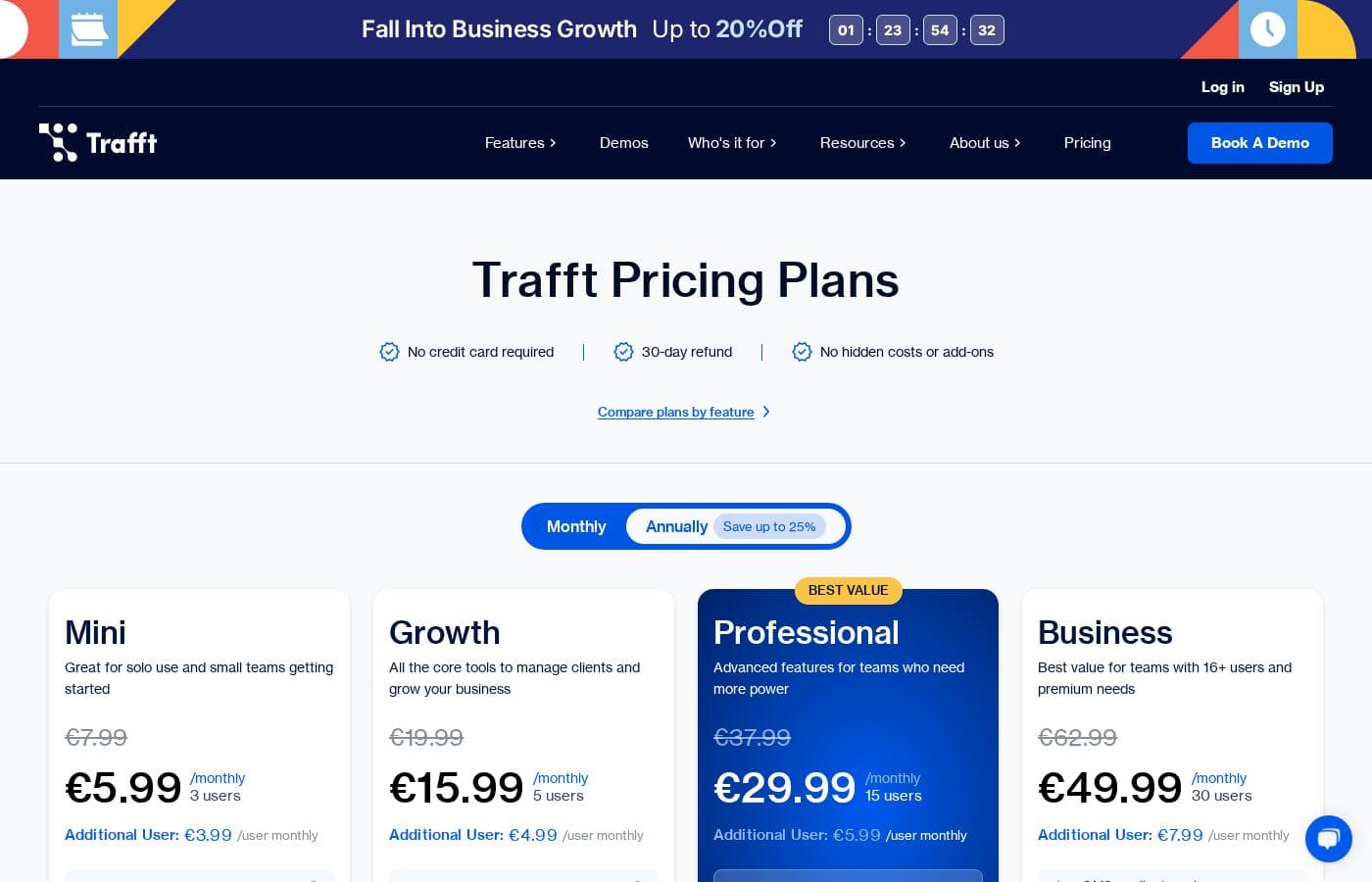
Trafft's pricing page

Trafft pricing page screenshotView pricing page screenshot
PlanBilled monthlyBilled annuallyIncludes
Free
See vendor page
See vendor page
Free forever; 100 appointments/month, 1 location, 1 user, no additional users
Mini
See vendor page
See vendor page
3 users, additional user extra per user monthly, SMS credits sold separately, 3 locations; price number not shown in text
Growth
See vendor page
See vendor page
5 users, additional user extra per user monthly, SMS credits sold separately, 5 locations; price number not shown in text
Professional
See vendor page
See vendor page
15 users, additional user extra per user monthly, 5 SMS credits/month, unlimited locations; price number not shown in text
Business
See vendor page
See vendor page
30 users, additional user extra per user monthly, 10 SMS credits/month, unlimited locations; price number not shown in text

Price history

Tracking prices since Sep 8, 2026. No price change detected yet.

Pricing range: Free–paid tiers (billed monthly or annually)

Pricing types: Free plan, Free trial, Monthly subscription, Yearly subscription

Pricing notes

Trafft offers a Free plan plus four paid tiers: Mini, Growth, Professional, and Business, billed monthly or annually with annual billing saving up to 25%.

Here's a closer look at what each plan includes.

Free

Best For: solo professionals and new businesses testing online booking Other Features:

  • 100 appointments per month, 1 location, 1 user
  • Booking website, embeddable form, and QR-code booking
  • 200 automated email notifications per month
  • Square payments and the WordPress plugin

The Free plan costs nothing and stays free forever. You get a working booking page and mobile app without entering a card. Group bookings, buffer time, and calendar sync wait until you upgrade, but it's a genuinely usable starting point.

Mini

Best For: solo use and small teams getting started Other Features:

  • Unlimited appointments across 3 locations
  • 3 users included, with extra users available for a fee
  • Group bookings, buffer time, and calendar sync with Google, Outlook, and Apple
  • Discount coupons and tax management
  • SMS credits available to purchase separately

Mini is the first paid step up. You unlock unlimited appointments, three locations, and calendar sync that quietly prevents double bookings. Pick it if you run a small team and just need the scheduling basics done well.

Growth

Best For: businesses that need client management and payments Other Features:

  • Unlimited appointments across 5 locations
  • 5 users included
  • Service extras, custom fields, and private services
  • Invoices plus Stripe, PayPal, Mollie, and Authorize.net payments
  • Zoom, email marketing, and analytics integrations

Growth adds the commercial toolkit. You can upsell services, collect custom details at booking, and take payments through the major gateways. Choose it when paid bookings, invoices, and marketing connections all belong in one place.

Professional

Best For: growing teams that need more power Other Features:

  • Unlimited appointments and unlimited locations
  • 15 users included
  • Recurring appointments, service packages, and resource management
  • Ratings and reviews plus custom roles and permissions
  • 5 SMS credits per month included

Trafft flags Professional as its best-value plan, and the feature jump backs that up. Recurring bookings, packages, resources, and staff permissions fit busier teams with real complexity. If five users feels tight, this is your natural next step.

Business

Best For: teams with 16+ users and premium needs Other Features:

  • Unlimited appointments and unlimited locations
  • 30 users included
  • WhatsApp messaging and Reserve with Google
  • Webhooks, API access, and an SMTP email gateway
  • Custom domain, Trafft branding removal, and 10 SMS credits per month

Business is the top tier for larger operations. You get developer-friendly API access, WhatsApp messaging, and a white-label experience on your own domain. If you're a smaller shop, stay lower β€” Professional already covers most of this.

One practical note before you buy: check the per-user fee for extra team members and SMS credit pricing, since both are billed beyond the base plan.

Every plan starts with a 14-day free trial and no credit card required, and the free-forever plan remains available if you'd rather not pay at all. Paid subscriptions carry a 30-day money-back guarantee, and there are no contracts β€” you can switch plans or cancel anytime. Need more than 50 users? Trafft's Enterprise option handles custom user counts and features.
How to pay less for Trafft

  • Use the 14-day free trial before you pay.
  • 30-day money-back guarantee if it does not fit.
Start free trial

Email me when Trafft changes price

One email when we detect a price change on the vendor's pricing page. No newsletter, no deals. Unsubscribe in one click.

User Reviews

No reviews yet.

Write a Review

Write a Review for Trafft
0/100 characters
0/2000 characters

Why use Trafft?

Manual scheduling gets expensive fast β€” in lost hours and lost clients. Trafft is built to take that job off your plate, and its site makes a solid case for why service businesses choose it:

  • Bookings happen while you sleep. Your booking page takes appointments 24/7, and clients can also book through Instagram, a shared link, a QR code, an embedded form, or Reserve with Google.
  • Fewer no-shows without the follow-up work. Automated email, SMS, and WhatsApp reminders go out before appointments β€” no more manual texting.
  • One calendar instead of several. Google and Outlook sync helps prevent double bookings, and you can manage every staff schedule from one dashboard.
  • Get paid on time. Secure online payment gateways and automatic invoices mean payment arrives with the booking.
  • See what's working. The dashboard shows occupancy, returning customers, top employees and services, plus earnings at a glance.
  • Start free, grow later. The forever-free plan targets solo professionals, with multi-location management ready when you expand.

Trafft alternatives

Other tools in the Appointment Scheduling category

View all Appointment Scheduling tools
Calendly

Calendly

Appointment Scheduling4.3/5

Calendly is touted as the leading online appointment scheduling tool. It currently serves over 20 million professionals globally. This powerful software connects multiple calendarsβ€”up to sixβ€”to ensure you only offer available times. While it’s simple enough for single users, it also meets the needs of enterprise organizations. Organizations, including 86% of Fortune 500 companies, rely on Calendly for secure, streamlined scheduling.

SimplyBook.me

SimplyBook.me

Appointment Scheduling4.1/5

SimplyBook.me is a highly robust online booking system designed specifically for all service-based industries. It helps you manage your staff, services, and locations all in one place. You get a proprietary, mobile-optimized booking website right away. Alternatively, you can easily integrate the system with your existing site. Importantly, the system is 27001 certified and hosted within the EU, giving you peace of mind about security and compliance. It’s an effective way to put your scheduling on autopilot.

Doodle

Doodle

Appointment Scheduling3.8/5

Trafft FAQ

Which tools does Trafft integrate with?

Trafft integrates with Google, Outlook, and Apple calendars, Zoom, Microsoft Teams, Mailchimp, Zapier, Google Analytics, and payments via Stripe, PayPal, Mollie, Authorize.net, and Square. Access varies by plan β€” calendar sync starts on Mini, Zoom on Growth, API on Business.

Does Trafft charge per seat or per booking?

Plans include a set number of users β€” 3 to 30 depending on tier. Extra staff cost a per-user monthly fee, and SMS credits beyond your allowance are sold as one-time top-ups or a recurring plan. There's no commission per booking.

What are Trafft's plan limits?

Free covers 100 appointments a month with one user and one location. Mini allows 3 users and 3 locations; Growth, 5 each; Professional, 15 users with unlimited locations; Business, 30 users. Enterprise handles 50+ users.

How do the trial, refunds, and cancellations work?

Every paid plan starts with a 14-day trial, no credit card required. Paid subscriptions carry a 30-day money-back guarantee. There are no contracts, so you can switch plans or cancel anytime. VAT or GST is added at checkout where applicable.

Ready to try Trafft? Check out the official site or pricing.

Are you Trafft? Claim this listing Β· Get the badge