ThreatDown

ThreatDown review

Business endpoint security with AI detection and 24/7 managed response, all in one console.

By Ciroapp Editorial Team · Updated Sep 17, 2026

Commission may apply at no extra cost

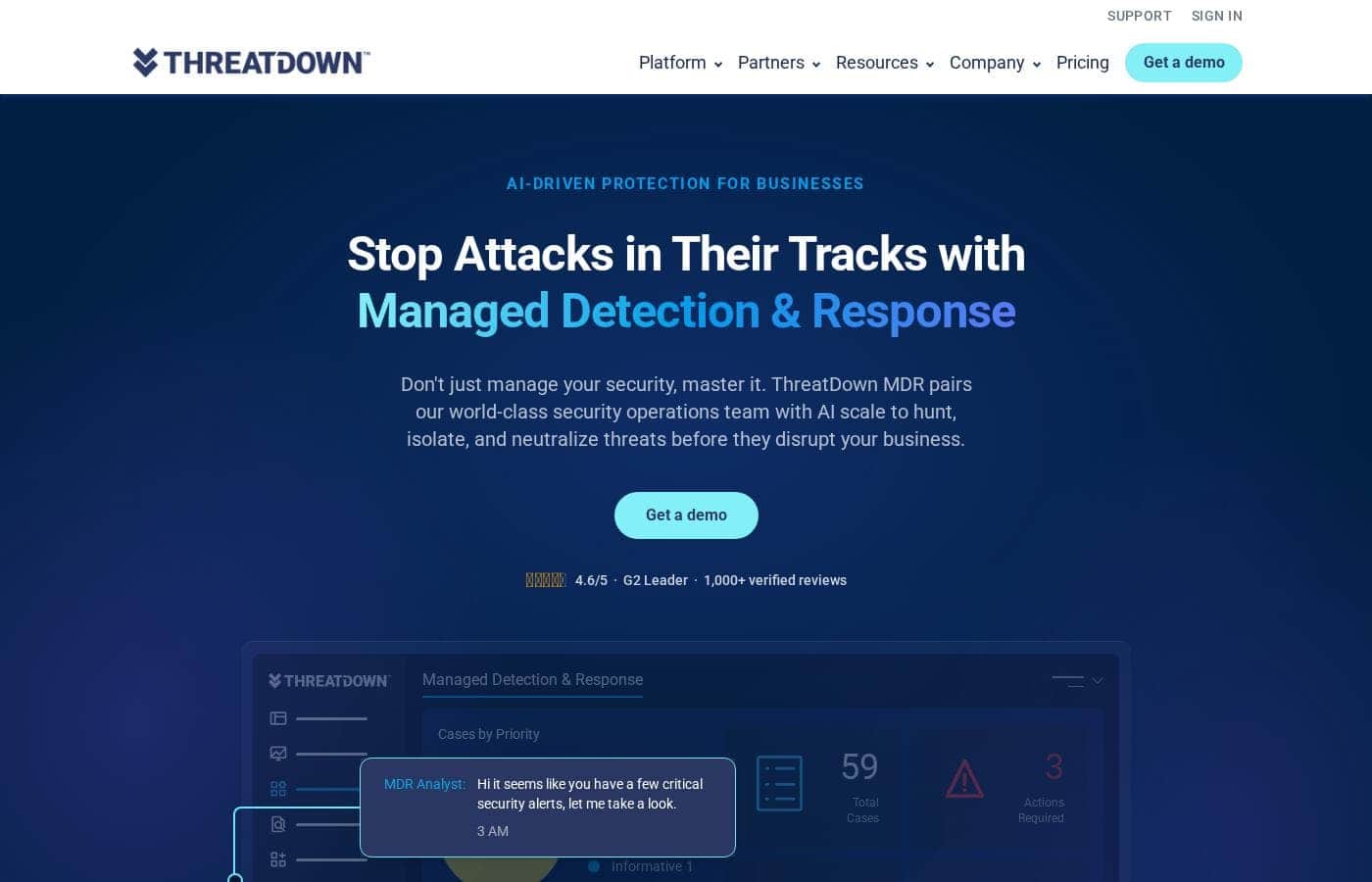
ThreatDown homepage screenshot

At a glance

Quick overview for ThreatDown: rating, pricing summary, key features, and highlights.
Vendor page checked Oct 13, 2026

Ciroapp score

4.2/ 5

ThreatDown packs next-gen antivirus, EDR, and 24/7 managed response into one lightweight agent, with annual plans from $345. Case studies, certifications, and a 4.6/5 G2 rating back up its claims, but there's no free trial and per-device totals need a quote. Overall, it's a strong pick for lean teams that want big-company security without the headcount.

Pros

  • Pros:24/7 MDR is included from the Elite tier ($495/year) with human analysts who monitor, investigate, isolate, and remediate threats — a documented 3 AM incident was resolved within roughly 20 minutes
  • Pros:One lightweight agent covers EDR, identity threat detection, patch management, and email security through the Nebula console, cutting tool sprawl for small teams
  • Pros:Fast deployment is backed by a real case study — one customer installed the agent across 1,000+ servers in five minutes, and a solo IT lead manages 150 endpoints saving 40 hours monthly

Cons

  • Cons:No free trial or money-back guarantee is mentioned anywhere on the site — you can only request a demo or go through a reseller before committing
  • Cons:Pricing scales with device count and contract term, so the listed $345–$745/year figures are per-device baselines that require a custom quote to confirm real totals
  • Cons:Detailed OS requirements and environment specifications aren't visible on the main site, forcing buyers to contact sales for technical prerequisites
Best for
  • Lean IT teams that need strong protection without a security operations center
  • Businesses that want 24/7 threat coverage without hiring analysts
  • MSPs managing security across multiple customer sites via OneView
This section is a summary. Detailed sections about features, use cases, pricing, and reviews follow below.

What is ThreatDown?

Small security teams can't watch alerts around the clock, but attackers work nights and weekends. ThreatDown tackles that gap with 24/7 managed detection and response, AI-driven threat processing, and one lightweight agent that installs in minutes. The result: threats get handled before they disrupt your morning.

ThreatDown is a business endpoint security platform from the team behind Malwarebytes. It bundles EDR, identity threat detection, vulnerability and patch management, email security, and DNS filtering under one console called Nebula. MSPs get a multi-site view through OneView.

Optional 24/7 MDR adds a security operations team that hunts, isolates, and fixes threats for you. It's built for IT teams and managed service providers protecting business endpoints.

Should you choose ThreatDown?

Quick buyer guidance before you compare plans or click through.

Choose it if

  • One-person or small IT teams — a cited case study shows a single admin covering 150 endpoints
  • Nonprofits and mid-size firms wanting MDR oversight, like the 320-endpoint nonprofit featured on the site
  • Companies concerned about AI-generated attacks and after-hours threats
  • Teams that want patching, DNS filtering, and email security bundled with endpoint protection
  • MSPs that need centralized visibility across customer sites

Skip it if

  • Home users or individuals — the product line, pricing, and messaging are clearly business-focused
  • Organizations uncomfortable with third-party analysts isolating and remediating their endpoints
  • Teams that need detailed OS or environment requirements upfront — those specifics aren't visible on the main site
  • Budgets where per-device MDR costs across large fleets need careful quoting before commitment

Next steps before buying

  1. 1Request a demo of the Nebula console to confirm the workflow fits your team before committing
  2. 2Map which modules you actually need — EDR, ITDR, patch management, email security — so you compare tiers fairly
  3. 3MSPs should review the OneView platform and partner program details separately
  4. 4Read the MDR service description and managed services terms, both linked in the site footer, before agreeing to analyst-driven response

Ease of use

Signals point to easy onboarding. ThreatDown says it installs in minutes and works immediately, and its case studies feature one-person IT teams managing 150 to 320 endpoints. Dedicated Nebula and OneView consoles, support portals, and a G2 badge for enterprise support quality back that up.

ThreatDown Key Features

🛡️ Round-the-clock MDR that works while you sleep

Don't lose sleep over after-hours attacks. ThreatDown MDR pairs a 24/7 security operations team with AI scale to hunt, isolate, and neutralize threats overnight. One shown incident timeline has an analyst investigating, isolating, and remediating a 3 AM alert within 20 minutes.

It's built for teams that can't staff overnight coverage.

✨ One agent, one console, one operator

Manage everything from one place. A single lightweight agent covers EDR, identity threat detection, vulnerability and patch management, and email security, all run through the Nebula console. MSPs get OneView for centralized visibility across customer sites.

The setup is designed so one person can manage it all.

✨ Layered defense from entry to impact

ThreatDown stacks four defensive layers—Prevention, Pre-Delivery, Pre-Execution, and Post-Execution—so attacks get stopped from entry to impact:

  • Prevention hardens your perimeter with DNS filtering, email security, patching, and firewall management.
  • Pre-execution machine learning and ransomware detection stop malicious code before it runs.
  • Post-execution tools like endpoint isolation and ransomware rollback reset your environment fast.

✨ AI built for AI-era attacks

ThreatDown's AI-driven threat processing matches the unprecedented volume of AI-generated attacks, analyzing, classifying, and responding at machine scale. The platform draws on nearly two decades of machine learning research from the Malwarebytes lineage, engineered to catch zero-day threats others miss. ThreatDown AI also gives you plain-language guidance, so alerts make sense without a security degree.

✨ Installs in minutes, protects immediately

You don't need a big rollout project. ThreatDown installs in minutes and works immediately, with no custom configuration required just to reach its baseline. One customer deployed the agent across more than 1,000 servers in five minutes.

That's a real win when your team is small and time is tight.

Use Cases

🌙 Stopping attacks that happen overnight

Your team can't watch alerts at 3 AM, but attackers work then. ThreatDown's 24/7 MDR analysts investigate, isolate, and remove threats while you sleep. One real incident went from detection at 2:56 AM to resolved by 3:20 AM.

Expected outcome: You start the day with a clean console, not a crisis.

🧑‍💻 One person protecting 150+ endpoints

A solo IT lead at Group Tyre secures 150 endpoints and saves 40 hours a month. EDR, patching, and email security run from one agent and one console, so a single operator can handle it all.

Expected outcome: One consolidated view of endpoint, email, and network activity.

🏢 MSPs watching every customer site at once

Managed service providers use OneView to see and manage each customer's security from one console. Setup moves fast too — one customer deployed the agent across 1,000+ servers in five minutes.

Expected outcome: Centralized multi-site visibility without extra headcount.

Tip: Review the partner program and OneView docs before quoting clients.

🛡️ Preventing ransomware and bouncing back fast

Patch management and vulnerability assessment shrink the attack surface first. DNS and email filtering block common entry points. If ransomware still lands, rollback restores encrypted files up to 7 days after the attack.

Expected outcome: Fewer ways in for attackers, and a way back if something slips through.

ThreatDown pricing

Prices not verified yet — see the vendor page.

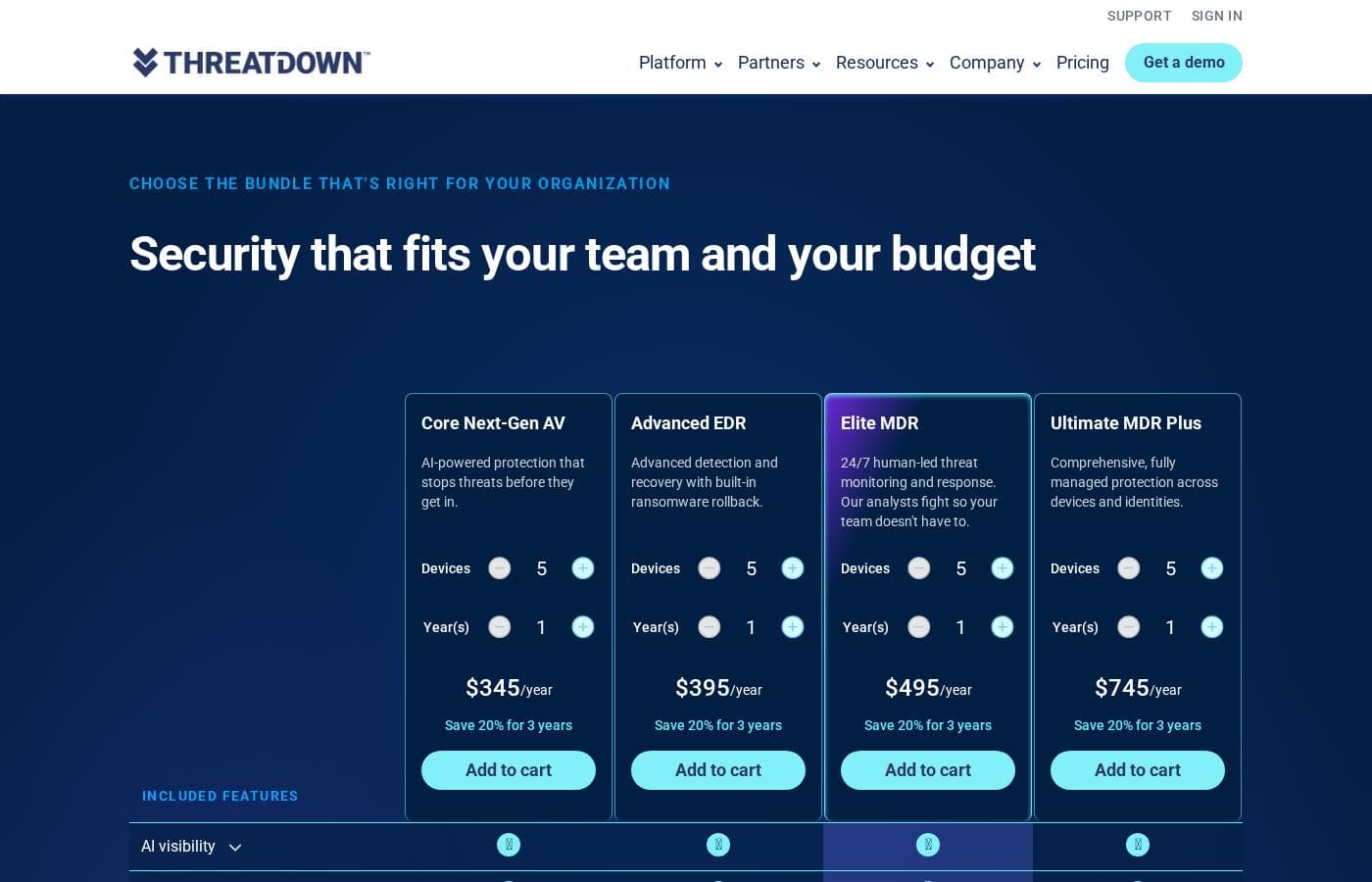
ThreatDown's pricing page

ThreatDown pricing page screenshotView pricing page screenshot

Price history

Tracking prices since Oct 1, 2026. No price change detected yet.

Pricing range: $345–$745/year

Pricing types: Yearly subscription

Pricing notes

ThreatDown offers four annual endpoint security bundles: Core Next-Gen AV at $345/year, Advanced EDR at $395/year, Elite MDR at $495/year, and Ultimate MDR Plus at $745/year. Pricing scales with device count, and a three-year commitment saves 20%.

ThreatDown costs between $345 and $745 per year with four plans: Core Next-Gen AV at $345/year, Advanced EDR at $395/year, Elite MDR at $495/year, and Ultimate MDR Plus at $745/year.

All bundles are billed annually. You can adjust the number of devices and years at checkout, and a three-year term saves 20%.

Core Next-Gen AV

Price: $345/year Best For: Teams that want solid baseline malware protection without managed services Other Features:

  • AI-powered next-gen antivirus
  • Ransomware rollback up to 7 days after an attack
  • Device control, application block, and vulnerability assessment
  • Browser phishing protection and AI visibility

Core is the starting point. It stops known and unknown threats before they execute and gives you automated remediation if something slips through. Pick it if your team handles security in-house and just wants reliable protection with recovery tools built in.

Advanced EDR

Price: $395/year Best For: IT teams that want deeper detection, investigation, and recovery capabilities Other Features:

  • Endpoint detection and response (EDR)
  • Patch management and host-based firewall management
  • Drive encryption for Windows workstations
  • Managed threat hunting

Advanced builds on Core with tools to spot suspicious behavior and respond quickly. Ransomware rollback is included, so encrypted files can be restored up to 7 days after an attack. Choose this tier if you have someone on staff to review alerts and act on them.

Elite MDR

Price: $495/year Best For: Teams without round-the-clock security staff Other Features:

  • 24x7x365 managed detection and response (MDR)
  • Human-led monitoring, investigation, and remediation
  • ThreatDown AI with plain-language guidance
  • Marked as Most Popular on the pricing page

This is ThreatDown's most popular plan, and it's easy to see why. Expert analysts watch your environment while you sleep, so attacks get handled overnight instead of Monday morning. If you can't staff a 24/7 security operation, this tier does it for you. 🛡️

Ultimate MDR Plus

Price: $745/year Best For: Organizations that want fully managed protection across devices and identities Other Features:

  • MDR Plus with malware removal, root cause analysis, and a published SLA
  • Identity threat detection and response (ITDR) included
  • Premium Support included, with faster SLAs and a dedicated technical resource
  • Threat intelligence and dark web exposure monitoring

Ultimate is the complete package. Identity-based attacks get coverage, and support perks that are paid add-ons on lower tiers come standard here. It suits teams that want one vendor handling endpoints, identities, and incident cleanup end to end.

A few things to know before you buy. The site doesn't mention a free trial or money-back guarantee, but you can request a demo before committing. Add-ons like DNS filtering, email security, server protection, and mobile security are available on every plan, and you can also purchase through a reseller or MSP partner. Since prices adjust with device count and term length, confirm your final total at checkout.
Email me when ThreatDown changes price

One email when we detect a price change on the vendor's pricing page. No newsletter, no deals. Unsubscribe in one click.

User Reviews

No reviews yet.

Write a Review

Write a Review for ThreatDown
0/100 characters
0/2000 characters

Why use ThreatDown?

Choosing security software usually means trading depth for simplicity. ThreatDown's pitch is that you don't have to. Based on the company's published materials, here's where it stands out:

  • Independent validation you can check. ThreatDown reports earning MRG Effitas certifications year after year and was named Product of the Year. Its published comparison chart places it first, ahead of Bitdefender, Symantec, ESET, and Microsoft.
  • Proof from real customers. The site shows a 4.6/5 G2 Leader rating from 1,000+ verified reviews, plus case studies from a nonprofit, a tech firm, and a distribution company.
  • Less tool sprawl. EDR, identity threat detection, patching, and email security run from a single lightweight agent in one console, designed so one operator can manage it all.
  • Round-the-clock coverage without hiring. 24/7 MDR pairs AI scale with human analysts who investigate, isolate, and remediate. The site prices it at roughly $10 per device monthly, versus $1M+ per year for a DIY SOC.
  • Fast setup. The company says it installs in minutes and works immediately. One customer reported deploying across 1,000+ servers in 5 minutes.
  • Hours back every week. Cited results include 5+ hours saved weekly at a nonprofit and 40 hours saved monthly by a one-person IT team covering 150 endpoints.

ThreatDown alternatives

Other tools in the Managed Security Service category

View all Managed Security Service tools
Wiz

Wiz

Managed Security Service4.2/5

Wiz is an AI-powered cloud security platform that protects everything you build and run in the cloud—from code to runtime. It's built for security teams, CISOs, and engineering organizations, especially those running multi-cloud environments or shipping fast with AI. The company says more than 65% of Fortune 100 firms use it, and 839 public reviews rank it #1 in cloud security.

Druva

Druva

Managed Security Service3.9/5

Druva is a fully managed SaaS platform for data protection and cyber resilience. It covers backup, disaster recovery, ransomware response, identity threats, and AI data from one cloud-native console. There's no hardware to install or maintain. It's built for IT and security teams protecting Microsoft 365, endpoints, VMware, AWS, Azure, NAS, and SQL. Customers range from mid-sized firms to NASA, Amgen, and Marriott.

AFTRDRK

AFTRDRK

Managed Security Service3.5/5

AFTRDRK's DRK Web Surveillance (DWS) gives you real cyber threat intelligence signals that come from where the real action takes place — deep in the underground forums, communications channels, marketplaces, and other enclaves where cybercriminals plan and execute attacks. By monitoring threats in closer proximity to where cybercrime is happening, DWS identifies risks targeting your organization earlier and more accurately than traditional tools.

ThreatDown FAQ

Does ThreatDown offer a free trial or money-back guarantee?

The pricing page doesn't list a free trial or refund policy. You can request a demo before buying, or get matched with a reseller or MSP partner. Review the managed service terms before you commit.

Which operating systems does ThreatDown protect?

The pricing page shows support for Windows, macOS, Linux, ChromeOS, iOS, and Android. Mobile Security extends coverage to Chromebook, Android, iOS, and iPadOS devices. Drive encryption enforcement targets Windows workstations.

How do you manage ThreatDown once it's deployed?

Everything runs from one lightweight agent in Nebula, a single-tenant console for your organization. MSPs get centralized multi-site visibility through OneView instead. Support portals for both consoles sit under the site's Support menu.

Is ThreatDown available in languages other than English?

Yes. The website offers full product and pricing pages in English, German, French, and Spanish. For availability, support hours, or local resellers in your region, contact sales or use the partner locator.

Ready to try ThreatDown? Check out the official site or pricing.

Are you ThreatDown? Claim this listing · Get the badge