SmartSuite

SmartSuite review

A work platform that connects GRC, IT, projects, and business operations in one place.

SmartSuite costs from $15/mo · 3 plans · prices checked Oct 12, 2026

By Ciroapp Editorial Team · Updated Sep 9, 2026

Commission may apply at no extra cost

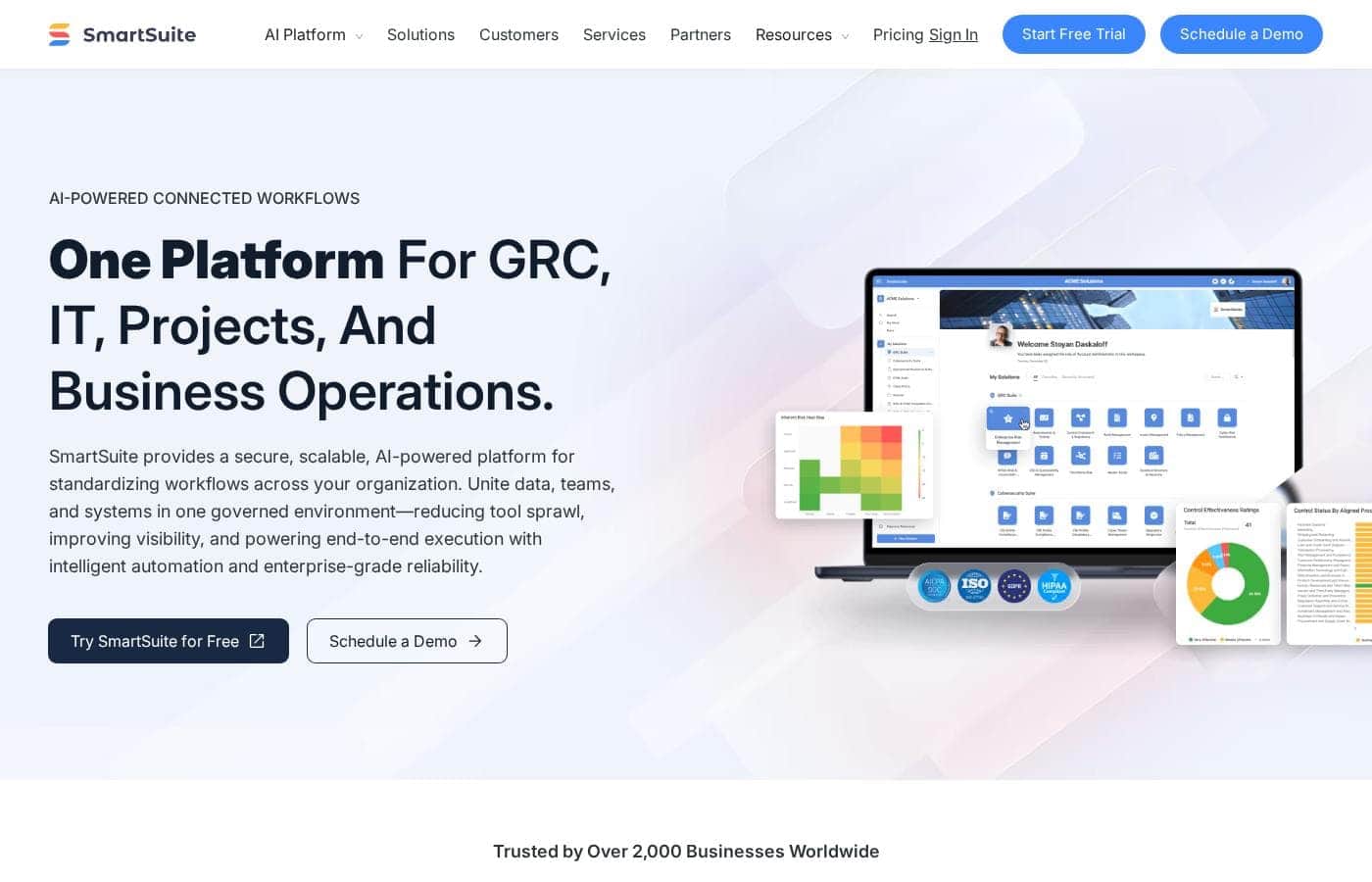
SmartSuite homepage screenshot

At a glance

Quick overview for SmartSuite: rating, pricing summary, key features, and highlights.
Pricing verified Oct 12, 2026

Ciroapp score

4.0/ 5

SmartSuite pulls GRC, IT, projects, and operations onto one no-code platform with strong security credentials and built-in AI assistants. Published pricing covers the lower tiers, but enterprise plans are quote-only, usage caps add up quickly, and no independent reviews back the vendor's claims. Overall, it's a solid pick for regulated teams that value consolidation over lightweight simplicity.

Pros

  • Pros:Published per-seat pricing for the lower tiers — Team costs $15 per seat/month billed annually ($20 monthly, 3-user minimum) and Professional runs $32 per seat/month billed annually ($36 monthly, 5-user minimum), with a 14-day free trial of Professional that needs no credit card.
  • Pros:Enterprise-grade compliance out of the box — SOC 2 Type II, ISO 27001, GDPR, and HIPAA alignment, AES-256 encryption at rest, HTTPS in transit, and a choice of U.S. or EU data centers — a practical fit for banking, healthcare, and other regulated teams.
  • Pros:Process owners can modify workflows, forms, dashboards, and automations without filing developer tickets, while IT retains control through role-based permissions, audit history, and centralized admin — no-code change without governance loss.

Cons

  • Cons:Enterprise and Signature pricing is quote-only — no dollar amounts are published, so budgeting for SSO, SCIM, audit logs, HIPAA with a BAA, or EU data residency requires a Sales conversation before you can compare total cost.
  • Cons:Per-plan usage ceilings constrain smaller teams — the Team plan caps at 5,000 records per solution and 50GB of file storage with a 30-day recycle bin, while automation runs are metered monthly across every tier — heavy workloads may force an early upgrade to Professional at more than double the seat price.
  • Cons:The vendor's claim of 25–40% lower subscription costs than comparable platforms is not independently verified, and with no G2, Capterra, or Trustpilot reviews available to cite, buyer sentiment rests entirely on company-published materials rather than hands-on testing.
Best for
  • GRC teams consolidating risk, compliance, audit, and third-party risk into one connected system
  • IT departments that need ITSM, asset management, and incident response together
  • PMOs tracking projects, portfolios, and OKRs with real-time reporting
Free trial
Yes
This section is a summary. Detailed sections about features, use cases, pricing, and reviews follow below.

What is SmartSuite?

Juggling risk logs in one tool, IT tickets in another, and project plans in a third? That's how handoffs break and visibility disappears. SmartSuite puts GRC, IT, projects, and operations on one connected platform, so you can automate manual work, cut tool sprawl, and see everything in real time.

SmartSuite is an AI-native work platform, often described as a Work Operating System. It brings data, automation, AI, permissions, and reporting into one governed environment. Teams run GRC, IT service delivery, project portfolios, and business operations on the same foundation.

Over 2,000 businesses across 100+ countries use it, from startups to enterprises in regulated industries like banking and healthcare.

Should you choose SmartSuite?

Quick buyer guidance before you compare plans or click through.

Choose it if

  • Teams tired of tool sprawl, data silos, and manual handoffs between systems
  • Process owners who want to change workflows and automations without waiting on developers
  • IT leaders who need role-based access, audit history, and centralized admin controls
  • Global teams that need 15-language support and U.S. or EU data residency
  • Organizations that want AI help embedded in everyday work, not bolted on afterward

Skip it if

  • Teams wanting only a lightweight task tracker; the platform's depth leans toward connected, governed business workflows
  • Shoppers wary of vendor cost claims; the stated 25–40% savings isn't independently verified, so compare real quotes
  • Organizations with niche tools to connect; confirm your systems work with SmartSuite's integrations, API, or webhooks first
  • Teams without rollout support; complex GRC deployments may need onboarding services or a SmartSuite partner, so factor that into your plan

Next steps before buying

  1. 1Start the free trial and test it with one real workflow, not just sample data
  2. 2Confirm your must-have integrations using SmartSuite's integration docs, Developer API, and webhook documentation
  3. 3Watch demo-library videos for your specific use case to see the product before shortlisting
  4. 4Compare against two or three alternatives on price and scope, and check trial terms before you commit

Ease of use

Based on the company's published materials (not hands-on testing), SmartSuite positions itself as a no-code platform: process owners can tailor workflows, forms, and automations without developers. The site emphasizes launching in weeks using ready-made Solution Suites, and it backs adoption with a free Academy, demo library, webinars, community, and onboarding services. That support network suggests help is available if setup feels heavy.

SmartSuite Key Features

✨ Change workflows yourself, no code needed

Design workflows visually, then tailor them as needs change—no code required. Process owners can adjust workflows, forms, dashboards, and automations themselves, while IT keeps control through permissions and governance. It's a good fit when teams want to move fast without filing developer tickets.

Every improvement stays reusable across teams and use cases.

🤖 AI that works inside your workflows

SmartSuite AI agents can act on your behalf—summarizing updates, drafting content, classifying requests, and triggering next steps. Models and access stay governed from a centralized AI Control Center. Purpose-built assistants cover each solution area:

  • Ticket Triage sorts tickets and routes them to queues
  • Status Reporter turns project activity into executive briefs
  • Evidence Assistant collects and summarizes compliance evidence

✨ Live reporting, one source of truth

Dashboards and reports show what matters, always up to date. Because data lives on one platform, leaders can track risk, IT, projects, and operations without stitching exports together. Use it for portfolio reviews, compliance oversight, or weekly ops check-ins—wherever current numbers change the decision.

✨ Security and governance built in

Role-based access, authentication controls, audit history, and centralized admin controls keep the right people in the right data. All traffic is HTTPS encrypted, and data at rest uses AES-256. You can deploy in U.S.

or EU data centers for residency needs. That matters most in regulated industries like banking and healthcare.

✨ Start fast, then expand on the same platform

Ready-to-deploy Solution Suites give you a best-practice foundation for GRC, IT service delivery, projects, and business operations. You start from proven templates instead of a blank slate, configure without code, and go live quickly. As adoption grows, teams can expand workflows on the same platform without starting over.

Use Cases

🛡️ Run GRC in one connected place

Risk and compliance teams manage assessments, audits, SOX controls, and vendor reviews in one place. Instead of juggling spreadsheets, you track status, owners, and evidence in real time. Expected outcome: a single source of truth for risk work.

Tip: Start with audit management, then expand.

🖥️ Deliver IT services without the chaos

IT teams handle tickets, incidents, and assets in one workspace. When something breaks, you triage requests, assign owners, and keep service history together. Expected outcome: faster resolution with fewer handoffs.

Tip: The Ticket Triage assistant classifies and routes requests for you.

📊 Track projects and OKRs in real time

PMO leads roll up projects, programs, and portfolio spend into one view. You see priorities, risks, and progress against OKRs without chasing status updates. Expected outcome: leadership reporting that's always current.

Tip: Watch the portfolio management demo to see rollups in action.

⚙️ Standardize everyday operations

Ops teams run HR onboarding, procurement requests, and sales workflows on the same platform as risk and IT. When processes connect, handoffs stop slipping. Expected outcome: consistent processes across departments.

Tip: Start with one team or use case, then expand as value shows.

SmartSuite pricing

From$15/mo

  • 3 plans

Prices checked on Oct 12, 2026 from SmartSuite's pricing page

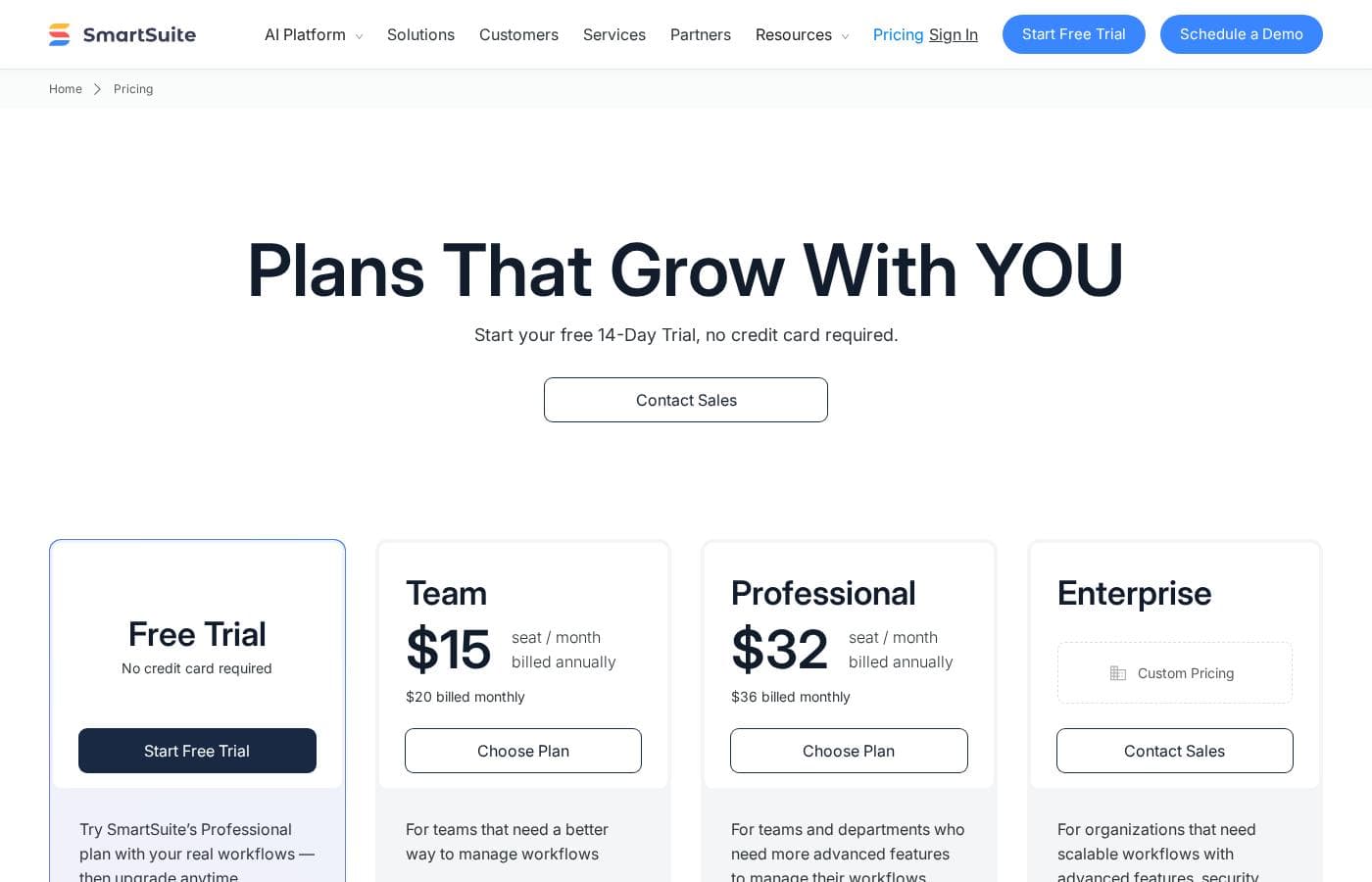
SmartSuite pricing page screenshotView pricing page screenshot
PlanBilled monthlyBilled annuallyIncludes
Team
per user
$15 seat / month billed annually ($20 billed monthly) per seat / month
$15/mo
$180 per year
For teams that need a better way to manage workflows. Min 3 billable users, SmartSuite AI, unlimited solutions, 5,000 records per solution, 50GB file storage, 30 days recycle bin.
Professional
per user
$32 seat / month billed annually ($36 billed monthly) per seat / month
$32/mo
$384 per year
For teams and departments needing more advanced features. Min 5 billable users, SmartSuite AI, unlimited solutions, 100,000 records per solution, 100GB file storage, 45 days recycle bin. Everything in Team plus folders, Gmail and Outlook integrations, and advanced permissions.
Enterprise
See vendor page
See vendor page
Custom pricing via Contact Sales. For organizations needing scalable workflows with advanced security and support. SmartSuite AI, unlimited solutions, 400,000 records per solution, 500GB file storage, 60 days recycle bin. Everything in Professional plus SSO, SCIM user provisioning, SCIM-synced user groups, audit logs, IP restrictions, DLP, European data residency, and premium support.

Price history

Tracking prices since Sep 9, 2026. No price change detected yet.

Pricing types: Free trial, Yearly subscription, Per seat pricing

Pricing notes

SmartSuite offers three public plans: Team at $15 per seat/month billed annually ($20 monthly), Professional at $32 per seat/month billed annually ($36 monthly), and Enterprise with custom pricing. A free 14-day trial of the Professional plan is available with no credit card required, and an exclusive Signature Plan is offered via Contact Sales.

SmartSuite sells tiered, per-user subscription plans, with Enterprise and Signature tiers for teams that need advanced security, compliance, and support.

Every tier starts with a free trial, so you can explore the platform before you pay. The pricing page compares plans feature by feature. Here's what the named tiers offer.

Enterprise

Other Features:

  • Priority email support through Premium Support
  • SAML-based single sign-on, including Microsoft Entra (formerly Azure AD)
  • HIPAA compliance with a Business Associate Agreement (BAA)
  • Payment by invoice through the Sales team
  • Professional services packages for qualified customers

Enterprise is built for larger organizations with strict security and governance needs. You get priority support, SSO, and HIPAA options in one tier. Invoice billing and professional services make procurement and rollout easier too. If your team handles regulated data, this plan is a natural fit.

Signature

Other Features:

  • HIPAA compliance with a BAA
  • Invoice billing via the Sales team
  • Professional services packages for qualified customers
  • Customer Success Manager with an annual plan of 25 or more licensed users

Signature sits at the top of SmartSuite's lineup next to Enterprise. It's aimed at enterprises that want the platform's most advanced options and hands-on help. If you're a smaller team with simple workflows, you likely don't need this level of service.

A few usage limits are worth knowing before you choose. Automation runs are capped each month, while records per solution, records per table, and attachment storage all vary by plan. Each plan also sets a minimum number of users per workspace. Broader security features, like audit logs, IP restrictions, and EU data residency, round out the platform's toolkit.

You can start with a free trial, so there's no risk in trying SmartSuite first. Dollar amounts aren't published on this page, so confirm current rates and user minimums with the Sales team before you buy. Enterprise and Signature customers can also pay by invoice, which keeps billing simple for larger teams.
Cost calculator

Estimate what SmartSuite costs for your team.

Billing

Team has no published price for this billing cycle.

Team is priced per user: price × 5 seats. Estimate based on published list prices, before taxes, add-ons and discounts.

How to pay less for SmartSuite

  • A free trial is available: test it before you pay.
  • Some plans are priced per user: only pay for seats people actually use.
  • Cheaper tools in this category start at $6.58/mo.
Start free trial

Email me when SmartSuite changes price

One email when we detect a price change on the vendor's pricing page. No newsletter, no deals. Unsubscribe in one click.

User Reviews

No reviews yet.

Write a Review

Write a Review for SmartSuite
0/100 characters
0/2000 characters

Why use SmartSuite?

Most teams don't need more tools—they need the tools they have to stop working against each other. That's the core problem SmartSuite is built to solve, and its published claims point to real, practical advantages.

  • Consolidate on one platform. Replace scattered point solutions for risk, IT, projects, and operations, keeping data, permissions, and reporting consistent across teams.
  • Customize without code. Process owners can tailor workflows, forms, dashboards, and automations themselves, while IT keeps control through permissions and governance.
  • Put AI to work inside workflows. AI agents and assistants can summarize updates, draft content, classify requests, and trigger next steps—all governed from a centralized AI Control Center.
  • Meet enterprise security expectations. SOC 2 Type II, ISO 27001, GDPR, and HIPAA alignment, AES-256 encryption at rest, plus U.S. and EU data centers for residency needs.
  • Roll out in weeks, not quarters. Ready-to-deploy Solution Suites and onboarding services start you from a best-practice foundation instead of a blank slate.
  • Watch for stated savings. SmartSuite claims 25–40% lower subscription costs than comparable solutions for similar scope—verify that against your actual quotes.

SmartSuite alternatives

Other tools in the CRM category

View all CRM tools
Close CRM

Close CRM

CRM4.1/5From $9/mo

Close CRM is a sales-focused platform designed to be one tool for all communication. It’s built for selling, not just data entry, helping teams manage customers and work deals with less busywork. The platform signals AI support for notes, enrichment, summaries, and email rewriting and can integrate with Claude and ChatGPT.

Keap

Keap

CRM3.7/5

Keap is an automation and growth platform built for small businesses and teams who want more leads, more revenue, and predictable sales. It helps you run things more smoothly, so you can get more done with the team you already have.

Propovoice

Propovoice

CRM3.5/5From $6.58/mo

Propovoice is an All-in-One Client Management Solution designed to work right inside your WordPress site. It serves as a simple yet powerful WP CRM and Invoicing plugin. This tool is built to support a wide range of service businesses. This includes 🏄 freelancers, independent professionals, and established agencies. Because it operates as a self-hosted plugin, not a traditional SaaS, you maintain complete security and control over all your data. Users often note that its pleasing user experience makes it quite rare and different in the WordPress environment. It's truly a unified platform for managing your service business needs.

Salesflare

Salesflare

CRM4.2/5

Salesflare is a simple yet powerful CRM designed for small and medium businesses selling B2B. It helps teams keep track of everything automatically, enrich data, and collaborate with more transparency. It connects with LinkedIn, Gmail, and Outlook to remove copy-paste and keep all details in one place.

Pipedrive

Pipedrive

CRM4.2/5From $14/mo

Pipedrive is a trusted CRM platform already used by over 100,000 companies worldwide. It is designed specifically for sales teams and growing small businesses. The tool helps you easily manage all your leads and deals. It provides a single space for your activities and instant access to crucial sales data. The core benefit is simple: less time managing and more time closing deals.

Hubspot

Hubspot

CRM4.2/5

The HubSpot Customer Platform is a comprehensive system built around the Smart CRM. This Smart CRM acts as your single source of truth for all business data. It helps go-to-market teams—marketing, sales, and customer service—work together seamlessly. Over 268,000 customers across more than 135 countries already use it to scale their operations. The platform offers specialized Hubs that connect to everything you need to create content, find leads, close deals, and grow revenue.

Salesforce

Salesforce

CRM4.2/5

Salesforce is a leading global software company recognized for providing integrated technology solutions. It helps businesses across many sectors, offering specific tools for Financial Services, Retail, Healthcare, and more. This platform focuses on connecting proactively with customers, automating workflows, and unifying data. Importantly, Salesforce incorporates powerful AI agents like Agentforce to improve support, boost productivity, and drive business outcomes. The system aims to give you a single, unified value chain approach. You can also leverage a strong ecosystem through the AppExchange for additional tools and partners.

Demodesk

Demodesk

CRM4.2/5

Demodesk is an AI meeting assistant and sales agent platform for revenue teams. It records online, phone, and in-person meetings, then transcribes and summarizes them in 98 languages. Its AI agents handle summaries, coaching, CRM updates, and deal insights. The company is based in Munich, stores data on EU servers (Azure Frankfurt), and is GDPR-native and ISO 27001:2022 certified. It fits European sales teams that want automation with strict data privacy.

Cheapest CRM software for 1 to 25 users

SmartSuite FAQ

How much does SmartSuite cost?

SmartSuite's cheapest paid plan, Team, costs $15 per month. Paid plans range from $15 to $32 per month. Prices checked on Oct 12, 2026 from the vendor's pricing page.

Does SmartSuite have a free plan?

No. SmartSuite lists no free plan; the cheapest paid plan starts at $15 per month.

Does SmartSuite offer a free trial or a money-back guarantee?

SmartSuite offers a free trial.

Has SmartSuite's price changed recently?

No. We have not detected a price change since we started tracking on Sep 9, 2026.

Can SmartSuite connect to the tools my team already uses?

Yes. SmartSuite has native integrations plus Zapier and Make, which connect to thousands of apps. Developers get a REST API and webhooks, and Gmail and Outlook email sync is built in. Confirm your must-have tools in the docs first.

How does SmartSuite protect sensitive data, and is it compliant?

It's built for regulated environments: SOC 2 Type II, ISO 27001, GDPR, and HIPAA alignment, with AES-256 encryption at rest. HIPAA needs a BAA on Enterprise or Signature plans. You can also choose EU data residency.

Ready to try SmartSuite? Check out the official site or pricing.

Are you SmartSuite? Claim this listing · Get the badge