Publer

Publer review

A streamlined, all-in-one platform for managing and scheduling social media posts.

By Ciroapp Editorial Team · Updated Sep 17, 2026

Commission may apply at no extra cost

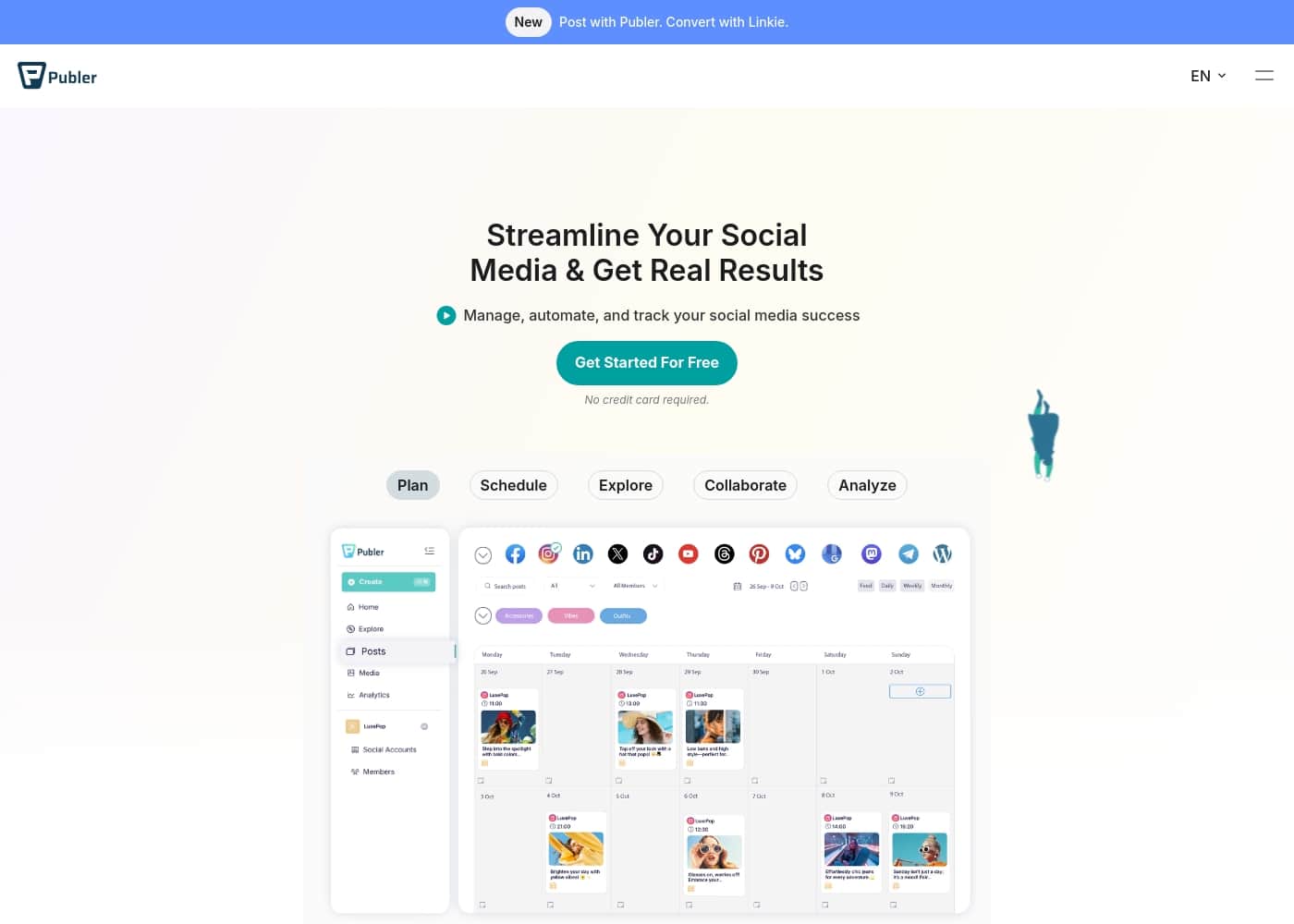
Publer homepage screenshot

At a glance

Quick overview for Publer: rating, pricing summary, key features, and highlights.

Ciroapp score

4.7/ 5

Efficient, affordable social media hub.

We found Publer to be a robust and user-friendly platform for managing social media across multiple channels. Its core strengths lie in scheduling, analytics, and team collaboration. Overall, it offers strong value for small businesses and creators seeking an all-in-one tool.

Pros

  • Pros:Intuitive, clean interface that simplifies scheduling and management.
  • Pros:Significant time-saving features like bulk uploading and content recycling.
  • Pros:Fair and affordable pricing with good value for money.

Cons

  • Cons:Free version has notable limitations, especially on media uploads.
  • Cons:Some advanced features (e.g., bulk Reel scheduling) are missing.
  • Cons:A few users found the cost high for specific use cases like RSS automation.
Best for
  • Solo content creators and influencers who post daily across Instagram, TikTok, and Facebook and want to batch-schedule a week of content in one sitting with auto-recycling of top posts.
  • Small business owners (e.g., local bakeries, real estate agents) who need to promote specials or listings on Facebook, Instagram, and Google Business without juggling multiple native apps.
  • Small marketing agencies managing several client brands that need per-client workspaces, approval workflows, and shareable analytics reports.
This section is a summary. Detailed sections about features, use cases, pricing, and reviews follow below.

What is Publer?

Managing multiple social media accounts can feel like a full-time job. You're juggling platforms, schedules, and engagement, often missing out on real results. ✨ Publer addresses this by offering a centralized hub to manage, automate, and track your social media success, aiming to save you time and boost engagement.

Publer is a social media management and scheduling tool designed for individuals and teams. It's built for small business owners, content creators, and agencies who need to streamline their workflow across platforms like Facebook, Instagram, LinkedIn, and more. 💡 The platform focuses on planning, scheduling, and analyzing content to help you stay consistent and grow your online presence.

Should you choose Publer?

Quick buyer guidance before you compare plans or click through.

Choose it if

  • Solo content creators and influencers who post daily across Instagram, TikTok, and Facebook and want to batch-schedule a week of content in one sitting with auto-recycling of top posts.
  • Small business owners (e.g., local bakeries, real estate agents) who need to promote specials or listings on Facebook, Instagram, and Google Business without juggling multiple native apps.
  • Small marketing agencies managing several client brands that need per-client workspaces, approval workflows, and shareable analytics reports.
  • Budget-conscious teams that want a free-forever tier plus paid plans starting at $4.00/month/account billed annually, with flexible add-on scaling for extra accounts and team members.

Skip it if

  • Users who rely heavily on advanced features like bulk Reel scheduling, since some of these capabilities are missing or limited on lower tiers.
  • Lightweight use cases such as single-purpose RSS feed automation, where reviewers have found the cost hard to justify.
  • Teams that need unlimited daily posting on a budget — the Free plan caps at 10 scheduled posts per account and paid tiers carry per-platform daily limits (e.g., 20 Instagram Reels) unless waived for news or government organizations.
  • X (Twitter) publishers on the free tier, since Twitter/X publishing is only supported on paid plans.

Next steps before buying

  1. 1Sign up at publer.io and connect your social accounts (Facebook, Instagram, TikTok, X, LinkedIn, and more) from the dashboard — no credit card is required to start a trial.
  2. 2Start with the free-forever tier to test the drag-and-drop calendar and basic scheduling, or activate the 7-day Professional / 14-day Business free trial to evaluate paid features like bulk scheduling and analytics.
  3. 3Import your content in bulk via CSV upload, arrange posts on the calendar, and enable auto-scheduling so posts go live at optimal engagement times.
  4. 4Set up workspaces and approval workflows if you manage clients or a team, and configure the Link in Bio page and browser extension for faster day-to-day publishing.
  5. 5If you decide to subscribe, choose a plan under Settings → Billing (yearly billing saves 20%, every 10th account is free, and a 14-day refund window applies), and consider the 50% non-profit discount if you qualify.

Publer Key Features

✨ Scheduling & Content Planning

Plan and schedule your social media content in advance to stay consistent. You can post across multiple platforms at once to expand your reach. Use the drag-and-drop calendar to organize everything visually.

Schedule posts at optimal times for maximum engagement. Automate posts in bulk to save time and stay offline. This helps you plan content easily and keep a regular posting rhythm.

✨ Analytics & Performance Tracking

Access in-depth analytics to track your social media performance. Understand what content works best for your audience. Make data-driven decisions to improve your strategy over time.

The platform helps you see results clearly. You can track engagement and other key metrics. This insight lets you focus on what drives real growth.

✨ Collaboration & Team Workflows

Streamline teamwork with built-in collaboration and approval features. It’s designed for teams or agencies managing multiple brands and client workflows. You can work together smoothly without confusion.

The platform makes it easier to coordinate tasks. Everyone stays on the same page. This reduces back-and-forth and speeds up your content approval process.

✨ Content Creation & Enhancement

Create engaging content in minutes with helpful tools. The platform supports features like auto-recycling to repurpose top content. This drives more interaction without extra effort.

You can also use a browser extension to share online content with a single click. This makes content creation faster and more efficient. It helps you stay creative while saving time.

✨ Trend Exploration & Content Discovery

Explore the latest trends and industry news to keep your content fresh. The platform helps you find relevant topics and ideas. This ensures your social media stays engaging and up-to-date.

You can discover new content opportunities easily. It’s a great way to stay ahead of the curve. This feature supports consistent growth for your online presence.

✨ Link in Bio & Traffic Driving

Design a custom, free Link in Bio for your Instagram. This helps boost clicks and drive sales from your social profiles. It’s a simple way to direct traffic to your website or products.

The feature is easy to set up and use. You can customize it to match your brand. It’s a practical tool for increasing conversions.

✨ Mobile Management & Support

Manage your social media on the go with the Publer Mobile App. You can handle posts and tasks anytime, anywhere. This ensures you never miss a beat.

You also get access to 24/5 expert support via live chat. Help is available when you need it. The platform is designed to be user-friendly and reliable.

Use Cases

📱 Solo Content Creator Stays Consistent

As a solo creator, you need to post daily across Instagram, TikTok, and Facebook. Manually logging in for each platform takes hours. Publer lets you schedule a week's worth of posts in one sitting. You can use the drag-and-drop calendar to plan visually. With auto-scheduling, you ensure posts go live at optimal times, even while you sleep. You save over 5 hours a week, which you can now spend creating more content or relaxing.

Expected outcome: Consistent posting without daily effort, leading to a 300% engagement boost.

Tip: Use the auto-recycling feature to repurpose your top-performing posts and keep engagement high.

🍰 Small Business Owner Saves Time

You run a local bakery and need to promote specials on Facebook, Instagram, and Google Business. Juggling three apps feels chaotic. Publer's bulk scheduling lets you upload all your posts at once using a CSV file. You plan everything on a calendar and forget about it. This automation saves you over 5 hours weekly, freeing you up to focus on baking. You also get analytics to see which posts drive the most clicks to your store.

Expected outcome: More time for core business tasks, with a clear view of what content works.

Tip: Use the browser extension to quickly share recipe videos from your website directly to your social feeds.

🤝 Agency Manages Multiple Clients

You're a marketing agency handling social media for 5 different brands. Coordinating approvals and schedules across teams is messy. Publer's collaboration and approval features streamline this. You can set up workspaces for each client, assign tasks, and get approvals before anything goes live. The platform's analytics help you show clients monthly reports with clear data. This saves your team from switching between tabs and tools.

Expected outcome: Smoother client workflows and faster content approval cycles.

Tip: Use the CSV bulk upload to schedule all client content for the month in one batch.

🏡 Real Estate Agent Boosts Visibility

As a real estate agent, you need to showcase listings on multiple platforms. Manually posting on Facebook, Instagram, and LinkedIn takes time you don't have. Publer lets you schedule property posts with photos and links in advance. You can use the auto-scheduling to post at peak times when buyers are active. The analytics show you which listings get the most engagement, helping you focus on what works.

Expected outcome: Increased property visibility and more inquiries from social media.

Tip: Use the Link in Bio feature to create a custom page that drives traffic to your listings.

📅 Team Collaborates on Content Calendar

Your marketing team needs to plan and schedule content for the next quarter. Everyone contributes ideas, but it's hard to coordinate. Publer's drag-and-drop calendar makes it easy to visualize the plan. Team members can comment and approve posts within the platform. You schedule everything in bulk, ensuring content goes live at optimal times. This cuts down on back-and-forth emails and keeps everyone aligned.

Expected outcome: A unified content plan with faster execution and fewer miscommunications.

♻️ Influencer Recycles Top Content

You're an influencer who posted a viral photo on Instagram. You want to reuse it on other platforms without extra work. Publer's recycling feature lets you automatically repurpose your best content. You can schedule it to post again on Facebook and LinkedIn, boosting engagement without creating new material. This saves time and keeps your audience engaged with your top-performing posts.

Expected outcome: Higher engagement from existing content, reducing the need for constant creation.

Tip: Set up auto-recycling rules to repurpose your top 10 posts every month.

📲 Freelancer Scales with Mobile App

You're a freelancer working from coffee shops and need to manage social media on the go. Publer's mobile app lets you schedule and track posts from your phone. You can upload photos, write captions, and schedule them for later. This means you stay consistent even when you're away from your desk. The app also lets you check analytics to see what's working in real time.

Expected outcome: Seamless social media management from anywhere, with no missed posts.

Publer pricing

Prices not verified yet — see the vendor page.

Publer's pricing page

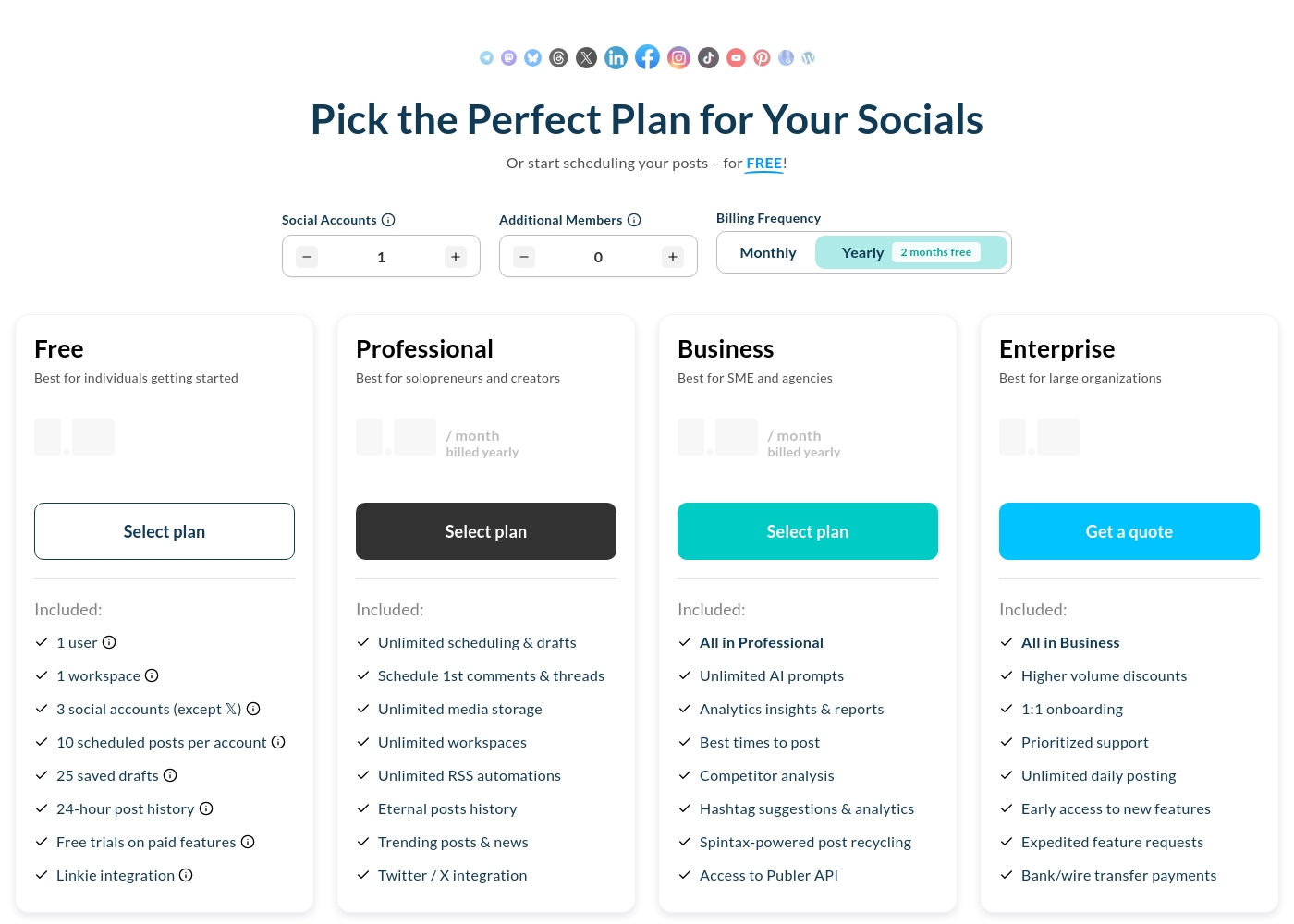
Publer pricing page screenshotView pricing page screenshot

Pricing types: Free plan, Free trial, Monthly subscription, Usage-based pricing

Pricing notes

Publer offers a free-forever tier and paid subscriptions starting at $4.00/month/account when billed annually. Paid tiers include the core feature set of either the Professional or Business plans with flexible add-on scaling for more channels or team members.

Yearly commitments receive a 20% discount (equivalent to two months free). Only paid plans support Twitter/X publishing, with 7-day or 14-day free trials available on standard upgrades before active billing begins.

Standard purchases are secured under a 14-day refund policy, with optional bank, card, or PayPal transactions handled by legal processors globally. Daily platform limitations apply uniformly until manual verification waivers are granted under specific organizational cases (news, gov).

Support scales naturally from self-serve online bases to automated queue management with prioritized assistance and personalized setup sessions for high-end accounts. Optional discounts are supported across registered nonprofits and massive visual network portfolios alike, allowing creators to start safely without commitment risk up front.

Small creators can manage basic posts easily while expanding profiles modularly alongside professional branding workflows over time with minimal manual overhead or locked features.

Publer pricing: Publer offers a free-forever tier and paid subscriptions starting at $4.00/month/account when billed annually. Yearly commitments receive a 20% discount (equivalent to two months free). Billing options: Free plan, Free trial, Monthly subscription, Usage-based pricing
Email me when Publer changes price

One email when we detect a price change on the vendor's pricing page. No newsletter, no deals. Unsubscribe in one click.

User Reviews

Publer earns overwhelmingly positive feedback on Trustpilot (4.9/5) for its ease of use, time-saving features, and fair pricing. Users praise the clean interface, bulk scheduling, and reliable performance, noting it simplifies multi-platform management.

🚀 Support responsiveness is frequently mentioned as a strength. Some find the free tier limiting and wish for more advanced features like bulk Reel scheduling.

Overall, the sentiment is one of high satisfaction for value and efficiency, with a few noting cost concerns for specific use cases like RSS feeds.

Summarized from public reviews on Trustpilot, Capterra

No reviews yet.

Write a Review

Write a Review for Publer
0/100 characters
0/2000 characters

Why use Publer?

Stop juggling tabs and start seeing results. Publer is built to simplify your social media workflow so you can focus on creating, not just managing. Here’s why it’s a smart choice:

  • Save significant time: Automate posts in bulk and use a drag-and-drop calendar to plan your content, potentially saving you over 5 hours weekly on social tasks. 📅
  • Boost engagement efficiently: Schedule posts at optimal times for maximum reach and use features like auto-recycling to repurpose top content and drive more interaction. 📈
  • Streamline teamwork: The platform includes collaboration and approval features, making it easier for teams or agencies to manage multiple brands and client workflows smoothly. 🤝
  • Gain actionable insights: Access in-depth analytics to track performance, understand what works, and make data-driven decisions to improve your strategy. 📊
  • Work from anywhere: Manage your socials on the go with the Publer Mobile App, ensuring you never miss a beat. 📱
  • Get support when needed: Enjoy access to 24/5 expert support via live chat to help you resolve issues quickly. 🛠️

With 13+ years of industry expertise and over 500K+ users, Publer is a proven platform that aims to make your social media efforts more efficient and effective.

Publer alternatives

Other tools in the Social Media category

View all Social Media tools
Hootsuite

Hootsuite

Social Media3.8/5

Hootsuite is the comprehensive platform designed to manage your entire social media presence faster and smarter. For 17 years, over 25 million users have relied on Hootsuite to streamline their workflow and outperform competitors. It centralizes all your essential social tools into just one single tab. You'll save hours creating, posting, and analyzing content, leaving you more time for strategic growth. The platform includes OwlyGPT, a social-first AI assistant trained on live feeds, helping you create trend-informed content and strategize smarter.

Publer FAQ

What social networks does Publer integrate with?

Publer supports Facebook, Instagram, TikTok, X (Twitter), LinkedIn, YouTube, Pinterest, Threads, Mastodon, Bluesky, Google Business, WordPress, and Telegram. You can manage all these from one dashboard.

How does the free trial work?

The Professional plan offers a 7-day free trial, and the Business plan offers a 14-day free trial. You can try almost all paid features during the trial without entering credit card details.

What are the daily posting limits?

Daily limits exist to prevent spam. For example, the Free plan has 10 scheduled posts per account, while the Professional plan has unlimited scheduling (but daily limits like 20 for Instagram Reels). Enterprise plans have unlimited daily posting. These limits can be waived for specific cases like news or government.

How do I upgrade or downgrade my plan?

You can change your plan anytime from Settings → Billing. The change takes effect immediately, and billing is pro-rated. No extra fees apply for switching.

What payment methods do you accept?

You can pay with PayPal or major credit/debit cards. Payments are handled securely by PayPro Global or Paddle. Yearly plans also allow bank/wire transfers.

Is there a discount for non-profits?

Yes. Publer offers a 50% discount for charities and non-profits. You need to provide supporting documents, such as a 501(c)(3), before starting a subscription.

How are social accounts and team members priced?

You pay per social account, but for every 9 accounts, the 10th is free. The same applies to additional team members. The plan owner is included in the price.

Can I cancel my subscription?

Yes. Cancel anytime from Settings → Billing. You can continue using the paid features until the end of your billing period. If recurring payment fails 3 times, you're automatically downgraded to the free version.

What is your refund policy?

You have 14 days from each payment to request a full refund. After 14 days, a pro-rated refund is available, but the yearly discount is waived. Refunds are issued manually upon request.

Will my price increase in the future?

Prices may go up for new customers, but existing subscribers are locked into their current rate. If you cancel and return later, you may be subject to the new pricing.

What kind of customer support do you offer?

All plans include self-serve help and live chat (24/5). You can also email [email protected]. Enterprise plans get 1:1 onboarding, prioritized support, and expedited feature requests.

How does Publer handle data and security?

Publer uses two-factor authentication (2FA) for added security. Payments are processed securely by third parties like PayPro Global and Paddle. Specific details on data handling are in their Privacy Policy.

Ready to try Publer? Check out the official site or pricing.

Are you Publer? Claim this listing · Get the badge