Palette.fm

Palette.fm review

Bring your black and white photos to life with vibrant, realistic AI colorization.

By Ciroapp Editorial Team · Updated Sep 17, 2026

Commission may apply at no extra cost

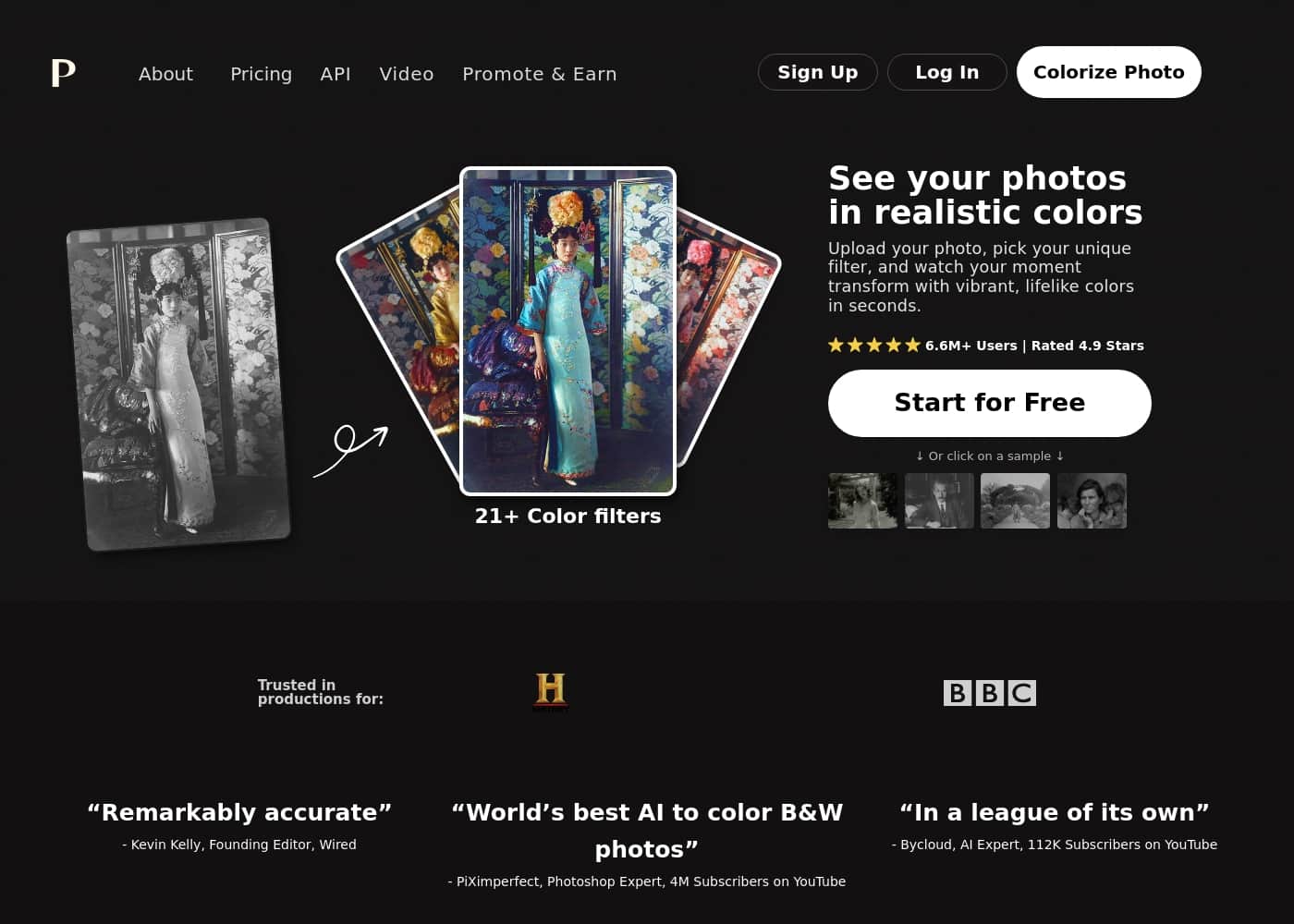
Palette.fm homepage screenshot

At a glance

Quick overview for Palette.fm: rating, pricing summary, key features, and highlights.
Vendor page checked Oct 12, 2026

Ciroapp score

4.2/ 5

Palette.fm turns black and white photos into realistic color with a simple upload, filter, and download flow, earning praise from Wired's Kevin Kelly and PiXimperfect. Keyword fine-tuning and batch uploads add power, but free previews are watermarked at 500x500 and support details are thin. Overall, it's an easy recommendation for reviving monochrome memories.

Pros

  • Pros:Produces remarkably realistic colorization — reviewers like Kevin Kelly (Wired) and PiXimperfect call it the world's best for accurate, natural-looking color
  • Pros:Simple three-step workflow — upload your photo, choose from over 21 color filters, and download the result in seconds
  • Pros:Fine-tune colors beyond the presets by adjusting keyword descriptions to guide the AI toward a specific look

Cons

  • Cons:The free plan caps images at 500x500 pixels with watermarks, so you can't evaluate full-resolution output quality without spending a credit
  • Cons:Specific third-party integrations (e.g., with design software), support channels and SLAs, and interface language options are not documented on the official site
  • Cons:Credits are consumed one per photo, which can add up quickly for large archival batch projects
Best for
  • Photographers who want to revive black and white portraits or offer colorized versions of their portfolios to clients
  • People restoring family history — old wedding photos, ancestors' portraits, and personal archives
  • Educators, museums, and archivists who need to batch-colorize large collections of historical images
This section is a summary. Detailed sections about features, use cases, pricing, and reviews follow below.

What is Palette.fm?

Do you have old black and white photos that feel distant? You want to see them in realistic color, but the tools seem complicated or produce unnatural results. Palette.fm fixes this.

It uses advanced AI to colorize your images accurately, giving you vibrant, lifelike colors in just seconds. ✨

Palette.fm is an AI-powered colorization tool designed for anyone with black and white photos. It's perfect for photographers, creators, and anyone wanting to restore family history. The service promises accurate colors and simple controls, trusted by over 2.8 million users.

💡
Should you choose Palette.fm?

Quick buyer guidance before you compare plans or click through.

Choose it if

  • Photographers who want to revive black and white portraits or offer colorized versions of their portfolios to clients
  • People restoring family history — old wedding photos, ancestors' portraits, and personal archives
  • Educators, museums, and archivists who need to batch-colorize large collections of historical images
  • Film and media creators blending colorized historical footage with modern scenes

Skip it if

  • Users who need guaranteed integrations with specific design software or a documented API workflow before committing
  • Teams that need per-seat licensing or documented support SLAs and response times, since pricing is per credit and support details aren't published
  • Anyone who only needs occasional free, full-resolution colorization — the free plan is limited to watermarked 500x500 previews

Next steps before buying

  1. 1Sign up at palette.fm and upload a grayscale or dull photo (or drag and drop several for batch processing)
  2. 2Pick one of the 21+ color filters and use the free preview to see the watermarked result at no cost
  3. 3Fine-tune the output with keyword adjustments if the colors need tweaking toward a specific look
  4. 4Spend your free trial credit or purchase a subscription/credit pack to download the high-resolution, watermark-free image

Palette.fm Key Features

🎨 AI-Powered Colorization

Palette.fm uses advanced AI to add vibrant, realistic color to your black and white photos. The technology is designed to be remarkably accurate, capturing lifelike details and natural light. It's trusted by over 2.8 million photographers and creators.

✨ Simple 3-Step Process

Colorizing a photo is straightforward. First, you upload your image or drag and drop multiple photos. Next, you choose from over 21 color filters.

Finally, you download your colorized photo or make further edits. You can also fine-tune colors by adjusting keywords.

✨ Accurate & Realistic Results

The AI focuses on getting the details right. It accurately colorizes elements like hands, lips, and clothing. The final images have lively, natural light, avoiding the flat, orange skin tones or heavy brown/purple tints common in other tools.

It's considered the world's best for realistic color.

✨ Flexible & Powerful Controls

You're not limited to preset filters. After picking a filter, you can click the adjust icon to fine-tune the colors. Use clear keyword descriptions to guide the AI toward the exact look you want.

This combination of simple choices and powerful customization works for both beginners and pros.

✨ Batch Processing & Pro Features

Palette.fm is built for efficiency. You can upload all your photos in one go for batch colorization. Paid plans unlock pro features like faster processing, pinning your favorite filters, organizing your workflow, and making copies for more efficient editing.

✨ Flexible Pricing Options

You can start completely free with watermarked previews. For high-resolution, logo-free images, you use credits. Each credit colorizes one photo.

Choose a subscription with monthly/annual credits that roll over, or buy a one-time credit pack. You can cancel subscriptions anytime.

Use Cases

🎞️ Family History Comes Alive

Imagine your grandmother's old wedding photo. It's beautiful, but the black and white makes it feel distant. You upload it to Palette.fm. In seconds, you see her bouquet in soft pink and the garden in lush green. It’s not just a colorized photo; it’s a moment you can finally feel connected to.

Tip: Start with the free preview to see the colors before committing.

📸 Reviving a Photography Portfolio

You're a photographer with a collection of classic black and white portraits. You want to offer them in a new light without manual work. Here's how Palette.fm helps:

  1. Upload your entire portfolio in one go with the batch upload feature.
  2. Select a color filter from over 21 options that match your artistic style.
  3. Download high-resolution, watermark-free images using your credits.

You now have a vibrant, colorized collection ready for client presentations or prints.

🏛️ Bringing History to Education

A history teacher is preparing a lesson on the 1950s. The textbook photos are dull. Palette.fm lets you transform these archives.

You upload a city scene. The tool accurately colors the cars, clothing, and storefronts based on real-world knowledge. Suddenly, your lesson is immersive.

Students see the past in realistic color, not just gray.

🎬 Creative Project Transformation

You're working on a film project that mixes historical footage with modern scenes. You need the old clips to feel vivid and current. Palette.fm's AI colorization does the heavy lifting.

You upload frames, choose a natural light filter, and the details—from fabric textures to skin tones—look convincingly real. The footage now blends seamlessly with your new shots.

🖼️ The Quick Personal Touch-Up

Problem: You found a favorite family photo that's perfect except for being black and white. Approach: You sign up for the free trial credit. Upload the image, pick a warm filter, and adjust the keywords to "sunny day" to fine-tune the sky and grass.

Outcome: You download a single, high-quality colorized memory to frame, with no subscription needed.

📚 Batch Processing for Archivists

A local museum has thousands of historical photos to digitize and colorize. Manual colorization is impossible. They use Palette.fm's subscription plan for efficiency.

The batch upload handles many images at once. The AI gets the 'little wow' details right—hands, lips, and natural light—saving countless hours of research and editing.

Palette.fm pricing

Prices not verified yet — see the vendor page.

Palette.fm's pricing page

Palette.fm pricing page screenshotView pricing page screenshot

Price history

Tracking prices since Oct 9, 2026. No price change detected yet.

Pricing types: Free plan, Free trial, Monthly subscription, Yearly subscription, One-time payment, Usage-based pricing

Pricing notes

Palette.fm offers modular pricing ranging from free previews to subscription and one-time credit bundles. balance.

balance. balance.

balance. balance.

balance. balance.

balance. balance.

balance. balance.

balance. balance.

balance. balance.

balance. balance.

balance. balance.

balance. balance.

balance. balance.

balance. balance.

balance. balance.

balance. balance.

balance. balance.

balance. balance.

balance. balance.

balance. balance.

balance. balance.

balance. balance.

balance. balance.

balance. balance.

balance. balance.

balance. balance.

balance. balance.

balance. balance.

balance. balance.

balance.

Palette.fm pricing: Palette.fm offers modular pricing ranging from free previews to subscription and one-time credit bundles. You can start for free with watermarked images or upgrade to a paid plan for high-resolution, logo-free downloads. balance.

Enjoy flexibility with credits that roll over and the ability to cancel subscriptions any time. balance. balance.

balance. balance. balance.

balance. balance. balance.

balance. balance. balance.

balance. balance. balance.

balance. balance. Enjoy flexibility with credits that roll over and the ability to cance

Email me when Palette.fm changes price

One email when we detect a price change on the vendor's pricing page. No newsletter, no deals. Unsubscribe in one click.

User Reviews

No reviews yet.

Write a Review

Write a Review for Palette.fm
0/100 characters
0/2000 characters

Why use Palette.fm?

You should choose Palette.fm because it delivers remarkably accurate and realistic results that other tools miss. Here’s why it stands out: ✅

  • Accuracy You Can Trust: Experts like Kevin Kelly (Wired) and PiXimperfect call it the world's best for realistic color.
  • Simple & Powerful: The process is straightforward—upload, pick a filter, and download. You can also fine-tune colors with simple keywords.
  • Catches the Details: It gets the 'little wow' details right, from hands and lips to lively, natural light.
  • Fast & Efficient: Colorize photos in seconds, with batch uploads for handling many images at once.
  • Flexible Options: Start for free to see previews, then choose a subscription for high-resolution, watermark-free images or a one-time payment pack. No complicated recurring plans required.

Palette.fm alternatives

Other tools in the Photo editing category

View all Photo editing tools
Adobe Lightroom

Adobe Lightroom

Photo editing4.1/5

Lightroom is a raw photo editor and digital asset manager in one application. Rather than modifying pixels directly, it stores edits as instructions layered over the original file, so any adjustment can be revisited or reverted indefinitely. The cloud version keeps originals and edits in Adobe's storage and mirrors them across devices, while Lightroom Classic maintains a local catalog on your own drive. Core tools include exposure and color controls, AI masking, healing, presets, HDR merge, and panorama stitching.

Luminar Neo

Luminar Neo

Photo editing4/5

Luminar Neo is a powerful, next-generation photo editing application. It uses an intuitive interface and a modern toolkit driven by advanced AI technology. This photo editor is built around a flexible, performance-focused engine. This structure ensures you get faster editing and exceptional results. You can install Luminar Neo on both macOS and Windows, available as a standalone application or a convenient plug-in.

Fotor

Fotor

Photo editing3.9/5

Fotor is a user-friendly online photo editor designed for everyone. It works well for both amateurs and more seasoned professionals. Unlike complex traditional software, Fotor provides powerful editing features within a highly intuitive interface. You can easily edit your photos online in just three simple steps: Upload, Edit, and Download. It’s also incredibly flexible. You can use Fotor on Windows, Mac, iOS, and Android devices. This availability means you can enhance your pictures anytime, anywhere, all managed with a single account.

Picsart

Picsart

Photo editing3.9/5

Palette.fm FAQ

What integrations does Palette.fm offer?

The website mentions an API and a video for workflows, but specific third-party integrations (like with design software) are not explicitly listed on the official site.

How does Palette.fm handle my data and privacy?

You should check their Privacy Policy (linked in the footer) for details on data processing and storage.

Are there limits on file size or batch uploads?

The free plan resizes images to a maximum of 500x500 pixels. Paid plans support higher resolution (up to 5000x5000 pixels). Batch uploads are supported, but specific file size or count limits per upload aren't stated.

How do credits work for subscriptions vs. one-time purchases?

Subscriptions provide credits that refresh monthly or annually and roll over (up to 5x the monthly amount). One-time purchases are credit bundles valid for 2 years. Each credit colorizes one photo.

What does the free trial include?

The free trial includes one credit for a single, logo-free, full-resolution colorization. You also get unlimited color previews on the free plan (with watermarks and lower resolution).

Is pricing per seat or per usage?

Pricing is per credit (usage), not per seat. Credits are used to colorize individual photos, and there is no mention of user or team-based pricing.

Can I cancel my subscription anytime?

Yes, the pricing page states you have the freedom to cancel your subscription anytime. Credits remain valid only while your subscription is active.

What support options and response times are available?

The footer has a 'Contact Us' link, but specific support channels, SLAs, or response times are not detailed.

Which languages and regions does Palette.fm support?

The service is web-based and appears to be available globally, but specific language support for the interface is not mentioned.

How do I get started or migrate existing projects?

Getting started is straightforward: sign up, upload photos, and pick a filter. For migrating existing projects (like from another tool), there is no specific import feature mentioned.

Who is Palette.fm best suited for?

It's designed for photographers, creators, and anyone with old black and white photos. It's trusted by millions and used in productions by companies like History and BBC.

Ready to try Palette.fm? Check out the official site or pricing.

Are you Palette.fm? Claim this listing · Get the badge