Murf AI

Murf AI review

Studio-grade AI voiceovers from text, plus developer APIs for speech, cloning, and translation.

By Ciroapp Editorial Team Β· Updated Sep 17, 2026

Commission may apply at no extra cost

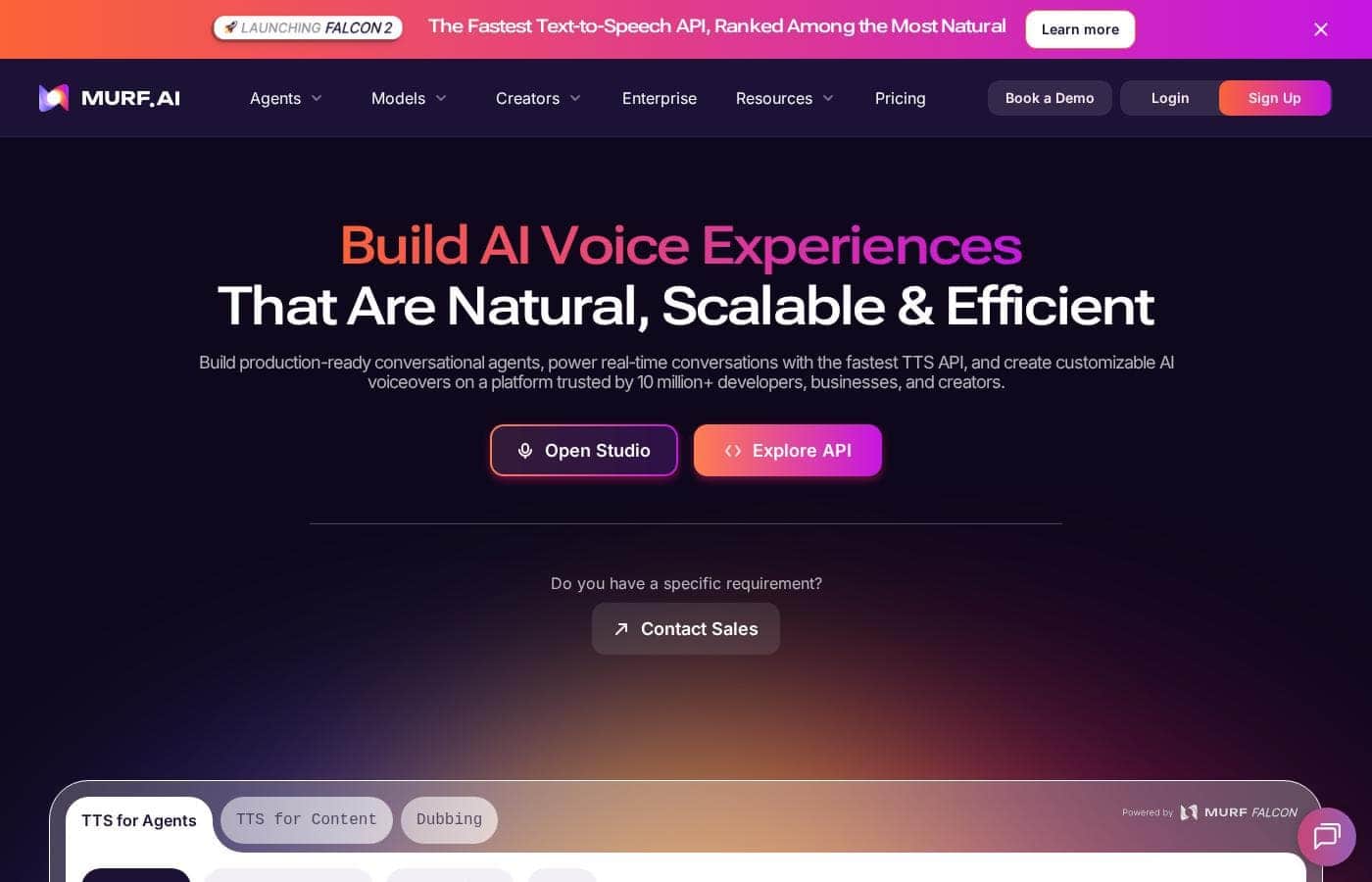
Murf AI homepage screenshot

At a glance

Quick overview for Murf AI: rating, pricing summary, key features, and highlights.

Ciroapp score

3.8/ 5

Murf AI converts scripts into realistic voiceovers with 200+ voices, 10 speaking styles, and tight control over pitch, tone, and pronunciation. Developer APIs add text-to-speech, cloning, and translation, though published pricing is murky and AI voices can't match human actors. Overall, it's a solid pick for teams that need frequent, editable narration.

Pros

  • Pros:Large voice library β€” over 200 realistic voices with 10 speaking styles gives genuine variety when matching tone to different content types
  • Pros:Fine-grained control over pitch, speed, tone, and specific pronunciations, which is essential for technical terms and brand names
  • Pros:Developer-ready SOTA APIs for text-to-speech, voice cloning, and translation, so the same voice tech can power your own products

Cons

  • Cons:AI-generated voices, however realistic, may still fall short of professional voice actors for emotionally nuanced or character-driven performances
  • Cons:Voice cloning and API integration require developer involvement, so teams without technical resources may only use part of the platform's capability
  • Cons:Output quality depends heavily on script quality; awkwardly written scripts still produce awkward narration regardless of voice choice
Best for
  • Marketing and corporate video teams that need frequent voiceovers and want to revise narration without re-recording sessions
  • Developers building conversational agents or products that need embedded text-to-speech, voice cloning, or translation
  • E-learning and training creators who need to keep course narration current as material changes
This section is a summary. Detailed sections about features, use cases, pricing, and reviews follow below.

What is Murf AI?

Murf AI is a dedicated AI voice platform built for people who need professional-sounding voiceovers without hiring voice actors or booking studio time. It combines a browser-based Voice Studio for generating narration from text with a set of developer APIs for embedding speech into products. The platform covers the full workflow: script input, voice selection, fine-tuning, and export.

Murf AI is an AI voice generator with two main surfaces. The AI Voice Studio lets professionals convert scripts into realistic voiceovers using more than 200 voices across 10 speaking styles, with control over pitch, speed, tone, and specific pronunciations. For developers, Murf exposes State-of-the-Art (SOTA) voice APIs covering text-to-speech, voice cloning, and translation, so voice capabilities can be integrated directly into applications and conversational agents.
Should you choose Murf AI?

Quick buyer guidance before you compare plans or click through.

Choose it if

  • Marketing and corporate video teams that need frequent voiceovers and want to revise narration without re-recording sessions
  • Developers building conversational agents or products that need embedded text-to-speech, voice cloning, or translation
  • E-learning and training creators who need to keep course narration current as material changes
  • Content teams producing multilingual audio who want translation and voice generation in one platform

Skip it if

  • Projects that require the emotional nuance and direction of a professional human voice actor, such as character work or high-stakes brand campaigns
  • Teams with no technical staff who need the API, cloning, or translation capabilities but cannot integrate them
  • One-off voiceover needs where setting up and learning a voice platform outweighs simply hiring a freelancer for a single recording

Next steps before buying

  1. 1Go to murf.ai and explore the AI Voice Studio to hear samples of the 200+ voices across the available speaking styles
  2. 2Start with a short real script from an actual project and generate a draft voiceover, testing a few voices to find one that fits your content's tone
  3. 3Fine-tune the output using the pitch, speed, tone, and pronunciation controls, paying particular attention to any product names or technical terms in your script
  4. 4If you need voice inside your own product, review the developer API documentation for text-to-speech, voice cloning, and translation before committing to a workflow

Murf AI Key Features

✨ AI Voice Studio

The core of the platform is a studio environment where you paste or type a script and generate voiceover audio from it. You can choose from over 200 realistic voices and 10 different speaking styles, then refine the output directly rather than re-recording from scratch.

✨ Fine-Tuned Voice Controls

Murf gives you control over the details of delivery: pitch, speed, tone, and specific pronunciations. This matters for brand-sensitive content, technical terminology, or any script where default rendering would mispronounce names, product terms, or jargon.

✨ Developer Voice APIs

Beyond the studio, Murf offers State-of-the-Art (SOTA) voice APIs covering text-to-speech, voice cloning, and translation. These are designed for integration into new products, enabling use cases like conversational agents, in-app narration, and multilingual voice experiences.

✨ Voice Cloning and Translation

The API suite includes voice cloning, which lets a product or team work with a consistent custom voice, and translation capabilities for reaching audiences in other languages. Together they extend Murf from a narration tool into infrastructure for voice-driven applications.

Use Cases

πŸ’‘ Corporate and Marketing Videos

Teams producing corporate videos, product explainers, and promotional content can generate narration from their scripts directly, iterating quickly as scripts change instead of scheduling re-records with voice talent.

πŸ’‘ Conversational Agents and Products

Developers can use Murf's voice APIs to add text-to-speech to applications, build conversational agents with natural-sounding responses, and implement voice cloning for a consistent brand voice across an experience.

πŸ’‘ Multilingual Voice Content

Using the translation capability alongside the voice library, teams can produce voice content for audiences in multiple languages without recording separate sessions for each locale.

πŸ’‘ Training and E-Learning Narration

Course creators and training teams can turn written material into narrated lessons, using pronunciation controls to handle industry terminology correctly and speaking styles to keep instructional audio engaging.

Murf AI pricing

Prices not verified yet β€” see the vendor page.

Murf AI's pricing page

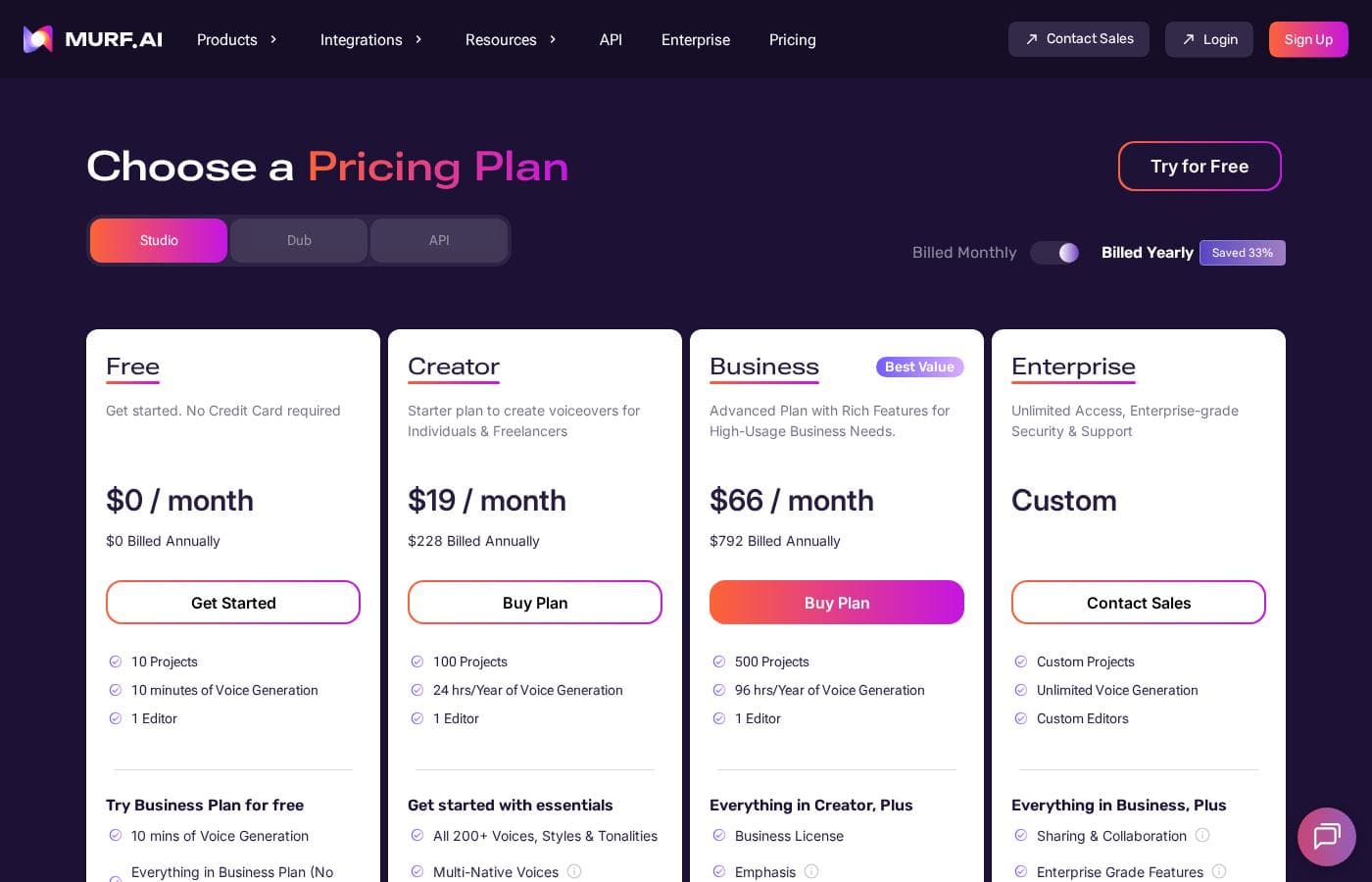
Murf AI pricing page screenshotView pricing page screenshot

Pricing types: Free plan, Monthly subscription

Pricing notes

Murf AI pricing: Billing options: Free plan, Monthly subscription

Email me when Murf AI changes price

One email when we detect a price change on the vendor's pricing page. No newsletter, no deals. Unsubscribe in one click.

User Reviews

No reviews yet.

Write a Review

Write a Review for Murf AI
0/100 characters
0/2000 characters

Why use Murf AI?

Recording voiceovers the traditional way requires equipment, talent, and repeated re-records whenever a script changes. Murf AI replaces that cycle with text-to-speech generation that can be revised instantly: change a line, adjust pacing, or swap a voice and regenerate in seconds.

The breadth of 200+ voices and 10 speaking styles makes it practical to match tone to context, from corporate explainers to conversational product experiences, while the pronunciation and pitch controls address the detail work that separates passable output from usable production audio.

Murf AI alternatives

Other tools in the AI voice generator category

View all AI voice generator tools
Inworld AI

Inworld AI

AI voice generator4.1/5

Inworld is a research lab and inference provider focused on realtime AI for consumer-facing applications. We build first-party speech models, serve the LLMs developers choose, and operate the inference behind modular APIs, so developers of high-volume consumer applications can meet the quality, latency, reliability, and cost bar their users require. Perfect for building Tutors, Companions, Voice agents, Fitness coaches, NPCs, Customer Experience, and more realtime conversational use cases.

Vapi

Vapi

AI voice generator4.1/5

Vapi is an API-native platform built specifically for developers who need powerful voice AI capabilities. It’s the essential tool for creating sophisticated voice products and managing large-scale phone operations. The platform offers thousands of configurations and integrations, making the process simple and accessible. πŸ’‘ Teams from trail-blazing startups to Fortune 500 companies deploy their voice agents on Vapi.

Insighto

Insighto

AI voice generator3.5/5

Insighto is an AI-powered Phone Agent Platform that automates customer conversations through AI-powered phone calls and chat, reducing wait times and improving business communications πŸ€–. It’s for businesses that want seamless, around-the-clock support across calls, SMS, email, WhatsApp, and live chat. It also offers fully white-labeled branding and easy CRM integrations with HubSpot, Zoho, Salesforce.

Murf AI FAQ

Can I use Murf AI without any technical skills?

Yes. The AI Voice Studio is designed for professionals who need voiceovers from text without coding: you enter a script, choose from over 200 voices and 10 speaking styles, and adjust pitch, speed, tone, and pronunciations through the interface. The developer APIs are a separate layer intended for teams that want to integrate text-to-speech, voice cloning, or translation into their own products.

What can I control about the generated voice?

Murf lets you fine-tune the details of the output, including pitch, speed, and tone, as well as specific pronunciations. The pronunciation control is particularly useful for product names, technical jargon, and proper nouns that default text-to-speech engines often misrender. You can also select among 10 different speaking styles to change how a line is delivered.

Does Murf AI support languages other than English?

Yes. Murf's API suite includes translation capabilities alongside text-to-speech and voice cloning, so voice content can be produced for audiences in other languages. Combined with the 200+ voice library, this makes it possible to create multilingual versions of narration or to build voice experiences that serve users across locales.

What do the Murf APIs let developers build?

The State-of-the-Art (SOTA) voice APIs expose text-to-speech, voice cloning, and translation, enabling developers to embed realistic voice generation into new products. Common applications include conversational agents that respond with natural speech, applications that narrate content aloud, and products that need a consistent cloned brand voice.

Ready to try Murf AI? Check out the official site or pricing.

Are you Murf AI? Claim this listing Β· Get the badge