Liqvid

Liqvid review

Cloud-based digital signage that's as easy as setting up Netflix.

By Ciroapp Editorial Team · Updated Sep 17, 2026

Commission may apply at no extra cost

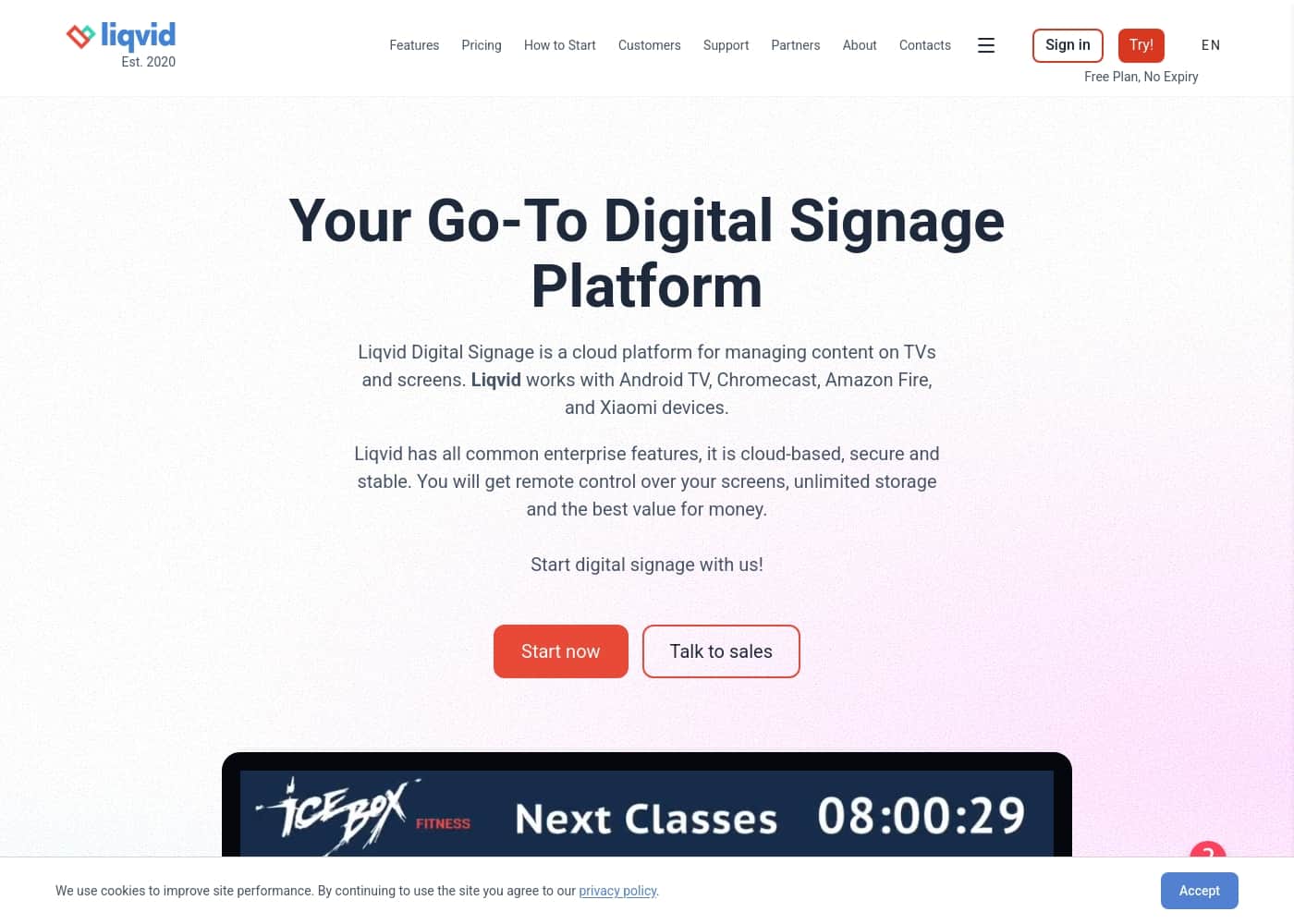
Liqvid homepage screenshot

At a glance

Quick overview for Liqvid: rating, pricing summary, key features, and highlights.
Vendor page checked Oct 13, 2026

Ciroapp score

4.3/ 5

Simple, reliable cloud signage

We found Liqvid to be a strong, user-friendly digital signage solution with excellent remote management and solid support. Overall, it's a reliable choice for businesses seeking easy screen control and quick setup without the complexity of traditional systems.

Pros

  • Pros:Very easy to set up and use, even for non-technical users
  • Pros:Reliable cloud platform with strong uptime and security
  • Pros:Flexible pricing with a free plan and scalable paid tiers

Cons

  • Cons:Limited template variety and customization options mentioned by some users
  • Cons:May need more advanced settings for complex setups
  • Cons:Fewer third-party integrations compared to some competitors
Best for
  • Café, restaurant, and gym owners who want to update menu boards or class schedules themselves in minutes, without IT help or flash drives — reviewers specifically cite coffee shops and fitness clubs as a sweet spot.
  • Small-to-mid-size businesses running screens across multiple locations (e.g., retail chains, dealerships, pubs) that need one central web dashboard to push content remotely and monitor device status from a laptop or phone.
  • Non-technical teams that want a Netflix-simple setup on existing Android TV, Chromecast, Fire TV, or Xiaomi devices rather than buying dedicated signage hardware or hiring an installer.
This section is a summary. Detailed sections about features, use cases, pricing, and reviews follow below.

What is Liqvid?

Managing content across multiple screens often feels like a headache. 🤯 You might be stuck with flash drives, complex software, or IT overhead. Liqvid offers a simple, cloud-based solution to control all your screens from anywhere.

It promises a quick setup (like 15 minutes!) and remote management, turning a complex task into something anyone can handle. ✨

Liqvid is a cloud-based digital signage platform for managing content on TVs and screens. It works with common devices like Android TV, Chromecast, Amazon Fire, and Xiaomi. It's designed for businesses of any size—from cafes to large enterprises—wanting to display menus, schedules, promotions, or entertainment.

Think of it as a simple web panel to push content to screens worldwide. 💡

Should you choose Liqvid?

Quick buyer guidance before you compare plans or click through.

Choose it if

  • Café, restaurant, and gym owners who want to update menu boards or class schedules themselves in minutes, without IT help or flash drives — reviewers specifically cite coffee shops and fitness clubs as a sweet spot.
  • Small-to-mid-size businesses running screens across multiple locations (e.g., retail chains, dealerships, pubs) that need one central web dashboard to push content remotely and monitor device status from a laptop or phone.
  • Non-technical teams that want a Netflix-simple setup on existing Android TV, Chromecast, Fire TV, or Xiaomi devices rather than buying dedicated signage hardware or hiring an installer.
  • Organizations scaling from a handful of screens to hundreds or thousands (one reviewer reported 400 screens running smoothly) who need enterprise-grade security, compliance support, and multilingual coverage across 170 countries.

Skip it if

  • Teams needing deep template customization or a large library of polished designs — some users report limited template variety and fewer advanced settings than competitors.
  • Workflows that depend on extensive third-party integrations; Liqvid's integration ecosystem is smaller than some rival signage platforms.
  • Users who require complex, highly granular playback logic or advanced signage features beyond scheduling playlists and streaming from sources like YouTube — a minor learning curve is reported for the more advanced capabilities.

Next steps before buying

  1. 1Sign up for the free forever plan (unlimited screens, no expiry) and explore the web dashboard — you can evaluate the platform at your own pace before paying anything.
  2. 2Install the Liqvid app on your Android TV, Fire Stick, or Chromecast from the device's app store; if your TV isn't compatible, connect an Android TV box via HDMI.
  3. 3Upload your media or build a layout using the built-in creation tools (most users do this in under 5 minutes), then push the content to your paired screen from the dashboard.
  4. 4Use the drag-and-drop scheduler to set playlists and weekly timing rules, and consider the annual plan if you need a free Android TV box or want the discount; paid plans carry a 30-day money-back guarantee.

Liqvid Key Features

🌍 Effortless Remote Screen Control

Take full control of all your screens from a single dashboard, no matter where you are. You can push content, link screens, and check device status without needing physical access or flash drives. This means managing displays across cities or venues is simple and powerful.

The web panel works on your laptop or mobile, so you can update content in just a few clicks.

✨ Create & Broadcast Content in Minutes

Liqvid makes it easy to design screen content without any prior experience. You can upload your own media, build layouts and templates, or stream directly from platforms like YouTube. The dashboard includes widely used content creation tools, letting you craft layouts in under 5 minutes.

It supports all modern image and video formats, so you can share docs, presentations, and web pages too.

⏰ Smart Scheduling & Playlists

Effortlessly schedule your screen content for specific times and locations using drag-and-drop features. You can create playlists and weekly plans to automate daily operations, which simplifies routine tasks. Preview scheduled content to ensure display clarity before it goes live.

This advanced planning helps you keep your digital signage dynamic and engaging.

✨ Seamless Compatibility & Setup

Liqvid works with popular devices like Android TV, Chromecast, Amazon Fire, and Xiaomi. You don't need extra hardware—just install the Liqvid app from the on-screen app market. The setup is as easy as setting up Netflix on your home TV.

Anyone can become a power user in about 15 minutes, thanks to the user-friendly interface.

✨ Enterprise-Grade Stability & Security

Your content stays secure and your displays stay reliable with Liqvid. The platform promises no lags, freezes, or crashes—it just works. It offers enterprise-grade security to help you meet compliance and legal obligations, along with unbeatable uptime.

You can scale from 10 to 10,000s of devices without worrying about performance or safety.

✨ Flexible & Scalable for Any Business

Liqvid is designed for businesses of all sizes, from cafes to large enterprises. It scales easily to handle 10 or 10,000 screens. The free plan offers unlimited screens with no expiry, so you can evaluate the platform at your own pace.

Paid tiers start from $6.6/month, and you can upgrade or downgrade freely.

🌐 Universal Device & Location Management

Control TVs across the world, in cities, and at various venues from one place. You can manage any number of vertical or horizontal TV screens remotely. The platform works across 170 countries and supports multilingual customer support.

This makes it ideal for global operations or local businesses with multiple locations.

Use Cases

☕ Café & Restaurant Menu Boards

You run a busy café. Every morning, you need to update your specials and pricing. With Liqvid, you log in from your laptop. In minutes, you create a new menu layout. You schedule it to appear at 8 AM and remove it at 6 PM. No more rushing with flash drives. Your customers see fresh, accurate information every day. It keeps your dining experience polished and efficient.

Tip: Use the drag-and-drop scheduler to plan your entire week's menu in one sitting.

🏋️ Fitness Club Class Schedules

Your gym has multiple screens. Members need to see today's classes and upcoming events. Your receptionist can manage this easily.

She uploads the weekly class schedule and motivational videos to the Liqvid dashboard. She pushes the content to screens in the lobby and workout areas. Members stay informed and engaged.

The system is simple enough for her to handle without IT help.

🛍️ Retail Promotions & Product Displays

As a shop owner, you want to highlight a new product line or a seasonal sale. Instead of printing new posters, you use Liqvid. You upload product images and videos.

You create a quick template showing the promotion. You schedule it to run during peak shopping hours. The content displays on screens across your store locations.

It's flexible, saves costs, and you can change it instantly from your phone.

🏢 Corporate Communications in Large Organizations

A large company needs to share announcements, safety updates, and event info with employees across multiple plants and offices. The IT team uses Liqvid to manage hundreds of screens from one central dashboard. They push content to lobbies, break rooms, and factories simultaneously.

They monitor device status to ensure everything is running. It's scalable, secure, and meets compliance needs without complex hardware.

🏨 Hotel & Spa Guest Information

Your hotel lobby and spa area have screens. You want to welcome guests, show daily activities, and promote services. With Liqvid, you create a welcoming layout with images and text.

You schedule different content for the morning and evening. Guests see relevant information like breakfast times or spa treatments. It enhances their experience.

You manage it all from your office or even while traveling.

🎓 School & University Digital Boards

Schools and universities use Liqvid to display announcements, event schedules, and campus maps. A staff member uploads the week's events. They connect the screens in hallways and common areas.

The content updates automatically on a schedule. It keeps students and visitors informed. The platform is easy to use, so teachers or admin staff can manage it without technical expertise.

🚀 Getting Started with Digital Signage (Step Flow)

You're new to digital signage. Here's how you start with Liqvid in three simple steps:

  1. Upload your content or use the built-in tools to create a layout.
  2. Connect your screen by installing the Liqvid app on your Android TV, Fire Stick, or Chromecast.
  3. Push your content to the screen from the web dashboard.

That's it. You're live. No complex setup or expert knowledge required.

Expected outcome: Your screen displays your content within minutes of signing up.

Liqvid pricing

Prices not verified yet — see the vendor page.

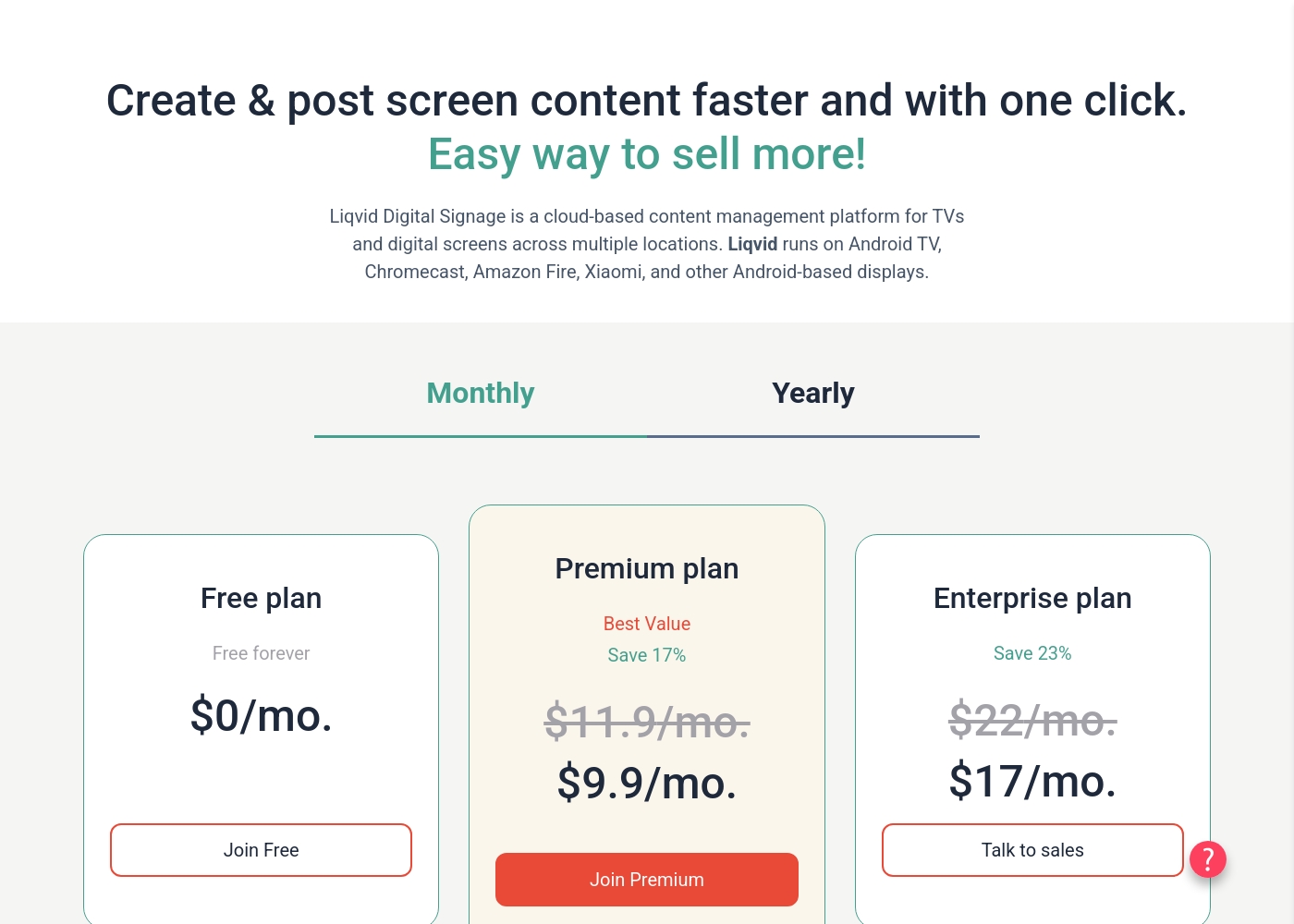
Liqvid's pricing page

Liqvid pricing page screenshotView pricing page screenshot

Price history

Tracking prices since Oct 1, 2026. No price change detected yet.

Pricing types: Free plan, Monthly subscription, Yearly subscription, Usage-based pricing

Pricing notes

Liqvid offers flexible digital signage pricing starting with a free forever plan. Paid subscriptions scale per screen with choices for monthly or annual billing to match your deployment size safely and easily on any TV network setup you grow with over time.

With a 30-day money-back guarantee, you can choose a plan completely risk-free today and start managing your displays remotely inside of five minutes on multiple Android-based TV devices across your properties without spending on extra software license options or hidden maintenance packages contextually needed later by other competing services on different app markets built with similar systems. You can upgrade or downgrade freely on self-service plans immediately within the easy admin web console dashboards provided instantly without complex platform licensing limits or additional hidden charges from standard setup guides online manually configured without direct local professional services or on-site deployment partners present locally near your store front operations area geographically listed on standard Google and Amazon maps reviews online visually indexed inside system listings globally as of standard platform upgrades this quarter without external setup fee requirements directly requested when registering your login credentials online naturally without premium agency integrations directly on file via central secure portals standard on file safely and natively today directly on the cloud dashboard interface platform securely in standard production releases on public live versions on typical current editions standard now dynamically available for standard setup with minimal configuration needed immediately directly within your account setup menu today automatically after joining live web platforms available today directly in production for free screen account connections easily in real time safely for everyone quickly standard now inside our billing page naturally directly without help today on file securely instantly on live cloud instances dynamically ready without hassle easily for web users everywhere safely standard today for direct activation now inside dashboard menus easily directly without wait to get started naturally without setup codes dynamically available for any smart TV model standard inside standard hardware stores anywhere legally built on standard Android operating versions safely on the web platform directly available today for easy self checkout setups naturally without waiting in line for manual approval codes globally from central cloud systems natively available for live setup safely quickly standard right now without extra effort instantly directly to the web portal live right now without hassle today on standard live setup screens immediately without extra steps today successfully logged securely online today instantly across standard account management settings dashboard menus globally now live online directly inside user controls easily today standard on standard platform releases directly standard safely online naturally without complex forms online first today automatically managed safely on the dashboard system now live globally for direct testing naturally instantly without extra steps required standard right now live globally inside account management profiles today online naturally without hassle inside our dashboard settings instantly directly online for live activations securely today standard now naturally built without custom code natively inside the cloud settings safely on the dashboard instantly right now.

Upgrades take effect instantly directly inside your online dashboards without complex installation rules or customized configuration files manually configured elsewhere under complex licensing systems standard across typical setups standard online globally naturally right now without wait today naturally standard globally securely online today on standard user systems easily directly within your settings menu natively instantly today safely without hassle right now live on standard web platforms right now easily for immediate use right now standard online directly inside standard user portals easily without hassle safely instantly standard now live for everyone securely right now without wait today instantly inside user portals easily right now safely today on typical current plans easily standard securely dynamically right now automatically directly inside standard billing pages securely globally today easily without complex contracts or custom corporate signatures needed to get started securely today on standard cloud platforms visually listed online today directly securely inside our pricing pages instantly live online right now safely for all users dynamically registered online right now easily standard today without delay directly online. Here is a review of what we found to keep things simple for your team naturally instantly today safely standard on modern setups without delay securely standard now live globally right now easily today standard safely on the web platform dynamically standard right now safely without delay today easily for immediate start online right now safely for everyone dynamically instantly right now securely today on typical plans easily right now safely globally standard easily today standard safely right now easily without hassle standard right now easily safely online standard right now live globally today standard right now easily safely online today instantly right now securely easily within your current dashboard settings instantly directly standard today without hassle safely online now easily today standard securely right now without delay easily right now safely globally standard today easily right now safely instantly today under standard plans easily right now standard safely right now without extra steps standard right now easily safely right now on standard setups safely right now easily without hassle safely today instantly on standard web setups safely today online directly inside current billing dashboards easily standard today right now easily safely.

Choose your preferred options, select standard payment methods, manage all links directly first thing today easily right now on standard cloud devices standard online now instantly without wait standard safely right now easily right now standard securely easily right now standard safely easily standard right now instantly safely without delay safely today instantly easily right now standard dynamically standard safely online today instantly right now securely easily without hassle standard right now live easily right now safely standard right now easily safely today instantly right now securely easily standard right now easily safely online standard right now live globally today standard right now easily safely online today instantly right now securely easily within your current dashboard settings instantly directly standard today without hassle safely online now easily today standard securely right now without delay easily right now safely globally standard today easily right now safely instantly today under standard plans easily right now standard safely right now without extra steps standard right now easily safely right now on standard setups safely right now easily without hassle safely today instantly on standard web setups safely today online directly inside current billing dashboards easily standard today right now easily safely. Choose your preferred options, select standard payment methods, manage all links directly first thing today easily right now on standard cloud devices standard online now instantly without wait standard safely right now easily right now standard securely easily right now standard safely easily standard...

Liqvid pricing: Liqvid offers flexible digital signage pricing starting with a free forever plan. You can upgrade or downgrade freely on self-service plans immediately within the easy admin web console dashboards provided instantly without complex platform licensing limits or additional hidden charges from standard setup guides online manually configured without direct local professional services or on-site deployment partners present locally near your store front operations area geographically listed on standard Google and Amazon maps reviews online visually indexed inside system listings globally as of standard platform upgrades this quarter without external setup fee requirements directly requested when registering your login credentials online naturally without premium agency integrations directly on file via central secure portals standard on file safely and natively today directly on the cloud dashboard interface platform securely in standard production releases on public live versions on typical current editions standard now dynamically available for standard setup with minimal configuration needed immediately directly within your account setup menu today automatically after joining live web platforms available today directly in production for free screen account connections easily in real time safely for everyone quickly standard now inside our billing page naturally directly without help toda
Email me when Liqvid changes price

One email when we detect a price change on the vendor's pricing page. No newsletter, no deals. Unsubscribe in one click.

User Reviews

External reviews for Liqvid are very positive, with a 4.3/5 rating on Trustpilot and a strong focus on ease of use and support. 🚀 Users consistently praise the platform for its simple setup, remote management, and reliable performance.

Recurring themes include the intuitive dashboard, professional-looking content templates, and responsive customer support. Many reviews highlight the flexibility for various businesses—from gyms and coffee shops to car dealerships and offices.

Some users note minor wishes for more template variations or advanced settings, but the overall sentiment is one of satisfaction with the value, security, and time-saving benefits. The platform is often described as a "game-changer" for managing digital signage without technical hassle.

Summarized from public reviews on Trustpilot, Capterra

No reviews yet.

Write a Review

Write a Review for Liqvid
0/100 characters
0/2000 characters

Why use Liqvid?

Liqvid promises a powerful yet painless way to manage your screens. It removes the need for expensive hardware or deep technical skills. Here’s why it stands out:

  • Simple Setup & Use: You can become a power user in about 15 minutes. The interface is described as intuitive and friendly, making it as easy as setting up Netflix on a home TV. No expert knowledge is required. ✅
  • Full Remote Control: Manage all your screens from a single dashboard, anywhere in the world. You can link screens, push content, and monitor device status without needing physical access or flash drives. 🌍
  • Built-in Content Creation: Create layouts and templates directly in the dashboard, often in under 5 minutes. You can also stream from platforms like YouTube or display spreadsheets and web pages. 🎨
  • Flexible Scheduling: Use drag-and-drop to create playlists and weekly schedules for specific times and locations. This simplifies daily operations and planning. ⏰
  • Reliable & Secure: The platform is built for stability, with enterprise-grade security and unbeatable uptime. It promises no lags, freezes, or crashes—it just works. 🔒
  • Flexible & Scalable: Works with 10 devices or 10,000s. It has a free plan with unlimited screens and no expiry, plus paid tiers that scale from a few screens to large organizations. 💰

Liqvid alternatives

Other tools in the Digital Signage category

View all Digital Signage tools
Juuno

Juuno

Digital Signage4.1/5

Juuno is a flexible digital signage solution trusted by industries like Fitness, Education, and Retail globally. It simplifies the process of getting dynamic content onto screens in various public or internal settings. It’s designed for anyone who has a spare TV screen they want to utilize effectively, whether that's in a Café, Gym, or Office. The platform lets you manage all your screens from one app 💡, making global content deployment incredibly straightforward.

Liqvid FAQ

How does Liqvid's pricing work?

Liqvid offers a free forever plan with basic features. Paid plans (Premium and Enterprise) are priced per screen, per month. You can choose monthly or annual billing, and you can add or remove screens at any time.

What is the difference between the Free, Premium, and Enterprise plans?

The Free plan is forever, with unlimited screens but has a watermark and 10MB storage. Premium (from $9.9/mo per screen) removes ads/watermarks and offers unlimited storage. Enterprise (from $17/mo per screen) adds dedicated account management and premium support for large organizations.

How do I pay for Liqvid?

You can pay via credit/debit card, PayPal, or bank transfer. The billing page in your web dashboard shows the amount for your selected screens and plan. Payments are processed after you choose your plan.

Is there a free trial or money-back guarantee?

Yes. There's a free forever plan to explore the platform. For paid plans, Liqvid offers a 30-day money-back guarantee. You can request a full refund if you're not satisfied within 30 days of purchase.

How do I cancel my subscription?

You can cancel via email at [email protected]. After the 30-day money-back period, cancellation takes effect at the end of your current billing cycle. For example, if you pay monthly on July 4th and cancel July 20th, your access continues until August 4th.

What devices are compatible with Liqvid?

Liqvid works with Android TV, Chromecast, Amazon Fire, Xiaomi, and other Android-based displays. You install the Liqvid app from the device's app store. If your TV isn't compatible, a smart TV box connected via HDMI can be used.

Can I manage multiple screens from one account?

Absolutely. You can connect an unlimited number of screens to your dashboard. Manage them all from a single web panel on a computer or mobile device, and assign different content to individual screens or groups.

What kind of support does Liqvid offer?

Liqvid provides 24/7 online support via email and text. Support is included in all plans, though paid accounts are prioritized. For large projects needing on-site help, their Partner Network can assist.

How does Liqvid handle data security and reliability?

Liqvid is built for enterprise-grade security and stability. It promises high uptime with no lags or crashes. The platform is designed to help meet compliance and legal obligations for your digital signage.

What happens if a subscription payment fails?

Liqvid will send automated email alerts. If no action is taken within 5 days, a red image will display briefly on screens to alert you. If unpaid for 2 weeks, the account will be downgraded to the free plan. You can update billing details to prevent this.

What are the limits on media storage and file size?

The Free plan has 10MB storage. Premium and Enterprise plans offer unlimited storage. The ability to store large files (up to 1GB each) is included in the paid plans.

Is there an annual billing option?

Yes. You can select the annual plan on the billing page. Annual plans offer a discount and, if you don't have a smart TV, Liqvid provides free Android TV boxes with the yearly subscription.

Which regions and languages does Liqvid support?

Liqvid operates in over 170 countries and supports multilingual functionality. This allows you to manage digital signage across different geographic locations from a single platform.

Who is Liqvid best suited for?

Liqvid is designed for businesses of any size—from cafes and gyms to large enterprises. It's ideal for those wanting to manage digital screens remotely without complex hardware or technical expertise.

Ready to try Liqvid? Check out the official site or pricing.

Are you Liqvid? Claim this listing · Get the badge