Juuno

Juuno review

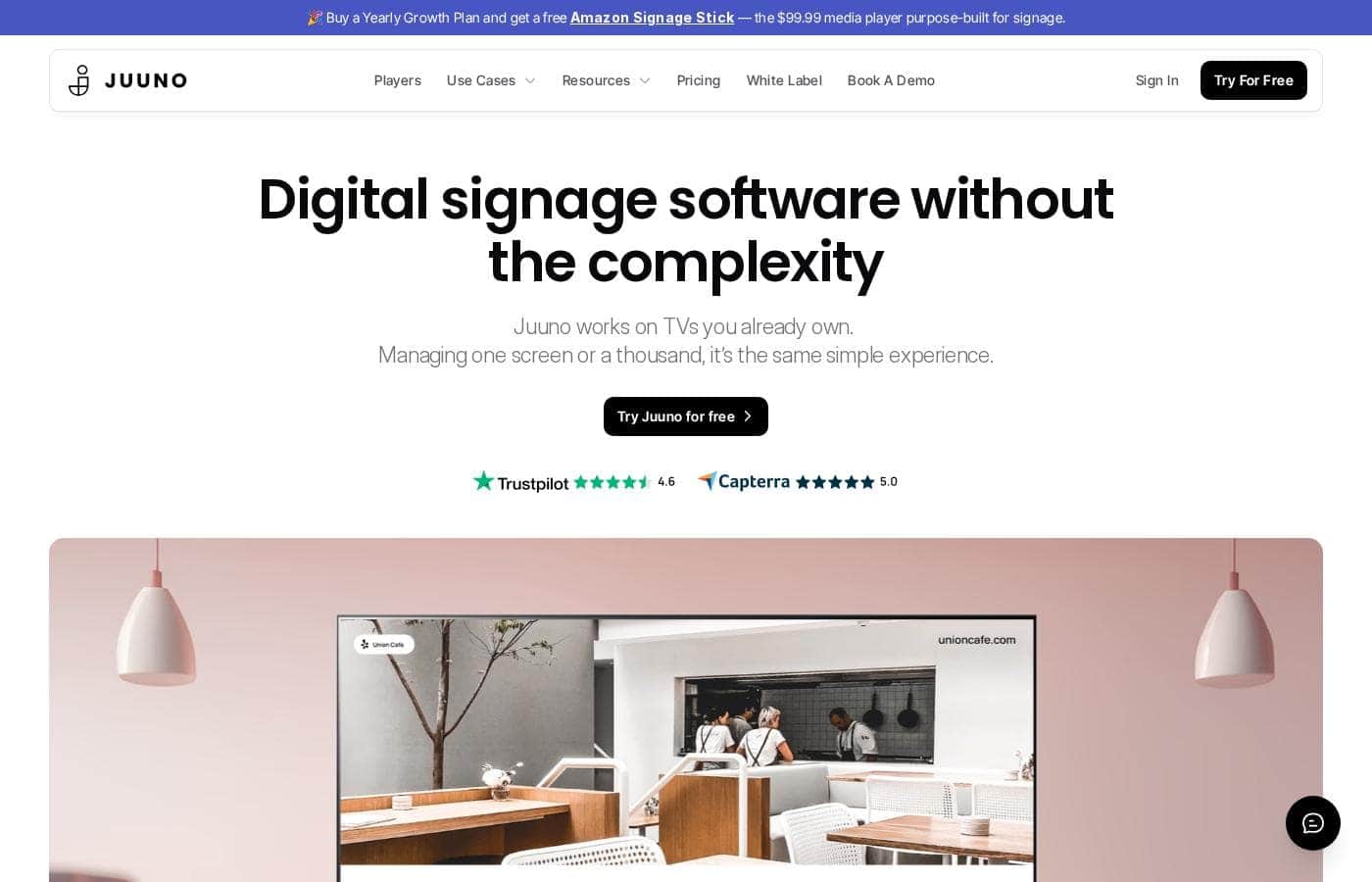
Simple digital signage for the TVs you already own.

Juuno costs from $5/mo · 5 plans · Free plan available · prices checked Oct 13, 2026

By Ciroapp Editorial Team · Updated Sep 17, 2026

Commission may apply at no extra cost

Juuno homepage screenshot

At a glance

Quick overview for Juuno: rating, pricing summary, key features, and highlights.
Pricing verified Oct 13, 2026

Ciroapp score

4.1/ 5

Juuno makes digital signage refreshingly simple: it runs on TVs you already own, and per-screen pricing starts at $5 with unlimited users. Playlists from Canva and YouTube, plus zones and scheduling, cover most small-business needs. Some advertised features are still marked 'coming soon,' and refund terms aren't published. Overall, it's a strong, low-risk pick for small teams and agencies.

Pros

  • Pros:Runs on hardware you already own — Amazon Signage Stick, Firestick, Chromecast, Raspberry Pi, Android, or even a TV web browser — so you avoid buying proprietary signage players
  • Pros:Per-screen pricing stays predictable — Business is $5/screen/month with unlimited users and playlists, so a two-screen café pays far less than a ten-screen store
  • Pros:Build playlists Spotify-style from content you already have, including Canva designs, YouTube videos, Instagram posts, PDFs, Google Slides, and live news feeds

Cons

  • Cons:Several advertised features aren't fully launched — Google Reviews is marked 'coming soon', the Secure Dashboards App is in beta, and advanced user roles, API access, and HD support are listed as upcoming on the Growth plan
  • Cons:No money-back guarantee is published on the pricing page, so cancellation and refund terms need to be verified before committing to a yearly plan
  • Cons:The free Amazon Signage Stick promo (a $99.99 value) is tied to a yearly Growth plan commitment, which raises the effective annual cost versus monthly billing
Best for
  • Cafés and coffee shops that need scheduled menu boards
  • Gyms and studios sharing offers, social posts, and class schedules
  • Schools and campuses managing many screens in one place
Free trial
Yes — 7 days
This section is a summary. Detailed sections about features, use cases, pricing, and reviews follow below.

What is Juuno?

Digital signage often means new hardware, confusing software, and creeping monthly costs. Juuno flips that. It runs on TVs you already own, advertises simple $5-per-screen pricing, and turns Canva designs, YouTube videos, and social posts into playlists in minutes.

Juuno is cloud-based digital signage software for businesses of any size — one screen to a thousand. You connect the TVs you already own through a player such as an Amazon Signage Stick, Chromecast, Raspberry Pi, or a web browser, then manage everything from one dashboard. Cafés, gyms, schools, offices, agencies, and organizations in retail, healthcare, and education use it.

Should you choose Juuno?

Quick buyer guidance before you compare plans or click through.

Choose it if

  • You already own TVs and want to avoid buying specialized players
  • You want Spotify-style playlists built from Canva, YouTube, Instagram, and Google apps
  • You need different content at different times through simple scheduling
  • You want portrait and landscape support, plus zones that divide one screen into sections
  • You're an agency interested in white label branding and client workspaces

Skip it if

  • Some apps aren't fully launched — Google Reviews is marked 'coming soon' and the Secured Dashboard is in beta
  • You'll still need a compatible player device; the free $99.99 Amazon Signage Stick requires a yearly Growth Plan
  • Enterprises needing SLAs or contract details will find little public information and should book a demo to confirm fit

Next steps before buying

  1. 1Check the pricing page before signing up — the homepage advertises $5 per screen, but full plan tiers and limits aren't shown here.
  2. 2Confirm your hardware works. Juuno supports Amazon Signage Stick, Firestick, Chromecast, Raspberry Pi, Android, and web browsers.
  3. 3Test free with one screen first using the free signup before committing to a paid plan.
  4. 4Compare plan terms carefully — the free Amazon Signage Stick promo is tied to the yearly Growth Plan, so weigh annual versus monthly costs.
  5. 5Shortlist alternatives like OptiSigns, Rise Vision, and Yodeck — Juuno publishes its own comparison pages worth skimming.

Ease of use

Everything on the site points to a low-friction setup. Juuno says you can be running in minutes on TVs you already own, offers a free signup and demo booking, and publishes a setup video. Customer reviews on the page call the platform intuitive and simpler than other tools they've tried, with support frequently praised.

Juuno Key Features

🎨 Build playlists from content you already have

Juuno turns designs and videos into signage in minutes. Pick apps like Canva, YouTube, Instagram, PDFs, or Google Slides, then stack them into a playlist — just like Spotify. Refresh it whenever you like, from one dashboard.

Cafés can rotate menus and promos, while offices mix announcements with live news feeds. No design skills needed.

✨ Split one screen into zones

Zones divide a display into sections, and each section plays different content at the same time. It's handy when one TV has several jobs. A café could run:

  • A scheduled menu board
  • A live Instagram wall
  • Daily announcements One screen now covers menus, social posts, and updates side by side.

✨ Schedule the right content at the right time

Every screen gets its own schedule, so breakfast menus appear in the morning and event promos take over later. You can add as many screens as you like and group them by client or zone. Overlays add extra polish, and content displays seamlessly in both portrait and landscape.

Set it and forget it — or change things daily.

✨ Made for teams, agencies, and client work

There are no seat limits, so unlimited teammates can join. Agencies get workspaces to manage multiple clients from one app, and white label players keep your branding front and center. Big rollouts stay simple too — Juuno handles one screen or a thousand with the same dashboard, so you won't outgrow it.

✨ Runs on the TVs you already own

You don't need new screens. Connect through an Amazon Signage Stick, Chromecast, Raspberry Pi, Android app, or a TV's web browser. Setup takes minutes, and every screen is managed from the same dashboard.

That means less hardware to buy and one place to fix problems when they come up.

Use Cases

☕ Scheduled menu boards for cafés

Your breakfast menu flips to lunch at 11am — automatically. Design it in Canva, schedule it once, and the TV does the rest.

Expected outcome: Menus stay current without anyone touching the screen.

Tip: Use zones to run your menu and a social wall side by side.

💪 Member engagement for gyms and studios

Mix class schedules, offers, and your latest Instagram posts into one playlist. Portrait mode works well for schedules near reception.

Expected outcome: Members always know what's on this week.

Tip: Loop a YouTube clip between promos to keep things fresh.

🎓 Campus-wide screens for schools

Every announcement, schedule, and quiz lives in one dashboard. Schedule different content per building and update it all without leaving your desk.

Expected outcome: Staff keep the whole campus informed in minutes.

🚀 Client signage for agencies

Workspaces keep each client's screens separate. White label puts your brand on everything, and $100 a month covers 20 screens.

Expected outcome: You can offer signage under your own name and build recurring revenue.

Juuno pricing

From$5/mo

  • 5 plans
  • Free plan available

Prices checked on Oct 13, 2026 from Juuno's pricing page

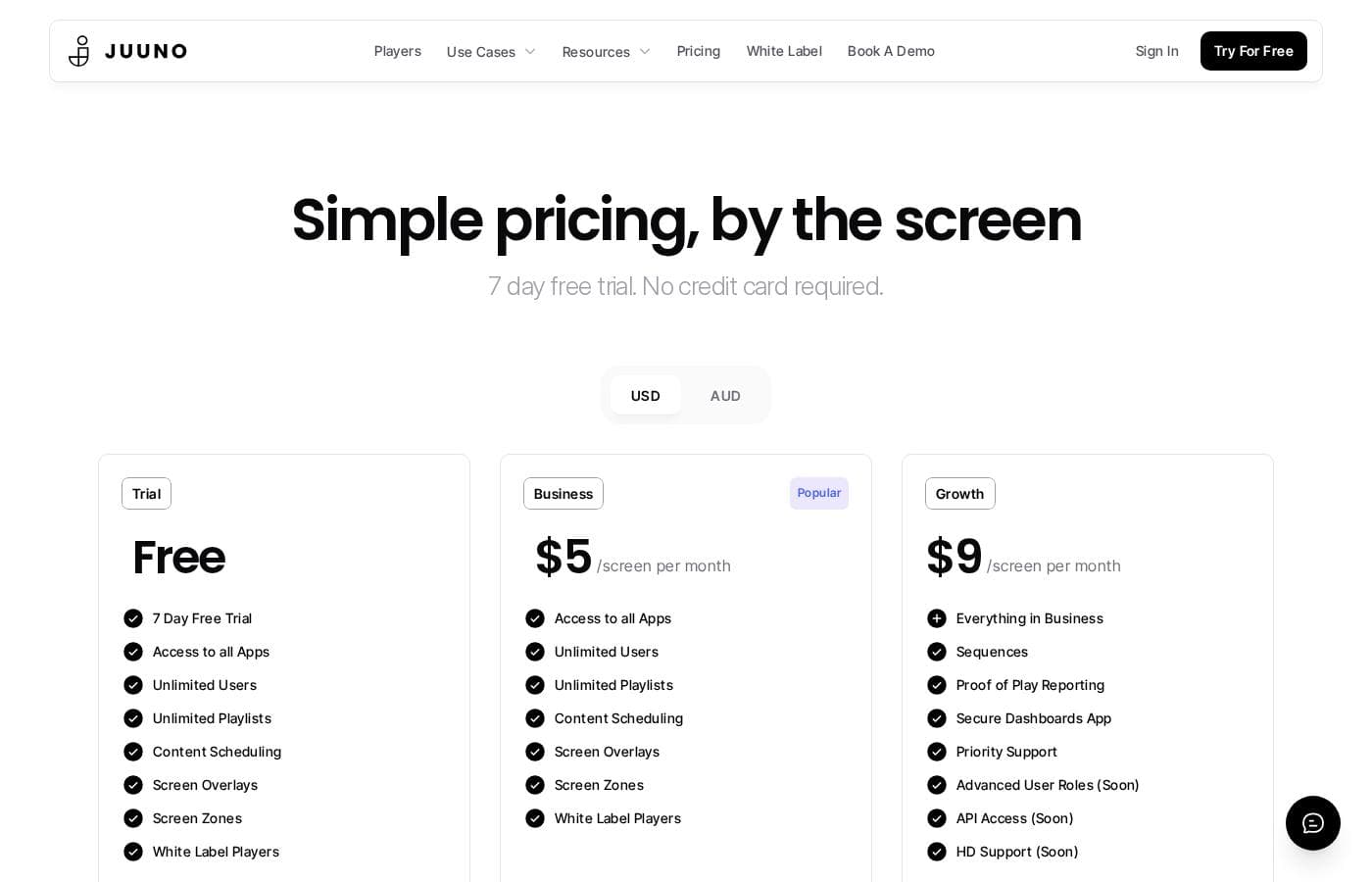
Juuno pricing page screenshotView pricing page screenshot
PlanBilled monthlyBilled annuallyIncludes
Trial
Free
—
7-day free trial
  • Access to all Apps
  • Unlimited Users
  • Unlimited Playlists
  • Content Scheduling
  • Screen Overlays
  • +2
Business
$5/mo
—
  • Access to all Apps
  • Unlimited Users
  • Unlimited Playlists
  • Content Scheduling
  • Screen Overlays
  • +2
Growth
$9/mo
—
  • Everything in Business
  • Sequences
  • Proof of Play Reporting
  • Secure Dashboards App
  • Priority Support
  • +3
White Label
$100/mo
—
Includes 20 screens; additional screens cost $5 per screen per month
  • Run Juuno under your own brand and domain
  • Juuno hosts and maintains everything
  • You control pricing, features, and clients
  • Includes 20 screens
Enterprise
See vendor page
See vendor page
Custom pricing — contact sales
  • Everything in Growth
  • Scale pricing
  • Custom Contracts
  • SLA/Uptime Guarantee
  • Dedicated Support
  • +1

Price history

Tracking prices since Sep 9, 2026. No price change detected yet.

Pricing types: Free trial, Monthly subscription, Yearly subscription

Pricing notes

Juuno uses simple per-screen pricing: Business starts at $5/screen/month, Growth is $9/screen/month, and White Label is $100/month for 20 screens. A 7-day free trial is available with no credit card required, and Enterprise pricing is custom.

Juuno costs between $5 and $100 per month with 5 plans: Trial (free for 7 days), Business at $5 per screen per month, Growth at $9 per screen per month, White Label at $100 per month, and Enterprise at custom pricing.

Here's a closer look at what each plan offers.

Trial

Price: Free for 7 days Other Features:

  • Access to all Apps
  • Unlimited Users
  • Unlimited Playlists
  • Content Scheduling
  • Screen Overlays and Screen Zones
  • White Label Players

The Trial gives you the full toolkit for a week, and no credit card is needed. It's the easiest way to test Juuno on a TV you already own before spending a cent.

Business

Price: $5 per screen per month Other Features:

  • Access to all Apps
  • Unlimited Users
  • Unlimited Playlists
  • Content Scheduling
  • Screen Overlays and Screen Zones
  • White Label Players

Business is the popular pick, and the value is clear. You pay per screen, so a café with two screens pays far less than a store running ten. Small businesses that just need solid signage without extras will feel at home here.

Growth

Price: $9 per screen per month Other Features:

  • Everything in Business
  • Sequences
  • Proof of Play Reporting
  • Secure Dashboards App
  • Priority Support
  • Advanced User Roles, API Access, and HD Support (coming soon)

Growth adds reporting and control on top of everything in Business. Agencies and multi-location teams that need proof of play data or priority support should step up here. 🎉 One extra perk: buying a yearly Growth plan gets you a free Amazon Signage Stick, a $99.99 media player built for signage.

White Label

Price: $100 per month Other Features:

  • Run Juuno under your own brand and domain
  • Juuno hosts and maintains everything behind the scenes
  • You control pricing, features, and clients
  • Includes 20 screens
  • Additional screens cost $5 per screen per month

White Label is made for agencies that want to sell signage as their own product. With 20 screens included, it works out to $5 per screen — the same rate as Business — but with your branding on top. If you want to build monthly recurring revenue under your own name, this is the plan for you.

Enterprise

Other Features:

  • Everything in Growth
  • Scale pricing
  • Custom Contracts
  • SLA/Uptime Guarantee
  • Dedicated Support
  • Custom Invoicing

Enterprise is for large deployments that need contracts, uptime guarantees, and custom invoicing. Pricing is tailored to your scale, so you'll need to get in touch for a quote. If you're running hundreds of screens, this beats stacking standard plans.

Bottom line: Juuno offers a 7-day free trial with no credit card required, so you can try every feature before paying. A money-back guarantee isn't shown on the pricing page, so confirm the cancellation terms before committing to a longer plan.
Cost calculator

Estimate what Juuno costs for your team.

Billing
Per month
$5
Per year
$60

Business states no user limit: shown as one price for the whole account. Check the price for 5 users with the vendor. Estimate based on published list prices, before taxes, add-ons and discounts.

How to pay less for Juuno

  • Start on the free plan and upgrade only when you hit its limits.
  • Use the 7-day free trial before you pay.
Start free trial

Email me when Juuno changes price

One email when we detect a price change on the vendor's pricing page. No newsletter, no deals. Unsubscribe in one click.

User Reviews

No reviews yet.

Write a Review

Write a Review for Juuno
0/100 characters
0/2000 characters

Why use Juuno?

Most signage tools push you toward new hardware and complicated setups. Juuno goes the other way: use the screens you have, pay a flat rate, and get content live fast.

  • No new screens required. Juuno works through an Amazon Signage Stick, Firestick, Chromecast, Raspberry Pi, Android app, or even a TV web browser.
  • Predictable pricing. The site advertises $5 per screen, and one case study (Splashway) describes cutting costs across 40+ screens.
  • Content without design skills. Pull in Canva designs, YouTube videos, Instagram and Facebook posts, PDFs, Google Slides, and live news feeds.
  • One screen, many messages. Zones split a display into sections, so a menu, social wall, and announcements can run side by side.
  • No seat limits. Unlimited teammates come standard, and workspaces let agencies manage multiple clients from one app.
  • Well-reviewed support. Juuno holds a 4.6/5 Trustpilot rating, and reviews on the site repeatedly highlight quick, helpful responses.

Juuno alternatives

Other tools in the Digital Signage category

View all Digital Signage tools
Liqvid

Liqvid

Digital Signage4.3/5

Juuno FAQ

How much does Juuno cost?

Juuno's cheapest paid plan, Business, costs $5 per month. Paid plans range from $5 to $100 per month. Prices checked on Oct 13, 2026 from the vendor's pricing page.

Does Juuno have a free plan?

Yes. Juuno has a free plan (Trial); paid plans start at $5 per month.

Does Juuno offer a free trial or a money-back guarantee?

Juuno offers a 7-day free trial.

Has Juuno's price changed recently?

No. We have not detected a price change since we started tracking on Sep 9, 2026.

Do I pay per user or per screen?

Per screen. Business costs $5 per screen monthly, Growth is $9, and every plan includes unlimited teammates and playlists. White Label includes 20 screens for $100, with extras at $5 each.

How responsive is Juuno's support if something breaks?

Reviews on the site call support quick and helpful, and Juuno holds a 4.6/5 Trustpilot rating. Growth adds priority support, while Enterprise includes dedicated support with an SLA and uptime guarantee.

Ready to try Juuno? Check out the official site or pricing.

Are you Juuno? Claim this listing · Get the badge