Landingi

Landingi review

Build, publish, and optimize landing pages without developers — from AI-generated drafts to programmatic campaigns at scale.

By Ciroapp Editorial Team · Updated Sep 17, 2026

Commission may apply at no extra cost

Landingi homepage screenshot

At a glance

Quick overview for Landingi: rating, pricing summary, key features, and highlights.
Vendor page checked Oct 12, 2026

Ciroapp score

3.9/ 5

Landingi combines AI page generation, programmatic variants, A/B/X testing, and 35+ language translation in one no-code builder — a strong fit for high-volume campaign teams and agencies. The catch is usage-based pricing and limited independent review data to confirm user satisfaction. Overall, it's a solid choice for teams that ship landing pages at scale.

Pros

  • Pros:Lunar AI generates complete, editable landing pages from a chat prompt, cutting initial build time significantly
  • Pros:Programmatic Landing Pages let you mass-produce targeted variants from one template using CSV or API data, which is rare at this price tier
  • Pros:Built-in optimization stack — EventTracker micro-conversion tracking, A/B/X testing, and Solis AI recommendations — reduces reliance on separate testing tools

Cons

  • Cons:The builder offers 11 widgets, which is a smaller native widget set than some competitors — custom needs may depend on the HTML embed widget
  • Cons:Usage-based pricing components mean costs can scale with traffic or page volume, making budgeting harder for high-traffic campaigns
  • Cons:The breadth of features (AI, programmatic pages, translations, testing) creates a learning curve for small teams that only need simple pages
Best for
  • Marketing teams running frequent paid campaigns who need fast page creation, A/B/X testing, and conversion tracking in one tool
  • Agencies managing landing pages for multiple clients and needing subaccounts, permissions, and audit trails
  • Growth teams operating in multiple markets who need programmatic page variants and automatic translation across 35+ languages
This section is a summary. Detailed sections about features, use cases, pricing, and reviews follow below.

What is Landingi?

Landingi is a landing page automation platform aimed at marketers, agencies, and growth teams who need to ship campaign pages quickly without waiting on developers. It combines a pixel-perfect drag-and-drop builder with AI features for generating copy, SEO metadata, and images, plus built-in analytics through EventTracker. The platform covers the full lifecycle: creation, publishing, testing, translation, and optimization, with 170+ integrations to connect the rest of your marketing stack.

Landingi is a cloud-based landing page builder that lets you create landing pages, pop-ups, one-pagers, and microsites using a visual drag-and-drop editor with 11 widgets, including countdown timers, pay-now buttons, and HTML embeds. Its Lunar AI feature generates a complete, editable landing page from a chat prompt, while Programmatic Landing Pages use a single template fed by CSV or API data to mass-produce targeted page variants. Publishing is flexible: custom domains, subdomains, WordPress, Landingi infrastructure, or self-hosted embedding.
Should you choose Landingi?

Quick buyer guidance before you compare plans or click through.

Choose it if

  • Marketing teams running frequent paid campaigns who need fast page creation, A/B/X testing, and conversion tracking in one tool
  • Agencies managing landing pages for multiple clients and needing subaccounts, permissions, and audit trails
  • Growth teams operating in multiple markets who need programmatic page variants and automatic translation across 35+ languages
  • Ecommerce and performance marketers who want countdown timers, pay-now buttons, and micro-conversion analytics without extra tooling

Skip it if

  • Solo users who only need one or two simple pages occasionally — the platform's depth and usage-based pricing may be more than necessary
  • Teams that need a large library of advanced native widgets out of the box and aren't comfortable relying on HTML embeds or integrations
  • Buyers who require extensive verified third-party user reviews before purchasing, since independent review data for Landingi is limited

Next steps before buying

  1. 1Start with the free plan or free trial to test the drag-and-drop builder and Lunar AI page generation on a real campaign brief
  2. 2Connect your domain or WordPress install and publish a first page to verify the publishing route that fits your infrastructure
  3. 3Install EventTracker on your highest-traffic landing page to baseline micro-conversions before making design changes
  4. 4Set up one A/B/X test on a key campaign page and review Solis AI recommendations to understand the optimization workflow
  5. 5If you run multi-market campaigns, pilot Programmatic Landing Pages with a small CSV to validate variant generation before scaling

Landingi Key Features

🚀 Create and launch pages faster

Move from campaign idea to live page without waiting for development. Landingi combines AI generation, visual editing, publishing, analytics, and optimization in one workflow. Lunar creates an editable landing page from a chat, while the classic builder gives you pixel-perfect no-code control.

✨ Publish on your terms

Build complete landing page experiences with forms, integrations, pre-designed sections, and custom publishing options. You can publish on your own domain or subdomain, through WordPress, with Landingi infrastructure, or by embedding pages on your own server.

📈 Test and optimize with context

Improve performance with tools that connect testing and behavioral data. EventTracker tracks micro-conversions, A/B/X testing compares page variants, and Solis provides automated recommendations based on your landing page context and performance data.

✨ Scale campaigns across markets

Scale campaigns across markets and large page portfolios without rebuilding every experience. Programmatic Landing Pages use one template and structured data from CSV or API to create targeted variants. Automatic translations support landing pages, forms, and SEO settings across 35+ languages.

✨ Keep teams aligned and campaigns governed

Support collaboration with workspaces, subaccounts, permissions, reusable Smart Sections, 2FA, and Audit Logs. Agencies can separate clients, assets, domains, and users, while enterprise teams can manage distributed campaigns with shared visibility and governance.

Use Cases

💡 Paid campaign landing pages

Launch dedicated pages for ads, email campaigns, and promotions using AI-generated drafts refined in the visual editor. Pair countdown timers and pay-now buttons with EventTracker micro-conversion tracking to see exactly where visitors convert or drop off, then run A/B/X tests to improve results.

💡 Multi-market and multilingual campaigns

Use Programmatic Landing Pages with CSV or API data to generate targeted variants for different segments, regions, or offers from one template. Automatic translations cover landing pages, forms, and SEO settings across 35+ languages, so international rollouts don't require rebuilding each experience.

💡 Agency client management

Agencies can separate clients with subaccounts and workspaces, apply their own branding, and control access with permissions, 2FA, and Audit Logs. Reusable Smart Sections let approved designs and content blocks be deployed across client pages without rebuilding them each time.

💡 Pop-ups and lead capture

Beyond full pages, build pop-ups and microsites with forms connected to your MarTech stack through 170+ integrations, including Zapier. Embed finished pages on your own server or publish through WordPress to fit existing site infrastructure.

Landingi pricing

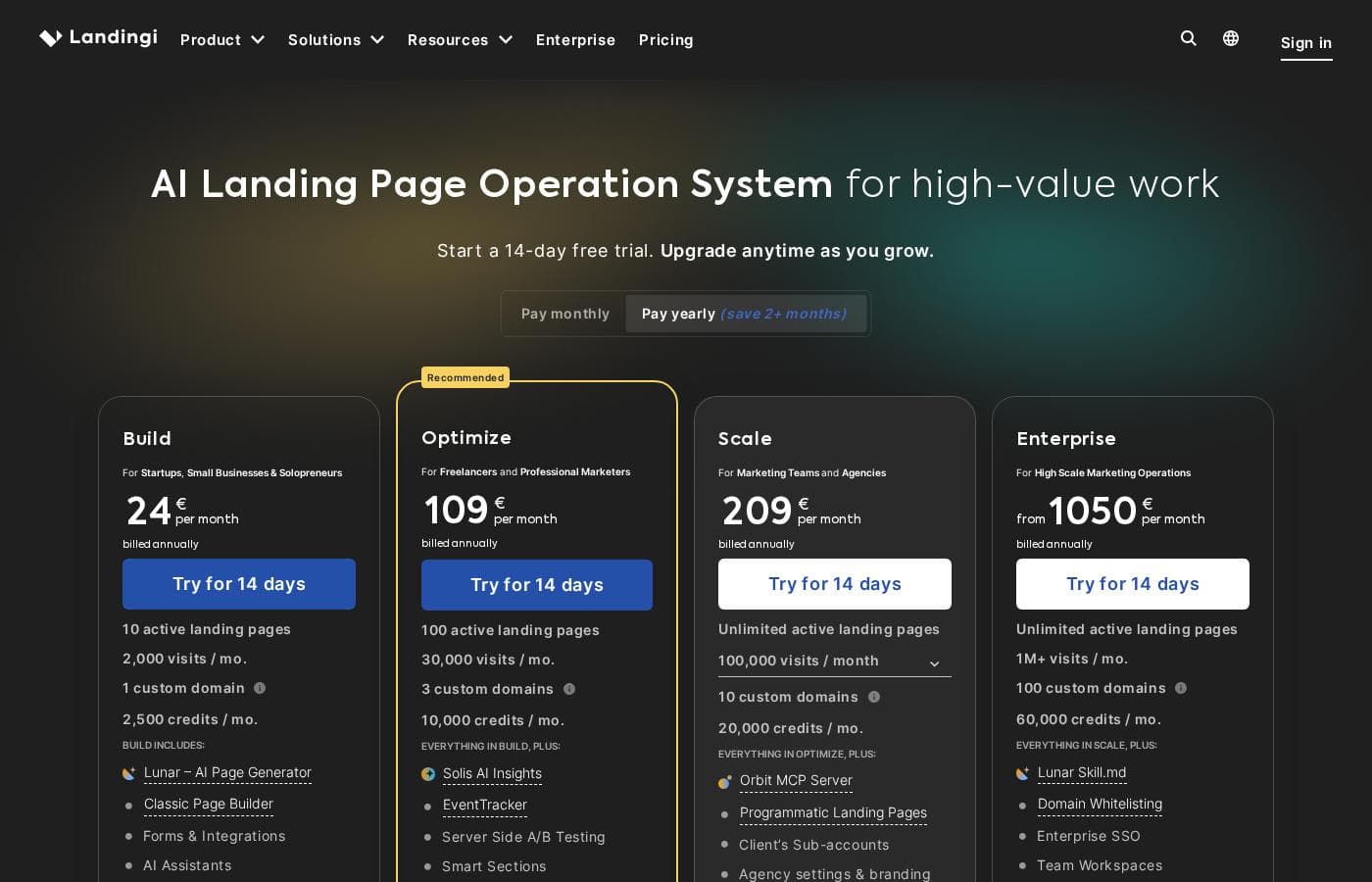
Prices not verified yet — see the vendor page.

Landingi's pricing page

Landingi pricing page screenshotView pricing page screenshot

Price history

Tracking prices since Oct 1, 2026. No price change detected yet.

Pricing types: Free plan, Free trial, Monthly subscription, Yearly subscription, Usage-based pricing

Pricing notes

Landingi pricing: Plans from $0/month Billing options: Free plan, Free trial, Monthly subscription, Yearly subscription, Usage-based pricing

Email me when Landingi changes price

One email when we detect a price change on the vendor's pricing page. No newsletter, no deals. Unsubscribe in one click.

User Reviews

No reviews yet.

Write a Review

Write a Review for Landingi
0/100 characters
0/2000 characters

Why use Landingi?

Most landing page tools stop at the builder. Landingi extends into the work that happens after launch: EventTracker captures micro-conversions, A/B/X testing compares page variants, and Solis delivers automated recommendations based on your page context and performance data.

For teams running campaigns across markets, automatic translation across 35+ languages and programmatic page generation remove the manual grind of duplicating and localizing pages. Agencies get subaccounts, workspaces, permissions, 2FA, and Audit Logs to keep client work separated and governed.

Landingi alternatives

Other tools in the Funnel Builder category

View all Funnel Builder tools
Leadpages

Leadpages

Funnel Builder4.2/5

Leadpages is a data-driven solution built for creating powerful, high-converting landing pages. It’s designed to be simple so you can avoid long development cycles. Best of all, you don't need to write a single line of code to get started. This tool is powerful and versatile. It offers tailored solutions for Marketing Teams, Agencies, Businesses, and even larger Enterprise groups looking to streamline their marketing stack. Whether you need to scale performance or optimize lead collection, Leadpages empowers your success.

ThriveCart

ThriveCart

Funnel Builder4.2/5

ThriveCart is an all-in-one checkout platform built for creators, coaches, and entrepreneurs. 🚀 It lets you launch high-converting checkouts and landing pages in minutes, with unlimited upsells, order bumps, trials, and subscriptions. With 100+ payment methods, an built-in affiliate platform, and ThriveCart Learn, you have a complete system to sell, deliver, and scale your offers.

Instapage

Instapage

Funnel Builder4.1/5

Instapage simplifies the process of building sophisticated landing pages. It uses an intuitive drag-and-drop editor. You don't need any technical expertise to create beautiful pages that load quickly on any screen. 💡 This platform is ideal for marketing teams and agencies. You can even use the integrated AI to instantly generate content, headlines, and CTAs. This feature optimizes your lead capture strategy without interrupting flow.

SamCart

SamCart

Funnel Builder4/5

SamCart is an intuitive platform built specifically for businesses of all types. It's designed to streamline your selling process and maximize revenue. You can launch vital assets like landing pages, checkout pages, lead magnets, and even complete microsites in just minutes. Pages built here are powered by AI to ensure optimal performance and speed, meaning your audience gets a great experience every time.

Unbounce

Unbounce

Funnel Builder4/5

Unbounce is the leading landing page platform, built specifically for marketers and agencies. This tool helps you create personalized, high-converting campaigns in record time. It combines a flexible drag-and-drop editor with advanced testing features. You can build landing pages, popups, and sticky bars without needing designers or developers. The main goal is simple: launch faster and convert more customers from this single, powerful platform.

Systeme.io

Systeme.io

Funnel Builder4/5

Systeme.io is proudly known as the easiest all-in-one marketing platform available. This comprehensive tool exists specifically for people who want to launch their online business successfully and without unnecessary hassle. You get everything necessary gathered into one single spot, making the entire creation process much less complicated. It truly serves as the only tool you need to manage and grow your venture.

Cheapest Funnel Builder software for 1 to 25 users

Landingi FAQ

Does Landingi require coding skills to build landing pages?

No. Landingi's core builder is a pixel-perfect drag-and-drop editor designed for no-code use, with 11 widgets including countdown timers, pay-now buttons, forms, and HTML embeds. The HTML embed widget is available if you want to add custom code, and developers can also connect pages via API for programmatic generation, but coding is optional rather than required.

How does Landingi's AI functionality work?

Landingi includes several AI capabilities: Lunar generates a complete, editable landing page from a chat conversation; AI features assist with text, SEO metadata, and images; and Solis AI Insights delivers automated recommendations based on your landing page's context and performance data. Additionally, the Orbit MCP Server lets you connect Landingi to supported external LLM workflows.

Can I run Landingi pages for multiple clients or brands?

Yes. Landingi supports subaccounts and separate workspaces so agencies can isolate clients, assets, domains, and users. Permissions, 2FA, Audit Logs, and enterprise SSO provide access control and governance, while agency branding lets you present the platform under your own identity. Smart Sections allow reusable approved content across client pages.

How do I publish a Landingi page on my own website?

Landingi offers several publishing routes: a custom domain or subdomain, direct WordPress integration, Landingi's own infrastructure, or embedding the page on your own server. This means you can keep pages on your existing domain for SEO purposes or host campaign pages separately.

Ready to try Landingi? Check out the official site or pricing.

Are you Landingi? Claim this listing · Get the badge