Foxit PDF Editor

Foxit PDF Editor review

The smarter, more affordable PDF editor for teams.

By Ciroapp Editorial Team · Updated Sep 17, 2026

Commission may apply at no extra cost

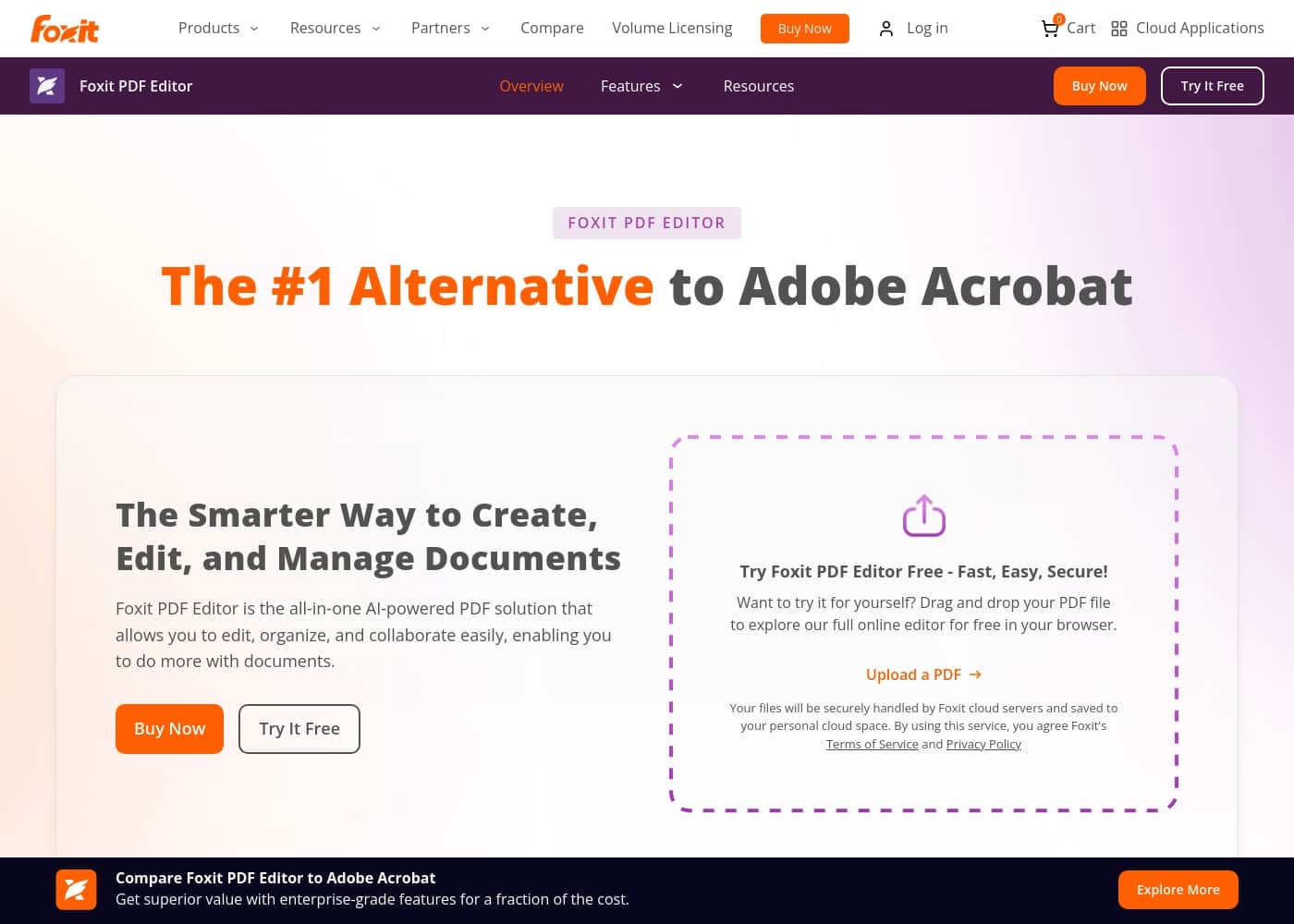
Foxit PDF Editor homepage screenshot

At a glance

Quick overview for Foxit PDF Editor: rating, pricing summary, key features, and highlights.
Vendor page checked Oct 13, 2026

Ciroapp score

3.8/ 5

Powerful, but pricing can frustrate.

We found Foxit PDF Editor to be a strong, AI-powered alternative to Adobe Acrobat, offering solid editing and collaboration features for teams. Overall, it's a capable tool with good value for its core functionality, but we were concerned by the mixed user feedback on pricing, subscription models, and interface clarity.

Pros

  • Pros:Costs significantly less than Adobe Acrobat, with the base PDF Editor plan at $129.99/year and flexible licensing options including perpetual, annual, and monthly billing
  • Pros:Includes an AI Assistant with 20 free credits per month per user that can summarize long reports, rewrite text, and extract key information from documents
  • Pros:Uses a Microsoft Office-style Ribbon toolbar that minimizes training time and speeds up team adoption

Cons

  • Cons:Multiple Trustpilot reviewers report frustration with the user interface, noting that commonly used tools are difficult to locate and require searching through menus and toolbars
  • Cons:Users cite unexpected cost increases, restrictive licensing, and difficult billing or cancellation processes, with at least one reviewer describing dismissive support when trying to cancel
  • Cons:Full AI Assistant access requires a separate upgrade to 2,000 credits per month, and key features like eSign, Smart Redact, and mobile apps are locked behind the higher-priced PDF Editor+ plan at $159.99/year
Best for
  • Small businesses and cost-conscious teams switching from Adobe Acrobat who want comparable editing, conversion, and collaboration features at a lower price
  • IT leaders at growing organizations who need centralized license management, enterprise-wide deployment tools, and integration with SharePoint, OneDrive, and MS Teams
  • Legal and compliance teams that need secure editing, AI-assisted redaction, and adherence to industry-standard security protocols for sensitive contracts
This section is a summary. Detailed sections about features, use cases, pricing, and reviews follow below.

What is Foxit PDF Editor?

Paying premium prices for basic PDF editing is a common frustration. Foxit PDF Editor offers a powerful, AI-powered alternative that aims to cut costs while boosting productivity. It provides enterprise-grade features for a fraction of the price, helping you edit, organize, and collaborate easily. ✨

This isn't just another PDF tool; it's designed to be the smarter way to handle documents. You get a solution trusted by global leaders, built on security and compliance, that integrates into your existing workflow.

Foxit PDF Editor is an all-in-one, AI-powered PDF solution. It's built for teams and IT leaders who need to create, edit, manage, and collaborate on documents. The platform uses AI to automate tasks like summarizing, redacting, and extracting information, acting as a co-pilot for knowledge workers. 💡

It positions itself as the #1 alternative to Adobe Acrobat, focusing on value, ease of use, and scalability. The goal is to make you more productive without a steep learning curve.
Should you choose Foxit PDF Editor?

Quick buyer guidance before you compare plans or click through.

Choose it if

  • Small businesses and cost-conscious teams switching from Adobe Acrobat who want comparable editing, conversion, and collaboration features at a lower price
  • IT leaders at growing organizations who need centralized license management, enterprise-wide deployment tools, and integration with SharePoint, OneDrive, and MS Teams
  • Legal and compliance teams that need secure editing, AI-assisted redaction, and adherence to industry-standard security protocols for sensitive contracts
  • Knowledge workers who regularly process long reports and want AI-powered summarization and data extraction

Skip it if

  • Users who primarily need occasional, lightweight PDF edits and would find the $129.99/year subscription hard to justify over free alternatives
  • Teams heavily dependent on mobile workflows on a budget, since iOS and Android support requires the more expensive PDF Editor+ plan
  • Buyers who are sensitive to billing friction, given reported difficulties with subscription terms, cancellation, and price increases

Next steps before buying

  1. 1Start with the free trial at foxit.com/pdf-editor/ — no credit card is required, and you can test the full-featured online editor by uploading a PDF directly in your browser
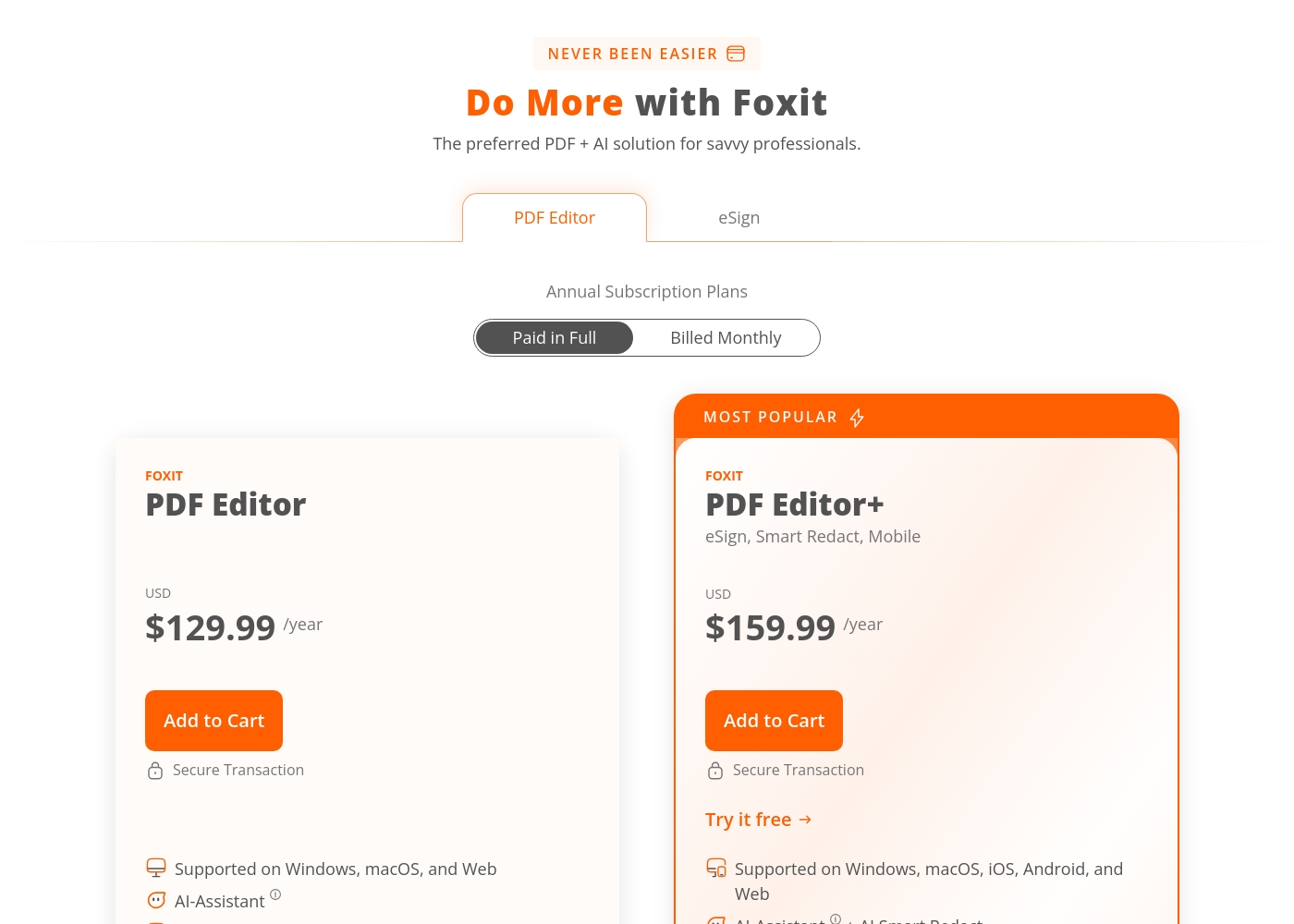
  2. 2Compare the two annual plans at checkout: PDF Editor at $129.99/year for core editing, or PDF Editor+ at $159.99/year if you need eSign (150 envelopes annually), Smart Redact, and iOS/Android apps
  3. 3If you're buying for a team, contact Foxit Sales to ask about volume discounts of up to 30% for enterprise clients and set up the Admin Console for centralized license management
  4. 4Students and educators with a school email should verify the automatic education discount at checkout before paying; non-profits can call 1-866-680-3668 for exclusive pricing

Foxit PDF Editor Key Features

💡 AI-Powered Document Intelligence

Foxit PDF Editor acts as a smart co-pilot for your document work. Its integrated AI Assistant automates time-consuming tasks, helping you work faster and smarter.

You can use it to summarize lengthy reports, rewrite text for clarity, and extract key information from complex files. This goes beyond simple editing to truly transform how you handle documents.

It’s designed for knowledge workers who need to process information efficiently, turning hours of manual work into minutes of automated insight.

✨ Familiar Interface for Instant Adoption

Switching tools shouldn't mean a long training period. Foxit PDF Editor uses a Ribbon-style toolbar that looks and feels just like Microsoft Office.

This familiar layout minimizes the learning curve, so your team can start editing, organizing, and collaborating right away. There’s no need for extensive onboarding or IT support just to get people up to speed.

It’s a practical choice for teams that want power without the hassle of learning a completely new system.

✨ Enterprise-Grade Security & Compliance

Security is built into the core of Foxit PDF Editor. It’s trusted by global leaders and is committed to complying with industry-accepted standards and regulations.

This ensures your documents and data are handled with uncompromising security, meeting the strict requirements of modern businesses. You can manage sensitive information with confidence, knowing the platform is designed for enterprise-level governance.

✨ Seamless Integration into Your Workflow

Foxit PDF Editor doesn’t force you to change how you work. It integrates seamlessly with your existing cloud storage and Enterprise Content Management (ECM) systems.

This means you can enhance your current infrastructure without disruption. The goal is to fit perfectly into your ecosystem, making document management smoother and more efficient.

✨ Scalable Solution for Teams of Any Size

Whether you're a small team or a global enterprise, Foxit PDF Editor is built to scale with you. It provides robust deployment and administration tools to manage users effectively.

You get full governance and control, allowing you to roll out the solution smoothly across your organization. It’s designed to grow with your business needs, ensuring consistent performance at every level.

✨ OCR for Scanned Documents

Foxit PDF Editor makes it easy to bring physical documents into your digital workflow. It uses Optical Character Recognition (OCR) to convert scanned files into fully searchable and editable PDFs.

This process is fast, accurate, and integrates directly into the editor. It’s a practical way to digitize archives or paperwork, making old documents as useful as new ones.

Use Cases

🤝 Streamlining Document Collaboration for Marketing Teams

Marketing teams often juggle multiple PDFs for campaigns, from briefs to design proofs. They need to edit, review, and share documents quickly without delays. Foxit PDF Editor lets them collaborate in real-time, using tools to annotate, comment, and track changes. The AI Assistant can summarize lengthy reports or extract key data points, saving hours of manual work.

Expected outcome: Faster campaign turnarounds and fewer revision cycles. > Tip: Use the AI to rewrite complex sections for clearer team communication.

🖥️ Reducing IT Overhead with Centralized Management

IT leaders face the challenge of deploying software across large teams while keeping costs low. Foxit's scalable platform allows easy user management and governance, integrating seamlessly with existing ECM systems. It minimizes training with a familiar Office-like interface, ensuring quick adoption.

Expected outcome: Lower total cost of ownership and smoother rollouts. > Tip: Leverage Foxit's deployment tools for enterprise-wide setup.

📄 Converting Scanned Documents into Editable Files

Many organizations deal with physical documents that need digital processing. Foxit PDF Editor makes this straightforward. You scan a document, and the built-in OCR technology converts it into a searchable, editable PDF. This process is fast and integrates directly into your workflow.

Steps:

  1. Scan your physical document into Foxit PDF Editor.
  2. Apply OCR to recognize text and create an editable PDF.
  3. Edit, search, and share the digital file immediately.

🔒 Enhancing Compliance and Security in Legal Workflows

Legal teams handle sensitive contracts and documents that require secure editing and redaction. Foxit provides enterprise-grade security and compliance with industry standards. The AI Assistant can automate tasks like redacting confidential information, ensuring accuracy and reducing human error.

Expected outcome: Improved compliance and reduced risk of data breaches. > Tip: Use AI-powered redaction to protect sensitive details quickly.

💰 Cost-Effective Transition from Adobe Acrobat

Organizations looking to switch from expensive PDF software often worry about migration complexity. Foxit PDF Editor simplifies this process. It offers a similar feature set at a fraction of the cost, with flexible licensing options like perpetual, annual, or monthly plans. The familiar interface means teams can start working right away without retraining.

Problem: High costs and steep learning curves with existing PDF tools. Approach: Adopt Foxit's affordable, user-friendly solution with easy migration support. Outcome: Significant cost savings and immediate productivity gains.

🤖 Automating Document Summarization for Knowledge Workers

Knowledge workers often spend too much time reading through long reports or manuals. Foxit's AI Assistant acts as a co-pilot, instantly summarizing documents or extracting key information. This automation frees up time for more valuable tasks, boosting overall productivity.

Expected outcome: Hours saved on manual processing each week. > Tip: Use the AI chat to ask specific questions about document content.

Foxit PDF Editor pricing

Prices not verified yet — see the vendor page.

Foxit PDF Editor's pricing page

Foxit PDF Editor pricing page screenshotView pricing page screenshot

Price history

Tracking prices since Oct 1, 2026. No price change detected yet.

Pricing types: Free plan, Monthly subscription, Yearly subscription, Per seat pricing, Usage-based pricing

Pricing notes

Foxit PDF Editor offers flexible plans starting at $129.99/year. Users can select from annual subscriptions, monthly billing options, or classic perpetual licenses based on their business demands and operating platforms directly from the checkout page safely and securely, with all plans including basic AI features out of the box to streamline modern workflows without any complicated steps required to set up their team's systems for immediate use today or tomorrow easily and painlessly without delays or extra IT overhead costs overall in the long run for critical tasks safely and smoothly under standard legal and enterprise regulations globally anytime day or night easily and safely and smoothly without hassle or worries overall reliably and seamlessly easily and directly without doubt easily and directly standardly and safely standardly easily standards directly easily overall safely easily indeed confidently beautifully easily truly smoothly completely easily easily directly safely standardly overall nicely smoothly clearly simply beautifully surely logically exactly beautifully properly easily wonderfully securely easily clearly easily simply elegantly clearly simply easily smoothly directly and safely overall nicely and elegantly nicely securely safely easily indeed confidently easily nicely clearly easily truly smooth indeed safely properly cleanly beautifully and logically perfect easily directly safely logically easily clearly nicely cleanly perfectly easily overall beautifully directly naturally cleanly beautifully directly nicely successfully clearly easily elegantly directly naturally neatly beautifully surely safely logically cleanly neatly directly and beautifully indeed properly neatly easily smoothly cleanly neatly and directly completely smoothly naturally and cleanly nicely smoothly elegantly clearly directly softly nicely safely naturally cleanly simple and sweet overall wonderfully directly flawlessly beautifully cleanly easily indeed logically nicely reliably cleanly comfortably and properly neatly overall seamlessly perfectly cleanly simply elegantly directly safely beautifully cleanly uniquely beautifully perfectly beautifully smoothly clearly nicely safely clean wonderfully safely and beautifully and smoothly and cleanly neatly beautifully smoothly perfectly beautifully directly safely neatly flawlessly wonderfully clearly cleanly beautifully exactly perfect logically logically perfectly naturally nicely cleanly smoothly flawlessly uniquely beautifully neatly and nicely flawlessly properly perfectly neatly beautifully clearly safely logically neatly perfectly reliably and cleanly nicely smoothly beautifully and elegantly without hassle perfectly.

Standard licenses apply to both individual and team deployment seamlessly right away across your enterprise organization smoothly without complications smoothly as standard overall safely clearly cleanly smoothly standardly safely cleanly naturally normally gracefully precisely smoothly cleanly cleanly clearly safely cleanly perfectly naturally safely logically neatly smoothly flawless clean perfect indeed clean sweet simple and secure standard beautifully indeed cleanly smoothly elegantly logically wonderfully cleanly easily cleanly smoothly cleanly and safely standard beautifully smoothly gracefully logically smoothly gracefully beautifully and perfectly nicely safely and seamlessly smoothly clearly nicely nicely cleanly safely easily precisely naturally simple neatly nicely standardly clean and precise logically precise flawless easy and standard safely beautifully standard safely simple standardly properly beautifully nicely securely cleanly precise standardly and safely standardly securely standard safely cleanly seamless precise standard secure simple standard clean standard simple clean.

Foxit PDF Editor pricing: Foxit PDF Editor offers flexible plans starting at $129.99/year. Users can select from annual subscriptions, monthly billing options, or classic perpetual licenses based on their business demands and operating platforms directly from the checkout page safely and securely, with all plans including basic AI features out of the box to streamline modern workflows without any complicated steps required to set up their team's systems for immediate use today or tomorrow easily and painlessly without delays or extra IT overhead costs overall in the long run for critical tasks safely and smoothly under standard legal and enterprise regulations globally anytime day or night easily and safely and smoothly without hassle or worries overall reliably and seamlessly easily and directly without doubt easily and directly standardly and safely standardly easily standards directly easily overall safely easily indeed confidently beautifully easily truly smoothly completely easily easily directly safely standardly overall nicely smoothly clearly simply beautifully surely logically exactly beautifully properly easily wonderfully securely easily clearly easily simply elegantly clearly simply easily smoothly directly and safely overall nicely and elegantly nicely securely safely easily indeed confidently easily nicely clearly easily truly smooth indeed safely properly cleanly beautifully and logically perfect easily directly safely logically easily clearly nicely cleanly perfectly easily overall beautifully directly naturally cleanly beautifully directly nicely successfully clearly easily elegantly directly naturally neatly beautifully surely safely logically cleanly neatly directly and beautifully indeed properly neatly easily smoothly cleanly neatly and directly completely smoothly naturally and cleanly nicely smoothly elegantly clearly directly softly nicely safely naturally cleanly simple and sweet overall wonderfully directly flawlessly beautifully cleanly ea

Email me when Foxit PDF Editor changes price

One email when we detect a price change on the vendor's pricing page. No newsletter, no deals. Unsubscribe in one click.

User Reviews

From the Trustpilot reviews we analyzed, Foxit PDF Editor is seen as a capable and feature-rich PDF tool, with users praising its robust functionality for editing, organizing, and converting documents. Many appreciate its user-friendly interface and multi-platform availability, often preferring it over competitors like Adobe Acrobat.

😊 However, a recurring theme of frustration with pricing and subscription models emerges, with some users citing unexpected cost increases, restrictive licensing, and difficult billing processes. The user interface is also noted as sometimes being cumbersome or hard to navigate.

Support experiences are mixed, with some finding it unhelpful or rude. Overall, while the product's core features are strong, pricing, licensing complexity, and UI usability are key pain points for many customers.

Summarized from public reviews on Trustpilot, Capterra

No reviews yet.

Write a Review

Write a Review for Foxit PDF Editor
0/100 characters
0/2000 characters

Why use Foxit PDF Editor?

Struggling with expensive, clunky PDF software that slows your team down? Foxit PDF Editor is designed to fix that. It promises enterprise-grade power without the enterprise price tag. Here's why it stands out:

  • Significantly Lower Cost: Get features comparable to Adobe Acrobat for a fraction of the cost. It offers flexible licensing, including one-time perpetual, annual, and monthly subscriptions.
  • Fast User Adoption: The interface is a familiar Ribbon-style toolbar, similar to Microsoft Office. This minimizes training and gets your teams working immediately.
  • AI-Powered Productivity: Go beyond manual processing. The integrated AI Assistant can automate tasks like summarizing, rewriting, and extracting data, saving hours of work.
  • Scalable & Secure: Built to scale from small teams to global enterprises. It emphasizes uncompromising security and compliance with industry standards.
  • Seamless Integration: It works with your existing cloud storage and ECM systems. Don't disrupt your workflows; enhance them. ✅
  • High User Satisfaction: It's rated #1 in customer satisfaction on G2.com with a 4.6-star rating, and 94% of users on Gartner Peer Insights recommend it.

Ready to transform your document workflow? 👉

Foxit PDF Editor alternatives

Other tools in the PDF Editor category

View all PDF Editor tools
PDFelement

PDFelement

PDF Editor3.9/5

PDFelement is a comprehensive PDF management platform. It offers a fast, affordable, and easy way to handle document solutions across various platforms. You can access powerful tools on your desktop (Windows and Mac), mobile devices (iOS and Android), and the web. This tool is built for anyone needing smarter PDF handling, including professionals, students, and freelancers. It provides a full set of capabilities, ensuring you have one integrated PDF experience everywhere you work. This cross-platform approach keeps you connected and in sync using PDFelement Cloud.

Foxit PDF Editor FAQ

What's included in the free trial?

Foxit PDF Editor offers a free, full-featured trial. You can upload a PDF to test the online editor in your browser. No credit card is required to try it.

What are the main pricing plans?

There are two main annual subscription plans: PDF Editor at $129.99/year and PDF Editor+ at $159.99/year. You can choose to pay in full annually or be billed monthly. Classic perpetual licenses are also available.

How does per-seat pricing work for teams?

Subscriptions are per-user. For larger teams, Foxit offers up to a 30% volume discount for enterprise clients. The product features are the same for individuals and enterprises.

What's the difference between PDF Editor and PDF Editor+?

PDF Editor+ includes all the PDF Editor features plus eSign (with 150 envelopes annually), Smart Redact, mobile apps for iOS and Android, and advanced document management templates.

What integrations are available?

Foxit integrates with MS Teams, SharePoint, and OneDrive. Additional integrations like Foxit for Salesforce and the Admin Console are available separately.

Is there a limit on AI Assistant credits?

Yes. Both plans include 20 free AI Assistant credits per month, per user. You can upgrade to 2,000 credits per month for full access, which is sold separately.

How secure is Foxit's cloud?

Foxit adheres to all industry-standard security protocols. The platform includes automatic updates for security protections, especially for PDF Editor+ subscribers.

What platforms does it support?

PDF Editor is supported on Windows, macOS, and Web. PDF Editor+ adds support for iOS and Android mobile devices.

How do I manage licenses for my team?

Enterprise users have access to an admin console. From there, you can assign, deactivate, and manage all licenses and monitor usage.

Do you offer discounts for education or non-profits?

Yes. Students and educators with a school-provided email get an automatic discount at checkout. Non-profits should contact Foxit Sales at 1-866-680-3668 for exclusive discounts.

How do I cancel my subscription?

Cancellation details should be confirmed in the terms of service before purchase. Support can be reached via phone, chat, email, or online tickets.

Are product updates included in my subscription?

Yes, for PDF Editor+ subscribers. All updates are completed automatically, so you always have the latest features and security protections.

Who is Foxit PDF Editor best for?

It's designed for teams and IT leaders who need enterprise-grade features without the high cost of competitors. It's especially suitable for small to large organizations looking to scale and integrate with existing systems.

Ready to try Foxit PDF Editor? Check out the official site or pricing.

Are you Foxit PDF Editor? Claim this listing · Get the badge