Butter

Butter

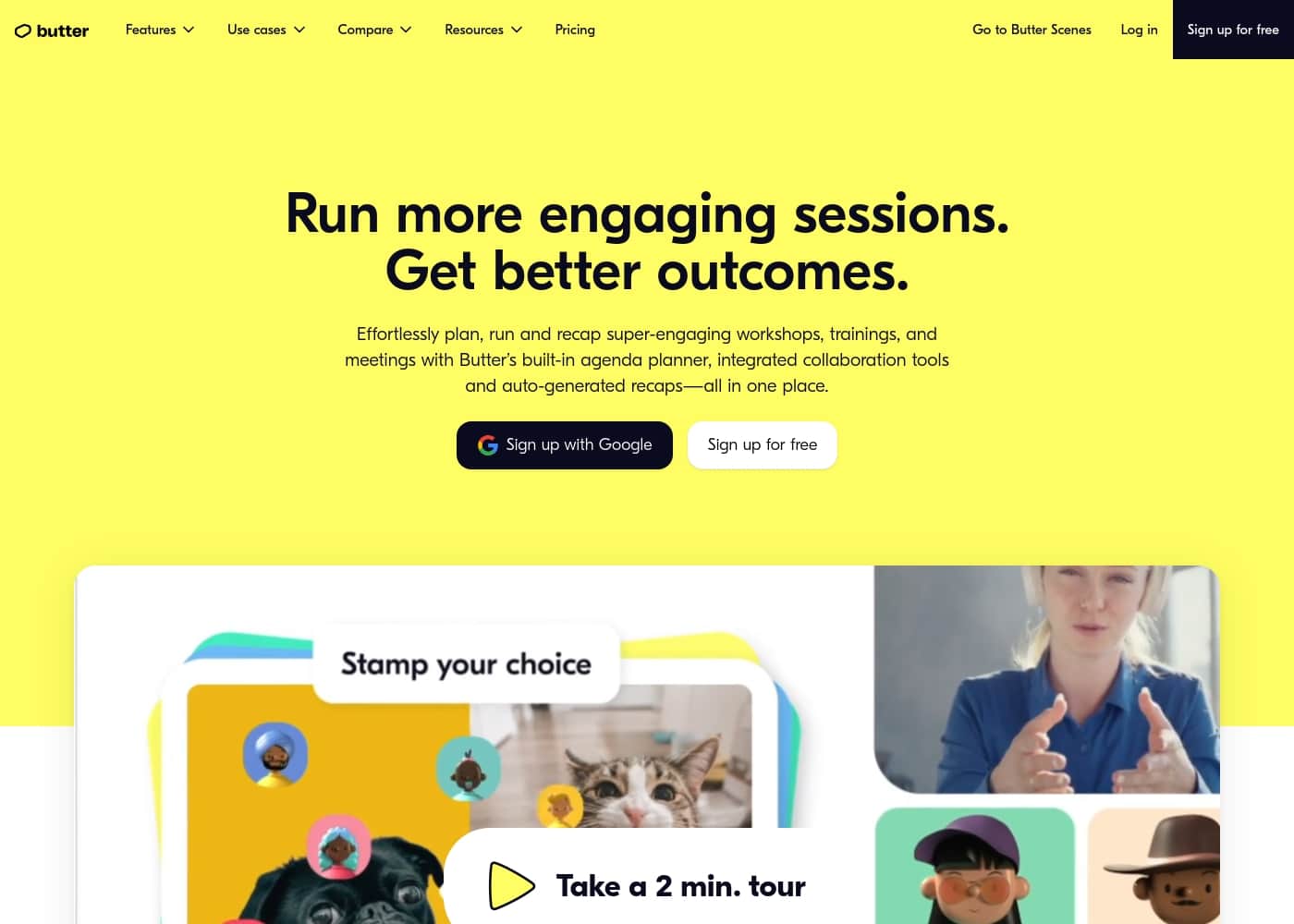
The collaborative tool built for engaging workshops and interactive sessions.

#1 dans Video Conferencing
2 min read · Updated 11/17/2025
Butter homepage screenshot

At a glance

Quick overview for Butter: rating, pricing summary, key features, and highlights.

Ciroapp review

4.8
The specialized, high-energy workshop facilitator.

We find Butter excels as a specialized platform built for high-energy collaboration, moving beyond standard video conferencing limitations. Hosts get powerful tools for structured planning, preloading agendas, and engaging attendees using features like breakouts and polls. Overall, the generous free tier and comprehensive paid features make it a strong contender for facilitators and trainers seeking deeper interaction.

Pros

  • Pro:Robust permanent free plan includes all core tools and templates.
  • Pro:Designed specifically for running interactive workshops and collaborative sessions.
  • Pro:Facilitators can pre-load structured agendas and engagement tools easily.
  • Pro:Advanced AI features use ChatGPT-4o for accurate session summaries and recaps.

Cons

  • Con:Paid pricing is calculated per-member, which can increase costs for large teams.
  • Con:The Free plan limits sessions to 60 minutes and 20 participants.
  • Con:The Starter plan caps session recording at 10 hours per workspace monthly.
  • Con:Access to the superior ChatGPT-4o engine requires the top-tier plan or an add-on purchase.
Free trial
Yes — 21 days
Range: $0–$39/member/monthFree plan, Free trial, Monthly subscription, Per seat pricing
This section is a summary. Detailed sections about features, use cases, pricing, and reviews follow below.

Butter review, pricing, features, pros & cons

It’s frustrating when standard video tools fall short. They are often built just for conversations, not true, deep collaboration.

Butter addresses this by being designed specifically for running highly interactive sessions. You can set up the perfect flow and easily engage every single participant. It puts all your essential planning and engagement tools in one focused workspace. ✅

What is Butter?

Butter is much more than your average meeting software. This tool is built to empower hosts, moderators, and facilitators. It focuses entirely on running sessions that demand collaboration and engagement.

Think about running lively workshops, bootcamps, training courses, or interactive webinars. Butter lets you plan structured sessions that can practically run themselves. You can set up customized agendas and preload all your favorite tools ahead of time. For teams, Butter also includes one specific workspace where you can collaborate, share templates, and easily access recaps for all your sessions.💡

Butter Key Features

✅ Structured Planning and Flow Control

It’s easy to prepare sessions that practically run themselves when you focus on structure. Butter lets you set up the perfect flow and customize your agenda ahead of time. You can even plan extended flows for sessions taking place over multiple days.

Save preparation time by using artificial intelligence (AI) to create a powerful schedule in seconds. If you prefer to jumpstart your planning manually, you can also easily steal and customize expert-made templates. This ensures a consistent experience every time you host.

To maximize effectiveness, you can preload all your favorite tools directly into your session setup. This integrated approach ensures that when your session starts, every necessary engagement element is ready to launch precisely when you need it.

✨ Deep Engagement Tools for Interaction

Butter is designed specifically for running highly interactive and collaborative sessions. We know that standard video tools often fall short because they are built only for conversations, not deep engagement.

Butter empowers hosts and facilitators by providing all essential tools in one focused workspace. You can keep attendees energized and productive regardless of the session type, whether you are running a workshop, a bootcamp, or an interactive webinar.

Core tools designed for interaction include breakouts, polls, and Butterboards. By having this full suite of tools ready, you can efficiently create tons of engagement during the session itself.

💡 Dedicated Team Workspace and Sharing

For teams, Butter includes one specific workspace designed to enhance collaboration and efficiency. This space acts as your central hub for shared resources and session knowledge.

Within the workspace, team members can collaborate on session flows and easily share templates, maintaining consistency across all facilitators. This makes it simple to standardize the way your team delivers high-energy events.

The team workspace also provides easy access to recaps for every session run by your team, helping you quickly review past events and outcomes.

✨ Flexible Access and Device Support

Butter believes in removing barriers to participation and access. Participants can join sessions immediately just by clicking the shared invite link; they don’t even need an account.

We support several ways to run and join sessions for maximum flexibility. You can access Butter directly from your web browser, or you can download the dedicated desktop app.

For participants on the go, we also have the Butter mobile app available for both iOS and Android platforms. Note that while participants don't need an account, hosts must have a Butter account to set up and start a session.

✨ Automated Recaps and AI Summaries

Post-session workflow is simplified with powerful recap and recording capabilities. Paid plans offer AI-powered session recaps derived automatically after the meeting ends.

These recaps include summaries, full transcripts, and even GIFs, depending on your plan tier. Advanced plans incorporate the high-end ChatGPT-4o engine to ensure high-quality, accurate summaries of your collaborative sessions.

When you upgrade, you gain immediate access to these features, along with options for unlimited session recording and unlimited history for your session recaps.

Use Cases

🛠️ Running Highly Structured Collaborative Workshops

It’s hard to keep attendees focused during a multi-hour workshop using standard meeting software. Butter solves this by letting you effortlessly prepare your flow beforehand. You can design a customized agenda and preload all your favorite engagement tools precisely where they are needed.

This structure ensures a professional and seamless session. You transition easily between discussions, breakouts, and quick activities, keeping every participant energized. The tool empowers you to be a great facilitator, reducing the technical burden.

📚 Delivering Interactive Training and Bootcamps

Training sessions, courses, and bootcamps require deep engagement, not just passive viewing. Use expert-made templates to instantly steal a proven structure for your learning course.

Set up sessions for multiple days and include structured transitions into breakout groups for practical application. Butter handles the heavy lifting, allowing you to focus completely on delivering high-value content. For large groups, the Unlimited plan supports up to 200 participants per session.

🤝 Establishing a Team Workspace for Consistency

Your facilitation team needs a central place to share knowledge and standardize session delivery. Butter provides a dedicated workspace for your entire team. Here, you can collaborate on planning flows and share successful templates across the entire team.

This improves team efficiency and ensures everyone is running sessions that align with your organizational goals. You can also easily access recaps for all past sessions, helping everyone stay informed.

🤖 Effortless Preparation using AI Assistance

Starting from a blank slate when planning a session can be challenging. Butter helps you quickly overcome initial hurdles through powerful AI assistance.

Follow this simple flow:

  1. Use AI to draft a functional agenda fast.
  2. Customize the agenda and add specific tools like polls or music breaks.
  3. Preload all necessary external links or documents.

Expected outcome: Your session is ready to run smoothly in minutes, not hours.

📝 Simplifying Post-Session Follow-Up with Recaps

Problem: After a dynamic workshop, distilling key outcomes and decisions is often time-consuming manual labor. Approach: Butter uses AI to automatically generate session recaps, summaries, and transcripts.

Outcome: You can share these precise recaps immediately with participants or stakeholders. Paid plans offer history ranging from 45 days up to unlimited, ensuring your team has easy access to all past session results when needed.

🌟 Hosting Engaging, Interactive Webinars

Interactive webinars and events demand high energy from hosts and quick access to tools. Butter puts everything you need—like music, polls, breakouts, and quick reactions—in one focused workspace. The tool is designed specifically to maximize participant interaction, ensuring your event is lively and memorable.

You avoid the technical clutter of switching between multiple applications, making your delivery professional and seamless for attendees.

Pricing Overview for Butter

Pricing range
$0–$39/member/month
Pricing types
Free plan, Free trial, Monthly subscription, Per seat pricing

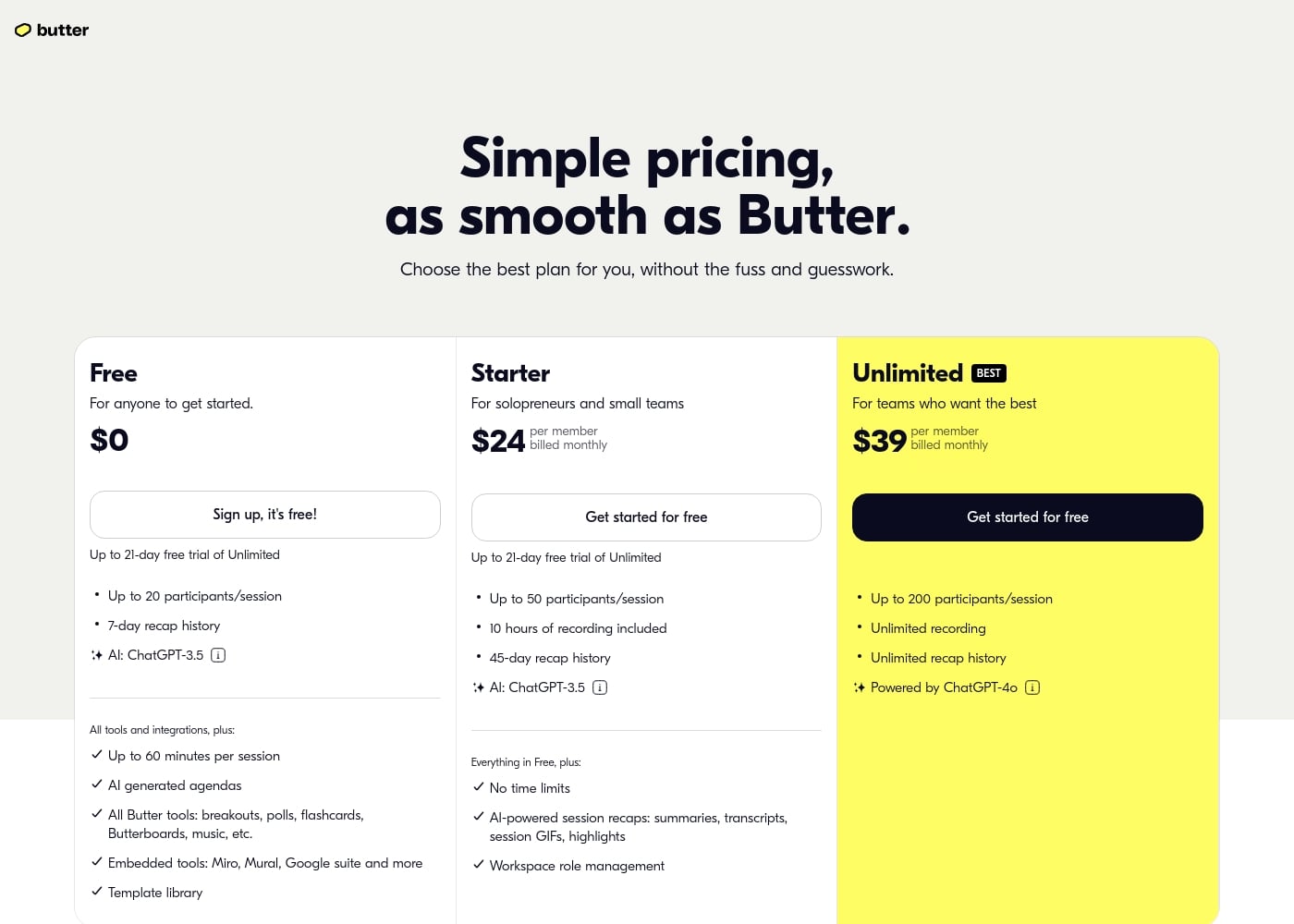
Butter offers a permanent Free plan alongside flexible, per-member subscriptions for growing teams. Paid plans start at $24 per member per month, scaling up based on participant limits, session length, and powerful AI capabilities.

Plans & Pricing

Free

Monthly$0
Max 5 members in workspace, 7-day recap history
  • Up to 20 participants/session
  • Up to 60 minutes per session
  • AI generated agendas
  • All core Butter tools
  • Template library

Starter

Monthly$24
Max 10 members in workspace, 10 hours of recording included (resets monthly), 45-day recap history
  • Everything in Free, plus:
  • No time limits
  • Up to 50 participants/session
  • AI-powered session recaps (ChatGPT-3.5 default)
  • Workspace role management

Unlimited

Monthly$39
Unlimited members in workspace
  • Powered by ChatGPT-4o (Included)
  • Unlimited recording
  • Unlimited recap history
  • Up to 200 participants/session

Butter costs between $0 and $39 per member per month with three plans: Free at $0 (per member), Starter at $24/member/month, and Unlimited at $39/member/month.

Here’s a closer look at what each plan provides.

Free

Price: $0 Websites Supported: Not explicitly stated (Max 5 members in workspace) Best For: Anyone to get started Refund Policy: Not explicitly stated Other Features:

  • Up to 20 participants/session
  • Sessions up to 60 minutes
  • 7-day recap history
  • AI (ChatGPT-3.5) generated agendas
  • Access to all tools (breakouts, polls, Butterboards, etc.)

This robust $0 plan is the best way for individuals or small groups to test Butter’s collaborative environment. You get full access to essential engagement tools, though sessions are limited to one hour and 20 participants.

Starter

Price: $24 per member billed monthly Websites Supported: Not explicitly stated (Max 10 members in workspace) Best For: Solopreneurs and small teams Refund Policy: Not explicitly stated Other Features:

  • No time limits for sessions
  • Up to 50 participants/session
  • 10 hours of recording included (per workspace, resets monthly)
  • 45-day recap history
  • AI-powered session recaps (summaries, transcripts, GIFs) using ChatGPT-3.5

The Starter plan is an excellent fit if you regularly host longer sessions or larger groups. It removes the 60-minute time cap and includes valuable session recap features and essential workspace role management for better team organization.

Unlimited

Price: $39 per member billed monthly Websites Supported: Not explicitly stated (Unlimited members in workspace) Best For: Teams who want the best Refund Policy: Not explicitly stated Other Features:

  • Up to 200 participants/session
  • Unlimited session recording
  • Unlimited recap history
  • Powered by Advanced ChatGPT-4o AI (included)

Choose the Unlimited plan for the highest capacity and performance. It eliminates all storage and history limits and incorporates the high-end ChatGPT-4o engine, ensuring your large-scale workshops and training sessions are captured and summarized accurately.

If you want to try the top-tier features, new users can begin with a free trial of the Unlimited plan for up to 21 days. If you decide not to purchase commercial features after the trial ends, your workspace will automatically be downgraded to the permanent Free plan. You may cancel paid plans anytime through your workspace settings.
User Reviews

Users on Trustpilot are highly enthusiastic about Butter, describing it as a powerful, all-in-one design and video editing solution. They consistently mention the platform's intuitive and easy nature, noting it has virtually no learning curve compared to professional tools like Adobe After Effects.

The built-in, beautifully designed templates help users create highly polished, professional-grade content quickly. Many small business owners and teams noted how Butter streamlines their creative processes, helping them generate content 10x faster.

The tool is praised for its unique animations, powerful components, and ability to generate design variations quickly. Furthermore, reviewers highlight the team's responsiveness and continuous feature development, with one enthusiastic user calling it "Canva on steroids!" 🔥 The platform is seen as an effective solution for maintaining brand consistency and achieving high-quality results without requiring a dedicated marketing team.

What users say elsewhere

Molly P.
· Trustpilot · Mar 21, 2025
5.0 / 5

Butter has truly transformed how I create content. It gives you the power of Adobe After Effects without the steep learning curve, delivering professional results instantly.

Alex D.
· Trustpilot · Aug 8, 2025
5.0 / 5

It made our creative process so much easier, from gathering basic inspiration to creating complex variations. The team is super responsive and adds new features constantly.

No reviews yet.

Write a Review

Write a Review for Butter
0/100 characters
0/2000 characters

Why use Butter?

Stop wasting time on meetings that truly could have been an email! Butter helps you deliver great outcomes by focusing entirely on high-energy collaboration. Here's why you should choose Butter for your next interactive event:

  • Structured Planning: Effortlessly prepare sessions by setting up a perfect flow. You can use customizable, expert-made templates or quickly create powerful schedules using AI assistance.
  • Full Engagement: Keep attendees energized and productive throughout the entire session. Butter provides everything hosts need to facilitate deep interaction, all in one place.
  • Team Efficiency: Access a dedicated workspace just for your team. Here, you can share templates, collaborate on flows, and easily find recaps for every session you run.
  • Flexible Access: Participants can join immediately just by clicking the shared invite link through their browser or apps. Hosts and participants can use the browser, desktop app, or mobile app for full flexibility.
  • Start Free: You can access a free plan forever to run sessions up to 60 minutes with 20 participants. Paid plans unlock unlimited rooms, advanced AI summaries, custom branding, and capacity for up to 200 people. ✨

Ready to transform your workflow with Butter?

Frequently Asked Questions

How long is the free trial, and what plan does it cover?

New users can try the Unlimited plan with all its features for up to 21 days for free. You can potentially extend this trial by another 14 days by completing a checklist on your dashboard.

What happens to my workspace after the free trial ends?

If you do not purchase a plan, your workspace automatically downgrades to the permanent Free plan. This limits sessions to 60 minutes and caps participation at 20 people.

Is Butter priced by the number of session participants or by core team members?

Paid plans are based on monthly billing per workspace member who needs editing or facilitation access. Anyone can join sessions as a participant for free without needing a paid membership.

What is the difference between the Starter and Unlimited plans regarding AI features?

The Starter plan uses the standard ChatGPT-3.5 engine by default for summaries. The Unlimited plan includes the superior and more accurate ChatGPT-4o engine at no extra cost for enhanced recaps.

Can Starter plan users access the advanced ChatGPT-4o engine?

Yes, Starter plan members can purchase an add-on. You can upgrade the Starter plan to include the ChatGPT-4o engine for an extra $8 per member monthly.

What are the session recording limits on the Starter plan?

Starter workspaces come with 10 collective hours of recording per workspace monthly. If you exceed this pool, you will be charged $3 for every extra hour of recording used.

What tools or integrations can I embed into a Butter session?

Butter supports embedding popular collaborative tools directly into your sessions. Explicitly included tools are Miro, Mural, and applications within the Google suite.

How do I manage my billing details or change my payment method?

You can change your invoice details, update payment information, or select a new invoice recipient in the 'Plan & billing' tab in your Workspace settings.

Are there discounts available for organizations with many users?

Yes, discounts are available if your team purchases paid plans for 20 or more people. You should contact the Butter team directly for a customized pricing plan.

How do I cancel my subscription, and what happens to deactivated members?

You can cancel your paid plan anytime through the 'Plan & billing' tab in your Workspace settings. Deactivating a member removes their access to content but frees up a paid seat.

How does Butter handle data security and GDPR compliance?

As a Danish company, Butter states they care deeply about privacy and are continually striving for GDPR compliance. Detailed security and privacy policies are available on their website.

What is the recap history limit if I am using the Free plan?

The Free plan maintains a 7-day recap history limit. If you require access to older sessions, you must upgrade to a paid plan.

Do participants need to download an app or software to join a session?

No, participants can join any Butter session instantly just by clicking the invite link through their standard web browser. Hosts can use the browser or the desktop app.

What level of support do I receive with the different plans?

All plans include email support and access to the Help Center. The Unlimited plan also provides access to Premium support, and personalized onboarding is available upon request.

Can I use custom branding, like my company logo, in the sessions?

Yes, custom branding features allow you to include your logo in the corner of your sessions. This feature is available with both the Starter and Unlimited paid workspaces.

Does Butter offer specific tools for migrating content from other platforms?

Not explicitly stated on the official site. However, the platform features a template library and the ability to customize agendas, simplifying session setup.

Ready to try Butter? Check out the official site or pricing.