BILL

BILL review

Pay bills, send invoices, and manage spend — all on one AI-powered platform.

BILL costs from $49/mo · 6 plans · Free plan available

By Ciroapp Editorial Team · Updated Sep 17, 2026

Commission may apply at no extra cost

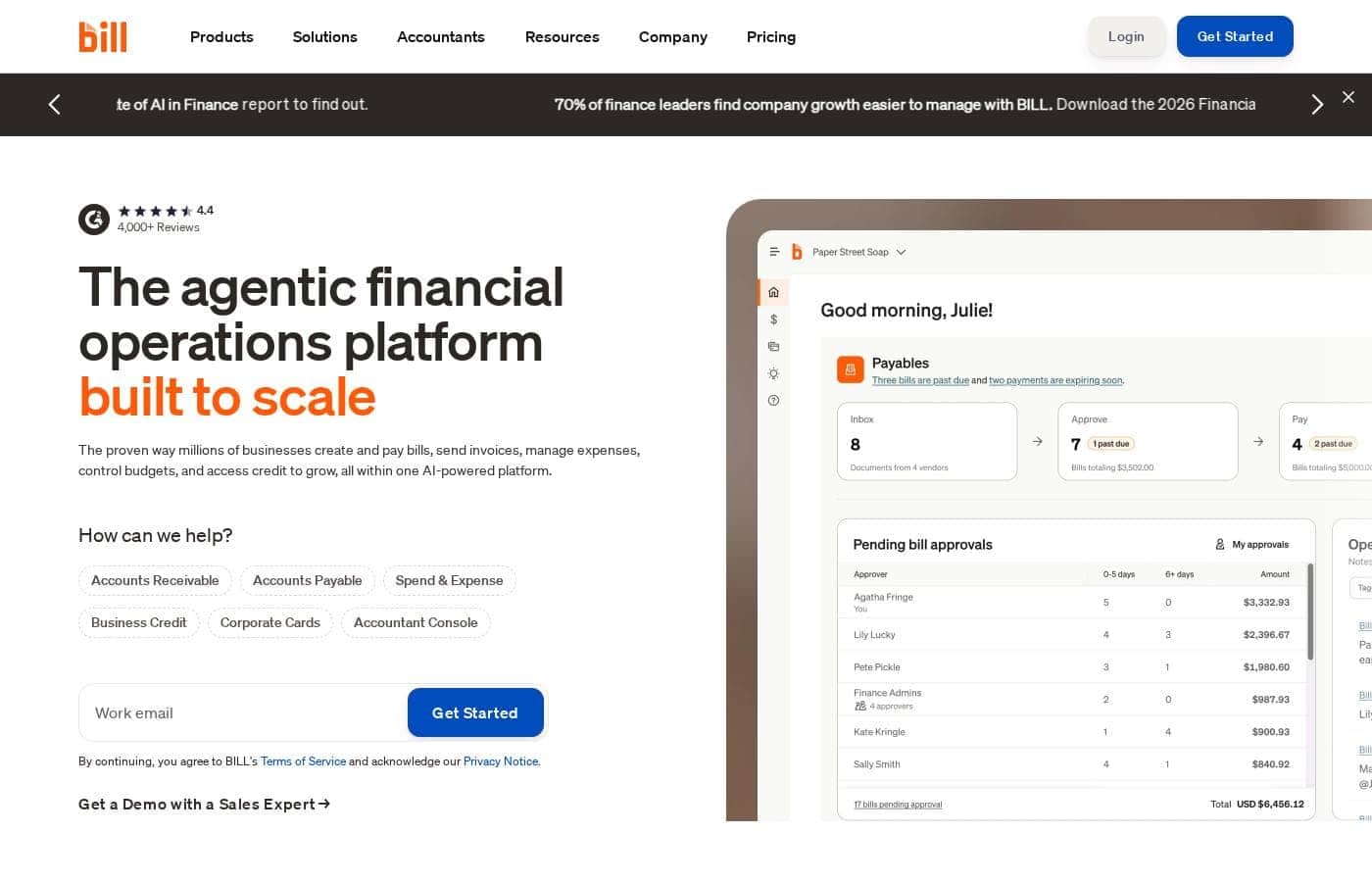
BILL homepage screenshot

At a glance

Quick overview for BILL: rating, pricing summary, key features, and highlights.

Ciroapp score

4.2/ 5

BILL automates bill pay, invoicing, and spend management in one place, with two-way sync to QuickBooks, Xero, NetSuite, Sage Intacct, and Dynamics. Plans run $0–$89 per user, but fees stack on every payment and no refund policy is published. Overall, it's a strong pick for automating payables — if you budget for the add-on costs.

Pros

  • Pros:Automates the full accounts payable cycle — bill import, AI-assisted coding, approval routing, and payment — reducing manual entry and errors
  • Pros:Syncs two-way with major accounting systems including QuickBooks Online, Pro, Premier, Xero, NetSuite, Sage Intacct, and Microsoft Dynamics, cutting re-keying work
  • Pros:Supports multiple payment methods (ACH, check, card, international transfers) through an 8.3-million-member network processing $345 billion in annual payment volume

Cons

  • Cons:Per-user pricing stacks up quickly for larger teams — Team and Corporate plans cost $65 and $89 per user per month, and approver-only seat discounts only apply at the Corporate tier
  • Cons:Transaction fees add on top of every subscription — $0.59 per ACH payment, $1.99 per mailed check, and 2.9% for card payments, with higher costs for faster or international transfers
  • Cons:The Essentials plan only syncs with accounting software via manual CSV import/export, which undermines the automation value proposition at the entry tier
Best for
  • Small businesses drowning in manual bill pay and paper invoices
  • Midsize companies that need approval workflows and multi-entity controls
  • Accounting firms managing bill pay and bookkeeping for many clients — 9,500+ firms partner with BILL
Free trial
Yes
This section is a summary. Detailed sections about features, use cases, pricing, and reviews follow below.

What is BILL?

Chasing paper bills, approval emails, and receipts across separate tools eats up your week. BILL puts bill pay, invoicing, expenses, and budgets on one platform. Its AI cuts manual work, and surveyed users report saving about 12 hours a month on average.

BILL is an AI-powered financial operations platform for small and midsize businesses, accounting firms, and finance teams. It handles accounts payable, accounts receivable, spend and expense management, business credit, and corporate cards in one place. The site reports over 500,000 businesses use BILL, with an 8.3-million-member payment network.

It syncs two-way with QuickBooks, NetSuite, Sage Intacct, Xero, and Microsoft Dynamics.

Should you choose BILL?

Quick buyer guidance before you compare plans or click through.

Choose it if

  • Teams already on QuickBooks, NetSuite, Sage Intacct, Xero, or Microsoft Dynamics — BILL offers two-way sync with each
  • Companies that need flexible payment options: ACH, check, card, and international transfers
  • Businesses seeking credit lines from $1,000 to $5 million with an application that takes minutes (approval required)
  • Owners who want budget controls, spend visibility, and rewards on eligible purchases
  • Remote teams that rely on mobile apps for approvals and expenses on iOS and Android

Skip it if

  • Buyers who need transparent pricing up front — the homepage links to a pricing page but shows no dollar figures, so expect a sales conversation
  • Businesses that don't use major accounting software — the platform's value leans heavily on two-way sync with tools like QuickBooks and NetSuite
  • Companies expecting guaranteed credit — the $1,000 to $5 million range isn't guaranteed and depends on application approval
  • Very small teams with only a handful of monthly bills, who may not need a full financial operations platform
  • Buyers who prefer self-serve onboarding — the site primarily funnels you toward a demo with a sales expert

Next steps before buying

  1. 1Review the pricing page and note what isn't listed — ask sales for complete fee details, including any ACH and transaction costs
  2. 2Confirm BILL integrates with your accounting software, HRIS, and other tools before committing
  3. 3Compare BILL against alternatives using its compare page and independent reviews — it holds a 4.4 rating across 4,000+ reviews
  4. 4Read the credit terms carefully — the BILL Divvy Card is issued by bank partners, and credit lines require application approval
  5. 5Book the demo with specific questions about onboarding time, support options, and any trial terms

Ease of use

Public signals point to a low-friction daily workflow: one login, an aggregated cash-flow task list, automatic approval routing, and mobile apps for iOS and Android. Customer stories support this — one founder cut payables from roughly 30 hours a week to about 5. Note this assessment is based on BILL's own materials, not hands-on testing, and setup details aren't published.

BILL Key Features

✨ AI-powered AP automation

Bill pay shouldn't eat your week. BILL's AI works from bill creation through approvals and payments, cutting manual entry and errors. Import bill info, auto-route approvals based on your company's policies, and auto-pay vendors with flat-fee ACH.

A centralized bill inbox keeps everything in one place, while automatic W-9 collection handles the paperwork.

💳 Pay vendors your way

No more tool-switching to settle invoices. BILL supports ACH, check, card, and international transfers, so you can pick what fits each supplier. Behind the scenes, an 8.3-million-member network processes $345 billion in annual payment volume.

Ready bills show up in one aggregated cash-flow task list instead of scattered emails. 💳

✨ Spend and expense control

Set budgets with proactive spend controls so you catch overspending before it happens. Team members get physical and virtual cards, and AI-powered expense tracking makes reimbursements simple.

  • Track company spend in one place
  • Earn rewards on eligible purchases
  • Handle approvals and expenses from iOS and Android apps

✨ Synced books and stronger controls

Keep your books close. BILL syncs two ways with QuickBooks, NetSuite, Sage Intacct, Xero, and Microsoft Dynamics, so you stop re-keying data. Customers like Wag report an 80% faster close. Teams that need tighter governance get custom roles, AP controls, procurement with purchase orders and matching, and multi-entity accounting.

✨ Invoicing and accounts receivable

Getting paid matters too. Create custom invoices, automate payment reminders, and accept ACH or card payments. Flexible sending and tracking help you follow each invoice from send to settle.

Accounting firms get their own console for client bill pay, and 9,500+ firms partner with BILL.

Use Cases

💸 Automate the whole payables cycle

Your AP team imports bills, and BILL routes approvals based on your policies. Vendors get paid by flat-fee ACH, check, card, or international transfer. Expected outcome: less manual entry, fewer errors, and two-way sync with QuickBooks or NetSuite.

Tip: Approve bills on the go with the mobile app.

📨 Get paid faster with less chasing

You send custom invoices, and automated payment reminders follow up for you. Customers pay by ACH or card. Expected outcome: steadier cash flow without the awkward "just checking in" emails.

💳 Control spend before it happens

Finance leads set budgets, hand out physical and virtual cards, and track company spend in one place. Employees snap receipts in the mobile app, and AI speeds up expenses and reimbursements. Expected outcome: clear visibility plus rewards on eligible spend.

🧮 Run client books at scale (accounting firms)

Firms use the Accountant Console to manage bill pay and bookkeeping across many clients. Partner plans start at $49 a month with wholesale client pricing. Expected outcome: less busywork per client and a service you can resell to grow your firm.

BILL pricing

From$49/mo

  • 6 plans
  • Free plan available

Prices not verified yet — see the vendor page.

BILL's pricing page

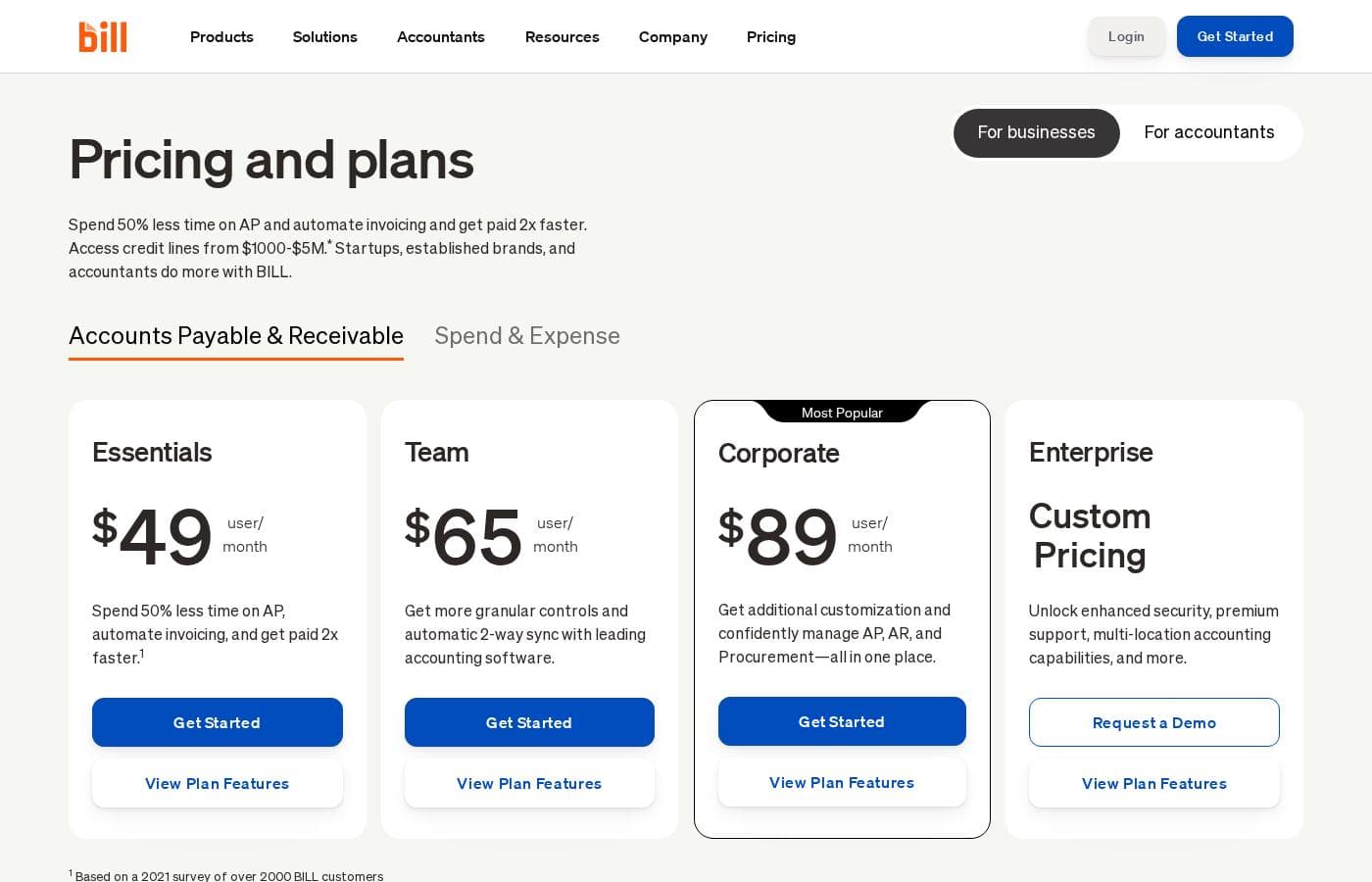
BILL pricing page screenshotView pricing page screenshot
PlanBilled monthlyBilled annuallyIncludes
Spend & Expense
Free
—
Credit lines are not guaranteed and are determined upon application approval
  • Unlimited physical and virtual cards
  • Budgets with proactive spend controls
  • AI-powered expense management and reimbursements
  • Access to credit lines from $1,000–$5M
  • Mobile app, API access, and flexible rewards
Essentials
per user
$49/mo
—
Accounting integrations are manual via CSV import/export
  • Bill entry and centralized inbox
  • Automated approval workflows
  • Pay by ACH, virtual card, or credit card
  • Custom invoices with automated payment reminders
  • 6 standard user roles and standard approval policies
Team
per user
$65/mo
—
  • Automatic 2-way sync with QuickBooks Online, Pro, Premier, and Xero
  • Custom user roles
  • AI multi-line bill coding with the Invoice Coding Agent
  • Flexible invoice sending and tracking
  • Automated payment reminders and auto-charge/auto-pay
Corporate
per user
$89/mo
—
  • Custom approval policies and custom user roles
  • Procurement: purchase requests, purchase orders, tolerance rules, 2-way matching
  • Unlimited purchase requesters for free
  • Discounts for approver-only users
BILL AP & AR Partner (Accountants)
$49/mo
—
  • Access to both BILL AP and AR
  • Wholesale client subscription pricing you can resell
  • Extra 10-20% client subscription discount based on clients onboarded
BILL Spend & Expense Partner (Accountants)
Free
—
  • Free-to-use for you and your clients
  • No contracts and no hidden fees

Pricing types: Free plan, Free trial, Monthly subscription, Per seat pricing, Usage-based pricing

Pricing notes

BILL's paid AP & AR plans cost $49–$89 per user per month (Essentials, Team, Corporate), with custom pricing for Enterprise. BILL Spend & Expense is free at $0 per user per month, and all plans carry small per-transaction payment fees.

BILL costs between $0 and $89 per user per month with 5 plans: Spend & Expense at $0, Essentials at $49, Team at $65, Corporate at $89, and Enterprise at custom pricing.

Here's what each plan includes.

Essentials

Price: $49 per user per month Best For: Small businesses that want to cut AP time or automate invoicing without deep accounting integrations Other Features:

  • Manually syncs with accounting software via CSV import/export
  • Automated approval workflows and a centralized bill inbox
  • Automatic W-9 collection and verification
  • Custom invoices with automated payment reminders, paid by ACH or card
  • 6 standard user roles and standard approval policies

Essentials is the entry point for BILL's paid AP and AR tools. You can create and pay bills, send invoices, and track everything from one inbox. The trade-off is that accounting syncs are manual rather than automatic. Choose it if you're a small team that mostly needs the core workflow.

Team

Price: $65 per user per month Best For: Growing teams that want automatic sync with leading accounting software Other Features:

  • Automatic 2-way sync with QuickBooks Online, Pro, Premier, and Xero
  • Custom user roles
  • AI multi-line bill coding with the Invoice Coding Agent
  • Flexible invoice sending and tracking

Team adds the two things growing companies ask for most: automatic accounting sync and more control over user roles. If you're tired of CSV exports, this is the first tier that fixes it.

Corporate

Price: $89 per user per month Best For: Companies that want AP, AR, and procurement in one place Other Features:

  • Custom approval policies and custom user roles
  • Procurement tools: purchase requests, purchase orders, tolerance rules, and 2-way matching
  • Unlimited purchase requesters at no extra cost
  • Discounts for approver-only users

Corporate is BILL's most popular plan. It's the first tier with procurement built in, so you can manage buying and paying together. Because approver-only seats cost less here, you keep per-user costs in check as the team grows.

Enterprise

Price: Custom pricing Best For: Larger or multi-entity organizations with complex systems Other Features:

  • Everything in Corporate, plus 2-way sync with QuickBooks Enterprise, Oracle NetSuite, Sage Intacct, and Microsoft Dynamics
  • 2 and 3-way purchase order matching
  • Single Sign-On, dual control, and multi-location accounting
  • API access and priority support

Enterprise suits companies running bigger ERPs or managing multiple entities. You'll need to request a demo to get a quote.

Spend & Expense

Price: $0 per user per month Best For: Any business that wants free spend, expense, and card management Other Features:

  • As many physical and virtual cards as you need
  • Budgets with proactive spend controls
  • AI-powered expense tracking and easy reimbursements
  • Access to credit lines from $1,000–$5M (subject to application approval)

Spend & Expense is free, so it layers on top of any plan at no extra software cost. Just remember that credit lines aren't guaranteed — they depend on approval.

BILL also sells partner plans for accounting firms: the AP & AR Partner plan is $49/month with wholesale client pricing, and the Spend & Expense Partner plan is free.

The bottom line: BILL has a genuinely free plan — Spend & Expense costs $0 per user per month with no subscription fees. Paid AP & AR plans are billed per user, and a free trial is available in most cases. Every plan also carries per-transaction fees, such as $0.59 per ACH payment and $1.99 per mailed check. No refund policy is shown, so it's worth confirming trial terms and how many users need full access before you commit.
Cost calculator

Estimate what BILL costs for your team.

Billing
Per month
$245
Per year
$2,940

Essentials is priced per user: price × 5 seats. Estimate based on published list prices, before taxes, add-ons and discounts.

How to pay less for BILL

  • Start on the free plan and upgrade only when you hit its limits.
  • A free trial is available: test it before you pay.
  • Some plans are priced per user: only pay for seats people actually use.
Start free trial

Email me when BILL changes price

One email when we detect a price change on the vendor's pricing page. No newsletter, no deals. Unsubscribe in one click.

User Reviews

No reviews yet.

Write a Review

Write a Review for BILL
0/100 characters
0/2000 characters

Why use BILL?

If your back office runs on spreadsheets, paper invoices, and back-and-forth approval emails, BILL is built to replace that chaos with one automated workflow. Here's what stands out from its own materials and customer stories:

  • Automate the whole payables cycle. Import bill info, auto-route approvals to match your company's policies, and auto-pay vendors with flat-fee ACH.
  • Pay your way. Settle invoices via ACH, check, card, or international transfers without switching tools.
  • Let AI handle the busywork. BILL applies AI from bill creation through approvals and payments to reduce errors and manual entry.
  • Control spend before it happens. Set budgets, track company spend, and pair it with the BILL Divvy Card plus rewards on eligible spend.
  • Keep your books close. Two-way sync with QuickBooks, NetSuite, and Sage Intacct cuts re-keying — customers like Wag report an 80% faster close.
  • Grow with credit when you need it. Apply in minutes for credit lines from $1,000 to $5 million, subject to application approval.

With 8.3 million network members and $345 billion in annual payment volume, BILL has real scale behind it.

BILL alternatives

Other tools in the Expense Management category

View all Expense Management tools
Travel Code

Travel Code

Expense Management3.8/5

Travel Code is an AI-driven platform for booking flights, hotels, and transfers with a focus on corporate travel. Affiliates earn high commissions by offering smart, automated travel solutions to business clients worldwide.

Divvy

Divvy

Expense Management4/5

BILL Spend & Expense (formerly Divvy) is an all-in-one expense management platform built for modern businesses. ✅ It blends free, world-class software with access to the BILL Divvy Card. This unique combination helps small or midsize companies achieve greater control. It focuses on transforming spend and expense management by emphasizing control, simplicity, and savings. The ultimate goal is to eliminate manual expense reports entirely.

Coast

Coast

Fleet Management4.1/5

Coast is a smart fuel card and expense management built on the Visa network. Drivers can fill up anywhere their Visa is accepted and pay for parking, tolls, maintenance, and more. All with granular driver and vehicle controls and reporting.

BILL FAQ

How much does BILL cost?

BILL's cheapest paid plan, Essentials, costs $49 per month. Paid plans range from $49 to $89 per month.

Does BILL have a free plan?

Yes. BILL has a free plan (Spend & Expense); paid plans start at $49 per month.

Does BILL offer a free trial or a money-back guarantee?

BILL offers a free trial.

Which accounting software does BILL sync with, and on which plans?

Team and Corporate sync automatically with QuickBooks Online, Pro, Premier, and Xero. Enterprise adds QuickBooks Enterprise, Oracle NetSuite, Sage Intacct, and Microsoft Dynamics. Essentials only connects via manual CSV import/export.

What will I pay per transaction on top of my subscription?

Every plan adds payment fees. You'll pay $0.59 per ACH payment, $1.99 per mailed check, and 2.9% for card payments. Faster options and international transfers cost more.

What support does BILL provide if I get stuck?

All plans include Help Center access, live chat, and phone support. Enterprise customers get priority support, and accounting firm partners receive priority live chat and phone. Business hours are listed in the Help Center.

Ready to try BILL? Check out the official site or pricing.

Are you BILL? Claim this listing · Get the badge