
Astra

Astra review

The lightweight WordPress theme toolkit that pairs a fast core with starter templates and AI-assisted site building.

Astra costs from $5.75/mo Β· 5 plans

By Ciroapp Editorial Team Β· Updated Sep 16, 2026

Commission may apply at no extra cost

Astra homepage screenshot

At a glance

Quick overview for Astra: rating, pricing summary, key features, and highlights.
Vendor page checked Oct 12, 2026

Ciroapp score

4.1/ 5

Astra pairs a genuinely fast, lightweight WordPress core with a large starter-template library, AI drafting tools, and support for Gutenberg, Elementor, and Beaver Builder. The trade-off is that its standout features, like advanced WooCommerce controls, custom layouts, and white labeling, sit behind the paid Pro add-on, and the ecosystem spans several plugins. Overall, it's a sensible, low-risk default for fast WordPress production.

Pros

  • Pros:The free tier is a complete, usable theme β€” not a crippled demo β€” so real sites can launch at zero cost.
  • Pros:Lean, modular code keeps pages fast, which is uncommon among themes offering this much built-in functionality.
  • Pros:Compatible with the block editor plus Elementor and Beaver Builder, so you are not locked into a single editing workflow.

Cons

  • Cons:The most differentiating features β€” advanced WooCommerce controls, custom layouts, white labeling β€” require the paid Pro add-on, so the free theme alone can feel basic.
  • Cons:The experience is spread across several pieces (core theme, Pro add-on, template plugin, AI tools), which can feel fragmented to maintain and configure.
  • Cons:Heavy template use has a downside β€” without deliberate customization, Astra-built sites can share a recognizable look.
Best for
  • Solo freelance designers who need to ship polished client sites on short timelines using templates and AI drafts.
  • Small agencies standardizing one fast, white-labeled theme stack across an entire client portfolio.
  • Bloggers and content creators who want a lightweight theme with a template jumpstart rather than a blank default.
This section is a summary. Detailed sections about features, use cases, pricing, and reviews follow below.

What is Astra?

Astra is a WordPress theme that has grown into one of the most widely used foundations for building sites on the platform. Rather than shipping only a theme, the project bundles a core theme, a library of pre-built starter templates, and AI-assisted site generation into a single toolkit. Its codebase is engineered around speed, keeping pages light so performance does not degrade as designs get more complex.

That combination has made it a common choice for solo freelancers, professional web builders, and agencies managing many client projects.

Astra is a multipurpose WordPress theme designed to serve as the base layer for nearly any type of site β€” blogs, business pages, portfolios, and online stores. The free theme installs directly from WordPress and covers core layout, header, footer, and styling controls. Around that core, the ecosystem adds pre-built template sites that can be imported and edited, plus AI integrations that help generate page content and layouts.

More advanced capabilities, such as extended WooCommerce options and white labeling, come through the paid Astra Pro add-on.
Should you choose Astra?

Quick buyer guidance before you compare plans or click through.

Choose it if

  • Solo freelance designers who need to ship polished client sites on short timelines using templates and AI drafts.
  • Small agencies standardizing one fast, white-labeled theme stack across an entire client portfolio.
  • Bloggers and content creators who want a lightweight theme with a template jumpstart rather than a blank default.
  • WooCommerce store owners who need shop-specific layout and checkout options without sacrificing page speed.

Skip it if

  • Developers who want a minimal, unopinionated blank starter theme β€” Astra's feature set and add-on ecosystem will feel like excess machinery.
  • Teams that expect one tool to handle everything with no add-ons, since Astra's advanced capabilities are distributed across Pro modules and companion plugins.
  • Buyers expecting an all-inclusive platform like Wix or Squarespace β€” Astra assumes you are comfortable operating WordPress itself.
  • Projects where a completely unique, from-scratch visual identity is the core requirement, since template-driven starts need deliberate work to avoid a familiar look.

Next steps before buying

  1. 1Install the free Astra theme from your WordPress dashboard (Appearance > Themes > Add New, search for 'Astra') or download it from wpastra.com.
  2. 2Run the onboarding wizard and choose a starter template that matches your site's niche, importing it with its placeholder content.
  3. 3Replace the template's demo text and images with your own, editing in Gutenberg, Elementor, or Beaver Builder.
  4. 4Evaluate whether you need Pro modules β€” advanced header/footer building, WooCommerce options, white labeling β€” and upgrade only if a specific missing feature justifies it.

Astra Key Features

✨ Lightweight, performance-first core

Astra's core theme is built to stay small, with lean markup and scripts that keep frontend payloads low. Features are modular, so the theme loads only the assets a page actually uses. This emphasis on speed helps Core Web Vitals and keeps even template-heavy sites responsive.

✨ Pre-built starter templates

The template library offers complete starter sites for niches like business, portfolio, blog, and e-commerce. Each import brings page layouts, imagery, and placeholder content that you then swap for your own. It can shorten a typical build from days of layout work to an afternoon of editing.

✨ AI-assisted site building

AI integrations help generate page copy and layout starting points during the build process. Instead of facing an empty editor, you describe the site and refine what the AI produces. It pairs naturally with the template library, since generated content drops into pre-built structures.

✨ Visual header, footer, and layout controls

Astra Pro adds a drag-and-drop header and footer builder along with custom layout rules, so structural elements can be redesigned without touching code. Display conditions let you target headers, blocks, or layouts to specific pages. Hooks and filters remain available for developers who want finer control.

✨ WooCommerce and conversion features

Shop-focused options cover product page layouts, gallery styles, and checkout tweaks intended to reduce friction for buyers. Stores built on Astra inherit the same lightweight core, which helps where slow product pages typically hurt sales. The free theme covers the basics, while deeper merchandising controls sit in Pro.

✨ Compatibility with the WordPress ecosystem

Astra is tested against the block editor and major page builders including Elementor and Beaver Builder, so your editor choice is not dictated by the theme. Translation-ready output and standard WordPress APIs keep it compatible with common plugins. That makes it a safe base when a project's toolset is not fully known at the start.

Use Cases

πŸ’‘ Fast client site delivery for freelancers

Freelancers can import a niche-matched starter template, use AI for first-pass copy, and spend their hours on branding and client-specific edits. The lean core means the finished site is fast without extra performance work. For solo operators juggling several builds at once, that compression of the production timeline is the main value.

πŸ’‘ Standardized agency workflows

Agencies can treat Astra as the default base for every client project, keeping the theme, plugins, and update process consistent across the portfolio. Pro's white-labeling removes visible branding for client handoffs. Consistency also cuts maintenance overhead, since behavior is predictable from site to site.

πŸ’‘ WooCommerce stores

Store owners get shop-specific layout and checkout options on top of a fast theme core. Pre-built store templates handle the initial design so effort goes into product photography and copy. Speed advantages matter most on product and category pages, where slow loads correlate with abandoned carts.

πŸ’‘ Blogs and content sites

Writers and publishers get readable defaults, fast archive pages, and layouts that keep ad-heavy or image-heavy posts from dragging. Starter blog templates cover common publication styles. Because the theme is light, content sites can grow their post count without performance degrading.

πŸ’‘ Local business and portfolio sites

Small businesses and individual professionals can launch a credible multi-page site from a template in a single session. The visual controls cover the header, footer, and layout tweaks that usually require a developer. For a first business site, the free tier is often enough to go live.

Astra pricing

From$5.75/mo

  • From the vendor's pricing page, checked Oct 12, 2026
  • 5 plans

Vendor page checked on Oct 12, 2026; confirm current prices on Astra's pricing page

Astra pricing page screenshotView pricing page screenshot
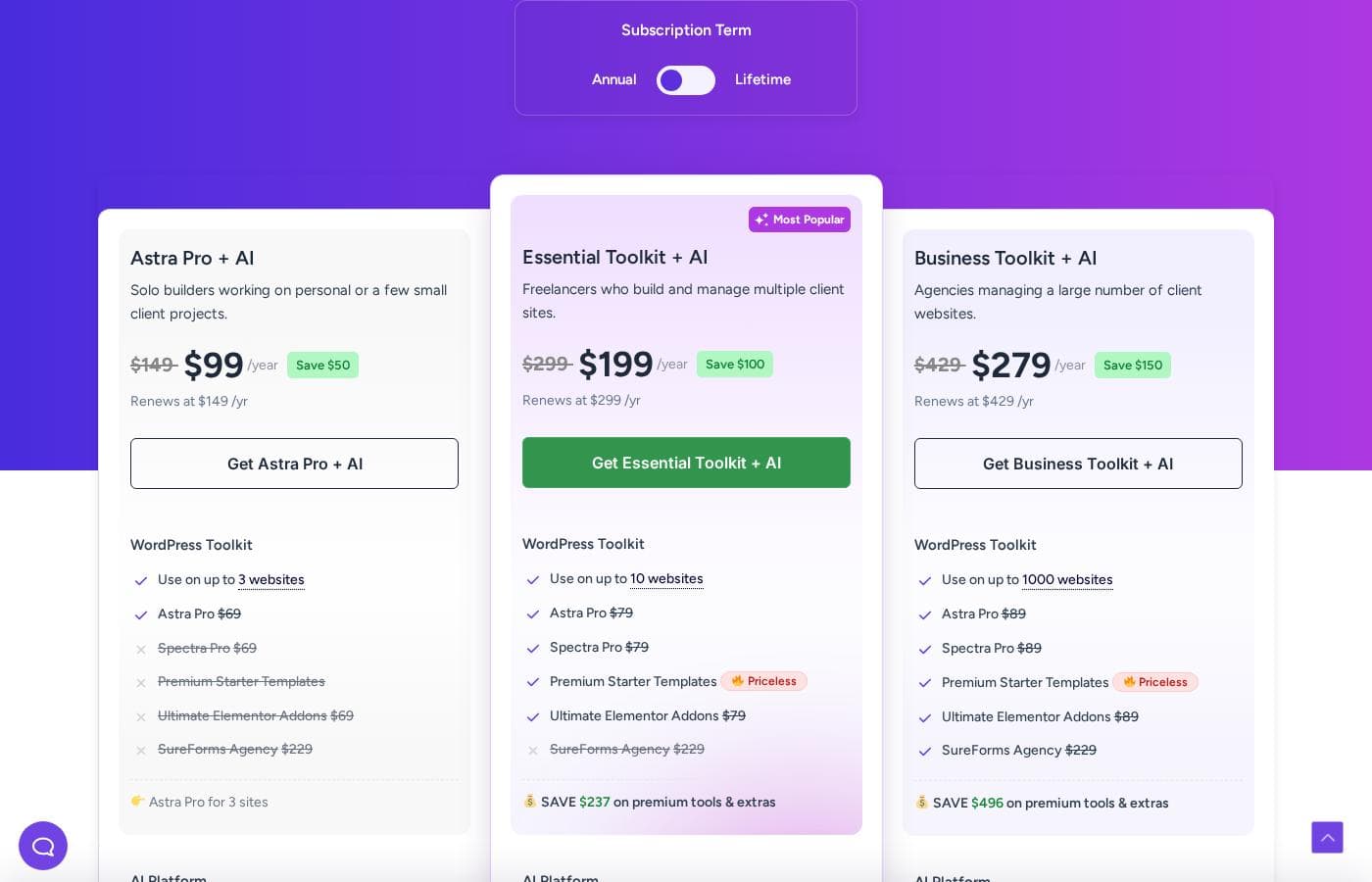
PlanBilled monthlyBilled annuallyIncludes
Astra Pro + AI
Intro offer $99/yr; list price shown
β€”
$12.42/mo
$149 per year
Introductory pricing; renews at $149/yr. For solo builders; up to 3 websites, 1 hosted website, free domain for 1 year, AI platform for 3 years, 14-day money-back guarantee.
Essential Toolkit + AI
Intro offer $199/yr; list price shown
β€”
$24.92/mo
$299 per year
Introductory pricing; renews at $299/yr. For freelancers; up to 10 websites, 2 hosted websites, free domain for 1 year, 5 blueprint sites, 5 sandbox sites, 14-day money-back guarantee.
Business Toolkit + AI
Intro offer $279/yr; list price shown
β€”
$35.75/mo
$429 per year
Introductory pricing; renews at $429/yr. For agencies; up to 1000 websites, 5 hosted websites, free domain for 1 year, 20 blueprint sites, 20 sandbox sites, AI Site Planner, 24/7 VIP support, 14-day money-back guarantee.
Astra Pro Β· Addon Only
β€”
$5.75/mo
$69 per year
Billed once per year; up to 3 websites; Astra Pro addon only, no AI platform, hosting, or domain.
Astra Pro Β· Addon Only (Lifetime)
$349
β€”
No recurring cost, no renewal; originally $349, save $100; up to 3 websites; Astra Pro addon only.

Price history

Tracking prices since Oct 1, 2026. No price change detected yet.

Pricing types: Free plan, Yearly subscription, One-time payment, Usage-based pricing

Pricing notes

Astra pricing: Plans from $0/year Billing options: Free plan, Yearly subscription, One-time payment, Usage-based pricing

Cost calculator

Estimate what Astra costs for your team.

Billing

Astra Pro + AI has no published price for this billing cycle.

Astra Pro + AI has a flat price: the number of seats does not change the total. Estimate based on published list prices, before taxes, add-ons and discounts.

How to pay less for Astra

  • Cheaper tools in this category start at $5/mo.
Visit Astra

Email me when Astra changes price

One email when we detect a price change on the vendor's pricing page. No newsletter, no deals. Unsubscribe in one click.

User Reviews

No reviews yet.

Write a Review

Write a Review for Astra
0/100 characters
0/2000 characters

Why use Astra?

Speed is the practical reason to pick Astra: its lean output keeps pages fast, which matters for both SEO and conversion. It also avoids locking you into a single editing workflow, working with the block editor as well as popular page builders like Elementor and Beaver Builder.

The template library removes most of the blank-canvas problem, letting you start from a finished design instead of a default installation. And because the free tier is genuinely functional, you can validate it on a real project before paying for anything.

Astra alternatives

Other tools in the WordPress themes category

View all WordPress themes tools
Divi

Divi

WordPress themes4.1/5From $5/mo

Divi is the world’s most popular premium WordPress theme and their flagship visual page builder. It is more than just a theme; it’s a robust website building framework. This tool replaces the standard WordPress post editor with a highly advanced visual editor. πŸ’‘ Whether you are a seasoned design professional or a complete newcomer, Divi gives you the power to create beautiful designs with surprising ease. Freelancers, agencies, and website owners can all jump right into the visual interface.

Avada

Avada

WordPress themes4.3/5

Avada is the #1 selling WordPress website builder, trusted by professionals, marketers, and beginners alike. It focuses heavily on usability and high performance, making the website creation process easier. You can launch your website quickly using its intuitive live visual builder and drag-and-drop functionality βœ…. The platform is entirely developed and maintained in-house, ensuring stability without relying on third-party solutions.

F

Flatsome

WordPress themes4.1/5

Flatsome is a premium multi-purpose WordPress theme developed by UX Themes, aimed primarily at eCommerce sites built on WooCommerce. It ships with its own visual editor, the UX Builder, which lets you compose pages by dragging elements onto a live canvas rather than writing code. The package also includes prebuilt demo layouts, a child theme for safe customization, and translation-ready files (.po) for WPML, so it can serve multilingual stores as well as standard brochure-style sites.

Shoptimizer

Shoptimizer

WordPress themes4/5

Shoptimizer is a specialized theme solution built specifically for WooCommerce. It is designed to enhance your online store's performance across several crucial metrics. You can easily see its capabilities in action by viewing the available demo. πŸ’‘ For store owners looking for an immediate upgrade, Shoptimizer is currently offered at an exceptional flash sale price of just $49, a significant reduction from the usual cost of $99.

The7

The7

WordPress themes4/5

The7 is a highly regarded WordPress theme known for its incredible flexibility and deep capabilities. Developers, design agencies (some owning 75+ licenses), and everyday users turn to it when they need a robust solution without compatibility issues. Users often call it the "Swiss army knife" of themes because you can build almost any site you require. The theme is easy to install, edit, and use, offering a reliable, modular approach for building block by block.

W

Woodmart

WordPress themes4/5

Woodmart is a multipurpose WooCommerce theme for WordPress. It ships with a theme options panel, a library of prebuilt website demos and section templates, and native support for popular page builders. Commerce-focused features such as AJAX product filtering, quick view, off-canvas sidebars, and multiple product page layouts are built into the theme itself rather than requiring separate plugins. Buyers receive it as a standard ThemeForest license that includes six months of item support, extendable for an additional fee at checkout.

Astra FAQ

How much does Astra cost?

Astra's cheapest paid plan, Astra Pro Β· Addon Only, costs $5.75 per month. Paid plans range from $5.75 to $35.75 per month.

Has Astra's price changed recently?

No. We have not detected a price change since we started tracking on Oct 1, 2026.

Is Astra really free?

Yes. The core Astra theme is free, available directly from the WordPress theme directory, and complete enough to launch a real site. The paid Astra Pro plugin adds advanced modules such as full header/footer building, custom layouts, extended WooCommerce options, and white labeling. Plans start at $0/year, with paid tiers unlocking the Pro features.

Does Astra work with Elementor and the WordPress block editor?

Yes. Astra is built to be editor-agnostic and works with Gutenberg, Elementor, and Beaver Builder. Its starter templates are built in compatible formats, so whichever builder you choose, the imported design edits natively in that tool rather than fighting it.

Can beginners use Astra without coding?

Yes. The onboarding wizard, starter templates, and visual customization controls cover most everyday changes, and the AI tools can generate initial copy and layouts. Coding knowledge only becomes relevant if you want to use the developer hooks and filters, which are optional.

Is Astra suitable for agencies building client sites?

It is one of the more common agency choices. The template library speeds up production, the performance-focused core reduces post-launch optimization work, and Pro's white-labeling removes Astra branding from client dashboards. Standardizing on one theme across projects also simplifies maintenance.

Ready to try Astra? Check out the official site or pricing.

Are you Astra? Claim this listing Β· Get the badge