AnalyticsWP

AnalyticsWP review

First-party WordPress analytics that keeps your data on your own site

By Ciroapp Editorial Team · Updated Sep 16, 2026

Commission may apply at no extra cost

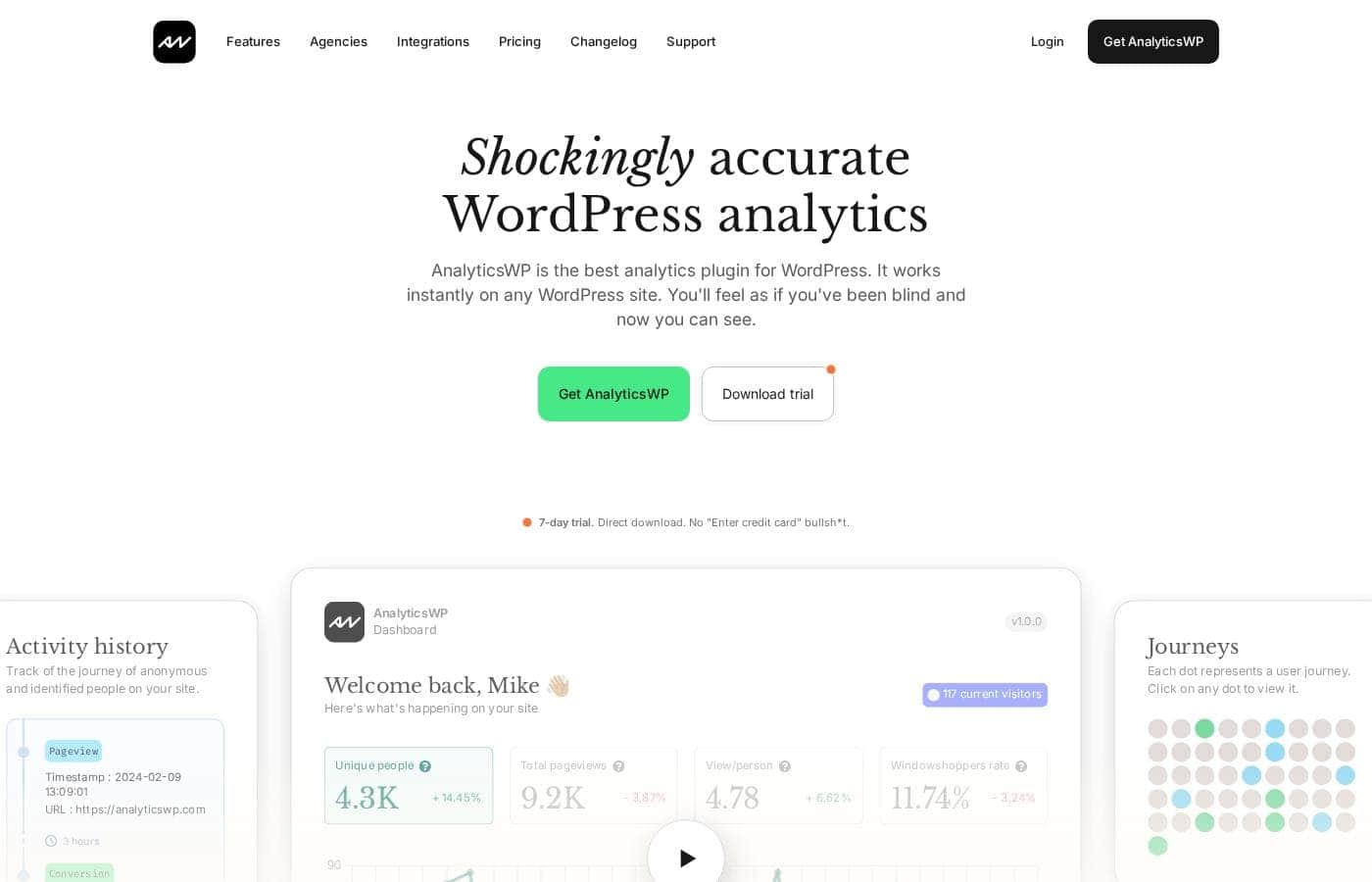
AnalyticsWP homepage screenshot

At a glance

Quick overview for AnalyticsWP: rating, pricing summary, key features, and highlights.
Vendor page checked Oct 13, 2026

Ciroapp score

4.1/ 5

AnalyticsWP tracks WordPress visitors with first-party tech that shrugs off ad blockers, keeping every stat on your own server — with lifetime pricing from $99 to $399, a 7-day no-signup trial, and a 30-day refund. Overall, it's a low-risk, recommendable pick for WordPress and WooCommerce owners, though only WooCommerce is named among claimed integrations and independent reviews are absent.

Pros

  • Pros:First-party tracking keeps all analytics data on your own server, and the vendor claims it is entirely ad blocker proof — so visitor counts, pageviews, and referrer reports aren't silently missing people who block scripts.
  • Pros:Automatic WooCommerce detection adds order-level attribution with no manual setup — each order records its original landing page, referrer, and the source event that started the journey, plus full customer journeys from first click to purchase.
  • Pros:Activity history tracks both anonymous and identified visitors, and you can enter a WordPress user ID to replay one specific user's journey page by page — useful for support troubleshooting and understanding what logged-in users actually do.

Cons

  • Cons:Built exclusively for WordPress — it cannot be used on any other platform, so it's a non-starter for mixed stacks or non-WP projects.
  • Cons:Although the site claims 16+ native integrations, WooCommerce is the only one actually named on the page, so you can't verify upfront whether your must-have plugins are supported; you'll need to test during the trial.
  • Cons:Only limited-time lifetime licenses are displayed — there is no monthly billing option and no standard post-deal price shown, so buyers who prefer subscriptions or want cost predictability after the deal ends are out of luck.
Best for
  • WordPress site owners who want accurate visitor stats without third-party data sharing
  • WooCommerce store owners who want order referrer and full customer journey tracking
  • Agencies and freelancers managing many client sites under one license
Free trial
Yes — 7 days
Money-back guarantee
Yes — 30 days
This section is a summary. Detailed sections about features, use cases, pricing, and reviews follow below.

What is AnalyticsWP?

You installed analytics, but ad blockers ate your data and the numbers never quite matched reality. AnalyticsWP tracks visitors with first-party technology on your own site, so stats stay accurate and private. It's built only for WordPress, installs with one upload, and maps full user journeys, including WooCommerce orders.

AnalyticsWP is a WordPress analytics plugin that tracks who visits your site and what they do there. It's built exclusively for WordPress, with automatic WooCommerce detection when it's installed. The maker targets WordPress site owners, agencies, and solopreneurs who want accurate, private stats without sending data to outside servers.

Once uploaded, a dashboard shows visitors, pageviews, referrers, popular pages, and individual user journeys.

Should you choose AnalyticsWP?

Quick buyer guidance before you compare plans or click through.

Choose it if

  • You run everything on WordPress and want a tool built only for it
  • You'd rather pay once than manage a monthly analytics subscription
  • You want analytics that keeps data on your own server
  • You prefer testing the full plugin before paying, with no email or card needed
  • You want automatic WooCommerce detection instead of manual setup

Skip it if

  • Non-WordPress sites, since the plugin is built exclusively for WordPress
  • Buyers who prefer monthly billing, because the site shows only a limited-time lifetime offer with no standard price displayed
  • Anyone who leans on social proof, since the visible testimonials are openly labeled placeholders pending real ones
  • Teams that need every integration named upfront, because the site cites 16+ integrations but only WooCommerce is listed on the page

Next steps before buying

  1. 1Download the free 7-day trial (no email or credit card) and confirm real visitor data appears in your dashboard.
  2. 2Check that your must-have plugins are among the 16+ supported integrations; only WooCommerce is named on the site.
  3. 3Review current pricing and license terms, since the lifetime deal is time-limited and no base price appears on the page.
  4. 4Read the GDPR page and developer docs if privacy posture or custom events matter to you.
  5. 5Compare it briefly with alternatives so the countdown timer doesn't make the decision for you.

Ease of use

Setup looks very low-friction. The vendor says installing takes nothing more than uploading the plugin, and integrations detect automatically, WooCommerce included. A support team and developer documentation exist for questions and custom events. Note that these are the maker's own onboarding claims, not the result of hands-on testing.

AnalyticsWP Key Features

✨ Accurate stats that ad blockers can't touch

Tired of reports that miss half your visitors? AnalyticsWP uses first-party tracking on your own site, so it's entirely ad blocker proof. Script-blocking tools won't skip people.

Your numbers finally match what's really happening — unique visitors, pageviews, and views per person, all in one dashboard.

✨ Follow every visitor's journey

See the real path people take through your site, not just raw counts. The activity history tracks both anonymous and identified visitors step by step. You can even enter a WordPress user ID to view that person's specific journey.

It's an easy way to learn how people arrive and where they go next.

🛒 Know exactly where your orders come from

Run WooCommerce? AnalyticsWP detects it automatically and adds order referrer tracking plus full customer journeys — no manual setup. Each order record includes:

  • The order's original landing page
  • The referrer behind the sale
  • The source event that started the journey

That's how you find out which channels actually drive sales. 🛒

🔒 Lightweight and private by design

Efficiency was a core design goal, so the plugin won't slow down or bloat your site. Your data never leaves your server — there's no sharing with external services, and AnalyticsWP was engineered with GDPR compliance in mind. 🔒

✨ Works with the tools you already use

AnalyticsWP integrates with 16+ popular WordPress platforms and plugins through native, built-in integrations that detect themselves automatically. Developers also get comprehensive documentation for tracking custom events, so you're not limited to out-of-the-box reports.

Use Cases

📊 Get Stats You Can Actually Trust

You run a WordPress site, but ad blockers keep eating your numbers. AnalyticsWP tracks with first-party tech on your own server. You see visitors, pageviews, referrers, and top pages in one dashboard.

Expected outcome: Cleaner data, no external sharing, no monthly bill.

Tip: Test the full plugin free for 7 days.

🛒 Follow Shoppers From First Click to Checkout

You sell with WooCommerce and want to know where orders come from. AnalyticsWP detects your store automatically and logs each order's referrer and landing page. You can replay full customer journeys, start to finish.

Expected outcome: You know which sources actually drive sales.

Tip: Check the referrer on your next order.

🏢 Cover Every Client Site With One License

You're an agency or freelancer juggling many WordPress builds. The unlimited-site license covers every site you run, with updates forever. Clients get private, accurate stats without extra subscriptions.

Expected outcome: One payment instead of one per client.

Tip: The $399 plan covers unlimited websites.

🔍 See Exactly What One User Did

A customer reports an issue, or you want to know what a logged-in user did. Enter their user_id and view their full journey, pageview by pageview.

Expected outcome: Real answers instead of guesswork.

Tip: Journeys work for anonymous visitors too.

AnalyticsWP pricing

  • 3 plans

Prices not verified yet — see the vendor page.

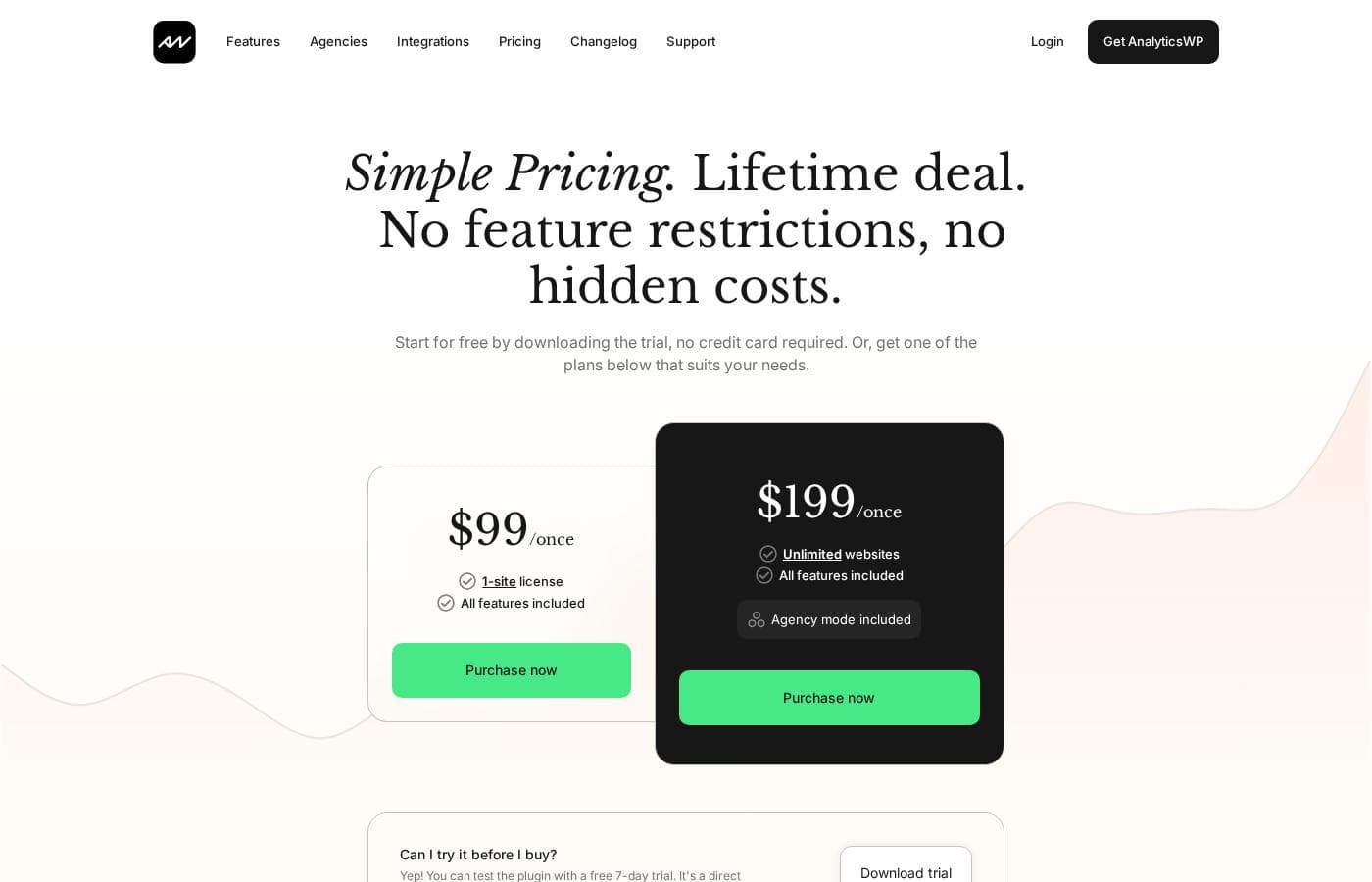
AnalyticsWP's pricing page

AnalyticsWP pricing page screenshotView pricing page screenshot
PlanBilled monthlyBilled annuallyIncludes
$99 1-Site License
See vendor page
See vendor page
1 website
  • 1-site license
  • All features included
  • No feature restrictions
  • Lifetime updates
  • Normally $299
$199 1-Site License
See vendor page
See vendor page
1 website
  • 1-site license
  • All features included
  • No feature restrictions
  • Lifetime updates
  • Normally $499
$399 Unlimited-Site License
See vendor page
See vendor page
Unlimited websites
  • Unlimited websites
  • All features included
  • No feature restrictions
  • Lifetime updates

Price history

Tracking prices since Sep 8, 2026. No price change detected yet.

Pricing range: $99–$399 one-time

Pricing types: Free trial, One-time payment, Lifetime deal

Pricing notes

AnalyticsWP sells one-time lifetime licenses from $99 to $399 — no subscriptions, no renewals. Every plan includes all features, and a free 7-day trial lets you test the full plugin before buying.

AnalyticsWP costs between $99 and $399 as a one-time payment with 3 lifetime plans: the $99 1-Site License at $99, the $199 1-Site License at $199, and the $399 Unlimited-Site License at $399.

All plans are one-time purchases under the current lifetime deal. Here's what each one gets you.

$99 1-Site License

Price: $99 once (normally $299) Websites Supported: 1 site Refund Policy: Full refund within 30 days, no questions asked Other Features: All features included, no feature restrictions, lifetime updates

This is the easiest way in. If you run one WordPress site and want accurate, first-party analytics without a subscription, this tier covers you. You get the full plugin — nothing is held back.

$199 1-Site License

Price: $199 once (normally $499) Websites Supported: 1 site Refund Policy: Full refund within 30 days, no questions asked Other Features: All features included, no feature restrictions, lifetime updates

On the page, this tier looks nearly identical to the $99 license — both cover one site with every feature. The listing doesn't spell out what sets it apart, so it's worth comparing the two at checkout before you buy. Either way, checkout runs through solidaffiliate.com, the company's sister product.

$399 Unlimited-Site License

Price: $399 once Websites Supported: Unlimited websites Refund Policy: Full refund within 30 days, no questions asked Other Features: All features included, no feature restrictions, lifetime updates

Agencies, freelancers, and anyone juggling several WordPress projects should go here. One payment covers every site you'll ever install it on. For multi-site users, it's the clear value pick. 🎉

A couple of things make trying this low-risk. There's a free 7-day trial — you download the full plugin directly, with no credit card or email required. If you buy and change your mind, you get a full refund within 30 days, no questions asked. And because this is a lifetime deal, there are no renewals or annual fees to worry about; the site notes only a limited number of licenses remain, so this pricing may not stick around forever.

How to pay less for AnalyticsWP

  • Use the 7-day free trial before you pay.
  • 30-day money-back guarantee if it does not fit.
Start free trial

Email me when AnalyticsWP changes price

One email when we detect a price change on the vendor's pricing page. No newsletter, no deals. Unsubscribe in one click.

User Reviews

No reviews yet.

Write a Review

Write a Review for AnalyticsWP
0/100 characters
0/2000 characters

Why use AnalyticsWP?

Most analytics tools miss visitors who block scripts and send your data to servers you don't control. AnalyticsWP attacks both problems at once, and its WordPress-only focus keeps things simple. Here's what stands out from the vendor's own materials:

  • Tracking that survives ad blockers. It uses first-party technology the vendor calls entirely ad blocker proof, so your numbers shouldn't skip people.
  • Your data stays home. Nothing is shared with external servers, and the plugin was engineered with GDPR compliance in mind.
  • Journeys, not just counts. Follow anonymous and identified visitors from landing page to purchase, including full WooCommerce customer journeys.
  • Built to stay light. Efficiency was a core design goal, so the plugin shouldn't slow down or bloat your site.
  • One payment, unlimited sites. A limited-time lifetime license covers every website you run and includes updates forever.
  • A real free trial. Download the full plugin for 7 days with no email or credit card required.

AnalyticsWP alternatives

Other tools in the WordPress Analytics Plugin category

View all WordPress Analytics Plugin tools
MonsterInsights

MonsterInsights

WordPress Analytics Plugin4.1/5

MonsterInsights is recognized as the best and most popular Google Analytics plugin available for WordPress. Over 3 million professionals currently use it to grow their business with confidence. It simplifies the way you handle website data. Instead of digging through complex analytics interfaces, you see useful visitor information directly in your WordPress dashboard. 💡 This powerful tool is designed for smart business owners, marketers, and developers who need user-friendly insights. You can finally make informed decisions without needing to write any code.

AnalyticsWP FAQ

Which plugins does AnalyticsWP integrate with?

The site advertises 16+ native, built-in integrations with automatic detection. WooCommerce is the only one named, and it adds full customer journey and order referrer tracking. Test your must-have plugins during the free trial.

Where does my analytics data live?

On your own site. AnalyticsWP uses first-party tracking and shares nothing with external servers. It was engineered with GDPR compliance in mind, and a dedicated GDPR page explains the privacy approach.

Where do I buy it, and who handles the payment?

Orders are processed at solidaffiliate.com, the company's sister product, not the AnalyticsWP site itself. It's disclosed right on the pricing page, so don't be surprised when you land there at checkout.

What if I need help or want to track custom events?

A support team is reachable through the site's support page, and developer documentation covers custom event tracking. The site doesn't promise response times, so ask the team directly if support speed matters to you.

Ready to try AnalyticsWP? Check out the official site or pricing.

Are you AnalyticsWP? Claim this listing · Get the badge