Amelia

Amelia review

Amelia turns your WordPress site into a complete booking platform for appointments and events. One plugin covers scheduling, staff calendars, payments, and automated reminders.

By Ciroapp Editorial Team · Updated Sep 8, 2026

Commission may apply at no extra cost

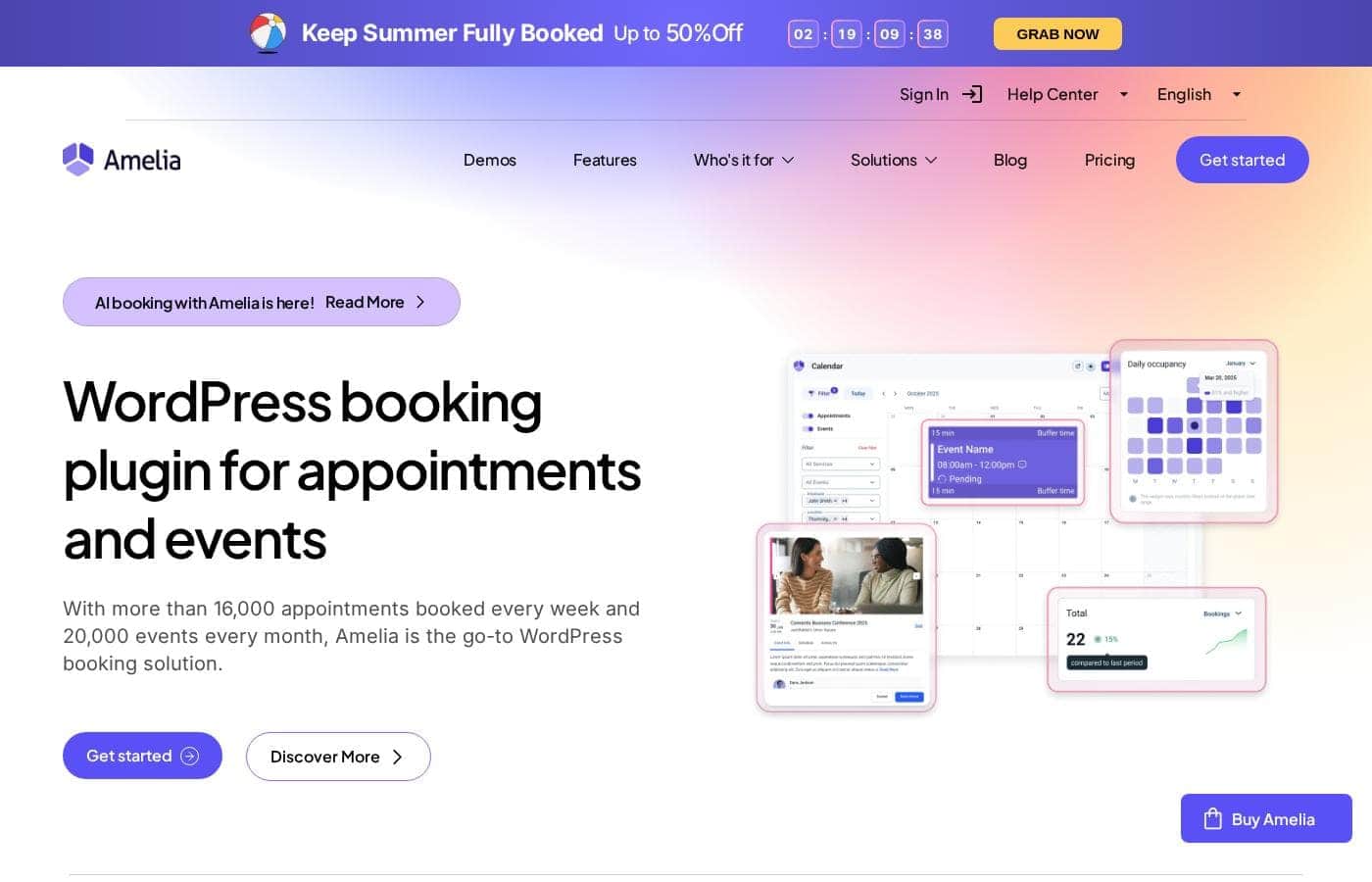
Amelia homepage screenshot

At a glance

Quick overview for Amelia: rating, pricing summary, key features, and highlights.
Vendor page checked Oct 12, 2026

Ciroapp score

4.0/ 5

Amelia packs appointment scheduling, staff calendars, payments, and automated reminders into one WordPress plugin. It also handles ticketed events alongside appointments, a combination its competitors rarely offer. The downsides are a confusing pricing page, no paid-tier trial, and WordPress-only deployment. Overall, it's a strong pick for service businesses already running WordPress.

Pros

  • Pros:Combines appointment scheduling and event ticketing in a single plugin, so service businesses avoid running two separate tools.
  • Pros:Customers book, pay, and reschedule on your own WordPress site rather than through third-party platforms that charge per-booking commissions.
  • Pros:Automated email and SMS confirmations and reminders directly reduce no-shows, one of the biggest revenue leaks in appointment businesses.

Cons

  • Cons:There is no free trial of the paid plans — evaluation means the limited free version or the 15-day money-back guarantee.
  • Cons:Fuller feature sets sit in the Pro and Elite tiers, which list from $199 to $432 per year before discounts, a real jump for solo operators.
  • Cons:WordPress-only — no hosted version or SaaS dashboard, so Shopify, Wix, and custom-stack businesses cannot use it.
Best for
  • Salons, spas, and barbershops that need per-stylist calendars, deposits, and self-service rebooking on their own site
  • Clinics, therapists, and tutors whose revenue depends on automated reminders cutting no-shows
  • Coaches and consultants selling one-on-one sessions with online payments and Zoom links
This section is a summary. Detailed sections about features, use cases, pricing, and reviews follow below.

What is Amelia?

Amelia is a booking plugin for WordPress that handles appointment scheduling and event management in a single package. It targets service-based businesses that want customers to book, reschedule, and pay directly on their own website instead of juggling phone calls or third-party platforms. With more than 80,000 customers worldwide, it is one of the most widely used scheduling plugins in the WordPress ecosystem.

Amelia is a WordPress plugin that adds a full booking system to an existing site, covering one-on-one appointments, group sessions, and ticketed events. Customers use a step-by-step booking form on the front end, while site owners manage services, employees, payments, and notifications from the WordPress dashboard. It is sold in four license tiers — Starter, Standard, Pro, and Elite — available as annual or lifetime purchases, with a limited free version published on WordPress.org.
Should you choose Amelia?

Quick buyer guidance before you compare plans or click through.

Choose it if

  • Salons, spas, and barbershops that need per-stylist calendars, deposits, and self-service rebooking on their own site
  • Clinics, therapists, and tutors whose revenue depends on automated reminders cutting no-shows
  • Coaches and consultants selling one-on-one sessions with online payments and Zoom links
  • Studios and educators running ticketed classes or workshops alongside private appointments
  • WordPress agencies that need one license covering 20 or more client domains

Skip it if

  • Businesses not running WordPress — there is no Shopify, Wix, or standalone hosted version
  • Sites that need only one simple booking form and will not use staff schedules, events, or reporting
  • Buyers who require a full-product free trial before paying — only the limited free version is available
  • Teams that want predictable, undiscounted renewal pricing; current promotions and crossed-out list prices complicate budgeting

Next steps before buying

  1. 1Install the free version from WordPress.org and enter your services and working hours to test the booking flow
  2. 2List your offerings in detail — services or events, durations, prices, and each employee's schedule — before configuring the paid plugin
  3. 3Buy a license at wpamelia.com/pricing: Starter or Standard for one site, Pro for growing feature needs, Elite for multiple domains
  4. 4Connect a payment method (on-site, PayPal, Stripe, or WooCommerce), enable email and SMS reminders, and sync staff calendars
  5. 5Embed the booking form with the Gutenberg block or Elementor widget and run one end-to-end test booking on a real page

Amelia Key Features

✨ Appointments and Events in One Plugin

Most WordPress scheduling tools make you choose between appointment booking and event management. Amelia does both: one-on-one services with durations, buffers, and real-time availability sit alongside group classes and ticketed events in the same dashboard. A studio can sell private sessions and public workshops without installing a second plugin.

✨ Front-End Booking Experience

Customers book through a step-by-step catalog form on your site: they choose a service or event, pick an employee and time slot from live availability, and check out without a phone call. The interface is modern and mobile-responsive, and forms can be placed on any page using a Gutenberg block, an Elementor widget, or shortcodes.

✨ Employee Schedules and Calendar Sync

Every staff member gets individual working hours, days off, and service assignments, so customers can only book genuinely open slots. Google Calendar and Outlook synchronization keeps Amelia bookings and personal appointments from colliding, which matters for staff who split time between locations.

✨ Payments, Deposits, and Coupons

Amelia collects money at the moment of booking through on-site payment, PayPal, Stripe, or WooCommerce, and supports full payments, deposits, and pay-later options. Built-in tax settings and coupon codes let you run promotions or handle VAT without adding a separate checkout plugin.

✨ Automated Notifications

Bookings trigger automated email and SMS messages — confirmations, reminders, reschedule notices, and follow-ups. For appointment-driven businesses, the reminder workflow often justifies the license cost on its own, since fewer no-shows convert directly into recovered revenue.

✨ Reporting and Administration

The admin dashboard aggregates appointments, customers, and revenue so owners can track utilization and sales without exporting spreadsheets. Custom fields, service extras, and customer accounts round out the back-office tools.

Use Cases

💡 Salons, Spas, and Barbershops

Each stylist or therapist works from their own calendar, so a colorist and a massage therapist sharing one location never collide. Deposit payments filter out chronic no-shows, and returning clients can rebook a preferred provider in a few clicks instead of calling the front desk.

💡 Clinics, Coaches, and Tutors

Practitioners who sell their time — physiotherapists, tutors, business coaches — publish real-time availability and let clients self-book around the clock. Automated reminders reduce missed appointments, and Zoom links support remote sessions for consultants and online tutors.

💡 Classes, Workshops, and Events

Educators and trainers sell seats for recurring classes or one-off events with capacity limits and ticketed entry. Because events live alongside appointments in the same plugin, a studio can upsell a private session to a class attendee without switching tools.

💡 Agencies and Multi-Site Owners

The Elite license covers up to 20 or more domains, which makes Amelia viable for WordPress agencies deploying booking functionality across many client sites under a single renewal. Standard single-domain tiers cover freelancers building one site at a time.

Amelia pricing

  • 4 plans

Prices not verified yet — see the vendor page.

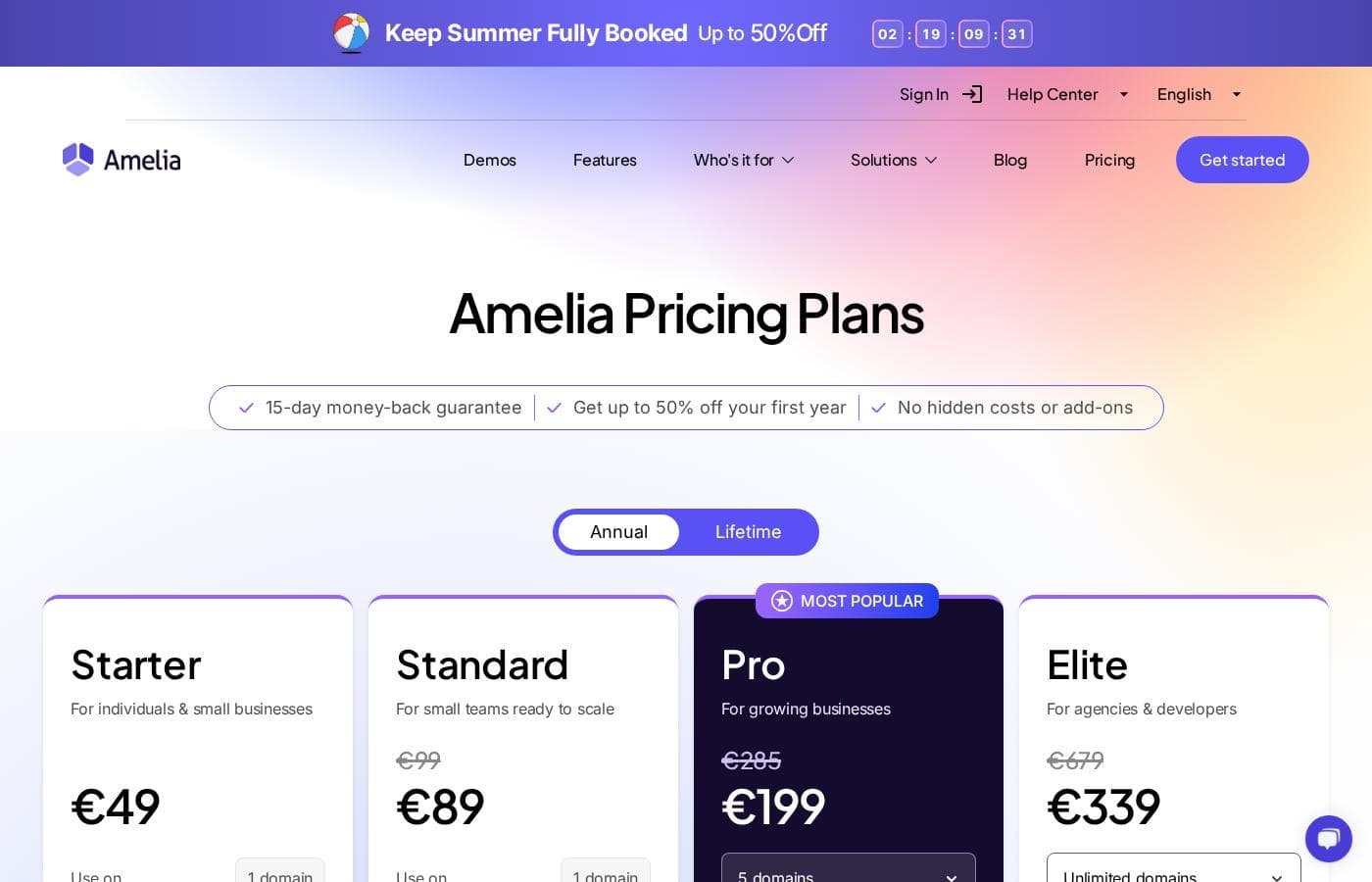
Amelia's pricing page

Amelia pricing page screenshotView pricing page screenshot
PlanBilled monthlyBilled annuallyIncludes
Starter
See vendor page
See vendor page
No visible price in the 'Starting from' section; For individuals & small businesses, use on 1 domain.
Standard
See vendor page
—
a second Standard figure of $255 appears alongside $299. 1 domain; Annual and Lifetime tabs are present but the exact mapping of prices to billing periods is ambiguous in the text.
Pro
See vendor page
—
5 domains; marked 'Most Popular'.
Elite
See vendor page
—
unlimited domains; for agencies & developers.

Price history

Tracking prices since Sep 7, 2026. No price change detected yet.

Pricing types: Free plan, Free trial, Monthly subscription, Yearly subscription, One-time payment

Pricing notes

Amelia offers Starter, Standard, Pro, and Elite plans with both Annual and Lifetime billing, plus a free limited version and a 15-day money-back guarantee. Visible 'starting from' prices include $199 (struck to $149), $432 (struck to $259), $255 (struck to $299), $439 (struck to $349), and $1189 (struck to $709), while the main plan cards display a '$1' placeholder.

Amelia pricing: Plans from $1 Billing options: Free plan, Free trial, Monthly subscription, Yearly subscription, One-time payment

Email me when Amelia changes price

One email when we detect a price change on the vendor's pricing page. No newsletter, no deals. Unsubscribe in one click.

User Reviews

No reviews yet.

Write a Review

Write a Review for Amelia
0/100 characters
0/2000 characters

Why use Amelia?

Taking bookings by phone and email costs staff hours and produces double-bookings, forgotten appointments, and no-shows. Amelia replaces that workflow: customers see live availability, pick a slot, pay or leave a deposit, and automatically receive confirmations and reminders.

Employee calendars stay synchronized with Google Calendar or Outlook, and owners get revenue and appointment reports instead of maintaining spreadsheets. Because everything runs inside your own WordPress install, there are no per-booking commissions and you keep control of your data.

Amelia alternatives

Other tools in the Booking plugin for WordPress category

View all Booking plugin for WordPress tools
Booknetic

Booknetic

Booking plugin for WordPress4.2/5

Booknetic is a powerful WordPress appointment scheduling plugin that provides complete customization and automation of your online bookings. It's a versatile solution designed to match the specific needs of various industries, from fitness centers to legal consultants. The core system is built around a fully customizable booking widget and a highly responsive design. This plugin works perfectly across every screen size and browser. Customers benefit from a separate mobile-responsive panel where they can easily create profiles and manage, view, and edit their appointments on the go.

FluentBooking

FluentBooking

Booking plugin for WordPress4/5

FluentBooking is the simplest appointment booking solution designed specifically for WordPress. It's perfect for anyone who arranges meetings often, whether for sales calls, consulting, webinars, or personal services. You are in control of your data and branding. ✅ Best of all, you don't need any coding skills or complex web development knowledge to install and use it. This makes it ideal for professionals, entrepreneurs, and web agencies alike.

Amelia FAQ

Does Amelia have a free version or free trial?

Amelia publishes a limited free version on WordPress.org that covers basic scheduling, but there is no free trial of the paid tiers. If you want to test paid features, the practical route is to purchase a license and use the 15-day money-back guarantee if it does not fit your workflow.

How much does Amelia cost?

Amelia sells Starter, Standard, Pro, and Elite licenses, each available as annual or lifetime purchases. Advertised entry prices start at $1 during promotions, while regular list prices include Pro annual from $199 (discounted to $149) and Elite annual from $432 (discounted to $259). Lifetime licenses are listed at $255 for Standard, $349 for Pro, and $709 for Elite.

Can Amelia handle appointments and events at the same time?

Yes. Appointment booking for one-on-one services and event management with tickets and capacity limits are both core to the plugin and run from the same dashboard, which is one of its main differentiators against appointment-only scheduling plugins.

Which payment methods does Amelia support?

Amelia can collect payment during booking through on-site checkout as well as gateways such as PayPal, Stripe, and WooCommerce. It supports full payments, deposits, and pay-later options, with built-in tax and coupon handling.

Can multiple employees have their own calendars?

Yes. Each employee gets individual working hours, days off, and assigned services, and the booking form only shows genuinely open slots. Google Calendar and Outlook sync keeps Amelia bookings consistent with staff members' external schedules.

Ready to try Amelia? Check out the official site or pricing.

Are you Amelia? Claim this listing · Get the badge